


Breaking Down The Technology in Amazon Go
The announcement of the Amazon Go store last year was met with much anticipation. The concept is a perfect union between the convenience of Amazon and the traditional shopping experience—but without the lines. CNET wrote this colorful piece predicting that the announcement is going to have retailers everywhere scrambling for new ideas, as Amazon continues to threaten brick-and-mortar stores more and more. All you need is your phone…but how does it work exactly?
Originally, it seemed that Amazon was going to use RFID technology to implement their vision, but this isn’t the case, according to GeekWire. According to the announcement video and the patent, Amazon Go relies on computer vision and sensor fusion, the same kind of technology as self-driving cars. Customers with compatible smartphones can tag a reader as they enter the store and simply put items in their bags and walk out.
The fine points of how all the technical components work together are still anyone’s guess, but we know that there are three main components to the system: The entrance and exit, the shelves, and customers’ smartphones.
Entrance and Exit
Based on the patent, the entrance and exit of the store will use 2D barcodes and a “customized” system. Mostly likely, the scanners at the front of the store will need to read a code or detect you in some other way. IDTechEx speculates that facial recognition and GPS may also play a role in confirming your entrance. We can only assume that there will have to be some sort of staff in the store to prevent theft or unpermitted entrance.
Smartphones
We know that the Amazon Go shops will require users to have a supported smartphone and use their app, but that’s all we know so far. Your smartphone is most likely used to track your proximity to individual items and keep track of what’s inside your bag.
Shelves
It’s not really just the shelves that are at work in this component. The patent says that there are “cameras, pressure sensors, infrared sensors, scales, volume displacement sensors, light curtains, etc.” It seems clear that this is where the real magic happens. There are a multitude of sensors that will interact with each other to manage your cart. Based on the patent illustration, it looks like Amazon Go stores are going to have more cameras per square foot than any store in the world; they’ll be on the ceilings, on the shelves, everywhere. The cameras can be used in conjunction with the various weight sensors to recognize products and product removal by customers. It’s been confirmed that if the system fails to recognize what a customer has picked up, the system can look at the user’s account to make an educated guess.
The Amazon Go store is still in beta testing, but we’re probably going to see some more shops open in major cities in 2017. Until there’s more information, we can’t know everything about how the system works, but it’s sure to change the way we shop in the future.
The 15 best LG V20 cases to keep your phone in perfect condition
The LG V20 — the followup to last year’s LG V10 — is shaping up to be one of the most noteworthy phones of the year, which means you should be prepared when the time comes to hold it. The V20 may have passed military drop tests, but there are still a variety of reasons to apply a protective case. Many people can’t stand to see a naked product, one exposed to the world that dares misfortune to befall it. Some are well aware of their clumsiness and can’t put a case on it soon enough, while others invest in one just to change up the look of their phone. Whatever your motivation, we’ve picked out a few of our favorite LG V20 cases. Maybe something will catch your eye.
More: Want a smaller version of the LG V20? It’s called the LG V34 Isai Beat
OtterBox Defender Series Case ($60)

For the best in protection for your shiny new toy, look no further than OtterBox’s Defender case. OtterBox makes Defender cases for many other smartphones out there, and they are seriously tough. First and foremost is the built-in screen protector that completely covers the 5.7-inch display, followed by the drop resistant cover that will only enhance the phone’s own drop proof capabilities. The case also has port covers to keep dirt, dust, and other debris out of the phone’s important parts, but still leaves them entirely accessible when needed. When the time comes to put the phone away, you can attach it to the included holster and clip it onto your waist for safe keeping and easy transportation.
Buy one now from:
OtterBox T-Mobile Verizon
Urban Armor Gear Plasma Series Case ($30+)

What Urban Armor Gear’s case lacks in the built-in screen protector department, it more than makes up for when it comes to guarding the rest of the phone. Like the phone itself, the Plasma case also meets military drop-test standards, so you don’t have to worry about your LG V20 if it takes a tumble. The sides come with button covers, as well as rubber grips to decrease the chances of an accidental drop, while the edges surrounding the screen are scratch resistant and will prevent skidding, in the event the phone is in a position to slide along a surface. The case itself is also incredibly light, so don’t worry about adding more mass to your phone.
Buy one now from:
Urban Armor B&H Jet
Tech21 Evo Check Case ($40)

The most unique thing the Evo Check case has going for it is the material it’s made out of, which is known as FlexShock. Tech21’s proprietary blend results in a case that’s well equipped to deal with sudden and drastic impacts, which is especially important if you’re prone to dropping your phone. It’s lightweight and thin, and the case’s design doesn’t draw much attention, but it is smooth to the touch and features a diamond pattern on the back. All ports and buttons are accessible, and fully functional, while the case is on.
Buy one now from:
T-Mobile
Incipio DualPro Case ($30)

The LG V20 can handle itself when it comes to drops from a reasonable height, but you can’t have too much protection, right? Incipio’s DualPro case has a hard outer shell that defends against scratches, and a flexible inner layer and bumper that keeps your phone from shaking around too much or being damaged by hard impacts. The cut-outs for phone features are accurate and there are good button covers for the volume controls. If you don’t want to solely rely on the phone’s abilities to deal with high falls, the DualPro delivers good protection against drops, thanks to that aforementioned hard outer shell and soft interior. It comes in a couple of different color combinations.
Buy one now from:
T-Mobile
Poetic Revolution Series Case ($17)

Poetic says its Revolution case is rugged, so it should suit people constantly on the move and in areas that aren’t phone friendly. Like the OtterBox Defender, this case also comes with a built-in screen protector. Not only does it cover the display, it’s also water resistant. It has a boxy look when viewing the case from the sides, because of the face plate around the display instead of raised edges. Speaking of the sides, they’re covered in a unique grip texture to keep you from dropping your phone, but even if you do, there’s nothing to worry about. The reinforced back and corners are meant to withstand most falls and scratches, while the ports, buttons, and speakers are covered to keep out dirt and dust. That’s not to say you should go around dropping your phone wherever you please, but it’ll probably be okay if there’s an accidental fall.
Buy one now from:
Amazon
Best app deals of the day! 6 paid iPhone apps for free for a limited time
Everyone likes apps, but sometimes the best ones are a bit expensive. Now and then, developers put paid apps on sale for free for a limited time, but you have to snatch them up while you have the chance. Here are the latest and greatest apps on sale in the iOS App Store.
These apps normally cost money and this sale lasts for a limited time only. If you go to the App Store and it says the app costs money, that means the deal has expired and you will be charged.
More: 200 Awesome iPhone Apps | The best Android apps for almost any occasion
Talking Bruce

Bruce is your pet panda who responds to your touch and swipes, and repeats everything you say in a cute voice.
Available on:
iOS
Soccer Juggler

The rules are simple — kick the soccer ball up and keep it off the ground. You get one point for each kick. If you kick the ball and hit the target on the roof, you get two points.
Available on:
iOS
Mango

Mango is the ideal tool for monitoring your calorie intake and physical activity routine, on a daily basis; the perfect app if you want to lose weight, or simply improve your eating habits, by tracking your activity.
Available on:
iOS
Phoenix Photo Editor

With Phoenix you will have all the freedom to customize your photos with unique filters, effects, borders, and fonts.
Available on:
iOS
ManCam

A powerful camera app with full control over your image. Quickly and simply adjust all parameters of your image. No more tapping and hoping to get a good shot. Do what you want the way you want it.
Available on:
iOS
Personal Statement

Personal statements for your college or university applications are now made easy for you with this app, which is intuitive, useful, and easy to use.
Available on:
iOS
This case turns your iPhone 7 into a diving camera — touchscreen controls included
Why it matters to you
iPhone 7s may soon be able to photograph underwater scenes — but you’ll have to pay nearly as much for the case as for a point-and-shoot underwater camera.
Sure, the iPhone 7 can withstand a little splashing, but a new Kickstarter campaign is aiming to take the smartphone over 300 feet underwater — without losing the touchscreen controls. LenzO is an iPhone 7 and 7 Plus case designed to turn the phone into a diving camera.
After launching on Kickstarter last week, the LenzO is already over a quarter of the way to a $60,000 funding goal. Created by the designer for National Geographic’s first underwater housing, Valentins Ranetkins, and five-time Emmy Award-winning underwater cinematagrapher Anthony Lenzo, the case seals out water down to 100 meters or 328 feet.

ValsTech / Kickstarter
More: Dedicated dive camera adds depth data to video down to 656 feet
But besides waterproofing the case, the Lenzo by ValsTech also solves another challenge — using a touchscreen underwater. The case uses two control systems, through which operating a control on the outside of the case adjusts a small arm on the inside of the case. With a press on the outside, the arm will touch the screen on the inside, controlling camera functions within that water seal. Access to the physical home and wake/sleep buttons is also maintained with the case.
Along with access to the camera controls, the case also includes built-in filters to adjust the camera’s white balance to shoot underwater. A dome gives both the rear and front-facing cameras an unobstructed view, the company says.
While the iPhone 7 case will float to the top if you drop it, the iPhone 7 Plus case is instead made from solid aluminum. ValsTech says the aluminum version will have a better depth rating, but didn’t say just how far beyond that 328 feet the case can dive.
LenzO’s creators say the case is the only iPhone 7 underwater case that works with the native camera app instead of a third-party download. If the Kickstarter campaign is successful, early backers can receive the Lenzo for $229 for the iPhone 7 or $450 for the iPhone 7 Plus, while the cases are expected to retail for $395 and $749. The company’s iPhone 6 and 6S housing retails for $295.
40 of our favorite iPhone 6 cases for style and protection
Apple’s iPhone 6 has proven to be another smash hit, with sales in the millions. But shortly after they hit the stores, they also began to hit floors and sidewalks as horrified new owners accidentally dropped them. You can alleviate the worry by investing in some protection. That sexy, svelte look demands some respect and we’ve got a range of the best iPhone 6 cases for you here to suit any style or budget.
More: Protect your iPhone 6 from spills and submersion with one of these 15 cases
Pad & Quill Luxury Pocket Book Case ($100)

Pad & Quill is all about luxury, functionality, and craftsmanship, and the company the Luxury Pocket Book case doesn’t disappoint. Made using full-grain, American leather, this case is meant to completely replace your wallet. Such being the case, it features five internal pockets, including a clear ID pocket and a hidden cash pocket. It also comes in five color combinations, it can be personalized, and it ships with a hand-finished birch cradle for additional style and protection. This is a bulkier case than you might be used to, however, and doesn’t support the iPhone’s flash function. Still, that may not be a huge deal breaker if everything else about the case speaks to you.
Buy one now from:
Pad & Quill
Lunatik TAKTIK Strike ($50)

The Taktik Strike features shock-absorbing Impact Truss technology and ballistic bezels, meaning it’s tougher than the slim design and lightweight build lets on. This case will protect your phone from drops, shocks, and even the heaviest of impacts, and your display will be protected thanks to the tempered glass screen protector. The case also features a switch that allows you to toggle the ringer on and off easier, and an audio toggle seal that pivots and allows you to choose how loud you want the sounds coming from your phone to be.
Buy one now from:
Lunatik
Inner Exile Odyssey Voyage Case ($65)

If you want a case that protects not just your device, but the all important buttons that reside along its edges, Inner Exile has such a case for you. It looks as elegant as possible, with a smooth aluminum design. The case comes in two parts that snap-lock together, and once it’s locked, the iPhone is held in place and protected from every angle by a hardened polycarbonate shell designed to hug its every curve. It also comes with a 3.5mm adapter, making it compatible with all headphone jacks.
Buy one now from:
Amazon
Cable and Case Armorbox Hybrid Case ($15)

The Armorbox’s design may be a little off-putting — especially given the visible kickstand on back — but that’s only because the case was designed with protection in mind, not style. The case’s design, which uses outer and inner shells, is meant to provide maximum protection, while the ribbed trim gives you a better grip on your iPhone 6 and helps reduce the chance of accidental drops. It also comes with a screen protector.
Buy one now from:
Amazon
Spigen Tough Armor FX Case ($18+)

What this case lacks in colors and design, it makes up for with overall protection. The case utilizes TPU and polycarbonate materials, along with button covers, a built-in screen protector, and raised corners that lift the back of the phone. The latter has also been treated with a special coating to ensure it maintains the iPhone’s responsiveness and functionality. Drop protection, shock absorption, and air cushioning in the corners round out the hallmarks, all of which have been to meet military drop-test standards.
Buy one now from:
Amazon Spigen
iDeal Swipe Wallet Case ($20+)

iDeal wants you to never have to open your case in order to answer phone calls — and the Swipe Wallet comes with several unique and practical features to make this a reality. First off, there’s the answer function located on the front of the case, which allows you to answer calls with the mere swipe of a finger. The window on the front can also display the time, music, and calls, while the side contains two hidden volume buttons. Since it’s a wallet case, it also has slots on the back for holding up to four cards, and its slim design allows it to rest neatly within your pocket. It also has a built-in stand and magnetic closure.
Buy one now from:
Amazon iDeal
Zagg Speaker Case ($82+)

This unusual offering from Zagg is unlike any iPhone 6 case we’ve seen before. There’s a simple black bumper case with metallic button covers, then there’s a separate Bluetooth speaker and microphone that snaps into the back. The idea is that you only take the speaker when you need it, and easily pop it out and use it in the center of the table for conference calls. It also boosts the sound considerably when listening to various forms of entertainment, though it’s not really powerful enough to fill a room with music. As an added bonus, the speaker section contains a 1,800mAh battery and a USB port, so you can potentially use charge your iPhone battery so longs as you bring your Lightning cable with you.
Buy one now from:
Amazon
Loopy Case ($35)

Do you often fumble with your iPhone 6 when trying to juggle it with your keys, coffee cup, and whatever else you’re holding? Then you’re going to love the Loopy Case. It’s a pretty standard, flexible case with a hard-shell backing, but it has a wee added extra on the back in the shape of a rubber loop. The idea is that you can stick a finger through the loop and easily secure your iPhone. Doing so makes it easy to carry multiple items, or just add a touch of extra security whenever you’re holding your phone. It can also work as a stand for propping your iPhone in landscape view. The ends of the changeable loop — it comes with a spare — give the case a slight curve when the iPhone is fitted, but we bounced it up and down vigorously and there’s no doubt that it’s truly secure once placed.
Buy one now from:
Loopy
Burkley Jacketcase ($30+)

What do you do if you love leather, but you don’t want a wallet case? You check out this case from Burkley, which features a fitted hard-shell design and a leather finish. Snap your iPhone 6 securely into place, and you’ll find accurate openings for your ports, camera, and buttons. The coverage is pretty minimal, so this isn’t the most protective case out there, but the leather finish is attractive and makes your phone very comfortable to hold given the added grip. You also have a choice of different colors and styles of leather.
Buy one now from:
Amazon
Mikol Nero Marquina Case ($100)

Premium iPhone cases come in all sorts of different flavors, but this is the first time we’ve seen a marble one. These cases look absolutely stunning, but we’re not sure how practical they are, and we’re not willing to drop test one. The basic case is standard TPU, minimalist, and closely fitted to the iPhone 6, with cut-outs in all the right places. Set into the back is a panel of marble. Each case is completely unique. You can go for white, black, or a kind of reddish option, and you can also get the white one with white TPU instead of black. These aren’t protective cases, they’re all about the style, and they aren’t cheap.
Buy one now from:
Amazon Mikol
UberEats in London now an early riser — you can order starting from 7 a.m.
Why it matters to you
Now that UberEats is starting its service even earlier, hungry patrons have more food delivery choices.
Your list of excuses for skipping the most important meal of the day is growing shorter by the second, especially now that UberEats is now serving up breakfast on demand. That is, if you’re in the British capital of London. Beginning Tuesday, January 30, the ridesharing company is planning on helping you get a good start to your day by starting its services at an impressive 7 a.m. So rise and shine, sleepy heads. We know Uber does.
While previously, UberEats was not available in London until 11 a.m., the company has decided to expand its window of opportunity by a solid four hours. The new UberEats app will let you place an order not quite at the crack of dawn, but early enough to ensure that even if you don’t have time to make yourself a delicious breakfast, you can get one delivered.
More: McDonald’s, UberEats to partner for delivery in Florida starting in January
And you can get it delivered just about anywhere. Because the app supports custom locations, you can have your first meal of the day waiting for you at a destination other than your doorstep. So whether you want to leave your spinning class to find an egg sandwich or get to your desk and start chowing down on a danish, Uber can help.
Already, Uber has a number of popular breakfast options on board, including PAUL, Bagel Factory, and Crepeaffaire, which are apparently all the rage across the pond. And while UberEats isn’t a particularly cheap service to use, it will likely prove a welcome service for those who can afford it.
Of course, competition in the breakfast space will remain fierce, especially with other services like Deliveroo offering food delivery. In fact, the British answer to Seamless recently started a monthly subscription model for folks who find themselves ordering in all the time. So get moving, UberEats. The people are hungry.
Rollcap 4K action cam will have a built-in 3-axis image stabilizer
Why it matters to you
Those who have been using 4K action cams that rely on large, external gimbals may prefer the Rollcap, which has one built right in.
Apparently there aren’t already enough action cameras on the market. Chinese drone manufacturer ZeroTech has announced that it will soon launch Rollcap, a 4K-capable action camera that features an integrated 3-axis stabilization gimbal, later this year.
Smaller than the size of a pop can, Rollcap is designed to negate the need for an external gimbal by building it right into the frame of the camera itself. To help stabilize the 4K video and 13 megapixel stills, Rollcap’s self-contained gimbal rolls, tilts, and pans +/- 85 degrees, +/- 30 degrees, and +/- 40 degrees, respectively.

In front of its sensor is a 94-degree lens that is roughly equivalent to a 21mm lens on a full-frame camera. On the side of the camera is the power button, as well as a MicroUSB port, presumably used to charge the camera and transfer data if you’re in a hurry.

More: Still under recall, GoPro quietly creates a cheaper way to replace crashed Karmas
A dedicated smartphone app is used for composing shots and changing camera settings, while triggering the camera can be done both through the app as well as on the camera using the Rollcap’s single button. Various camera modes include a high-speed burst mode for stills, a timelapse mode, a self-timer mode, an HDR mode, and a slow-motion video mode designed for capturing video at higher frame rates.

There’s little additional information in terms of detailed specs or an exact release date, but ZeroTech has confirmed that Rollcap will retail for between $500 and $600 when it drops in late 2017. This price point puts it on the higher end of the action-cam market, but considering it effectively includes a gimbal as part of the setup, it comes out to about the same as what you would expect to pay for a 4K action cam and separate gimbal.
Best icon packs for Android

Without icon packs, we are left with chaos.
App icons are different shapes, different sizes, different color schemes and follow different design guidelines. Samsung’s icons look different than Google’s icons, which look different from Microsoft’s icons, which look different from every other developer’s icons. They are messy. They are awkward. They need to be brought under control. And that’s where icon packs come in.
Icon packs bring control. Icon packs bring consistency. Icon packs bring class. Even if you’re not into big involved themes, you should use an icon pack. A good icon pack can help you find your apps more quickly, can help make your phone look and feel less cluttered, and they just look better. And whether you want an icon pack that stands out or blends in, we have the best icon packs right here for your pleasure and consideration.
How to get started
Before you actually download and install an icon pack, you need a launcher that supports replacing your phone’s stock icons with new ones. Most third-party options, like Nova Launcher and Apex Launcher, support icon packs. Even BlackBerry’s default launcher supports them.
How to use custom icon packs with your launcher
The best icon packs out there
The Randle Trinity: Whicons, Zwart, Golden Icons

I’ve featured a lot of icon packs in my themes over the last year, but the icon packs that come up time and time again are the packs by icon developer Randle. All three packs are basically clones with one difference: the single color which they dye all your apps.
Whicons is far and away my most used and most loved icon pack: a simple, beautiful and easy-to-match icon pack that fits with more themes than you can shake an S-Pen at. When Whicons fails, I can usually turn to its ebony twin, Zwart (the dutch word for black). For flashier, ostentatious themes, I can reach for Golden Icons, bringing both a pop of color and subtle, silky texture to the icon drawer.
These packs all feature deep icon libraries, ample alternate icons, and icon masks to help unthemed icons blend in with the theme. Well, in two out of three anyway. The icon mask in Golden Icons is a black/white mask, same as Whicons and Zwarte, which makes unthemed icons stand out, even without bright colors. If the mask there could be replaced with a gold/white mask instead of black/white, things would be perfect.
If you’re only going to install one icon pack, make it Whicons. If you’re only going to install three icon packs, make it all three of Randle’s packs. Between the three of them, you’ll be able to match almost any wallpaper and keep things clean, consistent, and cool.
Randle Icon Packs (Free)
Noctum

I’m a girl that loves a good dark theme. I’m also a girl that loves a good dark icon pack, and Noctum is a dark icon pack after my own heart. This pack works in shades of grey, using a stark white as an accent in the absence of color. Noctum’s icon mask is one of the best I’ve ever seen, tinting icons in the same greys the rest of the pack uses without garish overlay shapes, and the pack also comes with three search widgets to help you unify the icon pack into a full-fledged theme.
And theming is something Noctum does quite well. One of my favorite minimal themes on Android Central — Black Panther from our Captain America Civil War themes — is nothing more than a color-matched monotone wallpaper and Noctum, and it works marvelously. That said, Noctum can do colorful themes, too, popping against neon wallpapers while colorful icons get lost in the rainbow.
Noctum ($1.50)
Lines

There are a lot of minimal icon packs out there, but the eponymous Lines is one of the largest icon packs out there and one of the best, toeing the line between crisp lines and being too thin for high density displays. Lines itself well to battery-friendly AMOLED black themes because the icons are still easily recognizable while lighting up the least pixels required.
Lines has even branched out into other theme assets, offering a large wallpaper gallery/picker with Muzei support and a variety of widgets to match your snappy icons, like battery widgets and clock widgets. Lines has a free version with ads and a paid version without ads, and it’s worth every cent.
Lines (Free, $1.99)
Ombre

Ombre achieves consistency in a unique way. This pack puts all of its icons atop a simple rectangular bar, which it then dresses up a million different ways. That bar transforms into a playlist for Google Play Music, a stack of Post-Its for Google Keep, a seekbar for YouTube, a chat window for Google Allo, and so on. It’s adorable, it’s brilliant, and it’s colorful as all get-out. Each icon stands out, but together they still come together into a consistent pack.
Ombre, like most of DrumDestroyer Themes, comes in two variants: a light and a dark. Ombre is the dark variant, and what a lovely and colorful dark pack it is! ELEV8 is the light version, which isn’t quite as fun, but it just as colorful while being a bit more bright and sunshine-y. The icon masks for both are quite good, and quite worth their meager price tag for the variation and the blast of color and whimsey they provide.
Ombre ($0.99)
Glim

If you search for Material Design icon packs, you’re going to get a truly ridiculous amount of packs to choose from. The one I have used for years and come back to every holiday is Glim. Glim is a Material-based pack with soft shadows, wide variety, and color variants of most popular apps. What this means for you is that if you’re looking to dye your home screen apps a particular color, Glim is the pack for you.
From dyeing the dock orange for our BB-8 themes to painting my whole app drawer red every Christmas, Glim has color variants for most apps and enough color variant alternate icons to give you the rainbow, no matter what icons you need to theme. Glim eschews icon masks for a truly ridiculous amount of color variants and alternate icons, over a thousand to be exact.
Glim (Free, $0.99)
Your favorites?
What are your favorite icon packs? Let us know in the comments below!
Tim Allen loves the BlackBerry ‘Mercury’, makes a cameo on Last Man Standing
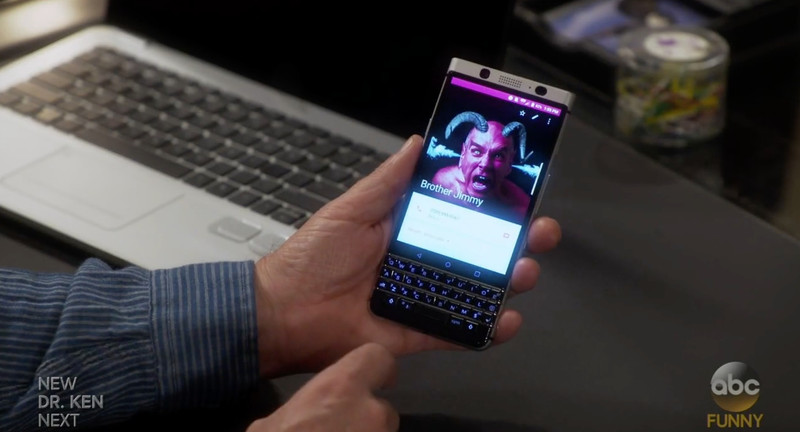
Although the BlackBerry ‘Mercury’ has yet to be officially announced, it seems as though there is already some sly marketing happening on behalf of BlackBerry Mobile. As spotted in the CrackBerry forums, in the latest episode of Last Man Standing, plenty of on-screen time is given to the QWERTY handset by Tim Allen’s character, Michael Baxter.
More: BlackBerry ‘Mercury’ hands-on from CES 2017
While it’s not really surprising given Tim Allen’s well-known love for BlackBerry phones, it’s interesting to see this sort of product placement happening already. Hopefully, it’s just a small beginning to a much larger marketing campaign BlackBerry Mobile has planned for the rollout of the ‘Mercury.’
Best Messaging Apps
Which apps are worth using to stay in touch? We’ve got the scoop.

Best Overall

See at Google Play
There is almost no contest. WhatsApp is an all-inclusive messaging app that’s all you need for staying in touch, no matter where you are in the world. WhatsApp merely relies on whether your phone has an Internet connection — whether that’s through cellular or Wi-Fi — so it’s great if you’re frequently traveling between regions. You can use WhatsApp to send and receive photos, videos, documents, and voice messages. It also supports group chats and voice calls.
Bottom Line: If you’re looking for a formidable, all-in-one messaging that’s packed with more features than some of Google’s offerings, WhatsApp is the second most-popular messaging app available.
One More Thing: Both parties have to be using the WhatsApp app to communicate, though all it requires to register is your phone number.
Why WhatsApp is the best
Google has yet to settle on the one best messaging app. As a result, Android users have had to resign themselves to simply switching off between applications when necessary. It’s not the most user-friendly solution, but it’s the reality until Google lands on a cohesive messaging strategy.
WhatsApp is worth adding to your arsenal — and possibly switching over to for primary communication. In addition to being able to send and receive photos, videos, documents, and voice messages, WhatsApp lets you place free VoIP calls as long as you’re on a strong Wi-Fi signal. That’s especially helpful when you’re traveling overseas.
Additionally, WhatsApp works well on 2G networks, which is fantastic if you’re roaming the countryside with the faintest signal available, and it offers end-to-end encrypted messaging. And since it was the first messaging app of its kind, there were so many early adopters that you’d be hard pressed not to find your friends already have an account. (Even I was surprised at how many of my friends and family members were already users!)
Best for Google users
Google Hangouts

See at Google Play
Text messages, video chat, group chats — it’s all there in Google Hangouts. We still don’t know where Google is taking its once heralded messaging app, but for now, we’re still using it to chat. Use it to easily multitask between conversations with your friends, family, and colleagues between your different Google accounts. You can even use Hangouts to make phone calls with your Google Voice number or download the Hangouts Dialer to make free Wi-Fi calls.
Bottom line: For now, Hangouts is basically a required app if you’re planning to stay connected in the Google-verse. We’re not sure where Google is taking it (some are expecting it to see it become the next prized messaging app of the enterprise), but there are definitely more people using it than Allo or Duo.
One more thing: Why isn’t this Google’s primary messaging app again?
Best for texting
Messenger from Google

See at Google Play
You’re already a Google user, so you might as well stay with the family when it comes to text messaging. Messenger from Google lets you receive SMS and MMS messages — simple as that! Messenger supports RCS messaging, audio messaging, emoji, location sharing, colored text threads, and message archiving. It even comes with its own batch of stickers!
Bottom Line: Messenger from Google is the messenger for your Google phone.
One More Thing: If you’re thinking I really don’t want anymore Google, Textra is the next best text messaging app. It doesn’t support RCS, but it does have Giphy integration, and offers full compatibility with Pushbullet, MightyText, Android Wear, and Android Auto for enhanced notifications and quick replies.
Best “everyone is using it”
Facebook Messenger

See at Google Play
Chances are, you’ve got an overwhelming list of friends and family who’ve become suddenly available on Facebook. Keep up with them all by downloading Facebook Messenger. The app supports messaging from both your Facebook account and phone number. You don’t have to use the SMS feature if you don’t want to, but it could be helpful if you find yourself constantly jumping between apps.
Facebook Messenger is one of the more dynamic messaging apps. It offers a hefty number of sticker packs, not to mention stellar video chat functionality. The app also supports group chats — including group voice chats — audio messaging, read receipts, and location sharing services. You can even use Facebook Messenger to swap cash with friends.
Bottom line: You’ve come this far at accepting Facebook as a part of your life. You might as well adopt the feature-filled Messenger app into your life, too.
One more thing: Not only are there stickers, but you can play games with your Facebook friends from Messenger, too!
Best Overall
See at Google Play
There is almost no contest. WhatsApp is an all-inclusive messaging app that’s all you need for staying in touch, no matter where you are in the world. WhatsApp merely relies on whether your phone has an Internet connection — whether that’s through cellular or Wi-Fi — so it’s great if you’re frequently traveling between regions. You can use WhatsApp to send and receive photos, videos, documents, and voice messages. It also supports group chats and voice calls.
Bottom Line: If you’re looking for a formidable, all-in-one messaging that’s packed with more features than some of Google’s offerings, WhatsApp is the second most-popular messaging app available.
One More Thing: Both parties have to be using the WhatsApp app to communicate, though all it requires to register is your phone number.
 AIVAnet