


How do you use your old Android phones or tablets?
What are the best ways to repurpose an Android device?
There’s a great thread going on right now on Reddit asking people to sum up how they use their old Android phones and tablets.

From security cameras to timelapse builders to permanent media servers, there are a lot of ways you can repurpose old Android phones and tablets — especially now as they are not going obsolete nearly as quickly.
Some people choose to use old Android phones as personal media players for their kids, as Wi-Fi is pretty ubiquitous and microSD cards can stand in for low storage space. Others use their old phones as dashcams to record potential car accidents or incidents on the road.
The best microSD cards
So how do you use your old Android phones or tablets? Let us know in the comments below!
Acer Chromebook R11 vs. Acer Chromebook R13: Comparing two very good Chromebooks

These are two great Chromebooks that are built for different types of users.
If you’re looking to buy a Chromebook, whether it’s your first or not, Acer has two great models that will fit most people’s needs. We’re talking about the Acer Chromebook R11 and the Acer Chromebook R13, and we’re going to compare the two head to head so you can see which one might be the right one for you.
In many ways, both of these great Chromebooks are very alike. That stands to reason, as they are both made by Acer as products that are a step up from entry level in the space. Right away you can see that they look a lot alike — there aren’t a lot of ways you can differentiate your look in the laptop market without going to extremes, but every product line has a signature design. The Acer R series of Chromebooks have all shared some great design features, but there are some readily apparent differences, starting with the materials used.
Design and construction
The R11 is plastic, while the R13 is aluminum. I can’t knock Acer for building the R11 out of plastic — it’s the best way to cut down on the weight and overall mass when you build something well-suited for using on-the-go. Being made of plastic doesn’t mean it’s not durable or well built. From our original review of the Chromebook R11:
The chassis doesn’t unnecessarily flex in your hands, the keyboard offers good travel without any bounce in the frame and the display hinge is tight.
On the other hand, there’s something to be said about how a well-built aluminum laptop feels while you’re using it. And the R13 is certainly well built. The full aluminum frame is solid and designed to take a bit of roughhousing, though we wouldn’t recommend treating your electronics poorly. The finish rivals products from Apple and Sony and has slightly textured brushed feel. Even the specially built solid hinge is aluminum and cast as part of the frame itself. You’ll be satisfied that you have a premium product that was worth the extra money if you go with the Chromebook R13.
Both models have a 180-degree hinge so that they can convert into what Acer calls Display Mode. While in display mode the keyboard is disabled and all navigation is done via touch or with an attached keyboard and mouse. While neither can provide the optimal tablet experience with the rest of the body still attached, the R11 is hands down the better experience in “tablet mode.”
The R11 is hands down the better experience in “tablet mode.”
It’s a matter of size. While there are instances where a 13-inch tablet would be great, they are few and far between. The R11 is easier to hold, lighter and just not as awkward as the bigger R13 when you’re trying to use either as a tablet replacement. One area where the R13 does have a Display Mode advantage is using it in the upright position that resembles a tent (see the image above). This is great for watching a movie or show, and the 13-inch display has an advantage here.
Both models work exactly as described when in Display Mode and we’ve seen no problems with the keyboard and trackpad properly switching on and off, even when repeatedly flipping things back and forth.
The Display
The Acer Chromebook R11 has an 11.6-inch 1366×768 IPS display, while the Acer Chromebook R13 sports a 13.3-inch 1920×1080 IPS display. Both are touch-enabled, and responsive while using the multi-touch digitizers. While you may be tempted to think the R13 has the better screen simply because of the resolution, you shouldn’t jump to conclusions.
Size isn’t everything and the Chromebook R11 makes up for its resolution with a better quality image.
The R13 has a very good display with excellent color reproduction and comfortable viewing angles. The lone drawback is the very high-gloss finish which can be distracting in certain lighting. There’s nothing to complain about and even the pickiest user (speaking from experience) will be satisfied. But the display on the R11 is simply better.
Resolution aside, anything you’re looking at will look better on the R11’s display. It’s more vibrant without being overly saturated and the contrast ratio almost mimics real life. There is little to no difference in the viewing angles, and the R11 holds that bright display even when not facing it directly.
Granted, we can’t dismiss the resolution. A 1080p screen will be the better measurement for most things we do on the web, for watching a video and looking through a photo album. But the quality of the R11’s panel surprised us. In a good way.
The trackpad and keyboard
There are two things you need to know about the trackpad and keyboards on the two. Neither is backlit, which disappoints us as much as it does you. The second is that the R13 is a good bit better at both.
The R11 has a nice keyboard, and no matter how hard you type the keys will still bounce back and not wiggle like we see some other chiclet-style keyboards do. But the keys are made from a hard plastic and the coating isn’t enough to completely overcome it. When you have a flat chiclet key with no contour, the material matters when you do a lot of typing. The R13 has about the same bounce and travel, but with a nice soft coating over each key. Yes, this is a bit of a nitpick, but if you do a lot of typing, it makes a clear difference. The R11 isn’t bad, not at all. It’s just that the R13 is a lot better.
One area easy to judge was the trackpad — the R13 is a lot better here.
The same can’t be said of the R11’s trackpad. It’s fully functional with full multi-finger gesture support, but the finish not as smooth as it needs to be. We noticed right away that there’s too much drag when gliding your finger across the trackpad and intricate or precise pointing can difficult. It works, and for the majority of pointing and clicking it’s OK. Just OK, not great. A solution could be a good wireless mouse when you need to do anything with a lot of detail.
The R13 trackpad doesn’t suffer from the same issue. It’s not at the level of a MacBook or the Chromebook Pixel was, but it’s smooth and you’ll not have any complaints.
The hardware and specifications
Both models have relatively inexpensive but completely adequate processors paired with fast memory. Chrome OS is designed to run very well on this type of setup, as processor demands are kept to a minimum while RAM is used to hold processes longer rather than clear itself. Chrome OS is very good at processing a thing once and keeping it alive for the fast access the next time. Here’s a look at the specifications of each.
| Display (Touchscreen) | 11.6-inch 1366×768 IPS | 13.3-inch 1920×1080 IPS |
| Processor | Intel Celeron N3150 | MediaTek M8173C |
| Memory | 2/4GB DDR3L | 4GB LPDDR3 |
| Storage | 16/32GB SD card | 16/32/64GB SD card |
| Connectivity | 802.11ac Wi-Fi, Bluetooth 4.0 | Wi-Fi 802.11ac, Bluetooth 4.0 |
| Ports | USB 3.0, USB 2.0, HDMI | USB-C 3.1, USB-A 3.0, HDMI |
| Est. Battery life | 9.5 hours | 12 hours |
| Charger | Proprietary 45W/19V | USB Power Delivery (USB-C) |
| Camera | 720p | 1080p HDR |
| Weight | 2.76lb | 3.3lb |
For the most part, they match up as you would expect a smaller, more portable laptop and larger and heavier laptop would. The R13 can be had with more storage, has a larger battery and better camera. The larger size of the R13 is what allows it to have a bigger battery, and the R11 comes in a budget-friendly 16GB / 2GB option while the R13 has a higher-priced option with more storage.
The R11 uses an Intel processor while the R13 uses a MediaTek ARM processor. If we were looking at these just a year ago, we would advise you to shy away from an ARM Chromebook in most instances. But a year is forever in the tech world, and today Chrome runs as well on an ARM CPU as it does the quad-core Celeron. We suspect this is because Chrome has been further optimized for the ARM instruction set and ARM chips have gotten a lot better. In any case, don’t let the ARM processor in the R13 scare you off.
ARM processors on Chromebooks are no longer a red flag, and both models perform well.
While neither are the powerhouses the expensive Core M Chromebooks are, both have enough of what it takes to power Chrome and the things you’ll be doing with no problems.
One other thing to note is that the R13 has a USB 3.1 Type-C port in addition to a USB Type-A port. It also supports the USB Power Delivery standards, so it acts as the charging input as well as a charging output for any other USB-PD device. That’s starting to matter more now, and chances are the next thing you buy will also use USB-C with Power Delivery for charging and data transfer.
Both Chromebooks give you access to the web and everything Chrome has to offer as well as access to Google Play. This gives you over one million apps that can help fill any gap in productivity or fun you’ll come across while using Chrome.
The winner?
It’s tempting to say the Chromebook R13 is the better laptop. But that’s not taking into account the size and weight, and reasons why you might want something smaller or want something bigger.
If you’ll be using your Chromebook at home or in the office most of the time, and want something with a bigger display and a roomier keyboard, the R13 is definitely the one to buy. Conversely, if you spend most of your time with your Chromebook at Starbucks or on a plane, the R11 has a clear advantage when it comes to portability because of it’s smaller footprint and lighter weight.

And if you plan to use your Chromebook as a tablet very often, there is no question the R11 is the better option.
I’m not on the go without a full bag of gear very often. Being able to carry more stuff is one of the few perks of being in a wheelchair, as you can throw a bag across the handles and go. I would choose the Acer Chromebook R13 because of the bigger (if not better) display and superior trackpad. But if things were different and I spent more time commuting or liked to work in the park or coffee shop, I would pick up the Acer Chromebook R11. Nothing else makes enough difference to use the R13 while on the go or to use the R11 at your desk all day.
One thing we’re sure of is that it’s great to have such good choices in the mid-range when it comes to Chromebooks. Not too long ago you were stuck with only the low-end and high-end when it came to buying, and for many, the quality and performance from expensive models just didn’t justify the high price.
See Acer Chromebook R11 at Amazon
See Acer Chromebook R13 at Amazon
Best Android Games for the NVIDIA Shield

What are the best games to play on the NVIDIA Shield TV from the Google Play Store?
As NVIDIA proclaims in every ad, their new Shield Android TV box is “the streamer for gamers”. So which games are worth checking out?
Well, for starters we’re not going to dive into NVIDIA’s GeForce Now subscription service, or NVIDIA Gamestream. We’ll touch on those services later.
For now, we’re just going to highlight some of the best games available via the Google Play Store, specifically adapted to play on the NVIDIA Shield TV. So let’s dive right in!
The Witness
If you consider yourself a hardcore puzzle gamer, you owe it to yourself to check out The Witness, one of the most beautifully crafted and challenging puzzle games ever conceived. At first glance, this appears to be a rather standard puzzle adventure game, where you wander around a mysterious island solving grid puzzles all the live long day, things become quite layered as you start to unravel the true nature of the island and just how deep the puzzle theme extends.
I’ll keep the description vague and cryptic, because it’s really one of those games you want to experience for yourself.
Download: The Witness ($19.99)
Borderlands: The Pre-Sequel
The Borderlands franchise is a gloriously unique first-person shooter, mixing genre elements from action, RPG, and FPS into an addictive experience, topped off with the beautiful cel-shaded graphics and a storyline featuring razor-sharp wit.
The Pre-Sequel was originally released in 2014 for the major consoles, and fits in story wise between the first and second Borderland games. As such, it largely uses the game mechanics from Borderlands 2, while adding in some new weapons and elements. The game also supports co-op play, though sadly no split-screen co-op is available at this time.
Still, Borderlands: TPS plays like a dream on the NVIDIA Shield and should provide hours of fun.
Download: Borderlands: The Pre-Sequel ($14.99)
Ultimate Chicken Horse
Ultimate Chicken Horse is a rather unique party platformer that’ll have you and your friends gathering around the TV like it was 1998 again. The concept is that up to four friends collaborate to build out a challenging level — based on the different platforms and traps, made available to the group. Then, everyone simultaneously tries to complete the level.
Equal parts strategic and stupid, this game is great fun to get a few friends together and have at it (if you’ve got the right number of Shield controllers to accommodate the crew — third-party Bluetooth controller support is lacking). The goal is to set enough traps to sabotage your opponents while leaving a clean route for yourself to make it through the level and reach the goal. Everything is packaged in a fun, cartoony art style, with a host of farm animals as your disposal as playable characters.
Download: Ultimate Chicken Horse ($11.99)
GoNNER
GoNNER was my personal favorite game I played on the NVIDIA Shield TV in 2016, and it’s a real treat for folks looking for a challenging shooter-platformer. Levels are generated procedurally, meaning that you’ll never play the exact same level twice. The game seems to adapt the level difficulty to your skill and playing ability as you work your way through the multiple worlds.
But it’s worth noting that this game is tough. Like really tough. Before you head out to play, you choose your head and gun — you unlock more of both as you explore levels throughout the game — and then you’re tasked with dispatching the enemies as fast and efficiently as possible to continue to collect ammo for your weapons, and purple tiles which are used to heal up and upgrade weapons before boss battles, or save them to “delay” a game over screen.
I specifically chose the word delay because, again, this game is really hard. Are you up for the challenge?
Download: GoNNER ($9.99)
Metal Gear Rising: Revengeance
Right off the hop, for those wondering this game is nothing like the stealth action found in Metal Gear Solid, the crown jewel of the Metal Gear franchise. Instead, this is a slick-looking hack-and-slash action spin-off title starring Raiden, whom fans will remember best from Metal Gear Solid 2.
In Metal Gear Rising: Revengeance, players assume control of Raiden, a katana-wielding cyborg. Set in the far-off year of… 2018… the story revolves around conflicts between rival Private Military Companies, with some corporations actively looking to court chaos to keep the war economy chugging along. We won’t dive too much into the plot specifics, but just want to reiterate that this is nothing like the gameplay found in Metal Gear Solid games. Another thing worth noting is the file size — a whopping 5.5GB! If you just have the 16GB console, you’ll definitely want to look into expandable storage options for your Shield TV, or start clearing out some room before installing.
Download: Metal Gear Rising Revengeance ($14.99)
Portal
When making a list of best games, and Portal is one of the options, you always got to plug arguably one of the most fun and inventive games of all time. If you’ve never played Portal before, I’m actually jealous because it means you get to experience this outstanding game fresh for the first time.
This game is celebrated justly for its brilliantly subtle storyline, mind bending puzzles, and one of the most celebrated video game villains of recent time. And it’s been ported beautifully over to the NVIDIA Shield TV via the Google Play Store.
Anyone who’s played this knows exactly why this game deserves every award it’s ever won. If you haven’t played it yet, spend the $10 and enjoy.
Download: Portal ($9.99)
Real Racing 3
So far every game on this list has been a paid title. Real Racing 3 bucks that trend. It’s already arguably the best looking racing game available for Android phones, and it looks just as pretty on the big screen playing through the NVIDIA Shield TV.
Jump behind the wheel of one of over 140 intensely detailed vehicles based on real cars, and hit the track in over 4,000 events including Cup races, Eliminations and Endurance challenges on 17 race tracks based off of iconic circuits from around the world, including Silverstone, Hockenheimring, Le Mans, Dubai Autodrome and many more.
If you’re a racing fan and looking for a good title for your Shield TV, give Real Racing 3 a try.
Real Racing 3 (Free)
What are your favorite titles for the NVIDIA Shield TV?
These are the games that piqued our interest, but what are your favorite games for the NVIDIA Shield TV? Got any opinions on the games that made our list? Let us know in the comments!
ZTE considers cancelling Project CSX ‘Hawkeye’ smartphone after poor response

ZTE continues to trip over its own proverbial feet by assuming that a crowd knows what it wants.
The crowdsourced, crowdfunded ZTE Hawkeye, which in just under three weeks has raised only $35,000, has come under fire for ostensibly thinking that its potential audience would be willing to concede to a mid-range spec sheet after lobbying for the device to be a pie-in-the-sky project from the get-go.
Despite the fact that two features — eye-tracking and an adhesive back — won out over the rest of the votes, ZTE’s naivety in not anticipating the backlash exposes the company’s biggest flaw when it comes to attempting to expand further into the U.S. market: it just doesn’t compare to the rest of the world.
“We are already fourth in terms of market share [in North America],” said Jeff Yee, Vice President of Technology Partnerships and Planning for ZTE North America, in an interview with Android Central. “We sold 18 million devices, and many of those were by connecting directly with consumers.”

“We’ve heard lots of negative things from consumers after receiving direct feedback. We honestly didn’t foresee this happening.”
In 2017, the company aims to continue that momentum, according to Yee, by “moving upmarket with flagships” that people truly care about. Project CSX, or Crowd Source X, is ZTE’s first attempt to appeal democratically to an audience that, cumulatively, would have a final say in how a phone turns out.
But Project CSX, or Hawkeye in its finished form — another questionable crowdsourced decision — has been met with almost no response by a buying public that traditionally falls all over itself for such things. The Nextbit Robin, for instance, raised over $1.3 million back in late 2015 on the promise of a well-designed phone with a few gimmicks.

“The whole Hawkeye process was interactive — it was designed to be,” said Yee. “We were committed to not just source the idea, but also the branding, material choices and colors. This information has been invaluable.” ZTE subsequently issued an apology for minimizing the importance of what, in retrospect, was one of the device’s most important decisions, the choice of SoC, offering to change the Snapdragon 625 to a Snapdragon 835 at the risk of delaying the phone’s release date and significantly increasing its $199 price.
“We’ve heard lots of negative things from consumers after receiving direct feedback. We honestly didn’t foresee this happening.” The team behind CSX thought that it could create a single SKU (version of the phone) that would appeal to a worldwide audience. That’s how they settled on a device running a light version of Android with a spec sheet that wouldn’t have been out of place in the early months of 2016. But for a phone shipping in late 2017, even with a $199 price tag, those looking for a high-end device — one that had their actual input in the heart and soul of the finished product — were sure to be disappointed.
Yee says that ZTE is more than willing to change some of the fundamentals of the phone if it will lead to increased sales — the Kickstarter campaign of $500,000 has largely stalled at just under $40,000 — but he and his team are committed to bringing the phone to market in some form. “We would definitely make some changes in response to a majority vote. If everyone wanted a Snapdragon 835, we would definitely try to make that happen. If everyone wanted a removable battery, we’d try to make that happen.”
ZTE has acknowledged that the Hawkeye Kickstarter campaign isn’t working.
But Yee understands that there were mistakes made in the initial voting process that led to a diffusion in the actual decisions made. “The challenge with running some of these polls is that we get so much feedback, it doesn’t allow us to do line-item voting. If we could restructure some of the polls from the beginning, we would have broken it down to more specifics: Do you want a Snapdragon 625 or 835. Do you want a fingerprint sensor on the front or the back? We’d also have been able to tell people, when voting, your decision will have this impact on price.”
Yee also acknowledges that the Kickstarter campaign isn’t working. “We’re already rethinking our strategy around selling the device, and Kickstarter just wasn’t the right place to sell this phone. We’re reconsidering the platform on how it goes out.” There’s also the possibility that Hawkeye will be canceled entirely, and though Yee says ZTE is committed to bringing the two core tenets of the phone — eye-tracking and rear adhesion — to market, they may instead be integrated into a future Axon flagship.
“This whole process has been a learning experience for us and because it is an industry first, we’ve learned so much from the program. If we choose to do it again, we now know how to break it down and learn from our past — and learn from our mistakes.”
Yee also says that the next time around, he would try to find a way to give royalties to those who submitted ideas. He says that some people remarked on how they refused to disclose their Project CSX proposals because ZTE has no mechanism for compensating individuals.

Before any decisions are made about the future of Project CSX, the company’s current flagship, the Axon 7, is poised to get updated to Android 7.0 Nougat in early February. Yee says that Google has received the final Nougat build, which includes long-awaited Daydream support, and is going through the process of certifying the release for public use. That process should wrap up in the coming days, and users of the sold-unlocked device can look forward to an update in the next two weeks or so.
Good news for a company that hasn’t been in the news much over the past few months, overshadowed by the release of the Huawei Mate 9 in the U.S. and Xiaomi’s ultra-modern Mi Mix in China. But ZTE appears to have big plans for 2017, and even if Hawkeye never makes it to market in its currently-proposed form, there are plenty of good ideas left — both crowdsourced and otherwise.
Starbucks launching voice ordering from your phone, Amazon Echo
You can now order your double upside down macchiato half decaf with room and a splash of cream with just your voice.
Starbucks has aggressively pushed its mobile ordering platform in the last year attempting to get fewer people standing in line and more ordering directly from their phones for a seamless pickup. The next level of that expansion is voice-only ordering, which Starbucks is now rolling out on iOS and will hit Android soon. At the same time, Starbucks is pushing into the oh-so-popular Amazon Echo with the ability to order drinks directly from the connected speaker.

The primary voice control interface is part of the new “My Starbucks barista” product, which breaks down the ordering process inside the Starbucks app into a messaging-like conversation with artificial intelligence. You tell it what you want, building your order piece by piece, and it’ll ask you to confirm before passing it along to your nearest store so you can walk in and pick it up. The new feature is arriving in a beta test for a thousand customers to start, but will expand through the summer as an Android version arrives as well.
You can just shout at your Echo as you walk out the door with your hands full.
The ability to walk through the ordering process with your voice may not seem that appealing when you can just order on the same phone (and probably quicker) by tapping a few buttons, but with the Amazon Echo that isn’t an option. With a new “Starbucks Reorder” skill on the Echo, you’ll be able to order your “usual” drink on the speaker by simply saying “[Alexa,] order my Starbucks” and have it dispatched to your store of choice right away. This could be useful to shout as you’re walking out the door with your hands full, so long as your local Starbucks is only a few minutes away — otherwise you’ll be coming up to a cold drink when you drive up 15 minutes later.
If you’re someone who’s extremely particular about your drink order, chances are you won’t be swayed by the voice interface that introduces more opportunity for mis-ordering. But for those who get the same basic drink over and over again, and are in such a hurry that they can’t (or just plain don’t want to) wait in line, these are some neat new ideas that could potentially smooth out the ordering process.
Amazon Echo

- Amazon Echo review
- Echo Dot review
- Top Echo Tips & Tricks
- Tap, Echo or Dot: The ultimate Alexa question
- Amazon Echo vs. Google Home
- Get the latest Alexa news
Amazon
New T-Mobile deal will refund the sales tax paid on your new phone
Taxes really aren’t great, so T-Mobile wants to give you a refund on them.
T-Mobile simplifies its monthly plan billing by including taxes in its base price to keep things clean and consistent, and now it’s doing the same with its smartphone pricing. Starting February 1, when you buy a new phone from T-Mobile, it will refund you 11.2% of the price to cover even the highest sales tax you could pay the in the U.S.

As is usually the case with this sort of thing, there are a few hoops to jump through. You’ll have to buy your new phone on an installment plan rather than outright, and then it could take up to 60 days to receive your money in the form of a prepaid MasterCard. It’s annoying that the rebate couldn’t be put back on your bill as a credit or something … but hey, we can’t be too upset about free money. Best of all, this deal applies to every phone from T-Mobile, not just specific models or brands.
On top of this deal, T-Mobile is also running a limited-time offer where you’ll receive $150 for each line you bring to T-Mobile (up to 12 lines). By stacking these two deals you could be in for a nice chunk of savings when you switch and buy a new phone.
Some of Earth’s oxygen escapes to the moon every month
The Earth and the moon share more than an orbit around the Sun. Turns out that bits of atmosphere manage to travel the 240,000 miles out to our nearest celestial neighbor, and have been for more than 2 billion years, according to data gathered by Japan’s moon-orbiting Kaguya spacecraft.

In a study published on Monday to the journal Nature Astronomy, planetary scientist Kentaro Terada of Osaka University observes that ionized oxygen particles escape from the upper atmosphere for five days every month to bombard the surface of the moon. Terada’s data suggests that oxygen atoms in the upper atmosphere are first ionized by ultraviolet light and then accelerated into the magnetosphere, the planet’s magnetic envelope. The magnetosphere extends more than 370,000 miles away from the Sun, fully enveloping the moon’s own orbit around the Earth.
For five days every month when the moon passes through the magnetosphere, it is blasted with these ionized particles. The Osaka University team estimates that every square centimeter of the moon’s exposed surface is struck by approximately 26,000 oxygen ions every second over the five day period. While this isn’t enough for the moon to develop a breathable atmosphere of its own, this discovery suggests that the moon’s surface could hold clues to Earth’s ancient atmosphere — much like ice cores being dug out of the Greenland and Antarctic permafrost.
Source: Science News
GM and Honda will mass-produce hydrogen fuel cells together
Just weeks after the car and energy industries began their big push on hydrogen, the first real action is being taken. General Motors and Honda have leapt into bed together to begin work on a new factory that’ll mass-produce hydrogen fuel cells for their vehicles. Fuel Cell System Manufacturing (FCSM) will be based at GM’s electric vehicle battery site in Brownstown, MI (pictured), and is expected to start work in 2020.
The partnership between GM and Honda has been in place for several years after the pair signed a development agreement back in 2013. Each one will kick in $85 million to equip the joint venture and hire around 100 engineers to run the plant when it begins operations. The pair hope that combining their efforts will result in cheaper fuel cells thanks to economies of scale that mass-producing these cells provide.
Both companies are pushing fuel cell technology as the futuristic alternative to gasoline, citing the lack of emissions, range and quick refueling times as the benefits. The release also repeats the wonky claim that “water vapor is the only emission from fuel cell vehicles.” Which, as we know, is only because the emissions take place where the hydrogen is sourced, rather than when it is consumed.
For instance, the cheapest way to procure commercial quantities of hydrogen is using natural gas to reform methane into hydrogen. But this process releases carbon monoxide into the atmosphere, which isn’t exactly the most healthy thing to do. Also, methane leakage from this process is similarly dangerous, since methane is a much nastier greenhouse gas than carbon dioxide.
Hydrogen’s dangers are well-known, but the energy industry will be much more in favor of it than EVs. After all, oil companies can bolt on hydrogen tanks onto existing gas stations in a way that they wouldn’t with EVs. Which, you know, don’t create emissions and don’t need expensive and cumbersome infrastructure. Just saying.
Car2Go adds luxury Mercedes models to its carsharing lineup
If you live in a big city, you’ve likely seen Car2Go’s white and blue two-seater Smart cars zipping about. Unlike other car sharing services, you can rent one of the company’s vehicles, take it for a spin, and then simply park it anywhere in its service area when you’re done. While it’s certainly convenient, it’s not very useful if you need to haul around friends or a trunk full of shopping bags. That’s changing today, as the company just announced that it’s bringing full-sized Mercedes CLA sedans and GLA crossovers to seven cities.
Both cars will offer plenty of tech-enabled features, including smartphone integration with CarPlay and Android Auto; adaptive braking; blind-spot assistance; a rear view camera; and Harman/Kardon sound systems. Thankfully, Car2Go is also taking a subtler approach to branding: They’ll be available in black, white and silver, with just a small sticker labeling them as Car2Go vehicles.
While the company will still keep its iconic Smart cars around (including the newer Smart ForTwo models), it appears to be gearing up to focus more on the luxury models. That makes sense, since its main competitor today is BMW’s ReachNow service, which also offers luxury cars. It’ll cost you $0.49 per minute, $19 per hour or $79 per day to rent the new Car2Go vehicles, which is a slight bump over its normal Smart car pricing.
Car2Go is launching its luxury models in Seattle (where ReachNow already has a big presence); Portland, Oregon; Austin, Texas; Washington, D.C.; Toronto; and Vancouver. The company also plans to expand the new lineup to more cities by the end of the year.
Via: Jalopnik
Source: Car2Go
The best cordless stick vacuum
By Liam McCabe
This post was done in partnership with The Sweethome, a buyer’s guide to the best homewares. When readers choose to buy The Sweethome’s independently chosen editorial picks, it may earn affiliate commissions that support its work. Read the full article here.
Power cords got you wound up? We’ve spent more than 100 hours over the past few years looking into 73 different cordless vacuums, and after testing more than a dozen of them, we’re sure the Dyson V6 is the best choice. No cordless vacuum from any other brand matches the cleaning performance of the V6; in our tests, it picked up more ground-in dust and hair from our carpets than any competitor and cleaned up bare floors in fewer passes.
Who should get this
The best cordless vacuums now have enough cleaning power to match good plug-in vacuums, and enough battery life to clean small to midsize homes (roughly 1,200 square feet) in a single pass. Obviously, the best part about owning a cordless vacuum is that you have no cable to unwrap and rewrap during every cleaning session or catch on corners and doorways. So if you have ever skipped vacuuming because you’re feeling too lazy to unwrap the cord (guilty as charged), or your cramped floor plan makes cord-wrangling feel like a major chore, a cordless vacuum can be a life-changer.
But cordless vacuums have some disadvantages. Cordless vacuums always cost much more than plug-ins with comparable cleaning performance and can’t consistently match the cleaning performance of the very best plug-ins on thicker carpets. They also have shorter warranty periods and limited run times. See our full guide for more on the pros and cons of cordless vacuums. And if you need more help choosing the right vacuum for your home, we have a quick guide for that.
How we picked and tested

The cordless vacuums we tested for this guide (left to right): Hoover Cruise, Hoover Air Cordless Lift, Dyson V8 Absolute, Anker HomeVac Duo, Dyson V6, Hoover Linx, Hoover Air Cordless 2-in-1, Black+Decker Smartech HSVJ520JMB. Photo: Liam McCabe
We started by making a list of all the cordless vacuums we could find. Since we started covering this category in 2014, we’ve tracked 73 models (though many are now discontinued).
For our main pick, we looked for a cordless vacuum that cleans as well as a good plug-in. That means it should suck up noticeable debris from bare floors and short- or medium-pile carpets in a couple of passes, as well as some of the less-noticeable fine dust and hair that accumulates deeper in carpets over time. We stuck to models that met the following criteria: an 18-volt battery or greater, a lithium or lithium-ion battery, at least 15 minutes of run time, strong customer ratings, and a two-in-one design or a hose with attachments.
After winnowing down the possibilities based on specs, we decided to call in four vacuums for testing, ranging in price from $180 to $300: the Dyson V6 (base model), the Hoover Air Cordless Lift, the Hoover Cruise and the Black+Decker Smartech HSVJ520JMB.
Some cheaper picks lack features but work fine to tidy up smaller spaces. So we called in a few budget-friendly models for testing as well: the Hoover Linx, the Hoover Air Cordless 2-in-1, and the Anker HomeVac Duo. We also called in the Dyson V8 Absolute, an upgrade vacuum with extra battery life.
We tested at home, using an evolving procedure to measure cleaning performance, handling, and ease of maintenance. Cleaning trials included cat litter, baby powder, cat hair, steel-cut oatmeal, and lentils, sucked up from wood floors, laminate floors, tile floors, low-pile area rugs, low-pile knit carpets, and medium-pile rugs. We tested open-floor pickup, as well as side suction from corners and baseboards. And we tried to measure the strength of a vacuum’s airflow by seeing how much debris it can clean up without actually driving over it. We also double-checked battery life and tested vacuums for maneuverability using a timed slalom course.
Our pick
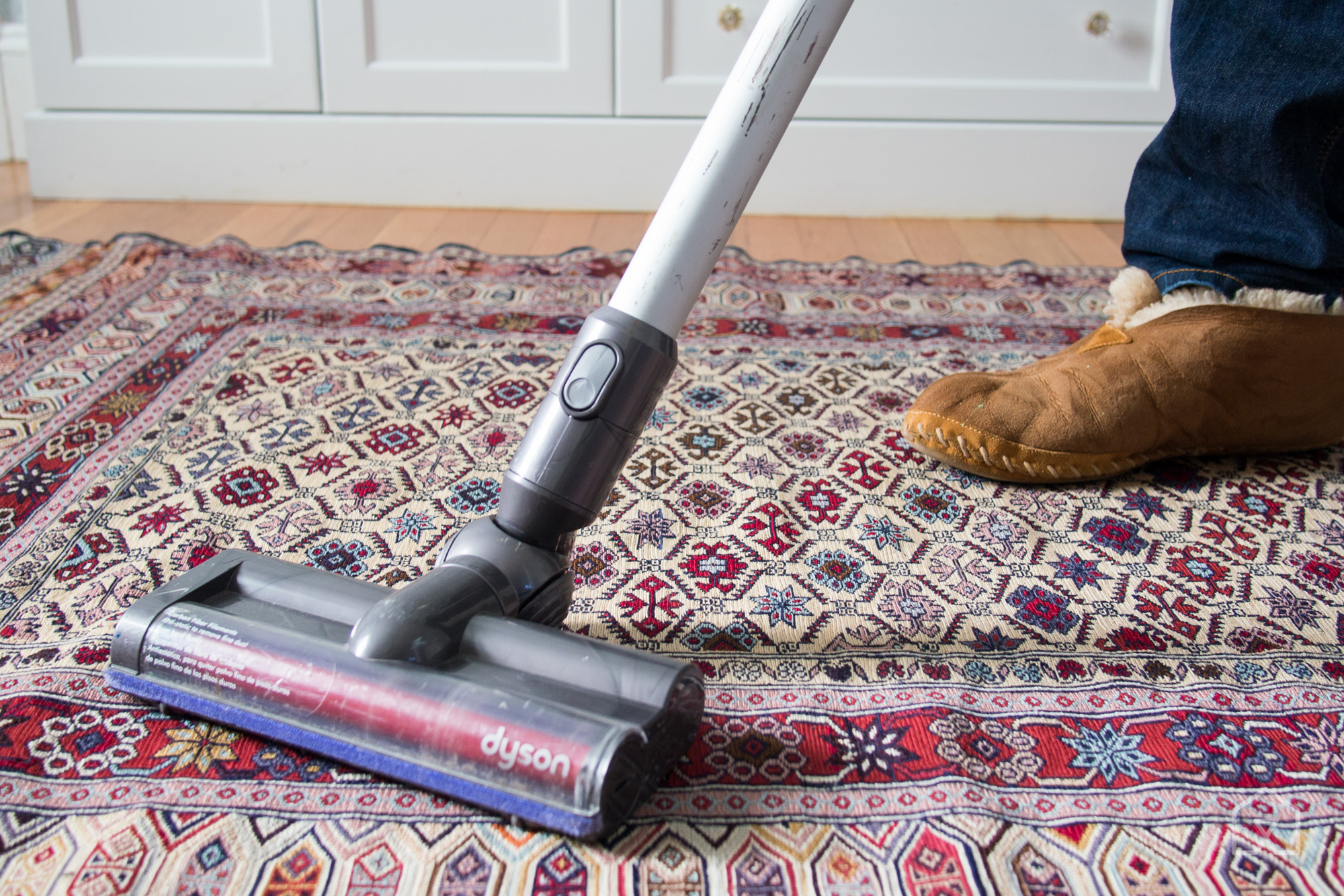
The Dyson V6 base model has a cleaning head that works well on both carpets and bare floors. Photo: Liam McCabe
The Dyson V6 base model is the best cordless vacuum for most people because it cleans as well as a good plug-in vacuum on most common types of flooring and costs less than other Dyson cordless models. In our tests no other brand’s cordless vacuums came anywhere close to matching the carpet-cleaning performance of the V6. The V6 is also great on bare floors, and it can convert into a handheld vacuum, too. It’s lightweight and very thin, and most people find it easy to handle and to stash away between uses. With a 17-minute battery life (about average for the category), it’s best suited for an apartment or a smaller townhouse, where it can usually clean the whole space on a single charge—our estimate is about 1,200 square feet.
Dyson makes a handful of V6 variants that some people might want to consider depending on their flooring, but after looking at all the configurations we think the base model is the right choice for most people because it works well on almost any surface and (most days) costs less than the others. For more on why we like the Dyson V6, see our full guide.
A tried-and-true choice for modest messes

Photo: Liam McCabe
A cheaper cordless vacuum can work for small jobs like picking up crumbs off the kitchen floor, or as a “good enough” cleaner for a home with mostly bare floors. If that’s what you’re after, we think the Hoover Linx (BH50010) is the best choice. For the price, it’s as durable and effective as a cordless vac can get.
The Linx is a competent floor cleaner, a little bit more capable than others at its price. It can pick up visible debris from bare floors and debris sitting on the top layer of short rugs and carpets. The side brushes flick particles away from baseboards pretty reliably. The Linx is not strong enough to suck up much of the fine dust in your carpets—nothing at this price is. But if you’re mostly cleaning bare floors and area rugs (which you can pick up and shake out by hand from time to time), using the Linx is a fine way to keep your floors tidy. If you’ve only ever used a cheap vacuum anyhow, the Linx will seem normal.
A budget model with a longer battery life

Photo: Liam McCabe
If you want a budget cordless vacuum with more battery life or the ability to pull double duty as a hand vacuum, check out the Anker HomeVac Duo (also known as the Eufy HomeVac Duo). Like the Hoover Linx, the Anker HomeVac Duo can’t compete with the Dyson V6 in cleaning power, but it’s useful for tidying up.
This guide may have been updated by The Sweethome. To see the current recommendation, please go here.
Note from The Sweethome: When readers choose to buy our independently chosen editorial picks, we may earn affiliate commissions that support our work.
 AIVAnet