


ZTE’s crowdsouced phone will pack dual cameras
ZTE has already confirmed that its crowdsourced Hawkeye phone will include showstopping features like eye tracking and a sticky case, but what about the nuts and bolts? Well, it’s finally spilling the beans… and Hawkeye is a fairly powerful device for the money. The Snapdragon 625 processor, 3GB of RAM, 32GB of expandable storage and 5.5-inch 1080p screen are good, though not mind-blowing. However, you’ll also get a dual rear camera system — 12-megapixel and 13-megapixel sensors will deliver iPhone 7 Plus-style zooming at a price where that feature is relatively rare.
You’ll also find a backside fingerprint reader, NFC and a front 8-megapixel camera. You’ll also get LTE data on AT&T, T-Mobile and most Canadian carriers (including Freedom). ZTE is quick to boast about Hawkeye shipping with Android 7.0 Nougat, although that’s not exactly something we’d cheer about. Nougat is practically expected for a 2017 device, and could be old hat by the time Hawkeye reaches backers in September.
The company is still asking for your input on the phone’s color and material. For a $199 Kickstarter price, though, what you’re getting is tempting. Even if you don’t care for the crowdsourced features, it promises to be at least a solid performer.
Source: Kickstarter, ZTE
The death of Phones4u is still playing out
It’s been nearly two and a half years since Phones4u folded, but the aftermath of the company’s abrupt closure is still being felt. Thanks to a recent employment tribunal, 400 former staff have been awarded 12 weeks redundancy pay on the basis there was no consultation period ahead of the layoffs — not unusual when a firm suddenly implodes. The government’s Redundancy Payments Service is forking out £3,712 per person, equivalent to 8 weeks of statutory pay, while the invoice for the remaining 5 weeks is now on the desk of administrator PricewaterhouseCoopers (PwC), which did not dispute the claim.
It’s unlikely ex-Phones4u staff will end up seeing much, if anything from PwC, however. They join a long list of creditors owed money by the contract reseller, and are low enough down the pecking order that they can only expect a token payment when all is said and done. PwC is still picking at the carcass of Phones4u to find value wherever it can, including leasing old store sites and auctioning off leftover inventory like headphones.
Phones4u famously collapsed in 2014 after its only remaining partners Vodafone and EE both dropped the contract reseller within weeks of each other, forcing the company into administration. The timing was particularly unfortunate as it came just days after the company opened up pre-orders for the iPhone 6 and 6 Plus, leaving some customers out of pocket with little hope of a refund.
The situation was worse for thousands of Phones4u employees, though, who were suddenly out of work. Dixons Carphone, Vodafone and EE all quickly stepped in to take over stores and save hundreds of jobs. Not everyone was so lucky, of course, but for a few hundred ex-staff at least, getting some of the redundancy pay they were entitled to is better than nothing.
Via: Mobile News
Source: PricewaterhouseCoopers, Evening Express
ICYMI: SpaceX redeems itself with a showstopper rocket launch

Today on In Case You Missed It: SpaceX is back in launching mode after the FAA grounded the company following an unfortunate explosion last September. The rocket company successfully launched satellites from its revamped Falcon9, then the motor completed its landing on a SpaceX floating pad.
NASA Goddard released a video about its goals for earth science studies in the New Year and they mostly all point to studying climate change. Lastly, the last man of walk on the moon, astronaut Gene Cernan, died on Monday, leaving behind a legacy of being invaluable, even while working on the back-up team.
As always, please share any interesting tech or science videos you find by using the #ICYMI hashtag on Twitter for @mskerryd.
Bragi Officially Launches $150 AirPods Competitor ‘The Headphone’
Announced last September two days before the Apple iPhone 7 event, and originally planned to launch in November, Bragi’s $149.00 wireless Bluetooth hearable, called “The Headphone,” is now available for all users to purchase online. The Headphone includes a number of changes from Bragi’s The Dash ($299) in order to make it cheaper, ranging from having physical inputs instead of touch inputs and no activity tracking.
These feature removals have also boosted battery in The Headphone, however, with users able to get up to six hours of music playback on a single charge instead of the four hours that The Dash gets in one life. With the three physical buttons on The Headphone, users can skip through tracks, take calls, make voice commands, activate audio transparency, and more without needing to take out their connected smartphone.

At $150 The Headphone is $10 cheaper than Apple’s AirPods, with a few alternative design changes that might make Bragi’s device more enticing for some users, like the physical playback buttons and slightly longer battery life than the AirPods’ five hours. Bragi itself took to comparing The Dash, The Headphone, and AirPods in a Facebook post last September centering around nine categories that omitted the AirPods’ flagship features like Siri, seamless device pairing, and iCloud sync.
Those interested can order The Headphone today from Bragi’s website for $149.00, with shipping currently estimated to arrive within the next two weeks. Although The Dash is available in Black and White, The Headphone is only made in Black. A range of other Bragi accessories can also be purchased from the company’s online shop, including The Leash to connect The Dash buds together and extra FitSleeves.
Tags: AirPods, Bragi
Discuss this article in our forums
Apple Possibly Planning to Launch iPhone 6 Battery Exchange Program
Apple may be preparing to launch an iPhone 6 battery exchange program for undisclosed reasons, according to Japanese website Mac Otakara.
It is unclear if the iPhone 6 program would be related to Apple’s existing iPhone 6s battery replacement program. Apple launched that program in November after it determined that a “very small number of iPhone 6s devices may unexpectedly shut down” due to a manufacturing issue.
A number of iPhone 6s users said their devices typically shut down with around 30% battery life remaining. Apple noted the shutdowns are not a safety issue, but rather a feature designed to protect the iPhone’s internal components from low voltage. However, affected batteries still need to be replaced.
Apple also has an iPhone 5 Battery Replacement Program, which it launched in August 2014 after it determined that a “very small percentage of iPhone 5 devices may suddenly experience shorter battery life or need to be charged more frequently,” so an iPhone 6 program would not be unprecedented.
Mac Otakara accurately leaked several iPhone 7 and iPhone 7 Plus features, including the removal of the headphone jack, but some of its rumors, such as a new Jet White color, have yet to materialize or proven incorrect.
Tag: macotakara.jp
Discuss this article in our forums
Samsung launches Galaxy C9 Pro with 6GB RAM in India
6-inch Full HD display, 4000mAh battery, and stereo speakers.
Samsung has launched the Galaxy C9 Pro — the company’s first phone with 6GB of RAM — in India. The phone was unveiled in China last October, and will be up for sale in India next month for ₹36,900 ($545). Pre-orders for the handset will go live starting January 27, and Samsung is throwing in a one-time screen replacement service for free to those pre-booking the device. The service will be valid for one year from the date of purchase.

The Galaxy C9 Pro offers a 6-inch Full HD display, Snapdragon 653 SoC, 6GB of RAM, 64GB storage, microSD slot, 16MP front and rear cameras, stereo speakers, and a 4000mAh battery. The handset weighs 189g, but has a thickness of just 6.9mm in spite of the large battery. On the software front, it runs Android 6.0.1 Marshmallow out of the box.
The Galaxy C9 Pro is slated to make its debut in other Asian markets shortly.
Android Wear 2.0 rumored to launch on February 9

Wearables are about to get exciting again.
We know that Android Wear 2.0 is coming next month, and a tweet from Evan Blass suggests a launch is on the cards for February 9. Google is rumored to unveil two Nexus-branded smartwatches, so it is likely we’ll see them early next month.
Mark your calendar: Android Wear 2.0 launches on February 9th.
— Evan Blass (@evleaks) January 17, 2017
Android Wear 2.0 brings Play Store access to the wrist, offers an easier way of signing in to your devices, comes with new standalone apps, and will eventually get support for Google Assistant.
After a lacklustre 2016, it looks like the smartwatch category is set for a resurgence this year. Swarovski’s first product in this segment is set to make its debut in the month of March, and Casio is launching its rugged smartwatch in April. Of the current crop of watches, 18 models are expected to pick up the update, including the Huawei Watch, Moto 360 2015, LG Watch Urbane, Fossil Q Founder, and several others.
Nougat update starts rolling out to the Xperia Z5 and Z5 Premium

Xperia Z5 and Z5 Premium pick up Nougat.
After rolling out Nougat to the Xperia X, Xperia XZ, and the Xperia X Performance, Sony is now bringing the update to the Xperia Z5 family. As noted by Xperia Blog, the Android 7.0 update is now rolling out to the Xperia Z5 and Xperia Z5 Premium, and will make its way shortly to the Xperia Z5 Compact, Xperia Z3+ and Xperia Z4 Tablet.
The 1.3GB update increments the firmware to 32.3.A.0.372, and includes new features in Nougat like multi-window mode, Doze enhancements, Google Now integration with the Xperia Home launcher, and more. If you’re using either the Xperia Z5 or Z5 Premium, head into your phone’s settings to see if the update is available for you.
How to enable fingerprint gestures on the Honor 6X
This is how to turn on the magic of the Honor 6X’s rear-facing fingerprint sensor.
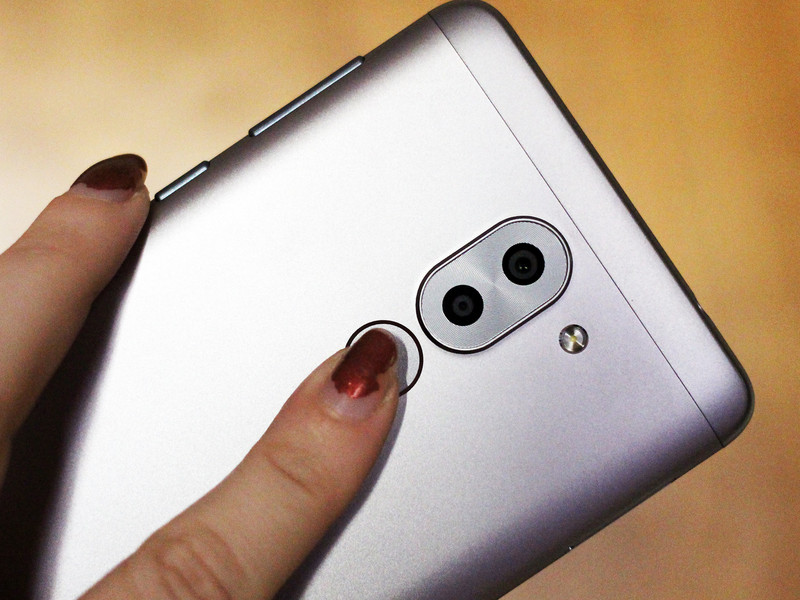
The Honor 6X may be cheap in price, but it’s an appealing buy precisely because it packs a few features you’d normally see paired with a flagship.
The 6X comes able with a few fingerprint gestures, including the ability to use the rear-facing sensor as a shutter button for the camera app. You can also use it to swipe down on the notifications shade, for those times when you’ve only got one finger that’s mobile. Here’s how to enable these gestures and four others.
How to enable fingerprint gestures on the Honor 6X
Swipe down to reveal the notification shade.
Tap on Shortcuts.
Select Settings.
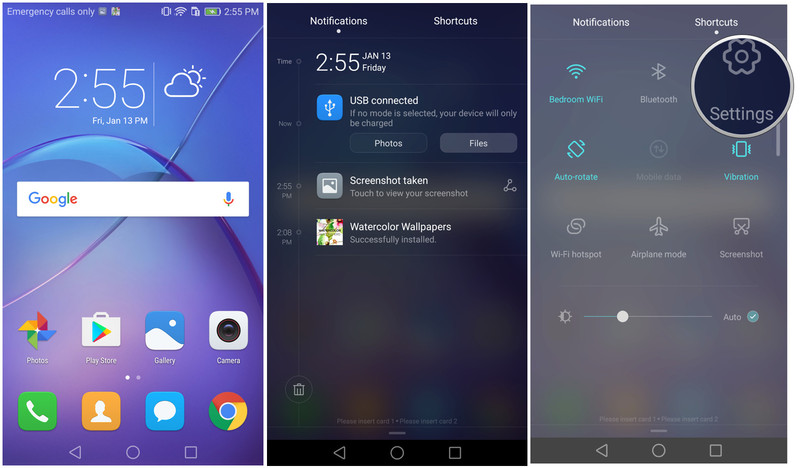
Scroll down.
Select Fingerprint ID.
Choose which of the Touch and hold gestures and Slide gestures you want enabled.

Now get to gesturin’! Keep in mind that the touch control gestures can be used with any finger, regardless if it’s registered to unlock the device. Also, you can choose to have all six gestures enabled at the same time.
Nest Cam Outdoor review: Secure enough as a security camera?
Nest has made the move from indoor security, to offering all-seeing protection for the outside of your home. Say hello to the Nest Cam Outdoor.
Boasting some of the same features as its indoor Nest Cam sibling, the outdoor version is touted as offering 24/7 security come rain or shine.
But does the Outdoor really stand up as a proper security camera?
Nest Cam Outdoor installation: Is it secure?
- Magnet mounted
- Continuous power required
- IP65 rated (water- and dust-proof)
When it comes to installing Nest Outdoor the first thing you’ll need to consider is power. In the installation manual Nest recommends using an outdoor power outlet, which not everyone will have.
Or you can install the camera and use indoor power instead – as we did for this review – but it will require a drill and a bit more work. It’ll be cheaper than getting an electrician to install outside outlets and more secure as the cable won’t be exposed.
Pocket-lint
To feed the cable you’ll need to drill a hole through the outside wall that’s about the width of a broom handle. As you can imagine, that requires a sizeable drill bit, a heavy-duty drill and a lot of cleaning up afterwards. Fortunately the rest of the installation is pain free, as attaching the camera to the wall is a breeze using the provided screws.
Despite the power cable being relatively long you’ll still have to consider where on the outside of the house you’re going to place the camera and where the plug is relative to that on the inside of your home.
As a proper security camera the Nest Outdoor does show some obvious shortcomings. If installed with outdoor power then what’s to stop a shady character coming along and unplugging the camera from the wall? There’s also no form of security between where the power cable meets the waterproof housing – it’s a simple twist-and-pull exercise to disconnect it. The cable itself is also thin and undoubtedly easy to cut through.
In short, if you’re looking for a serious home security camera then this is probably not it – unless you’re also willing to invest in some protective housing for the wiring and power supply.
Connecting Nest Outdoor Cam to home Wi-Fi
- Wi-Fi 802.11b/g/n, 2.4 GHz (WEP, WPA, WPA2 encryption supported)
- Bluetooth Low Energy (BLE)
- 128-bit AES with TLS/SSL secured
Before the installation begins, Nest recommends connecting the camera to your home Wi-Fi indoors before venturing outside to setup. The process is straightforward enough: download the app, create an account, scan a QR code on the camera, select your Wi-Fi network, input your password and you’re away.
Where this process falls down is when you get outside to setup the camera and realise the Wi-Fi signal in your home isn’t strong enough to penetrate the outside walls and compete with interference from your neighbour’s signals. There’s no Ethernet, so you can’t opt to plug into, say, a powerline adapter or your router for a wired connection.
Pocket-lint
Our Wi-Fi router is only situated around 15 feet away from the Nest Outdoor, but the connection regularly dropped out and we found ourselves bombarded with warning messages from the camera alerting us to the lack of connection. A similar thing happens with the standard Nest Cam too.
We initially tried fixing the problem by using a Wi-Fi analyser to find a quieter channel with less interference and this worked briefly, but the problem soon returned. The next solution was the addition of a Wi-Fi extender, which boosted the signal and meant the connection became solid and more permanent. That’s an added cost right there though.
Nest Cam Outdoor review: Sleek but unsubtle design
With the camera installed on the outside of your home it’s quite an apparent object – even more so when the green light illuminates to show it’s recording (you can turn this off in the app).
Installed on a brick backdrop, the camera’s black and white finish and power cable stand out like a sore thumb. Maybe this visual presence is a good thing though: people will know you’re watching; whereas other people might think you have something to hide. Either way that functions as a visual deterrent.
An advantage of Nest is that footage is stored and accessible via the cloud, so even if a thief or unwelcome visitor manages to upset the camera, they cannot remove the footage as a result.
Nest Cam Outdoor recordings, alerts and video quality
- 3-megapixel sensor
- 1080p HD 30fps capture
- 130° wide-angle lens
- Night vision mode
- 8x digital zoom
Nest Outdoor camera boasts a 130-degree view of the surroundings with up to 1080p video capture from its 3MP sensor. There’s also an eight times digital zoom which offers a surprisingly clear picture through digital enhancement within the app – but only if you wish to fix the view on a certain point (it cannot be used on recorded footage).
Pocket-lint
Because Nest is cloud based that means recordings will use your home broadband bandwidth, so you’ll need to consider this if you have a fair usage policy on your internet.
Nest notes that “at 1080p, each camera could use 140GB to 380GB of upload bandwidth per month”. Which is a lot. Even at 720p the camera could still use between 60GB and 160GB a month.
You’ll also need to consider bandwidth if you’re not on superfast broadband as the camera requires 200-1,200kbps bandwidth while streaming video (depending on what quality you’ve set it to). The app does allow you to record in 360p, 720p and 1080p, so there’s plenty of flexibility there but it’s still a big consideration for remote viewing.
Nest Cam Outdoor also has an impressive night-vision mode which gives a clear view of the same surroundings at night without the need for extra lighting.
Capable of detecting movement and people, the camera will alert you to the presence of both and is reasonably intelligent in terms of being able differentiate between the two. For example, you’ll get push emails telling you that the camera “saw someone” or that it “noticed some activity” and the inclusion of a photograph of the relevant event with the ability to click straight through and see the footage within the app.
Pocket-lint
However, we also found that when the camera wasn’t placed in a quiet spot that we were bombarded with notifications that might not warrant any attention. We learned the hard way.
During the review process, we had the camera installed on the front of the house, which meant that people walking up and down the road, vehicles passing by and cars driving in and out of the driveway all set off alerts on an hourly basis. Installed in front of a doorway or in a secluded spot might yield more useful results. And this probably highlights one of the strengths of the camera and its uses.
Nest Cam Outdoor: Convenient two-way communication?
- Built in mic and speaker
If you were to install the Nest Outdoor Cam in a position near or above the front door then it would act as a good tool for both monitoring and communicate with visitors thanks to its two-way communication via built-in speaker and mic. This could be especially useful for elderly homeowners who struggle to get to their front door quickly.
You can scare off unwanted persons by shouting at them through the camer, or simply communicate with visitors and the postie if you’re just got out the shower and need 60-seconds.
Pocket-lint
The camera uses a push-to-talk logic whereby you need to press a mic button on the app to talk to the visitor. This will greet them with an audio cue (“bing-bong”) first, then you can talk. When you let go of the button so they can talk but they’ll have to wait for the “bing-bong” cue before they can speak. If they start talking back to you before that happens then you won’t hear half of what they said.
Most visitors won’t be aware of how this system works so you’ll either have to explain it to them or hope they’re so surprised there’s a camera talking to them that they will need a moment to gather their reply. This problem is inherent due to both your voice and their reply having to go through Nest’s cloud servers first – hence some lag. Only what the visitor says is recorded.
This is not a system you’d want to have a long conversation over, but as a quick interaction “hi, I’ll be there in a minute” or “could you just leave the parcel by the door please?” will work just fine. This doesn’t have to be done while you’re at home either, because Nest is cloud-based and you can use the app remotely (e.g. in your office or workplace) and still access footage and communicate with visitors with relative ease.
Nest Aware: Subscription-based recordings and features
- 24/7 live video
- 30 day history
- Activity/people alerts
The Nest Outdoor Cam comes with a 30 day free trial of Nest Aware. This means you get a taster of what’s on offer at the full subscription level. After that date you’ll have to consider upgrade – depending on what you want to do with the camera.
The free plan only offers a three hour snapshot history, activity alerts (no person alerts), live video feed and the two-way communication features. If you want more recording history then you’ll have to pay.
Pocket-lint
Currently Nest Aware is £8 per month or £80 per annum for 10 day video history and £24 per month or £240 per annum for 30 day history. It’s then extra for each additional camera – so the costs will soon mount up. In our minds that’s quite a subscription cost on top of the initial outlay.
Without the subscription, if you’re intending to use the Nest Outdoor Cam as a security camera then it’s only useful for live feed and notifications. If you were burgled overnight and didn’t realise until the next morning then you wouldn’t have access to the footage of the culprits if it was outside the three hour snapshot zone.
Additional footage functionality – time-lapses, clips and sharing
- Shareable live stream
- Time-lapse video creation
- Saveable and sharable clips
Nest Outdoor’s nice-to-have features include the ability to create time-lapse videos. Here you can capture footage from the camera and turn it into a 30-, 60- or 120-second video. We created some pretty snazzy videos of people coming and going, day turning into night and clouds turning to starry night skylines. Beyond more than a few fun uses we can’t imagine this will be a heavily used feature for most people. Especially with the camera being in a fixed position most of the time.
One of the features you would want to pay for though is the ability to capture, save and share clips of events or detected activity throughout the day. This could have several different uses, especially if you ever had to share footage of intruders with the Police (for example). It’s easy to simply select the timeframe using the calendar (for the day) and the timeline (for the hour) and you can set the start and end of the clip before exporting. You can download that video or share a direct link for people to view.
Pocket-lint
The camera also offers the ability to share live streams publicly or to anyone with a designated password. You could theoretically share this with family or friends if you were going to be away from home and wanted someone to keep an eye out for you.
When it comes to sharing, you can also register other members of the household to the account so everyone can have the app on their phone to monitor footage and receive alerts. These features come at no extra cost unlike the time-lapse and clip sharing, for which you’ll need a Nest Aware subscription.
Verdict
As a secure security camera the Nest Outdoor Cam is somewhat lacking. But as a smart camera for the home it certainly has a lot of great features.
We like the quality of the footage for both day and night capture, the alert system for people detection, and the two-way engagement to speak with visitors or ward off unwanted guests (whether you’re home or not via the app).
That said, the camera is not without its shortcomings. You’ll need to install it properly, it could be easily taken out unlike a hardcore dedicated security camera, and there’s no ability to remote control its position.
Plus the longevity of capture is limited to just three hours unless you’re happy to stump up the extra £8/£24 per month for a Nest Aware subscription to provide access to capture from 10/30 days prior.
Nest does make high-quality smart home products and, as such, if you’re considering a smart camera for the outside of your home then this should certainly be on your shortlist. It’s not hardcore as security cameras go, but it’s still a handy bit of kit.
 AIVAnet