


Rollcap 4K action cam will have a built-in 3-axis image stabilizer
Why it matters to you
Those who have been using 4K action cams that rely on large, external gimbals may prefer the Rollcap, which has one built right in.
Apparently there aren’t already enough action cameras on the market. Chinese drone manufacturer ZeroTech has announced that it will soon launch Rollcap, a 4K-capable action camera that features an integrated 3-axis stabilization gimbal, later this year.
Smaller than the size of a pop can, Rollcap is designed to negate the need for an external gimbal by building it right into the frame of the camera itself. To help stabilize the 4K video and 13 megapixel stills, Rollcap’s self-contained gimbal rolls, tilts, and pans +/- 85 degrees, +/- 30 degrees, and +/- 40 degrees, respectively.

In front of its sensor is a 94-degree lens that is roughly equivalent to a 21mm lens on a full-frame camera. On the side of the camera is the power button, as well as a MicroUSB port, presumably used to charge the camera and transfer data if you’re in a hurry.

More: Still under recall, GoPro quietly creates a cheaper way to replace crashed Karmas
A dedicated smartphone app is used for composing shots and changing camera settings, while triggering the camera can be done both through the app as well as on the camera using the Rollcap’s single button. Various camera modes include a high-speed burst mode for stills, a timelapse mode, a self-timer mode, an HDR mode, and a slow-motion video mode designed for capturing video at higher frame rates.

There’s little additional information in terms of detailed specs or an exact release date, but ZeroTech has confirmed that Rollcap will retail for between $500 and $600 when it drops in late 2017. This price point puts it on the higher end of the action-cam market, but considering it effectively includes a gimbal as part of the setup, it comes out to about the same as what you would expect to pay for a 4K action cam and separate gimbal.
Best icon packs for Android

Without icon packs, we are left with chaos.
App icons are different shapes, different sizes, different color schemes and follow different design guidelines. Samsung’s icons look different than Google’s icons, which look different from Microsoft’s icons, which look different from every other developer’s icons. They are messy. They are awkward. They need to be brought under control. And that’s where icon packs come in.
Icon packs bring control. Icon packs bring consistency. Icon packs bring class. Even if you’re not into big involved themes, you should use an icon pack. A good icon pack can help you find your apps more quickly, can help make your phone look and feel less cluttered, and they just look better. And whether you want an icon pack that stands out or blends in, we have the best icon packs right here for your pleasure and consideration.
How to get started
Before you actually download and install an icon pack, you need a launcher that supports replacing your phone’s stock icons with new ones. Most third-party options, like Nova Launcher and Apex Launcher, support icon packs. Even BlackBerry’s default launcher supports them.
How to use custom icon packs with your launcher
The best icon packs out there
The Randle Trinity: Whicons, Zwart, Golden Icons

I’ve featured a lot of icon packs in my themes over the last year, but the icon packs that come up time and time again are the packs by icon developer Randle. All three packs are basically clones with one difference: the single color which they dye all your apps.
Whicons is far and away my most used and most loved icon pack: a simple, beautiful and easy-to-match icon pack that fits with more themes than you can shake an S-Pen at. When Whicons fails, I can usually turn to its ebony twin, Zwart (the dutch word for black). For flashier, ostentatious themes, I can reach for Golden Icons, bringing both a pop of color and subtle, silky texture to the icon drawer.
These packs all feature deep icon libraries, ample alternate icons, and icon masks to help unthemed icons blend in with the theme. Well, in two out of three anyway. The icon mask in Golden Icons is a black/white mask, same as Whicons and Zwarte, which makes unthemed icons stand out, even without bright colors. If the mask there could be replaced with a gold/white mask instead of black/white, things would be perfect.
If you’re only going to install one icon pack, make it Whicons. If you’re only going to install three icon packs, make it all three of Randle’s packs. Between the three of them, you’ll be able to match almost any wallpaper and keep things clean, consistent, and cool.
Randle Icon Packs (Free)
Noctum

I’m a girl that loves a good dark theme. I’m also a girl that loves a good dark icon pack, and Noctum is a dark icon pack after my own heart. This pack works in shades of grey, using a stark white as an accent in the absence of color. Noctum’s icon mask is one of the best I’ve ever seen, tinting icons in the same greys the rest of the pack uses without garish overlay shapes, and the pack also comes with three search widgets to help you unify the icon pack into a full-fledged theme.
And theming is something Noctum does quite well. One of my favorite minimal themes on Android Central — Black Panther from our Captain America Civil War themes — is nothing more than a color-matched monotone wallpaper and Noctum, and it works marvelously. That said, Noctum can do colorful themes, too, popping against neon wallpapers while colorful icons get lost in the rainbow.
Noctum ($1.50)
Lines

There are a lot of minimal icon packs out there, but the eponymous Lines is one of the largest icon packs out there and one of the best, toeing the line between crisp lines and being too thin for high density displays. Lines itself well to battery-friendly AMOLED black themes because the icons are still easily recognizable while lighting up the least pixels required.
Lines has even branched out into other theme assets, offering a large wallpaper gallery/picker with Muzei support and a variety of widgets to match your snappy icons, like battery widgets and clock widgets. Lines has a free version with ads and a paid version without ads, and it’s worth every cent.
Lines (Free, $1.99)
Ombre

Ombre achieves consistency in a unique way. This pack puts all of its icons atop a simple rectangular bar, which it then dresses up a million different ways. That bar transforms into a playlist for Google Play Music, a stack of Post-Its for Google Keep, a seekbar for YouTube, a chat window for Google Allo, and so on. It’s adorable, it’s brilliant, and it’s colorful as all get-out. Each icon stands out, but together they still come together into a consistent pack.
Ombre, like most of DrumDestroyer Themes, comes in two variants: a light and a dark. Ombre is the dark variant, and what a lovely and colorful dark pack it is! ELEV8 is the light version, which isn’t quite as fun, but it just as colorful while being a bit more bright and sunshine-y. The icon masks for both are quite good, and quite worth their meager price tag for the variation and the blast of color and whimsey they provide.
Ombre ($0.99)
Glim

If you search for Material Design icon packs, you’re going to get a truly ridiculous amount of packs to choose from. The one I have used for years and come back to every holiday is Glim. Glim is a Material-based pack with soft shadows, wide variety, and color variants of most popular apps. What this means for you is that if you’re looking to dye your home screen apps a particular color, Glim is the pack for you.
From dyeing the dock orange for our BB-8 themes to painting my whole app drawer red every Christmas, Glim has color variants for most apps and enough color variant alternate icons to give you the rainbow, no matter what icons you need to theme. Glim eschews icon masks for a truly ridiculous amount of color variants and alternate icons, over a thousand to be exact.
Glim (Free, $0.99)
Your favorites?
What are your favorite icon packs? Let us know in the comments below!
Tim Allen loves the BlackBerry ‘Mercury’, makes a cameo on Last Man Standing
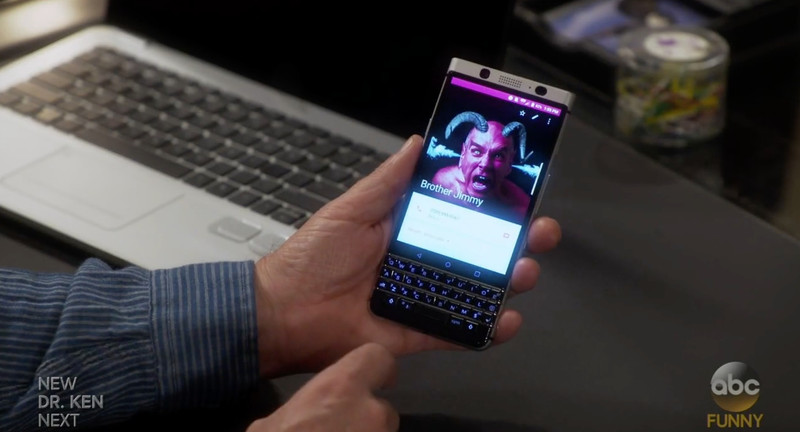
Although the BlackBerry ‘Mercury’ has yet to be officially announced, it seems as though there is already some sly marketing happening on behalf of BlackBerry Mobile. As spotted in the CrackBerry forums, in the latest episode of Last Man Standing, plenty of on-screen time is given to the QWERTY handset by Tim Allen’s character, Michael Baxter.
More: BlackBerry ‘Mercury’ hands-on from CES 2017
While it’s not really surprising given Tim Allen’s well-known love for BlackBerry phones, it’s interesting to see this sort of product placement happening already. Hopefully, it’s just a small beginning to a much larger marketing campaign BlackBerry Mobile has planned for the rollout of the ‘Mercury.’
Best Messaging Apps
Which apps are worth using to stay in touch? We’ve got the scoop.

Best Overall

See at Google Play
There is almost no contest. WhatsApp is an all-inclusive messaging app that’s all you need for staying in touch, no matter where you are in the world. WhatsApp merely relies on whether your phone has an Internet connection — whether that’s through cellular or Wi-Fi — so it’s great if you’re frequently traveling between regions. You can use WhatsApp to send and receive photos, videos, documents, and voice messages. It also supports group chats and voice calls.
Bottom Line: If you’re looking for a formidable, all-in-one messaging that’s packed with more features than some of Google’s offerings, WhatsApp is the second most-popular messaging app available.
One More Thing: Both parties have to be using the WhatsApp app to communicate, though all it requires to register is your phone number.
Why WhatsApp is the best
Google has yet to settle on the one best messaging app. As a result, Android users have had to resign themselves to simply switching off between applications when necessary. It’s not the most user-friendly solution, but it’s the reality until Google lands on a cohesive messaging strategy.
WhatsApp is worth adding to your arsenal — and possibly switching over to for primary communication. In addition to being able to send and receive photos, videos, documents, and voice messages, WhatsApp lets you place free VoIP calls as long as you’re on a strong Wi-Fi signal. That’s especially helpful when you’re traveling overseas.
Additionally, WhatsApp works well on 2G networks, which is fantastic if you’re roaming the countryside with the faintest signal available, and it offers end-to-end encrypted messaging. And since it was the first messaging app of its kind, there were so many early adopters that you’d be hard pressed not to find your friends already have an account. (Even I was surprised at how many of my friends and family members were already users!)
Best for Google users
Google Hangouts

See at Google Play
Text messages, video chat, group chats — it’s all there in Google Hangouts. We still don’t know where Google is taking its once heralded messaging app, but for now, we’re still using it to chat. Use it to easily multitask between conversations with your friends, family, and colleagues between your different Google accounts. You can even use Hangouts to make phone calls with your Google Voice number or download the Hangouts Dialer to make free Wi-Fi calls.
Bottom line: For now, Hangouts is basically a required app if you’re planning to stay connected in the Google-verse. We’re not sure where Google is taking it (some are expecting it to see it become the next prized messaging app of the enterprise), but there are definitely more people using it than Allo or Duo.
One more thing: Why isn’t this Google’s primary messaging app again?
Best for texting
Messenger from Google

See at Google Play
You’re already a Google user, so you might as well stay with the family when it comes to text messaging. Messenger from Google lets you receive SMS and MMS messages — simple as that! Messenger supports RCS messaging, audio messaging, emoji, location sharing, colored text threads, and message archiving. It even comes with its own batch of stickers!
Bottom Line: Messenger from Google is the messenger for your Google phone.
One More Thing: If you’re thinking I really don’t want anymore Google, Textra is the next best text messaging app. It doesn’t support RCS, but it does have Giphy integration, and offers full compatibility with Pushbullet, MightyText, Android Wear, and Android Auto for enhanced notifications and quick replies.
Best “everyone is using it”
Facebook Messenger

See at Google Play
Chances are, you’ve got an overwhelming list of friends and family who’ve become suddenly available on Facebook. Keep up with them all by downloading Facebook Messenger. The app supports messaging from both your Facebook account and phone number. You don’t have to use the SMS feature if you don’t want to, but it could be helpful if you find yourself constantly jumping between apps.
Facebook Messenger is one of the more dynamic messaging apps. It offers a hefty number of sticker packs, not to mention stellar video chat functionality. The app also supports group chats — including group voice chats — audio messaging, read receipts, and location sharing services. You can even use Facebook Messenger to swap cash with friends.
Bottom line: You’ve come this far at accepting Facebook as a part of your life. You might as well adopt the feature-filled Messenger app into your life, too.
One more thing: Not only are there stickers, but you can play games with your Facebook friends from Messenger, too!
Best Overall
See at Google Play
There is almost no contest. WhatsApp is an all-inclusive messaging app that’s all you need for staying in touch, no matter where you are in the world. WhatsApp merely relies on whether your phone has an Internet connection — whether that’s through cellular or Wi-Fi — so it’s great if you’re frequently traveling between regions. You can use WhatsApp to send and receive photos, videos, documents, and voice messages. It also supports group chats and voice calls.
Bottom Line: If you’re looking for a formidable, all-in-one messaging that’s packed with more features than some of Google’s offerings, WhatsApp is the second most-popular messaging app available.
One More Thing: Both parties have to be using the WhatsApp app to communicate, though all it requires to register is your phone number.
How to fix a wobbly image in your PlayStation VR
How do I stop wobble in PlayStation VR?

It’s not an easy problem to explain, and it can be a frustrating problem to properly diagnose and solve. Occasionally, some PlayStation VR users find a small amount of rotation on the video or game they’re in. It’s as though the headset is rocking on an axis, even though you’re standing or sitting perfectly still. The core of this wobble effect lies in the tracking method Sony uses for PlayStation VR. As cool as those futuristic lights look when you’re in the middle of a game, using a single camera system to track that light in a room can lead to problems.
Here are some of the best ways to address the wobble effect on your PlayStation VR.
Read more at VR Heads!
Fitbit cuts 110 jobs as wearable sales slow
While Fitbit currently holds top spot in the wearables market, not everything is going to plan. In its fourth quarter financials, the company said today that it didn’t grow nearly as much as it had anticipated, which means it will introduce a range of cost-cutting measures to help get things back on track. At the top of the list is confirmation that Fitbit will lay off 110 employees, which equates to around 6 percent of its global workforce.
In the previous three months, Fitbit sold 6.5 million devices, which include trackers and smartwatches, earning the company around $580 million. However, the wearable maker expected revenues of between $725 million and $750 million, ensuring that its annual growth totalled 17 percent instead of the 25 percent target it had set last year.
“We are confident this performance is not reflective of the value of our brand, market-leading platform, and company’s long-term potential,” said Fitbit CEO James Park. “While we have experienced softer-than-expected holiday demand for trackers in our most mature markets, especially during Black Friday, we have continued to grow rapidly in select markets like EMEA, where revenue grew 58 percent during the fourth quarter.”
Today’s results show that the market for wearables may be reaching saturation point. Fitbit also counts competition from bigger companies, like Apple and Samsung, as a reason for slower growth. Along with the job cuts and greater focus on aligning its sales and marketing spends, the company says it hopes to reduce costs by $200 million by optimizing its research and development investments.
In the last eight months alone, Fitbit has bought payment startup Coin, snapped up the technology assets of Pebble and acquired the hardware and software know-how of smartwatch maker Vector. There was even talk of it snapping up rival wearable maker Jawbone, but it apparently wasn’t prepared to meet the desired asking price. With three companies now under its umbrella, Fitbit may be ready to de-duplicate roles, which may cost it up to $4 million during this operating quarter.
Moving forward, Fitbit says it will use its market-leading position to “deliver a more personalized experience” for customers, while updating its existing products to offer more functionality. There’s also talk of it launching new products in new categories — something we’ve been expecting for some time now.
Source: Fitbit
Is the UK’s new piracy email alert program dead on arrival?
All of the UK’s major internet service providers have just embarked on a new project aimed at curbing digital piracy. As part of a bigger campaign to promote legal sources of media, spearheaded by copyright holders and the UK government, ISPs have signed up to the Voluntary Copyright Alert Programme. Under this, providers have agreed to send warning emails to subscribers when their IP address has been implicated in illegal file-sharing. Rather than being threatening, these emails are intended to be educational, informing people of what’s happening on their connection and pointing them towards all the legal ways they can watch the latest DVD releases. There’s just one problem: It doesn’t work.
UK ISPs are just now putting this into action, and the timing couldn’t be worse. You see, ISPs in the US have been doing exactly the same thing for years now, but have just announced they are abandoning their nigh-identical Copyright Alert System. After several years of remaining silent on the project’s progress, the Center for Copyright Information — the cross-industry organization that created the alert system — issued a short press release on Friday announcing its demise. “After four years of extensive consumer education and engagement, the Copyright Alert System will conclude its work,” it reads.
While there’s no explicit reference to the program being a failure — in fact, the release calls it a success — shutting the thing down implies as much. The Motion Picture Association of America (MPAA), a member of the Center for Copyright Information, has added weight to this theory. As Variety reports, the MPAA’s Steven Fabrizio said the alerts did little to deter serial pirates. The system “was simply not set up to deal with the hard-core repeat infringer problem. Ultimately, these persistent infringers must be addressed by ISPs under their ‘repeat infringer’ policies as provided in the Digital Millennium Copyright Act,” he commented.
It’s far from surprising to hear the alerts were ineffective in putting off the keenest pirates. After all, they were “educational” in nature and contained no threat of legal action, even if the ‘we’re watching you’ message could’ve been enough to spook some. It’s likely some of these repeat offenders would also be aware that in most cases, an IP address isn’t sufficient evidence to finger a specific individual for copyright infringement. In short, it kind of doesn’t matter how many times you try the educational route if the kid at the back of the class isn’t listening, and there’s no such thing as detention.

There are several other, unavoidable issues with these notices. For one, they are more or less targeted specifically at torrent users, since the peer-to-peer nature of the file-sharing system exposes users’ IP addresses (provided they aren’t obscuring them with a VPN). That means anyone using direct download sites, pirate streaming services and other means aren’t receiving these alerts, limiting their impact. And if torrent users suddenly drop off the radar, who’s to say they haven’t just converted to a more anonymous illegal content source?
All things considered, the Copyright Alert System was almost doomed to fail from the outset, just like the UK’s brand new Voluntary Copyright Alert Programme. The British version is even weaker too, since there are zero repercussions, unlike the US system whereby ISPs could throttle internet connections after issuing repeated warnings. That said, the US alert program undoubtedly did turn some pirates onto legal paths — though obviously not enough to justify keeping the project alive.
It’s obvious educational email alerts are never going to be a silver bullet, and we doubt copyright holders are too bothered about the success of such campaigns at the moment. Thanks primarily to streaming services, music revenues in the US and UK grew last year. The draw of convenient online services was echoed in video, too, with revenues in the UK eclipsing those of physical discs for the first time in 2016.
[Inline image credit: Getty/iStockphoto]
Researchers give driverless cars better cooperation skills
Are you really ready to ride with just a robot at the wheel? To make self-driving cars safer, researchers from the École Polytechnique Fédérale de Lausanne (EPFL) in Switzerland want them to communicate both with each other and non-robotic vehicles to avoid any nasty surprises. As such, they rigged up three vehicles, including a robotic truck and non-autonomous vehicle, to function as one unit on a real road. By working in a team and using each others’ sensors, the vehicles were able to anticipate each others’ moves, making lane change maneuvers safer.
In the EPFL’s scheme, vehicles can travel together as a convoy that doesn’t have any particular “leader.” Rather, they work as a group with other vehicles in the near vicinity, sharing GPS, laser, video camera and other sensor data via WiFi. That way, each vehicle can take advantage of its neighbor’s “eyes” to sense hazardous situations and better coordinate their movements.
The system is managed by special algorithms that allow cars “to work together and achieve complex group behavior,” says researcher Alcherio Martinoli. That allows the convoy to reorganize and adapt when vehicles join the group, change lanes or exit. To prove that it works, they did a demo on Swedish roads with three vehicles, including a robotic and non-robotic car, along with a robotic big-rig truck (video, above). When a vehicle wants to merge, “it sends a specific message and the others reorganize to leave enough space,” says EPFL’s Guillaume Jornod.
While three cars isn’t a lot, “for the first time we were able to validate what we had achieved in a simulation,” says Martinoli, adding that it should be relatively easy to scale up. The point, he adds, is to put the coordination algorithms on top of the robotic driving tech, but make it robust enough to handle regular, unconnected cars, too. “We are hoping that, with a rise in demand, carmakers will come up with ever cheaper solutions for converting legacy vehicles … and that we will be able to deploy and improve this multi-lane convoy system.”
Source: EPFL
Starbucks Begins iOS Beta Test of Assistant That Can Take Coffee Orders Via Voice or Message
Starbucks today launched a limited iOS beta test for a new artificial intelligence assistant called “My Starbucks barista,” which will let customers order their favorite menu items by speaking with a virtual barista within a new messaging interface in the company’s mobile app (via TechCrunch).
If they choose to, users can also opt to simply type their order to Starbucks, similar to chatbots that have become popular in apps like Facebook Messenger. My Starbucks barista will ask to confirm the pick-up location for the order and can help customers through the payment process as well, leaving them only needing to pass by their local Starbucks and pick up their order when it’s ready.
“The Starbucks experience is built on the personal connection between our barista and customer, so everything we do in our digital ecosystem must reflect that sensibility,” said Gerri Martin-Flickinger, chief technology officer for Starbucks, in a statement. “Our team is focused on making sure that Starbucks voice ordering within our app is truly personal and equally important was finding the right partner in Amazon to test and learn from this new capability.”
Additionally, a new “Starbucks Reorder Skill” is being implemented for Amazon’s Alexa devices, giving users the chance to simply say, “Alexa, order my Starbucks” to reorder their usual items. The process requires the Starbucks app to be installed, with an account already in place that includes a designated favorite order.
The Starbucks app has increased in popularity over the years thanks to its ability to let customers place orders online and arrive in the store to receive their drinks and food at the pick-up counter. The practice has become so popular in some locations, however, that customers have been known to leave when faced with long wait times. To fix the problem, Starbucks has begun hiring online order-only baristas, as well as testing out text notifications that alert customers when to arrive at the store.
The beta test is currently beginning, but is limited to a small set of 1,000 iOS users in the U.S., with “a phased rollout” estimated to begin on a larger scale this summer. An update to the Android app is said to come later in 2017.
The Starbucks iOS app is available to download for free. [Direct Link]
Tag: Starbucks
Discuss this article in our forums
How to activate Three Wi-Fi Calling on iPhone
After what seems like an age of promising, Three has finally enabled baked-in Wi-Fi calling in to the iPhone. If you have an Apple iPhone and are on the Three network, you’ll be able to make and receive calls and texts from anywhere you have a Wi-Fi connection, without the need for the company’s separate InTouch app.
The service is compatible with any iPhone launched since 2014, so that means the iPhone 5c, iPhone 5s, iPhone 6, iPhone 6s, iPhone SE and iPhone 7, that obviously includes any “Plus” models of those listed devices.
Before switching on you need to ensure you have the latest software. That means making sure you’re running iOS 10.2. To do that follow the following instructions:
Go to Settings > General > Software Update
Download and install any software update that shows up, if none, proceed to the next step.
If you’ve downloaded the latest software, you should also make sure you have the latest carrier software package installed. This isn’t always included in the software update by default, so you’ll need to go through the following steps:
Head to Settings > General > About
Wait a few seconds and you should see a “Carrier update available” message pop up
Install it, then head back to Settings > Phone
Once you have the latest software and carrier updates, follow the simple steps below:
Go to Settings > Phone
Select “Wi-Fi Calling”
Toggle the “Wi-Fi Calling on This iPhone” switch to the on position
Confirm that you want to activate the feature
Pocket-lint
As soon as it’s been activated, if you’re connected to a Wi-Fi network your “Three UK” network name in the status bar should now say “Three WiFi Call”.
Any time you see that message in your status bar, your calls and text messages will be made over Wi-Fi, which usually means you’ll get better call quality.
 AIVAnet