


LG’s Nexus-like Watch Style surfaces in photos
LG’s Google-blessed smartwatches now exist as more than a set of specs. Well-known leaker Evan Blass has scored photos of the Watch Style, the budget model of the two that LG is expected to launch in early February. The Android Wear 2.0 device certainly lives up to its name — it’s designed to look good, with a subtle bezel (silver and rose gold are shown here) and matching, easily removed leather straps. They’re even relatively thin, although that’s partly a trick of the eye.
However, they’re definitely not meant for athletic types. Notice how there’s no heart rate monitor on the bottom? The omission was anticipated, but it’s clear that LG will steer you toward the higher-end Watch Sport (which will also have GPS and cellular data) if you want to measure your beats per minute.
The upside of this just-the-basics approach may be the price. An Android Police source claims that the Watch Style will start at $249 — presumably, different bands or color options might raise the cost a little further. It wouldn’t be the most affordable Android apparel you can buy (ASUS’ ZenWatch 3 costs $229), but $249 is low enough that it might be appealing to anyone who wants the latest Android Wear experience without going overboard on features.
LG Watch Style, in silver (top) and rose gold (bottom) pic.twitter.com/JlHaq35bZ0
— Evan Blass (@evleaks) January 28, 2017
Via: 9to5Google
Source: Evan Blass (Twitter), Android Police
Finally, you can keep being productive even when you’re offline with Trello
Why it matters to you
Trello joins other productivity apps like those from Google that allow you to keep working even if you don’t have a great connection.
You don’t stop doing work just because you’ve gone offline, and now, Trello won’t either. On Friday, the desktop and mobile app that is the favorite of project managers and hyperorganized individuals everywhere announced a critical change to its iOS version — the ability to work offline.
“Whether you’re home, on a plane, in a tunnel or in the middle of nowhere, you can use Trello without worrying if you’re connected,” Trello wrote in its iOS release notes. “Your work will automatically sync when you are back online.”
The feature is one that has been in high demand for years now. While Trello offered the semblance of a solution in 2015 and began offering a beta version of offline support in 2016, this is the first time that all Trello users can take advantage of the offline feature.
More: Microsoft takes aim at Trello, Samsung sees a flexible future
The Atlassian-owned company joins a host of other productivity and work apps that have recently made operations possible, even when users are offline. A whole host of Google apps boast the function, and even Netflix has joined the party by allowing viewers to download their content ahead of time in anticipation of spotty connectivity.
So what exactly can you do offline with Trello? Thanks to the latest iOS update, you can add new cards and their details (like members, labels, and the like), and you can move cards from board to board. While these changes won’t necessarily be reflected on other members’ screens, you’ll be able to see which cards still need to be synced with the icon of arrows pointing in a circle.
The Android version of offline Trello is still in beta, but the functionality is much the same. So if you’re looking for an excuse to stop organizing, being offline no longer applies in the case of Trello.
Steady hands — a robot just helped doctors perform a novel eye surgery
Why it matters to you
A robot’s careful control of a needle has allowed doctors to completely remove the clot in retinal vein thrombosis for the first time.
Ommetaphobics, look away. If the idea of something touching your eye makes you a bit queasy, you certainly won’t like a medical innovation involving a robot, a needle, and your retinal vein. All the same, it’s an important development in the field of ophthalmology.
Belgian eye surgeons became the first to use a surgical robot to operate on a patient with retinal vein occlusion this week, with the robot employing a truly minuscule needle to do its work. Measuring barely 0.03 millimeters, the needle was used to inject a clot-dissolving drug into the patient’s retinal vein. Both the robot and the needle were made specifically for the surgery.
If the proof is in the pudding, consider this operation dessert. The process proved that it is indeed possible to dissolve a blood clot directly from the retinal vein — that is, if you have a robot to help you. This could lead to new treatments for retinal vein occlusion, which if left untreated, can lead to blindness. Currently, treatment for the disorder requires monthly injections in the eye, and while this reduces the effects of the blood clot, it does not completely remove the clot. This new injection method, however, changes the game.
More: ‘Ori and the Blind Forest’ director: Xbox’s Project Scorpio is a ‘next-gen’ console
The introduction of robots to the treatment has allowed for medicine to go where it has never gone before. Even the steadiest of human hands would not be able to hold such a small needle still for an extended period of time. A robot, however, can. While a surgeon is responsible for guiding the hair-thin needle into the vein, the robot eliminates any vibrations, which increases precision by a factor of 10. Once the retinal vein has been reached, the doctor can stabilize both the needle and the eye, allowing for the safe injection of the thrombolytic drug.
Not only is this treatment the first to truly address the problem at its core, it’s also significantly more affordable than previous alternatives. While current treatments can cost tens of thousands of dollars, ” … you’re only treating the side effects and that there is little more you can do than avoid reducing eyesight,” said Professor Peter Stalmans, eye surgeon at University Hospitals Leuven. “This is a high price tag, The robotic device finally enables us to treat the cause of the thrombosis in the retina. I look forward to what is next: if we succeed, we will literally be able to make blind people see again.”
Apple, Microsoft and Uber help staff stranded by Trump ban
President Trump’s restrictions on immigration from Muslim-majority countries is affecting many, many more tech companies besides Google. Apple, Microsoft, Uber and others are rushing to accommodate employees who suddenly find themselves isolated by the new ban — and in some cases, pressing for change at the highest levels. Apple, for instance, is both providing staff with support and “reaching out” to the White House to discuss the “negative effect” of the ban. Microsoft, meanwhile, says it’s offering “legal advice and assistance” to workers. Uber, meanwhile, is discussing a very specific solution.
In a Facebook post, Uber chief Travis Kalanick stated that his company would identify affected drivers and “compensate them pro bono” during the next three months. They won’t have to worry about “putting food on the table” in the meantime, he says. The ridesharing firm will offer more info in the days ahead.
On top of the practical considerations, tech companies are also voicing a concerted moral opposition to the immigration ban. Apple CEO Tim Cook is reminding staff that “diversity makes us stronger,” and that the company wouldn’t exist without immigration — Steve Jobs was the child of a Syrian immigrant, after all. Netflix CEO Reed Hastings, meanwhile, decries the restrictions as both “un-American” and likely to increase the threat to Americans by fostering hate. Twitter’s Jack Dorsey says that the human and financial effects of the order are “real and upsetting.” Mozilla is also chipping in with arguments that this both creates a “barrier to innovation” and hurts people who may face “persecution, terror and war.” Whatever you believe, it’s safe to presume that the tech world won’t be quiet about this issue any time soon.
Update: Tesla founder Elon Musk (who, if you’ll recall, is part of Trump’s policy forum) has voiced his opposition to the immigration ban. He notes that this is “not the best way” to solve the country’s problems, and that many people hurt by the restrictions are “strong supporters of the US.” It’s a diplomatic comment, to be sure, but also a direct one.
The Executive Order’s humanitarian and economic impact is real and upsetting. We benefit from what refugees and immigrants bring to the U.S. https://t.co/HdwVGzIECt
— jack (@jack) January 28, 2017
Many people negatively affected by this policy are strong supporters of the US. They’ve done right,not wrong & don’t deserve to be rejected.
— Elon Musk (@elonmusk) January 29, 2017
Via: TechCrunch, The Verge
Source: BuzzFeed News, Travis Kalanick (Facebook), Business Insider
The Doomsday Clock is the closest to midnight since 1953
The Bulletin of the Atomic Scientists just pushed the Doomsday Clock to two and half minutes to midnight, marking the closest point humanity has been to extinction since the first hydrogen bomb test in 1953. Given this latest warning, it’s a good time to recall the symbolic clock’s history, from its 1947 creation by Manhattan Project scientists to the present. Nowadays, it takes into account not just nuclear dangers but climate change, geopolitics and other factors. With Donald Trump in power, the groups says, all of those areas are more at risk.
The Manhattan Project’s “Fat Man” and “Little Boy” atomic bombs are frightening physical proof of Albert Einstein’s famous equation E=MC^2. The scientists who developed the bombs were profoundly disturbed by the immense destruction and loss of life after their use in Hiroshima and Nagasaki for the first, and thankfully last, times.
In 1945, they founded the “Bulletin of the Atomic Scientists” to educate researchers, politicians and the public on the dangers of atomic weapons. The group created a magazine in June 1947 (pictured below), and was looking for a simple cover illustration that captured its fears about nuclear proliferation. Physicist Alexander Langsdorf Jr.’s wife, Martyl Langsdorf, a landscape engineer, had the perfect idea: She fused the metaphor of midnight approaching with a ticking bomb, and the Doomsday Clock was born.

The original Bulletin of the Atomic Scientists’ cover, and one from 1957 at two minutes to midnight.
The clock was first set to seven minutes before midnight but moved ahead four minutes in 1949 when the Soviet Union tested its first atomic bomb. At that point, both the Americans and Soviets had fission bombs that split heavy radioactive elements like plutonium. Those early devices could “only” release the equivalent energy of up to 500,000 tons of TNT. The Hiroshima bomb, which had about 3 to 4 percent of that power, killed 100,000 people.
However, the clock was moved ahead to midnight minus two minutes after both nations tested hydrogen bombs in 1953. Also referred to as thermonuclear weapons, the devices fuse hydrogen atoms, often using fission bombs as a trigger. That can create a blast equivalent to 57 million tons of TNT (in the case of the USSR’s “Tsar Bomba,” below) or 100 times more energy than the most powerful fission bombs.
The clock stayed at that time until 1960, when it was moved back four minutes thanks to increased cooperation between the two nuclear powers. In 1963, it was set back even farther to 12 minutes to midnight with the Partial Test Ban Treaty but shifted ahead five minutes when France and China acquired nuclear weapons.
The Doomsday Clock oscillated back and forth until 1991. At that point, it hit its safest point ever, 17 minutes to midnight, after the US and USSR signed the Strategic Arms Reduction Treaty (START I), and the Soviet Union dissolved. The situation has gotten steadily worse since, thank to political instability and nuclear tests by Pakistan, India and North Korea. The Bulletin also added climate change to nuclear annihilation in 2007 as one of the greatest threats against mankind.

As the Bulletin notes, the clock has become a cultural touchstone, used by religious cults for end-of-days prophecies, as a metaphorical background to the 1964 Stanley Kubrick film Dr. Strangelove, and as a motif for the graphic novel Watchmen. As detailed in The Atlantic, it recently went through a major redesign that simplified and modernized it, while retaining its “brutally simple visual analogy,” according to designer Michael Beirut. The Bulletin of the Atomic Scientists group now uses the new design (above) as its logo.
Yesterday, the clock was moved ahead 30 seconds, the closest it’s been to midnight for 64 years. It’s hard to believe things could be worse right now than they were during, say, the Bay of Pigs invasion in 1961. However, the group cited global warming dangers and nuclear weapon proliferation as the main reasons behind the shift. “Making matters worse, the United States now has a president who has promised to impede progress on both of those fronts,” wrote physicist Lawrence M. Krauss and Rear Adm. David Titley (retired) in the New York Times.

Doomsday Clock graph, 1947-2017. Image courtesy of Wikimedia Commons.
While the Paris Agreement on climate change was a positive step, the scientists believe the new administration is “openly hostile” to the idea of human-caused climate change. “It is well past time to move beyond arguments over the reality of climate change and on to solutions, including fiscal measures — such as carbon markets and carbon taxes or fees — that encourage efficiency and put a price on carbon emissions,” the group wrote.
On the nuclear side, North Korea recently tested weapons and Russia is building new silo-based and mobile missiles. Meanwhile, the US is busy modernizing its 7,200-weapon stockpile — the biggest of any nation — rather than reducing it. All of that requires diligent, serious leadership, but Trump “has shown a troubling propensity to discount or outright reject expert advice related to international security, including the conclusions of intelligence experts,” the Bulletin said.
“These are all matters in which President Trump has signaled that he would make matters worse either because of a mistaken belief that the threats posed by nuclear weapons and climate can be ignored, or that the words of a president of the United States do not matter to the rest of the world,” wrote Krauss and Titley. The consequences of that, as shown in the video below, could end us all.
Source: Bulletin of the Atomic Scientists
Apple CEO Tim Cook on Immigration Executive Order: ‘It is Not a Policy We Support’
Apple CEO Tim Cook today sent an email to employees speaking out against the immigration executive order that United States President Donald Trump signed yesterday afternoon. In the letter, shared with MacRumors by an Apple employee, Cook says Trump’s order is “not a policy we support.”
Cook goes on to say that Apple’s HR, Legal and Security teams are in contact with all Apple employees who are affected, and he says Apple has “reached out” to the White House to “explain the negative effect” on the company. Cook’s full letter is below:
Team,
In my conversations with officials here in Washington this week, I’ve made it clear that Apple believes deeply in the importance of immigration — both to our company and to our nation’s future. Apple would not exist without immigration, let alone thrive and innovate the way we do.
I’ve heard from many of you who are deeply concerned about the executive order issued yesterday restricting immigration from seven Muslim-majority countries. I share your concerns. It is not a policy we support.
There are employees at Apple who are directly affected by yesterday’s immigration order. Our HR, Legal and Security teams are in contact with them, and Apple will do everything we can to support them. We’re providing resources on AppleWeb for anyone with questions or concerns about immigration policies. And we have reached out to the White House to explain the negative effect on our coworkers and our company.
As I’ve said many times, diversity makes our team stronger. And if there’s one thing I know about the people at Apple, it’s the depth of our empathy and support for one another. It’s as important now as it’s ever been, and it will not weaken one bit. I know I can count on all of you to make sure everyone at Apple feels welcome, respected and valued.
Apple is open. Open to everyone, no matter where they come from, which language they speak, who they love or how they worship. Our employees represent the finest talent in the world, and our team hails from every corner of the globe.
In the words of Dr. Martin Luther King, “We may have all come on different ships, but we are in the same boat now.”
Tim
Cook’s letter addresses the immigration executive order signed by Trump on Friday, which suspends entry of all refugees to the United States for a total of 120 days, bans Syrian refugees for an indeterminate amount of time, and blocks citizens of seven countries (Iraq, Iran, Somalia, Sudan, Libya, Syria, and Yemen) from entering the United States for 90 days. The order has left immigrants stranded at airports around the country and has sparked panic and outrage among tech companies with affected employees.
The letter comes after Cook spent a week in Washington, where he met with Utah senator Orrin Hatch to discuss the economy and tech industry and had dinner with Ivanka Trump and Jared Kushner. While Cook did not meet with President Trump during the trip, back in December, he and several other tech leaders like Amazon CEO Jeff Bezos, Microsoft CEO Satya Nadella, and Tesla CEO Elon Musk sat down with Trump to discuss a range of topics including trade and immigration.
Though Apple has butted heads with Trump over the past few months after Trump suggested he would force the company to build its products in the United States instead of overseas, Cook explained to employees that he attended the summit to “influence these issues” because “being on the sideline” is not “a successful place to be.”
Note: Due to the political nature of the discussion regarding this topic, the discussion thread is located in our Politics, Religion, Social Issues forum. All forum members and site visitors are welcome to read and follow the thread, but posting is limited to forum members with at least 100 posts.
Tag: Tim Cook
Discuss this article in our forums
Is your system booting slowly? Here’s how to flush out clogged startup apps
Is starting your computer way more of a hassle than it should be? Do you find yourself waiting around for apps to load and connections to finish before you can even start? That kind of waiting is never fun — but we know how to make it better. Slow login times can be caused by startup apps, those apps that are set (either manually or automatically) to open when you turn on your computer.
More: How to take control of the Action Center in Windows 10
Some login apps are unnecessary, and some are just broken items from past apps that really should be removed anyway. In other words, you can get rid of them and improve startup times without sacrificing anything. So let’s talk about how to do it for Windows and MacOS!
Managing startup apps in Windows 10
Windows 10 gives you plenty of control over what software launches when you start up, and even helps you identify what apps may be slowing down your computer. Here’s how to cut back on some of those apps and make a difference.
Step 1: Launch the task manager. You can find the task manager by clicking on the Windows button and looking for it in the list, or searching for it in the nearby search bar.

Step 2: The task manager will only show the current programs you have open. Get it to reveal more information by selecting at More details the bottom of the window. This opens a larger window with a much longer list of apps and various tabs. Don’t get overwhelmed! Look at the tab options and go to the one that says “Start up.”
Step 3: The Start up tab shows you all the apps that are enabled to auto-start when you login. You’ll notice that all active apps say “Enabled” in the status section. That’s the part you want to change. Look through the list and find the apps that you don’t need to automatically launch — this varies, but consider your tasks and what’s essential. You probably want OneDrive to launch at work, your Nvidia graphics card to launch on a gaming rig, and so on. When you find an app you don’t need, right-click (or do a long tap with your finger, etc.) to bring up a menu where the your first option is to Disable the app. There’s also a Disable button at the bottom of the window if you don’t want to right-click.
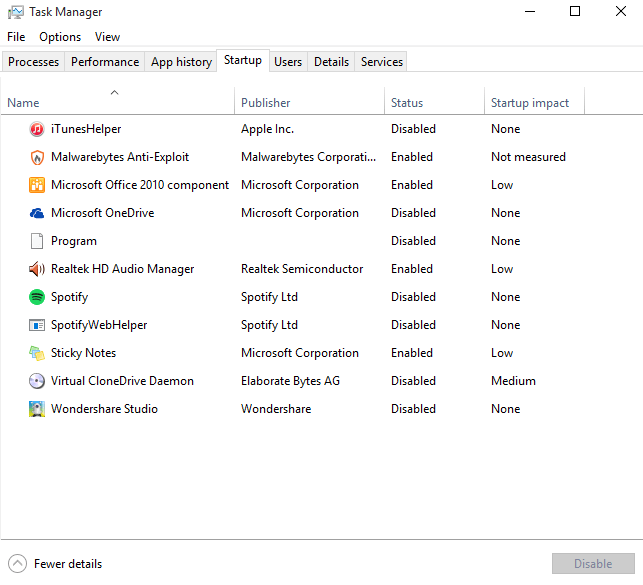
Step 4: In the task manager, you’ll see that the last column is called “Start up impact” which is designed to show just how much time it may be taking up. If it says “None” then you probably don’t need to worry about disabling it. If it says “Not measured,” then it’s probably a new app (or you have a new Windows 10 OS), because Windows hasn’t been able to measure its impact yet. Over time, Startup impact can provide useful information on what apps are best to disable. Look for apps that have a “High” impact, and odd-named apps that don’t have anything listed under Publisher. These are prime targets.
Step 5: If you aren’t sure what an app does, it’s a smart idea to leave it. But if you’re desperate to improve login speeds and you end up disabling a few apps that you don’t really recognize, your next step should be to shut down your computer and then restart it. Login and complete a few basic tasks, stream some video, and generally try things out. This will help both determine if the startup speed has improved, and see if you accidentally disabled an app that it looks like you need. Even if the app is disabled, it will still stay listed in the task manager so that you can enable it again if necessary.
Become a WhatsApp expert with these top 10 tips and tricks
WhatsApp is one of the most-used chat apps in the world. It allows people to chat via instant messaging for free and to make video and voice calls without paying a dime. The app boasts ample functionality, but some features are a bit hidden and may not be immediately apparent. From starring messages to hiding your status, we’re going to show you some simple tips and tricks that will make you a WhatsApp expert in no time.
More: The 10 best messaging apps for Android and iOS
Group chats vs. Broadcasts

In the Chats tab, you will see both Broadcast Lists and New Group listed at the top of your chats. You can use Broadcast Lists to send a message to multiple contacts at the same time. Use the New Group option when you want to create a group, and chat with more than one person at the same time. A broadcast is a one-off and will not group the people who are receiving the message. The difference is that with a broadcast you are sending an individual message to several people at the same time, and with groups, you are grouping everyone together, and everyone can see and reply to the messages.
Use WhatsApp on the web or desktop
WhatsApp has a companion desktop app, which mirrors what you see in your mobile app. To access this, go to Settings > WhatsApp Web/Desktop. The app will then use your camera to scan a QR code. Hold your smartphone up to your monitor, scan the code, and allow the app to log you into your account where you can continue your chat. You can access WhatsApp using the official web app or download it directly to your desktop.
Hide Last Seen, Profile Photo, and Status

If you’d like a bit more privacy, you can hide the timestamp where you were last seen, your profile photo, or your status. To access these options, go to Settings > Account > Privacy. Here, you can choose whether you want everyone, your contacts, or nobody to be able to see the aforementioned information.
Archive your chats, and view them later
If you multiple chat threads, you can always archive the most important, allowing for easy access later on. To do this, swipe left on any chat and choose Archive. To see your archived chats, simply swipe down when you’re in the chats tab. Once there, you will see Archived Chats above the search bar.
How do you know if your message was read?

As you chat, you will see checkmarks beside your messages. A gray checkmark means your message was sent, and two gray checkmarks means your message was sent and delivered. If you see two blue checkmarks, that means that your message has been read.
Manage a group

If you have a group chat and want to access more options, just tap the name of the group. This will open Group Info, where you have more control. Here, you can see individual links, media, or documents that have been shared in the group. You can also see any messages that you’ve starred in the past, mute notifications from that group for up to one year, and choose whether you want to save any incoming media. If you want to add a new participant, or you want to send someone the link to that group, you will also see the option to do both if you scroll down.
Block a contact
Blocking a contact may look like a bit of a mystery at first, but it’s not as difficult as you might think. To do so, tap the name of the contact at the top of the chat. This will open Contact Info. Once there, tap the Block this Contact option at the bottom. You can also block someone in your contacts by going into Settings > Account > Privacy > Blocked and adding the contact in question.
Star a message
You may want to star a message, especially if it’s a long group conversation or if you want to get to a portion of a long chat session quickly. To do so, tap and hold any individual message you’ve received, followed by the star on the left-hand side. To access your starred messages, go to the Settings tab > Starred Messages. If you want to un-star a message, simply tap and hold the message, and tap the star again.
Back up your chats

To back up your messages, go to Settings > Chats > Chat Backup. Here, you can schedule an Auto Backup that will allow you to create daily, weekly, or monthly backups. The software will push your data to iCloud or Google Drive, meaning you can easily restore your messages when you re-install WhatsApp. Keep in mind, however, that the backup will not be protected by end-to-end encryption while on iCloud or Google Drive.
Minimize your data usage

If you notice that you’re using a ton of data, you can control this by going to Settings > Data and Storage Usage. Here, you can choose whether you want media and documents to be downloaded via your Wi-Fi network, cellular network, or neither network. If you use WhatsApp primarily for calling, you can turn on Low Data Usage to minimize the amount of data used during calls. You can also monitor your network usage, and storage usage by user, to see which of your contacts sends you the most data.
Iceland is drilling a giant hole, not for oil, but for geothermal energy
Why it matters to you
If all goes well, Iceland may have found a way to harness the energy of supercritical steam, paving the way for new geothermal energy techniques.
Drill, baby, drill. But in this case, not for oil — rather, the nation of Iceland is digging a giant hole into a volcano in the name of renewable energy. By boring the world’s deepest geothermal hole in the Reykjanes peninsula (it goes down 3.1 miles), scientists say they’ll be able to take advantage of the extreme pressure and heat to tap into an impressive 30 to 50 megawatts of electricity from a single geothermal well.
Iceland is already one of the world’s greatest users and suppliers of geothermal energy, producing around 26 percent of its electricity from geothermal sources. However, most of the country’s wells pale in comparison to this latest gargantuan effort. While a typical geothermal well extends just 1.5 miles into the ground, this new one is twice as deep, and as a result could yield up to 10 times more power.
By the time the drilling team gets to around 3 miles beneath Earth’s crust, scientists expect to find a mixture of molten rock and water, but given the huge amount of heat and pressure present, the water will become what is called “supercritical steam.” Neither a liquid nor a gas, this supercritical steam contains far more potential energy than either of those states of matter, and scientists say it holds the key to more electricity.
More: For $13, EnergyPal indoor HDTV antenna gives you free HD channels in 1080p
“We hope that this will open new doors for the geothermal industry globally to step into an era of more production,” said Asgeir Margeirsson, CEO of the Iceland Deep Drilling Project (IDDP), the collaboration among scientists, industry, and the Icelandic government responsible for the Reykjanes project.
He added, “If this works, in the future we would need to drill fewer wells to produce the same amount of energy, meaning we would touch less surface, which means less environmental impact and hopefully lower costs.”
This is not the first time such an ambitious project has been attempted. Six years ago, a similar effort was taken, but it ended disastrously when the drilling team ran into hot magma at 1.3 miles beneath the surface, destroying the entire drill string. But already, the current team has gone further without significant incident (knock on wood).
Two babies were treated with a novel technique that may have cured them of cancer
Why it matters to you
Genetically modified T cells could be the answer to curing cancer, especially if delivered in an off-the-shelf manner.
We may have gotten another step closer to finding a cure for cancer. In a paper published this week, doctors in London watched leukemia vanish from two babies after being treated with genetically engineered immune cells from a donor. If this treatment proves to be as effective as scientists hope, it could pave the way for a brand new cost-effective way of treating one of humanity’s most devastating diseases.
Doctors at London’s Great Ormond Street Hospital used an “off-the-shelf” technique to deliver specially engineered T cells (the key to your immune system) to the babies via an IV. The T cells were designed to fight leukemia, and were delivered directly to the young patients’ veins when they were needed. The London experiment was notable not for this technique, however, but for the extent to which the cells were genetically modified. As the MIT Technology Review points out, the cells saw a total of four genetic changes, one of which allowed the donor T cells to work within another person, and another which allowed them to target cancer cells.
More: Deep learning algorithm matches dermatologists at recognizing skin cancer
The 11 and 16-month-old infants had both previously undergone different treatments which did not successfully cure them of the disease. But this latest experiment appears to have done its job. Both children are currently in remission.
That said, some researchers have noted that there may be confounding variables at play. Both patients also received standard chemotherapy, so it’s unclear if the cell treatment alone is the reason they are currently cancer-free. “There is a hint of efficacy but no proof,” says Stephan Grupp, director of cancer immunotherapy at the Children’s Hospital of Philadelphia. “It would be great if it works, but that just hasn’t been shown yet.”
Great would be a serious understatement. If off-the-shelf cell therapy with these specially modified cells work, it would not only be effective, but efficient and relatively cheap as well. The other technique currently used to deliver engineered T cells to a patient involves collecting a patient’s blood cells, engineering their own T cells, and then returning the blood back to the patient. This, is a hugely expensive process (around $75,000) that must be customized to each individual patient.
But with this alternative off-the-shelf approach, “The patient could be treated immediately, as opposed to taking cells from a patient and manufacturing them,” says Julianne Smith, vice president of CAR-T development for Cellectis, which specializes in supplying universal cells. Smith continued, “We estimate the cost to manufacture a dose would be about $4,000.”
It’s still too early to determine whether or not this is truly a viable treatment option, but it looks like progress no matter how you slice it.
 AIVAnet