


Avenza Maps can guide your outdoor trek when you don’t have network access
Why it matters to you
Avenza Maps will prevent you from getting lost even without an internet connection.
Modern maps apps on our mobile devices are incredibly useful, helping us to navigate from one place to the next, keeping us informed on shifting traffic patterns, and recommending places to eat, drink, and shop too. But, take away our device’s Internet connection and suddenly those same apps aren’t quite so handy. Without their ability to download information about our current surroundings they become all but useless. That is not the case with Avenza Maps which was built to function offline, offering high-quality maps even when traveling off the grid.
Available as a free download for iOS, Android, and Windows, Avenza Maps serves as a portal to the Avenza Map Store, which is filled with hundreds of different maps that are available to purchase for a nominal fee. Those maps were created by professional cartographers, surveyors, and organizations like National Geographic and the U.S. Forest Service. Many are even specialized for use in national parks, hiking trails, and other recreational areas around the world.
More: Transform your running shoes into winter-ready treads with these tips
The Avenza app uses your mobile device’s built-in GPS capabilities to find your current location and suggest maps that are applicable to that specific place. You can also search the store to find maps for a future destination and have them downloaded and stored on your phone before you arrive. Most of the files are priced at 99 cents.
The maps are stored on your device and have the ability to interact with all the features of the app, even while offline. Those features include being able to use the device’s GPS capabilities to find your current location, track your movement in real time across the map, and drop waypoints — complete with custom names and notes. The app can also provide the latitudinal and longitudinal coordinates of any location on the map and can accurately measure distances and area too.
In day-to-day use, it’s tough to beat Google Maps or even Apple Maps at this point. But, if you’re going to be backpacking in a remote area, or visiting a foreign city where a data connection can be a costly option, Avenza Maps can be a viable alternative, provided you are adept at reading maps. The software won’t provide turn-by-turn directions, for instance, so you will have to navigate your own course to and from your destination. Still, when you consider that most other mapping apps can’t do much of anything once they stray from an Internet connection, this is a handy option to have installed as a backup.
Samsung Galaxy Tab S3 news and rumors
The Samsung Galaxy Tab S3 has been the subject of a number of rumors — including that it would be released in September 2016. A report from SamMobile suggests the tablet will now launch at some point in the first quarter of 2017.
Here’s everything we know about the Galaxy Tab S3 so far.
More: Samsung Chromebook Pro with touchscreen reportedly arriving soon
Specs
We now finally have a first look at what could be the specs of the Galaxy Tab S3. According to a Geekbench filing that was spotted by PocketNow, the device will sport a Qualcomm Snapdragon 820, as well as 4GB of RAM and a 2,048 x 1,536 resolution display.
According to the SamMobile report, the Tab X3 will come in two variants — the SM-T280, which will be the Wi-Fi-only model, and the SM-T285, which will offer LTE connectivity as well.
These specs are somewhat disappointing, especially for what’s supposed to be a flagship tablet. A Snapdragon 821 or even 835 would have been a much nicer option for the processor, and the display on the tablet is the same as the Galaxy Tab S2. Still, the specs aren’t bad — and they should be fully capable for most users. Not only that, but the Snapdragon 820 will represent a pretty big upgrade for Samsung — the Galaxy Tab S2 offered an Exynos 5433 or Snapdragon 652 processor, depending on the region where it was purchased.
Whenever the Samsung Galaxy Tab S3 is finally released, it should be a real hit, which Samsung could use after the whole fiasco with the Galaxy Note 7.
We’ll update this article as we continue to hear more about the upcoming tablet.
Updated on 01-26-2017 by Christian de Looper: Reformatted article and added spec leak from Geekbench.
Samsung Galaxy Tab S3 news and rumors
The Samsung Galaxy Tab S3 has been the subject of a number of rumors — including that it would be released in September 2016. A report from SamMobile suggests the tablet will now launch at some point in the first quarter of 2017.
Here’s everything we know about the Galaxy Tab S3 so far.
More: Samsung Chromebook Pro with touchscreen reportedly arriving soon
Specs
We now finally have a first look at what could be the specs of the Galaxy Tab S3. According to a Geekbench filing that was spotted by PocketNow, the device will sport a Qualcomm Snapdragon 820, as well as 4GB of RAM and a 2,048 x 1,536 resolution display.
According to the SamMobile report, the Tab X3 will come in two variants — the SM-T280, which will be the Wi-Fi-only model, and the SM-T285, which will offer LTE connectivity as well.
These specs are somewhat disappointing, especially for what’s supposed to be a flagship tablet. A Snapdragon 821 or even 835 would have been a much nicer option for the processor, and the display on the tablet is the same as the Galaxy Tab S2. Still, the specs aren’t bad — and they should be fully capable for most users. Not only that, but the Snapdragon 820 will represent a pretty big upgrade for Samsung — the Galaxy Tab S2 offered an Exynos 5433 or Snapdragon 652 processor, depending on the region where it was purchased.
Whenever the Samsung Galaxy Tab S3 is finally released, it should be a real hit, which Samsung could use after the whole fiasco with the Galaxy Note 7.
We’ll update this article as we continue to hear more about the upcoming tablet.
Updated on 01-26-2017 by Christian de Looper: Reformatted article and added spec leak from Geekbench.
Luma Surround WiFi review

Research Center:
Luma Surround WiFi
For 15 years, Dr. Paul Judge and Mike Van Bruinisse created secure networking solutions for big corporations across the globe. Now they are addressing the general market with Luma, a “personalized” system to add wireless connectivity to a home network. It’s different than the standard router in that there’s no single unit trying to provide wireless coverage throughout the house. The system is also controlled by a mobile device, and easily fits within any environment thanks to each unit’s small, elegant design.
The big selling point with Luma is that, once the initial Luma device is connected via Ethernet to the ISP’s modem, customers can expand their wireless coverage by setting up additional units throughout the home. No additional wires are needed, and each additional “node” unit wirelessly connects to the main “hub” unit coupled to the modem, creating what the company calls “surround” Wi-Fi coverage. This is a better setup than adding additional routers or wireless extenders/repeaters to an established modem/router setup.
Luma is one of a handful of mesh-based networking systems now available to purchase. They established a relatively new market in 2016 that is set to expand a great deal throughout 2017. Luma is actually one of the cheaper mesh-based solution currently available, costing $299 for a three-pack and $149 for a single unit. Sure, a router can be less expensive, but it just doesn’t provide the blanket of coverage that mesh-based networks promise to create.
The mesh difference
For this review, we were provided with the Luma three-pack kit. This setup is good for large homes of four bedrooms or more while a single device would be ideal for a studio apartment. Even if customers merely purchase a single unit or the two-pack kit, what’s great about mesh-based setups is that customers can tack on additional units to the overall “surround Wi-Fi” coverage without any effort.

The idea behind Luma is to offer hassle-free installation and network management. Each unit comes packed with one gigabit Ethernet port that connects to the ISP’s modem, one gigabit Ethernet port to connect a wired device, and a USB 2.0 port. Right now, that port is only provided for charging devices like smartphones and tablets, but customer support hints that additional uses will come later.
A simple solution with a simple setup
The setup process requires the use of a smartphone or tablet, and the company’s Luma app for Android or iOS. Once the app is downloaded and installed, users then create an account and start the setup process. That begins with telling the app how many Luma devices the user intends to install, describing the user’s home environment, and then selecting where the modem is generally located on a simple map.
Luma is great for customers wanting to add Wireless AC connectivity to their network. It’s easily expandable, creating a huge blanket in the home.
For instance, the initial screen lists three home types to select: single family, apartment or combo, and townhouse or other. This screen also requires the user to input the number of floors in the home ranging from one to more than five. After that, the next screen provides a general diagram of the first floor divided into five sections so the Luma setup can determine where the first unit will be installed.
After all that info is established, the first Luma unit is connected to an Ethernet port on the ISP’s modem and then powered up. A circular blue ring on the front will then illuminate and slowly “spin,” indicating that it’s ready to be configured. Users can then choose to connect directly to the Luma device via Bluetooth or Wi-FI so the Luma app can continue establishing the wireless network. Once that starts, the Luma’s blue ring becomes solid and users merely sit back and let the hardware and software do their thing.
When the first Luma device installation is completed, the Luma ring turns a solid green, indicating that the setup process is done, and then goes dark. Users then repeat the installation process with additional Luma devices, telling the app where they will be placed, connecting to them via Bluetooth or Wi-Fi, and then letting the hardware and software configure the network.

That’s it. There’s nothing else to do but connect devices to the new wireless network. Users will see one single network name that was created during the setup process, thus there’s no need to select an individual Luma unit or a specific band. There’s no visual indication that the Luma devices are even on, but rather they sit like coaster-sized hexagonal objects on any surface. The only signs of life are within the app and through the list of available networks when connecting a wireless device.
One app to control them all
The Luma app is broken down into four panels: Wi-Fi, Security, Connections, and Filtering. The main screen defaults to the Wi-Fi panel, showing that all Luma devices are online along with their combined download and upload speeds. Tap on a specific Luma unit and a second screen opens to reveal a brief list of details, and options to reboot or identify the device.
Users can’t log in with a browser to configure the network’s fine details.
The main window also provides a small orange button on the bottom right corner that pulls up a small control panel enabling users to prioritize a connected device, pause the internet, invite users to the network, and to add another Luma device. Prioritizing a device means the Luma network will put that device before all others, so this is handy when using a PC gaming laptop, a console, or a multimedia center used to stream video. Users simply tap on the Prioritize Device icon and select the device in a list of gadgets that have access to the Luma network.
In addition to the miniature control panel, the main window provides a three-bar icon in the top left corner that opens a menu. Here users can configure the Wi-Fi settings, their Luma account, get help and support through online documentation, and start an online chat with technical support within the app. There’s a link to the store too for buying additional Luma devices.
Luma isn’t designed for network tweakers
The drawback to the Luma network is that there is very little customization involved as seen with the typical store-bought router. Users can’t log in using a web browser to configure the finer details like specific channels, channel widths, and so on. Instead, the Wi-Fi Settings aspect in the app’s menu brings up a single page listing the network’s name, password, and options to set up a guest network. There’s an “Advanced” option too that pulls up another page with a few more options.

On the Advanced page, users will see an option to set a static IP address to a specific device, and toggles for turning on/off Universal Plug and Play, and IGMP Snooping. Tapping on the static IP address setting pulls up a window for manually choosing a device that has connected to the Luma network, assigning an IP address, and then adding the necessary port forwards if needed.
We actually had to use the port forwarding feature to get Star Wars: Battlefront to work correctly. In a test, we loaded up the PC version on an brand new Alienware 17 R4 laptop and ran the game as usual. However, when trying to join or leave an online multiplayer game, the session would remain in a continuous loading loop, forcing us to manually exit the game. The only way to resolve this was to manually assign the laptop with a static IP address in the Luma app and forward the necessary ports. There are no options to make specific ports generally open.
Don’t worry: Luma has your back
As for the other three panels listed in the main window, the Security section provides a brief report showing the number of scanned events and alerts. Tapping on the report panel pulls up a second page where users can toggle the security mode between three options: Off, Detect, and Block. The Detect aspect will alert users of suspicious activity so they can manually take action whereas the Block option automatically blocks suspicious activity.
When we created an account and set up the Luma network, customer service called to see if we needed help getting set up.
The third panel, Connections, is broken down into three sections: People, Devices, and Assign. Adding people means the network administrator can assign a name to their devices and set policies. There are only three policies to configure: Content Filter, Time Limit, and Bedtime. Content Filter can be adjusted by moving a horizontal slider between MPAA ratings spanning “U” (unrestricted) to “G” (general audience). The Time Limit option has a slider too, limiting family members and guests to one, two, four, eight, and unlimited hours. Bedtime allows users to select specific days and hours registered device owners can’t access the network.
Next, the Devices section lists all connected and previously connected wireless gadgets that have permission to access the network. Tapping on a device listing pulls up a second page listing basic info, connection details, and actions users can take. The basic info can be edited to match the device such as its name and type, and assigned to a registered user. Connection details include its signal strength, its IP address, and MAC address. Actions consist of blocking the device from the network, forgetting the device, and prioritizing it before all others. Finally, the Assign section is rather straight-forward: assign a connected device to a registered user.
The last panel in the main window is Filtering. This is an overall filter that comes before individual filtering. Like the content filter option in the People section, users are presented with a horizontal slider consisting of Unrestricted, Rated R, Rated PG-13, Rated PG, and Rated G settings.
Finally, the only other detail regarding the Luma app is the little bell icon in the top right of the main window. If it shines with a little orange dot, that means it currently offers network notifications. Tap on the icon and a second page loads showing devices that have accessed the network. Tap on a device and users are prompted with a thumbs up (approve) or thumbs down (block) icon. These devices can also be found in the Connections/Devices panel too.
That’s essentially it for what Luma provides feature-wise. The big selling points of the Luma system consist of easy smartphone-based manageability, parental controls, automatic malware scanning and blocking, device prioritization, the ability to pause the internet with one tap, and means for setting general content rules for all connected devices. The Luma system is also fine-tuned for Amazon Alexa, allowing users to verbally command Alexa to handle Luma-based tasks like pausing a specific user’s network access, to prioritize a specific device, and more.
Based on our experience, customers will get top-notch support 24 hours a day, seven days a week. When we created an account and set up the Luma network, customer service actually called shortly thereafter to see if we needed any help getting set up. The in-app chat option is great in our book too, plus users can jump online and chat with technical support on the Luma page or call them directly.
Does it deliver?
On a technical level, Luma is an AC1300 class router providing speeds of up to 867 megabits per second on the 5GHz band and up to 450 megabits per second on the 2.4GHz band. Each unit is powered by a quad-core processor although the company isn’t quite eager to cough up the actual details. How the Luma units work together to create “surround” Wi-Fi is somewhat of a mystery too. However, the units include a Bluetooth 4.0 and Bluetooth Low Energy component, WPA and WPA2 encryption, and compatibility with NAT, DHCP, and VPN Pass-through.
We tested the system using three devices: a Samsung Galaxy S6 Edge Plus smartphone, an Alienware 17 R4 laptop, and a Lenovo Ideapad Windows 10 laptop with a built-in single-band Wireless N component and an additional dual-band Wireless N USB dongle. For Android, we used an app called Wi-Fi SweetSpots that provided a live feed of the router’s speed between it and the connected device.
Device:
Samsung Galaxy S6 Edge Plus
Alienware 17 R4
Laptop
Lenovo Ideapad Laptop
Internal Wireless N
Lenovo Ideapad Laptop
External Wireless N
5GHz Default Max:
867Mbps
867Mbps
450Mbps
450Mbps
2.4GHz Default Max:
450Mbps
450Mbps
300Mbps
300Mbps
2.4 GHz Speeds:
Up to 650Mbps
N/A
Up to 72Mbps
N/A
5GHz Speeds:
Up to 650Mbps
Up to 866.7Mbps
N/A
Up to 433Mbps
Take note that the Luma network automatically chooses the best connection for the device, meaning if a device supports the 5GHz band, Luma automatically uses it. That said, users won’t see two separate Luma names representing two separate bands in the list when scanning for a Luma-based connection. This makes connectivity simple for the end-user but difficult to test using dual-band devices.
For the Lenovo laptop, we first tested its internal Qualcomm Atheros AR956x single-band Wireless N component, and then shoved in a dual-band Wireless N USB dongle provided by Trendnet. Like the Wireless AC devices, the Luma network defaulted to the 5GHz band when using the USB dongle, so testing the 2.4GHz speed required us to remove Trendnet’s adapter.
Because users can’t change the band’s channel or channel width, devices may be bottlenecked. We saw something similar with the Starry Station, as the 2.4GHz and 5GHz channels were locked down 20MHz, and apparently, that’s what is going on here. The Lenovo laptop is capable of up to 300 megabits per second on the Wireless N 2.4GHz band, but right now it’s capped at 72 megabits per second.
Luma Surround WiFi Compared To

Linksys Velop

Linksys WRT3200ACM

Plume Adaptive Wi-Fi

Starry Station

D-Link DIR-869 EXO AC1750

Portal Wi-Fi router

Ubiquiti Amplifi HD

Betternet Betterspot VPN Router

HooToo TripMate Titan

TP-Link AC3150

Linksys EA9500 Max-Stream AC5400

Zyxel NBG6815 AC2200

Netgear Nighthawk X4S

Netgear Nighthawk X8

Google & TP-Link OnHub
As for the Samsung Galaxy S6 Edge, the smartphone managed up to around 650 megabits per second, which isn’t bad at all. Looking back, the phone saw up to 581 megabits per second with the Starry Station, so the Luma network provided slightly faster speeds in our testing. Still, due to Luma not providing means to manually change the channel and channel width, Wireless N devices may be limited. In this test, the Luma devices selected Channel 1 for the 2.4Ghz band and Channel 161 for the 5Ghz band.
Of course, the max throughput depends on the surrounding conditions. The modem provided by the ISP has built-in Wi-Fi and could be causing interference. Neighboring networks may be interfering with the Luma’s performance too, hence why customers should have access to channels and channel widths. But the company set out for simplicity with the Luma mesh networking design so that general customers can quickly install and easily manage a Wi-Fi network.
Our Take
This is a solid solution for customers wanting to add Wireless AC connectivity to their current network. It’s easily expandable by wirelessly connecting additional units, creating a single blanket across the house. However, Luma is also one of the cheaper mesh-based networking solutions on the market, so don’t expect tons of features and customization.
Is there a better alternative?
The DT Accessory Pack
Luma Whole Home WiFi System
$149.00
Linkskey 9-Port 10/100/1000 Mbps Gigabit Ethernet
$156.48
CelerCable Network Cable CAT6 25 Feet with Snagless RJ45 Connectors
$7.99
Luma has a lot of competition. Of the alternatives, we most enjoyed the Securifi Almond 3, which performed well and offers an interesting touchscreen interface. We also like the Portal. It’s not a mesh network, but it does use a unique, rarely accessed Wi-Fi band to achieve the same goal of providing faster, more consistent networking.
How long will it last?
Luma and its competitors are essentially creating a new market that kicks out the traditional wireless networking routers. Instead of one unit struggling to reach every corner of the house with wireless connectivity, smaller satellite-style units using mesh networking technology create better coverage. This is the future of home networking.
Should you buy it?
Customers looking to add wireless coverage to their current network should consider the Luma system. It’s easy to install, easy to maintain, and easily expandable. It’s meant for the general customer looking to quickly set up a secure networking environment and jump online immediately. But competition in this segment has suddenly become tight, and the Luma doesn’t stand out. We think most users will want to turn first to the Almond 3 and Portal, then consider the Luma if those options don’t meet their needs.
Verizon eyeballs Charter in bid to become the second largest cable company in the U.S.
Why it matters to you
A merger of Verizon and Charter could signal the beginning of an era of telecom consolidation.
AT&T has DirecTV. Comcast has NBCUniversal. And now, Verizon is looking to make a mega-acquisition of its own. According to The Wall Street Journal, the carrier is “exploring” an acquisition of Charter, the second largest cable company in the U.S.
It’s not a done deal. Verizon chief Lowell McAdam reportedly corresponded with Gerg Maffei, CEO of Charter parent company Liberty Media, and also enlisted the help of financial advisers to navigate a potential bid. Reuters reports, however, that no proposal is on the table, and CNBC says there are “no significant talks” going on between Verizon and Charter at this time.
More: China approves merger of Dell and EMC; mammoth deal will be official next week
Such a deal has long been a topic of speculation. McAdam told a Wall Street analyst that a merger would make “industrial sense,” and according to Bloomberg, Verizon has been exploring ways to expand its vertical reach. The carrier reportedly studied “more than 10” acquisition targets, including large media companies, network and cable operators, and fiber-optic service providers, before approaching Charter.
It’s a logical move for Verizon. The company, which has 114 million wireless subscribers, would gain access to Charter’s 24 million cable customers and 21 million broadband customers. And were a deal to go through, those subscribers would come under the umbrella of Verizon’s fiber-optic, high-speed FiOS service, which had roughly 6 million subscribers as of January 2017.
Charter inherited many of its subscribers in 2014 as the result of a merger with Time Warner Cable. In the wake of a failed $45 billion merger attempt by Comcast, Charter paid $55 billion in exchange for Time Warner’s millions of customers.
Verizon has struggled to maintain growth in wireless in light of what it calls a “competitive squeeze.” During the company’s January earnings report, it reported a larger-than-expected fall in subscriber additions, and is projecting a year of flat growth.
A merger with Charter would produce a profitable mega-network worth an estimated $500 billion at an opportune time. Some studies project that 23 million people will connect to the internet for the first time over the next three years, and by 2019, video streaming services like Netflix and Hulu are expected to account for 80 percent of the world’s traffic.
More: Broadcom snaps up Brocade as tech merger fever heats up
A proposed acquisition of Yahoo also hasn’t gone as planned. Verizon began piecing together a $4.8 billion bid for the internet giant in July 2016, but negotiations stalled in the wake of two massive data breaches at Yahoo.
A Charter acquisition could head off a rumored merger of Sprint and AT&T. U.S. regulators killed AT&T’s proposed acquisition of T-Mobile in 2011, citing antitrust concerns. But the new presidential administration is expected to be more amenable to consolidation within the telecom industry.
Charter’s shares surged 10 percent in Thursday’s premarket trading.
Verizon eyeballs Charter in bid to become the second largest cable company in the U.S.
Why it matters to you
A merger of Verizon and Charter could signal the beginning of an era of telecom consolidation.
AT&T has DirecTV. Comcast has NBCUniversal. And now, Verizon is looking to make a mega-acquisition of its own. According to The Wall Street Journal, the carrier is “exploring” an acquisition of Charter, the second largest cable company in the U.S.
It’s not a done deal. Verizon chief Lowell McAdam reportedly corresponded with Gerg Maffei, CEO of Charter parent company Liberty Media, and also enlisted the help of financial advisers to navigate a potential bid. Reuters reports, however, that no proposal is on the table, and CNBC says there are “no significant talks” going on between Verizon and Charter at this time.
More: China approves merger of Dell and EMC; mammoth deal will be official next week
Such a deal has long been a topic of speculation. McAdam told a Wall Street analyst that a merger would make “industrial sense,” and according to Bloomberg, Verizon has been exploring ways to expand its vertical reach. The carrier reportedly studied “more than 10” acquisition targets, including large media companies, network and cable operators, and fiber-optic service providers, before approaching Charter.
It’s a logical move for Verizon. The company, which has 114 million wireless subscribers, would gain access to Charter’s 24 million cable customers and 21 million broadband customers. And were a deal to go through, those subscribers would come under the umbrella of Verizon’s fiber-optic, high-speed FiOS service, which had roughly 6 million subscribers as of January 2017.
Charter inherited many of its subscribers in 2014 as the result of a merger with Time Warner Cable. In the wake of a failed $45 billion merger attempt by Comcast, Charter paid $55 billion in exchange for Time Warner’s millions of customers.
Verizon has struggled to maintain growth in wireless in light of what it calls a “competitive squeeze.” During the company’s January earnings report, it reported a larger-than-expected fall in subscriber additions, and is projecting a year of flat growth.
A merger with Charter would produce a profitable mega-network worth an estimated $500 billion at an opportune time. Some studies project that 23 million people will connect to the internet for the first time over the next three years, and by 2019, video streaming services like Netflix and Hulu are expected to account for 80 percent of the world’s traffic.
More: Broadcom snaps up Brocade as tech merger fever heats up
A proposed acquisition of Yahoo also hasn’t gone as planned. Verizon began piecing together a $4.8 billion bid for the internet giant in July 2016, but negotiations stalled in the wake of two massive data breaches at Yahoo.
A Charter acquisition could head off a rumored merger of Sprint and AT&T. U.S. regulators killed AT&T’s proposed acquisition of T-Mobile in 2011, citing antitrust concerns. But the new presidential administration is expected to be more amenable to consolidation within the telecom industry.
Charter’s shares surged 10 percent in Thursday’s premarket trading.
Our absolute favorite HTC Vive games
The HTC Vive is an exciting piece of technology, offering an immersive virtual reality experience, but users may find the selection of games available right now somewhat disappointing. This wave of consumer-grade VR is still in its early stages, and many developers are still trying to figure out the best way to craft compelling games. Still, there are some early gems on the Vive; here are ten games that show off some of the exciting new possibilities for gameplay that VR brings to the table. Check back in the future as we play more games and update this list with our findings of the best the platform as to offer. All these games are available on SteamVR.
More: Oculus debuts Asynchronous Spacewarp VR frame-blending technology
Thumper ($20)
Please enable Javascript to watch this video
Part of what makes virtual reality so exciting is its ability to dominate the player’s senses in a way screens and monitors simply cannot. No game better exemplifies this than Thumper, a so-called “rhythm violence” game that puts players in control of a metallic beetle, which races along a psychedelic highway to confront and defeat gigantic monsters. Players then use simple, intuitive commands to avoid obstacles along the track, lean into turns, and hop over rails.
The hazards are synced with the game’s soundtrack, and consist of militant drums and ominous soundscapes. Even with the distance granted by a monitor, Thumper feels oppressive, but in virtual reality, it truly becomes a grinding descent into hell. While the game’s various environments look great in VR, the boss fights are truly awe-inspiring. Massive, cosmic horrors are rarely as menacing as they are in VR.
Buy it now from:
Steam
Space Pirate Trainer ($15)
Please enable Javascript to watch this video
Shooting galleries are already too common on the Vive. The controllers lend themselves to the act of pointing and pulling a trigger, and such games allow players to move very little and still engage with obstacles. Space Pirate Trainer stands out from the crowd, however, thanks to its tight controls and gorgeous presentation, which gives players an experience straight out of an ‘80s sci-fi film.
The game takes place largely on an isolated platform. Players hold the Vive controllers in their hands, each one acting as an in-game gun. These guns can be set to perform a variety of actions, allowing you to fire in bursts or using powerful charged shots. Increasingly difficult waves of robotic enemies will attack you, and as they do, you must shoot them down while dodging their attacks. This simple gameplay is surprisingly fun, however, as it gets you moving and multitasking. There are few VR experiences more thrilling than twirling around incoming lasers and firing back, guns akimbo.
Buy it now from:
Steam
Keep Talking and Nobody Explodes
Please enable Javascript to watch this video
Virtual reality headsets seem like an isolating experience at first, and though it is possible to mirror the visuals to a screen for the sake of people around you, there is no way to convey the same experience you’re having. Keep Talking and Nobody Explodes is a unique multiplayer experience that offers a way for people not wearing the headset to participate. The game tasks the player wearing the headset with disarming a bomb, with input from other players. The problem? Only the player wearing the headset can see the bomb. In order to disarm it, the main player must describe the various modules on the bomb, while the other players consult a lengthy manual that offers instructions on what to do.
The result is tense, and often frantic experience as players shout at each other as the clock ticks down. The modules that can appear on the bomb appoint players with various tasks, such as translating morse code or playing memory games, and communication is vital; it can also break down quickly. The asymmetric gameplay of Keep Talking and Nobody Explodes is great fun, and provides a much-needed template for socially-oriented VR games.
Buy it now from:
Steam
Fantastic Contraption ($30)
The Vive’s motion controls and use of actual, physical space opens up some exciting possibilities for games that really let you get your hands dirty, and Fantastic Contraption is a perfect example. Based on a flash game from 2008 of the same name, Fantastic Contraption tasks you with using simple components, such as wheels and rods, to construct devices that move a goal object through the level and into the goal area. It’s conceptually reminiscent of the old Incredible Machine series, but with simpler components and a greater focus on physics.
Unlike its predecessor where you simply used the mouse to connect parts and construct 2D contraptions, now you manipulate components directly with your hands in full 3D. The concept translates beautifully into the new medium, and getting down on your hands and knees to tinker with your contraption is gratifyingly immersive.
Buy it now from:
Steam
Hover Junkers ($35)
While many of the titles currently available seem more like proofs of concept than anything else, Hover Junkers is a fully-realized and exciting multiplayer experience that has us hooked. It solves the problem of moving in a limited space by turning your small play area into the deck of a hover ship that you use to fly around the battlefield, collect junk, and trade blasts with your opponents. Collected junk can be used to bolster your defenses, creating walls for you to crouch behind. Shooting and reloading are handled with naturalistic gestures.
Piloting around, ducking behind cover, and popping up to shoot at your enemies is as natural and immersive as any first person shooter we’ve ever played, so Hover Junkers serves as a fantastic ambassador for the genre.
Buy it now from:
Steam
Size matters not: KDE Slimbooks measure 0.70 inches with sixth-gen Intel CPUs
Why it matters to you
A new slim notebook based on the popular open-source Linux-based KDE community software that should interest customers looking for an alternative to Windows.
The international free software community KDE announced the launch of a KDE-branded laptop on Thursday called the KDE Slimbook. Built for KDE fans across the globe, the new Slimbook promises a highly stable computing experience given that KDE developers are using an identical hardware and software configuration when testing their apps. That means apps and hardware issues are resolved before a new version of KDE’s software is distributed to end users.
The new Slimbook is based on the KDE Neon platform and the Plasma Desktop interface. Neon is a software repository based on Ubuntu LTS (which is based on Linux) that provides rapid updates of Qt and KDE software while the rest of the Ubuntu-based components installed on the notebook are updated at a normal pace. KDE Plasma is the visual desktop environment built to enhance the Linux computing experience.
More: Lenovo issues a new Yoga 2-in-1 BIOS enabling Linux following conspiracy accusations
“Spanish laptop retailer Slimbook approached KDE with the idea to offer KDE-branded laptops that come pre-installed with Plasma and KDE Applications,” said KDE’s Thomas Pfeiffer in an update. “We were excited about the idea, and put our designers and developers to the task of creating a branding for such a device and making sure that KDE neon runs without any hardware-related issues on it.”
There are two versions of the KDE Slimbook: one with an Intel Core i5-6200U processor and one with an Intel Core i7-6500U, both of which are sixth-generation Skylake chips. Here is a brief rundown of each:
Core i5-6200U
Core i7-6500U
Release date:
Q3 of 2015
Q3 of 2015
Cores:
2
2
Threads:
4
4
Base speed:
2.30GHz
2.50GHz
Boost speed:
2.80GHz
3.10GHz
Cache:
3MB
4MB
Maximum power draw:
15 watts
15 watts
Graphics:
Intel HD Graphics 520
Intel HD Graphics 520
Graphics speed (base):
300MHz
300MHz
Graphics speed (max):
1,000MHz
1,050MHz
Outside the two processor differences, the KDE Slimbooks are identical in their hardware specifications and options. Here they are:
Screen size:
13.3 inches
Resolution:
1,920 x 1,080
System memory:
4GB DDR3 @ 1,600MHz
8GB DDR3 @ 1,600MHz
16GB DDR3 @ 1,600MHz
Storage (Samsung or Crucial):
120GB mSATA SSD
250GB mSATA SSD
500GB mSATA SSD
Connectivity:
Wireless N
Wireless AC
Bluetooth 4.0
Ports:
2x USB 3.0
1x Ethernet
1x Mini HDMI1x SD card reader
Keyboard:
LED-backlit
Webcam:
Yes
Battery:
6,800mAh
Size:
13 x 8.66 x 0.70 inches
Weight:
3 pounds
Outer material:
Aluminum
Color:
Silver
According to the specs, the operating system is marked as KDE Neon “for now.” Pfeiffer said that the KDE community is open other to distributions that can be pre-installed with Plasma, offering customers a choice of multiple operating systems. He also pointed out that the KDE Slimbook was created for those who love KDE software, and was not built primarily for those who are active contributors in the KDE community.
“We were not content with the quality of laptops available on the market,” explains KDE. “The majority shipped with proprietary and locked-in software solutions, filled with not-uninstallable bloat where the user was left at the mercy of whatever the company selling them a laptop saw fit for them to work with. As creators and makers we knew what it meant to be locked into a set of solutions defined by others.”
To purchase the KDE Slimbook, head here. The Intel Core i5 version has a starting price of $779 and the Core i7 model has a starting price of $908. Customers can only configure the amount of system memory, the amount of storage, the wireless connectivity component, and the keyboard layout.
LG’s next big phone will debut in Barcelona on February 26
Why it matters to you
Success is vital for LG’s next flagship phone — G6 — after the G5’s modular gamble didn’t pay off.
LG bet it all on mods with the G5, but its “Friends” ecosystem hasn’t been a winner, and the company has not released additional modules to help build the range and entice usage. Rumors that the modular system will be dropped are already spreading. As a result, LG will really have to blow the competition out of the water with its next flagship phone, which we expect will be called the G6.
Here’s everything we think we know about the LG G6.
Water resistance over modules and a removable battery?
LG’s Friends range of modules for the G5 didn’t catch on, despite being an unusual feature with plenty of potential. This lack of success may mean LG will drop the feature for the G6, and may add water resistance in its place. The latest rumors about the phone come from a CNET report, which cites a person familiar with the phone. According to the report, the LG G6 will indeed drop the removable battery in favor of water resistance — a controversial move, to be sure.
Not only that, but companies that supply waterproof adhesives are apparently bidding for the job of keeping the wet stuff out of the G6, according to ET News. Additionally, LG’s new teaser video which may refer to the G6 talks about water resistance as an often requested feature.
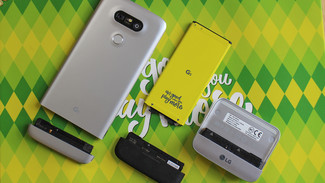 Sealing up the phone means not having removable sections for new modules or a replacement battery, another aspect that made the G5 standout from the competition. Previously, ET News reported that LG is not building modular components for the G6, and did not add them to the LG V20. The Japanese version of the V20, named the Isai Beat locally, included water resistance, but not the removable battery — two features that can’t work together.
In December, a tweet from David Ruddock of Android Police notes the G6 will not, in fact, have a removable battery. It will, however, feature an all-glass design, and will keep its headphone jack (unlike the iPhone and rumored Samsung S8).
Source: LG G6 will not have a removable battery, LG will move to an all-glass design language similar to Samsung. Headphone jack is a go.
— David Ruddock (@RDR0b11) December 7, 2016
It may not be the end for LG Friends, and LG has said it is not abandoning the modular ecosystem, according to CNET. Perhaps LG will return with a stronger range for the G7, or a spinoff range only for modules. It’s speculation for now, but should LG drop modules for the next major releases, it will be a blow to LG consumers that own the G5 as it would mean they spent money on supplementary products that aren’t reusable with future devices.
Design and display
The LG G6’s aesthetics are no longer a mystery. LG Display, the division in charge of mass-producing smartphone panels, TVs, and screens of every shape in-between, provided an image of the upcoming smartphone’s topmost bezel and sides to The Verge.
LG has confirmed that the G6 will have a 5.7-inch Quad HD+ display with a resolution of 2,880 x 1,440 pixels, but what’s unique is the 18:9 aspect ratio — meaning the device is likely more elongated than typical devices with that aspect ratio. And the company says the screen is impressively less than 1mm thick.
More: LG V20 review
One of 2017’s smartphone trends will be the gradual elimination of the bezel, and LG says it has reduced the bezel on the top of the G6 by 20 percent, as well as 10 percent on the sides. The overall screen-to-bezel ratio is said to be greater than 90 percent, with the bottom bezel measuring slightly taller than the top. The display, which is likely OLED, will be 10 percent more visible in daylight and will use up 30 percent less battery life.
A purported render of the G6, courtesy of @OnLeaks, shows a 360-degree video of what the phone will end up looking like. The render falls in line with other leaks we’ve seen, and has a similar design to the G5, although slightly more refined. It also appears as though LG will do away with modularity in the G6, and it looks like the 3.5mm headphone jack will stick around in LG’s flagship, at least for now. The leaks also show what appear to be glossy finishes, following the new design trend set by Apple with the jet black version of the iPhone 7.
Android Authority has also managed to get its hands on what appears to be very early renders, showing that the phone will have an almost identical design to its predecessor, the LG G5. For example, it will have the same dual-camera module placement, the same center-mounted fingerprint sensor, and the same button placement, on the right of the device. There will be a few differences, however — the G6 is expected to slim down a little to 72.43mm, which is slightly thinner than the G5’s 73.9mm, although barely enough to notice a difference.
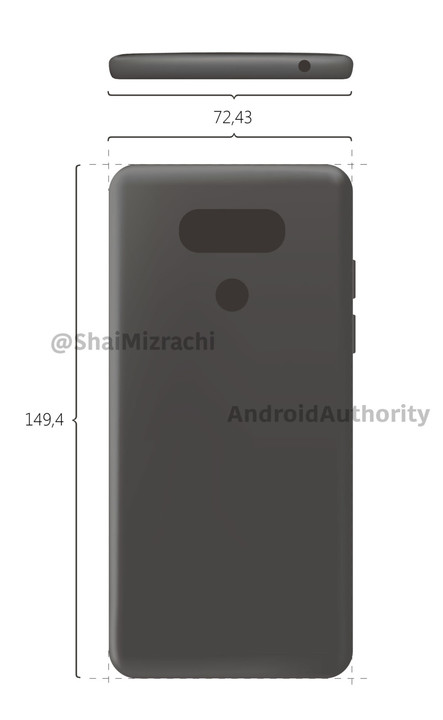
Android Authority has updated its post to say that the renders are an extremely early design, so it’s possible (and even likely) that the final design will change before the release of the G6.
An older processor
The LG G6 might not feature a top-of-the-line processor. According to Forbes, Samsung’s getting first dibs on the Qualcomm’s new Snapdragon 835, leaving competitors like LG with older chips. The G6 is said to feature the Snapdragon 821, the same processor as HTC’s U Ultra.
“The Snapdragon 835 won’t be available in large quantities until after the Galaxy S8 launches,” the Forbes source said.
It isn’t the first time LG’s opted to use an older processor in a flagship phone. Two years ago, it sourced the Snapdragon 808 instead of the 810 because of availability concerns. LG executives told Forbes that the company preferred, “proven [chip] that they can test thoroughly than the latest [and] fastest” — a factor that likely played a part in the decision.
Digital assistant(s)
Previous reports indicated that the LG G6 would include both Amazon Alexa and Google Assistant, however recent rumors suggest that instead the phone will only offer Google Assistant. The new report comes from CNET, which says that LG was planning on including Alexa in the phone, but shelved the plan because it didn’t feel ready to include the assistant just yet — and that we should expect the assistant to appear in LG phones later this year.
So far, the Google Pixel and Pixel XL are the only phones with Google Assistant, Google’s new digital assistant. According to a report from Business Korea, however, the LG G6 could have it too — making the G6 the first non-Google-branded phone to get the new assistant.
If LG did decide to include Alexa, it would be only the second smartphone, behind the Huawei Mate 9, to feature the assistant. LG has integrated Alexa into some of its other products, such as the InstaView refrigerator, so a continued partnership would make sense.
Release date
Looking forward to a new smartphone from LG? Good, because prepare to get excited. The company will hold a special event on February 26 in Barcelona, Spain, where it’s likely to show the G6 smartphone. The gathering takes place the day before Mobile World Congress opens its doors in the city. The invitation includes the tagline, “See more, play more,” which continues on from the “play more” theme introduced with the G5, and may play on the possible larger, higher resolution screen feature on the new phone.
It’s also spreading the word through LG social media accounts. On Twitter, LG posted a shorter version of the teaser video released earlier in January, where it asks members of the public to describe their ideal phone. The dream device is apparently water resistant, has a big screen, can be used with one hand, and has a great camera. LG closes the video telling us to imagine our wishes came true, then flashed a “February, 2017” date up on the screen.
The tweet, posted on January 18, says “Everything you want is on its way,” which indicates the above wishlist of features will be part of the G6.
The LG G series has traditionally been released at Mobile World Congress, so it’s not a surprise the G6 will also arrive at the show. What could change, however, is the availability date after the device is launched. The G5 was first unveiled at MWC in February 2016, but it wasn’t until April that consumers could actually buy it. According to the South Korea-based ETNews the G6 could be made available a full month earlier than its predecessor.
Why the change in availability? Well, 2016 wasn’t exactly LG’s best year. The G5 largely failed to capture the imaginations of consumers, and while the LG V20 was a great device, it also didn’t sell like LG might have hoped. In the new year, LG wants to shake things up a little — which means beating out the competition by releasing flagships a little early.
Iris scanner
Following reports of an LG Pay mobile payments system, LG may introduce heightened security on the G6, in the form of an iris scanner. LG Innotek, a division of LG that produces components and other technology, has shown a traditional double-camera iris scanner, and a new single module with an iris scanner and a selfie camera inside, at a recent technology show.
This has prompted rumors LG may take one of the modules and integrate it into the G6, although LG Innotek has issued a statement saying no deal exists. The company supplies components to many manufacturers.
MST payments
If there’s one feature Samsung has a leg up on compared to Google, LG, Apple, and other smartphone competitors, it’s Samsung Pay. Where other mobile payment solutions use NFC, or near field communication, to offer a tap-and-pay experience, Samsung uses Magnetic Secure Transmission (MST). This means it replicates a card swipe — so it works wherever you can use your credit card.
That’s far better than looking for NFC terminals. LG is now rumored to be adding MST technology into the G6 to offer a similar payment service to rival Samsung, according to ET News. The company was supposed to launch LG Pay at the start of the year, but the plans were scrapped. We may see it for the first time on the G6.
More: LG G5 review
We’ll continue to update this post as we learn more information about the rumored device.
Article originally published on 10-28-2016. Updated on 01-26-2017 by Christian de Looper: Added confirmation from CNET that LG would do away with removable battery in favor of water resistance.
The Rosetta Disk will last 1,000 years, contains mankind’s most important books
Why it matters to you
Crafted to last 1,000 years as an artifact for a future civilization, the Rosetta Wearable Disk contains thousands of pages of information in hundreds of languages.
Imagine what a wearable device containing the world’s most important information would look like.
Now try and imagine, were you designing such a thing, how you would ensure that it would still be as easily readable 50 or 100 years from now. In a world of ever-changing tech standards, it’s difficult to do that kind of thing for a decade ahead — let alone five or 10 of them.
The Rosetta Project has long been attempting to answer this second question. A global collaboration of language specialists, the Rosetta Project aims to create a modern version of the historic Rosetta Stone, the 196 B.C. artifact which provided modern mankind with our understanding of Egyptian hieroglyphs.
Starting out in 1998, the Rosetta Project used cutting-edge nickel micro-etching technology to bring to life a handful of Rosetta Disks, offering 13,500 individual pages of data in 1,500 languages; readable only using a 500x microscope.
More: Point your camera at text to get it translated with Google’s live camera translation
Jump forward to the present day, and the team has released a new Rosetta Disk — and one that also answers the first question we posed. Called the Rosetta Wearable Disk, it’s a Rosetta Disk about 2 centimeters in diameter and which can be easily worn on the human body.
The Rosetta Wearable Disk was produced using a laser which writes straightly onto a photosensitive material coated on a glass plate. These features are then developed to form the microscopic pages before the plate is electroformed to create a thin disk. As with the first-gen Rosetta Disk, information can be read using extreme magnification. (You can check it out for yourself, complete with high-res zooming, here.)
“This is the first process that’s come along that’s made me realize that we can reliably produce these disks in larger batches,” Dr. Laura Welcher, director of the Rosetta Project, told Digital Trends. “The cost went down, the scale went up, but it’s still a custom process. We definitely pushed the boundaries of what can be done in terms of storing text, particularly multilingual text. The ultimate goal was to create something much more affordable than the originals, which were available to people who made donations of $25,000 each.”
Because the Rosetta Wearable Disk is physically smaller than the original Rosetta Disks, there are fewer languages and pages per language, but it’s still an astonishing feat.
“The big question was always what books would you want in order to restart civilization?” Welcher said.
There are 100 numbered copies of the Rosetta Wearable Disk in all and these are available — while supplies last — to anyone who donates $1,000 or more to The Long Now Foundation — with proceeds going toward aiding language documentation and archiving. A thousand bucks may not be affordable to everyone, but given that the disk will reportedly last a millennium that is only $1 per year.
As to what’s next for the project, it seems that Welcher has been inspired by her dive into (semi) mass-market, affordable wearables.
“In the future, I think there could be a version of the disk that’s producible in much larger numbers,” she said. “There are some really interesting things we could explore with a wearable technology. We could look at other kinds of information that could go on these disks. I’m also interested in the materials we could make these from — possibly making a very, very hard transparent surface that would protect it so that we don’t have to cover it in glass as we are at the moment.”
 AIVAnet