


Android Wear 2.0 rumored to launch on February 9

Wearables are about to get exciting again.
We know that Android Wear 2.0 is coming next month, and a tweet from Evan Blass suggests a launch is on the cards for February 9. Google is rumored to unveil two Nexus-branded smartwatches, so it is likely we’ll see them early next month.
Mark your calendar: Android Wear 2.0 launches on February 9th.
— Evan Blass (@evleaks) January 17, 2017
Android Wear 2.0 brings Play Store access to the wrist, offers an easier way of signing in to your devices, comes with new standalone apps, and will eventually get support for Google Assistant.
After a lacklustre 2016, it looks like the smartwatch category is set for a resurgence this year. Swarovski’s first product in this segment is set to make its debut in the month of March, and Casio is launching its rugged smartwatch in April. Of the current crop of watches, 18 models are expected to pick up the update, including the Huawei Watch, Moto 360 2015, LG Watch Urbane, Fossil Q Founder, and several others.
Nougat update starts rolling out to the Xperia Z5 and Z5 Premium

Xperia Z5 and Z5 Premium pick up Nougat.
After rolling out Nougat to the Xperia X, Xperia XZ, and the Xperia X Performance, Sony is now bringing the update to the Xperia Z5 family. As noted by Xperia Blog, the Android 7.0 update is now rolling out to the Xperia Z5 and Xperia Z5 Premium, and will make its way shortly to the Xperia Z5 Compact, Xperia Z3+ and Xperia Z4 Tablet.
The 1.3GB update increments the firmware to 32.3.A.0.372, and includes new features in Nougat like multi-window mode, Doze enhancements, Google Now integration with the Xperia Home launcher, and more. If you’re using either the Xperia Z5 or Z5 Premium, head into your phone’s settings to see if the update is available for you.
How to enable fingerprint gestures on the Honor 6X
This is how to turn on the magic of the Honor 6X’s rear-facing fingerprint sensor.
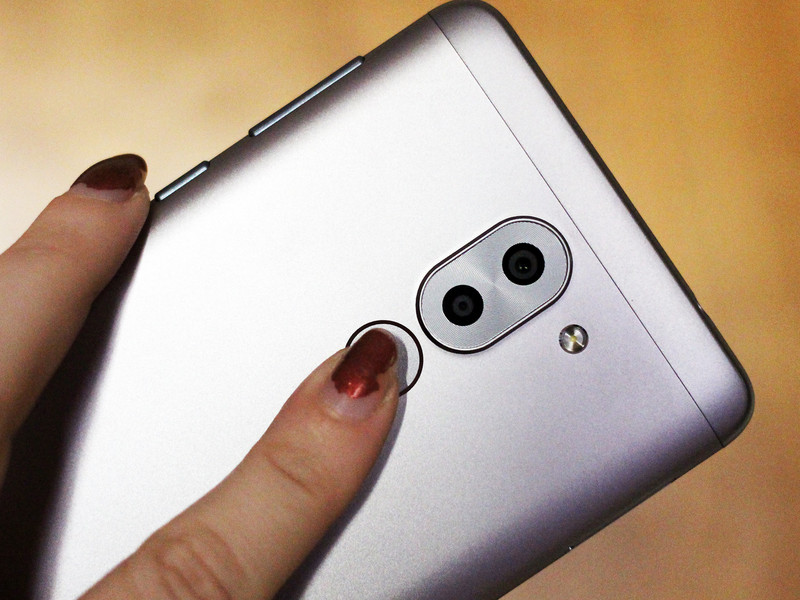
The Honor 6X may be cheap in price, but it’s an appealing buy precisely because it packs a few features you’d normally see paired with a flagship.
The 6X comes able with a few fingerprint gestures, including the ability to use the rear-facing sensor as a shutter button for the camera app. You can also use it to swipe down on the notifications shade, for those times when you’ve only got one finger that’s mobile. Here’s how to enable these gestures and four others.
How to enable fingerprint gestures on the Honor 6X
Swipe down to reveal the notification shade.
Tap on Shortcuts.
Select Settings.
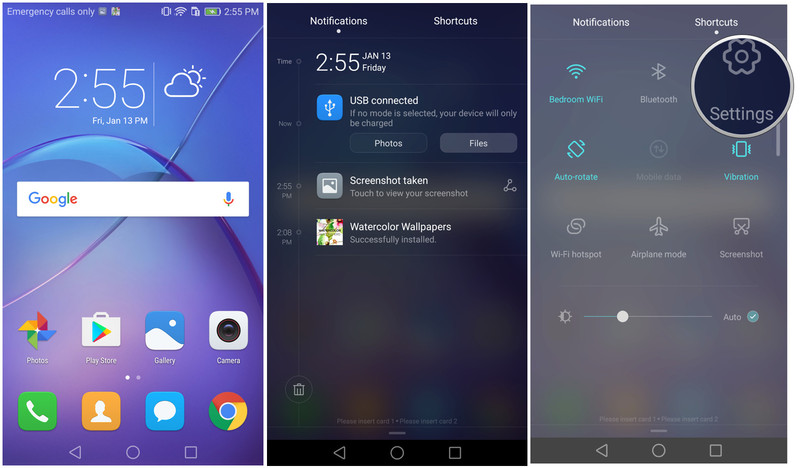
Scroll down.
Select Fingerprint ID.
Choose which of the Touch and hold gestures and Slide gestures you want enabled.

Now get to gesturin’! Keep in mind that the touch control gestures can be used with any finger, regardless if it’s registered to unlock the device. Also, you can choose to have all six gestures enabled at the same time.
Nest Cam Outdoor review: Secure enough as a security camera?
Nest has made the move from indoor security, to offering all-seeing protection for the outside of your home. Say hello to the Nest Cam Outdoor.
Boasting some of the same features as its indoor Nest Cam sibling, the outdoor version is touted as offering 24/7 security come rain or shine.
But does the Outdoor really stand up as a proper security camera?
Nest Cam Outdoor installation: Is it secure?
- Magnet mounted
- Continuous power required
- IP65 rated (water- and dust-proof)
When it comes to installing Nest Outdoor the first thing you’ll need to consider is power. In the installation manual Nest recommends using an outdoor power outlet, which not everyone will have.
Or you can install the camera and use indoor power instead – as we did for this review – but it will require a drill and a bit more work. It’ll be cheaper than getting an electrician to install outside outlets and more secure as the cable won’t be exposed.
Pocket-lint
To feed the cable you’ll need to drill a hole through the outside wall that’s about the width of a broom handle. As you can imagine, that requires a sizeable drill bit, a heavy-duty drill and a lot of cleaning up afterwards. Fortunately the rest of the installation is pain free, as attaching the camera to the wall is a breeze using the provided screws.
Despite the power cable being relatively long you’ll still have to consider where on the outside of the house you’re going to place the camera and where the plug is relative to that on the inside of your home.
As a proper security camera the Nest Outdoor does show some obvious shortcomings. If installed with outdoor power then what’s to stop a shady character coming along and unplugging the camera from the wall? There’s also no form of security between where the power cable meets the waterproof housing – it’s a simple twist-and-pull exercise to disconnect it. The cable itself is also thin and undoubtedly easy to cut through.
In short, if you’re looking for a serious home security camera then this is probably not it – unless you’re also willing to invest in some protective housing for the wiring and power supply.
Connecting Nest Outdoor Cam to home Wi-Fi
- Wi-Fi 802.11b/g/n, 2.4 GHz (WEP, WPA, WPA2 encryption supported)
- Bluetooth Low Energy (BLE)
- 128-bit AES with TLS/SSL secured
Before the installation begins, Nest recommends connecting the camera to your home Wi-Fi indoors before venturing outside to setup. The process is straightforward enough: download the app, create an account, scan a QR code on the camera, select your Wi-Fi network, input your password and you’re away.
Where this process falls down is when you get outside to setup the camera and realise the Wi-Fi signal in your home isn’t strong enough to penetrate the outside walls and compete with interference from your neighbour’s signals. There’s no Ethernet, so you can’t opt to plug into, say, a powerline adapter or your router for a wired connection.
Pocket-lint
Our Wi-Fi router is only situated around 15 feet away from the Nest Outdoor, but the connection regularly dropped out and we found ourselves bombarded with warning messages from the camera alerting us to the lack of connection. A similar thing happens with the standard Nest Cam too.
We initially tried fixing the problem by using a Wi-Fi analyser to find a quieter channel with less interference and this worked briefly, but the problem soon returned. The next solution was the addition of a Wi-Fi extender, which boosted the signal and meant the connection became solid and more permanent. That’s an added cost right there though.
Nest Cam Outdoor review: Sleek but unsubtle design
With the camera installed on the outside of your home it’s quite an apparent object – even more so when the green light illuminates to show it’s recording (you can turn this off in the app).
Installed on a brick backdrop, the camera’s black and white finish and power cable stand out like a sore thumb. Maybe this visual presence is a good thing though: people will know you’re watching; whereas other people might think you have something to hide. Either way that functions as a visual deterrent.
An advantage of Nest is that footage is stored and accessible via the cloud, so even if a thief or unwelcome visitor manages to upset the camera, they cannot remove the footage as a result.
Nest Cam Outdoor recordings, alerts and video quality
- 3-megapixel sensor
- 1080p HD 30fps capture
- 130° wide-angle lens
- Night vision mode
- 8x digital zoom
Nest Outdoor camera boasts a 130-degree view of the surroundings with up to 1080p video capture from its 3MP sensor. There’s also an eight times digital zoom which offers a surprisingly clear picture through digital enhancement within the app – but only if you wish to fix the view on a certain point (it cannot be used on recorded footage).
Pocket-lint
Because Nest is cloud based that means recordings will use your home broadband bandwidth, so you’ll need to consider this if you have a fair usage policy on your internet.
Nest notes that “at 1080p, each camera could use 140GB to 380GB of upload bandwidth per month”. Which is a lot. Even at 720p the camera could still use between 60GB and 160GB a month.
You’ll also need to consider bandwidth if you’re not on superfast broadband as the camera requires 200-1,200kbps bandwidth while streaming video (depending on what quality you’ve set it to). The app does allow you to record in 360p, 720p and 1080p, so there’s plenty of flexibility there but it’s still a big consideration for remote viewing.
Nest Cam Outdoor also has an impressive night-vision mode which gives a clear view of the same surroundings at night without the need for extra lighting.
Capable of detecting movement and people, the camera will alert you to the presence of both and is reasonably intelligent in terms of being able differentiate between the two. For example, you’ll get push emails telling you that the camera “saw someone” or that it “noticed some activity” and the inclusion of a photograph of the relevant event with the ability to click straight through and see the footage within the app.
Pocket-lint
However, we also found that when the camera wasn’t placed in a quiet spot that we were bombarded with notifications that might not warrant any attention. We learned the hard way.
During the review process, we had the camera installed on the front of the house, which meant that people walking up and down the road, vehicles passing by and cars driving in and out of the driveway all set off alerts on an hourly basis. Installed in front of a doorway or in a secluded spot might yield more useful results. And this probably highlights one of the strengths of the camera and its uses.
Nest Cam Outdoor: Convenient two-way communication?
- Built in mic and speaker
If you were to install the Nest Outdoor Cam in a position near or above the front door then it would act as a good tool for both monitoring and communicate with visitors thanks to its two-way communication via built-in speaker and mic. This could be especially useful for elderly homeowners who struggle to get to their front door quickly.
You can scare off unwanted persons by shouting at them through the camer, or simply communicate with visitors and the postie if you’re just got out the shower and need 60-seconds.
Pocket-lint
The camera uses a push-to-talk logic whereby you need to press a mic button on the app to talk to the visitor. This will greet them with an audio cue (“bing-bong”) first, then you can talk. When you let go of the button so they can talk but they’ll have to wait for the “bing-bong” cue before they can speak. If they start talking back to you before that happens then you won’t hear half of what they said.
Most visitors won’t be aware of how this system works so you’ll either have to explain it to them or hope they’re so surprised there’s a camera talking to them that they will need a moment to gather their reply. This problem is inherent due to both your voice and their reply having to go through Nest’s cloud servers first – hence some lag. Only what the visitor says is recorded.
This is not a system you’d want to have a long conversation over, but as a quick interaction “hi, I’ll be there in a minute” or “could you just leave the parcel by the door please?” will work just fine. This doesn’t have to be done while you’re at home either, because Nest is cloud-based and you can use the app remotely (e.g. in your office or workplace) and still access footage and communicate with visitors with relative ease.
Nest Aware: Subscription-based recordings and features
- 24/7 live video
- 30 day history
- Activity/people alerts
The Nest Outdoor Cam comes with a 30 day free trial of Nest Aware. This means you get a taster of what’s on offer at the full subscription level. After that date you’ll have to consider upgrade – depending on what you want to do with the camera.
The free plan only offers a three hour snapshot history, activity alerts (no person alerts), live video feed and the two-way communication features. If you want more recording history then you’ll have to pay.
Pocket-lint
Currently Nest Aware is £8 per month or £80 per annum for 10 day video history and £24 per month or £240 per annum for 30 day history. It’s then extra for each additional camera – so the costs will soon mount up. In our minds that’s quite a subscription cost on top of the initial outlay.
Without the subscription, if you’re intending to use the Nest Outdoor Cam as a security camera then it’s only useful for live feed and notifications. If you were burgled overnight and didn’t realise until the next morning then you wouldn’t have access to the footage of the culprits if it was outside the three hour snapshot zone.
Additional footage functionality – time-lapses, clips and sharing
- Shareable live stream
- Time-lapse video creation
- Saveable and sharable clips
Nest Outdoor’s nice-to-have features include the ability to create time-lapse videos. Here you can capture footage from the camera and turn it into a 30-, 60- or 120-second video. We created some pretty snazzy videos of people coming and going, day turning into night and clouds turning to starry night skylines. Beyond more than a few fun uses we can’t imagine this will be a heavily used feature for most people. Especially with the camera being in a fixed position most of the time.
One of the features you would want to pay for though is the ability to capture, save and share clips of events or detected activity throughout the day. This could have several different uses, especially if you ever had to share footage of intruders with the Police (for example). It’s easy to simply select the timeframe using the calendar (for the day) and the timeline (for the hour) and you can set the start and end of the clip before exporting. You can download that video or share a direct link for people to view.
Pocket-lint
The camera also offers the ability to share live streams publicly or to anyone with a designated password. You could theoretically share this with family or friends if you were going to be away from home and wanted someone to keep an eye out for you.
When it comes to sharing, you can also register other members of the household to the account so everyone can have the app on their phone to monitor footage and receive alerts. These features come at no extra cost unlike the time-lapse and clip sharing, for which you’ll need a Nest Aware subscription.
Verdict
As a secure security camera the Nest Outdoor Cam is somewhat lacking. But as a smart camera for the home it certainly has a lot of great features.
We like the quality of the footage for both day and night capture, the alert system for people detection, and the two-way engagement to speak with visitors or ward off unwanted guests (whether you’re home or not via the app).
That said, the camera is not without its shortcomings. You’ll need to install it properly, it could be easily taken out unlike a hardcore dedicated security camera, and there’s no ability to remote control its position.
Plus the longevity of capture is limited to just three hours unless you’re happy to stump up the extra £8/£24 per month for a Nest Aware subscription to provide access to capture from 10/30 days prior.
Nest does make high-quality smart home products and, as such, if you’re considering a smart camera for the outside of your home then this should certainly be on your shortlist. It’s not hardcore as security cameras go, but it’s still a handy bit of kit.
BT launches Whole Home Wi-Fi to eliminate dead spots
BT has come up with a new Wi-Fi router system, the first of its kind in the UK, which promises to effectively eliminate “dead spots”. The system comprises three compact, 165mm discs, each with four built-in antenna which extend the Wi-Fi signal around your home.
- BT Smart Hub: BT’s new Hub is faster, smarter and ready for the future
BT says the new system will mean you’ll never get a weak signal no matter where you are in your home as it can intelligently determine which disc your device needs to connect to. BT has designed a companion app to go with the system that will give you complete control. It even provides a step-by-step guide telling you how to set it up and where best to place each of the discs.
You’ll also be able to see how your network is being used, who is online as well as being able to “pause” your connection to keep people off during meal times, or whenever you want the family to talk to each other.
- Google Wi-Fi now available to buy: How does the mesh router work?
It sounds like a similar system to Google Wi-Fi, which is only available in the US. The aim of both systems is to increase the Wi-Fi coverage around your home without affecting signal quality or speed.
The BT Whole Home Wi-Fi system is available now for £299.99
Android Wear 2.0 will launch on 9 February
Usually reliable Twitter tipster Evan Blass has confirmed today that Android Wear 2.0 will launch on 9 February. It marries up nicely with an email sent to Android Developers saying the new software would launch in early February.
- Android Wear 2.0: What’s new in the major software update for watches?
Android Wear 2.0 will usher in a wealth of new features, including built-in access to the Play Store, the ability for apps to connect to the internet directly via Wi-Fi on whatever watch you’re using, no smartphone needed and a new app launcher. A reply to Blass’s tweet lists the Android Wear watches already available that will be upgraded to 2.0 this year. We can’t confirm the authenticity of the list, but it’s some good info to go with for now.
- Best smartwatches to look forward to in 2017
Watches expected to be updated this year include:
- Moto 360 Gen 2
- Moto 360 Sport
- LG Watch Urbane Gen 2 LTE
- LG Watch Urbane
- LG G Watch R
- Polar M600
- Casio Smart Outdoor Watch
- Nixon Mission
- Tag Heuer Connected
- Fossil Q Wander
- Fossil Q Marshall
- Fossil Q Founder
- Michael Kors Access Bradshaw
- Michael Kors Access Dylan
- Huawei Watch
- Huawei Watch ladies
- Asus ZenWatch 2
- Asus ZenWatch 3
We’re also expecting to see a possible third generation of the LG Watch Urbane at MWC 2017, along with two Google branded smartwatches later in the year.
App Store app prices set to rise 25 percent following Brexit
Apps in Apple’s App Store are going to rise in price by 25 percent following the UK’s decision to leave the EU. All price tiers will be affected, meaning a 79p app will now cost 99p and £1.49 apps will rise to £1.79. Even Super Mario Run, which at £7.99 could already be deemed expensive, will rise to £9.99. It means UK app store prices are on par with the US for the first time when you factor in the weakened pound, combined with the UK’s 20 percent VAT rate.
- Brexit forces OnePlus 3 price to soar £329
Customers in other markets including India and Turkey will see price increases, but the rise in the UK can almost certainly be blamed on Brexit. The pound is at its lowest rate against the dollar in nearly 31 years, dipping below $1.20. The lowest priced apps will be no 49p, but only if developers opt to use the alternative tiers.
- Apple App Store and Google Play are changing: How will that affect you?
The increases will roll out in the next seven days. But Apple is by no means the first company to have to increase its UK prices because of Brexit. Tesla has been forced to put a 5 percent increase on custom car orders, the OnePlus 3 has gone up by £20, computer maker Dell has put the prices up on its portfolio of products and even the HTC Vive has gone up by £70.
Apple has told Pocket-lint: “Price tiers on the App Store are set internationally on the basis of several factors, including currency exchange rates, business practices, taxes, and the cost of doing business. These factors vary from region to region and over time.”
Autopilot update rolls out to all Teslas with HW2 hardware
Tesla’s Enhanced Autopilot update has rolled out to all its HW2 vehicles, company chief Elon Musk has announced on Twitter. HW2 is what the automaker calls its second-generation self-driving hardware found in its newer models, including the Model S and X. The Enhanced Autopilot update was designed to bring several autonomous features to the new hardware, such as autosteer, smart summon, autopark and auto lane change. Some of those features were available on the first-gen hardware, but Tesla had to deactivate them for HW2 until they’ve undergone more testing. Unfortunately, it might still take some time before you can try the reactivated features unless you’re one of the 1,000 testers who had early access to them.
Musk said Enhanced Autopilot is in “non-actuating mode,” which means it’ll lurk in your system in an inactive state while Tesla continues to assess its reliability. If all goes well, the automaker could activate all the features that came with the update as soon as the end of this week. You’ll know for sure once they’ve appeared on the system’s patch notes.
HW2 Autopilot now downloading to all HW2 cars, but in non-actuating mode to assess reliability. If looks good, actuation by end of week.
— Elon Musk (@elonmusk) January 16, 2017
Via: TechCrunch
Source: Elon Musk (Twitter)
Apple hikes UK App Store prices by 25 percent because Brexit
If you’re an iPhone, iPad or Mac user in the UK, prepare yourself: App Store prices are on the rise. As 9to5Mac reports, developers are being notified that their software will soon be bumped up in price. Apps worth 79 pence before will soon cost 99 pence, while those priced at £1.49 will rise to £1.99. Similar increases will be seen at higher price points too — video games with a £7.99 price-tag, such as Nintendo’s Super Mario Run, will soon shoot up to £9.99, for instance. The reason? Almost certainly Brexit, and the negative impact it’s having on the pound at the moment.
An Apple spokesperson said: “Price tiers on the App Store are set internationally on the basis of several factors, including currency exchange rates, business practices, taxes, and the cost of doing business. These factors vary from region to region and over time.”
The timing couldn’t be worse for UK Prime Minister Theresa May, who will announce later today that Britain is leaving the European single market. The pound slipped to a 31-year low against the dollar last week, and today dropped below the euro too. These fluctuations are tied to the ongoing uncertainty around Britain and the trade deals it will be able to negotiate once May triggers Article 50, the political starting pistol for the nation’s exit from the European Union.
Apple isn’t the only technology company adapting to Brexit uncertainty. Last year, the OnePlus 3 and HTC Vive received small, but significant price increases in the UK. Tesla announced a similar move for its electric vehicles in December — the implementation was pushed from January 1st to 15th, however — upping sticker prices by 5 percent to accommodate for the shifting currency. Apple has been doing the same, albeit quietly, for some of its key hardware, including the iPad Pro and iPhone 7. We wouldn’t be surprised if more companies follow their lead in the next few months.
Source: 9to5Mac
The Morning After: Tuesday, January 17th 2017
Why are there so many sketchy ads for fake goods on Instagram? Why have e-waste levels jumped? And why is LG boasting that its next phone won’t burst into flames? That’s a lot of questions for a Tuesday morning.
Great deals on Armami and Doir.
Why do Instagram and Twitter want me to buy fake Yeezys?

Both Facebook and Twitter are part of the Ads Integrity Alliance and have policies in place to keep out sketchy advertisers, but that’s clearly not keeping some from slipping through the cracks. Without much oversight from the social networks themselves, exercising common sense is key; if an ad sounds too good to be true, it probably is. If you’re seeing an ad for a pair of Yeezys that cost less than their retail value, there’s no way those shoes are the real deal. For Facebook and Twitter, like harassment, this is yet another issue that needs to be taken more seriously.
Those controllers are far more important than the hardware they attach to.
The heart of Nintendo’s new console isn’t the Switch

The Switch is harder to describe than the latest Xbox or PlayStation. The console itself is the tablet: the part that does all the processing and acts as a screen when it’s away from your housebound dock and TV. But if the tablet is the brains of Nintendo’s strange new 2-in-1, the heart is split between the two Joy-Con controllers.
Gadget garbage levels have jumped almost two thirds in five years.
E-waste levels are surging in Asia

Throwaway gadget culture was already having a nasty effect on the environment, but now it’s getting considerably worse. A United Nations University study has revealed that the volume of e-waste in East and Southeast Asia surged 63 percent between 2010 and 2015, reaching 12.3 million tonnes. Some Asian countries (such as China) have rapidly burgeoning middle classes. That’s great for quality of life, but it also leads to more people buying gadgets that wind up in landfills
Some even want a 50-year ban
New York driver groups push for a ban on autonomous cars
Companies like Uber and Lyft dream of a day when they can depend solely on self-driving cars, and that’s making driver organizations a little nervous. New York’s Upstate Transportation Association and Independent Drivers Guild are both pressing for bans on autonomous vehicles in the state, out of concern that they’ll ultimately cost thousands of transportation jobs. The IDG believes that it only needs to preserve existing laws to guarantee a ban, but the UTA is considerably more aggressive — it wants a 50-year ban on self-driving cars.
That’s not a feature.
LG is already bragging that its next phone doesn’t explode
LG is trying to capitalize on Samsung’s Note 7 woes as it gears up to revealing its next flagship phone. It’s unfortunately poorly thought out. The company says it’s rigorously testing the phone through extreme heat and harsh drop tests, as well as pointing out an embedded heat pipe to help disperse extra warmth. Well, all signs point to the battery being the cause of Samsung’s problems: a heat pipe wouldn’t have helped. (And the Galaxy S7 had one anyway…)
ZeniMax says Facebook knew that Oculus stole its core tech.
Mark Zuckerberg will testify in Oculus VR lawsuit this week

Mark Zuckerberg is heading to a Dallas court to testify in an ongoing lawsuit filed against Oculus, the VR company Facebook purchased for $2.3 billion. ZeniMax, the parent company of Doom developer id Software, claims that Oculus CTO John Carmack took its intellectual property when he left the company in 2013. Zuckerberg will testify in the suit tomorrow (January 17th), and Oculus co-founder (and noted recluse) Palmer Luckey is also set to testify later in the week.
But wait, there’s more…
- James Cameron producing history of sci-fi series for AMC
- We’ve never seen global sea ice levels this low before
- Nintendo’s Switch doesn’t come with a charging Joy-Con grip
- Virginia bill would effectively ban city-run broadband
 AIVAnet