


Samsung’s Galaxy S8 reportedly helps you talk to a doctor
Artificial intelligence might not be the Galaxy S8’s only big software upgrade, it seems. SamMobile sources claim that S Health is about to get a revamp that helps you get in touch with doctors. Tie-ins with partners like Amwell and WebMD would not only let you search for drugs and symptoms, but schedule online doctor’s appointments using video chats. You could pay for appointments in-app, take photos to illustrate your condition and find nearby pharmacies if medicine is in order.
The app isn’t explicitly tied to the S8 launch, but Samsung historically brings major software updates to new phones first and likes to showcase them at major media events. Don’t count on getting exactly what you’ve read about here, though — SamMobile frequently has the inside track on Samsung’s plans, but it’s not perfect. As plausible as the S Health upgrade sounds, we wouldn’t be shocked if it misses the S8 launch or doesn’t include everything mentioned so far.
Via: 9to5Google
Source: SamMobile
The best washer and dryer
By Liam McCabe
This post was done in partnership with The Sweethome, a buyer’s guide to the best homewares. When readers choose to buy The Sweethome’s independently chosen editorial picks, it may earn affiliate commissions that support its work. Read the full article here.
After more than 100 hours of research, we think that the LG WM3770HWA washer is the best front-loading washer for most people. This machine checks off all the boxes: It’s an excellent stain remover, versatile enough to clean almost any load of laundry, and gently handles different fabrics. If you want a matching dryer for stacking or just aesthetics, the LG DLEX3370W electric dryer (also available in a gas version) is a solid companion. It boasts an Energy Star efficiency badge—not too many dryers do—and its steam feature can dewrinkle and deodorize clothes in a hurry.
How we picked
If you’re deciding between a front-loader and a top-loader, here’s the takeaway: Both can work, but front-loaders have the edge on performance and efficiency. So our search for the best overall washer boiled down to finding a front-loader with strong cleaning performance, useful features, and a reasonable expectation for reliability. If your heart is set on a top-loader, see our full guide.
For price, the sweet spot is $800 to $900 (for the washer alone). Cheaper models can work great, too, but the washers in our target price range come with life-improving features like extra-hot wash options and faster wash cycles. Higher-end models usually don’t offer any practical advantages, unless you’re willing to spend about twice our target range.
The defining features we looked for in our washer picks are quiet operation, reliability, a built-in water heater, and accelerated wash options. See our full guide for more on our testing criteria.
After sifting through roughly 65 different front-load washers, we settled on a handful of finalists. They include the LG WM3770HWA (and other models in the 3000 series), the Electrolux EFLS617SIW, the Whirlpool Duet WFW90HEFW, the Maytag MHW5500FW, and the Samsung WF45K6500AW.
| LG WM3770HWA | Electrolux EFLS617SIW | Samsung WF42H5000AW | Maytag MVWB755D | |
| Rank | Our pick | Runner-up | Budget | Decent top-loader |
| Load location | Front-load | Front-load | Front-load | Top-load |
| Efficiency | CEE Tier 2, very efficient | CEE Tier 3, the most efficient | CEE Tier 3, the most efficient | Energy Star, sort of efficient |
| Capacity | Seriously, they’re all big enough | Seriously, they’re all big enough | Seriously, they’re all big enough | Seriously, they’re all big enough |
| Best feature | Built-in water heater, accelerated wash mode, SmartDiagnosis | Built-in water heater, SmartBoost detergent system | Effective and efficient for a low price | Less maintenance required |
| Reversible door | No | Yes | No | No |
| Warranty | One-year full, 10-year motor, lifetime drum | One-year full, 10-year motor | One-year full, three-year drum, 10-year motor | One-year full, 10-year motor and basket |
Most dryers are similar to each other, and our picks in this guide are simply the matching companions to our favorite washers. But matched pairs don’t magically work any better together, so don’t feel pressured to buy both machines. You can often save money by stacking a lower-end dryer on top of a nicer washer, as long as they’re from the same brand at the same width.
Our pick

Photo: LG
The LG WM3770HWA is the washer that we’d buy—it’s full-featured, efficient, effective, quiet, reliable, and affordable. A handful of other front-loaders at this price are great machines, too, but we like the WM3770 a little bit more for a few reasons.
Reliability is a major factor that sets apart LG washing machines. That gets a little tricky with the WM3770, because it’s a new washer. But it’s so similar to our previous recommendation, the WM3570, that we’re comfortable sliding it into the top spot (and we still think the WM3570 is a great buy if you find it in stock). A couple years’ worth of user reviews and reader feedback on the older models suggest that apart from a couple of known issues, LG makes a reliable product. Treated properly, these should last eight to 12 years, or about as long as similar models from most other brands. Several Sweethome and Wirecutter staff members bought the older WM3570 after we recommended it, and are still happy with it more than a year later.
As a brand, LG is ranked by Consumer Reports’s reader survey (subscription required) as the least likely to need a repair in a five-year period, and J.D. Power ranks LG as the second-most reliable brand. Most (but not all) of the technicians we spoke with think LG makes good machines, and one even said he thinks it’s the best brand of washers overall. If a problem arises, LG has a feature called SmartDiagnosis that can read out an error code over the phone so a repair technician can plan to bring the right replacement parts. The warranty is a little better than most, with the typical one-year full coverage, and 10-year coverage on the direct-drive motor.
As a clothes cleaner, the WM3770 can thoroughly wash pretty much any load of laundry. One of the things we like the most about the WM3770, and that helps it stand out from some of its close competitors, is that it can wash with really, really hot water. Plenty of modern washers have built-in water heaters, but only a few can crank up the heat like this one, hitting wash temps as high as 158 °F according to LG (some competitors top out at 120 °F). That’s hot enough to meet the chemical-free sanitization standards set by the NSF and the anti-allergen standards set by the Asthma and Allergy Foundation of America (AAFA). For more on our pick, check out the full guide.
If you’re looking for the matching dryer, you’ll be happy to know that the DLEX3370W electric dryer (or DLGX3371W gas dryer) is better than the average dryer. It’s an Energy Star–qualified model, which actually means something—most dryers do not qualify for that badge, and because most dryers suck up a ton of energy, you might actually notice some savings.
A promising new front-loader
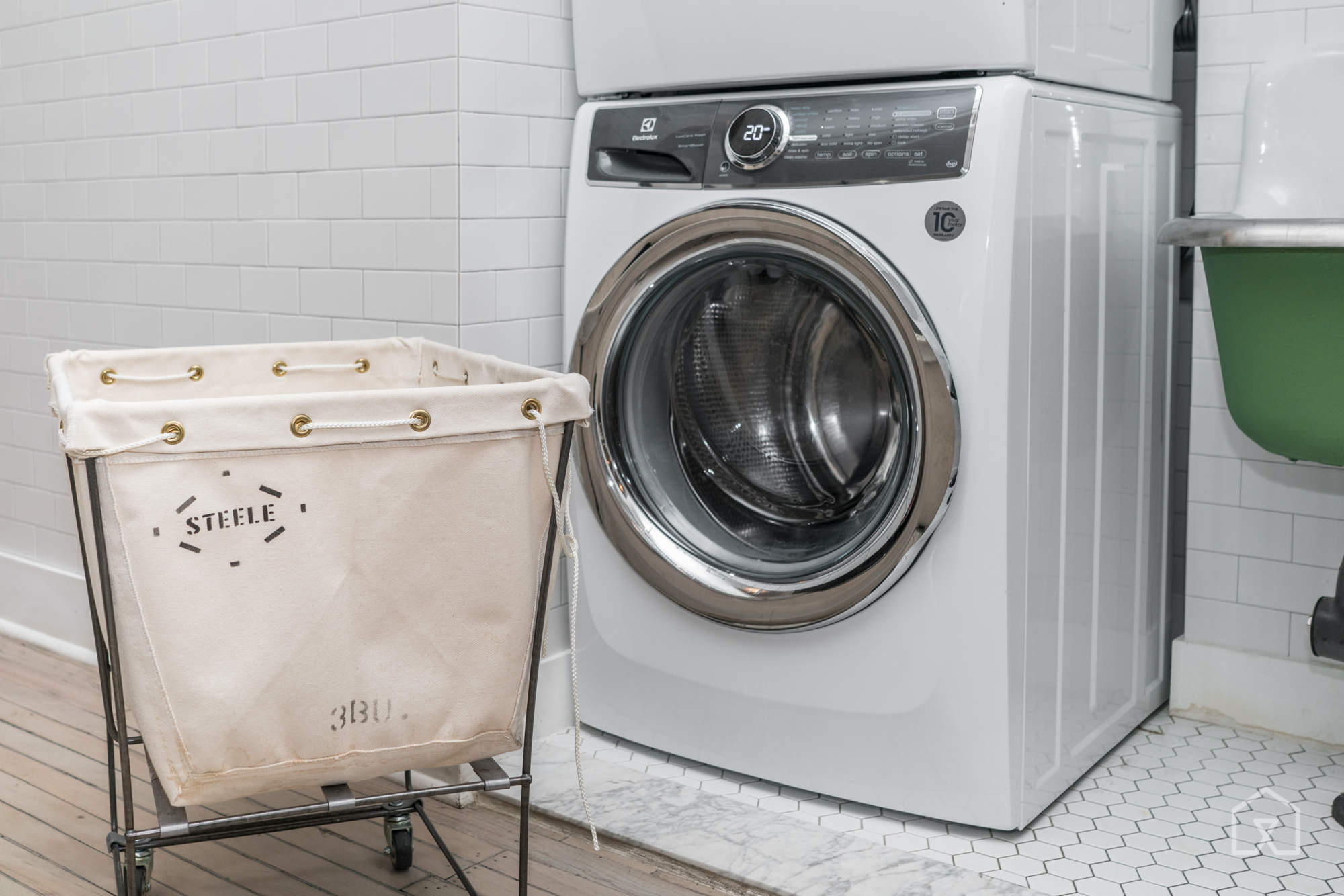
Photo: Michael Hession. Location courtesy of Food52.
If the prices shift or availability is limited, or if something about our main pick doesn’t sit right with you, we think the next-best washing machine is the Electrolux EFLS617SIW.
The EFLS617SIW has the best set of features and cleaning options you’ll find in a washing machine right now, hands down. Tests have shown that compared with other full-size front-loaders, it’s the single best clothes cleaner available. It’s also one of the most efficient washers you can buy.
However, Consumer Reports raised a concern that it’s rougher on fabrics than many other washers. Also, Electrolux’s reputation isn’t as solid as LG’s for laundry, and this particular model has been out for only a couple of months (at the time of this writing), so we don’t have as much information about defects, performance problems, and general owner satisfaction.
By all accounts, the EFLS617SIW is a fantastic cleaner. The people at Reviewed.com ran tests and declared that the EFLS617SIW was the best stain remover they’d ever seen. In CNET’s tests, the washer removed 60 percent of stains on the test strip, “a huge leap” over competing models. Consumer Reports also rated the machine’s wash performance as Excellent.
If you need a matching dryer, grab the electric EFME617Sxx or the gas-powered EFMG617Sxx (identical except for the power source and price).
A more affordable basic front-loader

Photo: Samsung
With a cheaper front-loader, you’ll miss out on a few useful cycles, options, and features that help remove stains, care for garments, cut down wash times, and maybe even prevent mold and mildew growth. Otherwise, you’ll still get a pretty excellent washing machine, and with fewer parts that can break compared with higher-end washers.
If you’re sold on the advantages of a front-loader but can’t quite afford our main pick or runner-up, check out the Samsung WF42H5000AW. It’s usually the cheapest stackable, full-size washer available. It’s exceptionally efficient. Consumer Reports rates its wash performance as Excellent. User reviews are strong compared with other front-load washers.
Downsides: It doesn’t have an internal water heater, so it can’t reach very hot wash temperatures. It also runs a little slower than our main pick, with no option for an accelerated normal cycle. As a company, Samsung has a strong reputation for reliability, but a poor reputation for customer service on home appliances and most other product categories. For such an affordable front-loader, you might be willing to take the risk. If you’re looking for the matching dryer for stacking, it’s the DV42H5000EW electric dryer (or the DV42H5000GW for gas).
Top-loading machines
If you’re really looking for a top-loading machine, we have recommendations in our full guide, as well as a guide about the differences between top-loading and front-loading machines.
This guide may have been updated by The Sweethome. To see the current recommendation, please go here.
Note from The Sweethome: When readers choose to buy our independently chosen editorial picks, we may earn affiliate commissions that support our work.
LED lights could get better with self-assembling particles
LEDs have dramatically transformed the lighting world over the past few years, thanks to their increased efficiency and life-span over past technologies. But LEDs could see even more upgrades with perovskite particles, a self-assembling nanoscale material that could make them even more efficient and cheaper to produce, Physorg reports. Researchers have already shown how perovskites could improve solar cells, but until now it was difficult to create uniform films made out of the material.
“Our new technique allows these nanoparticles to self-assemble to create ultra-fine grained films, an advance in fabrication that makes perovskite LEDs look more like a viable alternative to existing technologies,” said Barry Rand, an assistant professor of electrical engineering at Princeton and the lead researcher in the findings.
Basically, this bodes well for the future of LEDs. It could eventually make it easier to developer LED panels for TVs and monitors, or drive down the cost of LED lighting. Lighting using the new technology are superior in many ways to old-school incandescent bulbs, or even slightly more modern fluorescent bulbs, but they still cost quite a bit more than the older competition.
Via: Physorg
Source: Nature
China suspends plans for 85 coal power plants
China is taking some steps to curb pollution (it doesn’t have much choice), but one of its most recent steps may be more of a happy accident. The country’s National Energy Administration is suspending 85 planned or in-progress coal power plants — not because they’re threats to the environment and public health (which they are), but because they don’t fit in with China’s latest Five Year Plan. It’s targeting a coal capacity limit of 1,100GW, but the plants would have brought it to 1,250GW. While that’s still an increase over the current 920GW capacity, it’s definitely an improvement.
The freeze follows a gradual change of heart on coal from Chinese officials worried about excess capacity. They told multiple provinces to stop approving coal plants back in March 2016, and in April implemented a “traffic light” approval system that shot down plans for 90 percent of upcoming plants. By October, it was shutting down under-construction projects.
Of course, this isn’t really a shift away from coal — it’s more about keeping coal in check. However, it’s a big deal in a country where smog can reach crisis levels, particularly during cold winter months when heating drives spikes in demand. And it’s a sharp contrast with the change of direction in the US, where the incoming administration is bent on propping up the coal industry.
Via: Greenpeace
Source: Bjx.com.cn (translated)
Bragi’s latest wireless earbuds are now available for $149
Bragi announced the follow-up to its feature-packed activity tracking Dash wireless earbuds back in September. That product, known as the Headphone, was slated to ship in November, but after a short delay it’s now available to everyone. The new $149 set of wireless in-ear headphones don’t carry the same tracking abilities and hand gestures as its $300 predecessor, but don’t let the lack of smarts fool you. This more affordable model is still a solid set of wireless earbuds.
Bragi’s Headphone is $10 cheaper than Apple’s AirPods, which were also delayed before shipping in December. Bragi’s audio accessory also doesn’t require you to have something sticking out of your ear. The Headphone packs in on-board controls for adjusting volume, enabling audio transparency to hear the outside world, taking calls and triggering voice commands. As we discovered during the course of our review though, mashing those buttons means pushing the earbud into your ear. It can be uncomfortable at times.
With the Headphone, Bragi remedied the connectivity issues we experienced with the original Dash. The more affordable version didn’t suffer any dropouts and, most importantly, the wireless in-ear headphones didn’t lose connection with each other during our tests. The Headphone also has improved battery life of up to 6 hours before needing to recharge, thanks to the company nixing those smart features.
Now that earbuds without the tether are becoming more common, there are a number of options to choose from. Bragi’s Headphones are certainly worth considering.
Source: Bragi
Apple Warns You When Your Display is Using Significant Energy in Latest macOS Beta
Apple advertises that the latest MacBook Pro models provide up to 10 hours of battery life on a single charge for web browsing and iTunes movie playback, but a user’s mileage may vary based upon factors such as display brightness, which apps are running, and external devices connected.
For this reason, Apple lists apps using a significant amount of energy under the battery menu in the macOS menu bar. The feature enables users to monitor which apps are drawing a lot of power and impacting battery life, whether it be the built-in Spotlight tool or a power-hungry web browser with several tabs open.
Now, Apple has gone one step further and expanded the feature to include display brightness. On the latest macOS Sierra beta, when a Mac’s display is set above 75% brightness—or at least 13 out of 16 notches—a new item called “Display Brightness” is listed under the battery menu.
Clicking on “Display Brightness” lowers the Mac’s brightness to 75%. Likewise, when we updated a new MacBook Pro to the fourth beta of macOS Sierra 10.12.3, the display’s brightness was automatically lowered to 75%. This is the same brightness level as Apple used during its latest MacBook Pro battery tests.
 New: “Display Brightness” is now listed and “Apps” has been dropped from the title
Battery life on the latest MacBook Pro models has been a controversial topic since the notebooks launched in October. A subset of users have reported getting as little as three to six hours of battery life on a single charge, sometimes even with only basic web browsing and other non-intensive tasks.
Apple has consistently stood by its advertised battery life for the latest MacBook Pro. It did, however, remove the “time remaining” battery life indicator on macOS Sierra 10.12.2, noting the estimates “couldn’t accurately keep up with what users were doing” because of the “dynamic ways” people use their Macs.
Consumer Reports initially failed to recommend the latest MacBook Pro because of battery life inconsistencies, but it later worked with Apple and learned that a Safari bug triggered by its own testing configuration was to blame for the mixed results. Apple fixed that bug in macOS 10.12.3, and Consumer Reports has since reversed course and now recommends the latest MacBook Pro after retesting.
The new feature is currently limited to beta testers. It will be widely available when macOS 10.12.3 is officially released over the coming days.
Related Roundups: MacBook Pro, macOS Sierra
Tag: battery life
Buyer’s Guide: MacBook Pro (Buy Now)
Discuss this article in our forums
Blu Life Max hands on and early impressions
We’re at the beginning of a new year which means we’ll be getting a lot of new gadgets and electronics from CES, Mobile World Congress, and other events. It’s the time of year when companies start to roll out their big products. Indeed, it’s also flagship phone season.
Blu, a brand that we’ve come to admire for its efforts, is back with its latest handset; however, it’s anything but flagship. Known as the Blu Life Max, this is an entry-level model that speaks to more basic user needs.
If there’s one thing Blu is known for, it’s offering unlocked phones at competitive prices. A year or two ago this was pretty much Blu‘s space to own — at least here in the US. But, now that there are more brands jockeying for position, it’s getting more difficult to be the clear choice for budget-based decisions.

The Life Max launches at an interesting price point of $129.99. It’s just under what Motorola commands for its Moto G line, and it’s a step above Blu’s most basic model, the R1 HD. For a very limited time (three days), customers can purchase the phone for an introductory price of $79.99, or a hefty $50 off.
I’ve been spending a couple of days with the phone as it was sent to us ahead of time by Blu. By the time this is published we’ll have had spent just under a week with the device. Is that enough time to form a full review? Of course not. But, it’s plenty long enough to get a general feel for the phone.
Hardware
Before going further, let’s talk about the hardware specifications. Considering the price, we shouldn’t anticipate all that much. Strangely enough, today’s low-end phone is actually strong enough for most people I know. I’m sure I’ll catch flack for saying it, but there’s no need for 4GB and 6GB phones for a lot of consumers. Not everyone wants or needs to play the cutting edge games. Most folks are far more passive in their usage.

Key Details
- Android 6.0 Marshmallow
- 5.5-inch HD display at 720 x 1280 pixel resolution
- Quad-core 1.3GHz MediaTek processor
- 2GB RAM
- 16GB storage with microSD expansion card (64GB)
- 8-Megapixel rear camera
- 5-megapixel front-facing camera
- Fingerprint sensor
- 4G LTE support for two GSM SIM card
- 3.5mm headphone jack
- 3700mAh battery
As you can likely surmise from the specs, the Life Max is not going to set the world on fire. The 2GB RAM and quad-core processor are considered entry level in early 2017 yet it was more than enough to play the most demanding games all that long ago. To that end, the hardware still gets the job done for your mom, dad, and first-time smartphone users.
If you’re the type of person who likes to keep up with the newest tech and most powerful stuff, you’ve likely got your eye on something else right now. You’ve probably got a brand or model that you’re partial to and looking at its successor for your next upgrade. What about your less demanding friends or family members? I’m willing to bet they don’t have a strong allegiance to anything particular.

We live in a time when phones with big displays, large batteries, and a stock version of Android don’t cost as much as a good night on the town. At 5.5-inches, this is right in line with the bigger handsets of the day. The 3,700mAh battery is more than enough to get one through two days of basic usage. And, even though it’s a generation behind the times, the Android 6.0 experience is smart, secure, and user friendly. All of the above considered, it’s hard to say no, right?
Thanks to the standards supported in Android 6.0 Marshmallow, most phones include a fingerprint sensor. Present in the Life Max, it’s an added layer of security for accessing the phone, making payments, and protecting files.
Display
Don’t be completely taken in just yet, though, there are some minor quibbles with the device, some of which are more pesky for seasoned users. The display, for instance, while big and spacious is only a 720p HD resolution.
When considering that most devices in this space are at 1080 pixels or 1440 pixels, you’ll know the picture is not as sharp as it could be. On the other hand, for your basic needs such as email, messaging, social media, and light gaming, the Life Max works just fine.

We’ve had no issues with brightness, color balance, or warmth in the phone in our time with it. It’s not remarkable by any stretch, but that’s also somewhat of a good thing. There’s nothing here that sticks out to us a troublesome. The screen works well in all lighting conditions, even outside.
Design
The general design of the Life Max is somewhat puzzling; the microUSB charging port is on the top of the phone. We’ve seen plenty of devices in the early days of Android where chargers were plugged into the side, but the basic rule of thumb is to go with the bottom.
Speaking of chargers, Blu opted for microUSB here instead of the USB Type-C port. This wouldn’t be as much of a sticky point if they hadn’t already adopted the new standard for some of its other phones. Why? I’m guessing cost.
 So what goes on the bottom side of the Life Max? It would appear to be a pair of stereo speakers. Appearances are deceiving, though, because this one only puts out sound from the left speaker. It’s a decent enough output with a generally appealing range, but a true stereo would have been just that much better.
As for the feel of the Life Max, I am reminded of the Samsung Galaxy Note 3 and its faux stitched leather case. The Blu phone has a removable back that bends and flexes like less expensive polycarbonate shells. It does feel a smidge more “real” than the leather of the Samsung line, but it’s still synthetic.
Camera
The camera situation is a mixed bag that swings back and forth from really excellent to unimpressive and washed out. Although the phone handles well-lit environments without much issue, it struggles to deliver an accurate color, even when on HDR.
I found multiple instances where coloration looks as if it was dialed down. It wasn’t in every situation, but it was often enough to where I noticed. In a word, it lacked pop when in indoor settings. Other than that, the range was represented well, and felt balanced.

The time from pressing the camera button to the time the image was snapped and stored was slower than I would have liked. As was to be expected, the problem was exacerbated when using HDR.
With those things out in the open, I should state that there were some really impressive shots captured by the Life Max. Still images worked better than motion, of course, but I was surprised by some of the final results from both indoors and outdoors. Moreover, throwing some of the photos through filters or post-processing in an app brought about some interesting final products.
Software
One of my favorite things about Blu phones is that they are usually a stripped down stock Android experience. Some models might sprinkle in some customization and minor enhancements but it’s void of any carrier influence or major software agenda.
You’ll find a couple of Amazon applications, Opera, McAfee Security, NextRadio, and a Blu Help application pre-loaded. Also, a full suite of Google apps are installed: Play Store, Drive, Gmail, Chrome, YouTube, and others. Of the 16GB of space in the phone, you’ll have a little more than 10GB to play with — more if you install a microSD card.

The Life Max doesn’t have some of the custom touches found in other Blu phones. I am not sure why, as they generally don’t take up too much space or change things up. Perhaps this is the way they plan to go with handsets in 2017. With that said, I do enjoy playing around with color options and themes in other Blu devices and somewhat looked forward to it here. Nevertheless, the default Android experience, as designed by Google, is present and is excellent for first-time users.
One area that consumers would be wise to care about is the topic of security and updates. Just because a phone is stock Android doesn’t mean it’s impervious to exploitation or flaws. Moreover, major software updates or security patches are something that seasoned users have come to expect.
That the Life Max launches with Android 6.0 instead of 7.0 isn’t as big of a deal to its target demographic. What’s more important, to me, at least, is whether it keeps up with the security releases and patches from Google. The Life Max unit I am reviewing shows it is up to date but does list the Android security patch level as October 5, 2016. Without knowing ahead of time, I have to assume Blu keeps up with the most important releases. For now, I have to give them the benefit of the doubt.

Other Details
Another feature that’s common in Blu phones is that they are unlocked and dual-SIM ready. 4G LTE is supported on T-Mobile and AT&T, which also loops in MetroPCS, Straight Talk, Simple Mobile, Cricket, and others. Additionally, T-Mobile includes VoLTE and HD Voice support for enhanced coverage and better quality call performance. If you are currently a subscriber to any of the above, or are considering switching to one, you can rest easy knowing the Life Max can hop back and forth without a problem.
I didn’t run into any performance issues with the Life Max. Sure, it’s easy to open a bunch of apps and try hopping back and forth between them, looking for lag or dropped frame rates. It’s also not difficult to find some of the most demanding games and load them up, probing for vulnerabilities or weaknesses. The truth is, though, this is not the way I use my phone. I suspect it’s the same for most readers, too.
Conclusion
You don’t buy a new family car and take it out on the highway, switching gears, revving the engine, and pushing it to limits. You also don’t take it off-road into mud, snow, and other strange conditions. No, you just go about things normally. You go to and from work, the store, school, and other places. Once in awhile you might take a long road trip, but you don’t spend four hours zooming down the highway at 120mph.
 While you might run into the occasional weird scenario on the road, or have to drive a little more aggressively from time to time, your family car is more of a passive experience. If you need a tuner car, or plan to do some off-roading, then you buy something designed for it. There are certain models and brands who rise to the top for that sort of thing.
I say all of this as an analogy to today’s entry-level phones. They work. They get the job done for most people in most scenarios. They don’t hold a candle to the top-tier stuff rolling out but that matters little to the basic user needs. Blu’s entry-level phones, including the new Life Max, does just as well as anything else in the space.
It’s hard to consider any Blu phone a disappointment, especially at their respective prices. There may be some questionable decisions or general inconsistency across the board, but they are largely solid value propositions.
The Life Max is an excellent choice for someone looking to get their feet wet with a smartphone. Additionally, if you are replacing a phone and don’t want to break the bank, Blu is a brand to consider.
 Getting back to the car analogy in conclusion, if you’re looking for something to hold on to for years, go with a top-of-the-line model and finance it over a long term. Ride it until the wheels fall off. If you’re content with leasing and want to upgrade or switch out on a regular basis, Blu makes it easy and affordably to do so. It is easy for me to recommend the Life Max for what it offers at its price.
A friendly reminder: The Blu Life Max carries a $129.99 price tag and it can be purchased through Best Buy and Amazon. Best Buy, for its part, will have a three-day introductory sale that drops the cost down to $79.99. This, to me, takes it from “should consider” to “would be a shame to miss out” for those considering it.
OnePlus Bullets (V2) Earphones review
If you’re in the market for a pair of affordable earphones, most of the options are just about average – both in form and function. There’s cheap in-ear design and bass-heavy music that makes you question your love for music, and gives masses the perception that you need to spend big bucks for a great audio experience.
OnePlus wants to change that. Just like with the OnePlus 3/3T, the operative word for the company is ‘best value’, and while they’ve been successful in delivering that with smartphones, are they third time lucky with headphones?
The $49.99 OnePlus got all the hype, but didn’t impress many. Then there were the OnePlus Silver Bullets. Both of these weren’t bad earphones, mind you, but weren’t groundbreaking either. That changes with the second-generation Bullets, the OnePlus Bullets (V2).
OnePlus Bullets (V2) Earphones Specifications
- Impedance: 24Ω
- Coil Material: Copper-clad aluminum
- Diaphragm: Aryphan Polyarylate
- Wire Core Material: Enamelled copper wire
- Driver Unit: 9mm dynamic
- Total Harmonic Distortion (THD): <1% (1000Hz, 1mW)
- Sound Pressure Level (SPL): 107dB
- Rated Power: 3mW
- Frequency Range: 20 – 20,000Hz
- Cable Length: 1.25m
- Weight: 14g

Design
At first glance, the Bullets (V2) absolutely impress. From the elegant packaging to the fact that how well made they are, it looks like a pair of premium earphones. The brushed metal finish with the aluminum casing sporting chamfered edges is stylish and classy.
The silicone tips fit nicely and the earbuds are very light – I could wear them for long stretches without any discomfort or them falling out. The in-line remote has large, practical buttons with a fine tactile feedback. It looks like it’s nicely built, and can last much longer than most headphones.
The Bullets (V2) sport flat cables that are generally tangle-free. However, it tends to retain the bends when I take them out of my backpack’s pocket. The bends don’t straighten out by themselves, while the cable keeps picking up new ones. Also, the 3.5mm plug is a straight one instead of an L-plug. I don’t mind it, but I know a lot of people prefer the latter.
Overall, the OnePlus Bullets (V2) are nicely made, and can take a stretch here and there. They fit comfortably and look quite good.
Performance
The Bullets (V2) look great, yes, but the performance is what blows your mind considering the price they come at.
They offer a well-balanced audio experience and exhibit a wide soundstage. There’s a restrained bass that allows the mids and highs to shine through without being overshadowed. The sound envelops the listener with its richness, and offers a fair bit of detail.
The Bullets (V2) are one of the most natural sounding earphones out there, and you can listen to practically any kind of music on these, and it offers a very enjoyable experience. For any price range, that is.

Summary
The OnePlus Bullets (V2) offer a terrific sound signature, and are one of the best affordable earphones out there. That they come for only $19.99 (₹1,199 in India) is indeed incredible value, and you should just order one for yourself while I hit publish and get back to listening some classic rock on these. Come as you are.
Buy OnePlus Bullets (V2) at OnePlus Store
What do you want your phone to do that it can’t?

Phones today are incredibly powerful. They’re supercomputers in our pockets. But that doesn’t mean they do everything — and there’s plenty people want, realistic or otherwise.
The weeks after CES are a strange amalgam of far-in-the-future prognosticating about the future of technology in its myriad form factors and the beginning of the year’s less ambitious, commercially available products.
We look to the big launches of the year, like the LG G6 and Galaxy S8, to set the trends for the rest of the industry.
We’ve already seen one major phone launch in the HTC U Ultra, and while the gleaming, shimmering expanse of its “liquid surface” exterior is surely impressive, it’s by no means original. From an industrial design perspective, the phone that impressed us most last year, the Xiaomi Mi Mix, isn’t even coming to North America; and the niche technology integrations we saw at CES — the Spectrometer Smartphone, for example — feels like it’s solving a problem no one really has.

Other launches, like the BlackBerry ‘Mercury’, are banking on nostalgia and the persistent human desire for something tactile in order to push interest in its hardware keyboard, but as good as the hardware feels, the market has largely moved on.
So many trends have come and gone throughout the years: hardware keyboards; 3D screens; 3D cameras; motion gesture gimmicks; basically the entire software experience on the Galaxy S4.
So we look to the big launches of the year, like the LG G6 and Galaxy S8, to set the trends for the rest of the industry. But while we have a sense of the what the phones will look like, the more interesting question is what they’ll do — and do differently — to separate them from the previous generations. We saw hints of this trend with the Huawei Mate 9’s subtle machine learning algorithms, which purport to optimize performance based on how one uses his or her phone, but it remains to be seen whether this kind of AI-driven customization is really what people want.
We know, because we’ve heard it repeated dozens of times, that the Galaxy S8 will come with an AI-based assistant called Bixby, obtained through the company’s acquisition of Viv last year, but whether it can — or should — compete with Google Assistant is the big question.

So many trends have come and gone throughout the years since Android’s release: hardware keyboards; 3D screens; 3D cameras; motion gesture gimmicks; basically the entire software experience on the Galaxy S4. We’ve reached a point, nearly ten years later, of a comfortable maturity. The mainstream is happy because their phones are basically reliable and do most of what they want.
People want flexible phones for some reason.
But others want more: they want thicker phones with larger batteries; better cameras with actual zooms; huge screens with no bezels; wireless charging that picks up signal from anywhere; speakers that don’t sound like a tin can mess; and dozens of other things that probably shouldn’t be shoehorned into a tiny computer that fits in your pocket. They want flexible phones for some reason.
So here’s the question: What do you want your phone to do that it currently can’t?
Let us know in the comments, and get a discussion going!
NVIDIA Shield Android TV review: The best you can get

The Android TV box from a gaming powerhouse isn’t just about gaming — it’s an entertainment hub.
The original NVIDIA Shield Android TV was released in May 2015, and even as we counted down the days to 2017 it still stood as the go-to top-end Android TV box. So when NVIDIA CEO Jen-Hsun Huang stood on stage at CES 2017 to release the new Shield Android TV, it wasn’t surprising to see that not all that much had changed.
Acknowledging that the Tegra X1 inside the Shield Android TV was more than powerful enough, the internal specs remained identical for the new version. But NVIDIA made some changes that mattered to a lot of people: the box is nearly half the size, it now includes a remote, and the software has been upgraded to Android 7.0 with a few new features. At the same time, NVIDIA completely redesigned its Shield Controller, and has the whole system ready for the launch of Google Assistant on Android TV later this year.
With these tweaks, the price remains the same: $199, including accessories. Over 18 months after it launched the box that has carried the Android TV market, does NVIDIA still have a leader on its hands? We answer that question in here, in our complete review of the new Shield Android TV.

Strategic cutting
Shield Android TV Hardware
NVIDIA really didn’t mess with a good thing here. As has been noted in so many places, the core components inside the new Shield Android TV remain unchanged: Tegra X1 processor, 3GB of RAM and 16GB of storage run the show. And even at a glance you may not recognize the difference in the external hardware — that is, until you notice how small the box has become.
The new Shield Android TV has similar proportions to the original, but is roughly 40% smaller — you can easily wrap a hand around it — and notably lighter. Of course the more important part about the new smaller size is it’ll be easier to find a place for it in your entertainment center. Though there’s no functional difference, when you take the new box and hold it right next to the original you do notice a considerable dropoff in material quality for 2017.
There’s an external hardware quality dropoff here, but don’t get hung up on that.
Now this isn’t something most people will notice, but it’s worth noting this is a clear point of cost savings for NVIDIA this year. Gone are the heft and nice metal finishes, replaced with a full plastic build. The green LED strip on top no longer appears from a black trim, but is instead a green-tinted plastic bit that lights up when on (though the brightness is adjustable still), while the area above it is no longer a capacitive on/off button — you’ll have to just use the remote.
Around back, you’ll notice a couple of other features were dropped when moving to the dramatically more compact chassis: microSD card and Micro-USB. The former isn’t too much of a loss considering you can still use any storage device over USB, and the latter was only needed for Shield-to-computer transfers which can now be handled with a USB-A to USB-A cable and a toggle in the settings. All in all, nothing substantial has changed here.
Sure the box doesn’t feel quite as nice, but that’s something you forget about five minutes after you hook up the cables (by the way, you’ll need your own HDMI cable) and place it in your entertainment center. And in return, it let NVIDIA keep the same price on the box while including a brand new redesigned Shield Controller and a TV-style remote that used to cost $49 extra.
Both accessories are now included, and they’re big improvements as well.
Let’s start with the Shield Controller: it’s a ground-up redesign, and it’s fantastic. The geodescent pattern means you’ll never mistake it for something from another console, and despite my initial worries is very comfortable to use. Aside from the joysticks being on the same longitude the layout is very similar to an Xbox One S controller — in a good way — and NVIDIA has switched to physical back/home/pause buttons on the bottom of the controller that are tougher to accidentally hit during gameplay.
The button up top still functions as a voice activation point for the built-in microphone, but later on in the year the controller will enable always-listening when Google Assistant arrives. At that time, the controller will need to be left within earshot if you want to use Assistant on the Shield Android TV — NVIDIA claims you’ll get about two weeks of constant listening from the controller, which is great. Play time for the controller lands at 60 hours before needing to be recharged over an included Micro-USB cable.
Until that Google Assistant update arrives (NVIDIA says “a couple of months”), a majority of Shield Android TV owners are likely to use the now-included Shield Remote instead. NVIDIA is smartly repositioning the Shield Android TV as an all-around entertainment box rather than just for gaming, and a key cog was including a remote rather than asking people to shell out another $49.
A pile of subtle hardware changes make this a better overall entertainment box.
The new Shield Remote on the surface looks unchanged from the original, but internally it has switched from a rechargeable battery to a pair of coin cell batteries that NVIDIA claims offer one year of battery life with regular use. The only concession is that the remote has lost its headphone jack so it can no longer offer private listening — you’ll have to use the Shield Controller or pair Bluetooth headphones directly to the box. That’s a worthwhile trade-off for me, because even though I absolutely loved the private listening feature it meant that my remote was completely dead most of the time I picked it up.
NVIDIA’s final nod to the idea of the Shield Android TV being an overall entertainment option is that the controller and remote both now have IR blasters integrated, meaning they can control power and volume on just about any TV or receiver, rather than relying on the box’s HDMI-CEC capabilities. This isn’t a universal remote situation, but for most people it will get the job done and mean for most tasks you won’t be picking up two remotes to use the Shield Android TV.

Entertainment hub
Shield Android TV Software and gaming
One of the great parts about Android TV is its consistency across devices, and that means there isn’t much to write home about here on the Shield. After the Nexus Player this is the second Android TV box to be running Android 7.0 Nougat, which gives us the latest look at what Google has done on the big screen: generally, a little cleaning up of the interface and a couple new features that are useful but not game changing.
This is basically the same Android TV you already know, with a couple new tricks.
Nougat brings a new task switcher that’s hidden behind a double-press of the home button and saves you from dropping back to the main home screen every time, which is useful. Developers targeting Nougat can now also offer picture-in-picture support so you can watch a mini view of the current media playing while browsing the rest of the Android TV interface — though chances are it’s going to be a while before any real number of devs get on board there. The same goes for DVR functionality, which will let any media app pause, record, rewind and play on demand rather than simply stream for live playback.
Aside from that, this is the Android TV interface you know. The number of media-centric apps is pretty solid, though some are less than spectacularly written and sometimes performance can be an issue. The big names like ESPN, Fox Sports, CBS, Hulu, HBO Go, Sling TV, Plex, Pandora and more are here, but as soon as you drop off the “top” section of the Play Store you get into the weeds pretty quickly. This is where Google Cast support helps fill in the gaps — and between the native apps and Casting from my phone I’m super happy with Android TV at this point. It obviously makes the most sense for someone in a Google-centric world, but even not taking that into account there’s plenty to like here from a media perspective.
Performance on the Shield Android TV is still simply fantastic, and it’s clear the hardware inside is overkill for your typical tasks of searching for and playing content. Even when it comes to streaming in 4K HDR on Netflix or Amazon Prime Video, the Shield Android TV handles it without issue. (The fact that you even have access to Amazon’s video platform in 4K HDR is special, though, as you can’t even get that on Amazon’s own Fire TV box.) Load times are fast and switching between active apps is a breeze.

Talking about the Shield Android TV’s software will get far more interesting once the update for Google Assistant rolls out, as the Shield Android TV can turn into more of a whole home device that expands beyond entertainment. Demos I’ve seen are extremely promising, showing Google Assistant doing everything you can do with a Google Home or a Pixel, but displayed on a huge TV with even more to see. It can show you any kind of media you want, but also answer questions, integrate with apps and work as a smart home hub with the integration of some Smart Things components.
But of course, we’re still a couple months away from that. For now … we’re sticking with the basics. Just know if you have a Shield Android TV today (old or new) you’ll be slated to receive Assistant soon and unlock a whole group of new possibilities.
Gaming: NVIDIA’s wheelhouse
At its core, the Shield Android TV is still focused on providing the best gaming experience possible — and that hasn’t declined in any way despite the increased focus on serving up other kinds of entertainment. NVIDIA still has a three-pronged strategy: local Android games, GeForce Now streaming games, and GameStream games served from your local gaming PC — and I specifically list those in order of what most people are most likely to actually use the Shield Android TV for.
NVIDIA has spurred redevelopment of some old games to Android, and it’s great for casual gamers.
The local Android games currently available are new casual titles, big mobile names like Asphalt 8 and NVIDIA-boosted older console games like Tomb Raider II and Half-Life 2. They’re simple to buy in the Play Store and the Shield Controller works perfectly … but there isn’t a whole lot here that can satiate avid gamers. It won’t be hard to find a game that’ll feed your appetite for a few hours of entertainment, though.
A bit more involved but entirely more interesting to more intense gamers is NVIDIA’s subscription service, GeForce Now. With this system, NVIDIA handles the hard work of running high-end PC games on a remote server and streams them directly to your Shield Android TV. For $7.99 per month you have access to 60 titles (currently — it’s regularly expanding) to stream at any time, including saved games and online multiplayer. There are then 40+ newer high-end titles available for purchase for around $10-$60, many of which include a digital key for a download elsewhere such as Steam.
The experience of playing GeForce Now games when in ideal conditions is no different from if you had a full-blown PC sitting behind your TV. Response time is perfect, the games look great streaming in 1080p 60fps, and everything loads quickly — it’s seamless. The only issue comes whenever you have internet hiccups. NVIDIA requires a 60 ms ping and 50 mbps speeds for 1080p 60fps streams (and 20 mbps for 720p), but despite my 200 mbps internet connection and brand new Google Wifi router, the Shield Android TV couldn’t maintain a perfect stream unless I plugged in an ethernet cable. It does an admirable job of gracefully degrading quality to keep response times high, but the only way I’d ever want to play is via ethernet. This really isn’t a shortcoming of the Shield Android TV itself … but more so the demands of doing live network-streamed gaming.
GeForce Now is the sweet spot for those who don’t want a full-blown gaming console.
Moving a step further, NVIDIA’s GameStream is the top level, and requires a beefy gaming PC on your network that can run the games you want to play … at which point they’re streamed over your local network to play on the Shield Android TV like GeForce Now. There are a lot of supported games, but of course you also have to have a full-blown PC capable of handling the games in the first place. Once configured it works flawlessly (again, so long as the network holds on), but this isn’t something for casual gamers — they’ll be better off with the games on offer from GeForce Now.
Through the combination of the three systems, NVIDIA has a compelling gaming story to tell here. The new “NVIDIA Games” app on the Shield Android TV groups local Android games, GeForce Now games and GameStream games into a single place, so as long as you have it all set up ahead of time you won’t notice any difference in launching a local game to a streamed game. That’s a huge part of making the Shield Android TV gaming experience seamless, but it also requires a little bit of know-how and setup to make it perfect. Hardcore gamers — like those with a dedicated gaming PC and knowledge to set up GameStream — may not be satisfied with the setup and will prefer a proper gaming console or just sitting down at the PC directly. Casual gamers, though, shouldn’t consider any other Android TV box.

Still the best
Shield Android TV Bottom line
The second iteration of the Shield Android TV is a proper successor that shows NVIDIA knows just how to iterate on this platform. In an Android TV space that still lacks a robust number of choices — and even fewer good choices — the Shield Android TV stands as the box to get if you want a no-compromise complete experience. Yes at $199 it’s a bit more expensive than the competition from Amazon, Roku and Apple, but you only have to do a little bit of research to see that the Shield Android TV still offers supreme value even at that price.
For the money you’re getting a box that can truly handle everything: high-end streaming entertainment from all of the top properties, gaming from multiple sources that tops any other box in this class, and in the coming months updates that bring Google Assistant and full-home control possibilities. When you buy a new Shield Android TV you’re not just getting a simple little box that you’ll plug and then forget about a couple months in — you’re getting as close to a full entertainment system in a single box as you can reasonably expect … and at that point, it seems like a great deal that you’re getting all this for $199.
See at Amazon
NVIDIA Shield Android TV
- Read our Shield Android TV review
- The latest Shield Android TV news
- Join the forum discussion
- Complete Shield Android TV specs
Amazon
 AIVAnet