


First look: Android 7.0 Nougat on OnePlus 3 + 3T

Android 7.0 + OxygenOS 4.0 update adds software tweaks from the OnePlus 3T, along with small visual refresh and new Nougat features.
OnePlus recently released its first Android 7.0 beta build for the OnePlus 3, bringing the phone up to the latest (stable) version of the Android, while also including features from OxygenOS 3.5 on the OnePlus 3T. Because the OnePlus 3 and 3T are set to remain on the same software track going forwards, the experience on the OnePlus 3T should be the same when the update arrives for both phones later this month.
So what’s new? If you’ve already been using OxygenOS 3.5 — either in community build form on the 3, or as a stable build on the 3T, many features will already be familiar. (For example, the redesigned home screen launcher and updated widget shelf.)
But there are also plenty of other changes, both big and small.

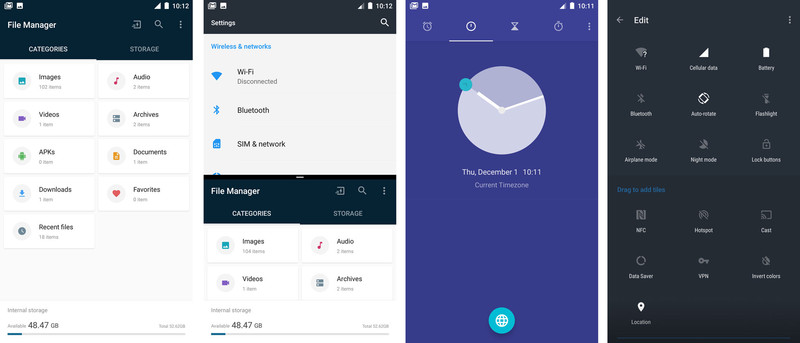
First, the most obvious changes: Android 7.0 brings a completely redesigned notification area, together with revamped notifications, inline reply support, split-screen multi-window and a new double-tap shortcut for switching between the last two apps. OnePlus was already working towards Nougat-style quick settings in OxygenOS 3.5, and so there isn’t much of a visual change compared to the OnePlus 3T’s quick settings menu.
More: What’s new in Android 7.0 Nougat
And the Settings menu has been redesigned to bring it in line with Android 7.0, with a slide-out navigation area allowing you to jump between settings panes. (Elsewhere in the Settings app, it’s now possible to customize which icons appear in the status bar, though for some reason the unsightly NFC and VoLTE graphics aren’t included in this list.)
There’s a subtle hint of Google Pixel about OnePlus’s tweaked color scheme.
There’s a subtle hint of Google Pixel to OnePlus’s updated interface as well. The quick settings area gets new blue accent colors, and these can also be seen in the quick settings area and other menu toggles throughout the UI.
Nougat also brings built-in display (DPI) scaling, making it easier to see more (or less) on screen at a time. There are five different scaling levels — the default “medium” level is the same as on Marshmallow, while the second-smallest “small” level basically mirrors the scaling of the Pixel. (Text, menus and graphics shrink down a little to allow more on screen.) The OnePlus 3’s UI has always been a little oversized, so this is a welcome change.
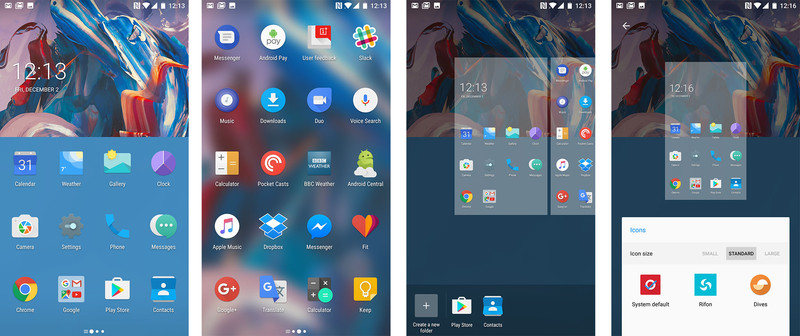
DPI scaling also affects the OnePlus launcher — “small” and “smallest” give you five icons per row, while the others stick with the default four.

Speaking of the launcher, the OxygenOS 4.0 home screen setup brings across all the features of the OnePlus 3T, while also introducing a handful of additional tweaks. The persistent Google search bar has gone away, replaced with a standard widget. (This also gives you more space for your own widgets, since disabling the search bar would previously just leave a section of dead space up top.)
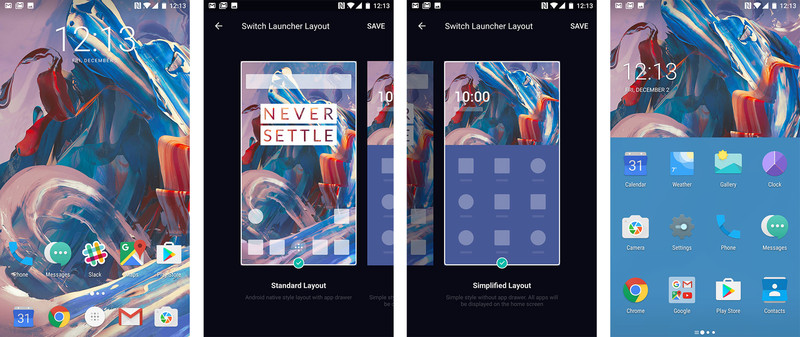
A new, optional simplified home screen setup gets rid of some of the clutter.
And interestingly, an optional new “simplified layout” gives you an alternative to the standard app drawer-based home screen. There’s simple scrolling panel of icons, with a basic clock widget up top. Your main home screen panel houses your favorite nine (or twelve, depending on scaling) apps, while the rest live off on the right. Widgets are confined to the widget shelf, and there’s a new tool for rearranging apps into groups or folders.
You can switch between the normal home screen layout and simplified view at any time.
In other areas, OxygenOS 4.0 continues where 3.5 left off, with a similar basic feature set, and the lightning-fast performance we’ve come to expect from these phones. That there’s not a mountain of new stuff to see in the OnePlus 3 Nougat update is a testament to the company’s software strategy — layering meaningful features on top of Android without getting in the way. For many of us here at AC, the most important change is DPI scaling — being able to scale down and see more on screen is a breath of fresh air.
The OxygenOS 4.0 beta, based on Android 7.0 Nougat, is now available for the OnePlus 3. The OnePlus 3T isn’t included in the beta, but will get the final Nougat update around the same time as its predecessor. From then on, OnePlus promises simuntaneous updates for both phones.
OnePlus 3 and OnePlus 3T
- OnePlus 3 review: Finally, all grown up
- The OnePlus 3T is official
- OnePlus 3 specs
- OnePlus 3T vs. OnePlus 3: What’s the difference?
- Latest OnePlus 3 news
- Discuss OnePlus 3 in the forums
OnePlus
Android Nougat
- Android 7.0 Nougat: Everything you need to know
- Will my phone get Android Nougat?
- Google Pixel + Pixel XL review
- All Android Nougat news
- How to manually update your Nexus or Pixel
- Join the Discussion
For less than $100, you can start taking 360-degree photos with LG 360 CAM
If you’re interested in giving 360-degree photography a go, this deal on the LG 360 CAM will let you get started for just under $100. For $99, you can start capturing the world around you with the 360 CAM’s dual fisheye 206-degree lens. And if you’re up for experimenting with video, the LG 360 CAM will let you record at 2560 x 1280 resolution with 5.1-channel surround sound.

At a discount from its usual $199, this deal offers a relatively affordable way to jump into the world of 360-degree cameras. If you’re at all on the fence, also be sure to give our review a look to see if the LG 360 CAM is for you.
See at DailySteals
Facebook exec says it has ‘a responsibility’ to fight fake news
After a barrage of criticism over fake news stories on Facebook, CEO Mark Zuckerberg said that over 99 percent of content on the site was authentic. Zuckerberg has since backed off that sentiment slightly, admitting that fake news is indeed a major issue for the company. At Harvard’s Campaign Managers Conference this week, the company’s vice president of communications and public policy had more to say on the topic.
“For so long, we had resisted having standards about whether something’s newsworthy because we did not consider ourselves a service that was predominantly for the distribution of news,” explained Facebook’s Elliot Schrage. “And that was wrong.”
Schrage’s comments came during a panel discussion about the role of media during the 2016 US presidential election. “Until this election, our focus was on helping people share,” he said. “This election forced us to question whether we have a role in assessing the validity of content people share. And I have to tell you all — that’s a pretty damn scary role to play.”
Of course, policing content then raises issues of censorship and Facebook doesn’t know how it should proceed just yet. The company has already announced it plans to give users easier ways to report hoaxes, develop better detection before links even hit the News Feed and cutting ad revenue to “misleading, illegal and deceptive” sites. According to a recent BuzzFeed report, Facebook employees have unofficially taken on the task of battling the fake news problem as well.
“We have a responsibility here,” Schrage said. “I think we recognize that. This has been a learning for us.”
Schrage explained that Facebook isn’t interested in hiring human editors who decide what hits the News Feed. The company already changed course from having employees choose trending topics in favor of an algorithm-based approach. Even after the switch, Facebook is still dealing with fake stories popping up there. Another report claimed editors were knowingly suppressing conservative links, an allegation which Facebook later denied.
So, how does Mr. Schrage propose Facebook alleviate the problem? First, he said that the tools that allow users to report fake news are “not well-done” and need an overhaul. He also hinted at potential solutions that seek to change user behavior rather than pulling content that’s shared from certain sites. Schrage called it a “think before you share” program, and it sounds a bit like an awareness campaign that could be ignored by a large portion of the site’s billions of users.
“We’re in the business of giving users the power to share,” Schrage said. “Part of that is helping them share thoughtfully and responsibly, and consume thoughtfully and responsibly.” As Vox notes, merely passing the responsibility to users is a similar approach to that of Twitter on the topic of abuse. And that course of action isn’t doing much to reassure people using the service.
Source: Vox
This new White House app lets you see 1600 Pennsylvania Ave in AR
Sick of Pokemon Go and looking for a new augmented reality experience to try?
Well, if you have a dollar bill, you can give the White House’s new 1600 app a go. Following the success of Niantic Labs’ smash hit this past summer, the White House has released an app that allows anyone with a smartphone or tablet and a $1 bill to take a 3D-interactive tour of 1600 Pennsylvania Avenue, the US President’s official residence. Just point your camera at the bill, and the White House will be constructed on top of it.
- 12 augmented-reality apps to try right now
“President Obama has used traditional events and new technology to open up the doors of the White House to more Americans than ever before,” wrote White House Press Secretary Josh Earnest in a blog post. “That’s why we teamed up with the White House Historical Association and Nexus Studios to create this augmented reality experience – to educate and inspire Americans to learn all about what the People’s House stands for.”
When you use the app, you’ll hear narration from Earnest, along with visuals of a Minecraft-style White House cycling through the seasons and various ceremonial events, such as the White House Easter Egg Roll. You can even tap parts of the White House to unlock “Easter eggs”.
The app is free to download. It’s available now for iOS and Android devices.
Thanks, Obama.
UNSHACKLED.com – No Strings Mobile, the guys who help you save big by splitting your phone and SIM contracts
We all own a smartphone, but some of us choose to sign up to a lengthy contract with a network provider, while others may choose to buy their phone outright and add a SIM-only plan. With regular mobile retailers, you’re usually required to pay a large upfront payment and then be faced with high monthly bills for a tariff that’s not always good enough. Buying SIM-free is the better option, but until recently you faced a hefty lump sum to pay upfront for the phone, with most of the flagships now costing well over £500 – that’s not the kind of money everyone has readily available.
UNSHACKLED.com is a new retailer that wants to rip up the rule book by combining the two methods to give you the best possible choice of phones and the widest choice of SIM-tariffs out there, so that you can control the costs of your monthly payments and keep the freedom to change whenever you want.
With UNSHACKLED.com, all of the phones are completely unlocked and SIM-free. You choose any phone you want, including all the major flagships: Apple iPhone 7 and iPhone 7 Plus, Samsung Galaxy S7 Edge and the Google Pixel. You can either buy these outright or you can choose how much of an upfront payment you’d like to make.The upfront payment can be as little as £19 or more if you have an old phone you want to trade-in.
The rest of the amount you pay for the phone is spread out over 24 months to mimic the set up of traditional phone contracts and give customers the kind of payment structure they’re familiar with. However, what’s completely novel is the ability to finish paying off the phone whenever you like, so if you wanted to pay a big chunk off at any time, or sell the phone on so you could upgrade to a new handset, there’s no penalties for doing so. This is a massive shift away from the early termination fees found in traditional phone contracts and allows you full control over when you change phones.
Once you’ve chosen your phone, you can then pick whichever SIM you like. All 16 of the UK mobile network providers are covered, including big names such as EE and Three as well as other perhaps less well-known ones such as The Peoples Operator and LIFE Mobile. As a fully independent retailer, they don’t need to push you towards a particular ‘top deal’ of the week to hit commission targets, they’re just there to help you choose the plan that works best for you.
You can choose whether you want a 1 month rolling SIM contract or a 12 month fixed contract. With the 1 month, you’re able to change your tariff every monthshould you find you’re not using all your minutes, or you need more data, for example. There’s handy guides on the site for calculating how much data you actually need to buy, so you don’t end up paying for more data than you need, or being charged for going over your data allowances, two of the main reasons monthly phone bills cost more than they should.
There’s also a free service available called MobileWatch, where you can sign up to get alerts if a better deal comes along for you. They compare the deal you’re on to what’s new on the market, let you know when there’s something cheaper available and help you switch over to the new plan without any hassle.
Unlike their competitors, UNSHACKLED.com isn’t tied down to any particular networks, it’s literally unshackled from them. This means you have the freedom to choose a phone and tariff that’s perfectly suited for you and what you need, not just suited to what a network provider wants to sell you. And before you think this is just another start-up, the team behind UNSHACKLED.com has a combined 96 years of experience working in the mobile industry, putting all that expertise into building a better, more customer-focused way to buy your mobile.
Pros and cons: Our quick verdict on the new MacBook Pro
Good news: Apple finally revamped the MacBook Pro, after sticking with the same design for more than four years. The bad news: It’s not quite the notebook we at Engadget had been waiting for. Though the refreshed MBP ushers in a series of improvements — faster SSDs, a thinner and lighter design, a Touch ID fingerprint sensor, brighter screen, more robust audio — loyal Mac fans will also probably have to make some changes to the way they work. For starters, there are no full-sized USB ports here, and no SD card reader. That last point will sting for any of the “pros” who use capture devices to record lots of photo, video and audio files. As for the USB ports, get ready to use a dongle if you typically connect an external monitor or even external storage drive.
Perhaps the biggest change, though, is the addition of the Touch Bar, which replaces the traditional Function buttons (even the Escape key) with a touch strip whose shortcuts change depending on the app you’re using. Though Apple has released an SDK to developers, so far most of the apps that support it are from Apple itself. So far, then, the use cases are fairly limited and superficial in nature. Meanwhile, you can no longer just press a button to adjust the volume or brightness. (Get used to a series of taps and swipes, which is simply less efficient.) Also, in our testing, the Siri icon that now sits above the Delete key frequently got in the way. Grr.
If the Touch Bar sounds annoying, the entry-level 13-inch MacBook Pro comes without it for $1,299, and has longer battery life. The problem is, you get two USB-C ports instead of four, and you forfeit the Touch ID sensor, which is one of our favorite things about the new MBP. If you want Touch ID, though, be prepared to spend at least $1,799 (yikes) and, you know, come to terms with the Touch Bar. Basically, then, there’s lots to like here, and we suspect many of you who have been holding out for a new MacBook Pro will buy this. It’s a shame, though: The laptop we really wanted is more a mashup of last year’s model and this year’s.
The House Science Committee is retweeting bad science
The House Committee on Science, Space and Technology was roundly criticized for retweeting an opinion-laced, misleading Breitbart News story on climate change. Titled “Global temperatures plunge. Icy silence from climate alarmists,” it noted that global temperatures were down a record amount, seemingly defying recent trends of rapidly rising temperatures. However, scientists criticized the article (and its source, The Daily Mail) as being inaccurate and misleading, which led Bernie Sanders to reply, “Where’d you get your PhD? Trump University?”
Where’d you get your PhD? Trump University? https://t.co/P5Ez5fVEwD
— Bernie Sanders (@SenSanders) December 1, 2016
It’s not clear who actually retweeted the report. As security analyst Richard Westmoreland noted, however, the Chairman of the Science, Space and Technology Committee, Lamar Smith, has written articles for Breitbart, including an (inaccurate) climate-denying one.
The original Daily Mail article, which cited a NASA report, claimed that El Nino was responsible for earlier temperature increases, “suggesting [the] rise may not be down to man-made emissions,” the sub-headline stated. The site also claimed that NASA said there was a “hiatus” in global warming, a favorite argument of global warming deniers.
As scientist Karen James points out on Facebook, though, NASA didn’t say that at all. Rather, it pointed out that surface temperature decreases were absorbed by the ocean, and that global temperature rises have neither slowed nor paused. She also notes that the cooling caused by La Nina (following warmer El Nino weather) is not news to scientists — they’ve already known for awhile that 2017 would likely be cooler than 2016.
False news & false facts put us all in danger… https://t.co/8hy6haEPaL
— US Rep E.B.Johnson (@RepEBJ) December 1, 2016
Scientists take a longer view when it comes to climate science, and here’s what they are sure of. Summer of 2016 was the hottest on record, and we’ve had 382 months in a row hotter than the 20th century mean temperature. (The last month below that average was December, 1984.) Also, Arctic temperatures have been much hotter than usual, and the region has lost enough ice to cover an area spanning Washington State to New Mexico. That has alarmed many climate scientists, who believe that global temperature rises may actually be much worse than thought.
Breitbart has previously published stories like “Birth control makes women unattractive and crazy,” and “Bill Kristol: Republican spoiler, renegade Jew.” The fact that it mixed opinion with no original reporting and cited UK gossip site The Daily Mail, which distorted legitimate NASA research, was a bridge too far for US Representative E.B. Johnson. Also a member of the Science, Space and Tech Committee, she tweeted that “false news & false facts put us all in danger.”
Via: Bernie Sanders (Twitter)
Source: Science, Space and Tech Committee (Twitter)
Intel and Amazon team up to help developers build Alexa devices
At this week’s Amazon Web Services conference re:Invent, the online retailer revealed two smart home initiatives that are getting a big hand from Intel. First, Intel built a reference design for a smart speaker that employs the Alexa virtual assistant to help with tasks. The device is meant to encourage other companies to make their own gadgets with Amazon’s voice tech and the Intel platform. Developers and manufacturers will be able to get their hands on the reference device during the first quarter of 2017.
Second, Intel brought Alexa voice controls to its Smart Home Hub, including wrangling smart devices, asking questions and more. In other words, Intel is helping developers build connected home products that can be controlled primarily through voice commands in addition to your phone, computer or tablet. Alexa already has some smart home skills through Echo, like controlling Logitech’s Harmony Hub. The virtual assistant also went to work on LG’s SmarThinQ hub, but it doesn’t help with any household tech there.
“With voice as the central interface, customers have an even more natural way to manage the hundreds of tasks they experience every day,” said Alex content marketing manager Ted Karczewski in a blog post.
Intel making a bigger push into the smart home is no surprise. Earlier this year, the company formed an alliance with Microsoft and Samsung to help all of that connected gear in your house talk to each other. Intel also announced a new chip for the IoT industry back in October, following years of investment in the area and its own platform for the smart devices.
Source: Intel, Amazon
Learning and STEM toys we love
By Courtney Schley
This post was done in partnership with The Wirecutter, a buyer’s guide to the best technology. When readers choose to buy The Wirecutter’s independently chosen editorial picks, it may earn affiliate commissions that supports its work. Read the full article here.
We don’t think there’s a right or wrong way for kids to play. For this kid-oriented gift guide, we focused on open-ended games, kits, toys, and crafts that promote lifelong skills like critical thinking, problem solving, logic, and even coding. To choose from the hundreds of toys available, we spent more than 30 hours trying 35 recommendations from experts, educators, and parents, including a reporting trip to the Katherine Delmar Burke School’s tinkering and technology lab in San Francisco. And, of course, we spent some time playing with our picks at home with our own kids.
What are learning toys?
The toys featured in this guide are often called “STEM” toys because they can help develop skills that would be useful in science, technology, engineering, and mathematics. But we prefer the term “learning toys,” because, as the educators we spoke to told us, these toys and games promote aptitudes that are relevant in all types of learning.
We’re not saying these toys will make kids into future inventors, programmers, or poets. Mostly we like these toys—and think the kids in your life will like them too—because they are open-ended, adaptive, flexible, provocative, and, most important, fun.
How we picked and tested

Students at Katherine Delmar Burke School in San Francisco build, code, craft, and play in the Makery, the school’s tinkering lab. Photo courtesy of Katherine Delmar Burke School.
To identify toys and games for this guide, we visited Katherine Delmar Burke School, an all-girls K–8 school in San Francisco. A few years ago, Burke’s built a large learning lab, dubbed it “The Makery,” and filled it with toys, games, computers, electronics, tools, building materials, and craft supplies. Students go to the lab to design, experiment, and create any number of projects, from robots and software to furniture and clothing.
We spoke with Mike Matthews, the director of curriculum and program innovation at Burke’s, and Jenny Howland, the K–4 technology teacher, to find out what they think makes a good learning toy for school and home. We tried out a number of games, toys, and kits in The Makery ourselves and learned which ones have been most successful—and fun—for the students.
We also talked to Wirecutter and Sweethome staff with kids in their lives to find out their favorite learning toys, paying particular attention to recommendations we received from multiple sources. Our research, expert interviews, and hands-on experience led us to identify several criteria that make a great learning toy:
- Open-ended: These types of toys can be played with, disassembled, reassembled, and interacted with in a variety of ways. Many of the games require the players to collaborate, which spurs kids toward creativity and exploration.
- Accessible: We focused on toys that won’t require extensive adult help or supervision. The toys we recommend don’t force kids to follow a specific set of instructions, but rather encourage play through experimentation.
- Replayable: Most of the toys and games on our list can be enjoyed by a wide range of ages, either because they offer different modes or difficulty levels, or because they allow increasingly complex interactions as the player builds skills.
- Fun: Harder to quantify but obviously the most important of the criteria is the “fun factor.” All the toys we chose were vetted by kids—either enjoyed regularly in classrooms and The Makery, or enjoyed by our own staffers’ kids, or both.
We divided our recommendations into five categories: games, building toys, electronics/circuitry kits, robots, and crafts.
Games

A Burke’s student plays Three Little Piggies. Photo courtesy of Katherine Delmar Burke School.
Like chess, the ultimate learning game, these analog games are logic-based and multi-solution, and require planning moves in advance. The deceptively simple sets have few pieces and are easily packable for play in the car or at friends’ houses, but each offers multiple modes of play and delightfully tough logic puzzles.
Rush Hour, a single-player game that has brightly colored pieces that snap onto the game board, was recommended by the teachers at Burke’s. Using different challenge configurations, the player has to move other cars so the red car can make its way out of a traffic jam. In our experience, different challenge modes can make it fun for kids in first and second grade as well as older elementary.
Three Little Piggies requires positioning the pigs’ houses in different ways to keep them safe from the Big Bad Wolf, and is a hit with the kindergartners at Burke’s but also offers more challenging play modes for older kids. Though technically a single-player game, multiple kids can work together to solve the puzzles. Check out our full guide for more game recommendations.
Building toys

Gears! Gears! Gears! Is a big box of gears that snap together with axles and extenders, creating spinnable mechanical structures. Photo: Leigh Krietsch-Boerner
According to ongoing research by early-childhood education specialists at Eastern Connecticut State University who rank toys according to how well they promote thinking, problem solving, social interaction, and creativity among young kids, one of the best-performing toys is a simple set of wooden blocks. These building toys are variations on basic wood blocks, incorporating magnets, flexible connectors, and gears to allow kids to build complex and creative structures.
Magformers, a set of flat shapes with internal magnets, lets kids make free-form structures that go way beyond the typical block tower or castle. Members of our staff also love Magna-Tiles, which come in additional shapes and sizes.
Zoob is a 250-piece set of connectable pieces that have ball joints that snap into U-shaped brackets, allowing kids to build shapes and structures with curves, bends, and joints. The basic Zoob set is great for kids 6 and up, though parents should be aware that it contains Lego-sized pieces and requires a similar level of dexterity.
Gears! Gears! Gears! is exactly what you’d guess—a big box of colored gears that snap together with axles and extenders to create complex, moveable structures. The challenge is figuring out how to align and order the gears so they’ll all turn in unison and not get jammed up.
Electronics/circuitry

Snap Circuits teaches the fundamentals of circuitry and electronics. Photo: Chris Heinonen
These toys help kids jump into experimenting with electronic circuitry and computing (with no soldering required). Each of these kits can be played with on its own to experiment with connections, signals, and inputs and to understand how electronic circuits and computing systems work.
Recommended for ages 8 and up, LittleBits are ready-made, modular circuits that snap together with magnets. Kids can connect a battery-supplied power source to, say, on/off and dimmer inputs, followed by a servo motor, to see how they work together to power and modulate the speed of the motor. Additional add-ons to LittleBits offer a world of possibilities to spark a deeper interest in learning the fundamentals of circuit theory—check out more options in our full guide.
SnapCircuits let kids explore the fundamentals of electronics and circuit design by using basic components (power sources, switches, resistors, capacitors, and wires of different sizes) that snap together on a large, flat surface. The beauty of SnapCircuits is that, unlike kits using ready-made motors and electronic components, kids are actually building and designing real circuits—much in the same way an engineer would prototype circuits, albeit in a simplified and accessible form.
We recommended the Kano Computer Kit in our 2015 holiday gift guide. The kit, which is accessible for kids as young as 6, has you assemble a small, portable computer using a Raspberry Pi 3 processor with 1 GB RAM, a wireless keyboard and touchpad, a speaker, and cables. We know that’s lot of money for what is effectively a $35 Raspberry Pi 3 processor, speakers, and wireless keyboard, but you’re paying for the convenience of a “kit” that a kid can access and the accompanying apps (which get updated/enhanced over time). Once assembled, kids can use Kano to learn coding (with Python and Javascript), play games (including Minecraft) on Kano’s OS, and use a number of other free apps available through Kano.
Robots

Dash can be programmed using several apps of varying skill levels. Photo courtesy of Katherine Delmar Burke School
Some computer science and educational researchers have concluded (PDF) that robots have great potential for allowing kids as young as 4 to engage with technology, programming, and engineering and to develop abstract skills like storytelling, creativity, and visual memory. We think the robots recommended here are great for play at home, too: they’re open-ended, adaptable, and responsive; help kids of all ages explore fundamental programming concepts; and are lovable to boot.
The small, Cyclopean robot Dash is Bluetooth-enabled and rechargeable, and rolls agilely on three wheels in response to voice cues or app-based commands from an Android or iOS device. Five included apps let you manipulate, program, and design new behaviors for the robot, and play music with it. The bot lends itself well to group play, fostering brainstorming and ideation, especially among kids of multiple ages: A preschooler can come up with ideas for what Dash should do as an older child programs the commands into the app.

Kids can manipulate and program Dash with five included apps. Photo courtesy of Katherine Delmar Burke School.
At its price, Dash is not a cheap toy, but other educational robots we looked at (such as the Sphero and Kibo) are in the same price range or more expensive. For the investment, you get a versatile, responsive toy designed to continue to remain challenging and interesting as your child grows and develops new skills.
Recommended by teachers at Burke’s and Wirecutter executive editor Mike Berk, mBot lets kids build, customize, and program a robot, exploring mechanics, engineering, circuitry, and coding. Kids first assemble mBot using the base kit and then customize it with add-on packs that have extra sensors, motors and mechanical pieces, and lights and audio devices that can extend its functions and capabilities. Kids can also build programs for mBot, using Makeblock’s app (either on an Android/iOS device, or a Mac/PC) with a drag-and-drop programming language inspired by Scratch 2.0.
Crafts
Many traditional crafts have a great deal to teach kids about engineering, math, and design. In Burke’s Makery, students experiment with a range of crafts—knitting, sewing, felting, weaving—alongside mechanical and electrical engineering projects. For this guide, we focused on ready-to-go kits designed to introduce small hands to a range of handicrafts.
Sweethome sewing machine guide writer Jackie Reeve says these simple, animal-shaped sewing projects that come in elephant, fox, and penguin patterns are among her favorites for her 4-year-old daughter. The felt pieces have precut holes along the seams and come with plastic needles and string that are suited for small hands and developing fine motor skills.
Jackie Reeve also recommends Seedling craft kits, noting their gender-neutral design and great variety of make-your-own projects. Superhero capes, tote bags, and peg families are just a few other examples of the brand’s offerings.
This guide may have been updated by The Wirecutter. To see the current recommendation, please go here.
Note from The Wirecutter: When readers choose to buy our independently chosen editorial picks, we may earn affiliate commissions that support our work.
UberPool coverage area doubles in London
Previously only available in more central parts of London, Uber’s ridesharing option has been expanded to cover the entirety of zone 3 today. The catchment area for UberPool, which was first offered in London a year ago almost to the day, has effectively doubled as a result of the expansion. With UberPool, passengers can save 25 percent on the cost of an UberX ride, with the catch being they might have to share their trip with a stranger.
That’s if, en route, your driver spots someone wanting to go the same way; or, of course, you may find yourself getting into an already-occupied car. Still, now you can get from Wood Green to Wimbledon for that bit cheaper, though you may have to walk to one of Uber’s “smart pickup points” instead of being collected roadside. Introduced a couple of months ago, Uber asks that during certain times of the day, ridesharers walk to convenient pickup locations so everyone can get to their final destinations as soon as possible.

Via: Gizmodo
 AIVAnet