


Daniel’s Favorite Things of 2016

2016 Daniel’s Favorite Things


Lots of people look to tech as their source of gift inspiration around this time of year, and I’m fine with that — I enjoy a good phone or connected doorbell with the rest of them. But I also encourage you to gift a great book, movie or, depending on your proclivity, coffee-making apparatus, to mix things up. Here are my favorite things from this year.

Google Pixel
No surprise here, but the best phone of the year is easily the Google Pixel. It’s fast — faster than any Android phone before it — and stable. It’s also smart, with plenty of special sauce from Google to make it just that much more enjoyable to use. It’s the little things, like the smooth launch animations as you swipe up to reveal the app drawer, or the handy Moves gestures that get better with each release. And it’s the amazing camera, that captures great photos in almost any situation. But mainly it’s the always-latest software that I can rely on to be performant and secure.
From $649 Buy Now

Moto Z Play
The dark horse of 2016 for me, the Moto Z Play is an excellent device at $400 or any price. I love its no-BS software, and its better-than-expected camera, but I’m all in for its two-day battery life and Moto Mods extensibility, which brings even longer uptime, or an amazing speaker for parties or an awesome zoom camera, or, soon, even a Tango add-on.
$449 Buy Now

Fitbit Charge 2
I don’t really wear a smartwatch anymore, mainly because the Fitbit Charge 2 does everything I need, and more. In addition to counting steps and automatically tracking my workouts and heart rate, it sends call and text notifications, and does so on an easy-to-read screen that lasts five days.
$149 Buy Now

Sonos Play:1
I love this thing. I use it every day, in my living room, bedroom and office. Yes, I have three — and that’s OK, because when I want to fill the house with sound I group them together and dance around in my underwear. Sorry for that mental image.
$199 Buy Now

Chromecast Ultra
I use the Chromecast for everything, from playing music from my excellent TV speakers (slightly better quality than the Sonos Play:1 above) to streaming basketball games from the NBA app. I love its versatility, its ease of use, and how many apps support it. It’s a really great protocol, and though I don’t have a 4K television I know that my living room will grow into the “Ultra” part of the Chromecast Ultra.
$70 Buy Now

Nest Outdoor Cam
I live in a big city, and whether it’s random people or random raccoons trying to get into my things, having a Nest Outdoor Cam pointing at the activity gives me peace of mind, and a history of what’s happened when I’m not home — and when I am. With excellent low-light performance,
$186 Buy Now

Ring Wi-Fi Video Doorbell
The other essential piece of my connected home, Ring’s connected doorbell, which alerts you when someone is by the front door and allows you to see and chat with the person on the other side, is absolutely incredible. A great app, inexpensive cloud subscription, and excellent video and audio quality, Ring has saved me from having to pick up a missed package at the post office more times than I can count.
From $195 Buy Now

Booq Saddle Pro laptop bag
I didn’t expect to love this business-oriented laptop bag, but Booq creates products with such care and thoughtful precision, every pocket, pouch and zipper feels like it’s there for a reason. I take it everywhere, mainly because the padded strap is comfortable and there is plenty of space for a laptop, tablet and all my stuff.
From $295 Buy Now

Aeropress Coffee Maker
What? You didn’t think it would be all tech, did you? This is tangentially related to tech, in that I can only do my job by drinking my weight in coffee each day, and the Aeropress makes a great cuppa. Easy to pick up but difficult to master, Aeropress emulates espresso for a fraction of the price.
$30 Buy Now

Baratza Encore Coffee Grinder
If you’re serious about coffee, you want need a great grinder — you’re not buying pre-ground coffee, are you? — and the best deal in town is Baratza’s Encore coffee grinder. Unless you’re making espresso, this will give you the perfect grind every time, from filter to pourover to Aeropress.
$130 Buy Now

Google Daydream View
In my brief time with it, Google’s Daydream View headset, and the Daydream platform in general, has proven to be the most accessible, and enjoyable, mobile VR experience I’ve had. From the 3D-friendly YouTube app to the excellent selection of Daydream-exclusive apps and games, there’s something for everyone here, and it’s well worth the relatively small investment if you have a Google Pixel.
$79 Buy Now

Amazon Tap
Yeah, the real Echo has voice control, but when you’re always in a different place around the house like I am, the Tap proves far more useful. Now that Spotify works with Alexa, I’m able to stream music and podcasts with the touch of a button, and I couldn’t be happier. Thinking of buying a second one because, you know, stairs.
$130 Buy Now
Top 10 Best Multiplayer VR Games

What are the best multiplayer VR games?
One of the best aspects of virtual reality is sharing the experience with friends, whether online or right in your living room. No matter the VR system you’re using, these are the best multiplayer titles available now.
Read more at VR Heads!
Draw Together review: Artwork in progress

Draw Together provides a fun canvas for collaborative art, but it can only ever be as strong as the community that holds the brushes.
Draw Together is a social drawing app that aims to have strangers work together to create collective works of art produced one tile at a time. Relying on anonymous folks from the internet to work together towards a common goal typically results in one of two outcomes: an oddly beautiful mesh of ideas, or an ugly parade of trolls. The result here is something like a digital quilting circle, except every other quilt becomes a dickbutt.
To jump in, you need to create an account, or log in via Facebook. Once you’re in the app, you can browse through the works in progress, or start your own drawing by tapping the floating “+” icon in the bottom right corner. To create your own drawing, you need keys. The size of your canvas is determined by the number of keys you spend two keys for a 2-by-2 drawing, three keys for a 3-by-3 and so on. You get the idea. If you’d rather contribute to an ongoing drawing, just tap one to expand it and then choose the blank tile you wish to draw on.

Drawing in Draw Together is pretty basic, and if you’ve ever spent any significant time sketching in Snapchat, everything will instantly feel familiar.
As it stands now, with a relatively small but growing user base, there’s a limited number of active drawings. Despite that, there’s still enough variety to show off the creativity the app is attempting to court — from nice landscapes, calls to “draw your favorite ____”, collections of random and abstract doodles and even an attempt at a crowdsourced game of tic-tac-toe. You’re also able to report any tiles you consider worthy of moderator review, an absolutely essential tool for an app of this kind. Yes, this is the internet, so expect memes galore (though the more creative ones are at least incorporated in the overall theme of the drawing).
Creating in Draw Together is pretty basic, and if you’ve ever spent any significant time sketching in Snapchat or other drawing apps, everything will instantly feel familiar. When adding to an existing project, you can drag from the edge of your tile to pull over and see what was drawn on adjacent tiles, but you are unable to back out to see the full picture until you are finished. And once you’re finished, you can’t go back in and edit it.
In terms of user interface, Draw Together has a few things going for it this early in its life, including direct and easy communication with the app developer via the Community tab to ask support and suggestions. That’s a pretty big gesture from the developer DroidBender, since this is designed to be a social app for casual artists, and there’s still a number of kinks to be worked out — both on the app development side of things, and in terms of community development.
Once you realize you need over 200 coins to buy new color packs or keys, it becomes pretty clear they expect you to pay for more coins via in-app purchases
On the app-side of things, the in-game economy seems pretty busted. You start off with 40 or so coins (used to buy new color packs and keys) and two keys (uses to start new canvases), but quickly learn that you only earn one to four coins per completed tile, along with the very occasional key. Once you realize you need over 200 coins to buy new color packs or keys, it becomes pretty clear they expect you to pay for more coins via in-app purchases, which range from $0.99 to $5.49. That, or spam your way to collecting enough coins to buy the colors you want.

Now I don’t typically care if a game has in-app purchases. But Draw Together will only continue to grow if there’s an active community of creators. And you’re probably going to turn off a huge swath of your potential audience when they realize you basically need to pay to earn the privilege of creating more than one drawing with a canvas bigger than 2-by-2.
The truth is, this isn’t the first attempt at creating a space for collaborative artwork online — hell, it’s not even the first app in the Google Play Store using the name Draw Together — and if not for the wonky structure of buying keys with coins to create new drawings, the concept delivered here might have legs. Ultimately, Draw Together will live or die based on whether or not it’s able to build and connect with a user base. If they were aiming for a kid-friendly market, there’s few things that worry parents more than leaving their child with an app that’s connected to their credit card.


Draw Together is a great concept, and manages to do a few things really well, but falls short in a couple places that might turn people away. And when your app relies on courting a strong community to keep the collaboration ever-expanding and fresh, that’s a problem.
It’s a shame, really, because Draw Together can create some special moments. When you get a notification that someone has drawn in the tile next to yours, and you’ve seen that they tried to add on to the idea you started in your tile, it’s a great feeling.
Android Gaming

- Best Android games
- Best free Android games
- Best games with no in-app purchases
- Best action games for Android
- Best RPGs for Android
- All the Android gaming news!
Report claims Galaxy Note 7 batteries exploded because they were too big

Instrumental report says there wasn’t sufficient clearance between the battery and its enclosure, and that ‘aggressive design’ led to the battery being squeezed.
Ever since the late Samsung Galaxy Note 7 was withdrawn from sale, there has been no shortage of theories — both legitimate and dubious — about exactly what caused the phone’s battery to go boom. Samsung originally blamed a battery cell issue in cells from one supplier, however the second recall and subsequent cancellation of the phone would seem to discount that.
Now a report from engineering firm Instrumental claims to have solved the mystery. The cause of the catastrophic Note 7 battery failures, the firm’s CEO says, basically has to do with the battery being too big. In her report, Anna Shedletsky concludes that there wasn’t enough space around the battery to allow for various manufacturing tolerances, and the slight expansion of the battery through use.
What’s interesting is that there is evidence in the design of an intellectual tension between safety and pushing the boundaries. Samsung engineers designed out all of the margin in the thickness of the battery, which is the direction where you get the most capacity gain for each unit of volume. But, the battery also sits within a CNC-machined pocket — a costly choice likely made to protect it from being poked by other internal components. Looking at the design, Samsung engineers were clearly trying to balance the risk of a super-aggressive manufacturing process to maximize capacity, while attempting to protect it internally.
High-res images posted by Instrumental show less than 0.1mm between that “machined pocket” and the top of the battery. Other dimensions are similarly constrained.

While this is all based on a sample size of one, Instrumental’s full report is well worth a read if you’re at all interested in how a modern smartphone is put together, and the challenges involved in cramming ever more technology into a smaller space. Interestingly, Shedletsky says that even if the Note 7 hadn’t suffered an early demise, the shortage of space around the battery would have eventually caused the phones to break apart through battery swelling.
One thing’s for sure: With a new Samsung flagship expected early next year, the Korean company is sure to be paying extra attention to engineering tolerances and battery size.
Samsung Galaxy Note 7
- Galaxy Note 7 fires, recall and cancellation: Everything you need to know
- Survey results: Samsung users stay loyal after Note 7 recall
- Samsung Galaxy Note 7 review
- The latest Galaxy Note 7 news
- Join the Note 7 discussion in the forums!
Grab a refurbished Acer Chromebook for just $99 today
If you have been considering picking up a Chromebook, you won’t want to miss out on this deal. Right now you can grab a refurbished Acer Chromebook for just $99, which is 50% of its original price. While it may not be the latest, nor the greatest Chromebook out there, it does come with 2GB of RAM, 16GB of internal storage and an 11.6-inch display.

This model will run Android apps when the functionality is finally enabled, and for anyone looking to try one out for the first time, this is a great deal. You’ll only be able to take advantage of this deal today, December 5, so don’t wait too long to make your purchase.
See at Newegg
LG V20 makes its debut in India for ₹54,999

Sales kick off December 6 at retail stores and Amazon India.
The LG V20 is now official in India. The phone will be available from retail stores and online on Amazon India starting tomorrow, December 6, for ₹54,999 ($805). LG is throwing in a free B&O Play in-ear headphones for free with every order.
The LG V20 features a 5.7-inch QHD display, and a secondary 2.1-inch display with a resolution of 1024 x 160 that shows frequently used apps, contacts, calendar items, and more. The phone is powered by a Snapdragon 820 SoC, and offers 4GB of RAM, 64GB storage, microSD slot, 16MP f/1.8 camera with an 8MP wide-angle lens, 5MP front camera, LTE, Wi-Fi ac, 32-bit “Quad DAC,” USB-C, and a 3200mAh removable battery.
On the software front, you get the latest iteration of LG UX running on Android 7.0 Nougat. Anyone interested in picking up the V20 in India?
LG V20
- LG V20 review: Built for power users
- LG V20 specs
- All LG V20 news
- LG V20 vs. Galaxy Note 7
- Discuss the V20 in the forums!
AT&T
T-Mobile
Sprint
B&H
How to set up a Google Pixel from an old iPhone or Android

What’s the best way to transfer data from my old phone to my Pixel?
One of the first things you’ll want to do when you get your brand new Pixel phone is make sure all the data from your is transferred over from your old phone, and Google has done the work to make sure it’s as painless as possible.
Included in the box with your Pixel is a USB-C to USB-A adapter which is used for the quickest and easiest method for transferring your data. We’ll walk you through how to transfer your data from either an Android device or an iPhone. The process is mostly the same, with a few differences.
- How to transfer data from another Android phone
- How to transfer data from an iPhone
How to transfer your data from another Android phone

If you’ve just powered up your Pixel for the first time, tap Let’s Go to start the setup process.
Tap Copy your data.
Tap to connect to a trusted Wi-Fi network.
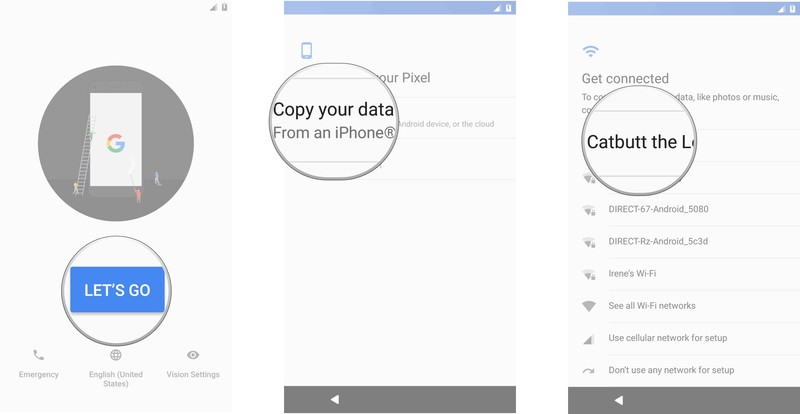
Enter the password for your Wi-Fi network and then tap Connect.
Once your phone is connected to the internet, it will automatically check for system updates.
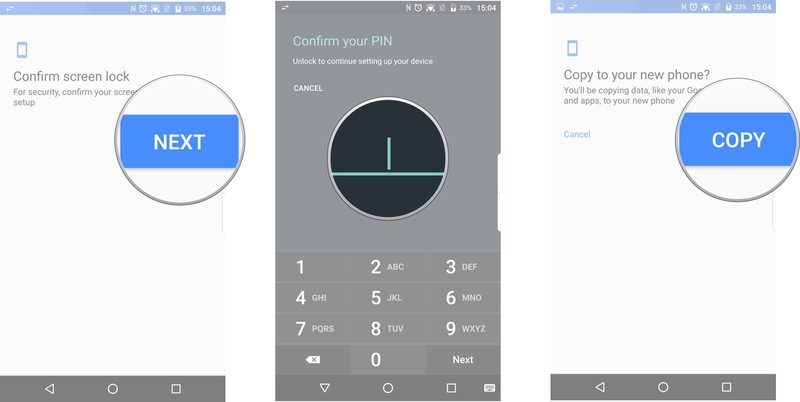
Connect your old Android phone to your Pixel with the USB-A to USB-C adapter and a USB cable as shown in the diagram.

Switch back to your old phone and follow the onscreen instructions to unlock your phone.
Tap Copy on your old phone to start the transfer process.
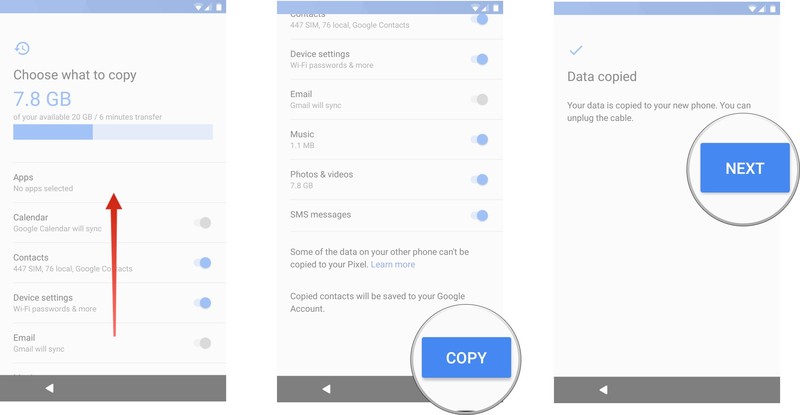
Switch back over to your Pixel. Swipe up to scroll down and review the data to be transferred.
Back on the Pixel, swipe up to scroll down and review the data to be transferred.
Tap Copy to begin the transfer process. It will likely take a few minutes.
Once your data transfer is complete, tap Next to continue with the setup process.
How to transfer your data from an iPhone
If you’ve just powered up your Pixel for the first time, tap Let’s Go to start the setup process.
Tap Copy your data.
Tap to connect to a trusted Wi-Fi network.
Enter the password for your Wi-Fi network and then tap Connect.
Once your phone is connected to the internet, it will automatically check for system updates.
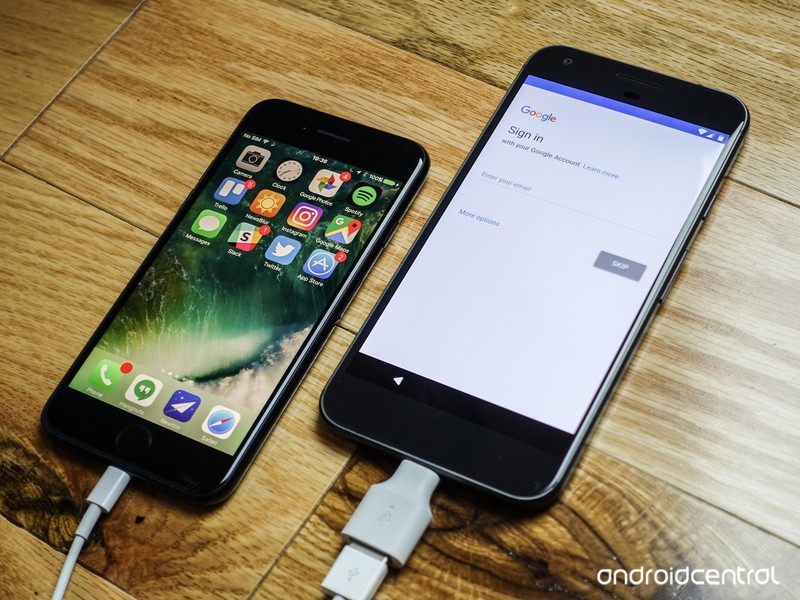
Connect your iPhone to your Pixel with the USB-A to USB-C adapter and a Lightning cable as shown in the diagram.
Let the Pixel find your iPhone.
Select the data you want to transfer over to the Pixel.
Tap Copy to begin the transfer process. It will likely take a few minutes.
Once your data transfer is complete, tap Next to continue with the setup process.

Questions? Having problems?
Let us know in the comments if you’re having issues! With our iPhone, messages and photo attachments were automatically added to the Messages app, while photos were added to the main photos app.
Google Pixel + Pixel XL
- Google Pixel and Pixel XL review
- Google Pixel XL review: A U.S. perspective
- Google Pixel FAQ: Should you upgrade?
- Pixel + Pixel XL specs
- Understanding Android 7.1 Nougat
- Join the discussion in the forums!
Google Store
Verizon
5 Portable Battery Pack Gifts Under $25

No one wants a dead phone, but for less than $25 you can make sure that doesn’t happen again.
Cell phone batteries don’t always last as long as our days do, and no one wants to be carrying around a dead phone or be tied to the wall to charge it up, right? Well, luckily you can charge your phone while you walk around, sit on the subway, have drinks with friends, or anywhere else you may be with ease. Portable batteries are a must-have these days since most phones have non-removable batteries, and they don’t have to cost a fortune.
There are a bunch of great portable batteries out there, and here are some affordable ones to consider for less than $25.
Aukey mini 5000mAh

Your first thought about a portable battery is that you don’t have the space to carry it around all day and don’t want something big and bulky in your bag. Well, Aukey’s 5000mAh power bank offers a nice small cylinder design that is shorter than a can of soda. You should be able to get up to two full charges out of the battery pack, so you can keep yourself powered up wherever you may be.
It has a single USB-A output, so you can bring your own charging cable, be it Micro-USB, USB-C, or even Lightning. You charge the battery itself with a Micro-USB cable, and it has built-in safeguards to protect against excessive currents, overheating, and overcharging. At $10, there is really no reason for everyone in your family not to have one of these.
See at Amazon
Kmashi 15000mAh

Depending on your usage habits or how many devices you are carrying around with you, you may need to have a large battery with you to be safe. Kmashi’s 15000mAh portable battery should offer anywhere from three to five full charges, depending whether it is a phone or table that you are charging up. It has two USB outputs, so you can add the cable of your choice to charge what is in your hand.
The built-in LED lights will let you know how much power is left in the battery so you don’t take a dead battery pack with you the following day. At under $15, this is the perfect option for anyone using more than one device during the day.
See at Amazon
Jackery 12000mAh

Looking for a happy medium between being small and having plenty of power to meet your needs? Jackery’s 12000mAh portable battery is only just over 4 inches tall and 3 inches wide, so you should be able to easily keep this in your bag, jacket pocket, glove compartment or anywhere else you may find it useful. You’ll have two USB outputs for charging your phone, tablet, action camera, or other electronics, and it charges through a Micro-USB port.
If you find yourself without power, or no flashlight around, the battery pack has a dual-LED flashlight built-in, so you can make sure you see where you are trying to go. Coming in at just over $20, it is a bit more expensive than some of the other options at this capacity, but the convenience of its size makes up for that.
See at Amazon
RAVPower 13400mAh

Some electronics need a higher output in order to avoid charging at a snail pace, and the RAVPower portable battery offers the highest output in the market. With 4.5A of output, the RAVPower 13400mAh power pack can charge two of your devices at the same time with ease. It utilizes exclusive iSmart technology which can automatically detect and deliver the optimal charging current for the device attached.
It has four LEDs to easily show you how much power remains in it, and thanks to its capacity you should be able to charge anywhere from three to five times depending on your device. Priced at just under $25, this is quite a value if you want a quicker charge while walking around.
See at Amazon
Anker Astro 5200mAh

If small is what you are looking for, Anker’s Astro 5200mAh is a great option to look at. While only marginally larger in capacity than some of the others in this size, it offers exclusive PowerIQ technology to detect the best charging for your phone or tablet and then offer that output (up to 2A). This means that it will charge your device as quick as it can, but it doesn’t support Qualcomm Quick Charge.
It is available in white, black, and red, so you can pick which one may be most visually appealing, or have one of each laying around to match your outfit. Coming in at just over $15, this is a great option to have around for yourself as well as grabbing a few for loved ones.
See at Amazon
Your favorite?
Do you have a favorite portable battery pack under $25 that isn’t listed here? Be sure to drop a line in the comments with a link to the battery and why you like it so much!
Google and Elon Musk open their AI platforms to researchers
Artificial intelligence got a big push today as both Google and OpenAI announced plans to open-source their deep learning code. Elon Musk’s OpenAI released Universe, a software platform that “lets us train a single [AI] agent on any task a human can complete with a computer.” At the same time, Google parent Alphabet is putting its entire DeepMind Lab training environment codebase on GitHub, helping anyone train their own AI systems.
DeepMind first burrowed into the public consciousness by defeating a world champion at the notoriously difficult game Go. However, to advance deep learning further, Alphabet says that such AI “agents” require highly detailed environments to serve as laboratories for AI research. The company is now open-sourcing that environment, called DeepMind Lab, to any programmers that want to use it.
“DeepMind Lab is a fully 3D game-like platform tailored for agent-based AI research,” Alphabet said in a blog. The agent floats around the environment, levitating and moving via thrusters, with a virtual camera that can track around its “body.” Google describes some of the chores it can do:
Example tasks include collecting fruit, navigating in mazes, traversing dangerous passages while avoiding falling off cliffs, bouncing through space using launch pads to move between platforms, playing laser tag, and quickly learning and remembering random procedurally generated environments.
The first-person 3D environment, Alphabet explains, should make for smarter AI. “If you or I had grown up in a world that looked like Space Invaders or Pac-Man, it doesn’t seem likely we would have achieved much general intelligence.”
An example of a the kind of decision-making is shown in the video below, where an agent foregoes tasty apples in favor of a bitter lemon, in order to get the ultimate reward (melon). (As a more specific example, Alphabet recently announced a partnership with Activision Blizzard, letting AI researchers attempt to build an AI agent that can master Starcraft II.)
It’s not likely coincidental that OpenAI, spearheaded by Elon Musk, happens to be releasing a very similar platform called Universe at the same time. Like DeepMind Lab, the idea is to give researchers a way to test and train their agents. OpenAI’s aim is pretty ambitious — the release consists of “a thousand environments including Flash games, browser tasks and games like slither.io and GTA V.” In its blog, the group expresses its aim:
Our goal is to develop a single AI agent that can flexibly apply its past experience on Universe environments to quickly master unfamiliar, difficult environments, which would be a major step towards general intelligence.
OpenAI says that deep learning systems are too specialized: “[DeepMind’s] AlphaGo can easily defeat you at Go, but you can’t explain the rules of a different board game to it and expect it to play with you.” As such, it’s using Universe to allow AI to run a lot of different types of tasks, “so they can develop world knowledge and problem solving strategies that can be efficiently reused in a new task.”
A single Python script can drive 20 different 1,024 x 768 environments at 60 fps simultaneously. In the first Universe release, those environments include Atari 2600 games, Flash games and Browser tasks like searching for a flight. Since the agent uses a virtual mouse, keyboard and screen like a human, it can do anything we can on a computer, and the plan is to eventually run them through more complex games and tasks.

An OpenAI “agent” plays “Dusk Drive”
OpenAI has already received permission from EA, Microsoft Studios, Valve and other companies to freely access games like Wing Commander III, Portal and Rimworld for learning. It’s reaching out to other companies, researchers and users, seeking “permission on your games, training agents across Universe tasks, (soon) integrating new games, or (soon) playing the games.
The DeepMind Lab repository will go live on GitHub later this week (look for the link here) and OpenAI’s Universe is now available. Both companies say they want to keep their AI systems open, but reading between the lines, they have selfish reasons for doing so. AI has now progressed to the point that a lot more learning data is needed, so normally insular tech companies are now forced to collaborate with the outside world.
Via: Bloomberg
Source: DeepMind Lab, OpenAI
Amazon Go is a grocery store with no checkout lines
It looks like those rumors of Amazon convenience stores were true. The online shopping giant unveiled Amazon Go today, its spin on brick and mortar retail. It uses computer vision, a whole bunch of sensors and deep learning to let you walk into a store, sign in with an Amazon Go app, fill up your bags and leave without stopping for a checkout line. Amazon is calling it a “Just Walk Out Shopping” experience, a self-descriptive name if there ever was one. The company is starting out with a large store in Seattle, but it’s clearly meant to serve as a model for other locations and retail stores.
For now, the Amazon Go store is only open to the company’s employees, but you can sign up to be alerted when it’s available to all. In many ways, it’s exactly how I would imagine Amazon’s approach to physical retail: incredibly convenient and potentially disruptive. While the company’s technology looks like it can effectively tell when you add and remove items from your “cart,” I’m more curious about how it would prevent people without the Amazon Go from entering the store. And potentially even more damning, what would a store like this mean for retail jobs?
 AIVAnet