


Fact-check Trump’s next tweetstorm as it happens
President-elect Donald Trump is an active Twitter user and has over 17.4 million followers. Those are facts. The contents of his tweets usually aren’t. Or they aren’t whole truths. As a way of fact checking our nation’s next leader’s online musings, The Washington Post created a Chrome extension that does just that. Called “RealDonaldContext,” it takes his 140-character thoughts and, as the name suggests, give context to what he’s saying.
For example, in the tweet above he made a few disparaging remarks about Vanity Fair. If someone hasn’t been paying attention to the internet over the past few days, they might not know what prompted the remarks. RealDonaldContext offers a solution, explaining that “this appears to have been in retribution for a bad review of the restaurant in Trump Tower” with a link to the review itself.
In the instance of Trump’s claim that Democratic presidential candidate Hillary Clinton “illegally” was given questions ahead of the second debate this fall, the extension gives a short explanation that the tweet is “incorrect or false.” From there is a summary of why, with a link back to WaPo’s story about the situation. The publication admits that the extension still needs a bit of work and that fact-checks can take a few minutes, but it’s going to work on trying to stay up to speed.
It’s handy, sure, but at the least you’ll have to follow Trump or hit his profile page to actually see the extension in action. In my testing, the fact checking only works on a tweet’s permalink, and even then, only if you refresh the link. So, this could be a short-lived experiment for a lot of folks. The other view is that this is preaching to the converted. After all, why would a Trump supporter follow an account that actively debunks what the President-elect is saying?
Source: The Washington Post
Woody Harrelson will livestream a movie into theaters next year
We’ve seen plays livestreamed to movie theaters and homes before, but what Woody Harrelson has planned for January 19th is a little different. His Lost in London Live movie will be streamed in movie theaters as it is shot, across 14 locations with a 30 person cast — all on one camera in a single continuous take. According to Harrelson, he wants to “truly blend the excitement of live theater with the scale and scope of film.”

The film is based on a 2002 incident where the actor broke an ashtray in a cab and ended up spending the night in a London jail. After the stream, Harrelson will participate in a live Q&A. The 100-minute stream will kick off at 9PM on the 19th, and you can find a list of theater locations here.
Source: Fathom Entertainment
Juiceman 3-in-1 Total Juicer review – CNET
The Good The Juiceman 3-in-1 Total Juicer functions as a citrus juicer, blender and produce juice extractor.
Most of its parts are dishwasher safe.
The Bad It doesn’t make much juice even for a low-performance centrifugal extractor.
It’s complex and has a lot of parts to wash, assemble and keep track of.
The Bottom Line While it can do the job of personal blender, produce juice extractor and motorized citrus reamer in a pinch, the Juiceman 3-in-1 Total Juicer can’t match other juicers for blending power.
The $120 Juiceman 3-in-1 Total Juicer is designed to handle the work of three separate kitchen appliances: an all-purpose produce juice extractor, a motorized citrus juicer and a travel-sized food blender. Delivering that much versatility is a tall order, and sadly the Total Juicer falls short.
It unlocks less juice from similar products which cost half the price. Its numerous parts are a hassle to deal with and the entire apparatus gets dirty too easily. Instead of the Total Juicer, consider the $300 Omega J8006. While the Omega is pricey and can’t blend like the Juiceman, it processes produce like a champ. The elite machine is a snap to clean too and has few components to fuss over. If you’re on a budget, the $40 Black & Decker JE2400BD makes more drinkable juice than the Juiceman at a third of the price.
This Juiceman 3-in-1 has way too many parts
See full gallery


1 – 5 of 11
Next
Prev
Design and features
If you’re familiar with basic centrifugal juice extractors, the Juiceman 3-in-1 Total Juicer, at least in its standard form, won’t look out of the ordinary. The machine consists of a heavy cylindrical base that houses an 800-watt electric motor. This engine spins a metal filter basket equipped with sharp blades at its bottom.

The Juiceman 3-in-one Total Juicer comes with lots of parts to tackle many duties.
Chris Monroe/CNET
Rotating at high speed, the basket essentially acts as a cheese grater on overdrive. Its blades both pulverize and liquify fruit and vegetables that land inside of it. Due to its weight, any liquid released in this process is sucked through the mesh strainer by centrifugal force. It then flows through the Juiceman’s spout and into a waiting juice cup. Lighter bits, and hopefully pulp smashed free of moisture, are thrown clear of the filter to land inside a waste container.
A clear plastic lid sits over both the filter basket and pulp container. It channels fruit and veg into the juicer via a wide-mouth food chute and provides a path for pulp to enter the collection jar. On the Juiceman’s base are a trio of suction cups that anchor the machine to smooth surfaces such as kitchen counters and table tops.

Transform the Juiceman into a dedicated citrus juicer.
Chris Monroe/CNET
What really sets this appliance apart, in theory, is its flexibility. You can remove all of its juice extractor parts — six in all — from the Juiceman’s base. If you then attach a separate set of four components to the base, the machine transforms into a stand-alone citrus juicer. One piece shifts the motor to a lower gear. Another part, a traditional citrus cone, spins slowly to ream pulp and juice from the halves of round citrus fruit. The other sections include a circular juice strainer, and a cylindrical pulp collector which also has a spout to feed liquid into the juice cup.
Lastly the Juiceman 3-in-1 morphs into a blender thanks to one additional part. This is a blending base complete with its own array of blades. You also use the juice cup as a travel-size blending cup. There’s a lid for the cup too so you can grab your drink and take it with you.
Huawei Mate 9 review
Editor’s note: Full review video to follow soon. In the meantime, our initial hands on video can be found above.
The spectacular failure of the Galaxy Note 7 earlier this year has presented an opportunity for companies to create the best big-screen Android alternative and Samsung’s misfortune could play right into the hands of Chinese OEM Huawei.16
Huawei’s Mate range dates back nearly as long as Samsung’s Note series and by offering metal unibody designs, large displays and fantastic battery life, the range has grown in popularity. The Mate 9 continues this trend with better internals, a large display and an upgraded version of the P9’s LEICA dual camera setup but, crucially, it also brings a major revamp to Huawei’s EMUI interface in the form of EMUI 5.
Buy now on Amazon
Alongside the regular Mate 9, Huawei also announced the first device in its partnership with Porsche Design – aptly named the Porsche Design Mate 9 – which brings the same internals coupled with a curved QHD display, 6GB of RAM and 256GB of storage. The Porsche Design Mate 9 is limited edition and with a price tag of €1399, it’s definitely not for everyone.
Is the Mate 9, in either form, the perfect smartphone for those wanting a big-screen Android experience? Let’s find out in this, our Huawei Mate 9 review.
About this review: We’ve been using the Huawei Mate 9 and Porsche Design Mate 9 for around five weeks now as our main phone. Until early December, both handsets were running pre-release firmware and while some of our impressions were based on the non-final software, we’ve retested both phones on their latest software for this review.
All reviews published prior to November 30th 2016 were based on the non-final software and we’ve noticed several ‘issues’ in this build have been fixed in the latest software. Throughout this review, we’ll be referencing these improvements and tweaks as a reference point against issues raised in other reviews.
Huawei Mate 9: Design

The design of the Mate 9 isn’t really surprising as it’s largely unchanged from last year, although Huawei has made it a little more compact and ergonomically friendly. Alongside this, Huawei has also added a curved unibody finished with soft-feeling aluminium and the result is a smartphone that doesn’t feel as large as you’d expect.
Considering there’s a 5.9-inch display, you could be forgiven for thinking the Mate 9 is a big phone and while the display is certainly large, narrow vertical bezels and a slim profile mean it handles a lot better than other large devices. Compared to the Google Nexus 6P or the iPhone 7 Plus, the Mate 9 is infinitely easier to handle and use, despite the larger display.


To the right of the Mate 9 you’ve got the power and volume keys while on the left is the dual-SIM tray. On the bottom is a USB-C port and one of the dual speakers, while the headphone jack and infrared port can be found up top. Huawei has also added brushed patterns and a slight chamfer to the edges which adds grip, improves the handling and makes the Mate 9 more ergonomically friendly.

On the back, you’ve got a dual-camera arrangement in a vertical layout, rather than the horizontal layout found in the Huawei P9. Beneath this is Huawei’s typical fingerprint sensor which, in typical fashion, remains one of the fastest on the market. Rather interestingly – considering Huawei’s habit of mentioning the iPhone camera bump during its press conferences – the camera is on a slightly raised hump, although this does sit flush when you use the case supplied in the box.

Although the Mate 9 is a good looking smartphone, the Porsche Design Mate 9 is Huawei’s real design champion and whether it’s a sign of things to come – or a game of imitation – it’s definitely a looker. Almost all the design elements have been changed; rather than a regular display, you’ve got a dual-curved screen like the one found on the Galaxy S7 Edge.
The design changes don’t just stop there; the screen is smaller than the Mate 9 (more on that later), the fingerprint sensor is moved to the front beneath the display and flanked by back and recent keys and the back is covered in a pitch-black anodized metal that looks striking and shimmers in the light.

The curved display itself is surprising as it’s incredibly subtle and more an element of design rather than a feature in itself. The different finish on the rear also means the Porsche Design Mate 9 attracts more fingerprints but is easier to hold and provides a hard edge to grab a hold of, and more grip than the regular Mate 9.
Rather than a revolutionary design, the Mate 9 is another step in the evolution of Huawei’s design strategy. Huawei is demonstrating that big doesn’t always have to feel big, and that they can pull off a large display that’s still friendly to your hand. Personally, while the Porsche Design Mate 9 is definitely a looker, I prefer the feel of the regular Mate 9 in the hand.
Huawei is demonstrating that big doesn’t always have to feel big, and that they can pull off a large display that’s still friendly to your hand.
Huawei Mate 9: Display

The Huawei Mate 9 sports a 5.9-inch 2.5D Full HD IPS display with a density of ~373ppi, while the Porsche Design brings Quad HD resolution in a smaller 5.5-inch AMOLED display with ~534ppi density.
You could be forgiven for judging the regular Mate 9 purely on the Full HD resolution but to do so would take away from the fact the display is fantastic. Like previous Huawei devices, there’s a super high contrast ratio (1600:1+) which offers an immersive experience and helps to shield the fact it’s not an AMOLED display.

Running both devices through our testing reveals both have a cool display out of the box – with the Porsche Design more accurate than the regular Mate 9 – although this can be easily changed in the settings menu. Like most flagships, both devices also come with a blue-light filter, which is branded as “Eye Comfort” mode and works just as you’d expect by changing the display tone to a much warmer color. Digging further and the Porsche Design Mate 9 has a max brightness of 383 nits, while the Mate 9 tops out at over 600 nits.
The Porsche Design Mate 9 aside, Huawei has always stuck to its guns when it came to adopting higher resolutions and the Mate 9 screen goes to show that you don’t always need more than Full HD. Yes, it would have been nice to have better than Full HD resolution on the regular Mate 9 but this display is fantastic regardless.
Huawei Mate 9: Performance

As you might expect, the Mate 9 is packed with the latest internals from Huawei in the form of the Kirin 960 chipset, which is made up of ARM’s latest Cortex-A73 chipset (versus the A72 used in the Mate 8 and Huawei P9). The Kirin 960 comes equipped with four Cortex-A73 ‘performance’ cores clocked at 2.4GHz, paired with four Cortex-A53 lower power cores clocked at 1.8GHz. The Mate 9 is also the first handset to run the new 8-core Mali-G71 MP8 GPU, which is expected to power the Galaxy S8 and other flagship devices next year.
The regular Mate 9 comes equipped with 4GB of RAM and either 64GB of storage, while Porsche Design Mate 9 owners will get 6GB of RAM and 256GB of storage. If you do opt for the regular Mate 9, you do get expandable storage, while the Porsche Design Mate 9 is limited to 256GB of storage.

The combination of the latest processing package, ample amounts of RAM and lightning fast UFS 2.1 storage means both versions of the Mate 9 fly through everything you throw at it. On the regular Mate 9, there’s between 2.4GB and 2.6GB of RAM free with no apps running and even with 20 apps running (including a couple of games), we’re yet to hit below 1.5GB of RAM free. Based on the RAM utilization, the Mate 9 is the closest we’ve seen a smartphone come to PC-levels of optimization and resource usage.
The Mate 9 is the closest we’ve seen a smartphone come to PC-levels of optimization and resource usage.
A large part of this is down to Huawei’s new machine learning algorithm, which learns your habits and prioritises your favourite apps to ensures there’s always the right resources available when you need them. Huawei goes a step further to say that their machine learning algorithm means your phone is fast out of the box and remains fast, even after months of usage. Of course, we can’t confirm this but so far, the results are certainly promising.

How do both versions of the Mate 9 stack up to the competition and how much better is the Kirin 960 than the Kirin 950? In AnTuTu, the regular Mate 9 scores 127507 while the Porsche Design Mate 9 scores 111354. In comparison, last year’s Mate 8 scores 51432, the Exynos-8890 powered Galaxy S7 Edge scores 127507 and the Snapdragon 821-powered Pixel XL scores 136883.

Moving on to GeekBench 4 and the results are quite similar; the regular Mate 9 scores 1910 in the single-core test and 5311 in the multi-core test while the Porsche Design Mate 9 scores 1936 and 5921 respectively. By way of comparison, the Mate 8 scores 1070 and 1787, the Galaxy S7 Edge scores 1578 and 3858, and the Pixel XL scores 1575 and 4090. Interestingly in the multi-core test, the regular Mate 9 is the first Android smartphone we’ve tested that’s on par with the iPhone 7 Plus (5395) while the Porsche Design Mate 9 leads the field comfortably.

The last of our regular benchmark tests is 3DMark, where we put the new GPU to the test and the regular Mate 9 scored 2203 on the Slingshot test, while the Porsche Design Mate 9 scores 1600. By way of comparison, the Mate 8 scores just 351, the Galaxy S7 Edge scores 2178 and the Pixel XL scores 2476.

To test the GPU further, we also ran another graphics-based benchmark (which we’ll be doing more of in 2017) in the form of GFX Bench. In the T-Rex HD on-screen test, the regular Mate 9 achieved 58 frames per second (fps), while in the Manhattan on-screen test, it scored 28fps. Meanwhile, in the same tests, there was quite a drop in the Porsche Design Mate 9 results at 41fps and 20fps, which is not overly surprising given the higher resolution and extra pixels the GPU has to power. By way of comparison, the Mate 8 scores just 39fps and 17fps, the Galaxy S7 Edge scores 50fps and 14fps and the Pixel XL scores 55fps and 30fps.
Overall, the benchmark results show how much the Kirin 960 has improved over previous versions, especially in the graphics department, where the Mali GPU has almost completely closed the gap to the Adreno GPU used in Snapdragon chipsets. On paper, the Kirin 960 may not be perceived as one of the best chipsets, but the experience on the Mate 9 is almost as smooth as the Pixel XL.
Huawei Mate 9: Hardware

Like most flagship handsets, the Mate 9 comes equipped with the latest internals, including an array of sensor, a fingerprint sensor, and connectivity options. Huawei also demonstrates its network infrastructure prowess through the addition of smart WiFi features, excellent antennae and full control over dual SIM functionality.
Beneath the camera on the rear, the regular Mate 9 has a lightning fast fingerprint sensor, in the same vein of those we’ve come to expect from Huawei. It takes around half a dozen taps to register your fingerprint and once enrolled, you can wake and unlock your phone in under a second. The fingerprint sensor also comes with gesture support, allowing you to tap once to go back a step, press and hold to return to the home screen and swipe down to access your notifications and shortcuts.

On the Porsche Design Mate 9, the fingerprint sensor is moved to the front of the device with the rear sensor replaced by a Porsche Design logo. The fingerprint sensor works almost as well as on the regular Mate 9, although there does seem to be a slightly longer delay in reading your fingerprint when the display is turned off. This sensor also supports gestures, albeit they are different to the regular Mate 9 and if you opt to switch off the capacitive navigation keys, you’ll use swipe-based gestures on the sensor to navigate between screens.
The Mate 9 comes with a dual stereo speaker setup with a single speaker found on the bottom and a secondary speaker built into the earpiece above the display. The speakers are fantastic and louder than you’ll ever need them to be, but when set to above 60%, there is a noticeable tininess to the audio. However, you probably won’t need to set it to higher than this as it’s plenty loud without distortion for general usage.

Unlike many smartphones, the Mate 9 keeps the regular 3.5mm headphone jack, which can be found up top. The design might be questionable – I personally prefer a bottom mounted headphone jack – but the wired audio output isn’t, with the Mate 9 able to drive ample amounts of power to a variety of headphones. It’s not quite on par with audio-centric smartphones such as the LG V20 and ZTE Axon 7 but it comes very close and offers one of the best audio experiences on a flagship smartphone.
Like most flagships, the Mate 9 offers a plethora of connectivity options that include NFC, Bluetooth, Wi-Fi and an infrared port. It’s especially great to see that Huawei kept the infrared port, which can be used to control your home appliances and entertainment. The dual SIM card slot allows you to use either two SIMs or a SIM card and microSD card (on the regular Mate 9 that is) and call quality is fantastic, especially as when you put the phone to your ear during a call, the Mate 9 eliminates ambient noise. This, coupled with the speaker in the earpiece, results in excellent call quality.
Huawei Mate 9: Battery Life

One of the principle cornerstones of Huawei’s smartphone philosophy is battery life and in particular, a desire to prioritize battery life over features (such as higher resolution displays).
The Mate 9 is no different and its 4,000mAh battery is one of the largest found on an Android flagship smartphone. Coupled with a Full HD display, you get excellent battery life as you might expect from such a large battery. By way of comparison however, the Porsche Design Mate 9 has a higher resolution (yet smaller) display and the same 4,000mAh battery capacity and there is a noticeable drop in battery life.
How does the battery stack up to the competition? Using our custom battery tester app, we’re able to say that the battery life on both devices is firmly up there with the best smartphones on the market.

The first of our tests focuses on gaming and each smartphone is charged to 100 percent, the display brightness is set to 200 nits and all sync is turned off (with Wi-Fi remaining on). During this test, the Mate 9 lasted 5 hours and 12 minutes, while Porsche Design lasted 4 hours and 34 minutes. By way of comparison, the Mate 8 lasts 4 hours and 48 minutes and the Pixel XL lasts 4 hours and 43 minutes. Our testing has revealed that no Android smartphone comes close to the iPhone 7 Plus, which lasts for 12 hours and 37 minutes when gaming.

Moving onto the next criteria and we use the same 1080p HD video file, charge phones to full and loop the video until the battery drains completely. In this test, the Mate 9 lasts for 14 hours and 12 minutes, while the Porsche Design lasts for 10 hours and 36 minutes. By way of comparison, the Mate 8 lasts for 10 hours and 34 minutes and the Pixel XL lasts for just over 7 hours.

Our last battery test focuses on wifi browsing and our apps loads the same six webpages in a continuous loop until the battery drains completely. In this test, the Huawei Mate 9 lasts for 14 hours and 4 minutes, while the Porsche Design lasts for 11 hours and 28 minutes. By way of comparison, the Mate 8 lasts for 11 hours and 57 minutes and the Pixel XL for 10 hours and 38 minutes.


Huawei has often claimed that it resisted the market transition to Quad HD displays because of the effect on battery life and as our testing has revealed, the QHD display on the Porsche Design Mate 9 has an impact on the battery life, when compared to the FHD display on the regular Mate 9. With that being said however, both smartphones offer exceptional battery life and even with heavy usage, neither device fails to last for more than a day. On several occasions, the 4000mAh unit has been enough to see us through the entirety of the second day, and sometimes, even half of the third.
With the Mate 9 Huawei proves that flagships can have lasting battery lives.
Throughout six weeks of testing, we’ve experienced screen on time ranging from 5 to 8 hours, whereas the Porsche Design Mate 9 achieves between 4 and 7 hours. For the most part, six hours of screen on time is regularly achievable for heavy users. Whether you’re a heavy, medium or light user, the Mate 9 will power you for days on end. Battery life is a problem that plagues all smartphone users and both variants of the Huawei Mate 9 are excellent solutions to this long-running concern with modern technology. Battery technology hasn’t progressed as fast as other areas of smartphone tech, but with the Mate 9 Huawei proves that flagships can have lasting battery lives.


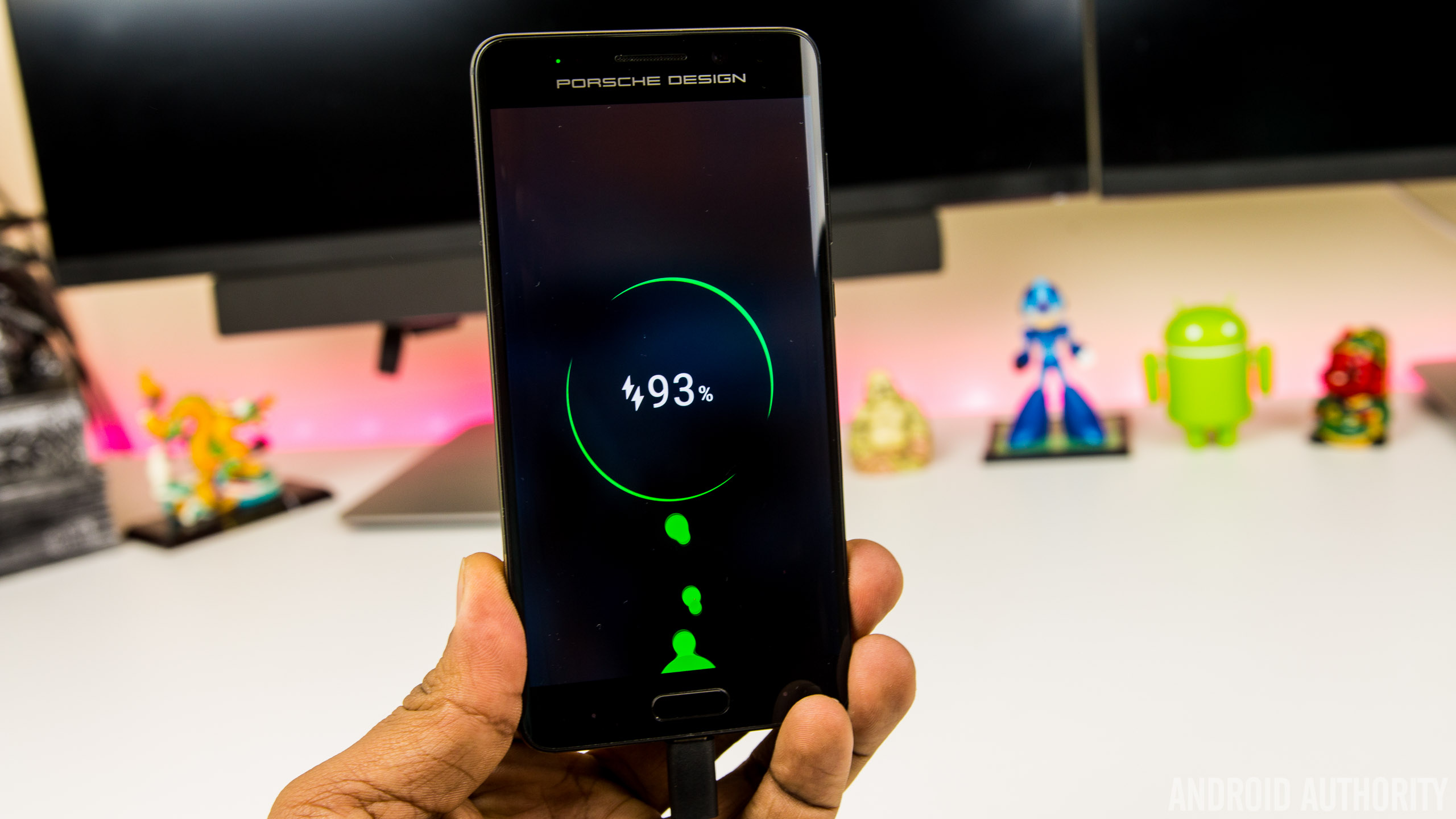
For the times when the battery is running low, the Mate 9 and Porsche Design Mate 9 are the first handsets to come equipped with Huawei SuperCharge, a proprietary fast charging solution that’s designed to rival Qualcomm’s QuickCharge and other OEM solutions. Charging the 4,000 mAh battery inside the Mate 9 is incredibly fast using the bundled SuperCharge charger (either the wall or the car charger), with the battery taking around 90 minutes to charge from full. How does this compare to the competition though?

Huawei claims its new 4.5V/5A charging technology is also designed to be cooler than rival fast charging solutions, and in a direct dig at Samsung, says a processor inside the charger communicates with your phone, continuously monitors the temperature of your Mate 9 and will slow charging down if it notices the handset is overheating. Below 50 percent, it charges rapidly and once it gets to 75%, the charging process slows a little. On the lock screen, the Mate 9 shows whether you’re charging at standard, “fast” or “super” speeds and while it’s not slated to work with rival fast charging solutions, the Mate 9 does charge quicker than normal when plugged into a QuickCharge 3.0 charger.
Huawei Mate 9: Camera

Huawei’s partnership with Leica continues with the Mate 9 sporting a new and improved second generation dual camera setup. Much like the one in the Huawei P9, the camera is centred around a Leica-branded dual camera, with a 12MP RGB sensor supplemented by a 20MP monochrome sensor. Both sensors are behind lenses with f/2.2 aperture and the RGB sensor also sports Optical Image Stabilisation for additional stability in photos and videos.
Like the P9, the RGB sensor captures the colors in a scene while the monochrome sensor enhances the detail and this means the Mate 9 is capable of capturing images with a very impressive bokeh effect. In the right conditions, you’re able to take images that top the same effect found in the iPhone 7 Plus and the photo sphere feature found on the Pixel XL.

Overall, image quality from the Mate 9’s dual camera array has been impressive. In daylight, you get images that are crisp, full of detail with colors that are more realistic (and less saturated) than those captured by the Galaxy S7 Edge or Pixel XL.
Huawei’s camera app means Pro mode is just a tap away and offers settings to adjust the exposure, ISO and focal point to take stunning photos. In the default mode, the Mate 9 seems to struggle with picking the right focal point (images are often under or over exposed) but manually selecting the right focal point or tweaking the scene in Pro mode allows you to take fantastic photos.


One of the biggest improvements in the final software build is the low light performance of the camera, with the Mate 9 now capable of taking low light pictures that are on par with the Galaxy S7 Edge. However, while low light shots are vastly improved, the Mate 9 does struggle with slight movement in low-light, with OIS proving less effective than in other flagship devices.
The Huawei camera app is rather straight forward to use, with options for flash, wide aperture and filters found in the viewfinder. A swipe to the right brings up the settings menu, while camera modes such as monochrome (black and white), Beauty, slow-mo, panorama, light painting and HDR can be found by swiping to the right.


HDR mode in particular is interesting as there’s no way to enable it by default or have it automatically turn on so you’ll need to remember to activate it by swiping left. The Mate 9 does activate HDR automatically in certain conditions, but hiding it in the modes menu means it’s less user-friendly than on other smartphones. HDR does a decent job of boosting colors, reducing blowouts and brightening shadows, but the effect is less pronounced than on other smartphones and the difference is minimal enough that you won’t activate HDR as much as you might with another Android device.
Moving to video and the Mate 9 is capable of shooting 4k video at 30 frames per second and like in photos, video quality is decent in daylight, but becomes a little grainy in low light. The Mate 9 is one of the first phones to shoot 4k using the new h.265 codec, but given it’s so new, very few apps (including YouTube) know what to do with it. Although there’s ample storage on the Mate 9, Huawei’s compression algorithm means 4k video file sizes are up to 50% lower than on other devices. The Mate 9 also supports shooting in 1080p at 60 frames per second (where you get software-based stabilisation) and 720p video at 120 frames per second for slow-motion footage.


The front camera on the Mate 9 is an 8MP sensor with f/1.9 aperture lens, capable of shooting Full HD video at 30 frames per second. For the most part, selfies come out rich and full of colors in good lighting and in low light, the camera does a good job at boosting the ISO and letting more light into the camera.
Huawei Mate 9 & Porsche Design Mate 9 camera samples

However, a very irritating part of taking low light selfies is the amount of time it takes the camera to actually take a photo. When the flash is set to auto (there’s no way to keep it on by default) and there’s not enough light, the screen lights up for two to three seconds before the camera fires. Unfortunately, most selfie takers won’t hold a pose for that long (especially as the screen can be quite blinding at full brightness), and especially not when taking a group selfie, resulting in selfies that have motion blur. This does seem to be a software-based issue so hopefully this will be resolved in the next update.
The Mate 9 takes gorgeous photos that you’ll be proud to share
Overall, the camera on the Mate 9 certainly doesn’t disappoint and it seems to be on par with other Android flagships. In particular, the improvement in the camera performance from pre-release to final software was drastic enough for us to change our thoughts on the camera; initially, there were several issues, especially in low light, but these are no longer a concern with the final update. It’s not perfect – no phone is after all – but the Mate 9 takes gorgeous photos that you’ll be proud to share.
Huawei Mate 9: Software

Look at past Huawei phones and there’s a single trend that has defined the company’s smartphone efforts to now: hardware is always great but poor software. Like most Chinese OEMs, Huawei used to develop its global software in China, without taking into consideration how different the Chinese market is from, well, everywhere else.
Earlier this year, we heard that Huawei was working on a revamped version of its EMUI interface, that would look to address a lot of the issues raised in previous reviews. In the Mate 9 we have just that, with EMUI 5 bringing the latest Android 7.0 Nougat OS as well as several fixes to issues that have plagued Huawei smartphones for generations.


With that out of the way, what’s new with EMUI 5? There’s a lot of changes, starting with the new Azure color scheme that’s present throughout the UI. It brings with it a complete visual overhaul, with the odd color scheme of old replaced by white backgrounds, faint grey accents and blue highlights and tones. The changes don’t end there as Huawei’s own stock apps adopt more of Google’s Material Design guidelines and the icons no longer look like out-of-place and inspired by iOS.
The biggest new feature of all? An app drawer. It sounds so simple, but finally EMUI brings the option for an app drawer in the settings. It’s not enabled by default – and when it is activated, there seems to be a one second lag before the home screen shows when you return from an app – but the app drawer brings the familiar Android interface, and vastly improves the overall user experience.
The result is a familiar software experience chiseled and refined into something closer to the bone of Android.
Android 7.0 Nougat also brings some improvements and tweaks that lend to the overall experience and it’s refreshing to see that Huawei has resisted previous habits of overhauling everything. Instead, EMUI 5 brings tweaks to the stock Android experience with Huawei showing flair and tweaks in selected locations rather than throughout the OS. The result is a familiar software experience chiseled and refined into something closer to the bone of Android.
Swiping down from the top brings a new, darker notification shade that displays more icons than before and can be heavily customised. In the settings menu, there’s an option to toggle between individual notification icons in the top bar or the total number of unread notifications. For the data-driven type of user, there’s also the option to display the current network speed – surprisingly useful at diagnosing when you have connectivity issues – as well as the carrier name, which is useful to distinguish between carriers when you’re using two SIM cards.


Moving further around EMUI 5 and one thing is clear; this is a rapid interface, with bloatware – on the global version at least – kept to a minimum. The few preloaded apps can generally be uninstalled, save for a few that Huawei uses to provide core EMUI f5 features. The launcher is fast, full of features and heavily customisable and aside from the aforementioned slight stutter when you have the app drawer enabled, there is no noticeable lag. Although the launcher’s color scheme is pleasant and usable, if it’s not for you, there are plenty of themes available in Huawei’s theme store, although these won’t change the look and feel of Huawei’s own default apps.
During a briefing on EMUI 5 in China, Huawei revealed that EMUI 5 had been redesigned to ensure most tasks were only a couple of taps away. The exact figures they quote are being able to reach 50% of features within two taps and over 92% within three taps and nowhere is this more noticeable than in the settings menu. In previous generations, you’d find options nested inside options inside further options and so on, but with EMUI 5, the Settings menu is more user friendly and easier to navigate.


Take the battery menu for example; in EMUI 4.1, the battery menu could be found nested three levels deep but in EMUI 5, it’s a top-level menu. Dig into this menu and you’ll find the usual plethora of options including an ultra-power saving mode (which reduces your usage to a couple of apps only), regular power saving and the ability to reduce the screen resolution to eek out the last hours of your battery.
Battery management has also been revamped in EMUI 5, with a large improvement in the way the interface handles power-intensive apps. Previously, Huawei phones would prompt you with constant notifications about resource-heavy apps, and these are a lot less persistent in EMUI 5. Huawei’s new machine learning algorithm can be seen at work here as apps that you use frequently – in my case, this include Slack and FIFA Mobile – will appear in these prompts but won’t be killed off by default. EMUI now also gives you the option to blacklist rogue apps that might be the cause of battery drain and have them automatically killed when you turn off your display.


EMUI 5 also adds the ability to use multiple accounts with single-account applications like WhatsApp and Facebook, using the Twin App feature. How does EMUI does this? Essentially, the Mate 9 runs two instances of the app at the same time. If you have two SIM cards and have been frustrated as you couldn’t run Whatsapp with both numbers on the same phone, then the Twin App feature is the perfect solution.
What about the Porsche Design Mate 9? Does the curved display have any software benefits? In a word: no. The software experience is almost identical, save for some ugly Porsche Design themes, tweaks to UI tuning to take advantage of the high res display and a dark mode to save on battery life. The biggest difference is in day-to-day usage, where the on-screen keys from the regular Mate 9 are replaced by back and recent apps keys flanking the home button; these keys aren’t labelled so you can swap them around and work just like you’d expect. Although it is possible to disable the keys and navigate by swiping the home key, it doesn’t really work as well as you’d hope, and we wish using on-screen keys like the regular Mate 9 was an option.
EMUI 5 is smooth, feature-rich and easily Huawei’s best software to-date
Overall, EMUI 5 feels more polished than previous generations and with a lot of features built-in like Samsung’s TouchWiz, it may yet serve as the next best alternative to the Galaxy Note 7. From EMUI 4 to EMUI 5, Huawei shows just how much can be achieved by listening to customer feedback. The result are clear to see: EMUI 5 is smooth, feature-rich and easily Huawei’s best software to-date.
Huawei Mate 9: Gallery
Huawei Mate 9: Specifications
| Size | Height: 156.9mm; Width: 78.9mm; Depth: 7.9mm |
| Weight | About 190g |
| Colors | Space Gray, Moonlight Silver, Champagne Gold, Mocha Brown, Ceramic White |
| Display | 5.9” FHD display |
| 2.5D glass | |
| 1080p (1920 x 1080), 373ppi | |
| 16.7M colors, Color saturation (NTSC) 96% | |
| High contrast 1500:1 (Typical) | |
| CPU | HUAWEI Kirin 960; Octa-core (4 x 2.4 GHz A73 + 4 x 1.8 GHz A53) + i6 co-processor |
| GPU | Mali-G71 MP8 |
| Operating System | Android™ 7.0 (Nougat) |
| Emotion UI | EMUI 5.0 |
| Memory | 64GB ROM |
| 4GB RAM | |
| microSD card slot, support up to 256GB (uses SIM 2 slot) | |
| Dual SIM | Dual SIM |
| NFC | NFC-supported |
| Connectivity | Wi-Fi 2.4G/5G, 802.11a/b/g/n/ac with Wi-Fi Direct support |
| BT4.2, support BLE | |
| USB Type C (High Speed USB) | |
| Camera | Front: 8MP AF, F1.9 |
| Main: Dual, 20MP Monochrome + 12MP RGB, F2.2 | |
| OIS (Optical Image Stabilization) | |
| 4K video | |
| Battery | 4000 mAh (Typical Value) |
Huawei Mate 9: Price & Final Thoughts

The Mate 9 isn’t a revolutionary upgrade over its predecessor, nor is it going to be for everyone, but it does excel in the key areas that Huawei intended it to: battery, performance and camera. 2016 is arguably the year where Huawei broke through, first with the P9 and now with the Mate 9. With all things considered, the Mate 9 is probably the best big-screen Android smartphone you can buy right now.
The very-public demise of the Galaxy Note 7, coupled with the current trend for smartphone displays to measure 5.5-inches or less, means the Mate 9 is one of just a handful of big Android devices currently available. The LG V20 is another of these but there doesn’t seem to be an LG V20 launch planned for Europe, meaning the Mate 9 is the only big-screen flagship currently available for this market.
What will the Mate 9 cost? At the launch in Munich, Huawei confirmed the Mate 9 would cost €699 when it launches in Europe this month. Pricing for the US is yet to be confirmed but given the EU pricing, it’s likely to cost around $700 when it launches at CES in January. For those in the US that really want it right now though, you can find it online for around $750. This pricing puts the Mate 9 firmly in the flagship Android smartphone category, and while it’s not perfect, it can definitely hold its own against other devices.

What about the Porsche Design Mate 9? Well, if the glorious QHD display, subtle curves and stylish design have piqued your interest, it will set you back €1,395. Yep, the Porsche Design Mate 9 costs over a thousand Euros, which makes it a luxury smartphone, that isn’t designed for the mass market.
If you’re after a smartphone that offers exceptional battery life, an intriguing dual camera and incredible performance, the Mate 9 delivers in spades
Should you buy either of them? If you’re after a smartphone that offers exceptional battery life, an intriguing dual camera and incredible performance, the Mate 9 delivers in spades. If money is no object and you want a smartphone that is unattainable to most customers, the Porsche Design Mate 9 is certainly worth considering.
Buy now on Amazon
Lenovo will launch Chrome OS-powered Yoga Book tablet in 2017
Remember Lenovo’s Yoga Book? Well, a version of that cool tablet will run Chrome OS starting next year.
According to Laptop Mag, which spoke to Jeff Meredith, Lenovo’s VP, Lenovo is working on a Chrome OS variant of the tablet. Currently, there are two versions of the Yoga Book available. You can get it running Windows 10 or Android 6.0 Marshmallow. The upcoming Chrome OS one will apparently support its “Real Pen” stylus, which also allows owners to write on the tablet’s keyboard – a flat, pressure-sensitive surface.
In our review of the Yoga Book, we called it one of the most exciting tech products we’ve seen in some time. But it’s also convoluted. It has limited power, some typing bugs, and simply awful recharging speed, all of which are significant marks in making this device practical for everyday use. Nevertheless, Lenovo said it’s had “a lot of interest” in Chrome OS, so it makes sense for the company to release a variant for the platform.
Lenovo didn’t reveal when exactly we can expect a Chrome OS-powered Yoga Book. But keep in mind Google has been updating Chrome OS to better support touch, and it’s rolling out the ability for select Chrome OS machines to run Android apps.
The Public Access Weekly: Roadrunner, roadrunner
 How is it already December 16th?! I haven’t even started my Christmas shopping yet (so, Amazon gift cards for all!), and there’s still New Years and CES approaching like a one-two-punch. It has, to put it mildly, been a busy month. Here’s what’s been going down in the Engadget community:
Commenters were treated to an upgrade this week, and now have profile and notification features enabled. We’re pretty pleased with the changes, and so far the switch has been incredibly smooth. However, if you’re experiencing anything wonky, please let us know by sending details to support@engagdet.com. I’d also like to give a shout out to the Engadget developer team who did a lot of work, very quickly, to make this happen. Cheers to them!

In Public Access, we’ve unfortunately had to remove the “Preview” feature for those who have the trial membership status because of some shady behavior on behalf of a few members. While those members have been suspended from the community, we do want to remind everyone that the trial status doesn’t last forever. Members who have successfully published three articles without requiring significant editorial corrections, will be graduated to full membership which does have preview abilities enabled.
Speaking of shady behavior, a quick reminder that copying someone else’s article and changing out the adjectives is still plagiarism. Rephrasing someone else’s work is not the same as writing an original piece. If you’re quoting an article, link and cite your sources and you will be A-OK. If you ever have questions about this you can reach us at publicaccess@engadget.com.
Looking for something to read? Check out:
Andre Smith highlights a few fun tech gadgets that can help you feel like James Bond…Or at least like Q. Personally, my favorite of the bunch is the pen document scanner or the lighter spy camera because they seem like they might have some kind of practical application. Not that I can think of one, but that’s never stopped me from making a fun gadget purchase before.
Meanwhile, Ben Grooten gets us excited for the impending CES 2017 by running through some of the VR that will likely be showcased during the event. From Asus and HTC to lesser known names like Royole Moon and Finch, this is an intriguing list of what we can look forward to next year.
Lastly, Courtney McCaffrey lists five of the top cities that any technology enthusiast would do well to visit, complete with reasons why these metropolises’ are hubs of bustling tech activity and a few suggestions on what to check out while you’re visiting. For those interested in the tech attractions in the SF-Bay Area, I would add the Computer History Museum, the Yoda fountain at Lucasfilms, the Internet Archive, and the Pinball Museum in Alameda to your list.
Looking for something to write about? Mull over:
The DOT is looking into the possibility of passengers making voice calls over WiFi on planes. (Because flying is already so much fun.) While this idea makes me cringe, it did make me wonder: What technology development has resulted in the worst side effects? Is it not being able to have a conversation without glancing at our phones anymore? The constant distraction of work chat rooms? Tell us what you think is the most unfortunate technology side effect on human behavior.
This week Super Mario Run was released and yes, everybody in the Engadget office is playing it like crazy. If you are too, write us a review of what you think of the game. If you’re not playing it (because you’re an Android user, or you’re still obsessed with Candy Crush, or you just hate Mario), tell us why.
‘Tis the season for red and green themed everything — and games like Overwatch are not missing the opportunity to get in on the fun with holiday events and game changes. Since the festivities won’t last forever, tell us: What is your favorite holiday themed tech change that you’ve seen this month? Maybe it’s the League of Legends holiday patch, or playing Temple Run 2 as Mrs. Claus, or maybe you just really, really like all those “log burning in a fireplace” apps. Weigh in and tell us what tech changes make it feel like the holidays to you.
Google is making little sweaters for phones in an NYC pop-up shop

‘Tis the season to stay warm.
It’s cold outside, so you’d best be wearing a sweater. And according to Google, that goes for your phone as well.
It’s sweater weather in NYC. Follow us live @Google on Snapchat to get knit at our #pixelsweater pop-up. ❄️ pic.twitter.com/X4v2o3PY2u
— Google (@Google) December 16, 2016
In the spirit of the holiday season, Google has set up a human-powered knitting machine to create mini sweaters for your phone at its Made by Google Space in SoHo, NYC. If you happen to be in the area, you should definitely swing on by to see it in person (and maybe snag a sweater for yourself or your phone).
For the rest of us, you’ll want to follow Google on Snapchat and check out its story to see what it’s all about.
Google Pixel + Pixel XL
- Google Pixel and Pixel XL review
- Google Pixel XL review: A U.S. perspective
- Google Pixel FAQ: Should you upgrade?
- Pixel + Pixel XL specs
- Understanding Android 7.1 Nougat
- Join the discussion in the forums!
Google Store
Verizon
Vainglory gets an update out in time for the holidays, adding a new hero to the mix
All the goodies included in Vainglory 2.0 Update.

Fans of Vainglory received an early present from the developers at Super Evil Megacorp (gotta love that company name) in the form of a huge update that adds many features the hardcore players have been requesting. It also adds a new hero, a new Mystery Chest for unlocking new goodies, along with updates to the some festive skins.

Let’s start with the new hero, Idris, an Assassin class hero with a well-rounded set of attacks. Build up his melee attacks with his lightsaber-esque staff for strong combat up close, or sit back and rely on his ranged attacks. On top of all that, just check out how cool he looks!
Another big addition is the Mystery Chest. It features every hero and skin in the market, with a better than one-in-three chance of receiving a new hero or skin as well as a shot at hitting a million Opal jackpot.
In terms of more substantial updates to the game itself, the update implements improvements to Guilds including a better system for finding and joining Guilds for beginners, as well as administrative updates and better rewards for both solo and team efforts.
And then there’s the added festive fun in the form of new winter-themed skins for some Heroes along with a revamped winter season map. For full details, check out the video from Vainglory’s YouTube channel above.
Android Gaming

- Best Android games
- Best free Android games
- Best games with no in-app purchases
- Best action games for Android
- Best RPGs for Android
- All the Android gaming news!
Evernote has changed its mind, won’t actually read your notes
Thanks, but no thanks.
Evernote has backtracked on a controversial update to its privacy policy that would have, in the name of machine learning, allow select employees to read small portions of user content. From the company’s corporate blog:
In the coming months we will be revising our existing Privacy Policy to address our customers’ concerns, reinforce that their data remains private by default, and confirm the trust they have placed in Evernote is well founded. In addition, we will make machine learning technologies available to our users, but no employees will be reading note content as part of this process unless users opt in. We will invite Evernote customers to help us build a better product by joining the program.

The issue stemmed from a portion of its updated privacy policy that would have gone into effect on January 23. “Select Evernote employees may see random content to ensure the features are working properly but they won’t know who it belongs to, “the company said in an earlier blog post. “They’ll only see the snippet they’re checking. Not only that, but if a machine identifies any personal information, it will mask it from the employee.”
That has now changed, but the damage may already be done.
Amazon’s new look for Fire TV is rolling out now
When Amazon started shipping its latest Fire TV Stick with Alexa voice controls built in, the company also mentioned that a refreshed look was on the way for its streaming devices. Well, Amazon tells TechCrunch that update is starting to roll out today. If you have a Fire TV or Fire TV Stick, you’ll soon notice that “cinematic experience” the company promised which includes more trailers and screenshots from movies and shows.
The biggest change is that the menu has been relocated from the left side of the screen and situated across the top. Another key tweak is that Amazon will show you a lot more options than just its own content, providing recommendations from other streaming services like HBO and Netflix. Of course, the online retailer will still push its original shows and movies up top. Speaking of Netflix, navigating through the library of apps and content on the Fire TV works similar to that streaming repository. You can browse what’s available by scrolling horizontally through the menus.
In addition to the new layout, Amazon is adding the ability for you to assign a PIN to access certain apps alongside parental controls. There are also accesibility improvements for users with hearing and visually impaired.
Source: TechCrunch
 AIVAnet