


How to share and review apps in Google Play

Google Play has a lot of app in the store… so how do you find the right ones?
Search can show you what you want if you’re specific enough — maybe — but most of our apps don’t come from search, they come from our friends, they come from strangers, they come from opinions. They come from our feedback others have left, which is why almost every app you’ve ever used has had one of those annoying little pop-ups asking you to rate it. Good apps deserve to be shared and championed. Bad apps deserve to be rated, too.
- How to share apps from Google Play
- How to share apps via Family Library
- How to rate apps in Google Play
- How to review apps in Google Play
- How to add apps to your Wishlist
- How to access your Wishlist
How to share apps from Google Play
Say you’ve got a cool app you want a friend to try. Say you need to video chat with your mom and she doesn’t have Duo or Skype installed. Instead of telling them to go find it themselves, you can share a link to the app directly in Google Play.
Tap the Google Play icon on your home screen.
Swipe in from the left edge of the screen OR tap the three-line menu icon in the top white bar to open the menu.
Tap My apps & games.

Swipe up to scroll down the list of Installed apps.
Tap the app you wish to share.
Swipe up to scroll down the app listing, past the rating and reviews.

Tap the Share button.
Tap to select which service you want to share your app’s link through, such as sharing it on Twitter.
Share the link.

How to share apps via Family Library
If you are part of a Family Library, you can share some of your paid apps with your family. Not every app you ever purchased is eligible, but any apps you can share with family are welcome, and here’s how we do it if you didn’t set Google Play to automatically share your apps with the family.
Tap the Google Play icon on your home screen.
Swipe in from the left edge of the screen OR tap the three line menu icon in the top white bar to open the menu.
Tap My apps & games.

Swipe up to Scroll down the list of Installed apps.
Tap the app you wish to share.
Below the Install and Uninstall buttons will be a toggle for Family Library if your app is eligible. Swipe the toggle right.

After that, apps will appear in a Family Library tab of My apps & games on your family members’ devices, ready to install.
How to rate apps in Google Play
If you think an app is great (or not so great), then you should tell you friends, you should tell everyone, and most of all you should tell Google by rating it in Google Play. Ratings help Google figure out which apps to show users in search results. Ratings are important, and here’s how to make one.
Tap My apps & games.
Swipe up to Scroll down the list of Installed apps.
Tap the app you wish to rate.

Swipe up to scroll down past the app listing’s screenshots. You’ll see your name and five empty stars.
Tap the star rating you wish to give the app.
The full review window will pop up, but you don’t have to fill it out if you don’t want to. Hit Submit to confirm your rating.

Your ratings will appear along others in the app’s listing, and if your Google+ friends and Google contacts see the app listing, they may see your rating before those of strangers.
How to review apps in Google Play
If you have specific praise (or scorn) for an app, then you can voice it in a review. App reviews on Google Play also serve as important feedback for developers, though any problems should be addressed with the developer directly before airing them in a public review. Reviews are easy to leave and easy to change, so make sure you keep yours current!
Tap My apps & games.
Scroll down the list of Installed apps.
Tap the app you wish to rate.

Swipe up to scroll down past the app listing’s screenshots. You’ll see your name and five empty stars.
Tap the star rating you wish to give the app.

The full review window will pop up. Type in a title and your review.
Tap Submit to save your review.

How to add apps to your Wishlist
The Wishlist in Google Play is often overlooked and ignored, and not without reason. As you can’t share your Google Play Wishlist, many don’t see the point in putting apps on it only for themselves. I find the Wishlist quite useful, allowing me to keep apps and movies on it while waiting for them to go on sale (or for more Google Opinion Rewards credit to roll in). It’s also great at keeping apps and elements together before projects, such as a new home screen theme or a DIY project.
Tap to open the listing of the app you wish to add to your Wishlist.
Tap the outlined bookmark icon to the right of the app’s title.

The bookmark icon will fill in and a message will appear stating the app is being added to the list. Should you wish to remove the app, simple tap the bookmark icon again.
How to access your Wishlist
Another reason Google Play Wishlists are often ignored is they’re somewhat buried in the store. It’s easy to get to, but still out of sight, out of mind for most. Here’s where it’s hiding:
Tap the Google Play icon on your home screen.
Swipe in from the left edge of the screen OR tap the three line menu icon in the top white bar to open the menu.

Swipe up to scroll down past Redeem and Send gift.
Tap Wishlist.

What’s on your app wish list?
What are some apps you think are worth sharing with friends, families — and the AC community? Let us know on the comments!
Samsung’s Note 7 upgrade program lets Korean customers buy the Galaxy S8 or Note 8 for 50% off
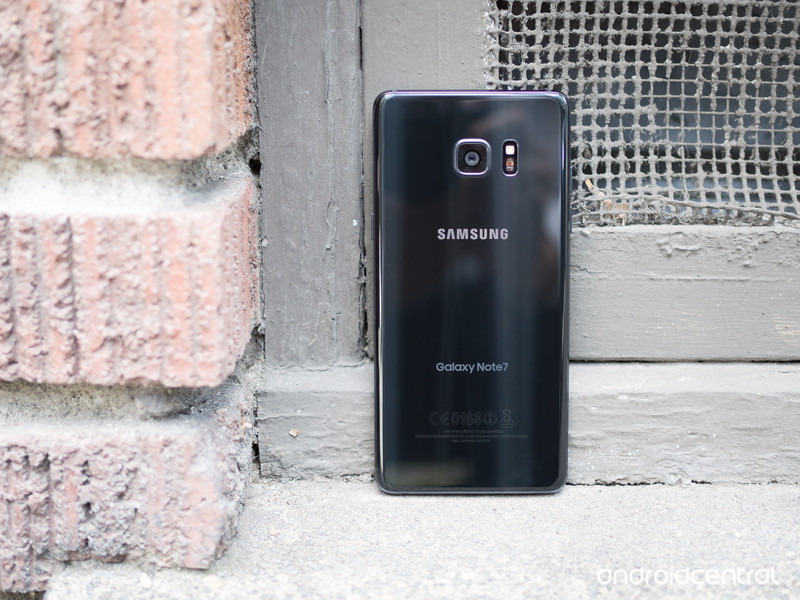
Samsung is rolling out an upgrade program to South Korean Note 7 customers that have traded in their Note 7 handsets for an S7 or S7 edge. Customers joining the Galaxy Upgrade program will have to sign a two-year contract and pay monthly instalments on their current device (the S7 or S7 edge) for 12 months, after which they’ll be able to upgrade to the Galaxy S8 or Note 8 for free.
Those looking to upgrade to next year’s handsets as soon as they become available can do so by paying off their instalments ahead of time. Samsung is also throwing in fast track service and a 50% discount on display repair costs, which can be availed twice.
The program is open until November 30, and customers that have already exchanged their Note 7 are also eligible. By offering an easy way to upgrade to next year’s flagships, Samsung is looking to prevent customers from leaving en masse.
The program is now live in South Korea, and more details should be forthcoming shortly. There’s no word right now if Samsung intends to launch a similar program in other markets, but we’ll let you know if that’s the case. Also, today’s announcement means that the Note brand will live on.
Fujifilm X-T2 review: A new benchmark for the mirrorless market
It took us about three minutes to fall in love with the Fujifilm X-T1. So when we were first shown the Fujifilm X-T2 back in July it only took us about three seconds.
In many ways the X-T2 is the most advanced compact system camera offering we’ve seen, its goal firmly set on being the best mirrorless solution for continuous autofocus and subject tracking.
Like the X-T1, the X-T2’s key sell is not only that it looks retro cool in its weather-sealed skin, but that it delivers top-spec features. And with the new Boost mode the camera can whizz away, snapping eight frames per second (8fps) or 11fps with the optional battery grip attached.
However, there’s no touchscreen control, while that additional grip option transforms the camera’s capabilities to such a degree that it’s almost like contemplating two different camera purchases. Does that confuse what the X-T2 is all about, or does its potential duality further bolster its strengths?
Fujifilm X-T2 review: New layout
For the X-T sequel the layout has changed a little compared to the original – but it’s largely for the better. The dials are now bigger, fuller in both height and reach, with both the dedicated shutter speed and ISO sensitivity dials offering press-to-lock buttons to avoid accidental knocks.
Pocket-lint
The exposure compensation dial – like that of the Fujifilm X-Pro2 can cater for +/-3EV or +/-5EV via the custom “C” option – lacks such a lock/release mechanism, though. We’ve rarely knocked this out of place in our use, so it’s not a massive problem – but as there’s no alert light when the position is shifted away from “0” you might not know about it; the exposure meter overlay present in the viewfinder is small too.
The only true frustration about the dials are the ring selectors around them – used to select between drive mode and metering, respectively – being too squat in terms of height, thus really fiddly to manoeuvre. It’s not impossible, of course, and this ensures that you won’t slide out of single frame to high frame-rate burst by accident, for example.
Pocket-lint
Even so, the overall feel of the X-T2 is far more open than the previous model; more detailed. On the rear there’s a toggle dedicated for autofocus point adjustment, as pulled from the X-Pro2 model. It’s a small toggle compared to what you might find on a Canon DSLR, such as the EOS 5D MkIV, but on the Fujifilm it’s incredibly useful.
Fujifilm X-T2 review: Screen and viewfinder
Another area where the X-T2 amps things up is with its new 3-directional LCD screen. This means it can be tilted vertically upwards and downwards or, via the flick of a switch to the screen’s side, horizontally to a right angle – which is handy for low-level portrait orientation work.
Pocket-lint
Thing is, this switch, like those ring selectors, is also fussy to handle – we would rather have seen a Pentax K1-style fully manoeuvrable one instead. Still, Fujifilm’s choice of tri-directional screen implementation isn’t just a first for the company, it’s the first time we’ve seen one in any camera. And the chances are you’ll typically use it in one direction or another anyway, depending if you’re more heavily portrait- or landscape-orientation based when shooting.
Having been using the X-T2 while abroad we’ve found the screen to be hugely useful for waist-level work – although it’s a shame it doesn’t pull away farther for an even better view, largely because the viewfinder eyecup can get in the way of vision. And we really can’t fathom why there’s still no touchscreen.
Pocket-lint
In an attempt to be battery savvy, the X-T2 also employs a low screen refresh rate when it’s not in use after a short period of time. We’re often guilty of leaving the screen on between shots, so while the idea is a good one we find its rapid implementation to be a little irksome – it’s not nice to watch a stuttery refresh rate. A half depress of the shutter button will kick things back into action though. Equally when the camera times out and goes to sleep a hard press of the shutter is needed to reactivate – and it’s not especially fast to fire back up.
The viewfinder in the X-T2 is a stormer. The X-T1 set the benchmark for this when it was launched in 2014 – and the X-T2 picks up where that camera left off. The main take-away point is how large the panel is: its 0.77x magnification makes it as physically large to the eye as a professional DSLR would offer. Add to that a high-resolution 2.36m-dot OLED panel and there’s certainly no lack of resolution. The X-T2 is twice as bright as the X-T1 and offers a higher refresh rate too (well, if Boost mode is activated anyway: that sets it to 100fps refresh rather than 60fps).
Pocket-lint
Our one and only qualm with the viewfinder is its activation speed. There’s an eye-level sensor that can automatically kick the panel into operation, but the minor delay means you’ll be staring into darkness for a short moment before things kick off. The only remedy, really, is the leave the viewfinder active all the time (by disengaging the screen via the “viewfinder” button to its side).
Fujifilm X-T2 review: Performance
Which leads us onto the more complex and detailed stuff in the X-T2’s continuous autofocus settings: this camera wants to be seen as akin to a high-end DSLR in its continuous autofocus adjustment options.
Pocket-lint
There are options to tweak tracking sensitivity for subjects entering ahead/behind the current subject, speed tracking sensitivity for steady or fast-accelerating/decelerating subjects, and zone area switching to prioritise subjects based on zonal positions. Confused yet? You needn’t be: the camera is setup with five pre-sets and a sixth custom setting so you can do as you please with the controls.
Which is all well and good, but there’s not the same degree of precision in the X-T2’s autofocus system to see it quite keep those pro DSLR cameras at bay. Sure, it’s the best we’ve seen in a compact system camera, but it’s still short of the mark in some areas. It doesn’t feel as comprehensive as the 3D tracking you’ll find in, say, the Nikon D500.
The reason is pretty simple: the focus point size lacks pinpoint accuracy, while the camera itself may slightly miss focus lock-on and you’ll end up with an object in front being the focal point. It’s slight, and we’re being critical, but even with those various tracking sensitivity options we’ve not always come up trumps with perfect shots.
Pocket-lint
The flip side to that is how much better than X-T2 is than earlier mirrorless models. It’s streets ahead when it comes to quickly locking onto a subject and holding it. Shooting cyclists whizzing down the streets of Shanghai on their electric bikes, for example, wasn’t a problem even when panning fast – so long as the shutter speed value is set correctly (something the X-T2 is so well setup for, given its manual layout).
Switching to single autofocus – which can be actioned by flicking the S/C/M switch on the front of the camera, it’s as easy as that – puts the full 91-point system at your fingertips. It’s easy to adjust point selection and point size using that rear toggle and the thumbwheels. Like we say, a slightly more pinpoint option – much in the same way as Panasonic offers with its G-series, such as the latest Lumix G80 – would elevate precision to an even higher level.
Pocket-lint
Otherwise, on the whole, the X-T2 does a grand job. It rarely has to hunt for focus, with only a few failed instances occurring during our testing. And with the 16-55mm f/2.8 lens the close-up focus distance is somewhat restricted – but that’s lens dependent rather than indicative of the camera itself.
Fujifilm X-T2 review: Battery grip enhancements
It’s not all entirely that simple, however, as the camera’s burst speed and continuous autofocus ability can be considerably enhanced with the addition of the VPB-XT2 battery grip. Not only does this bring two extra two batteries (totalling three) to the party for added longevity, it can also boost burst shooting maximum to 11fps (from 5fps/8fps).
Pocket-lint
The X-T2 has continuous autofocus that is potentially some six times more capable than the X-T1. As an example, Fujifilm demonstrated how the boost in processing, reduced shooting interval, blackout time and shutter time-lag would free-up more time in a 3fps burst to allow six opportunities to refocus in the X-T2, compared to the X-T1’s one opportunity (because of slower processing, and longer interval/blackout/lag times).
As the burst speed increases the number of opportunities for refocus to be possible within a burst are reduced, but Fujifilm still cites that 5fps on the X-T2 is twice as capable as in the X-T1. We’re talking accuracy here, as the system has those additional opportunities to refocus on a moving subject.
Which is all well and good, but the benefit above 5fps isn’t as significant. Furthermore, relying on an accessory grip to enhance functionality is a bit of a nonsense in some respects, given how radically the addition transforms the product. It’s almost as though Fujifilm has made two products in one, with two different target audiences.
And if you’re in the group of the battery grip then you’ll probably find its design limiting: it doesn’t extend the height of the camera grip sufficiently enough, which makes it rather uncomfortable to use, as there’s no space for the pinky.
Pocket-lint
If you don’t use the grip then a Boost mode does also exist in the standard X-T2 setup to up the finder refresh rate to and maximise burst shooting to 8fps. There are so many tiers to the X-T2’s capabilities depending on setup that it can come across as simply confusing.
So if shooting moving subjects is what you’re all about then you’ll not only want the X-T2’s battery grip – you’ll need it.
Fujifilm X-T2 review: X-Trans image quality
The remainder of the X-T2’s innards will be familiar to any X-Pro2 users: there’s the same 24.3-megapixel X-Trans CMOS III sensor, paired with X-Processor Pro, for ultra high-quality images. And we’ve been sold on this sensor since first using it.
Pocket-lint
Compared to the X-Pro2, the X-T2’s sensor has been tweaked slightly, with the on-board phase-detection autofocus area increased to 75 per cent vertical and 50 per cent horizontal – up from 40 per cent both directions in the X-T1. That expands the most responsive focus area to ally with the continuous autofocus options. In many ways it makes the X-T2 more “pro” than its “Pro2” brother.
The results, however, are largely one and the same. And they’re pretty mind-blowing at times. Fujifilm’s handling of dark shadow areas even at high ISO sensitivities is excellent, keeping colour noise at bay and maintaining richness and contrast that some competitors lack. That stands true right through to ISO 6400. Long exposures can look a little banded, however.
Pocket-lint
The lowest ISO sensitivities hold the most detail, although it’s a shame ISO 200 is the base level sensitivity for this camera. There is a low “L” setting on the ISO dial, but you won’t get the same dynamic range from such shots, which could be a problem when shooting raw and hoping to make adjustments.
There’s lots of colour without things looking overdone, although sometimes the default contrast is a little too harsh – this can be adjusted by selecting different Film types within the menus.
When it comes to detail the full-scale 24MP shots look great. It’s only when zooming in to inspect detail much closer that you’ll spot any degradation in quality due to processing as the ISO sensitivity rises. It’s only really by four-figure ISO sensitivities that you’ll start to see mottled textures or processing artefacts around defined subject edges, or heightened softness as a result of processing. It’s not particularly severe, however, with shots at ISO 6400 holding up well – so long as you’re not expecting flawless detail at every point.
Pocket-lint
As we said of the X-Pro2 there is some dependency on lens choice. The XF lenses in the Fujifilm stable are, by and large, aimed at the higher end, but they do carry their own issues from time to time: the 35mm f/2.0 has fairly severe corner softness, for example; the 100-400mm, while decent, is relatively limited in maximum aperture (at f/4.5-5.6) throughout. Pick lenses critically and learn their strong points and weaknesses for the best results. Centre sharpness, though, is something we can’t complain about from the 16-55mm f/2.8 lens though (it’s only really the weight and size of it that can feel off-kilter with a camera like the X-T2).
In addition to stills, the X-T2 also intros 4K video capture. It’s the first time it’s been offered in a Fujifilm camera. So it’s odd, then, that there’s no one-touch movie button control like the earlier X-T1. There’s full F-Log Gamma options, in among “Quick 4K” which means Film Simulation modes can be used during capture too, for graded-like results without the need to post-process. A 4:2:2 HDMI output for serious shooters looking to capture off-camera, plus 3.5mm headphone and microphone jacks, makes the X-T2 high-end in its thinking. Oh, and lets not forget the twin UHS-II-compatible SD card slots on board too.
Pocket-lint
Verdict
In some respects the Fujifilm X-T2 is so good that it nudges the grander-named X-Pro2 off the company roster’s top spot. It’s a camera that takes the earlier X-T1’s mantra and magnifies it considerably.
If you want the best continuous autofocus of any mirrorless camera then look no further the X-T2. Equally, if you’re seeking a top level, yet portable, interchangeable lens camera then the great build, performance and imaging results make this an obvious shortlist contender.
It’s not totally perfect, but most of our moans – no pinpoint focus, the potential confusion of Boost mode and the additional battery grip, continuous autofocus not outsmarting a top-end DSLR, lack of a touchscreen, plus some control foibles – are all minor points that can’t quite detract from what a world-class act the X-T2 is.
The X-T2, in many respects, sets a new benchmark for the mirrorless market.
Best Smarthome Device 2016: EE Pocket-lint Gadget Awards nominees
The Pocket-lint Gadget Awards will take place at the end of November and that means we will soon be finding out the winners of the 14 categories ranging from smartphones to smarthome. Each category has been narrowed down to between five and seven nominees from the hundreds of devices we have reviewed over the last 12 months.
As always, we have been running a series of features detailing the nominees within each category in a little more detail in order to help you with your voting decision. You can find all the previous features in our Awards hub, but here we are looking at the Best Smarthome Device nominees.
The smarthome category was introduced to the Pocket-lint Gadget Awards in 2014 but things have certainly become a lot more interesting since then. Devices are now more advanced and while there is still a way to go before a smarthome is second nature, there are some great products in this category this year. Amazon announced Echo and its Alexa assistant to the UK, while Dyson introduced its version of a robot vacuum cleaner.
There can only be one winner though so click here to see the Awards nominees for 2016’s Best Smarthome Device in a little more detail to help you make your mind up about which one should get your vote.
Voting in the 13th annual EE Pocket-lint Awards is now open so you can let us know which one of these great devices you think should win the Best Smarthome device award for this year and give us your verdict on all the other tech across the 13 select categories.
Winners will be announced at the exclusive event in London on 23 November in association with EE. For now, keep an eye on the EE Pocket-lint Gadget Awards 2016 hub for all the latest on how the voting works, who the elite judges are and the EE Pocket-lint Gadget Awards shortlist.
Samsung confirms Galaxy Note 8 with Note 7 trade-in programme
Samsung’s reputation, like the Galaxy Note 7, has gone up in flames in the past couple of months. The company’s long-awaited and highly successful phablet had too many hardware issues and complaints of overheating that production had to be stopped.
- RIP Samsung Galaxy Note 7: A eulogy for a great but flawed friend
To try and regain customer loyalty, in South Korea for now at least, Samsung is offering anyone who bought a Note 7 the opportunity to get a Galaxy S7 or Galaxy S7 Edge for half price. Once they have an S7, they could then upgrade to a Galaxy S8 or Galaxy Note 8 when they’re released in 2017.
While it could be seen as a welcome move and encourage customers to stay with Samsung, instead of turning to another Android device or even Apple, it’s also confirmed there will be a Note 8.
There’s obviously no mention of specs or features for now, but we’re hoping the Note 8 can at least arrive to market with a battery that doesn’t overheat or explode. Samsung hasn’t confirmed whether the trade-in programme will be rolled out globally.
If you were one of the unlucky customers to buy a Galaxy Note 7 but still want a great plus-sized smartphone, you can check out our list of the best ones to buy right now.
The Morning After: Monday October 24th 2016
Happy Monday. Over the weekend, we sampled smart-refrigerated wine, looked back on 15 years of iPod, and asked Amazon’s AI to fact-check politicians for us. Coming up this week: Apple’s MacBook event, some news from Microsoft, and a lot of companies reporting on their quarterly earnings — if you’re all about gross revenue and such.
‘schpensivePlum is the $1,500 smart wine fridge you can’t afford

Engadget editors run the gamut, from whisky connoisseurs to those looking for “whatever’s got the most booze in it.” We like the idea of Plum: a smart fridge aimed at making your wine taste the best it possibly can. It’ll even dispense it for you. (No, it doesn’t take wine boxes.)
Digital music was changed forever.The iPod: 15 years on

It’s been 15 years since the launch of the first iPod, the device that would lead to the iPhone, the iPad, iTunes music, and myriad other ways of taking our money. A lot has changed since then, but we all have a lot to thank Apple’s debut MP3 player for.
Compromises.Review: Razer’s latest gaming rig tries to deliver desktop gaming power and an ultraportable notebook
The Razer Blade Stealth gaming laptop has a powerful pitch: a portable, powerful notebook that could dip into the power of desktop-class graphics cards, changing it into a gaming powerhouse. Sean Buckley discovers that there are some caveats — most notably the poor battery life when the laptop is away from your desk.
Alexa is on it.Amazon’s talking speaker can now fact-check your leaders
The new Amazon Echo skill lets you fact-check any politician scrutinized by PolitiFact, FactCheck.org or the Washington Post — if that’s your idea of a fun Monday morning task.
But wait, there’s more…
- Samsung’s rushed Note 7 recall has had an effect on the Galaxy S8 — already
- Finally, ‘The Last Guardian’ is ready
- Elon Musk’s moon colony would rely on a lot of mining robots
- Nintendo’s new console won’t play your old carts and discs
Singapore will trial a full-size autonomous bus
Singapore will trial a pair of driverless buses. No, not micro buses, nor “Ollis” — full-sized buses, measuring 12 meters (40 feet) long. The vehicles will operate in the Jurong West region of Singapore, where the island’s Nanyang Technological University (NTU) is situated.
The buses will ferry up to 80 people between NTU and the neighboring “eco-business” hub CleanTech Park — around a one-mile journey. The team behind the trial is also considering servicing a nearby train station, which would extend the route to around a 5-mile round trip. The vehicles will charge at depots and at bus stops via charging masts.

It won’t be the first trial of a full-sized autonomous bus. Among others, Mercedes-Benz’s Future Bus took a 12-mile ride around Amsterdam back in June. Nonetheless, Singapore is something of a hotbed for autonomous vehicle testing. NTU and CleanTech Park have hosted a driverless Navia shuttle for three years now, while this year alone authorities have green lit trials of autonomous pods and nuTonomy’s self-driving taxis. (One of those taxis was recently involved in a minor accident, but the trial continues).
“Current efforts worldwide have been focused on cars,” NTU’s vice president of research Professor Lam Khin Yong told Channel NewsAsia. “So, this autonomous bus trial is the first of its kind in Singapore that will aim to improve road safety, reduce vehicle congestion, alleviate pollution and address manpower challenges.”
Source: Channel NewsAsia
Apple Sponsoring Annual Fashion Met Gala for Second Year Running
The Metropolitan Museum of Art has shared details on its annual 2017 Gala and Costume Institute exhibition, where Apple will be a sponsor for the second year running.
The 2017 event, which will take place on May 1, will have a focus on fashion designer Comme des Garçons’s Rei Kawakubo, who will also co-chair the event, alongside Katy Perry, Pharrell Williams, and Vogue editor Anna Wintour. Proceeds from the event go to the Metropolitan Museum of Art Costume Institute.
Image via Vogue
Last year’s fashion/tech themed event was co-chaired by Apple design chief Jony Ive, alongside Taylor Swift, Idris Elba, and others. The intersection of technology and fashion was a fitting choice for Apple’s co-sponsoring the 2016 event, as the company came out with its first fashion item, the Apple Watch, in 2015.
Apple’s continuing support for the gig outlines its deepening ties with the fashion industry, with the company’s timepieces turning up on the wrists of celebrities and in glitzy magazines, Apple stores taking a page out of Burberry’s fashion playbook thanks to Apple retail head Angela Ahrendts, and even audio accessories like Beats headphones becoming fashion statements.
Discuss this article in our forums
OnePlus 3T with Snapdragon 821 processor inbound?
The OnePlus 3 is one of our favourite smartphones of 2016 and as such, is nominated for a Pocket-lint Award, but that seemingly hasn’t stopped OnePlus wanting to make it even better.
- OnePlus 3 review: The flagship killer we’ve been waiting for
The current OnePlus 3 has a Qualcomm Snapdragon 820 processor coupled with 6GB RAM as it was released before Qualcomm released the 821. OnePlus is now expected to release the 3T smartphone with the new Snapdragon 821 processor.
A OnePlus phone with the model number A3010 has already passed through the China Compulsory Certification, which is China’s version of the FCC in the US that has to approve smartphones.
A OnePlus designer is also claimed to have confirmed a new device from his Weibo account, and the device he used to post the confirmation is said to be the OnePlus 3T.
All other specs are expected to stay the same, which is no bad thing considering there’s 6GB RAM, HD AMOLED display, fingerprint scanner and aluminium unibody design.
There’s no word on when the new phone will be released or if it will make it to Europe, but seeing as it’s pass through China’s approval system, it shouldn’t be too long before we see it.
Linux exploit gives any user full access in five seconds
If you need another reason to be paranoid about network security, a serious exploit that attacks a nine-year-old Linux kernel flaw is now in the wild. The researcher who found it, Phil Oester, told V3 that the attack is “trivial to execute, never fails and has probably been around for years.” Because of its complexity, he was only able to detect it because he had been “capturing all inbound HTTP traffic and was able to extract the exploit and test it out in a sandbox,” Oester said.
The kernel flaw (CVE-2016-5195) is an 11-year-old bug that Linus Tovalds himself tried to patch once. His work, unfortunately, was undone by another fix several years later, so Oester figures it’s been around since 2007. The problem is a so-called race condition in the Linux kernel’s memory system, that breaks during certain read-only memory operations, according to Red Hat. “An unprivileged local user could use this flaw to gain write access to otherwise read-only memory mappings and thus increase their privileges on the system.”
Torvalds points out that the race condition flaw used to be “purely theoretical,” but is now easier to trigger thanks to improved VM tech. Keepers of the Linux kernel have patched the bug (dubbed “Dirty COW,” for copy-on-write) and distributors like Red Hat, which classified the bug as “important,” are working on updates. “All Linux users need to take this bug very seriously, and patch their systems ASAP,” says Oester. He adds that the packet captures that helped him spot the exploit “have proved invaluable numerous times. I would recommend this extra security measure to all admins.”
(Thanks, Kristy.)
Via: Ars Technica
Source: V3
 AIVAnet