


‘Dishonored 2’s’ live-action trailer is all about glorious revenge
Just as we saw with Fallout 4 last year, Bethesda is hoping to amp you up for Dishonored 2 by making it seem more real with a live-action trailer. The two-minute piece is narrated by Emily, the kidnapped princess you rescued in the first game, who lays out her drive for revenge like Game of Throne’s Arya Stark. They killed her mother; took her kingdom; and framed her friend (Corvo, the bodyguard assassin who returns for another round of fun) for murder. Now she’s back to take what’s hers.
In the run-up to Bioshock Infinite, the original Dishonored was something of a surprise. It was an action game that offered plenty of choices, both in terms of how you played it (you were free to be bloodthirsty, stealthy or something in between), and how you handled major choices. Based on what we’ve seen from other videos, it looks like Dishonored 2 is doubling down on that freedom with even more ways to slaughter (or trick) your enemies, including the casual use of time travel.
Dishonored 2 hits stores on November 11th.
Scientists map the Milky Way Galaxy in exceptional detail
There have been detailed maps of the Milky Way before, but none quite so ornate as this. Researchers in the HI4PI sky survey have created a fine-grained map of our home galaxy using its most common material: neutral atomic hydrogen. Such studies have taken place before, as you might guess. However, the use of 10 billion data points from large radio telescopes (the Parkes Observatory and Effelsberg 100m) and noise-filtering algorithms have produced an image with twice the sensitivity as the previous best, and four times the angular resolution. The result? A view of the Milky Way so comprehensive that you can finally see the finer details of cloud structures in between stars — they were too blurry before.
The info isn’t just useful for visualizing humanity’s cosmic neighborhood, of course. Those structures likely helped form stars in the Milky Way for billions of years, so they could offer insight into the galaxy’s development. It could help us understand the rest of the universe, as well. As everything we can observe passes through that hydrogen, knowing its concentrations will help scientists correct their findings. It’s like cleaning a window, the study’s Dr. Benjamin Winkel says. The map and its data will be freely available to researchers around the world, so you could see a wave of discoveries that were previously held back by limited maps.
Via: CNN
Source: ICRAR
Samsung’s Galaxy Tab A grows a bit, gains a pen
With the Galaxy Note 7 still making headlines, Samsung is ready to divert some of America’s attention to another big screen with a pen: the 10.1″ Galaxy Tab A will be available stateside starting October 28th. Samsung’s latest tablet to hit American shores comes with a slightly larger, slightly higher definition screen than last year’s model, and the company’s S Pen stylus now comes standard.
Powering the new 1920×1200 WUXGA screen is an Octa-core Exynos 7870 processor with 3 GB of RAM and 16 GB of on-board storage, with support for up to 256 GB more in the microSD slot. There’s an 8 megapixel camera for photos, plus a 2 megapixel front-facing camera for selfies and video calls. Weighing in at 1.22 pounds, Samsung claims you’ll get around 14 hours of internet time out of the 7,300mAh battery — or about an hour less if you’re binge-watching video. For connectivity, the Tab A gets all the standard WiFi protocols, Bluetooth 4.2 LE and USB 2.0 for charging, but there doesn’t appear to be an LTE version available just yet. Finally, for excited Android Nougat adopters, the Tab A ships with 6.0 Marshmallow so you’ll have to wait for the update from Samsung at some point in the future.
The Tab A comes in two colors – your standard black and white – and will retail for $349.99 starting this Friday at Samsung.com and select shops.
Uranus might have two more moons
NASA launched its two Voyager probes almost 40 years ago, sending the first on a more direct route out of the solar system. Voyager 2 took a longer route to survey Neptune and Uranus in 1986, becoming the first and only spacecraft to fly by the ice giants. Scientists continue to comb over that data, and they might have just made a discovery from the 30-year-old recordings: Two additional moons orbiting Uranus, bringing its total to 29.
Cornell researchers were surveying Uranus’ rings when they found that the amount of material in its alpha ring varied periodically; He found the same when examining its beta ring. That asymmetry could be as-yet undiscovered moons within the rings, which Chancia and his partner estimate to be 2-9 miles in diameter, which are about the size of Saturn’s moons.
Voyager 2 measured the rings by firing radio signals through them back to earth as well as measuring light shined by background stars onto the orbiting matter, which helps reveal how much material is present. The potential satellites popping up in Uranus’ data are similar to quasi-moon structures in Saturn’s rings called moonlet wakes.
The ice giant’s rings are notably more narrow than Saturn’s, but the new structures might explain that by acting as “shepherd” moons that keep the circular material from spreading out. Two of Uranus’ 27 known satellites, Ophelia and Cordelia, do this for the planet’s epsilon ring.
The researchers didn’t actually find the rings, just the data supporting their likely existence. Further study and visual confirmation awaits other scientists, as the Cornell team remains committed to studying Uranus’ ring phenomena and whatever they reveal about their home planet.
Via: Phys.org
Source: Cornell University Library
Smartwatch shipments dropped ahead of new models
The smartwatch market isn’t quite as red-hot as it looked in recent months. IDC estimates that smartwatch shipments fell by just shy of 52 percent year-over-year in the third quarter of 2016, with the biggest names often being the hardest hit. Apple was still the top dog, but its shipments fell almost 72 percent to 1.1 million. Samsung’s shipments were virtually flat, while Lenovo and Pebble saw their unit numbers drop sharply. Interestingly, the only company in the top five to see a big surge was Garmin — the relative newcomer’s shipments more than tripled to 600,000. Should the industry be worried? Not necessarily.
The problem, appropriately enough, is timing. The periods aren’t strictly comparable — many manufacturers had just launched new watches last summer, but had nothing new to show (or had barely started deliveries) a year later. The original Apple Watch was widely available in Q3 of 2015, for instance, but Series 1 and Series 2 models didn’t arrive until the last two weeks of this past quarter. Samsung has yet to ship the Gear S3, there was no third-generation Moto 360 and Pebble only started shipping its newest watches in September.
This doesn’t mean that you can expect a year-over-year recovery in the fourth quarter. It’s possible that the enthusiasm for smartwatches has cooled off, and that we’re seeing what the market is really like now that early adopters have devices on their wrists. There should at least be a season-to-season improvement, however, thanks to both new hardware and the usual holiday rush. And the smartwatch field is still young. Even veterans like Pebble and Samsung are still trying to figure out what works, and the technology is still new enough that features like GPS and LTE data are still big deals whenever they show up.

Via: TechCrunch
Source: IDC
Twilight: filter your phone’s blue light for a better night’s sleep

Developer: Urbandroid Team
Price: Free w/$2.99 Pro unlock
Category: Like to sleep better
What you need to know
No, this is not the tween 2010 vampire vs werewolves movies. This is the Twilight app. Do you use your phone at night? That was obviously rhetorical, of course, you do! If you are anything like me, your phone screen is the last thing you see before you close your eyes at night whether you are reading the Bible app, a news article, setting your alarm for the morning, or checking Facebook. But did you know that your phone emits blue light that can cause you to sleep uneasily? “Recent research suggests that exposure to blue light before sleep may distort your natural (circadian) rhythm and cause inability to fall asleep.The cause is the photoreceptor in your eyes, called Melanopsin. This receptor is sensitive to a narrow band of blue light in the 460-480nm range which may suppress Melatonin production – a hormone responsible for your healthy sleep-wake cycles.”
Twilight takes that blue light out of your phone screen by overlaying a red colored screen over the entire display. It is kind of hard to explain so let me show you.


See! It’s red! The first picture is with Twilight on and the second is with it off. Within the settings, you have the ability to turn up and down the intensity at which Twilight will overlay. The picture above is at about 40%. Now I know what are thinking, I’m not going to remember to turn this on every night. Well to that I say, “You are in luck!” Twilight can be set up to turn on at sundown and turn off at sunup. I know, amazing, right?
There are other ways to have the app turn on and off if you so choose. You can have it always on, have it detect your alarms, they suggest you use their alarm app called Sleep As Android for this setting to work the best, and there is also a custom setting that lets you set any time you want it to turn on and off.


As you can see in the tutorial for the app, there is some good info on why this app can actually help you get better sleep. There is also a warning, because of the screen overlay, you may see some issues when installing apps or even opening some apps that don’t allow a screen overlay. I know, for instance, I have to pause Twilight to open my Capital One app. This is no big deal, though. All you have to do is pull down the notification shade and tap the pause button. Just remember to pull down that shade again when you are done to un-pause Twilight.


If you like digging deeper into app settings you can also go to more settings and turn on the exclude apps from filtering option. This will prompt you to allow Twilight access to accessibility settings. Once that is done you can go through and check mark any apps you know will need the overlay turned off. Twilight will then know to turn off automatically and also turn on by itself when the specific app is closed. That’s it, set it and forget it.
This app seems like something you don’t need, but I have used it for the last six months and, when it’s not on, I really miss it. Give it a try and I bet you won’t want to turn it off either.
Download from the Google Play Store
I used a Pixel XL for 4 days and all I want is a Note 7

In many ways, Google Pixel is the best phone I’ve ever used. However…
Google Pixel is priced at a point where people expect a premium experience — and in many ways, Google has delivered. The aluminum body looks and feels nice, the software is incredibly smooth and capable, the camera is out of this world excellent almost every time, and the battery life is on the higher end of functional. This is a great phone, and when you factor in security updates this is going to be the phone I recommend to people for a long time.
That said, over the last few days I found myself missing the kitchen sink of features that comes with owning a Galaxy Note 7. Before it was the laughing stock of the world for occasionally turning into a heap of molten slag, the Note 7 had some lessons to teach every other phone.
“Pro” camera mode

Google’s camera app for the Pixel couldn’t be easier to use, and the shots you get from this phone are incredible, but I want more. Specifically, when I took a trip out to the middle of nowhere to play with light painting I was reminded that there’s no way to do that in Google’s stock camera. You can install other apps to accomplish long exposure shots, but you’d think a phone trying to offer a premium experience would bake something like that in right?
Samsung’s camera app isn’t the easiest to use, but the ability access Pro mode and gain remarkable control over your photography is one of the things that makes the S7, S7 edge, and Note 7 so great. It’s a fairly small thing overall, but useful when you need it.
Expandable storage

Especially now that Google has made it possible to add storage to your phone in a permanent fashion, WHY hasn’t Google seen fit to add removable storage to their big flagship phones? Why bother with the feature if you’re not going to use it?
Samsung doesn’t offer Adoptable Storage by default on their phones, but there’s so much you can use the SD card for now that cameras are recording in 4K and taking enormous photos with RAW support baked in. It’s there if you need it, which is what you expect from a premium phone!
Wireless charging

I don’t fault Google for not including wireless charging in a phone with a metal body, because no one has fully implemented that feature yet and I personally prefer the metal body on the Pixel to the slippery glass on Samsung’s lineup, but it’s still a great feature. Google’s lack of wireless charging in the last few phones has been a bummer, and something a lot of people were hoping would come back with the Pixel phones.
Samsung, on the other hand, has been crushing it with wireless charging. Not just regular wireless charging, but fast wireless charging that really makes a difference. There’s a big part of the wireless charging experience that is greatly improved with the newer rapid chargers, making it much easier for people to consider adopting with new phones.
Waterproof body

Welcome to 2016, where IP53 is not acceptable in a phone with a premium price tag unless the Google logo is on the back? That seems odd, right? HTC was slammed for this same water and dust rating on their most recent phone, and despite being a great piece of hardware no one bought it because it was so expensive. The mental gymnastics require to praise the Pixel without talking about water resistance but slam the 10 for being too expensive for what you get are impressive.
Meanwhile, on Samsung’s phones you can watch Alec Baldwin in what is probably the best performance of his career on SNL while sitting in a hot tub. While not something you should do every day, it’s the kind of thing you should expect on a phone with one of the highest price tags on the market.
Is this a premium phone?

I’ve been beating up on the Pixel here a little, but it’s important to point out the things you get for “free” on this phone contributed to the seemingly inflated cost. Unlimited lifetime storage for full res photos and video is insanely great. Free 24/7/365 phone support with live video mirroring is a big deal. You get these things on top of a phone that offers a ridiculously good fingerprint scanner, one of the better displays you can buy in a phone, an insanely good camera, and a battery that will easily get you through the day.
This is a fantastic phone, but there’s clearly room for improvement and it’s important to remember that as we place this phone on its pedestal. And yeah, I miss the Note 7. I can’t have a Note 7 though, and the S7 edge isn’t nearly as comfortable to hold and use. So it’s a Pixel for me for now, in hopes that Google figures out how to really push for premium next time.
Google Pixel + Pixel XL
- Google Pixel and Pixel XL review
- Google Pixel XL review: A U.S. perspective
- Google Pixel FAQ: Should you upgrade?
- Pixel + Pixel XL specs
- Understanding Android 7.1 Nougat
- Join the discussion in the forums!
Google Store
Verizon
Save an additional $30 on the ad-powered Moto G4 at Amazon
Right now you can save an additional $30 on the ad-powered Moto G4 at Amazon, dropping the price to just $120. Normally, the 4th-gen Moto G retails for $199, but Amazon offers it with lock screen ads at a lower cost, as long as you are an Amazon Prime member. The phone features a 5.5-inch display, 16GB of storage, and comes unlocked to be used on the carrier of your choice.

This deal is only good for today, October 24, so be sure to act quickly if you are interested.
See at Amazon
Android Pay links up with Visa Checkout and Masterpass for quicker online payments
Google just loves making it even simpler to buy things online.
Alongside Google’s initiative to have Android Pay be a standalone mobile payment solution for e-commerce sites, it has also today announced a partnership that will let Android Pay users use their payment methods anywhere that Visa Checkout and Mastercard Masterpass are accepted. That means any site that has integrated with Visa Checkout or Masterpass is now available for you to pay via Android Pay on your phone once you link your accounts.
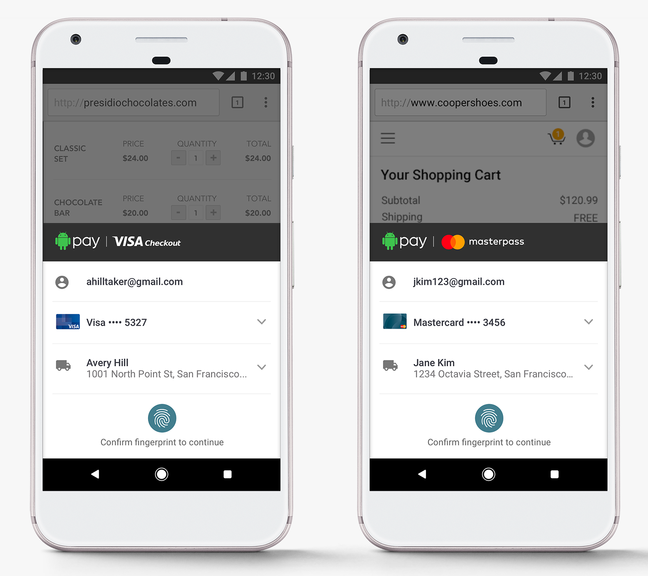
About as simple as online payments can get.
No more remembering individual logins for just one payment service or the other — if the site supports Visa Checkout or Masterpass, you’ll be able to pay with a couple taps and an authentication of your fingerprint on your phone. You won’t have to add your credit card numbers to another service or remember any more passwords.
The best part about the integration is that e-commerce sites don’t have to do any additional work to get it up and running either. Everything is handled on the Android Pay end. Buttons on the sites will be changed automatically, and soon every retailer that takes Visa Checkout or Masterpass will also be compatible with Android Pay.
The integration, according to Google, will be all finished early in 2017 so we unfortunately have to wait for a little while. But this integration with the massive presence of Visa Checkout and Masterpass adds a gigantic number of retailers much faster than Google could have done with Android Pay on its own. Keep on the lookout for the integration in the coming months.
Apple rolls out updates for the Watch and Mac
Apple launched updates on Monday for the Watch and Mac, mostly focused on squashing some bugs in each of the systems. The macOS Sierra 10.12.1 update adds an automatic smart album just for iPhone 7 Plus Depth Effect images, improves the security of Safari, fixes a glitch that caused text to paste incorrectly via Universal Clipboard, and improves the reliability of Auto Unlock with the Apple Watch. The macOS update also improves the compatibility of Microsoft Office with iCloud Desktop and Documents, and fixes an issue with Microsoft Exchange accounts preventing Mail from updating.
On the Watch side of things, update 3.1 improves battery life but doesn’t add any new features, according to release notes published on MacRumors. WatchOS 3.0 was a major overhaul and the latest update finesses some of its functions, squashing a bug that stopped the Watch Series 2 from charging fully, fixing another glitch that prevented Force Touch from working with some apps, and addressing one issue that made Activity rings disappear from the watch face. Also, the timer shouldn’t notify users twice once it’s finished anymore, Messages effects will work with Reduce Motion enabled and Watch wearers have the option to replay bubble and full-screen effects in Messages.
The Watch update is available across Series 2, Series 1 and first-generation models.
Source: MacRumors
 AIVAnet