


Surface Studio vs. the competition: Beauty isn’t skin deep
Over the past few years we’ve seen Microsoft take on the world of tablets with the Surface and, for those who prefer something more on the laptop side, the Surface Pro and Surface Book. But it hasn’t truly tackled desktops until today’s announcement of the all-in-one Surface Studio. As cool as features like the zero-gravity hinge might be, the Studio will be facing off against established lines like the iMac. We’ve assembled the specs of some of the leading 27-inch machines on the market and matched them up against the 28-inch Studio to see which is worthy of sitting on your desk.
Microsoft Surface Studio
Apple iMac
HP Envy 27
Dell XPS 27
Price
$2,999 / $3,499 / $4,199
$1,799 / $1,999 / $2,299
$1,300 / $1,500 / $1,700
$1,550 / $1,650 / $1,850 / $2,300
Dimensions
25.09 x 17.27 x 1.26 inches (63.73 x 43.89 x 3.22 cm)
25.6 x 20.3 x 8 inches (65 x 51.6 x 20.3 cm)
25.7 x 19.3 x 7.95 inches (65.28 x 49.02 x 20.19 cm)
26.14 x 19.32 x 9.44 inches (66.4 x 49.22 x 24 cm)
Weight
21.07 pounds (9.56 kg)
21 pounds (9.54 kg)
24.25 pounds (11 kg)
35.3 pounds (16 kg)
OS
Windows 10
OS X Sierra
Windows 10
Windows 10
Display
28-inch PixelSense touch
27-inch Retina 5K
27-inch LED touch or non-touch
27-inch IPS LED touch
Resolution
4,500 x 3,000 (192 ppi)
5,120 x 2,880 (218 ppi)
2,560 x 1,440 (109 ppi)
2,560 x 1,440 (109 ppi)
Processor
Intel Core i5 / Core i7
Intel Core i5 (3.2 / 3.3 GHz)
Intel Core i5 (2.2 Ghz) / Core i7 (2.8 Ghz)
Intel Core i5 (3.4 GHz) / Intel Core i7 (4 GHz)
Memory
8 / 16 / 32GB
8GB
8 / 12 / 16GB
8GB
Graphics
NVIDIA GTX 965M / 980M
AMD Radeon R9 M380 / M390 / M395
Integrated / GeForce GTX 950
Intel HD Graphics / NVIDIA GeForce GT 750M
Storage
1 / 2TB hybrid drive
1TB HDD (7200 rpm) / 1TB Fusion Drive / 2TB Fusion Drive
1TB (5400 / 7200 rpm)
1TB (7200 rpm)
Ports
USB 3.0 (x3), Mini Displayport, SD card reader
USB 3.0 (x4), Thunderbolt 2 (x2), gigabit ethernet, SDXC card reader
USB 3.0 (x4), gigabit ethernet, 3-in-1 card reader
USB 3.0 (x6), HDMI, gigabit ethernet, 8-in-1 card reader
Wireless
802.11ac, Bluetooth 4.0
802.11ac, Bluetooth 4.0
802.11ac, Bluetooth 4.2
802.11ac, Bluetooth 4.0
* Specs listed are standard configurations and don’t include upgrade options available at checkout. Width dimensions include the base.
Click here to catch all the latest news from Microsoft’s big Surface event.
Microsoft passes on updating the Surface Pro
Microsoft announced a flurry of hardware at its Surface event, but there was one very conspicuous omission: a new Surface Pro tablet. For the first time in a long while, a year will come and go without an updated version of Microsoft’s most iconic computer. There haven’t been any quiet spec bumps, either. The Surface Pro 4 still starts at $899 with a Core m3, 4GB of RAM and 128GB of storage, and higher-spec models have the same configurations as before. But why did the company pass on the opportunity?
We’ve asked Microsoft if it can comment on the lack of changes and will let you know if it has something to add. However, it wouldn’t be surprising if this is a matter of timing. Intel only just launched its 7th-generation Core processors at the tail end of August. That doesn’t leave Microsoft a lot of time to integrate the new chips into shipping products, especially for a popular and highly customized system like the Surface Pro 4. It won’t be surprising if there’s a sequel in the months ahead. Still, that’s not much consolation if you were really hoping to get a device upgrade before the year is out.
Click here to catch all the latest news from Microsoft’s big Surface event.
Source: Microsoft
Microsoft’s big-screen Surface Studio is an engineering marvel
Microsoft’s event unveiling the new Surface Studio just wrapped up, and we had a few minutes to stare straight into the gorgeous display of the company’s first “all-in-one” computer. Based on how Microsoft introduced this new product, the company really wants creators of all types to use the Studio, including visual artists, architects, writers or even accountants. The company thinks that being able to really immerse yourself in a display of this quality, size and capability will change how people do their work.
Unfortunately, in the glare-filled room, it was hard to get a sense of just how brilliant the display is — or what it’s like to really use the computer as Microsoft intends — but there’s no doubt this is an impressive canvas. The 28-inch, 4,500 x 3,000 display looks extremely bright and sharp, as you’d expect, and the degree of thinness here is just shocking. The relatively small bezels mean you lose yourself more in the screen than just about any other device out there.
And unlike many other devices that get thinner with no real reason, there’s an obvious advantage here: the thin screen plus the highly engineered arm and hinge system means it’s very easy to put this display at any angle you might want. Oddly, it reminds me a little bit of the iMac G4 that Apple made so many years ago — that sense of being able to manipulate and move the display into just the right position for the work you’re doing is unique.
All of the polish we’ve grown to expect from the Surface line is here in the Studio. The much-touted ability to tilt the screen down is as smooth as butter. And the display stays in place no matter what angle you set it at, while the hinge is strong enough to stay in place as you draw on it. Once you start to lean on it at all, you’ll end up with the screen as fast as it goes. Though, as we learned when trying it out, you’ll want to keep your desk clear below it if you want it to tilt down to the maximum 20-degrees — otherwise you’ll squash your keyboard or anything else around it.

Obviously, we haven’t had a chance yet to really put this machine through a rigorous test yet, but we did get to try out the pen and Surface Dial. The responsiveness of the Surface Pen feels even better than on the Surface Pro 4 and Surface Book. It could also be that having a sturdy surface and a large display make it easier to write on a touchscreen. But pressure sensitivity and overall response rate is excellent.
The Surface Dial feels entirely new — there’s very little to compare it to. It’s incredibly smooth to spin it, whether you place it on a desk or on the screen. And while there’s nothing that makes it adhere directly to the Surface Studio display, there’s some degree of friction that keeps it in place (when the computer is laying down, anyway). It’s really meant for you to hold up on the display as you’re using it. The Dial has different functions in every app, in Word it could help with formatting, while in Photoshop it can help you manage your palette. It feels pretty great in your hand, and rotating it is fairly smooth as well. But it seems there will be a bit of a learning curve for most people.
It’s going to be all up to developers to integrate the Dial in a way that makes it a compelling accessory, but we imagine at the very least Microsoft’s first-party apps will all have clever Dial functionality built-in by the time the Studio ships.

From a ports perspective, there’s not too much of note here — not surprising, given how small the actual box holding most of the components is. There are four USB 3 ports, an SD card slot, a mini Displayport connector, an ethernet jack and the critical headphone jack. It’s not a bad array, but a few USB-C slots probably wouldn’t have hurt.
Microsoft’s new wireless keyboard and mouse also feel pretty great, but that’s been true of their input devices for decades now. The keyboard has a nice amount of travel, making it easy to start pounding out sentences quickly with no issue. The mouse curves into your hand nicely, and has particularly satisfying clicks.
Ultimately, our first impressions of the Surface Studio are that it’s a remarkable piece of engineering, from the thin display to the hinge to the way the Dial interacts with the touchscreen. But it’s going to take a lot more time and testing to say if Microsoft’s vision of how people can use this computer to create and get things done makes sense. Though, even if you don’t want to put the screen down in canvas mode and start drawing on it, it still appears to be a hell of a computer, one that we’re looking forward to using more as soon as possible.
If you want to try it yourself, you can pre-order the Surface Studio starting today for $2,999, with delivery expected in mid-December. Microsoft did say that supplies will be limited this year, so if you really have your heart set on this machine, don’t dawdle.
Devindra Hardawar contributed to this report.
Microsoft’s 2016 Surface event by the numbers
Microsoft held its Surface 2016 event in New York on Wednesday and spent just over two hours showing off its newest laptop, the Surface Book i7, a slew of forthcoming VR headsets (not to mention a bunch of new ways to create content for them) and a ginormous digital drafting desk slash all-in-one computer, the Surface Studio.
Click here to catch all the latest news from Microsoft’s big Surface event.
Apple Said to Debut Three Glass-Backed iPhone 8 Models, Including New 5-Inch Size, in 2017
Apple is working on three new iPhone 8 models to be released in 2017, all of which will include glass-backed bodies, reports Japanese news site Nikkei. Previous rumors have also pointed towards three iPhone 8 models, but past information suggested that Apple would release one “premium” glass-backed model with an OLED display and two “standard” aluminum models rather than three models with a glass body.
Citing a supply chain source, Nikkei says Apple will release the three iPhones in the following sizes: 5.5 inches, 5 inches, and 4.7 inches. The site still believes one premium model with a curved edge-to-edge OLED display will be sold alongside two models that have standard LCD displays.
Edge-to-edge iPhone concept image via ConceptsiPhone
“Apple has tentatively decided that all the 5.5-inch, 5-inch and 4.7-inch models will have glass backs, departing from metal casings adopted by current iPhones, and Biel and Lens are likely to be providing all the glass backs for the new iPhones next year,” the source said.
All three iPhone 8 models will use glass supplied by Biel Crystal Manufactory and Lens Technology in China for both the front and back, which will be held together with an aluminum frame. Foxconn has been working on glass backs, but Biel is said to have the technological edge.
Because it is early in the development cycle, Nikkei warns that Apple’s plans could still change and it could decide to scrap plans to offer three devices. In 2016, early iPhone 7 rumors also pointed towards three devices, including one 4.7-inch iPhone and two 5.5-inch models, one with dual cameras and one with a single camera. The single camera model was reportedly scrapped six months ahead of the iPhone 7’s launch.
Rumors suggest Apple is planning on introducing significant design changes in the iPhone set to be released in 2017. Along with an edge-to-edge display that includes built-in Touch ID and other sensors, the device is said to include no Home button, advanced biometric features, an improved Taptic engine, and wireless charging.
Related Roundup: iPhone 8 (2017)
Tag: nikkei.com
Discuss this article in our forums
Microsoft Announces Surface Book i7, Desktop PC ‘Surface Studio,’ and Windows 10 Creators Update
At its media event today in New York City, Microsoft announced a new update coming to Windows 10 devices that’s focused on creativity and productivity tools, as well as two major new pieces of hardware: the Surface Book i7 and Surface Studio. The Surface Book is the second generation of last year’s original model, while the Surface Studio is the company’s all new, all-in-one desktop PC that’s aimed at the high-end, enterprise market with a starting price of $2,999.
Windows 10 Creators Update
Coming in early 2017, Microsoft today announced the newest update for Windows 10 devices, which it calls the “Creators Update.” In the update, the company aims to enhance user productivity with a collection of 3D creation tools, including a new update to Paint called “Paint 3D,” that use simplified interfaces to let anyone work and produce fully 3D artwork and projects. With a Windows Phone — and eventually coming to more devices — users can even scan real-world objects into digital form to send to friends and family.
Microsoft also showed off the upcoming “3D magic” in the Creators Update using Hololens, including a way for users to preview pieces of furniture in their own homes from a web browser. Windows 10 is gaining support for various VR headsets from companies like HP, Lenovo, Asus, and Acer, that all let users interact with the Creators Update’s “mixed-reality” abilities, including a feature called “Holo Tours” that transports Windows 10 users into 360-degree videos taken around the world.
Priority contacts will be placed on the Windows 10 toolbar in the Creators Update, making it easy to send documents, PowerPoint presentations, pictures, videos, and more by simply dragging and dropping the information onto the corresponding contact. Likewise, these contacts will gain urgent priority when sending anything to you so users can “cut through the noise,” and avoid missing emails and texts from close family and friends.
Surface Book i7
The first piece of hardware that Microsoft announced today was the Surface Book i7, which has doubled performance from last year’s model and an improved 16 hours of battery life, 30 percent more than the first generation. The laptop’s name comes from its included Intel Core i7 Processor, and Microsoft said the top-of-the-line version outperforms the high-end MacBook Pro three times over.

Surface Book i7 with Performance Base, which includes professional software meant for intensive tasks, starts at $2,399 (256GB with 8GB RAM) and goes up to $3,299 (1TB with 16GB RAM). The laptop will be launching next month, on November 10.
Surface Studio
As a companion to Surface Book i7, Microsoft also announced an all-in-one PC called Surface Studio that has the “thinnest LCD monitor ever built” and a 12.5mm thin touch screen. The 28-inch PixelSense Display has 13.5 million pixels and a feature called “TrueColor” that displays colors as close to they are in real life. The company said that there’s “no monitor like this on the planet.”
The PC can also fold down and lay at an angle, enhancing the “studio” aspect of the title and aimed at artists and drawing programs. The computer can be pushed down to a 20 degree angle using a “zero gravity hinge,” making it easy to adjust the viewing angle of the Surface Studio with just one hand. To help with adding new creation tools, Microsoft also introduced the “Surface Dial,” which can work off the Studio’s screen with various scrolling and adjustment controls.
When placed on the screen, the Surface Studio recognizes Surface Dial’s location dynamically and offers up new prompts, buttons, and toolsets for artists in apps like Photoshop. This allows users to “more seamlessly move through their workflow,” according to Microsoft, without having to fiddle with other toolbar options or programs while they’re working.

The Surface Studio’s processing unit is housed in the small silver box at its base. The cheapest model of Surface Studio includes an Intel Core i5 processor, 1TB SSD, 8GB RAM, and a 2GB GPU for $2,999. That jumps up to $3,499 for an Intel Core i7 processor and 16GB RAM, with the top-of-the-line model running for $4,199 with a 2TB SSD, i7 processor, 32GB RAM, and 4GB GPU. Pre-orders are up now, but the Surface Studio ships slightly later in the year, on December 15.
Miscellaneous
On the gaming side of things, the company said that the Creators Update will even stretch into the company’s Xbox platform, including a new focus on e-sports and streaming broadcasts through a new partnership with Beam. With a new tournament creation mode, users will be able to set up and customize brackets and invite their friends to duke it out in games like Killer Instinct, without having to focus on the administrative side of the experience.
Besides the Surface Book and Surface Studio, users can also pre-order the Surface Dial for $99, with an expected ship date on November 10. Anyone who pre-orders the Surface Studio will get a Dial included in the box. The company has updated its online storefront with information on all of the new devices, including a comparison chart for anyone trying to figure out which Surface is right for them.
Tags: Microsoft, Microsoft Surface
Discuss this article in our forums
Apple Releases Safari Technology Preview 16 With Bug Fixes and Feature Tweaks
Apple today released another update for Safari Technology Preview, the experimental browser Apple first introduced in March of 2016. Apple designed the Safari Technology Preview to test features that may be introduced into future release versions of Safari.
Safari Technology Preview release 16 includes bug fixes and updates for URL parser, Gamepad API, CSS, Media, Fetch API, JavaScript, Web APIs, Web Inspector, and Accessibility.
As of release 14, Safari Technology Preview includes regular updates and bug fixes for Safari’s WebDriver implementation.
The Safari Technology Preview update is available through the Software Update mechanism in the Mac App Store to anyone who has downloaded the browser. Versions are available for developers running both macOS Sierra and OS X El Capitan. Full release notes for the update are available on the Safari Technology Preview website.
Apple’s goal with Safari Technology Preview is to gather feedback from developers and users on its browser development process. Safari Technology Preview can be run side-by-side with the existing Safari browser and while designed for developers, it does not require a developer account to download.
Tag: Safari Technology Preview
Discuss this article in our forums
No lasting damage: Samsung users stay loyal after Note 7 recall [Infographic]
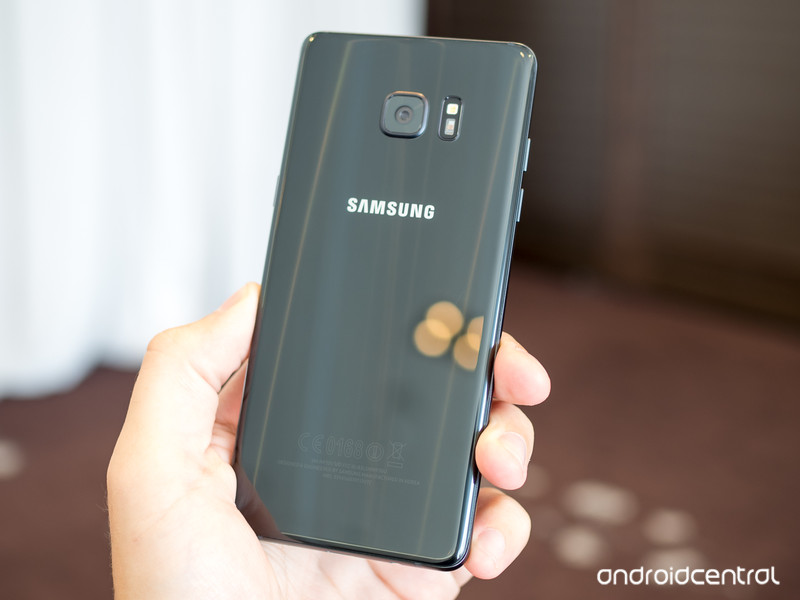
How did Samsung handle the Note 7 recall? Pretty darn well, according to you.
Earlier this month, Android Central asked you, our readers, to take a survey about how Samsung’s Galaxy Note 7 recall affected you and your perception of the company and its products. The response was impressive, with over 8,300 people taking part in the survey.
The results were also surprising. Of course, Android Central has a very specific audience, one that hews closely to the idea of the “enthusiast” phone user, but even with that selection bias, the data was interesting for a number of reasons. Most of the respondents were also based in North America, which further influenced the carrier-oriented results of the survey. Still, there’s a lot to learn here.
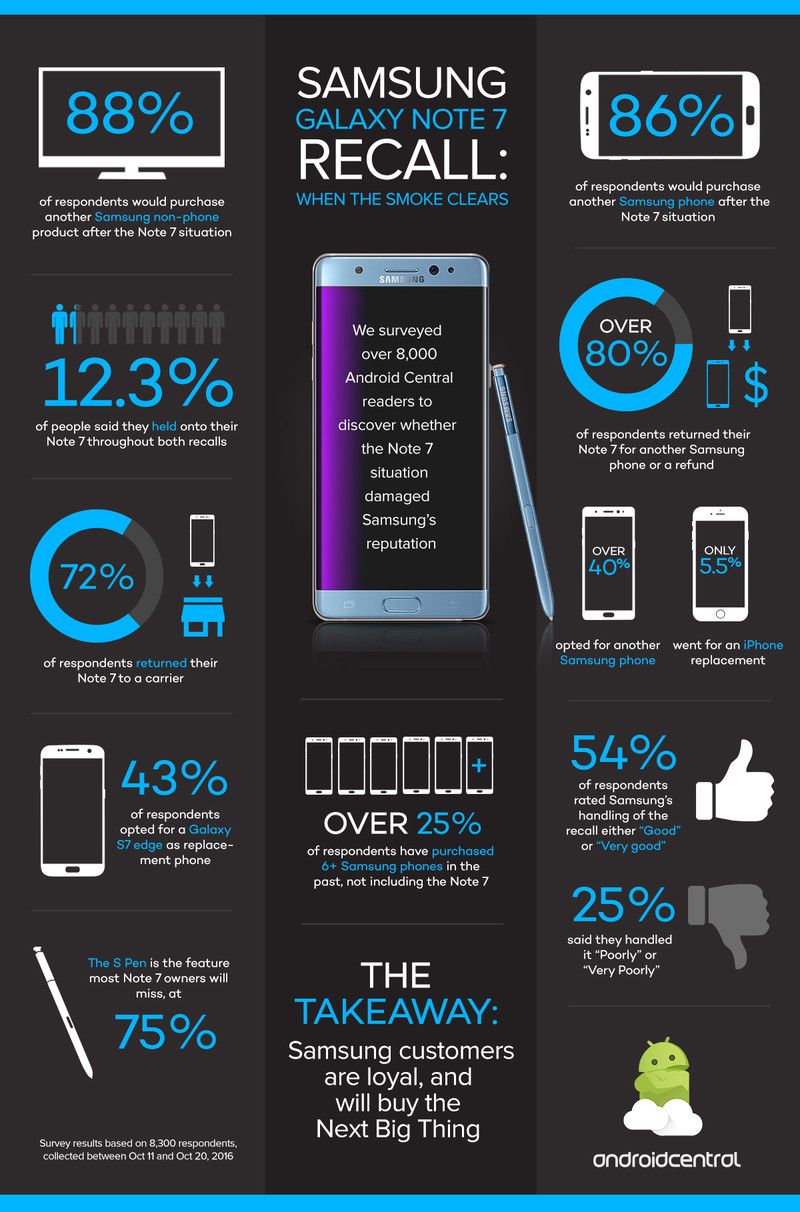
86% of respondents said they would purchase another Samsung phone, which is good news for the company.
Specifically, over 40% of the respondents who purchased a Note 7 returned it for another Samsung phone, while only 5.5% replaced it with an iPhone, pushing back against the assumption that owners owners were turning in their Android phones en masse for the safe haven of Apple’s ecosystem. While it does seem that a number of “undecided voters,” so to speak, switched to iPhone, far more felt comfortable sticking with Samsung for the long haul.
Of those who substituted their Note 7 for another phone, 43% opted for the next best Galaxy, the S7 edge compared to 12% for the smaller S7, and 15% for Google’s Pixel XL. This is not surprising, though, since many of the respondents showed a loyalty to Samsung that has built up over the years; a full quarter of people had purchased six or more Samsung phones before they bought and returned their Note 7.
Finally, 86% of respondents said they would purchase another Samsung phone, which is good news for a company trying to recover from a devastating and unprecedented recall. And over 50% of people thought Samsung handled the recall well, as opposed to 25% who thought they handled it poorly.
We’ve compiled some of the above data, and some more interesting stats, into a handy infographic, which you and see and share below!
What do you think?
Do these findings align with what you or your friends and family have experienced with the Galaxy Note 7 recall? Why or why not? Sound off in the comments!
Samsung Galaxy Note 7
- Galaxy Note 7 fires, recall and cancellation: Everything you need to know
- Survey results: Samsung users stay loyal after Note 7 recall
- Samsung Galaxy Note 7 review
- The latest Galaxy Note 7 news
- Join the Note 7 discussion in the forums!
Digital Offers: Learn to build cross-platform apps with Xamarin for just $35!
App development is the bees’ knees right now. The cat’s pajamas. “Where it’s at”. But do you build apps for iOS or Android? And which software do you use to do it? Of course, you want your apps to be in both the Google Play Store and the App Store, so do you bounce back and forth between coding languages to get them there? No.
There’s a big opportunity for people who use Xamarin to help develop apps for both iOS and Android, simultaneously. People who can use Xamarin to its fullest are much-sought-after in the current app development industry and the current app development industry is thriving. You need to get in there and show ’em what you got. But you need to learn Xamarin and get some real-world app-building experience first.
Enter the Xamarin Cross Platform Development Bundle from Android Central Digital Offers. Through more than 57 hours of content, you’ll learn the absolute basics of Xamarin, right up to the most advanced cross-platform development techniques, and you’ll build fully functional apps for iOS and Android using the C# programming language. That’s lifetime access to almost 60 hours of content, comprising 6 courses, for only $35. Go elsewhere for this kind of education, and you’d end up spending over $1000, but at Android Central Digital Offers, you save 96%!
In the first course, you’ll learn the basics of Xamarin and jump in the deep end, creating fully developed apps. From there, you’ll tackle mastering C#, Xamarin Forms, Xamarin and Android, building native cross-platform apps, and finish off with the Ultimate Xamarin Course, where you’ll learn advanced development techniques and strategies.
App development is big business right now and being able to simultaneously create apps for the two biggest mobile platforms is not only efficient but a valuable skill in the industry. Grab the Xamarin Cross Platform Development Bundle from Android Central Digital Offers and learn all there is to know about Xamarin so that you can get a foot in the app development door and start to build your career. Just don’t pay over $1000 elsewhere. Get lifetime access to over 57 hours of content for just $35 at Android Central Digital Offers.
See at Android Central Digital Offers
Go Time! Episode 15: The better wardrobe

It’s time for Episode 15 of Go Time!
Jen and Erin are back for another awesome episode of Go Time!, a Pokémon Go podcast. We talk about the fourth migration having occurred, ideas for ways to incorporate events into Pokémon Go, and rumors about a Halloween event inside of the game. Let’s be honest, though, this episode is mostly just the three of us firing back and forth about which team is superior.
There is always more to discuss in the world of Pokemon Go! Be sure to join us again next week!
- Google Play
- Soundcloud
- iTunes
- Or add us to your podcatcher of choice!
You can also join our Facebook page to keep up on all things Pokémon Go. See you in the world!
Pokémon Go
- Join our Pokémon Go forums!
- How to deal with GPS errors in-game
- Which team should you choose?
- How to play without killing your battery
- The Ultimate Pokémon Go Game Guide!
- Listen to the Pokémon Go podcast!
 AIVAnet