


Apple’s Thailand Website Honors King Bhumibol Adulyadej’s Death
Apple has made its Thai website black and white to honor the death of Thailand’s king Bhumibol Adulyadej, who passed away last week at the age of 88. Bhumibol Adulyadej had served as the ninth monarch of Thailand since 1946, making him the world’s longest-serving head of state at the time of his death ahead of Queen Elizabeth II.
The monochrome website reflects Thai citizens who have dressed in pure black or black and white to mourn the loss of Bhumibol Adulyadej, who was a highly revered figure in the country. Thai TV stations have also provided footage of the king in black and white, colors that represent grief and purity respectively in the country.
Tag: Thailand
Discuss this article in our forums
‘Ecobee3 Lite’ HomeKit Thermostat Launching for $170 on October 31
Smart thermostat company Ecobee today announced the launch of a cheaper “Ecobee3 Lite” device that will deliver Ecobee’s expected “superior comfort, control and energy savings” at $80 less than similar products from competitors, according to the company.
Similar to the flagship Ecobee 3 model, the Ecobee3 Lite has the same touchscreen controls and black aesthetic, and can be controlled from a smartphone through a connected Ecobee app. The cheaper model will also continue to support Apple’s HomeKit platform, as well as Amazon Echo, Samsung SmartThings, Wink and IFTTT.
“The new ecobee3 lite delivers the many features of a premium smart thermostat – beautiful design, superior comfort and an intuitive customer experience – but it’s kinder to our customers’ wallets than leading competitors,” said Stuart Lombard, President and CEO of ecobee. “ecobee3 lite upholds our continued promise to make customer’s lives simpler and better.”
To offset the entry-level cost, the Ecobee3 Lite loses a few features included with its $250 counterpart. Namely, the Lite isn’t compatible with the company’s room sensors, which Ecobee says help the system become smarter with additional sensors placed in multiple rooms so that the thermostat can accumulate a total view of a home’s temperature level. Ecobee3 Lite also lacks smart occupancy detection, and doesn’t support accessories like humidifiers, dehumidifiers, and ventilators.
In the United States, users will be able to purchase the Ecobee3 Lite beginning on October 31 for $169. The smart thermostat will be available at retail exclusively at Home Depot locations, and online at Amazon.com, HomeDepot.com, BestBuy.com and Ecobee.com. Canadian users will be able to buy the device for $219 (CAD) on Ecobee’s website. To make sure your system is compatible with Ecobee, the company has created a compatibility checker.
Tag: Ecobee
Discuss this article in our forums
Apple Music Beats 1 Radio Host Zane Lowe Announced as Keynote Speaker at SXSW
Apple Music’s Beats 1 radio host and creative director Zane Lowe has been announced as a keynote speaker for 2017’s South by Southwest music and film festival (via Billboard). Lowe has been tapped to give a presentation for the music portion of SXSW, which runs March 10-19 next year and also includes areas that branch into interactive media technologies.
Other than Lowe, speakers at next year’s SXSW include Rogue One: A Star Wars Story director Gareth Edwards, Mount Everest photographer and climber Cory Richards, author Adam Grant, and many more. The festival has also announced more than 750 panels that will be at SXSW in 2017, including ones focused on topics like “Does Spotify Help More Than It Hurts?”
“The programming announced today reflects a lot of the bigger-picture trends we think will be getting the most buzz in March 2017,” said Hugh Forrest, Chief Programming Officer. “These trends include innovation in the transportation space, the rise of artificial intelligence, more emphasis on innovation within healthcare, and an increase in creative industry inclusion.
Of course, the biggest trend for SXSW is always the convergence of the technology, music, and film industries, as different people from different sectors gain incredible value by sharing new ideas and new approaches to common challenges.”
As Apple Music continues to grow, Apple executive Jimmy Iovine recently stated that the company is “building the right hybrid” that carefully balances technology with culturally aware paradigm shifts. Lowe was a host for BBC Radio before moving to Beats 1 and Apple Music, and has since helped Apple launch a number of new shows and programming blocks for the service.
Tags: Zane Lowe, Apple Music
Discuss this article in our forums
‘Unprecedented’ Warrant Request Sought to Compel Individuals to Open Fingerprint-Locked Devices
In a new case that echoes Apple’s past struggle with the FBI, the Department of Justice has been granted a warrant to search a home in Lancaster, California — and all the smartphones inside of it — for all “passwords, encryption keys, and other access devices that may be necessary to access” the various handsets and tablets discovered inside the location. Notably, this includes requiring every person inside the home to provide their fingerprints to the cops to bypass the biometric scanners of each device (via Forbes).
Filed May 9, 2016, a section of the warrant reads:
“authorization to depress the fingerprints and thumbprints of every person who is located at the SUBJECT PREMISES during the execution of the search and who is reasonably believed by law enforcement to be the user of a fingerprint sensor-enabled device that is located at the SUBJECT PREMISES and falls within the scope of the warrant.”
An anonymous person located at the home in question avoided providing details of the crime in question, but they did indicate that the warrant has been served. The person claimed that they did not know about the specifics of the warrant’s parameters until it was served to them, and they are “trying to let this pass over” in the meantime.
The case has been said to “shock” legal experts because of the legalese workaround used in the warrant. According to one expert, the government filed the warrant “on the assumption that they will learn more after they have a warrant,” without providing any particulars as to what they plan to find at the home in question. This practice goes against the confines and scopes of usual warrants, and was seemingly an attempt to quietly include fingerprint data in the seizure of information.
Jennifer Lynch, senior staff attorney at the Electronic Frontier Foundation (EFF), added: “It’s not enough for a government to just say we have a warrant to search this house and therefore this person should unlock their phone. The government needs to say specifically what information they expect to find on the phone, how that relates to criminal activity and I would argue they need to set up a way to access only the information that is relevant to the investigation.
“The warrant has to be particular in how it describes the place to be searched and the thing to be seized and limited in scope. That’s why if a government suspects criminal activity to be happening on a property and there are 50 apartments in that property they have to specify which apartment and why and what they expect to find there.”
Lynch noted that “we’ve never seen anything like this,” with the government’s court filing revealing the first known attempt by the Department of Justice to acquire fingerprints of individuals in a certain location to unlock their smartphones. Lynch said that the filing cites “outdated cases” as the justification for bypassing self-incrimination laws to ultimately use a person’s “body as evidence when it may be material.”
“The reason I’m so concerned about this … is that it’s so broad in scope and the government is relying on these outdated cases to give it access to this amazing amount of information… The part the government is ignoring here is the vast amount of data that’s on the phone,” Lynch added.
“If this kind of thing became law then there would be nothing to prevent… a search of every phone at a certain location.”
Most recently, it was reported that the FBI was looking into “legal and technical options” for entering another iPhone, this one belonging to the culprit behind the Minnesota mall stabbings in September. The iOS version running on the iPhone is known only to the FBI, so if it’s an older model (iOS 8 or prior) the government could potentially access it without the same drama that emerged following its request for Apple to unlock the San Bernardino shooter’s iPhone earlier in the year.
Note: Due to the political nature of the discussion regarding this topic, the discussion thread is located in our Politics, Religion, Social Issues forum. All forum members and site visitors are welcome to read and follow the thread, but posting is limited to forum members with at least 100 posts.
Related Roundup: iPhone 7
Tag: Touch ID
Discuss this article in our forums
Apple Set to Battle Class Action Lawsuit Over Labor Code Violations Starting Tomorrow
A class action lawsuit filed by four former Apple retail employees over alleged California Labor Code violations commences tomorrow in San Diego Superior Court.
A civil jury trial is scheduled to begin Tuesday at 9:00 a.m. local time in a courtroom presided over by the Honorable Eddie C. Sturgeon, nearly two years after Apple’s appeal and motion for dismissal was denied in the case. The lawsuit, titled Felczer vs. Apple Inc., falls under the court’s Department 67.
The lawsuit, originally filed in 2011 and elevated to class action status in 2014, accuses Apple of failing to provide timely meal and rest breaks, failing to pay all wages due upon ending employment within the required time, and failing to provide accurate wage statements, according to court documents filed electronically.
The proposed class would involve all current, former, or prospective employees in California who have worked for Apple between December 16, 2007 and the time of trial, which totaled approximately 18,000 employees as of 2014. Any settlement awarded would be divided evenly between class members.
California Labor Code dictates that employees must be provided with at least a 30-minute meal break when the work period is more than five hours, and at least a 10-minute rest break for every four hours worked. The defendants claim Apple failed to always provide these breaks for at least four years prior to the lawsuit.
Meanwhile, the complaint notes Apple took several weeks to send out a final paycheck to multiple employees. As a result of these unlawful business practices, the lawsuit asks for compensatory damages and repayment of all wages owed, along with interest and legal fees, but it does not specify a damages amount.
Tags: lawsuit, Apple retail
Discuss this article in our forums
Apple Releases iOS 10.0.3 for iPhone 7 With Cellular Connectivity Bug Fix
Apple today released the second official update to the iOS 10 operating system, nearly one month after releasing iOS 10.0.2 and a month and a half after providing the new iOS 10 operating system to the public. iOS 10.0.3 comes ahead of iOS 10.1, a more significant update that brings a Portrait mode depth-of-field effect to the iPhone 7 Plus.
iOS 10.0.3 can be downloaded as an over-the-air update on all iPhone 7 and iPhone 7 Plus devices.
Today’s update includes a fix for a bug that could cause issues with cellular connectivity, a problem that only affected the new iPhone 7 and the iPhone 7 Plus. Shortly after the iPhone 7 was released, a number of Verizon users began experiencing a serious issue that caused them to regularly lose LTE connectivity on their new device. It was later discovered that the issue affected iPhone 7 and 7 devices associated with other carriers as well, and it should now be fixed for all users.
iOS 10 is a major update that includes features like a redesigned Lock screen experience, a revamped Messages app with a full App Store, a Siri SDK for developers, new looks and features for Maps and Apple Music, and tons more. Make sure to check out our iOS 10 roundup for details.
Related Roundup: iOS 10
Discuss this article in our forums
Get rid of Siri App Suggestions on your iPhone’s lock screen – CNET
After some initial confusion about the iOS 10 lock screen, I find myself frequently using iOS 10’s lock screen widgets to check my calendar, a sports score or the weather — all without needing to unlock my phone. One lockscreen even lets me quickly call home or text my wife. (Check out the 10 widgets that belong on your lock screen.)
With all these widgets helping me out, Siri App Suggestions — the two rows of “suggested” apps that appear on the lock screen — are unnecessary. Here’s how to remove them.
Remove Siri App Suggestions from lock screen
The Siri App Suggest widget is enabled by default in iOS 10. Thankfully, it’s just a widget, so removing it is easy.
 Enlarge Image
Screenshot by Matt Elliott/CNET
You can’t remove or rearrange widgets on a locked phone, so unlock your phone and swipe to the right on your home screen to view your widgets. Next, scroll to the bottom and tap the Edit button. You’ll see a list of your widgets at the top and another list below of other widgets you can add to the lock screen.
Find Siri App Suggestions in the list and tap the red button on the left and then tap Remove on the right to remove it from the list. Don’t forget to tap Done in the upper-right corner to save your changes.
Remove Siri App Suggestions from search screen
When you pull down on the home screen (or any other screen of your app icons), you call up the search screen. Below the search bar is the same Siri App Suggestions as you’ll find on the lock-screen widget. If you don’t use this to launch apps, you can disable it.

Enlarge Image
Screenshot by Matt Elliott/CNET
Go to Settings > General > Spotlight Search and tap to turn off the toggle switch at the top for Siri Suggestions. With it disabled, you’ll see just the search bar and nothing else on the search screen
HP Elite X3 Release Date, Price and Specs – CNET
What if there was one device to replace them all? What if you no longer needed a laptop or a desktop to get work done? That’s what HP is trying to provide with the new Elite X3 phone.
The phone features high-end specs that put it head-to-head with the iPhone 7 and top Android phones, but that’s only half the story. This isn’t your typical phone. For one, it’s running Windows 10 Mobile, an operating system most people don’t even know exists.
It’s also designed for business, specifically for people who travel a lot. The phone can be placed in a desk dock and connected to a laptop dock, which transforms it into something that resembles a traditional Windows computer, albeit one with severely gimped features.
The Elite X3 is available now for $699 (£575 or AU$1,100 converted — UK and Australian pricing is yet to be announced). HP is also offering the phone bundled with the desk dock for $799 (about £710 or AU$1,200) while a bundle with the phone, Desk Dock and Lap Dock will be available from October 21 for $1,299 (around £1,070 or AU$1,700).
Hands-on with HP’s new Windows phone
See full gallery


1 – 4 of 18
Next
Prev
Why it’s a cool idea
The idea of transforming a phone into multiple devices with different functions isn’t a new one. Asus attempted something similar with the PadFone, as did Motorola with the Atrix. Both products, however, didn’t have Windows 10, which happens to be both the key and the Achilles’ heel to HP’s potential success.
The Elite X3 includes support for Continuum, a feature that allows the phone to connect to an external display and act more like a traditional Windows 10 computer. HP’s Desk Dock and Lap Dock are what makes this possible.
 Sarah Tew/CNET
The Desk Dock features an Ethernet adapter, two USB ports, a USB Type C port, and a DisplayPort. There’s no HDMI port, but you can buy a DisplayPort-to-HDMI cable if you want to connect to a hotel TV (for instance) and use it as an external monitor.
The other option is to use the Lap Dock, which is essentially a laptop with no internals. It features a 12.5-inch Full HD display, full keyboard, a Micro-HDMI port and three USB Type C ports. Connecting the phone to either accessory will also charge it.
 Dan Graziano/CNET
Once you connect the phone to the dock you will see a familiar Windows interface. You can then run multiple apps at the same time and have the convenience of a mouse and keyboard. I actually used the Elite X3 and Desk Dock to write this article. It was an enjoyable experience at first and I didn’t want to let go of the phone. At first, I was convinced this could be the perfect travel companion, but the more I used the phone the more it frustrated me.
Why I wouldn’t buy it
On paper, the Elite X3 is a great phone. It has a 5.96-inch Quad HD display with a quad-core Snapdragon 820 processor, 4GB of RAM and 64GB of storage. Also on board is a 16-megapixel rear camera, 8-megapixel front camera, dual front-facing speakers, a rear fingerprint sensor, a USB Type-C port, and a microSD card slot for up to 2TB of additional space. There’s also an iris scanner (like we saw on the Galaxy Note 7) and wireless charging. If it were running Android, it would be a compelling device.
 Sarah Tew/CNET
What hurts the phone is the fact that it’s running Windows. Out of the 20 apps I use on a weekly basis, the Elite X3 has only six: Facebook, Instagram, Uber, Slack, Spotify and Twitter. There’s no Venmo, Snapchat, Nest, Lyft or any Google apps. Sure, a lot of these wouldn’t be important for enterprise customers, but it prevents the Elite X3 from replacing your personal phone.
Even the flagship Continuum feature became frustrating once I ventured outside of Microsoft’s ecosystem of apps. While Word, PowerPoint and Outlook worked perfectly, there are still some apps that don’t support the feature, such as the collaboration tool Slack. To get around this I was able to use the web version of Slack, which worked fine, but this didn’t work for Google Docs and I was forced to do all of my typing in Microsoft Word, which isn’t ideal given CBS Interactive uses Google Apps for Work.
While the Elite X3 is an interesting concept, you’re better off using an iPhone or Android phone with a Surface Pro or another portable laptop.
If HP can get Android running on the X3, however, I’d love to give it another look.
Lenovo Yoga Book review – CNET
The Good This is a very slim, very light hybrid laptop, available in both Windows 10 and Android versions. The backlit touch keyboard vanishes at the touch of a button and the included stylus works well on both the Wacom surface and with an ink tip on actual paper.
The Bad The keyboard isn’t suited for more than minimal typing, there’s only a single Micro-USB port for accessories and charging, and the Atom processor is slower than mainstream laptops. The hefty pen, extra tips and paper pad are a lot of additional gear to carry around.
The Bottom Line Lenovo’s slim Yoga Book two-in-one is great with a pen, but its faux keyboard keeps it from being a practical laptop.
Right out of the gate, the Lenovo Yoga Book gets credit for offering one of the most unusual designs we’ve ever seen: This superportable two-in-one laptop/tablet hybrid includes a Wacom sketching pad that can instantly transform into a QWERTY keyboard. The result is a fun, highly portable device that instantly appeals to creative professionals — but one that’s not nearly as practical as Lenovo makes it out to be.
That doesn’t mean it can’t be an option for your secondary or travel computer, instead of a Chromebook, iPad or other small-screen budget laptop. But that largely depends on your creation versus consumption patterns, and — for creators — what you’re actually working on.
 View full gallery
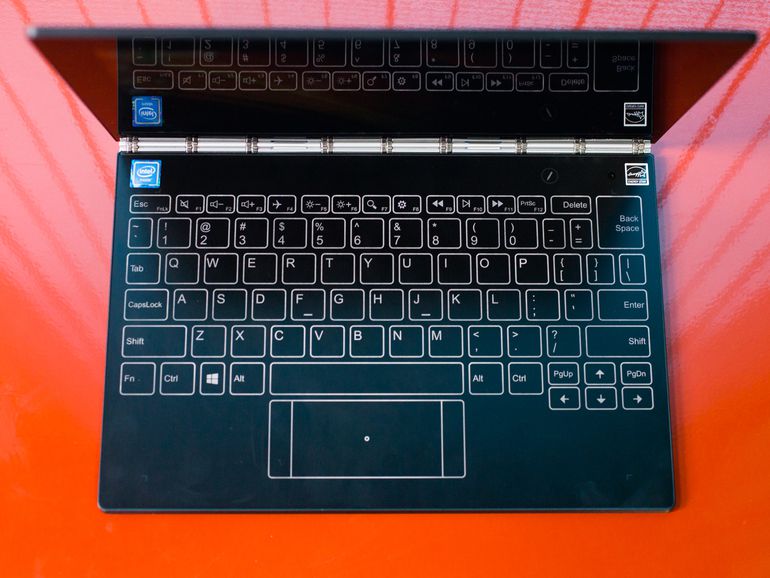
Instead of a keyboard, the Lenovo Yoga Book has a completely flat space that can be a keyboard when you want it to be.
Sarah Tew/CNET
The most striking feature of this slim 10.1-inch hybrid (available in both Windows and Android versions) is its keyboard, or at least the space on the clamshell body where the keyboard would normally be. Instead, there’s a completely flat, button-free surface that alternates between a drawing tablet and a touch-powered backlit keyboard. It’s a bit like an iPad’s on-screen keyboard, except that it doesn’t actually take over part of the screen.
Vanishing keyboard aside, the Yoga Book includes a pretty standard set of components for a budget laptop, with an Intel Atom x5 processor, 64GB of solid-state storage and 4GB of RAM. The price reflects these lower-end internal components, at $499 in the US for the Android version and $549 for the Windows 10 version. They’re £449 and £549 in the UK, and AU$799 and AU$999 in Australia, respectively. Both versions have the same internal components, but the Android model has a few keyboard/touchpad changes, some Android-centric software tweaks, and comes with a grey lid, versus the black lid in the Windows version.

View full gallery
When not serving as a keyboard, the flat space can also be a drawing pad.
Sarah Tew/CNET
Lenovo Yoga Book
| $549, £549 and AU$999 |
| 10.1 inch, 1,920×1,200 touch display |
| 1.44GHz Intel Atom x5-Z8550 |
| 4GB DDR3 SDRAM 1600MHz |
| 128MB Intel HD Graphics 400 |
| 64GB SSD |
| 802.11ac wireless, Bluetooth 4.0 |
| Windows 10 Home |
The overall shape and size of the Yoga Book can’t be beat. It’s 0.9 mm thick and weighs a hair over 1.5 pounds (680 grams). This is the only laptop I can recall taking to a coffee shop without a case, bag or anything to carry it in. I just tucked it under my arm like a slim paperback.
If Lenovo made a system roughly the same size and shape, but with a physical keyboard (even a very flat one, as in the 12-inch MacBook), it might be my favorite laptop.
The keyboard that wasn’t there
One messes with the traditional design and functionality of the classic QWERTY keyboard at one’s own risk, however. Many have tried in the past to prove that an on-screen, or zero-travel, keyboard is as good as having physical keys, and all have failed to one degree or another. There are dozens of add-on keyboards for Apple’s iPad, all predicated on the idea that the on-screen keyboard just isn’t good enough. Phones probably come closest to hitting the mark, especially with one-thumb swipe-based typing such as what is offered in Swype and SwiftKey, but that’s not how you want to write anything more than a quick email or a social media status update.

View full gallery
You will be looking at the keyboard often when typing on this flat surface.
Sarah Tew/CNET
Typing on a flat faux keyboard surface has been done before. My favorite example is a long-forgotten Acer laptop, called the Iconia 6120, from 2011. It was essentially two 14-inch LCD screens clamshelled together. Both were standard laptop touch displays, but the bottom one could show a large, touch-sensitive on-screen keyboard, as well as media transport controls and other widgets. There was never a second generation of that, which should tell you something about how well the concept worked in real life.
The keyboard here — called the Halo Keyboard — isn’t an image overlay on an LCD, but instead a backlit outline against a Wacom digitizer surface. It’s the kind of low-feedback experience that requires you to look down at your hands while typing, which may be a deal-breaker to some, but it’s also how many of us actually type.
View full gallery
The keyboard lights up on the surface.
Sarah Tew/CNET
While the Halo keyboard lacks the physical feedback of pushing a key down, there are two forms of feedback built in. One works, the other is awful. There’s a small haptic kick from typing, and that makes it easier to tell if a keystroke has registered, which is especially important while typing long sentences. That works fine, although it’s a general all-over kick, not localized to the area of the backlit keyboard you’re trying to hit.
The second is a loud beep with every keystroke. At least it’s every keystroke as long as you pause a few beats between each letter. Otherwise, your typing quickly outpaces the audio cues, and you end up with a trailing series of beeps, which totally throws off any typing rhythm. It makes the very minimal keyboard lag feel much worse than it is.

View full gallery
The Windows and Android Yoga Book keyboards differ slightly.
Sarah Tew/CNET
Fortunately, you can turn one or both of these effects off via a control panel, as well as adjust the brightness of the backlit keyboard icons. With the haptic feedback on but the beeping off, the keyboard feels much more exact, with just a tiny bit of lag under fast typing. I trained my fingers to adjust to the quirks of this system quickly, but this isn’t a device for longform typing.
The small touchpad below the keyboard is wide but very short, and it’s easy to misread exactly where it starts unless you’re staring directly down at it. Two-finger scrolling on long web pages and documents works surprisingly well, but the pad lacks the ability to tap-and-drag, or tap-drag-and-select, which are both common moves for standard physical touchpads. Instead, you’ll have to use the faux left and right mouse buttons on either side of the touch pad, which leads to some awkward two-hand maneuvers just to highlight some text.
Ecobee3 Lite review – CNET
The Good A responsive touchscreen and integrations with Amazon Alexa, Apple HomeKit, Samsung SmartThings, Wink and IFTTT give the lower-priced $169 Ecobee3 Lite Smart Thermostat serious appeal.
The Bad “Smart” is a bit of a stretch for the Ecobee3 Lite, since it doesn’t rely on activity-tracking sensors or any other sort of adaptive tech to learn your routine. $169 is still a lot to spend, especially on a programmable thermostat.
The Bottom Line No other Wi-Fi thermostat available today offers this many smart home partnerships for this low of a price, but you should weigh the importance of the integrations against the MSRP — many 7-day app-enabled programmable thermostats cost just $100.
Visit manufacturer site for details.
I’m not saying $169 is cheap, but it’s a darn good price in smart thermostat-land. There, Wi-Fi models regularly sell for over two hundred bucks and very few work with Amazon Alexa, Apple HomeKit, Samsung SmartThings, Wink and IFTTT.
That’s where Ecobee’s new Ecobee3 Lite Smart Thermostat comes in. Available beginning October 31 at Home Depot, Best Buy, Amazon and Ecobee’s online store, the $169 Ecobee3 Lite is the least expensive Wi-Fi thermostat you can find today that supports five major smart home platforms.
So what’s the downside? Like the $160 Emerson Sensi Wi-Fi Programmable Thermostat, the Ecobee3 Lite is only semi-smart — it doesn’t come with a remote sensor or any other advanced features. Instead, it bridges the gap between $100 app-enabled thermostats with no smart home integrations and $250 high-end models with smart home integrations and tech that learns your routine and makes automatic temperature adjustments.
The Ecobee3 Lite is easily the most appealing basic 7-day programmable thermostat on the market, one I can comfortably recommend. Just be sure to consider how much these connected home partnerships matter to you before you buy.
This Ecobee thermostat runs your heating…
See full gallery


1 – 5 of 9
Next
Prev
Same Ecobee style
The Ecobee3 Lite looks identical to the brand’s existing $249 Ecobee3 Wi-Fi Smart Thermostat. Both have a 3.5-inch glossy black digital display with a touchscreen interface, similar to a phone. Simply tap on the various options to change the temperature, view the current forecast, set schedules and otherwise adjust the settings.
It’s worth noting that the layout on the Android and iPhone app mirrors the Ecobee3 Lite’s hardware, so there’s little-to-no learning curve on that front.
Overall, I like the look of this thermostat and its companion app — it’s particularly great if you’re a fan of integrated touchscreen panels. Personally, I prefer more tactile displays with buttons or at least some sort of haptic feedback a la Nest’s $249 Learning Thermostat. But the Ecobee3 Lite’s interface is intuitive, easy to navigate and extremely responsive.
In other thermostat news:
- How to find a great thermostat for just 30 bucks
- Sensi found a smarter way to heat and cool your home
- Honeywell finds a new look for its latest Lyric thermostat
- Ecobee’s smart thermostat closes in on Nest
- Thermostat buying guide
- Install Emerson’s Sensi thermostat in a snap
Installation
Always consult a professional if you have questions about installing a thermostat. But, if you’re familiar with the general process, getting the Ecobee3 Lite up and running is pretty simple.
There’s one caveat: The Ecobee3 Lite doesn’t offer a rechargeable battery like Nest, so you’ll need to have a C wire to power the digital display or install the included Power Extender Kit.
Shut off power to your thermostat at the circuit breaker.
Remove your original thermostat’s faceplate.
Take a picture of your existing thermostat wiring.
Label your thermostat wires if they aren’t already.
Disconnect your thermostat wires from your old thermostat.
Uninstall your original thermostat’s baseplate.
Feed the wires through the new baseplate and screw it to the wall.
Connect the wires to the appropriate ports.
Attach the faceplate to the baseplate.
Turn power on to your HVAC system at the circuit breaker.
It took me roughly 15 minutes to replace a third-gen Nest thermostat with the Ecobee3 Lite at the CNET Smart Home. You may need to use a power drill to create new holes, though, and that could add time to your install.
 AIVAnet