


Vizio’s SmartCast soundbars don’t work well with Spotify for now
Vizio’s line of SmartCast soundbars and speakers tout Google Cast for wireless audio streaming from a variety of apps. One of those apps is Spotify, a massively popular music streaming service. Unfortunately, the Cast functionality with that particular library of tunes isn’t working like it should. There are a number of posts in both Spotify and Google’s forums from users who say Vizio’s latest soundbars don’t show up as an option for Casting in the streaming app. Spotify’s software isn’t recognizing the speakers as available gadgets for playing music. Reports of the issue go back as far as late July, over a month after the SmartCast soundbars went on sale.
While the situation is certainly a headache for folks who already bought Vizio’s audio gear, the company says a fix is on the way. “Vizio, Google and Spotify are aware of an issue on the soundbars and are working closely on improvements via a firmware update,” the company told Engadget. “Once available, the product will update automatically. In the meantime, we recommend using Bluetooth when streaming from Spotify.”
Bluetooth isn’t the best option in terms of audio quality, but at least the secondary connectivity offers a way for owners to still use Vizio’s soundbars with Spotify in the interim. Vizio doesn’t have a timeline for when the fix will be available, so Bluetooth may be the only option for using that particular music service for the foreseeable future. Users report that Cast functionality works well in other audio apps, so the issue appears to be limited to using Spotify with Vizio’s group of soundbars. The company didn’t mention any issues with the recently released Crave 360 speaker that went on sale earlier this month.
[Thanks, Dan]
Source: Spotify Community, Google Product Forums
Democrats slam Republicans fighting the internet handover
If you thought Facebook and Google raised a big fuss over Republican opposition to the US’ plan to hand the internet’s ‘keys’ (the authority managing domain name assignments) to an international governing body, you haven’t seen anything yet. A quintet of House and Senate Democrats have used TechCrunch to post an open letter to the Republicans, chastising them over their resistance to the transition to ICANN. While Senator Ted Cruz and supporters have previously claimed that international control would make it easier for authoritarian governments to censor the internet, the Democrats reject this outright. The task of managing the domain name system is “clerical,” they argue — countries like China or Russia can’t manipulate content just because DNS isn’t under exclusive US oversight.
If anything, the Dems argue, a delay past the planned October handover would play into Russia’s hands. It could push for moving these functions to an organization like the UN, where it’d have a better chance of skewing the internet in its favor — say, getting more authority to silence political opponents. And a delayed transition might tempt countries to create their own domain name system equivalents, fracturing the internet and giving them censorship powers that they can’t have today.
Not surprisingly, this is as much about us-versus-them politics as technical issues. The Democrats portray Cruz and crew as using the transition as an excuse to block a budget bill (before, many Republicans were fine with the handover), score points in election season and “mollify their extreme colleagues.” Whether or not you agree, it’s clear that at least some Democrats are determined to make this once-safe issue a major point of contention.
Source: TechCrunch
Tesla edges out Toyota for longest range zero-emission vehicle
We knew Tesla was revving up and adding range to its electric vehicle lineup, but now we have the EPA’s official word. The company’s top-of-the-line Model S P100D is not only quickest production car in the world, but it’s also the longest-running zero-emission vehicle with 315 miles of range – narrowly beating out Toyota’s hydrogen fuel-cell Mirai by just three miles.
While the Tesla might get you up to freeway speeds in a heartbeat, the Mirai will actually spend less time at the fueling station. According to fuel network True Zero, a Mirai will only spend four minutes at the hydrogen pump and, in an impressive feat of their own, the company set out to land a new Guinness World Record for most electric miles driven in a 24 hour period. By connecting the dots between True Zero’s fifteen fueling stations in California (and one in Tesla’s territory near Reno), the two companies put 1,438 miles on a Mirai in a single day. While that figure should do wonders for range anxiety, it still has to be confirmed by the good folks at Guinness.
Source: Autoblog, Next-Gen Transportation
30 minutes with Fujifilm’s medium-format mirrorless GFX 50S
Fujifilm made the biggest splash at Photokina with the GFX 50S, a mirrorless camera with a giant sensor stuffed into a fairly compact body. When it arrives early in 2017, the company will be in the weird position of having APS-C and medium-format cameras, but no full-frame model. So, it’s a big risk — Fujifilm is introducing a new format, complete with brand new lenses, and hoping that the market is open to the idea.
Most importantly, how is it as a camera? Fujifilm hasn’t released any images yet and the prototype had no memory card, but we were able to play with it a bit at Photokina. My first takeaway was just how small it is given the huge sensor.
You’d be forgiven for mistaking it for a DSLR or an oversized X-T2. I held it in one hand (I think I saw the rep flinch) with my camera in the other and believe, unofficially, that the GFX 50S is lighter with Fujifilm’s new 63mm f/2.8 prime than a Canon 7D with a similar-sized 15-85mm zoom. It’s less chunky as well, and thanks to the just-right grip, is marvelous to hold.
The weather-sealed camera is heftier than Hasselblad’s new X1D medium-format mirrorless camera. But Fujifilm told Engadget that it wasn’t aiming for the lightest weight, but just something lightweight with the best optical performance.To that end, it used a focal-plane, rather than the typical leaf, shutter. That helps keep the flange-back lens distance as short as possible — just 26.7mm. That, it says, makes for the best optics and most compact lenses.

The viewfinder is removable, and you can install a tiltable one or a large monitor in its place on the dedicated hotshoe. You can even go without an EVF completely, if that suits you. Given the large sensor and small body, battery life might be a concern, but Fujifilm will offer a grip accessory that adds longevity and additional camera controls.
As for the menu system, Fujifilm isn’t reinventing the wheel. It’s wisely sticking to the setup it uses for its high-end X-series APS-C mirrorless models, with simple menus and dedicated physical dials for ISO, shutter speed and aperture.
It’s only when the lens is popped to show the 43.8mm x 32.9mm, 51.4-megapixel sensor that you realize you’re in new territory. The size is quite a leap (1.7 times more area, to be exact) from the 36mm x 24mm chips on full-frame cameras by Sony, Canon and Nikon. Fujifilm engineered and built the new bayer (not X-trans) chip, which has no AA filter.

The EVF is remarkably bright and sharp, and the rear, tiltable display appears to be very high res. Looking at either, you can see the fruit of a larger chip. With the 63mm lens set at f/2.8, the depth of field is razor thin, so this thing is going to require a very good autofocus. Taking a few (simulated) shots, the AF was not fast, but again, it’s a prototype and there’s plenty of engineering work left to do. In any event, it’s not a camera for sports photographers or photojournalists — the large sensor is better suited for portrait, landscape and architectural photography.
It will take seriously good lenses to resolve a medium format, 50-plus megapixel sensor. Fujifilm said its three new models, a 63mm f/2.8, 120mm f/4.0 macro and 32-64mm f/4.0 zoom have much more sharpness than needed. (During its press event, in fact, Fujifilm said it wants the lenses to be ready for 100-megapixel sensors in this format). It’ll release an additional three lenses, a 35mm f/2.8, 23mm f/4 and 110mm f/2 in mid-2017 (remember that on a medium-format camera, the crop factor is less than one).
The success on this model will likely depend on the price, but Fujifilm said it will be well south of $10,000 (the Hasselblad X1D is $9,000 for the body only). At the same time, Fujifilm suggested that it’s not in competition with, and will therefore not be as cheap as, a $3,500 Canon 5D Mark IV, for example. In any case, the medium-format market is now getting oddly crowded with models from Hasselblad, PhaseOne, Pentax and now Fujifilm. And that should make the once-neglected segment, and photography in general, much more interesting.
Oculus’ Touch controllers priced at £190 in the UK
If you still haven’t figured out why the Oculus Rift sells for a solid $200 less than HTC’s Vive, let this be the final word: it’s the motion controllers. According to a display in a GAME store in the UK (found by our very own Nick Summers), Oculus’ virtual reality motion controllers will retail for £190, or just over $200 after deducting local UK taxes. That’s expensive, but not at all unexpected — if that price holds across the pond, it puts the cost of a room-scale Oculus Rift kit on equal ground with HTC’s $800 Vive.
Oculus Touch controllers to cost £190 in the UK. Crikey. pic.twitter.com/zg9JTNiCg8
— Nick Summers (@nisummers) September 20, 2016
As daunting as that total price is, it’s sort of the going rate for immersive, room-scale VR. We’re still in first generation of high-end consumer virtual reality, and first-gen hardware is always expensive. Even so, we’ve reached out to Oculus for confirmation on the listed UK price and if the $200 projection will carry over to the US market — but don’t expect a forthcoming revelation. The company is probably holding that announcement for Oculus Connect, next month.
Source: Twitter
Tinder brings swipe judgement to your iMessage conversations
Productivity apps have been trying to improve the hassle of group discussion for years, often by setting up basic “polls” that look more at home in enterprise software. But now you can spice up your queries with the interface everybody knows and loves: Tinder. The dating (and friend-finding) service is lending its swiping interface to iMessage users to better ask their friends photo-laden questions. Prepare to get your “hot or not” fix when picking dinner in your next group text.
But really, rolling images and choices together in a smooth interface is much easier than manually sending photo barrages spliced with context texts. It’s the iMessage API dream made reality: Expanded functionality tucked into a little conversation bubble. Sure, other apps have taken a stab at this, but they lack Tinder’s instant UI recognition. It’s only a matter of time before the newly fertile field of iMessage augments flood the App Store, so it was smart of the dating/friending app to leverage its recognizability, especially to diversify somewhat into the productivity space. Just don’t be surprised if asking your boss to get a new Tinder service to “improve team communication” ends up raising a few eyebrows.
Source: Tinder blog
Review: Kanex’s GoPower Watch Battery Provides Six Full Apple Watch Charges in a Small Package
Although Apple remains conservative regarding the battery life of the Apple Watch, many users have noted that the wearable device makes it through one day with plenty of charge left over in its 18-hour estimated life. Still, third-party power banks and portable chargers have been popular mainstays in the Apple Watch accessory line, and recently Kanex launched its own charging device for the Apple Watch, called the GoPower Watch.
Kanex’s charger is packed with a 4,000 mAh battery and a claim that, on a full charge, it can recharge the Apple Watch up to six times with an integrated inductive charger. As a bonus, the GoPower Watch also includes a USB port, letting you charge your iPhone (or any USB-powered device) simultaneously with the Apple Watch. There’s also priority charging, so your devices charge first and the battery pack second.
Design
Kanex’s GoPower Watch meets the form and function that any successful portable battery pack needs to be used on a daily basis. Its small 3-inch square will fit comfortably in a backpack, and the quartered LED lights — surrounding the only button on the housing — provide quick and easy reminders of how much juice is left in the pack.
The slightly raised inductive charger is surrounded by a smooth Space Gray material (admittedly, a few shades darker than Apple’s definition of Space Gray), that feels sturdy despite the small frame of the GoPower Watch. Interestingly, the actual inductive charger on Kanex’s device is a bit larger than Apple’s own inductive charger, but its added 1/4 of an inch appears negligible and doesn’t affect the charging of the device.
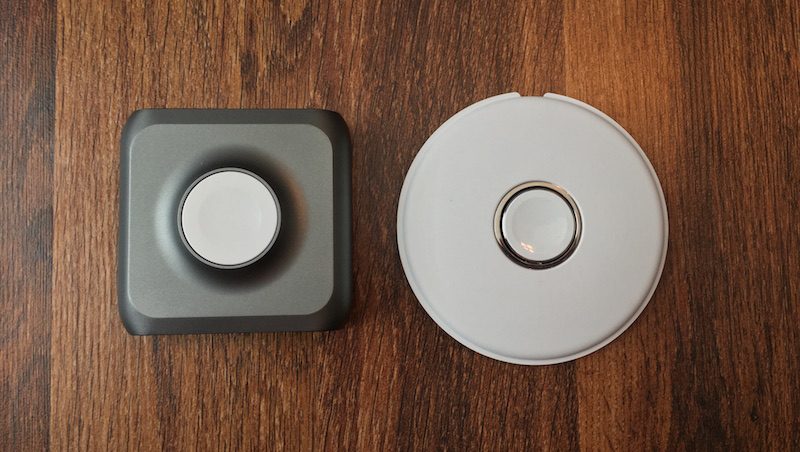 GoPower Watch compared with Apple’s Magnetic Charger
Otherwise, the design is no-frills. The front and rear of the pack are made up of a black, plastic-type material that’s a bit more fingerprint-attractive than the Space Gray of the rest of the device. On the back users will find the micro-USB port to charge up the battery pack, and the USB Type-A port for smartphone charging. Anyone opposed to large branding on their products probably won’t like the prevalent Kanex logo on the front of the unit, however.
Charging the Apple Watch
After using Kanex’s GoPower Watch battery for a week, I found that the company’s claims of six full recharges on an Apple Watch to be right on the money. The battery pack uses a simple circle of lights, cut into four quarters, to display the remaining charge in its 4,000 mAh battery. The GoPower Watch lost its first quarter of battery in the middle of the third charge of my Apple Watch, and then finally lost the second quarter in the sixth Apple Watch charge.
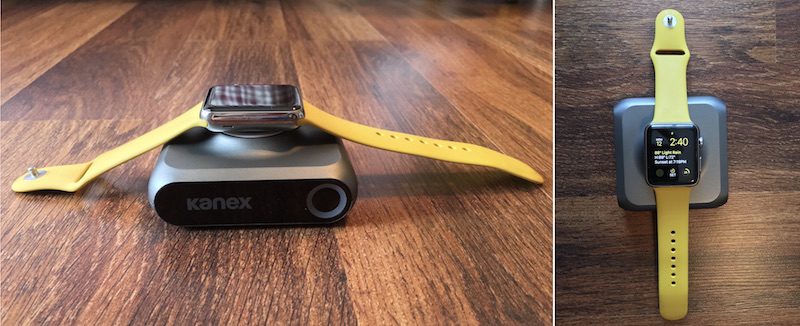
From there the battery status declined quickly, and after the pack filled my Apple Watch up to 100% life for the sixth time, the final portion of the ring began flashing and the battery quickly died. During these tests I didn’t charge my iPhone, focusing first on the company’s own Apple Watch-heavy marketing for the accessory. And in that sense, the GoPower Watch delivered on its promises. The average charging time of all the tests was about 90 minutes.
If used solely as a power bank for an Apple Watch, Kanex’s device will easily provide its intended six full recharges on Apple’s wearable, although the larger battery on the Apple Watch Series 2 means those models might get slightly fewer charge cycles. Although that might be a bit of overkill for most casual Apple Watch wearers, the combination of the integrated inductive charger and deep well of battery life could justify the $99 price tag for those who find themselves away from a traditional power source on a consistent basis.
Charging the iPhone
After depleting the GoPower Watch during my Apple Watch tests, I topped off the battery pack again — a lengthy process that takes the large part of an afternoon, which is the case for most battery packs — and focused on the iPhone. With the GoPower Watch fully charged, I managed to recharge my iPhone 6s Plus from 10 percent to 99 percent charge over the course of about two hours, after which Kanex’s battery was down to 50 percent.
In a subsequent test, to see how much percentage I could add onto my iPhone with the rest of the GoPower Watch’s battery, the battery pack swiftly whittled down to 25 percent and then died, adding on about 15 percent charge to my iPhone. Considering the 2,750 mAh within the iPhone 6s Plus, one full charge with a little left over makes sense coming off of the GoPower Watch’s 4,000 mAh battery.
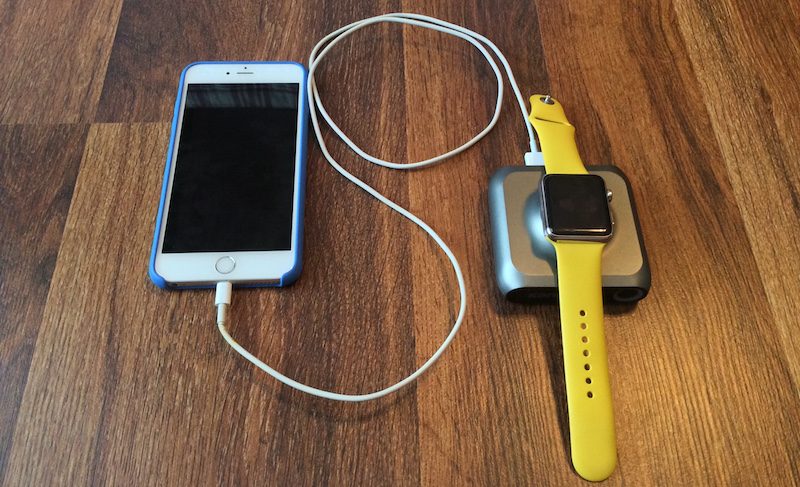
Although smaller smartphones could get more out of it, like the iPhone SE (1,624 mAh), iPhone 6s (1,715 mAh) and iPhone 7 (1,960 mAh), the GoPower Watch is simply not an iPhone accessory; it’s an Apple Watch accessory that could potentially recharge your iPhone in a pinch, with very little left over for your watch. Simultaneous charging of each device also negates the portability such battery packs allow for smartphones, since the Apple Watch needs to remain on a flat surface to stay attached to the inductive charger.
For iPhone battery packs, similarly priced accessories, like Mophie’s powerstation XXL, give users upwards of 20,000 mAh for around $100. Other brands, including Anker, offer similar battery capacities at even cheaper prices. As such, it’s hard to harp on GoPower Watch’s clear intent to focus on Apple Watch over iPhone, but it’s an aspect of the accessory that should still be noted.
Bottom Line
Overall, GoPower Watch’s solid design and integrated induction charger make it one of the most enticing charging solutions on the market for Apple’s wearable device, if you’re an Apple Watch power user and in need of one, that is. Lack of Nightstand Mode and closed-loop band support could, however, be deal-breakers for some.
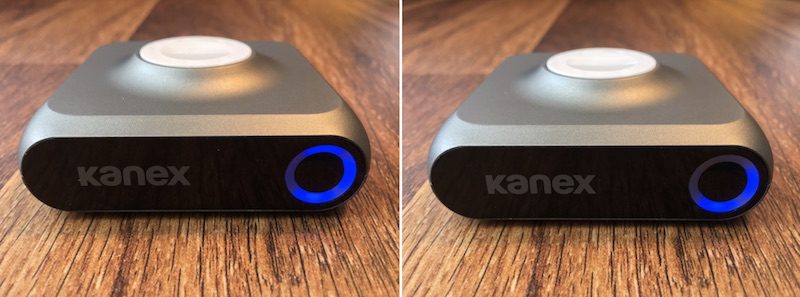 The display shows the GoPower Watch’s dwindling battery
Compared to other Apple Watch battery packs, Kanex’s solution is a slightly steeper monetary investment, but its higher-capacity battery justifies the price. Nomad’s Pod, for comparison, costs $29.95 but provides an 1,800 mAh battery, or the ability to keep your Apple Watch “powered all weekend,” according to the company.
If you repeatedly find yourself scrambling for a power source for your Apple Watch when not at home, and want to invest in something you won’t have to constantly remind yourself to charge all too often, the GoPower Watch makes a reliable case for itself. Just remember that it won’t provide much in the way of repeat charges to a smartphone, especially any larger-screened models with higher-capacity batteries.
Pros
– Clean design with soft, attractive Space Gray material
– Integrated inductive charger
– Charging Apple Watch as quickly and reliably as first-party accessories
– Meets Kanex’s claim of six full Apple Watch charges
Cons
– Dies quickly when charging bigger devices through USB-A port
– Doesn’t support Nightstand Mode or closed-loop bands
How to Buy
Anyone interested can purchase the Kanex GoPower Watch from the company’s website for $99.95. Kanex also sells a line of other accessories, including a USB-C battery pack for the 12-inch MacBook, a Thunderbolt 3 adapter, and a Bluetooth Mac keyboard that can sync with up to four devices and includes Apple’s long-gone numeric keypad.
Related Roundups: Apple Watch Series 2, watchOS 3
Tags: Kanex, GoPower Watch
Buyer’s Guide: Apple Watch (Buy Now)
Discuss this article in our forums
Here’s every PlayStation VR game we’ve played so far, ranked!

We’ve been playing PlayStation VR games for a little while now.
With demo stations all over the US and Canada as well as several spots opening in the UK, there have been many opportunities to sit down — or stand up — and get some quality time in with PlayStation VR demo games. There’s still a lot left to learn about the headset itself and how it functions within the PlayStation 4 ecosystem, but when it comes to the games we’ve tried it’s clear there are some favorites. We’ve decided to rank our PlayStation VR experiences to date, including which games we will absolutely be buying at launch and which we’re going to probably leave as a mostly positive demo.
Read more at VR Heads!
Google’s latest Android Experiment turns your phone into a paper plane
Throw a plane, not a phone.
After debuting it at Google I/O this past May, Google and Active Theory have released Paper Planes, an app and Android Experiment that means to bring people together on International Day of Peace (that’s today).

The app, which allows you to “throw” a virtual paper plane to anyone in the world able to accept it, utilizing a number of web technologies alongside native Android features to deliver an extensible and scalable application that is seriously fun and more than a little beautiful.
Using a combination of WebSockets, WebGL, and WebWorkers to facilitate the rendering and “placement” of the plane in a synthesized, wireframe world, along with Firebase Cloud Messaging, background services, and native Nougat inline replies, the app wants to make people feel like they’re considerably closer than they are.
The very act of stamping the plane with your passport (for some reason Google thinks that Canada is full of raccoons) and folding it to send — plus the very act of flicking your phone forward to initiate the transport — is something you don’t see very often on Android.

The really fun and interesting part is that when your plane returns to you, you can see where it’s travelled, with unique stamps that are specific to each location. My first plane went from Toronto to Santa Monica, California and back, and stopped in Memphis on the way.
It’s a tiny, thoughtful app with a huge, courageous message.
TomTom Spark 3 review: Getting better with age
Waking early in the city offers plenty of unique advantages to the urban runner. It’s a chance to run as the local population is wiping the sleep from its eyes, going about the routine of preparing for the day, heading to work, heading home from nights out, setting up market stalls and opening shops.
A waking city is something to experience, offering a different perspective. And for those who travel, that early morning run makes it feel as though you actually went somewhere and did something. With the TomTom Spark 3 sports watch, which is focused on running, cycling and swimming activity, that’s now so much easier.
TomTom Spark 3 review: Design and build
TomTom has stuck to a single design formula for a couple of iterations of its sports devices. In the Spark, the body is one piece that fits into a rubber strap. On the Spark 3 this is a new strap that’s softer and a little more comfortable to wear, but not a huge change from the previous version.
Pocket-lint
If you want to buy new straps that’s easy enough as TomTom offers loads of options for around £20-30. Yes, the old Spark fits into the new straps too, if that’s what you’re thinking.
The design sees a 22 x 25mm display sitting on top of the body, with a curved tongue offering a four-way controller for easy navigation of the menus and screens. There’s no touchscreen to fiddle with and the controller is distinct, so you know you’ve pressed it, making controls nice and simple.
The downside of this design is that to charge the watch you have to remove the strap and connect it to the bespoke charger which clips onto the bottom of the tongue; the upside to this equation is that the charger attaches securely, so there’s no worry that a magnetic charger didn’t connect properly.
Pocket-lint
The Spark 3 is identical to the older devices, so there’s nothing to tell them apart and the interface is simple, hierarchical and monotone as it was before. In fact, there’s been little change since the TomTom Runner launched in 2013, and even the new Adventurer repeats this design, so things are getting a little samey.
There are no customisations on offer and although TomTom offers 24/7 activity tracking – allowing you to set targets for steps or distance for example, and sleep tracking – this is strictly a sports watch, with no leaning towards other connected options, like smartphone notifications.
TomTom Spark 3 review: Route tracking
The Spark leverages TomTom’s experience in GPS for route tracking. The addition and the biggest change in the Spark 3 over previous versions is better support for routes: whereas previously GPS was used to record your location for you to view via TomTom MySports, the Spark 3 now lets you track routes in real-time on the watch itself.
Pocket-lint
The idea is to allow you figure out where you are, where you’ve been, and let you get back to where you started. Route exploration is one of the joys of running and the Spark 3 allows you turn right instead of left and figure out through the trace where you have to get back to.
This isn’t about mapping: unlike the Garmin Epix, which will show you topographical maps, the TomTom presents a simple traced line that, thanks to the new onboard compass, you’ll be able to find your way back to.
In practice it’s more useful than it might sound. If heading out in a strange location you don’t have to worry about looking at a map or remembering every point of interest – and you’re not restricted to out and back routes, because it’s fairly easily to run more randomly and return to the start location.
Pocket-lint
When running, all you have to do it head into the heart-rate stats and press up to see the trace. This offers two views: one that’s a larger view showing kilometres; the other a zoomed-in view to a few hundred metres. Generally, you can glance at the larger view to get back to somewhere you’ve been previously, then switch to the closer view to zoom back in and get on the same path again.
The simplicity of the display makes it ideal for running, as it’s all about glancing and confirming without breaking stride.
TomTom Spark 3 review: Adding routes
The other side of this ability to draw routes is about planning where you’re going to run. You can save trails you’ve run previously as routes so you can repeat them, or, and perhaps more exciting, is the ability to upload GPX files to add new trails.
This is a little more advanced, for those who know where they are going and what route they want to run, but it does mean that you can get a route that a friend has run, or download a route from the internet to put onto your watch.
Pocket-lint
Adding a GPX route to your Spark 3 will mean connecting the watch to a PC and using the TomTom MySports Connect app to open up the browser to sync to the device.
You can rename routes to make them more memorable to you, and then find them in the “trails” section of the menu. When you go to start a run, you simply have to head down and select that trail, so you can follow the path you took before – again with two views; the overview and the 100m view within easy access.
TomTom Spark 3 review: Sports performance
One of the things we’ve liked about previous iterations of the Spark is the accuracy of things like the heart-rate sensor. There are now many devices that will monitor your pulse, but many are inconsistent, inaccurate and frequently drop out and give you extraneous results.
The TomTom Spark 3 is solid in its delivery of heart-rate monitoring and offers a range of different stats on the run, like heart-rate zone so you can easily see what you’re doing relative to personal capacity, what the training effect of that is and how it can fit into your fitness plan.
Pocket-lint
This keen HR tracking is also paired with good GPS results. We’ve found this to be consistent with other devices, like our usual Garmin Forerunner, so the distance is pretty well recorded, for example.
The recording of the route can be a little off, although in the grander scheme of things, the distance is pretty close to the actual route distance, even if the trace line that you view sees you weaving across roads, into rivers or cutting corners. We suspect this comes down to the frequency with which the Spark records the GPS position – which is not uncommon for GPS devices.
However, the Spark 3 can be a little sluggish to pickup a GPS location at times. To help solve this, connection to the MySports app on your smartphone will transfer over QuickGPSfix data. This can be a little varied in performance, especially when travelling. We’ve arrived somewhere new, connected to the app and been good to go. On return, we’ve sometimes found ourselves waiting for a really long time for the location to be found – even after syncing with the app.
One of the downsides is that in the normal running mode you can’t even start running without a GPS fix. The treadmill option will allow you, if you can’t be bothered to wait.
Pocket-lint
The best advice (and we’ve had to do this with other devices too) is to get your watch looking at the sky well in advance, so you don’t have that delay when you’re standing there ready to run.
There’s no option for a footpod which might add accuracy in such circumstances, but there is support for a cadence sensor and chest strap heart-rate monitor, which gives better support for cyclists who might want to mount the Spark 3 on their handlebars.
The high contrast display of data means it’s easy to glance at your Spark 3 and see how you’re going, with plenty of screens to scroll through using the four-way controller to get to the stats that you want. For those running in the dark, there’s also illumination so you can see what’s going on.
The TomTom Spark doesn’t automatically identify your sports, which some smartwatch devices will attempt to do, but we’re happy with this. If you want to swim or cycle, you select those options and the stats you’re given are tailored to your view. There’s no open water swimming options, though, instead the Spark 3 relies on lengths, with you manually entering the size of the pool.
Pocket-lint
Although there’s support for a range of activity types, there’s no combined multisport option, so it’s no good for tracking your triathlon, unless you want to constantly stop and start the watch, which you’ll forget to do when you’re whipping off a wetsuit and putting on your bike helmet at pace. This is a criticism we’ve had of the Spark range since the beginning, but as auto-detection isn’t possible we can see why this feature still lacks.
We’ve found the battery life to be good for about three or four runs before you’ll want to charge. Of course that’s dependent on lots of factors, like whether you play music, how far you runs are and for how long, and if you’re using it all the time for tracking or just for specific sport. TomTom’s official figures say five hours of HR, GPS and music; 11 hours of GPS capture; or several weeks of activity wear.
TomTom Spark 3 review: MySports app and website
No device is complete today without an app and with any sportswatch you want a method of examining and compiling your data. Whether you’re a beginner wanting to track your weekly distance gains, or an advanced runner wanting to see how your heart responded when you started those hill repeats, stats are for champions.
To get started is a bit of a fiddle, as you’ll be invited to register the Spark by connecting to your computer. You can ignore that, if you want, but for the best results you’ll need to connect up and sign into your TomTom MySports account. It’s here you’ll get software updates and more functions, so the Spark 3 is still very much a device that needs to be connected by wire at some point in its life.
This MySports account is the same as you’ll sign into on the app too, with the same data being presented across both. The advantage of using the connection to your PC is that it’s solid: you plug in the cable and it works, whereas the connection to your phone can be a little temperamental, losing the connection and asking you to pair the device again, which is frustrating.
Pocket-lint
The PC interface which sits in the browser will also let you add GPX routes as we’ve mentioned, as well as save your runs as routes for the future, which the smartphone app doesn’t.
So the app is a little way behind, but at least it will sync to the Spark 3 so you can easily view your latest runs on the move without needing the PC link.
What’s really missing from both is any sort of training programme. If you’re targeting a 10km or half-marathon, it would be great to have access to training programmes to simply and easily use the Spark to guide you and monitor your weekly build-up and taper for effective training.
Pocket-lint
Sadly, you’d have to manually manage this process, although the Spark does have a number of races available, as well as the ability to set distance or time goals to guide the run you’re about to head out on.
The app will at least let you nominate connections to various other tracking platforms, so you can share your efforts with NikePlus, Strava, Endomondo, MapMyFitness, MyFitnessPal, TrainingPeaks and others. There’s no Fitbit on that list, but you can sync Fitbit with MyFitnessPal to get your data through.
TomTom Spark 3 review: Different watch versions
We’ve been using the TomTom Spark 3 Cardio + Music. This is TomTom’s top device and the complete package, as you get the Bluetooth headset in the box (more on that in a minute). It also commands a lofty £249 price point, which sounds a little high, but it does offer a wide range of features.
Here’s how the TomTom Spark 3 models break down. All models offer GPS tracking, 24/7 activity tracking, different sport tracking and the new route trace feature.
- TomTom Spark 3 Cardio + Headphones – £249 – heart-rate monitor, Bluetooth sports headphones, 500 songs storage.
- TomTom Spark 3 Cardio + Music – £199 – heart-rate monitor, 500 songs storage.
- TomTom Spark 3 Cardio – £169 – heart-rate monitor.
- TomTom Spark 3 Music + Headphones – £149 – Bluetooth sport headphones, 500 song storage.
- TomTom Spark 3 – £119 – no heart-rate monitor, no music, no headphones.
That’s a huge range of prices and the core GPS tracking and new route tracking features are available to all, meaning you can buy the device that fits your needs.
TomTom Sports Bluetooth headphones review
Bundled in some of these Spark packages are TomTom’s own headphones. Designed for sport, these headphones fit into your ears, looping over the tops of your ears and connecting around the back of your head. There’s a rubber strap that you can add and slide for a secure fit.
We found the fit to be really comfortable and with a selection of different tips in the box, getting a secure fit is pretty easy. They are lightweight and water resistant so well designed for the job.
Pocket-lint
There are controls on the right-hand earpiece that cover a range of functions, like power, play/pause, volume and track skipping. Pairing with the Spark is easy enough – you simply move up from the clock face to search.
The quality of playback is good too. There’s enough volume and we achieved a sufficiently good fit to provide a degree of isolation, too, for a good bass delivery, which is otherwise often lacking because you can’t get a secure fit when running.
The Bluetooth connection was pretty good too, although there was the occasional blip owed to a momentary loss of contact.
Pocket-lint
One of the slight downsides is that you can’t get music onto the watch unless you use your computer. You can’t just collect a bunch of files from your phone and move them over, it has to be a playlist from your computer. That playlist can just be an album and it can be automated, but we’d really like to be able to manage things from a phone.
Verdict
At the £119 starting point, you can’t really go wrong with the TomTom Spark 3. Although the functions are a little basic, you get a device that’s better than most at this price, with good GPS tracking.
Further up the range the combination of music and heart-rate monitoring is good, but we’d baulk at the TomTom Spark 3 Cardio + Headphones £249 price if the Bluetooth headphones weren’t as good as we found them to be. At that price though, there are a lot more rivals – from Garmin to Polar, even Android Wear pretenders and the Apple Watch – although few offer the combination of phone-free music, heart-rate monitoring and GPS with the same kind of battery life.
That makes the TomTom Spark 3 a device that’s worth considering for someone wanting a running or general sports companion. Garmin’s rival devices might be a little more engaging, with the use of colour and some more advanced functions, but they are also pretty expensive by comparison. The same can be said of Polar: there’s a little more excitement in places, but again at a higher price point.
TomTom’s upgrades have made the Spark 3 a better device over the past model in terms of functionality; its weakness is the smartphone app which could be a little more engaging, more stable and should really replace the required wired device-to-PC link.
 AIVAnet