


The Engadget Podcast Ep 6: I Beg Your Pardon
Managing editor Dana Wollman and reviews editor Cherlynn Low join host Terrence O’Brien to discuss all the latest Apple goodies. Plus they’ll talk about Samsung’s software bandaid for your exploding Note 7 and debate whether or not Edward Snowden deserves a presidential pardon.
The Flame Wars Leaderboard
Wins
Loses
Winning %
Chris Velazco
3
1
.750
Christopher Trout
2
1
.666
Dana Wollman
2
1
.666
Devindra Hardawar
6
4
.600
Nathan Ingraham
3
4
.429
Cherlynn Low
4
6
.400
Michael Gorman
1
2
.333
Relevant links:
- ACLU and Amnesty International ask Obama to pardon Snowden
- Edward Snowden explains why Obama should pardon him
- NYC nixes kiosk browsers after homeless commandeer their use
- Samsung’s Note 7 exploding battery ‘fix’ is a 60 percent limit
- Apple releases iOS 10 and watchOS 3
- Apple’s AirPods aren’t a must-buy — yet
- iPhone 7 and 7 Plus review: Apple (mostly) plays it safe
You can check out every episode on The Engadget Podcast page in audio, video and text form for the hearing impaired.
Watch on YouTube
Subscribe on Google Play Music
Subscribe on iTunes
Subscribe on Stitcher
Subscribe on Pocket Casts
iPhone 7 Teardown Reveals ‘Incredibly Thin’ A10 Chip With 2GB RAM, Intel Modem
While iFixit was busy tearing down the iPhone 7 Plus, the experts at Chipworks opened up an iPhone 7 to take a close look at the chips included on the device’s logic board.
The new A10 Fusion chip at the heart of the iPhone 7 is the most significant feature to be examined, with Chipworks noting the chip is indeed manufactured by TSMC with a die size of roughly 125 square millimeters. The iPhone 7 is also confirmed to include 2 GB of memory, compared to the 3 GB found on the iPhone 7 Plus.
The A10 is also extremely thin, due in large part to the InFO packaging technique used by TSMC which was seen as a major factor in TSMC winning exclusivity for A10 production.
[W]hatever node is being used, the A10 processor is incredibly thin, giving credibility to the reports that TSMC’s InFO packaging technique is being used.
The A10 sits below the Samsung K3RG1G10CM 2-GB LPDDR4 memory. This is similar to the low power mobile DRAM as the one we found in the iPhone 6s. Looking at the X-rays we see the four dies are not stacked, but are spread out across the package. This arrangement keeps the overall package height to a minimum. Assembled in a package-on-package assembly with the A10 InFO packaging technique reduces the total height of PoP significantly.
On the cellular modem side, Chipworks found an Intel part that is likely the XMM7360, paired with two SMARTi 5 RF transceiver chips and a power management chip also from Intel.
As we previously noted, Apple is producing two different models of both the iPhone 7 and 7 Plus, with models for AT&T and T-Mobile users not including support for CDMA networks. This is apparently a result of a modem supplier split between Intel and Qualcomm, with Intel’s current chips unable to support CDMA networks due to licensing issues. iPhone 7 and 7 Plus models with Qualcomm modems can support both GSM and CDMA networks.
Finally, Chipworks notes that flash storage for the iPhone 7 is also being at least dual-sourced, with Hynix and Toshiba chips being found in its two teardown phones.
For the rest of the details on the chips found in the iPhone 7, check out Chipworks’ full rundown.
Related Roundup: iPhone 7
Tag: A10 Fusion
Discuss this article in our forums
Target Says Apple Watch Series 2 Orders Will be Delayed, Offers $50 Gift Card to Affected Customers
Following in the footsteps of Best Buy, Target has emailed customers that pre-ordered the Apple Watch Series 2 today to inform them that orders may not be delivered by the original date promised upon checkout.
Target said it is experiencing delays in receiving Apple Watch Series 2 models from Apple, adding that it will expedite all orders as inventory becomes available to get customers their new Apple Watches as soon as possible.
No updated date was provided for when orders will begin. Target will be emailing a complimentary $50 gift card to affected customers in the next 24 hours to help assuage any inconvenience or frustration the delay may have caused.
Apple Watch Series 2 launched today in the U.S. and select other countries, including pre-order deliveries and limited in-store availability at Apple and authorized resellers. The second-generation models feature improved water resistance up to 50 meters, a built-in GPS, a two-times brighter display, and a faster dual-core S2 chip.
Related Roundups: Apple Watch, watchOS 3
Tag: Target
Buyer’s Guide: Apple Watch (Buy Now)
Discuss this article in our forums
Outlook on the web can import GDrive files and Facebook photos
Microsoft is showing its Outlook.com users some love by adding both Facebook and Google Drive integration. If you use Outlook on iOS or Android, you probably already know that you can link it with your GDrive account. Now that the feature’s finally available for the service’s web version, you can open file attachments and even edit the document right within its interface. All you need to do is click on the attachment icon and type in your Google log-in. The process is pretty much the same if you want to email your Facebook photos.
Say, you want to email snapshots from a party to a friend who doesn’t really use the social network. Just click on the attachment icon and log in. Once you’re done setting things up, you can browse both photos you uploaded and pictures of you other people uploaded within Outlook.com. From there, you can choose the ones you want to share with someone else. Finally, Microsoft made it easy to look for attachments within lengthy email threads. If you need to find something buried deep within piles of emails from your workmates, simply click on the new drop-down menu next to the subject line to see all the attachments in that conversation.

Source: Microsoft
‘Yakuza 6’ adds the thrill of running your own cat cafe
As Sega attempts to tie up the long-running (typically late-to-translation) Yakuza series, the sixth iteration has yet more ridiculous mini-games and side jobs, offering more mundane distractions from the boot-to-face Japanese gangster brawls that typically make up a large part of the games. While calming a weepy baby is certainly mundane IRL, if you’re a speedy enough typer (through your DualShock controller) you’ll be able to charm webcam girls online — for those days when the protagonist can’t quite make it to his regular hostess club. And that’s just to start with.
Yazuka series producer Toshihiro Nagoshi went in-depth at TGS 2016 about some of the more obscure timesinks the latest game comes with. These include, but aren’t limited to:
- Busking.
- Finding stray cats.
- Using said strays to run your own cat cafe.
- Typing online with web-cam girls. Oh boy.
- Soothing a crying baby. (That. Might. Be. His. Son!)
- A baseball simulator.
- In-game playable two-player (!) versions of Virtua Fighter 5 and Puyo Puyo.
- Making friends with other hostess bar patrons. Oh boy.
- Darts.
- Batting cage practice.
- Mah Jong.
- Diving for fish.
- Eating fish (probably)
Naturally, there will still be plenty of thugs to punch, people to swear at, and all that delightful melodrama you’d come to expect from a Yakuza game. Iteration six is scheduled for release in Japan later this year.
ICYMI: Hawaiian crows are our new favorite animal

Today on In Case You Missed It: Scientists filmed young Hawaiian crows and discovered that they’re so smart, they figured out how to use tools to get food without ever having been taught by adult crows. There are very few Alala in the world, but some are about to be released back into the wild so researchers are excited they’ll bring their stick engineering ways with them.
Johns Hopkins University researchers used a light to restart mouse hearts, which works due to embedded light-sensitive proteins rather than the volts of power currently used for similar jobs. Human trials for patients at risk of arrhythmia are still at least five years away.
If you’re interested in the How It’s Made video, that’s here and the mock Apple ad from Conan is here. As always, please share any interesting tech or science videos you find by using the #ICYMI hashtag on Twitter for @mskerryd.
iPhone 7 and Apple Watch Series 2 Launch Around the World
As the iPhone 7 and Apple Watch Series 2 go on sale around the world today, Apple has begun collecting photos from Apple retail locations and shared them on its website. This morning, CEO Tim Cook tweeted the short blog post, depicting customers excitedly purchasing the new devices at Apple locations across the globe.
It’s time! #iPhone7 and #AppleWatchSeries2 are here!https://t.co/n3vKSVWBfy
— Tim Cook (@tim_cook) September 16, 2016
Specifically, there are images from Apple Passeig de Gràcia in Spain, Apple Causeway Bay in Hong Kong, Apple Omotesando in Tokyo, and Apple Sydney in Australia.

Thanks to time zone differences, a few customers in New Zealand began receiving their iPhone 7 and iPhone 7 Plus pre-orders yesterday, sharing a few unboxed images of the smartphones online. In the Sydney Apple location, a group of students who had been waiting in line for the iPhone 7 Plus in Jet Black — which was confirmed to be sold out on Wednesday — walked away with $100 gift cards and two iPhone 7 models each.

With hype surrounding the iPhone 7, the Apple Watch Series 2 hasn’t received as much attention. Apple’s wearable device has faced a few pre-order snafus of its own, however, with Best Buy informing early pre-order customers that their launch day shipments would be delayed nearly two weeks. The retailer did the same thing for a few unfortunate iPhone 7 customers, and in compensation offered gift cards to be put towards a future purchase at Best Buy: $50 for Apple Watch pre-orders and $100 for iPhone 7 pre-orders.

For plenty of customers who pre-ordered early last Friday, their shipments should be arriving as the day progresses. If you’re waiting for your own device, be sure to check out the MacRumors forums to view iPhone 7 and Apple Watch Series 2 launch day posts from other members.
Related Roundups: Apple Watch, watchOS 3, iPhone 7
Buyer’s Guide: Apple Watch (Buy Now)
Discuss this article in our forums
Best Buy Delaying Some Apple Watch Series 1 Pre-Orders to Mid-October
After a string of emails about delayed shipments sent to pre-order customers of the Apple Watch Series 2 and iPhone 7 earlier in the week, Best Buy this morning has begun sending out notifications to a few users who pre-ordered the Apple Watch Series 1, informing them that the new shipping date is October 13, nearly a month after the devices launch today to the public.
Image via blkngld on Reddit
Apple isn’t mentioned in the email as it was in the email sent to Series 2 customers, but Best Buy is saying that “the item listed below is taking longer to fulfill than we anticipated,” then providing the new October 13 date. In the same thread on Reddit, some users are mentioning earlier estimated dates, but only by a few days, including October 10. As Redditor u8miladoo said:
Again, this is for the Series 1 , i pre ordered it since day 1. Smdh. Never again Best Buy. Funny thing is , it is letting me do a store pick up pre order and it says available for my store near me. Im thinking to just do another transaction , get it in store and cancel the other one. What a nightmare.
Instead of the gift card offer given to Series 2 and iPhone 7 customers, Best Buy is appearing to simply offer paying for “the amount of shipping” on each order, which will be applied whenever the order moves to shipping status. For u8miladoo, that amounts to $12.97 in credit.
A few Best Buy locations are said to have Apple Watch Series 2 and Series 1 stock when the stores begin opening this morning, so there’s a chance online pre-order customers with pushed-back shipping dates can purchase their Apple Watch in store, and then cancel the order online when they get home. Since the stores haven’t opened yet, however, no one has tried out this method to success.
Related Roundups: Apple Watch, watchOS 3
Tag: Best Buy
Buyer’s Guide: Apple Watch (Buy Now)
Discuss this article in our forums
Putting Linux on your Chromebook is easier than you think (and totally worth it!)

If you need to use those productivity programs that Chrome OS just doesn’t offer, or you just want to try something new, Linux on your Chromebook has you covered.
You’ve may have seen chatter on the internet about installing Linux on your Chromebook. Plenty of longtime Chrome OS users are doing it, and it allows the use of programs like GIMP (a Photoshop replacement), or Darktable, (a Lightroom alternative) as well as plenty of programs for video and audio editing. It’s a way to use your Chromebook for the few power-user features you might need. It’s also completely free and easier than you think.
Let’s walk through an easy setup that keeps Chrome OS and is able to run Ubuntu with the Xfce desktop and any applications you might need. You’ll be able to run both operating systems at once with a shared Downloads folder, a shared clipboard and web links opening in the Chrome browser you’re already familiar with. You can even run them side by side in a split window.
And yes, it really is as cool as it sounds.
Getting started

Before you try anything we’re talking about here, you need to do two things: back up all your user files to Google Drive, and have a Chrome OS restore image ready just in case. We’re going to be unlocking developer mode and starting with a clean and current Chrome OS install. There’s no way around that. The first time you unlock developer mode your Chromebook is Powerwashed and everything is erased. And whenever you’re doing something like this there is always a chance that you’ll need to reinstall Chrome from scratch with the restore image. Don’t worry, none of this is difficult.
Get everything you need ready before you start so you’re not stuck looking for it if things go wrong.
You’ll need to search Google to find the exact instructions to unlock developer mode for your Chromebook. On some models, you’ll need to toggle an actual switch, and on others it is done through the standard recovery software. If you’re using a Pixel, for example, you press and hold the Escape and Refresh keys, then hold the power button until the system shuts off and the keyboard backlight comes on to enter recovery mode. On some older Samsung Chromebooks, you’ll need to find a switch next to the SD card slot and flip it, then reboot. Everything you need to know is a web search away.
The same goes for grabbing a restore image. You’ll find full instructions on where to download one and how to write it to an SD card or thumb drive. Don’t skip this step — especially if you don’t have another computer to use. The process is simple and it’s always nice to have everything you need to factory flash your Chromebook on hand.
Once you’re unlocked and prepared in case you need to start from scratch, we can start copying some files.
Crouton

No, not the breadcrumb kind of Crouton, the chroot kind from David Schneider, a Google hardware engineer who loves Chromebooks. Crouton is a script that you can run to automatically fetch all the bits and pieces you need, create an environment for them, and get everything working without doing it by hand.
Using the same principle that Android and Google Play are using to run on Chrome, you can install a full Linux desktop that runs in its own space yet is able to share your Chromebook’s hardware. This isn’t the only way to install Linux on your Chromebook, and nobody is saying it’s the best way. But it is easy simple to uninstall or modify down the road. To get started, grab your Chromebook and download Crouton.
If you’re not going to play Steam games, you can run Chrome and Ubuntu at the same time in separate windows.
For the next step you need to make a choice — are you going to install Steam and play games? We’ll cover that with another how-to, but know that installing the full Steam client and installing any games your Chromebook meets the minimum requirements for is a thing. We’re going to be using a Chrome extension called Crouton Integration (also from David Schneider) that works with the window manager to run your Linux desktop in a window while Chrome OS is still active. This allows you to share things like the clipboard and Downloads folder, as well as use Chrome itself to open web links and pages.
The only concern is that there are performance trade-offs when you’re running something that taxes the GPU. For a program like GIMP, it’s fine. For Rocket League or CS: Go, it’s really not. If you’re not going to install Steam, grab the extension from the link above and install it. We’ll split out instructions anytime they’re different.
Once you have Crouton downloaded, and the Crouton Integration extension installed if you need it, we can install Linux with just a few commands.
The Chrosh shell
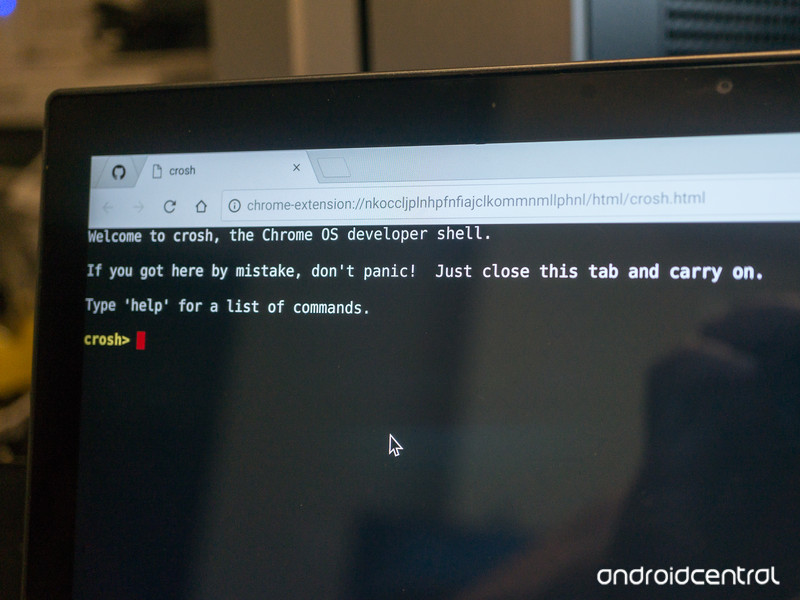
This is Chrome OS’s command line interface, and what you’ll need to run the installer. Open one with by pressing Ctrl+Alt+T on your keyboard. A new tab will open with a text interface. Switch to it, and enter the command shell to change from the Chrosh (Chrome Shell) shell to a proper bash (Bourne Again Shell — a command interpreter that’s universal across Linux, BSD, and OS X) shell. The text will change to green and you’re ready to run the install script.
- If you are using the Crouton Integration extension, type the following and hit enter. Mind the spelling, spacing, and punctuation.
sudo sh ~/Downloads/crouton -t xiwi,xfce
- If you’re not going to use Crouton Integration, use the following instead:
sudo sh ~/Downloads/crouton -t xfce
Now, we wait. Crouton is creating a chroot environment, fetching the right software packages and extracting them to the right place. You’ll have to interact with the shell tab a couple of times, but it halts at the right spot and waits for your input so you don’t have to try and read all the scrolling text. Depending on your internet connection, this will take anywhere between 5 and 20 minutes.
When it’s finished downloading and unpacking, you’re ready to fire things up.
Starting your new desktop
Using the same shell you used above, type sudo startxfce4 and press the enter key. A few lines of text will scroll by, then you’re switched to a new GUI. What you’re seeing is a full install of Ubuntu (12.04 LTS at the time of this writing) with the Xfce desktop environment running. You’ll use the username and password you set up earlier, and you can install any application the runs on Ubuntu and built for your processor architecture.
If you choose to integrate Crouton into Chrome, you might need a couple tips to get started.
The first time you launch Ubuntu, it might open full screen and prompt you to use the F11 key to switch back to a windowed view. Your Chromebook has no F11 key so you’ll need to use a little trick to exit. Right-click on the desktop and add an internet shortcut. It can point to any website or local file, so that’s not important. It will use Crouton Integration to switch back to Chrome OS to parse whatever URL you entered and minimize the Ubuntu window. You can then switch between Chrome and Ubuntu using the tray icon for Crouton Integration and Ubuntu will stay inside a bordered window with standard minimize, maximize and window keys.
A quick trick in case it happens again after you shut down — open the extensions page in the settings and scroll to the very bottom. Click the link titled Keyboard shortcuts and create one for Crouton Integration. You can use that shortcut to move to and from full screen.
If you didn’t use Crouton Integration, none of this applies. When you start an Ubuntu session, Chrome is suspended and when you log out you’re returned.
If you lose your mouse pointer the first time you start Ubuntu, don’t panic. On some hardware, this is expected. Just press and hold the power button until you’re at the login screen, and use Tab and Enter to shut down. When you reboot things are fine and it won’t happen again.
Make it your own
Using these instructions you’ll have a very basic setup. You’ll probably want to customize it a bit. You can go through the settings and try them all, but there are a few things you will probably want to install to get started — a bash utility and the Ubuntu Software Center. To get both up and running, right-click on the desktop and open a terminal session from the menu. Type the following commands one line at a time, hit enter and let them finish before moving on.
sudo apt-get update
This synchronizes the internal package database with the online servers. Ubuntu uses packages to install software, and will automatically install everything you need to run a program when you install the program itself. The command line version is apt, and we want to update the package lists before we fetch any new software.
sudo apt-get install bash-completion ttf-ubuntu-font-family software-center synaptic
This installs a utility that lets you enter the first letter or letters of a location in the terminal, and use the Tab key to fill in the rest, as well as the fonts you’ll need for the software store (otherwise some entries will have squares in place of letters) and the store itself. During the installation of the True Type fonts, you’ll need to accept a license. Use the arrow keys to scroll the window, then tab key to choose an option and the enter key to accept.
Ubuntu has its own app store to install programs with just a click of the mouse.
Once finished, you’ll find the Ubuntu Software Center in your apps list. That’s Ubuntu’s version of an app store where you can download just about any program available. If you’re using a Chromebook with an Intel processor, there’s nothing to do except look through it and grab the things you’ll need. If you’re using an ARM Chromebook, some of the programs aren’t going to run — check the description and reviews to see if someone has mentioned it. If something you want isn’t working for ARM processors, hit Google to find one that does. There a really good chance someone has compiled it for ARM because they wanted to use it, too.
You’ll be told when updates to your operating system are available and can install them with the click of a button. You’ll probably see a notice that a new version of Ubuntu is available to download. Don’t just click yes and try it! Ubuntu 12.04 LTS isn’t the newest version, but it is the best-supported version for most Chromebooks. Any and all critical updates and patches are available for 12.04, so there is no urgent need to try it. Google around a bit and see how newer versions work with your particular model before you jump in.
One last thing
Because your Chromebook is in Developer Mode, you’ll need to hit Ctrl + D at the boot screen every time you start it. You’ll also get a scary warning about security. Know that doing any of this makes your Chromebook less secure. It’s still more secure than most other laptops, but you are giving someone with physical access another way to try to get in.
When you log out of Ubuntu you go back to Chrome. the tab with your shell session is still open, and to go back just type sudo startxfce4 again. When you shut down, you’ll need to reopen a shell session tab (Ctrl+Alt+T) again, and switch to bash with the shell command. You can then start Ubuntu with the sudo startxfce4 command. The tab with the shell running will need to stay open while you’re in Ubuntu.
All that’s left now is to try it and see why the people “dual-booting” on their Chromebooks love it so much!
Chromebooks

- The best Chromebooks
- Should you buy a Chromebook?
- Google Play is coming to Chromebooks
- Acer Chromebook 14 review
- Join our Chromebook forums
Morning brief: Moto G4 Play now up for sale in the U.S., and the boys are back!

What could possibly go wrong?
Welcome to Fridays with Android Central. People all around the world are eagerly waiting in line to buy a phone that’s already sold out, Samsung is continuing to do all it can to get customers to turn in their defective Note 7s, and the budget Moto G4 Play is now up for sale in the U.S.
But more importantly, The Grand Tour is kicking off on November 18. The show will feature fast cars, a lot of swearing, and three middle-aged men making their transition from mucking around in a studio to having fun in giant tents. And with that, it’s time to do the news.
Moto G4 Play now available in the U.S.
After going up for pre-order earlier this month, the Moto G4 Play is now up for sale in the U.S. You can pick it up on Amazon for $149, or $99 if you don’t mind being inundated with lock screen ads. Motorola is also selling the phone directly, and if you’re a Verizon prepaid customer, you can pick up the handset for just $84.99.
Gargantuan Galaxy A9 Pro lands in India
The 6-inch Galaxy A9 Pro is now available in India. The phone will retail for ₹32,500 ($485), and will be available in black, gold, and white color options. Highlights include a 6-inch Full HD display, Snapdragon 652 SoC, 4GB of RAM, 32GB storage, microSD slot, 16MP camera, 8MP front shooter, NFC, and a 5000mAh battery. Overall, a great phone for the price if you can live with the 6-inch screen.
Samsung has already exchanged 130,000 Note 7 units in the U.S.
President and COO of Samsung America Tim Baxter issued a video message to the company’s customers, reiterating the Note 7 recall plans. Samsung has already exchanged 130,000 defective units of the phone in the U.S., and with the official recall now underway, customers are expected to get their devices exchanged by September 21.
Chrome 54 beta for Android brings redesigned New Tab page
Chrome 54 beta is now available on the Play Store, bringing a redesigned New Tab page. The Google search bar is intact, but thumbnails of your recently visited sites are replaced by recommended articles. The update also brings background video playback.
Samsung launches all-in-one productivity app
Samsung Focus is a “unified productivity app” that provides quick access to your emails (Exchange ActiveSync, IMAP, POP3), contacts, events, memos, and tasks from a single location. It’s like the BlackBerry Hub, but for Samsung phones running Android 6.0.1 Marshmallow and above. Download the app from here.
The Grand Tour will start streaming on Amazon Prime from Nov. 18
Clarkson, Hammond, and May will get back to their shenanigans from November 18. The Grand Tour is exclusive to Amazon Prime, with 12 episodes slated for the first season. New episodes will be broadcast every Friday. The show promises to be a cracker, and following the massive letdown that was this year’s Top Gear, I cannot wait.
That’s it from me for this week. Have a fun weekend everyone!
 AIVAnet