


The first presidential debate broke multiple internet records
It won’t shock you to hear that the first US presidential debate shattered TV viewing records — Nielsen says the broadcast was the most-watched debate ever with an average of 84 million viewers. However, it also pushed boundaries of the internet, too. For starters, YouTube reports that Clinton-versus-Trump was the biggest political live stream “of all time,” with almost 2 million concurrent viewers spread across six major news outlets. It was also one of the largest streams in the site’s history, and had 14 times more live viewers than during the 2012 debate.
Twitter isn’t offering concrete data, but does say that it beat the 10.3 million tweets sent during 2012’s first candidate showdown. We’ve reached out to Facebook to see if it can provide its own statistics.
The heated discussion smashed a few other records, as well. CBSN’s young online-only service broke both its hourly and single-day viewership records with about 1.4 million unique viewers. The political predictors at FiveThirtyEight, meanwhile, had their highest single-day traffic to date. And this isn’t counting outages — there are numerous reports of Politifact and Trump’s own site going down at the height of the event. There’s no guarantee that you’ll see a repeat of this server-crushing activity during this election, but it’s clear that the internet is much more of a go-to source for election coverage than it was 4 years ago.
Source: YouTube Official Blog, CNN Money (1), (2), CBS News
Honeywell Lyric T5 Release Date, Price and Specs – CNET

Honeywell’s new Lyric T5 thermostat is scheduled to hit stores in October.
Honeywell
Honeywell has been in the thermostat game since the introduction of its T-86 Round model in 1953.
Today, the heating and cooling giant sells dozens of thermostats, ranging from very affordable to the $199 Lyric — a Wi-Fi-enabled thermostat with geofencing capabilities that also works with the Apple HomeKit and Amazon Alexa platforms.
Honeywell’s $149 Lyric T5, announced today, is the brand’s next iteration of the smart thermostat.

How to install the Honeywell Lyric Thermostat
Follow these simple steps to setup your Honeywell Lyric thermostat.
by Megan Wollerton
Close
Drag
Similar to the round Honeywell Lyric thermostat, which will continue to retail for $199, the Lyric T5 will supposedly work with both HomeKit and Alexa when it officially launches in October. That means you should be able to say things like, “Siri/Alexa, set Away temperature to 68,” “Siri/Alexa, lower Living Room by 3 degrees,” “Siri/Alexa, set the temperature to 72 degrees.”
Here are some additional features of the Honeywell Lyric T5:
- New design: The T5 has a glossy black finish, a gray trim and is “touch-sensitive,” according to Honeywell
- Related app: The Lyric T5 will be accessible via the Lyric app for Android and iPhone
- Geofencing: Use the app to set custom Home and Away distances so your phone can make the changes automatically
- Auto changeover: Program the T5 to decide for you if your thermostat should be set to heat or air conditioning
- Smart response: The T5 is supposed to learn your routines and set the heat or A/C to the exact temperature you want
- Smart alerts: You can opt in to alerts based on needing to change a filter and extreme temperatures
All of the above features sound pretty standard for smart thermostats today. The Nest Learning Thermostat and the Ecobee3 Wi-Fi Smart Thermostat also track your whereabouts to keep your house at the right temperature 24-7. They also integrate with broader smart-home platforms; specifically, both Nest and Ecobee3 work with Amazon’s Alexa and the Ecobee3 is HomeKit-enabled.
At the same time, the Nest and the Ecobee3 cost $249. Given that the Honeywell Lyric T5 seems to offer similar features for 100 bucks less, the T5 is poised to compete well against its smart thermostat competition. We plan to test it out for ourselves as soon as we can.
More thermostat coverage:
- Same great Nest thermostat, now with even better looks
- This round thermostat has a few rough edges
- Ecobee’s smart thermostat closes in on Nest
- Thermostat buying guide
- These smart thermostats steal the heating and cooling spotlight
- How to find a great thermostat for just 30 bucks
Honeywell’s $149 Lyric T5 Wi-Fi Thermostat will be available for sale in the United States starting in October. The team will also release a new version of the Lyric app next month, as well as the Lyric T6 Pro Wi-Fi Thermostat, a model exclusive to HVAC contractors.
Wink Hub 2 Release Date, Price and Specs – CNET
 Wink
Wink
Hubs aren’t dead yet. Wink — the brand initially launched as an app for GE + Quirky products — unveiled the second edition of its hub today. With a slimmer design and a faster processor, the Wink Hub 2 also has more memory and locally stored automations for quicker smart home reactions.
Available starting in late October at Home Depot, Walmart, Amazon and on Wink’s site, the Wink Hub 2 will sell for $100 (£75 or AU$130 converted). If you’d rather, you can still buy the original Wink Hub for $70 (or about £120 in the UK), and I’m glad to hear the company isn’t phasing it out.
Second-gen home hubs don’t have a good track record. The Lowe’s Iris smart home system ran into glitches — and angry customers — when it pushed everyone from its first-gen system to its second. Wink will let customers make the transition when they’re ready, though the updated app that coincides with the new hub will have a tool to help you make the shift if you’re already invested in the Wink system.
The second SmartThings hub also disappointed with its confusing app and performance issues. With its primary competitors faltering, Wink could seize control of the hub market if its second hub avoids similar issues — if there’s any hub market remaining. The idea of controlling a smart home from a single platform is still enticing, but Apple, Google and Amazon are all making plays to do just that without a hub.
Still, the Wink Hub 2 is checking the right boxes. It includes antennas to respond to just about any smart home device.
Features
- Wi-Fi radio that supports 2.4 and 5GHz networks
- Ethernet port
- Bluetooth Low Energy radio
- Thread radio
- Support for Kidde
- Support for Lutron Clear Connect
- Z-Wave antenna
- Zigbee antenna
The Hub will also store schedules and product-to-product triggers you create on its hard drive, which will hopefully make your smart home more responsive. We’ll see if that’s enough to help Wink stand with tech giants like Google, Amazon and Apple as the race for smart home control heats up.
DJI Mavic Pro Release Date, Price and Specs – CNET
The DJI Mavic Pro may be the first prosumer camera drone with true mass appeal.
While there have been several kinder, gentler quadcopters this year — from the large PowerVision PowerEgg to the compact Yuneec Breeze — the Mavic Pro is really the only one to combine high performance in an ultracompact body. Add in DJI’s full assortment of safety and ease-of-use features and you’ve got a drone that anyone can take anywhere.
Despite the small size, you’ll get nearly the same or better performance as from the company’s top-of-the-line Phantom 4. The new OcuSync encrypted transmission system, for example, gives you control up to 4.3 miles (7 km) away with 1080p live streaming to Facebook Live, Periscope and YouTube through the DJI Go app. The Phantom 4 has a max range of 3.1 miles (5 km) and streams at 720p.
 Sarah Tew/CNET
Like the drone itself, the controller is very small, but still has a monochrome screen to give you important flight data. Want to see what you’re shooting? You can connect a phone and mount it just below the control sticks. Also, DJI added a switch to change from RC to a Wi-Fi mode, so you can quickly launch and control the Mavic with only your phone at distances up to 80 meters (262 feet) with a top speed of 4 meters per second (13 feet per second).
For the camera, DJI stripped away what it could of the body and the lens is smaller — a field of view of 78.8 degrees compared with the Phantom 4’s 94 degrees — but it has the same 1/2.3-inch size sensor. It can record 4K-resolution video at 30 frames per second or 1080p at up to 96fps and 12-megapixel photos in JPEG or Adobe raw. And it’s stabilized with the smallest three-axis gimbal DJI’s ever made.
You’ll be able to control the camera with buttons on the controller or with the mobile app. DJI plans to have full HD first-person-view goggles, too, that will give you a 85-degree view from the camera. You’ll be able to control camera tilt by looking up and down and turn your head to rotate the drone.
DJI Mavic Pro means never having to leave…
See full gallery


1 – 4 of 26
Next
Prev
DJI managed to not only retain the Phantom 4’s obstacle avoidance and intelligent flight capabilities, but updated them for the Mavic Pro. It can sense objects in front of it up to 49 feet (15 m) away while traveling at up to 22 mph (36 kph), while optical sensors on its belly help it fly indoors and keep it from hitting the ground even on a slope. In fact, a new Terrain Follow mode will keep it at the same height even if you head up a steep slope.
ActiveTrack, DJI’s name for its subject-tracking mode, can be used for people, animals and vehicles and will now allow the drone to follow from behind, in front or along side a subject as well as circle one. Selfie fans will appreciate the new Gesture mode, which lets you use hand motions to get the camera to focus on you and snap a photo.
The drone has a top regular speed of 24 mph (38.5 kph), but has a Sport mode which will let you take it up to 40 mph (64.8 kph). There’s a Tripod mode, too, that takes your top speed down to 2.2 mph (3.6 kph) so it’s easier to get the drone into just the right position for photos and video.
If all of that’s not enough, the Mavic Pro has a new Precision Landing system that uses the video and GPS information captured at takeoff to guide it back to land within an inch of where you launched from. So when you’ve reached the end of its 27-minute flight time, it will return right to you.
 Sarah Tew/CNET
The DJI Mavic Pro will start shipping October 15 priced at $999 (about AU$1,300 and £750) with the controller or $749 by itself. You can pick it up in Apple Stores in early November. You’ll be able to tack on DJI Care Refresh for $99, which gives you accidental damage insurance for aircraft, gimbal or camera during normal use for up to 12 months, and for an additional charge will get you up to two full replacements if you total it.
When it comes to consumer drones, in my experience, smaller is better. Take a big quad like the Yuneec Typhoon H out to a public park and you’ll get more looks and questions than you do with a Parrot Bebop. The Mavic Pro seems to be the perfect solution: a quad that’s as portable and easy to fly as a Bebop, but with the performance and image quality of a larger model.
Kenmore 81383 Dryer review – CNET
The Good The Kenmore 81383 dryer has plenty of special cycles and steam modes. The appliance’s controls are also straightforward and easy to operate. The dryer offers satisfying cycle speed, and you can stack it vertically or place it on a pedestal accessory.
The Bad While practical, the Kenmore 81383 dryer’s design is generic and unexciting. Instead of using a dedicated water line, you must fill the dryer’s water reservoir by hand. The Kenmore 81383’s 7.4-cubic-foot capacity is small compared with the drum size of other dryers.
The Bottom Line With its solid performance and extensive features, you won’t be disappointed by the capable Kenmore 81383 dryer, but this machine’s boring exterior won’t thrill anyone.
Visit manufacturer site for details.
The $1,050 Kenmore 81383 clothes dryer doesn’t flaunt a snazzy design or metal and glass like the $1,000 LG DLEY 1701V. It also lacks both the drying speed and the large capacity of its bigger sibling, the $1,100 Kenmore 69133 dryer. Still, this appliance does have some appeal, specifically to the logically minded who shop with their heads instead of their hearts.
What the Kenmore 81383 offers is a practical mix of useful features and satisfactory performance for its price. You can also purchase upgrades for this model which allow its owners to either place it on a pedestal or stack it vertically with companion washers. Of course, these add ons are common among front-load style laundry appliances and can’t entirely mitigate the Kenmore 81383’s forgettable exterior.
Kenmore’s 81383 dryer is practical, not packed…
See full gallery


1 – 2 of 7
Next
Prev
Design and features
With its subdued gray color scheme, which Kenmore calls “Metallic Silver”, and a generic profile, this dryer is by no means flashy. Indeed you could easily mistake it for one of countless other front-loading units on the market. It’s certainly no head-turner like the LG DLEY 1701V, which sports a design that’s simply beautiful.

This Kenmore dryer’s generic design could be found on any number of machines.
Chris Monroe/CNET
Measuring 39 inches tall and 27 inches wide by 30 inches deep, the Kenmore 81383 is more compact than other dryers I’ve recently taken for a spin. Of course those appliances, such as the Electrolux EFME617S Perfect Steam (8 cubic feet), Kenmore 69133 (8.8 cu. ft.), and Kenmore Elite 81072 (9 cu. ft.) all have roomier drums and spacious capacity to match. They make the 7.4-cubic-foot capacity you’ll find on the Kenmore 81383 feel cramped by comparison.

The Kenmore 81383 dryer places its controls front and center.
Chris Monroe/CNET
As a machine built to pair well with front-load style washers such as its companion, the Kenmore 41393 washing machine, the Kenmore 81383’s controls sit on its front face. Contained in a panel right above the drum, all the dryer’s buttons and keys are large and within easy reach. I also appreciate the big knob that turns without much effort and clicks softly into place when you select a dryer cycle.
Designed to handle different garment and fabric types, the dryer provides many cycles to choose from as well. Ten in all, they range from “Delicates” and “Casual” to “Heavy Duty” and “Bulky/Comforter,” just to name a few. The appliance is also equipped with steam modes to refresh, dewrinkle and even sanitize items. Instead of using a dedicated water line, however, the dryer relies on a small reservoir you must fill by hand periodically.
Acer Predator G1 review – CNET
The Good The Acer Predator G1 is a speedy, reasonably priced gaming desktop with a fun sense of design and an optional custom briefcase for on-the-go gaming.
The Bad Performance is slower than other similarly equipped gaming desktops; limited ports; requires two bulky external power bricks, and you’ve got to really like the sci-fi tank tread design.
The Bottom Line The Acer Predator G1 isn’t the fastest or even smallest VR-ready desktop, but it’s powerful enough for new games and VR headsets, and has a sense of fun missing from other gaming PCs.
Visit manufacturer site for details.
The compact Acer Predator G1 desktop isn’t the fastest or most powerful system in our roundup of gaming PCs with Nvidia’s new GeForce 1080 graphics cards. It’s also not the smallest, nor is it the least expensive or easiest to upgrade. But in testing and using it alongside many of its bigger and more powerful competitors, I found it had a better sense of — for lack of a technical term — fun. It’s a gaming desktop that doesn’t take itself too seriously, and that’s a rare thing. Plus, it plays new 2D and VR games just fine, and is reasonably priced, making it easier to overlook any performance and design issues.
This is a newer, smaller version of the massive Predator G6 desktop we reviewed earlier in 2016. But that system was a floor-hogging monster that looked like a sci-fi movie prop, with its tank tread design and overblown online marketing copy which promised to “crush 4K gaming…and power-up for galactic domination.” While the Predator G6 was a very capable VR-ready desktop, and decently priced one, it was also too big and goofy to fit into most homes or apartments, especially if you have to consider the spousal approval factor for new hardware.
 View full gallery Sarah Tew/CNET
The Predator G1 is similarly high-end, but boils the same armored-space-tank design into a more manageable form, about 14 inches tall and 5 inches wide. It’s still somewhat silly-looking, but less in-your-face than the larger G6 version.
At this point, certain features feel like a wink and a nod to the excessive design. There are not one, but two separate pull-out headphone holders — basically reinforced sticks that extend from the left and right sides of the system — and the front panel breathes and surges with glowing lights, framing a vertical optical drive that slides open from the center of panel.

View full gallery
Note the headphone holders deployed from either side.
Sarah Tew/CNET
My generous interpretation was that this was a miniaturized tongue-in-cheek take on the stereotypical gaming PC look and feel. I showed the Predator G1 to my game-playing spouse (70-plus hours in Fallout 4), hoping she’d find it as kitschy and charming as I did. But alas, she said it was hideous and banned it from the living room media center.

View full gallery Sarah Tew/CNET
How do I know there’s a certain sly charm to the Predator G1? If you buy the special-edition bundle, which is what we have here, it comes with a custom rolling suitcase, designed specifically to fit the G1 and its accessories. It’s an aluminum case with the same armored/ribbed design as the desktop itself, but with a pullout handle and wheels, like an ordinary suitcase you’d see at the airport. Inside are custom foam cutouts for the desktop, its external power supply, and its keyboard and mouse. It’s hilarious, but also kind of awesome.
That bundle, which also includes a copy of the recent Ubisoft game The Division, is $2,299, and that also gets you an Intel Core i7-6700 CPU, 32GB of RAM, a single Nvidia GeForce GTX 1080 graphics card and a 512GB SSD/2TB HDD storage combo. Acer says the suitcase alone is worth $265 (a stretch, but it’s not too shabby), so that’s a pretty good deal, and close to our VR-ready sweet spot of $2,000.

View full gallery Sarah Tew/CNET
As is often the case, the available configurations in other regions differ. Lower-spec versions of the G1 are for sale in the UK starting at £1,499 and in Australia starting at AU$2,299. Neither includes the suitcase. Sorry.
FBI investigating potential hack of Democrat officials’ cells
Reuters reports that the FBI is actively investigating whether several high ranking Democrat officials’ cellphones have been hacked. The Bureau believes that this attack, should it be confirmed, could be tied to the earlier DNC hacks and that of former Secretary of State, Hillary Clinton. Details remain sketchy at this point — there’s no word on how many phones may have been compromised or their owners’ positions within government. The FBI, the Clinton campaign and the DNC have yet to publicly comment.
We’ll update as more developments come to light.
Source: NBC News
Use Microsoft Rewards to score free Amazon or Starbucks gift cards every month – CNET
Look, I’m not here to judge. If Microsoft wants to bribe folks to use its Bing search engine and Edge browser, I’m only too happy to enjoy my next Starbucks peppermint mocha gratis.
There’s this thing called Microsoft Rewards. Until last month it was known as Bing Rewards, which netted you points in exchange for using Bing, taking quizzes and so on. Those points could be exchanged for things like sweepstake entries, Microsoft services and apparel, and even gift cards from various major businesses.
So I’m here to put free coffee in your pocket. Well, not really, because that would burn, but you get the idea. With a little strategic planning, you can score yourself a $5 Amazon, GameStop, Hulu or Starbucks gift card every single month. Probably even two $5 cards.

Give it a few months and you’ll start racking up rewards like these.
Microsoft
That may not sound like much, but consider: Hulu costs $7.99 per month. Play your Microsoft Rewards cards right and you could get the service absolutely free. Or you could pad your Amazon account with gift cards for the next time you decide to splurge. (Echo Dot, anyone?)
How to score points
If you want to start seriously amassing points, here’s the hard truth: You’ll need to bid goodbye to Google. Microsoft’s maximum rewards come from running Web searches with Bing (5 points per search, up to 250 points per day) on your PC. If you’re mostly on your phone or tablet, use Bing in your mobile browser (again, 5 points per search) and you can score up to 100 points per day.
Android users, you’ll need to change Chrome’s default search provider by venturing into the app’s Settings menu, then selecting Search Engine. In iOS, head to Settings > Safari, then tap Search Engine and choose Bing.
If you’re thinking, “No way, Bing is terrible,” think again. In my experience, Bing’s search results are virtually identical to what I get from Google. It’s mostly about switching your brain over to think “Bing” for search.

Some easy bonus points await you.
Microsoft
The tougher change for many users will be swapping Chrome or Firefox for Microsoft’s Edge browser. Doing so nets you 5 points per hour of active browsing, for a maximum of 150 points per month. Thankfully, this isn’t mandatory. You’ll accrue the search points even if you use another browser.
Bing and Edge are your big earners, but you can also score points by participating in various bonus offers. Set a reward goal, for example, and you’ll land a cool 100 points. Take a super-quick tour of Microsoft Rewards for another 50. Take a Bing-powered quiz to earn 30 extra points. Heck, at time of writing, you can earn 10 points just by clicking the Register to Vote link.
Newcomers to Microsoft Rewards will be limited to Level 1 status (meaning a maximum of just 50 search points per day) until hitting at least 500 points in a month, at which point the Bing yield jumps to a maximum of 250.
Yeah, it’s all fairly confusing. And it seems like a lot of work just for a few bucks’ worth of gift cards. But it’s really not.
Points for perks
Let’s do the math. Assuming you get to Level 2 status (very easy to do), then do nothing more than switch to Bing, you can potentially earn 350 points per day — or 10,500 points in a 30-day month.
To score a $5 gift card from any of the four aforementioned stores, it’ll cost you 5,250 points. So you can bank a pair of cards just by maximizing your search points. And there are other rewards as well, like a three-month Xbox Gold subscription for 15,000 points, or even 12 months for 29,000 — that’s the equivalent of just three months’ worth of maxed-out search points.
Obviously you can pick up even more points by performing bonus tasks a few times a month. But it’s hardly even necessary.
What are your thoughts on this? Are you willing to accept Microsoft’s, er, largesse in exchange for switching to Bing? Or do you need more than a free venti latte to give up your beloved Google?
Google Pixel: Welcome to your new, very circular home screen

Might Google’s new phones consign us to a world of circular icons? And what would that mean for other Android phone makers?
The first leaked Google Pixel phone render doesn’t show us a whole lot. It’s a rounded rectangle with a screen on the front, an earpiece, cameras, sensors and buttons. By far the most interesting thing about the leaked image is what’s on that screen.

Every icon is a circle. Even apps like the phone dialer, Messenger and Gmail have been put in a bubble. Depending on your perspective, it’s either a refreshing change, or a weird, confusing corruption of Material Design.
The immediate comparison to draw is with iOS. Since the first iPhone, Apple has used a rounded rectangular cookie cutter around all app icons, both first- and third-party. Then there are the likes of Huawei and Samsung, who’ve emulated that approach. (Though mercifully, it’s an option on Samsung phones, and only applies to certain skins in Huawei’s EMUI.)
All of which raises the question: Will Google do the same thing to all your apps on the Pixel? David Ruddock of Android Police raised the possibility a couple of weeks back, and we have to wonder how well this would work out in practice. In the early days at least, there’d be a whole lot of apps that just looked bad on your home screen.
The apparent move to a new “Google UI” on top of Nougat also complicates matters. Would the new Google design guidelines for icons apply to the whole of the Android ecosystem, or just Pixel phones? With Google’s hardware division apparently taking the lead here, it’s unclear who’s in the driving seat for design in the rest of the Android world. Today’s leaked render serves to highlight the possible confusion ahead when it comes to Nexus Android, Pixel Android and the nebulous mass that is the rest of the ecosystem.
In either case, Google has certainly been moving many of its apps over to circular (or in the case of Hangouts, almost circular) frames in recent weeks. Chances are that’s no accident.

Apps are a central part of any platform, as is how they’re presented to the user. If Google does go full-circle (see what we did there??), it’s probably because it wants to recreate the sense of cohesion that iPhone’s home screen has had from day one. (Perhaps that’s a good thing, once app developers are onboard with it.) By the same token, maybe it’s a product-level decision (i.e. Pixel) and not a platform-level one (i.e. Android).
In either case it’s an interesting design decision, and one that hints at just how wide-ranging the announcements at Google’s October 4 event could be.
Google Pixel + Pixel XL

- Everything we know so far
- New navigation buttons
- Google UI + circular icons
- Android 7.1 Nougat
How to watch Netflix on Google Cardboard
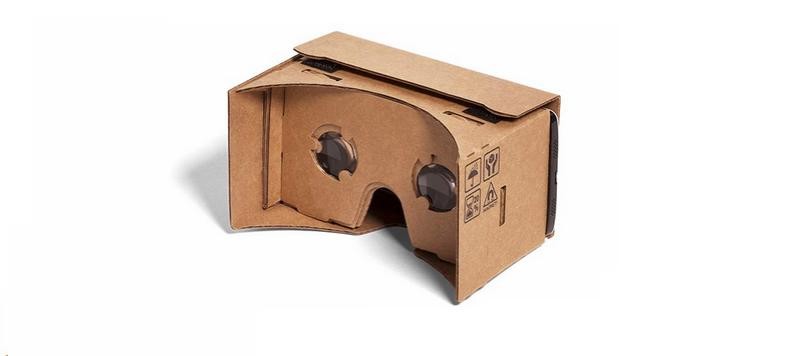
Netflix is now accessible in VR on more than Gear VR.
Plenty of people enjoy spending a few hours binging Netflix to catch up on their favorite show before the new season kicks off. If you have roommates, or distractions then you might have considered watching your shows in VR. Not everybody has access to Gear VR, the only VR headset with the app available. Have no fear though, we’ve got the details for you on how to watch Netflix using Google Cardboard
Read more at VR Heads!
 AIVAnet