


Twitter’s ‘Moments’ Feature Now Available for Everyone
Starting today, Twitter is opening up access to its Moments feature to everyone, allowing all Twitter users to create their own story timelines through tweets and photos.
Launched in October of 2015, Moments is designed to help Twitter users discover stories unfolding on the social network, like conversations between world leaders or celebrities, cultural memes, sports commentary, world events, and more.
At launch, Moments could only be created by Twitter’s curation team and a select group of publishing partners, but expansion started in August of 2016 when Moments became available to influencers, partners, and brands. At the time, Twitter promised Moments would be opened up to everyone “in the coming months,” and has finally made good on that vow.
Moments can be accessed both through the Twitter app for iOS devices and on the web through dedicated tabs. Moments offer streams featuring full-width images, autoplaying videos and GIFs, and text-based tweets.
For everyone who wants to make a Moment – starting today you can! Creators everywhere can now tell stories with Tweets. pic.twitter.com/ZJtNBoTPWf
— Twitter (@twitter) September 28, 2016
Creating a new Moment can be done through the “Moments” tab available on each user’s profile page. Twitter users can create a title, set a cover image, and add tweets to tell a story.
Moments is available to everyone starting today, but the feature appears to be rolling out to users and may not be immediately accessible.
Tag: Twitter
Discuss this article in our forums
Xiaomi Mi 5s Release Date, Price and Specs – CNET

The new Mi 5s drops the glass rear for brushed metal.
Xiaomi
It’s been less than a year since the Xiaomi Mi 5 was announced at MWC, but Chinese smartphone maker Xiaomi is already updating its flagship. The Mi 5s drops the glass rear for a brushed metal back and switches the capacitive button fingerprint sensor to an ultrasonic one.
The change means Xiaomi can cut costs since it won’t have to cut a hole in the screen’s glass to allow the capacitive sensor to touch your skin. But there’s still a slight indentation where the sensor is. The ultrasonic fingerprint sensor takes a 3D map of your fingerprint, and should recognise it even when your finger is wet.
Other changes include a bumped-up processor in the form of the Qualcomm Snapdragon 821 processor and 128GB of onboard storage.
Xiaomi has also buffed up the camera. While it’s gone down from 16-megapixel to 12-megapixel, the Mi 5s is using a Sony IMX378 1 or 2.3-inch CMOS sensor with larger pixels at 1.55 microns, which Xiaomi says is equivalent to those found on compact cameras. I’m looking forward to seeing how the camera holds up when I get a review unit.
Personally though, I’m not too sure if I’m a fan of the design change. The glass rear of the original Mi 5 helps it to stand out against a sea of competitors that sport a metal rear, and the Mi 5 now will be hard pressed to stand out. Then again, having accidentally dropped my Mi 5 and shattered the glass rear, I can guess why Xiaomi wants to switch that out for a more durable material.
We will see how the phone holds up when we get a review unit, in the meantime, here’s a quick rundown of the phone’s specs.
Key features
- Qualcomm Snapdragon 821 processor
- 3GB or 4GB RAM, 64GB or 128GB onboard storage
- 12-megapixel rear camera, 4-megapixel front
- 3,200mAh battery
- USB Type-C port
- Retails in China only for now
- 1,999 yuan ($300, £230, Au$390) or 2,299 yuan ($245, £265, AU$450)

The Mi 5s will come with a headphone jack, in case you’re wondering.
Xiaomi
Kenmore Elite 31633 review – CNET
The Good Kenmore’s $1,530 Elite 31633 washing machine (available at Sears for $915) has the best stain removal score of any top-loader we’ve tested so far. It also looks high-end and can hold twice as many clothes as your standard washer.
The Bad The touch-screen-integrated control panel is very sensitive and it doesn’t have an extra hot water temperature setting.
The Bottom Line The Kenmore Elite 31633 is the best top-load washer we’ve encountered to date and it’s on sale at Sears for just $915 — a steal if you need a large-capacity model.
Visit manufacturer site for details.
I was pleasantly surprised by Kenmore’s $1,530 Elite 31633 top-load washing machine. $1,530 is a lot to spend on a washer, so I expected it to have a lot high-end features. But the 31633 isn’t app-enabled, it doesn’t have a built-in sink or support a second, smaller washer in a storage pedestal below. Still, it’s an excellent appliance.
That’s due in large part to its, well, large 6.2-cubic-foot capacity and exceptional stain removal power. In fact, the 31633 earned the best cleaning score of any top-load washer we’ve tested so far.
Bonus: Sears regularly marks down its appliance prices and the 31633 is currently available for just $915. Get the Kenmore Elite 31633 if you’re looking for a family-sized top-load model that absolutely demolishes stains — particularly if you can find it at its discounted price. If not, consider Kenmore’s 29133 — it also performed very well, but has a smaller capacity and costs a more reasonable $1,100.
Up close with Kenmore’s Elite 31633 washing…
See full gallery


1 – 5 of 12
Next
Prev
A truly massive top-loader
Wrapped in a dark gray metallic finish with a glossy black touchscreen display panel, Kenmore’s 31633 looks like the top-loader of the future. A central dial lets you select among the 10 available cleaning cycles and everything else is accessible via integrated “buttons” on the display.
The controls actually work more like a phone touchscreen than actual buttons. At times they seemed too responsive, since you barely have to tap on the option you want to make a change. Alternatively, you have to hold the Start button for a couple of seconds before it will kick into action — something you’ll have to get used to considering the super-responsiveness of every other button.
The controls include basic settings like Wash Temp, Soil Level and Spin Speed, as well as advanced features like Steam Treat, Two Rinses, Fabric Softener and Accela-Wash — an option that reduces cycle time by at least a few minutes (the exact number varies based on the specific cycle you choose).
There’s no traditional clunky agitator taking up space inside the drum cavity either, just 6.2 cubic feet of space with a high-efficiency impeller-style agitator hanging out in the bottom.
Here’s a look at the Kenmore Elite 31633 versus some other top-load washers:
Comparing washing machines:
| Kenmore Elite 31633 | LG WT1801HVA | Kenmore 29133 | GE GTW860SPJMC |
| $1,530 | $1,150 | $1,100 | $1,200 |
| Metallic, White (model #31632 for $1,420) | Graphite Steel, White (for $1,050) | Metallic, White (model #29132 for $1,180) | Metallic, White (for $1,100) |
| 6.2 cubic feet | 4.9 cubic feet | 5.3 cubic feet | 5.1 cubic feet |
| 10 | 12 | 9 | 13 |
| 290 kWh/year | 135 kWh/year | 259 kWh/year | 152 kWh/year |
| 15.6 gallons | 15 gallons | 17.7 gallons | 12.3 gallons |
| 29.5 x 43.5 x 30 inches | 27 x 40.2 x 28.4 inches | 27.5 x 42 x 27.9 inches | 28 x 44.5 x 29 inches |
| 1 year, limited | 10 year, limited | 1 year, limited | 1 year, limited |
| 120V 60Hz | 120V 60Hz | 120V 60Hz | 120V 60Hz |
| No | Yes, Android and iPhone | No | Yes, Android and iPhone |
You start to realize just how massive the 31633 is when you compare it with other high-end top-load washing machines. Many washers hover around a 4.5 cubic-foot drum size and that’s plenty big enough for a standard 8-pound load of laundry. Looking at the chart above, LG’s WT1801HVA has a 4.9-cubic-foot capacity, Kenmore’s 29133 has 5.3 cubic feet of space inside its drum and GE’s GTW860SPJMC has a 5.1-cubic-foot capacity.
With a whopping 6.2 cubic feet in the Kenmore Elite 31633, you can literally double your laundry load and accommodate 16 pounds of clothes no problem. Got Laundry, a web-based laundry service says 15 pounds of clothes is roughly “8 T-shirts, 3 pairs of jeans, 8 pairs of socks, 2 towels, 2 sweatshirts and 1 sweater.” That’s a whole bunch of clothes — more than you could comfortably fit in any other washer we’ve tested to date.
Amazon Fire TV Stick with Alexa Voice Remote Release Date, Price and Specs – CNET
 Amazon
Roku makes our favorite streamers and leads the pack in sales, but Amazon is trying to find its own voice with an update to a familiar, inexpensive stick.
Available for preorder starting today is a new streaming media device officially called Fire TV Stick with Alexa Voice Remote. It costs the same $40 as its predecessor, the original Fire TV Stick, and still streams the same TV apps including Netflix, Hulu, Watch ESPN and of course Amazon video. But now the price includes the same remote found on the more expensive Fire TV box, complete with a little mic button and voice control.
Equally important in my book is a boost in speed. Amazon upgraded the processor with a quad-core version that’s supposedly 30 percent faster, addressing one of my major complaints with the original Stick. It also improved the Wi-Fi capability from 802.11n to 802.11ac, and added the ability to connect a set of Bluetooth wireless headphones for private listening.
 Amazon
Otherwise it’s basically identical to the previous $50 version, which paired the original stick with a “voice remote.” Addition of the word “Alexa” in the new Stick’s name indicates how Amazon intends to differentiate itself from Roku. Amazon claimed “4,000 channels, apps, and games” on the original Sticks, and now that line reads “7,000 channels, apps and Alexa skills.”
Alexa, the Amazon voice assistant that’s been available for the last year on Fire TV, has grown more useful recently. It now augments search capabilities (which now cover 90 apps) with the ability to launch apps, play movies and TV shows by title or genre, control playback (“skip ahead 30 seconds”) read back information on local movie showtimes, businesses and restaurants, create shopping lists, use any of the 3000 Alexa skills, and command all of the same smart home devices as Amazon’s Echo and Dot.
The main downside of Alexa on Fire TV compared to Alexa on those devices, however, is that you’ll need to turn on your TV and press a button on the remote to use it — the Stick isn’t “always on” and listening for your command.

How to combine Alexa devices to fit your needs
Some of Alexa’s devices work well together, others don’t. We discuss the best combinations so you can find the one that works for you.
by Andrew Gebhart
Close
Drag
Fire TV’s primary function is streaming video, however, and my main beef is still with its interface, which relentlessly channels (no pun intended) users toward Amazon content. A recent minor facelift improved the situation a bit, allowing some apps like Netflix and HBO to surface content on the home screen, and Amazon promises a major “content-first” interface update later this year. We’ll see.
Three days ago Roku introduced an onslaught of new streamers, including three with 4K capability, while Google is expected to unveil its 4K Chomecast next week. A couple year-old iterations of the Fire TV box remain Amazon’s sole 4K streamers for now — the new Stick doesn’t have 4K resolution.
Of course, the Fire TV Stick’s primary rivals are the $35 Chromecast, the $30 Roku Express and the $50 Roku Streaming Stick, my favorite streaming device overall. Amazon’s counter-punch is to pair its new $40 Stick with a limited time promotion: “Eligible customers who purchase and activate their device by October 31 will also receive a free content package worth up to $65, including one month of Sling TV, two months of Hulu (Limited Commercials), and a $10 credit for Amazon Video to rent or purchase new releases or old favorites.”
The Fire TV Stick with Alexa Voice Remote ships October 20. We’ll have a full review as soon as possible.
Xiaomi Mi 5s Plus Release Date, Price and Specs – CNET

The Mi 5s Plus features dual-cameras.
Xiaomi
Chinese smartphone maker Xiaomi’s third big-screen phone, after the Mi Note and Mi Max, is the Mi 5s Plus. But don’t let the name deceive you — the Mi 5s Plus feels more like a successor to the Mi Note, which was due a refresh this year.
Sporting the same 5.7-inch display size as the Mi Note, the Mi 5s Plus comes with a few upgrades not found on the Note, including a fingerprint sensor on the rear, dual cameras and a much bigger 3,800mAh battery.
Similar to the Huawei P9, the Mi 5s Plus’ dual 13-megapixel cameras feature a normal color sensor and a black-and-white one, which then combines both images for a more detailed image with less noise.
Like the Mi 5s, the Plus sports the latest Qualcomm Snapdragon 821 processor. Depending on which version you get, it will either come with 6GB RAM and 128GB of onboard storage or 4GB RAM and 64GB storage.
While the phone’s currently limited to China, expect it to be sold in markets such as India and Singapore in the near future. It will retail for 2,299 yuan (approximately $245, £265 or AU$450) for the lower specced model and 2,599 yuan (about $390, £300 or AU$510) for the 6GB RAM version.
I’ll be looking forward to see if the cameras on the Plus are as good as Huawei’s P9, so do check back in the future for our review. In the meantime, here’s a quick breakdown of the specs.
Key features
- Qualcomm Snapdragon 821 processor
- 4GB or 6GB RAM, 64GB or 128GB onboard storage
- 13-megapixel dual rear cameras
- 3,800mAh battery
BlackBerry is officially getting out of the phone hardware business
BlackBerry’s transition to a software company is complete. During its Q2 2017 earnings today, CEO John Chen announced that the company “plans to end all internal hardware development and will outsource that function to partners.” This change was already in the works for some time, with Foxconn taking over the design responsibilities of some of the company’s future devices and TCL, owners of the Alcatel brand, building its phones under the DTEK brand, but to see it official is bittersweet for this Canadian.

“Our new Mobility Solutions strategy is showing signs of momentum,” said Chen in a press release. “Under this strategy, we are focusing on software development, including security and applications.”
BlackBerry’s hardware business has been losing money for some time, and this is just the last nail in the coffin.
BlackBerry announced revenue of just $334 million for the quarter, down 47% from a year earlier, and down sharply from its days of billion-plus quarters less than three years ago. It lost $372 million due to a hit of $147 million from its RAP, or Resource Alignment Program, and $96 million from inventory write-downs.
In other words, BlackBerry’s hardware business has been losing money for some time, and this is just the last nail in the coffin. But the company says that its transition to a software and services company, building Android-based security solutions for other OEMs, is proving successful, and revenue increases will meet the targets set in early 2016 for the end of this fiscal year. Chen is a pragmatist, and has been warning that he would get out of the hardware business should he see no future in it, and this move is the first step towards realizing that goal.
The investment needed in rebranding a TCL-built phone with BlackBerry software is minimal, especially, as we’ve seen in recent months, the company intends to distribute its security-focused Android software suite to all users running Lollipop and above. As someone who has followed BlackBerry since the early days of BlackBerry OS — I lined up to purchase a Bold 9000 in 2008 when everyone else was lusting after the iPhone 3G — I am a little saddened by this news, but certainly not surprised. Based on what we’ve seen from the burgeoning DTEK line, if there’s any money to be made in the coming years, it’s not going to be in high-margin devices like the Priv that, at $699, are critical successes and commercial failures.
The news comes on the heels of an announcement by Alcatel parent company TCL of its new TCL 950 flagship, the purported basis for BlackBerry’s upcoming DTEK60, which is expected to be announced in mid-October.
Using Google Chromecast Audio as a whole-house audio alternative to Sonos

Great-sounding music is made easy with a Chromecast Audio. And you’ll save a fistful of dollars, too.
If you’re thinking about setting up a whole-house (or even just a single-room) streaming audio solution, Sonos systems are pretty much what you’ll find recommended by folks on the Internet. They are easy to set up and the Sonos service offers a decent choice of streaming content providers. But the price tag — you’ll be spending hundreds per room for individual Sonos amps or speakers — can be tough to swallow. We’ve got a solution: Use a Chromecast Audio and a few standard components and save a whole lot of money.
Three things make the Chromecast Audio a good (or even better) alternative — the Chromecast has its own 96KHz / 24bit capable audio hardware, the 3.5 mm combination output supports optical as well as analog connections and has a high dynamic range setting for hi-res music files, and the Google Cast app lets you create groups or zones so you can stream your music to specific sources just like you can with a Sonos. There’s no hacking or messing with hardware required, either. Plug your Chromecast Audio into a set of powered speakers, or a small amp and passive speakers, or even an A/V receiver, and cast some music.
Getting started

You’ll need three things — a Chromecast Audio, something to play the music that’s streaming and something to initiate it. The Chromecast Audio is the easy part — you’ll find one on Google Play as well as plenty of other online retailers or on the shelf at Walmart or Best Buy. One will set you back about $35 unless you find it on sale.
To tell the Chromecast what to play, you’ll need an Android or iOS device or a computer running Google Chrome (a Chromebook works really well, too). Install the Google Cast app and it will walk you through finding your Chromecast(s) and setting them up. You’ll then be able to stream from popular online services like Google Play Music, Pandora, Spotify and plenty of others. You can also stream your own hi-res music from a network-attached storage device using a server like Plex or an app like BubbleUPnP for your Android phone. You can even mirror local files from your Android phone or tablet or cast audio directly from a Chrome tab across your local network. There are plenty of options when it comes to the source of your music, and more apps are adding Google Cast support all the time.
The Chromecast Audio is designed to be plug and play with other equipment.
Playing back the sound is really the only part you’ll need to think about. You need a way to get the audio from the Chromecast’s 3.5 mm jack to a pair of speakers (either powered or via an external amp). There is nothing special about how this is done. In fact, you can plug a pair of headphones into your Chromecast Audio and it plays exactly as you would expect. That means you can let your needs and your budget decide what you use here.
Adding some speakers

Probably the best solution would be to use a small Class-T bookshelf amplifier and a pair of passive speakers. The amp can cost as little as $20 and still deliver great sound because we’re not necessarily looking for bells and whistles — we just need a way to increase the power of the signal and pass it along to some speakers. Decent bookshelf speakers start at $50 or so, while great ones can be bought for about $100. You can even splurge and use a pair of studio monitors (along with an amp capable of driving them) for one or more rooms if you plan on streaming a lot of hi-res music. The folks where you buy your speakers will be able to help you if you’re not sure what to buy, Just tell them what you’re planning to do and they’ll point you towards everything you would need. Add in a few cables and you’ve just built a great audio streaming setup without breaking the bank. Here’s an example of a good setup that would compare to a pair of Sonos Play 3 speakers or a Sonos Connect amp setup:
Chromecast Audio
Topping mini-amp
Pioneer speakers
Even after adding in the cost of a few cables and things like speaker stands if you want or need them, this is a much cheaper alternative that sounds great and has support for more services than a Sonos system. The only downside is wiring things up, which should take just a few minutes because everything on this list will be plug and play. Now multiply the savings by the number of places you want to bring your music to, and you’ll have saved a lot of money.
A great sounding system is easy to build, or you can plug a Chromecast Audio into your existing setup.
A Chromecast Audio is also really easy to drop into your existing home stereo or entertainment center. If you already have a great setup and would love to use Google Play Music or listen to your music across your own network, all you need to do is plug a Chromecast Audio into an open optical input using a Toslink cable and fire up the Google Cast app. You can even use a pair of powered speakers like these Mackie 4-inch Monitors for great sound without a separate amplifier. Being versatile is a big plus, and a Chromecast Audio will fit most anywhere and connect to anything using standard cables.
Whether you’re just looking for a cheap and easy way to build a streaming stereo for your office or bedroom, or want to connect your whole house with multiple setups indoors or out, a Chromecast Audio is a great way to do it.
Digital Offers: Keep your browsing private and secure for only $39!
There’s so many reasons why you’d want to securely browse the internet anonymously in 2016; whether you don’t like how advertisers and marketers track your every search and click online, you hate dealing with geo-locked content, or you’re bothered by the idea of your ISP or government snooping on you.
The obvious solution is to get yourself a VPN subscription, but those can be a hassle to set up and can end up costing you hundreds of dollars over time. Plus, there’s typically limitations on the number of devices you can use it for.

That’s what makes this deal from Android Central Digital Offers so amazing. You can get a lifetime subscription to Windscribe VPN for just $39.99! Featuring a desktop application and a browser extension that work in conjunction with one another, Windscribe VPN not only protects your online privacy and unblocks geo-locked websites but it also removes ads and trackers from your browsing experience.
Windscribe helps you stay private online by blocking ads and trackers and changing your IP address to one that is shared by thousands of people, so your Internet activity cannot be tracked by your Internet Service Provider and other parties. It also features a top-notch firewall and can be used on all your devices simultaneously (compatible with PCs running Windows XP, Vista, 7, 8, 10, Macs running OS X 10.8 or later, and Linux as well).
A lifetime subscription to Windscribe would typically run you upwards of $900. That’s why you should act now and save 95% with this amazing deal. Keep your browsing private and safe with Windscribe VPN.
See at Android Central Offers
Best OnePlus Phone
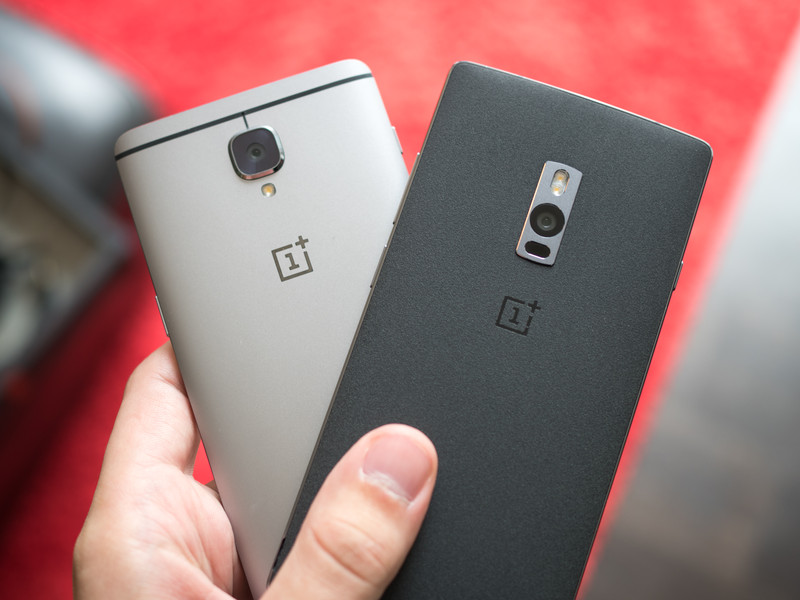
If you’re interested in getting the best OnePlus phone you can buy today, look no further than the OnePlus 3. It’s a fast and capable device all wrapped up in a beautiful chassis.
Best overall
OnePlus 3

See at OnePlus
The OnePlus 3 is the latest and greatest phone to come from OnePlus, and by far the best flagship they’ve released thus far. Featuring all the hardware specs and features you’d expect from a top-tier smartphone — a great screen, solid camera, speedy software, and long battery life — it’s one of the best Android phones of 2016.
And best of all is the price. At only $399, it costs significantly less than any other major 2016 flagship. While there are more affordable OnePlus phones available, none of them come close to matching the high quality experience you get from the OnePlus 3.
Bottom line: After years of fine-tuning, OnePlus has finally introduced a phone that’s worthy of competing in the competitive high-end smartphone market. That phone is the OnePlus 3.
One more thing: The OnePlus 3 comes in a single 64GB version, which is plenty of storage space for even the most avid of media collectors. And it’s dual-SIM too!
Why the OnePlus 3 is the best
Premium package at a mid-range price!
OnePlus has been trying to make major waves into the mainstream phone market, and they really hit their stride in a big way with the OnePlus 3. After previously dabbling with different materials, the OnePlus 3 gets a premium full aluminum build. Paired with the beautiful 5.5-inch, 1080p display protected by Gorilla Glass 4, it’s a stylish design with no compromises.
Powered by a Snapdragon 820 processor and 6GB of RAM, there’s plenty of power for running a mostly pure Android experience from OnePlus’ Oxygen OS. There a solid 16 megapixel camera on the back and an 8MP front-facing camera and in terms of storage, the OnePlus 3 comes with 64GB, but sadly no external SD slot. Other features such as a fingerprint scanner, NFC for Android Pay and two sim card slots are
On top of all that, there’s a capable 3000mAh battery which offers fantastic battery life during an average day of usage. When it’s time to top up, use the included Dash Charge wall plug to get your phone back up to 60% in just 30 minutes.
Here’s what Android Central’s Andrew Martonik had to say on it in his official review:
No longer are we looking at a phone that’s “good for the money” or downplaying shortcomings in light of the phone as a whole — the OnePlus 3 is aiming to just be a top-end phone, before you discuss the price or the company behind it.
Best for less
OnePlus 2
See at OnePlus
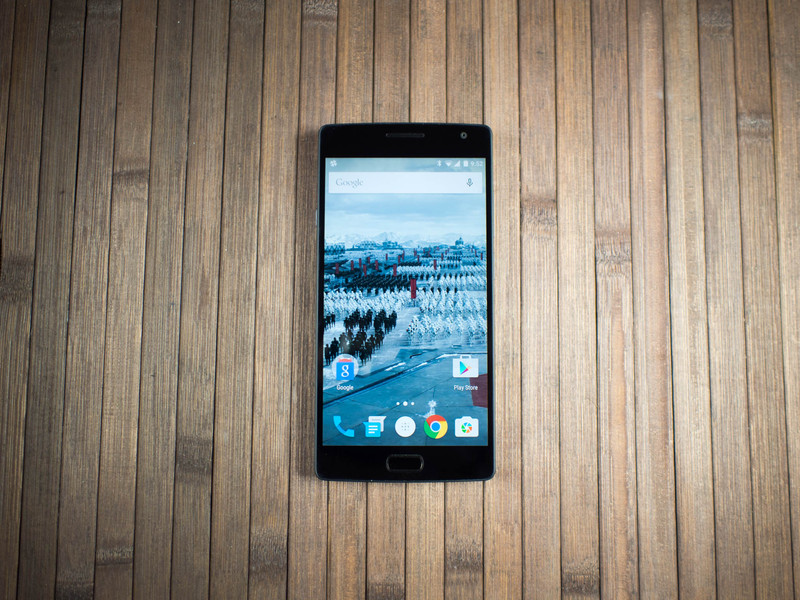
The OnePlus 2 was a somewhat interesting release in 2015. Following their “Never Settle” motto, OnePlus went with the year’s top chip: a Snapdragon 810 processor with 4GB of RAM for the 64GB model of the OnePlus 2. There is a handy notification slider opposite the power and volume buttons, allowing you to discretely silence your phone without taking it out of your pocket. However, OnePlus also left out features such as expandable memory, NFC support, and included a removable backplate but no removable battery. Depending on your usage habits, those might be deal breakers.
Even though it’s a year old, it’s a capable device that could be a decent option for folks looking for a mid-range phone with good specs. Currently running on Marshmallow, it should get an upgrade to Nougat along with the OnePlus 3 in 2017. The build quality here is quite nice as well — after the OnePlus One’s all-plastic body, the company transitioned to an aluminum-magnesium alloy frame with a swappable back cover. It’s a unique look that won’t be to everyone’s tastes, but the included sandstone cover is quite comfortable to hold.
Bottom line: If affordability is your top priority and you don’t care about lack of external storage or NFC, at $299 it will still serve the average user well.
Best budget
OnePlus X
See at OnePlus
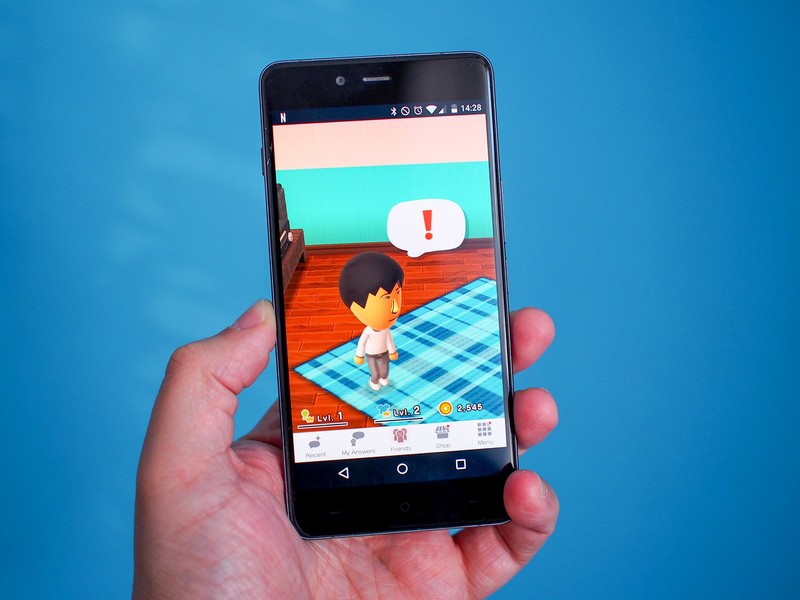
OnePlus put style first with the OnePlus X. With an engraved aluminum frame and black Onyx glass on the back, the compact OnePlus X has a polished look and feel to it that stands out among all other OnePlus phones. It’s got a brilliant 5-inch 1080p AMOLED display and performs well running the streamlined Oxygen OS.
This is a true budget phone, so it has a weaker camera than the OnePlus 2 and 3, but it does include the flexibility of either using two sim cards, or one sim card and a microSD — up to 128GB supported. Starting at only $199, it’s the most inexpensive of the three.
Bottom line: If you’re looking for an affordable, stylish phone in a compact size, the OnePlus X is a decent option.
One more thing:: The OnePlus X almost certainly won’t get Android 7.0 Nougat due to the use of an older Snapdragon 801 processor.
Best overall
OnePlus 3
See at OnePlus
The OnePlus 3 is the latest and greatest phone to come from OnePlus, and by far the best flagship they’ve released thus far. Featuring all the hardware specs and features you’d expect from a top-tier smartphone — a great screen, solid camera, speedy software, and long battery life — it’s one of the best Android phones of 2016.
And best of all is the price. At only $399, it costs significantly less than any other major 2016 flagship. While there are more affordable OnePlus phones available, none of them come close to matching the high quality experience you get from the OnePlus 3.
Bottom line: After years of fine-tuning, OnePlus has finally introduced a phone that’s worthy of competing in the competitive high-end smartphone market. That phone is the OnePlus 3.
One more thing: The OnePlus 3 comes in a single 64GB version, which is plenty of storage space for even the most avid of media collectors. And it’s dual-SIM too!
ICYMI: All aboard the world’s largest boat elevator

Today on In Case You Missed It: The Three Gorges Dam in China is home to the largest ship elevator, hauling up to 3000 tons of cargo from one lower level of water to the higher stream at the top. Meanwhile, Georgia Tech engineers believe their new fabric, which can harvest energy from both movement and the sun, will revolutionize how we keep devices charged.
The three baby parent video is here, and the crystallizing salts are here. As always, please share any interesting tech or science videos you find by using the #ICYMI hashtag on Twitter for @mskerryd.
 AIVAnet