


Samsung: 60 percent of old Galaxy Note 7s exchanged so far

90 percent of customers choosing to stick with the device, as opposed to getting a refund or a different Samsung phone.
Samsung’s Korean HQ has given an update on the progress of its global Galaxy Note 7 recall problem, as we approach a month since the company first halted sales of the potentially explosive phone.
First, the key stats:
- 60% of old Note 7s have been returned in the U.S. and Korea.
- In Singapore, 80% of old Note 7 owners have exchanged their phones.
- Globally, 90% of people returning the Note 7 have chosen to get a new, fixed device (as opposed to a refund or another Samsung phone).
Four days ago the firm said half of affected Note 7s had been returned in the United States alone. There’s no US-specific figure included in today’s update, but the 60% figure for the U.S. and Korea at least shows things are moving in the right direction. That’s likely been accelerated by Samsung’s recent software update, which shows a warning message whenever an old Note 7 is plugged in, and caps the battery level at 60 percent.
Sales of the Note 7 to new customers are set to begin in Korea this Saturday. In other parts of the world, including the UK, it’s looking like it’ll be later in October before the “safe” phone is opened up to new sales.
Meanwhile in India, Samsung will reportedly launch a big Note 7 ad campaign the day the iPhone 7 goes on sale in that country, reinforcing the message that the new Galaxy Note 7 is safe to use.
According to sources, the new Note 7 models will be manufactured separately and not be refurbished versions of the handsets made earlier. Samsung will highlight the fact prominently on packaging and promotional campaigns.
New Note 7s without the battery defect can be identified by their green battery icon.
Have you exchanged your Note 7 in the past week? Share your experiences down in the comments!
Samsung Galaxy Note 7
- Galaxy Note 7 recall: Everything you need to know
- Samsung Galaxy Note 7 review
- The latest Galaxy Note 7 news!
- Here are all four Note 7 colors
- Complete Galaxy Note 7 specs
- Join the Note 7 discussion in the forums!
Verizon
AT&T
T-Mobile
Sprint
Xiaomi Mi 5s Plus unveiled with Snapdragon 821, 6GB RAM, 13MP dual rear cameras
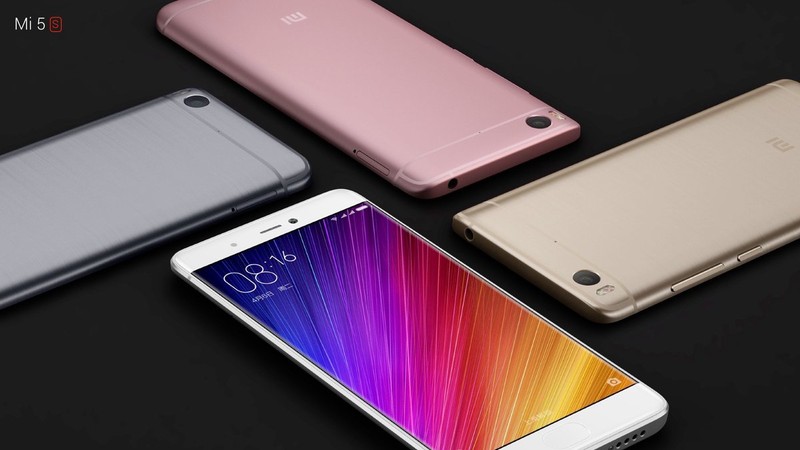
This is what the Mi 5 should’ve been.
At a media event in China, Xiaomi unveiled the Mi 5s and Mi 5s Plus. Both phones offer high-end internals in the form of a Snapdragon 821, with the Plus variant getting 6GB of RAM, and dual 13MP cameras at the back. The phones will be available in Gold, Rose Gold, Silver, and White color options, and will go up on sale in China starting this Thursday.
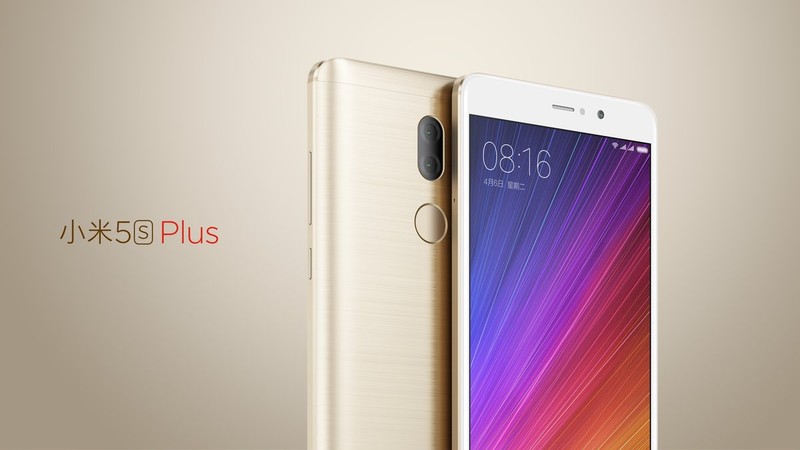
The Mi 5s Plus is the more interesting option among the two handsets, as it offers a dual 13MP camera setup at the back. The implementation is similar to what we’ve seen with the Huawei P9, with one sensor shooting in full color and the other being a dedicated monochrome sensor. The design itself looks similar to the Mi 5, although Xiaomi went with an all-metallic chassis this time around.
| Operating System | Android 6.0 Marshmallow with MIUI 8 | Android 6.0 Marshmallow with MIUI 8 |
| Display | 5.15-inch IPS Full HD display600 nits, 95% NTSC coverage | 5.7-inch Full HD display600 nits, 95% NTSC coverage |
| SoC | 2.15GHz Snapdragon 821 | 2.35GHz Snapdragon 821 |
| RAM and storage | 3GB RAM/64GB storage4GB RAM/128GB storage | 4GB RAM/64GB storage6GB RAM/128GB storage |
| Rear camera | 12MP 1/2.3-inch Sony IMX 378 sensor4K video, PDAF, OIS, dual-LED flash1.55µm pixel size | Dual 13MP cameras4K video, PDAF, OIS, dual-tone LED flashClearSight technology |
| Front shooter | 4MP camera with 1080p video recording | 4MP camera with 2.0µm pixels |
| Connectivity | 4G+ with 3x carrier aggregation, Wi-Fi acBluetooth 4.2, Wi-Fi Direct, NFC, GPS | 4G+ with 3x carrier aggregation, Wi-Fi acBluetooth 4.2, Wi-Fi Direct, NFC, GPS |
| Charging | USB-C with Quick Charge 3.0 | USB-C with Quick Charge 3.0 |
| Battery | 3000mAh | 3800mAh |
Both phones also offer an ultrasonic fingerprint sensor that’s placed underneath the home button. The Mi 5s with 3GB of RAM and 64GB storage will retail for ¥1,999 ($300). The variant with 4GB of RAM and 128GB storage will be available for ¥2,299 ($345). Meanwhile, the Mi 5s Plus with 4GB of RAM and 64GB storage will launch for ¥2,299 ($345), and the high-end model with 6GB of RAM and 128GB storage will set customers back ¥2,599 ($390).
How to keep the Pokémon Go Plus from disconnecting from your Android phone

How do I keep my Pokewatch from disconnecting?
If you’re one of the many people out there who recently decided to dive deeper into the world of Pokémon Go by picking up a Pokémon Go Plus for your wrist, you may have noticed it plays by slightly different rules than the rest of the game. You can use it without the screen on your phone even being on, and through it you can catch Pokemon, check in to Pokéstops, and gain all the steps necessary for egg hatching and candy earning. It’s a fun little accessory, right until it disconnects from your phone and you realize the last mile you walked didn’t count towards anything.
You aren’t along in being frustrated by this. The Pokémon Go Plus is a simple accessory, and disconnects aren’t always easy to immediately detect. Here’s how you can tell you’re disconnected, and what you can do to avoid future disconnections during gameplay.
How to tell you’ve been disconnected

For the most part, Pokémon Go Plus is pretty good about letting you know when it has disconnected from the phone. The wristband will vibrate and flash red as soon as it is disconnected from your phone. This is east to detect if you’re walking and feel the vibration or see the LED, but if you’re doing something important and can’t stop to look at your wrist or you just plain didn’t feel the vibration you may not know right away. This disconnection notification only happens once, so your window is limited.
The other way to know you’ve been disconnected is by tapping the LED button in the center of the watch and looking for a slow pulsing blue light. That pulsing blue light is the Pokémon Go Plus trying to connect to your phone, which naturally means it has been disconnected. If you tap this button and feel a single quick vibration pulse, it means you’re connected to your phone and everything is fine. If you see the slow blue pulse, it means you’ve been disconnected.
Why did my Pokémon Go Plus disconnect?

There are a couple of reasons why your Pokémon Go Plus would disconnect from your phone. For starters, the watch is designed to disconnect when you are actively using the Pokémon Go app on your phone to play the game. If you’re busy playing the game, you don’t need a separate reminder on your wrist that Pokémon are showing up around you. It’s also possible you’ve walked too far away from your phone, in which case the Bluetooth connection between your wrist and your phone will have been interrupted.
Your Pokémon Go Plus may have also disconnected if your GPS loses track of where you are. Pokémon Go needs the GPS in your phone to function, and when connected to your Pokémon Go Plus the phone has a constant connection to GPS services. If that connection fails, your watch will disconnect until you reconnect it.
Finally, several users have found issues with specific Android phones that don’t currently have a resolution. Some phones by OnePlus and Motorola, for example, disconnect from Bluetooth a little more easily than other. This means the Bluetooth Low Energy connection between your phone and Pokémon Go Plus may disconnect easily with interference. To deal with these problem, disable Wi-Fi on your phone and make sure Bluetooth Scanning is disabled.
How to reconnect to Pokémon Go Plus

Being disconnected is a bummer, but reconnecting is easy.
Open Pokémon Go on your phone
Tap the dark Pokemon Go Plus icon in the top left
Tap the LED button on your Pokemon Go Plus
You’ll feel a vibration on your wrist and see a notification in Pokémon Go when the two are connected. From here you can close the app and go back to using your phone as you see fit. You will also see a notification icon in your tray letting you know you are connected to Pokemon Go, which will tell you about the last thing you did in the game as you continue to play.
Enjoy!
Still having problems?
Are you still struggling to get your Pokémon Go Plus accessory to connect to your Android phone? Let us know in the comments below!
Pokémon Go
- Join our Pokémon Go forums!
- How to deal with GPS errors in-game
- Which team should you choose?
- How to play without killing your battery
- The Ultimate Pokémon Go Game Guide!
- Listen to the Pokémon Go podcast!
Roku Express vs Roku Express+ vs Roku Premiere vs Roku Premiere+ vs Roku Ultra: What’s the difference?
Roku recently announced a change to its portfolio of streaming boxes. Five new devices replace the old numbered players from the entry-level Roku Express and Roku Express+ to the 4K HDR-compatible Roku Ultra.
The recently updated Roku streaming stick still exists alongside the new options, making your choice pretty vast. We have put the latest devices up against each other to help you work out how they differ in order to find the right one for you.
Read on to find out the differences and similarities between the Roku Express, Express+, Premiere, Premiere+ and the Ultra.
Roku Express vs Express+ vs Premiere vs Premiere+ vs Ultra: Design
These new devices represent a new line-up for Roku, but the tried and tested design remains. The sleek black boxes and familiar Roku remote are all present.
The base models of the Roku Express and Roku Express+ measure 35.6 x 83.8 x 17.8mm and are easily dwarfed by the slender and practical remote.
The Roku Premiere, Roku Premiere+ and Roku Ultra also offer the clean design but they are slightly larger at 124.5 x 124.5 x 21.6mm, due to their improved processing power, optical outputs, ethernet inputs and SD card slots.
Roku Express vs Express+ vs Premiere vs Premiere+ vs Ultra: Hardware
Each of the new Roku streamers has been improved with new technology compared to the last series. Even the base model Roku Express is said to be faster than the Roku 1 it replaces, but with a budget price tag that allows it to compete with Google’s Chromecast.
The Roku Express+ has the added bonus of backwards compatibility in the form of composite A/V cable connectivity. This means it not only works with older televisions, but it will also work with HD screens and offers upscaling to 1080p over HDMI to boot.
The Roku Premiere is essentially the replacement for the old Roku 2 and a step up from the Express range with a quad-core processor and 4K streaming support (up to 60 frames per second). This extra grunt also comes with improved wireless connectivity meaning you shouldn’t have issues streaming over busy Wi-Fi networks.
To use the 4K streaming feature, you’ll need to have the necessary content via subscription or purchase, but with Netflix and other content providers available through Roku, this shouldn’t be a problem.
If you really want all the bells and whistles though, the Roku Premiere+ and Roku Ultra are the ones for you. These two streaming devices are the only devices in the line-up that not only include 4K at 60 frames per second, but HDR (high dynamic range) picture quality enhancement too.
The Roku Premiere+ and Roku Ultra also sport Ethernet input and improved wireless connectivity. They offer 802.11ac MIMO dual-band wireless compared to 802.11 b/g/n with WEP, WPA, and WPA2 support on the Roku Express models, giving you more choice when it comes to connecting your box to your home network.
The flagship models also include USB connectivity and a microSD card slot which means you can easily access your own video content or view photos on your television. For the most compatibility in this area, you’ll want to spend the extra on the Roku Ultra which is capable of playing back everything from .MP4 to .Flac to GIF files and a multitude of others in-between.
Roku Express vs Express+ vs Premiere vs Premiere+ vs Ultra: Audio
In terms of audio, all the new Roku models support Dolby pass-through via HDMI but only the Roku Ultra supports Dolby Digital+ via HDMI or the additional optical output. As mentioned above, the Roku Ultra also supports a range of different audio formats so you can play your own audio and video content through the box via microSD card or USB input.
All models up from the Roku Premiere include a night listening mode which compresses the dynamic range of the sound to ensure there are no unexpected loud elements of your viewing, such as gunfire or explosions in action films, which would disturb the neighbours if you’re watching late at night. Everything is set to the same level so there are no surprises.
There’s also the option of private listening on the Roku Premiere+ and Roku Ultra via the use of a headphone jack built into the remote control. This is perfect for when watching at night or if someone is trying to read, for example. This functionality is available for the other devices via the mobile app, but it’s a nice addition to be able to do this without the need to use your phone.
Roku Express vs Express+ vs Premiere vs Premiere+ vs Ultra: Remote controls
The remote control is one of the biggest things that differs from device-to-device. Even on the Roku Express, having the remote is an added bonus over say the Chromecast which doesn’t come bundled with a remote control and assumes you’ll be happy to use an app on a tablet or smartphone.
The Roku remote is familiar to any Roku fan but easy to use for anyone that is new to the range as well. The standard remote on the Roku Express and Roku Express+ models uses your basic IR blaster – so you will need to ensure the device is in your line of sight, but otherwise it’s a fantastically simple remote and a bonus to have.
Having said that, you can of course opt to use the mobile app available on both Android and iOS. There’s also compatibility with a range of universal remote controls, so whatever your preference there’s plenty of choice.
The Roku Premiere+ and Roku Ultra go one step further with an ‘enhanced’ remote that loses the IR blaster in favour of RF technology, meaning you can tuck the streaming box away and out-of-sight, but still easily use the remote without problem.
The enhanced remote includes the headphone jack for private listening and on the Roku Ultra, it also includes the ‘lost remote’ feature. This feature allows you to press a button on the box and the remote will alert you to its position, which is a great addition if you’re like us and forever losing the remote down the side of the sofa.
On the Roku Ultra, the enhanced remote also includes gaming buttons and the added bonus of voice search, which you can only otherwise get through the app with the other devices.
Roku Express vs Express+ vs Premiere vs Premiere+ vs Ultra: Price and availability
The Roku Express is the most affordable of the new line-up starting at $29.99, followed by its A/V compatible brother the Roku Express+ at $39.99. The slightly more powerful and 4K capable Roku Premiere and Roku Premiere+ come in at $79.99 and $99.99 respectively, while the all-powerful and functional Roku Ultra is going on sale for $129.99.
All the Roku streaming products are available to buy online with the exception of the Roku Express+ which is exclusive to Walmart. The Roku Premiere, Premiere+ and Ultra can be pre-ordered before their launch in the US on the 9 October. There is currently no word on UK pricing or availability.
Roku Express vs Express+ vs Premiere vs Premiere+ vs Ultra: Which should I buy?
The Roku Express is now the most affordable of the Roku range, giving you easy access to over 350,000 movies and TV shows from all the favourites including Netflix, Hulu Plus, Amazon Instant Video, HBO Go, Sling, Google Play Movies, FX Now, Lifetime, History and more. For those with an older TV, it also offers great connectivity via the A/V cables, while still supporting upscaling via HDMI.
If you are looking for 1080p upscaling, 4K streaming, HDR improvements and other enhancements like Dolby Digital+ output and night listening mode, then you’ll want to stump up a little more cash to get one of the higher end streamers.
On paper, the Roku Premiere+ seems like a good choice for those after a good balance between functionality and price, with its 4K streaming, HDR and the enhanced remote features.
For those willing to spend the extra dollar, the Roku Ultra offers support for more audio formats, support for Dolby Digital+ via HDMI or the additional optical output and a couple of extra remote features over the Premiere+.
You can now pick up Sonos speakers from an Apple Store
When you think music you more often than not think of the iPod and Apple, and when you think of multi-room you think Sonos. They’re two brands that dominate their market. And now they’ve formed a tight bond, as Sonos has announced its speakers are now available to buy through Apple’s online and retail stores.
The Play:1 and Play:5 are now available to buy through Apple.com in the US, but will be avaialble to buy from 468 Apple’s retail stores worldwide from October 5th. You should also see the speakers appear on Apple’s online store in “most markets outside the USA” between now and then.
- Which Sonos speaker is best for you? Play:1, Play:3, new Play:5 or Playbar?
If high quality products and sound quality weren’t enough of an incentive, anyone who buys a Sonos speaker from any of Apple’s retail channels will get a free 3 month membership to Apple Music, even if you’re already a Music subscriber.
Sonos says the best way to learn about its products is to actually listen to them and be guided through how they work. 140 Apple stores worldwide will have a demonstration area with the Sonos app running on an iPad Pro. Apple Music is available as a service to add through the Sonos controller app for iOS and Android and can give users access to exclusive content such as Frank Ocean’s latest album Blonde.
- Sonos now controllable via Spotify app, Amazon voice control coming 2017
- What is Sonos Trueplay and how does it work?
- Sonos: What is it and what are the alternatives?
Sonos has been making people more aware of its products and improving its usability in recent weeks, as the multi-room music system can now be controlled via Spotify’s desktop and mobile apps and Amazon’s Alexa voice assistant. The new features will be released as a beta in October, will a rollout planned soon after.
Xiaomi’s Mi 5s hides a fingerprint reader under its glass
We were already big fans of Xiaomi’s Mi 5 flagship smartphone, so it’s only natural for the Chinese company to build on this model’s success by bringing us the Mi 5s. It should be no surprise that this dual-SIM device — which has ditched the glass body to become fully metallic on the back — packs Qualcomm’s latest and greatest Snapdragon 821 chipset (as featured on the ASUS ZenFone 3 Deluxe), meaning it offers not only improved computational performance but also super speedy tri-band 4G carrier aggregation. As a bonus, it features up to 128GB of fast UFS 2.0 storage plus up to 4GB of LPDDR4 RAM. So what’s the real interesting bit about the Mi 5s? If you ask us, we’d say it’s the new under-glass ultrasonic fingerprint reader on the front.
At today’s launch event, CEO Lei Jun spent a good amount of time explaining the merits and challenges of integrating ultrasonic fingerprint technology into his phones. Xiaomi had actually been exploring this option since October 2014 while planning for the Mi 5, in the hopes of avoiding the need to cut a hole on the glass for the fingerprint sensor. That way it’d be slightly cheaper to make, more aesthetically pleasing and more durable. Ultrasonic also tolerates dirty fingers better than its capacitive counterpart which would solve a big pain point. Just to be safe, Xiaomi actually prepared two prototypes for the Mi 5 back then: One with a hole on the glass for the conventional capacitive reader, and another without a hole courtesy of an earlier version of the ultrasonic sensor.

Of course, the Mi 5 eventually went with the capacitive button solution, as it wasn’t until July this year when the ultrasonic sensor finally became mature enough for mass production. Hence its debut on the Mi 5s. Even though it’s an under-glass solution (there’s no word on whether this is Qualcomm, LG or Synaptics’ solution), Xiaomi still carved out a little dent on the screen’s 2.5D glass to help guide our fingers — which should come in handy if we want to unlock the phone just as we’re pulling it out of our pockets.
Another highlight of the Mi 5s is its main camera. Much like the Nexus 5X, Nexus 6P and HTC 10, the Mi 5s takes the large-pixel approach by using Sony’s 1/2.3-inch IMX378 CMOS, which offers a lower 12-megapixel still resolution but better sensitivity using large 1.55um pixel sites (these specs are in fact identical to those of the IMX 377 used by the three aforementioned smartphones). The camera also comes with an f/2.0 aperture, a dual-tone LED flash, phase detection auto-focus, auto HDR and video recording of up to 4K resolution at 30 fps. Xiaomi is quite proud of this new imager, so much that it has a gallery of sample photos for us to gaze upon. Flip to the other side of the phone and you get a 4-megapixel selfie camera with f/2.0 aperture, 80-degree wide-angle capture and real-time video beautification at up to 1080p.

Much like its predecessor, the Mi 5s is sticking with JDI’s 5.15-inch 1080p display rather than pushing for the sharper 2K resolution, which is good news for the already larger 3,200 mAh battery. It’s also just as bright as before at up to 600 nits and just as vibrant with the 95 percent NTSC gamut. What’s new this time is that it’s a force-sensitive touchscreen, which is a first for Xiaomi, though the company didn’t go into detail about how it’ll be implemented in its MIUI OS’ interface.
For those who reside in China, you’ll be able to pre-order on September 29th, with the base model (64GB storage with 3GB of RAM) asking for the usual 1,999 yuan (about $300) and the high-end version (128GB storage with 4GB of RAM) going for 2,299 yuan (about $345). It’ll come in four colors: Dark grey or gold if you want the brushed metal finish (like on the cheaper Redmi Pro), and silver or pink with the matte finish. There’s also a 79 yuan (about $12) pixel cover case, but it’s sadly a shameless rip-off of HTC’s Dot View case.

At the same launch event, Xiaomi also unveiled the Mi 5s Plus which features the same Snapdragon 821 chipset but clocked faster (2.35GHz instead of 2.15GHz), a larger 5.7-inch screen from Sharp (but lacking force sensitivity), a bigger 3,800 mAh battery, a different metallic body design (no plastic antenna lines and the conventional fingerprint reader is on the back) and a 13-megapixel dual-lens camera. Similar to Huawei’s implementation on its Leica-enhanced P9 and P9 Plus, the Mi 5s Plus uses a combination of an RGB sensor and a BW sensor — both Sony IMX258 — to produce more detailed and cleaner images, though each of the them can also be used independently as well, especially if you want to dabble with artistic black and white photos.
The Mi 5s Plus will be available for pre-order on the same day as the Mi 5s, with the 4GB RAM + 64GB storage version going for 2,299 yuan (about $345) and the 6GB RAM + 128GB storage model going for 2,599 yuan (about $390).
Via: Engadget Chinese
Source: Xiaomi (Mi 5s), (Mi 5s Plus)
Google India debuts offline YouTube app, public WiFi expansion
At an event in New Delhi, India, Google laid out plans to better serve users in the country. These efforts broadly focus on two areas: data usage and language support.
The company highlighted the work it has done so far to reduce the need for high-speed data. Rahul Ro-Chowdhury, Google’s VP of Chrome, said Indian users save 337TB of data every week thanks to Chrome’s data saver feature. It’s recently updated data saver to also reduce the size of videos by as much as two thirds.
But the best way to save data, obviously, is to negate the need to use it at all. Features like Google Maps offline, now popular around the world, were tailor made for India and other developing markets. The new Chrome for Android update will offer the ability to download entire webpages, and a wide range of video and music files, for consumption offline.
Introducing YouTube Go: Maximise your fun without burning up data.
App coming soon, sign up now https://t.co/MzGTV0FzmC #GoogleForIndia pic.twitter.com/RMaB3HjT76— Google India (@GoogleIndia) September 27, 2016
YouTube is one of the biggest bandwidth hogs across the world, and Google today announced an expansion of the video portal’s offline feature set for India. YouTube Go is a new app that allows users fine control of video downloads. The application offers a broad range of options for video quality and download time. It even allows for local sharing that won’t cost users a penny, via Bluetooth. It’s been designed to use as little data as possible, and also to work well in areas with unstable connections — downloads won’t fail if your connectivity drops; they’ll just pause until you get back online.
Google has been working hard to provide free internet access in the country. While Facebook has focused on zero-rating certain parts of the internet, Google has been offering WiFi in train stations. A Quartz report found that data speeds at these hotspots were among the best in the country — topping 40mbps in some cases. 1.5 million Indians had used the service across 19 stations by June, and Google has expanded its reach to a further 33 stations since.
Some 15,000 people are apparently using these hotspots to access the internet for the first time every day. With the initial pilot a success, Google is now announcing an expansion of the initiative, and renaming it “Google Station.”
“With Google Station, we aim to bring fast, affordable Wi-Fi to millions of people” – Caesar Sengupta at #GoogleForIndia pic.twitter.com/ElBvJoqFip
— Google India (@GoogleIndia) September 27, 2016
Despite the name, Station is set to expand the locations free WiFi is available beyond public transport buildings, as Google is looking to partner with private companies to offer solid WiFi elsewhere. The Verge explained that cafés, malls and other locations with heavy footfall will be able to work with Google to become part of the program. While some may make the hotspots free, Google will also offer the ability for businesses to monetize the hotspots, either through access fees or advertisements. Google is hoping to hit 100 locations by the end of the year through the initiative.
Google’s Play Store is also seeing a refresh designed to take advantage of free WiFi points. A new feature will use WiFi connections to pre-load the parts of the storefront that are most popular with other users. The pre-load will allow those on 2G connections to browse for new applications with fewer waits. Once a user decides on an application, they’ll be able to choose to delay the download until they connect to WiFi.
In addition to data saving tactics, Google’s VP of search John Giannandrea said the company is dedicated to enabling broad language support across India, highlighting that 12 of Google Translate’s supported languages are Indic. But while Allo and its Google Assistant are already available in the country, the company’s helpful AI currently only communicates in English. That’ll change by the end of year, as support for Hindi — the most-spoken Indic language — will arrive in the coming months.
Amit Fulay announces that #GoogleAllo was available first in India and, the Hindi Assistant is coming soon. #GoogleForIndia pic.twitter.com/qlUhk2TH3k
— Google India (@GoogleIndia) September 27, 2016
Choosing Hindi as the second language for its Assistant highlights the importance of India to Google. The country is likely to surpass China as the world’s most populous nation within the next decade. Unlike China, which is dominated by homegrown services, Google has managed to make solid inroads in India already. Caesar Sengupta, Google’s VP for the next billion users, leads a team based in Singapore that’s focused on delivering products and services to Southern and Southeast Asia.
While the focus at the New Delhi event was (obviously) India, many of the features announced will make their way to other countries in the region. “Every second three Indians come online and we have to ensure that the experience is wonderful and relevant for them,” Sengupta said, according to the Indian Express, “But the next billion is very different from the first billion, and by building products for these users, [we are] preparing for how the world will use tech in the coming years.”
Source: Indian Express, The Verge, Google India
Microsoft’s Edge browser stays secure by acting as a virtual PC
Microsoft has unveiled Windows Defender Application Guard for Microsoft Edge, a new system that will isolate the browser on Windows 10 Enterprise PCs, making them harder to hack. In a blog, the company wrote that it’s “the first operating system to ship this type of technology alongside a browser.” Using the Virtualization Based Security (VBS) recently introduced for Windows 10, Edge runs inside a small, virtual “PC,” keeping it separate from processes including storage, other apps and, most importantly, the Windows 10 kernel.
Microsoft says that while other browsers are “sandboxed” away from security-sensitive PC areas, they “still provide a pathway for malware and vulnerability exploits.” By contrast, Application Guard uses a hardware container to completely isolate Edge from the rest of the PC.
The system is only available on Windows 10 Enterprise for now, so administrators will need to choose sites that do and don’t run inside Application Guard. When it’s enabled, malware can’t penetrate the protective VM “box” around Edge to access the rest of the system. “Even if an untrusted site successfully loads malware, the malware is unable to reach beyond the isolated container to steal data or permanently compromise devices or the network,” Microsoft wrote.
Running Edge in a virtual machine will slow it down a bit, but Microsoft says it uses the minimum resources necessary to keep it light. The other hassle is that an Application Guard-enabled session won’t save your cookies or other data, because closing the browser completely wipes all memory of the session. Those things mean that, for now, the VM-protected Edge system isn’t quite ready for non-enterprise users just yet. However, in an age of constant hacking, a browser that isolates your system from danger seems like an idea whose time has come.
Hive takes on Hue with colour-changing light bulbs
In its bid to kit out Britain’s homes with tech-centric appliances, British Gas’ Hive has launched a wide range of internet-ready products. There’s the all-important smart thermostat, plugs, home sensors and, more recently, Hive Active Lights. These smart bulbs can be controlled via the Hive app and interact directly with the Hive Hub, but customers have only been able to buy the standard dimmable white light. That changes today, after the company added two new bulbs to its Active Light line-up, putting Philips’ Hue in its sights.
The two new additions are the Active Light Cool to Warm White and the Active Light Colour Changing Bulb, which will fit both the B22 and E27 light sockets you might have in your home. The Cool to Warm White bulb is tuneable from “warm white” 2700K to “daylight cool” 6500K colour temperatures, is energy efficient and typically lasts up to 25,000 hours.
The Active Light Colour Changing Bulb has roughly the same specifications as the Cool to Warm but supports a full spectrum of colours through a wide 240-degree beam angle that Hive says reduces shadowing. The White bulb starts at £29 but can be bought as part of a Starter Pack (which offers three bulbs and a controller) for £89 or as a five pack costing £119. The colour changing bulb starts at £44, rising to £159 for the three pack plus controller, and £179 for a pack of five.
Source: Hive Active Light
Google Announces Offline Video Viewing and Sharing App ‘YouTube Go’
Google has announced YouTube Go, a new app that lets users save videos for offline viewing and allows sharing of videos with nearby users over Bluetooth (via The Verge).
The app includes options for previewing videos before download, and controlling video quality and file size, all of which are intended to benefit users concerned about cellular data limits and those who are located in areas with limited connectivity.
The announcement was made at a Google event in Delhi, India, where the app will launch initially for users to test, before a broader rollout at a later date. The app will also make use of YouTube’s Smart Offline feature, which automatically downloads videos overnight so that they can be watched at a later time in areas without a data connection.
YouTube product management VP Johanna Wright said in a statement:
YouTube Go is a brand new app to help the next generation of users share and enjoy videos. YouTube Go was designed and built from the ground up with insights from India, in order to bring the power of video to mobile users in a way that is more conscious of their data and connectivity, while still being locally relevant and social.
Users in India can sign up to YouTube Go immediately, but it’s unclear exactly when the app will launch in the country or elsewhere.
Tags: YouTube, India
Discuss this article in our forums
 AIVAnet