


Messages App Store Has Grown to Over 1,650 Apps, 75% of Them Stickers
The Messages App Store has grown to more than 1,650 applications and sticker packs in the nine days since iOS 10 launched to the public, according to new data gathered by Sensor Tower (via TechCrunch). Unsurprisingly, the most popular type of Messages app is the sticker pack, which accounts for 1,251 of the total apps on the storefront. The other 402 include entertainment, news, and gaming-related apps.
Although stickers remain the dominant app category in Messages, due to a handful of fun and free packs users can download, the store is largely outweighed by paid sticker packs. Specifically, there are 944 paid sticker packs on the Messages store, and just 307 free sticker packs. The pricing of the paid packs is mostly at the $0.99 price point (86 percent of the packs cost this much), but there are some that are $1.99 (12 percent), $2.99 (1 percent), and $3.99 (only 1 pack in the entire store is priced at this amount).
Within the 402 non-sticker apps, games are the most popular experiences, with 91 gaming apps available to download in Messages. It beats the second most-popular category by over half, with Entertainment coming in second (39 apps), followed by Utilities (31 apps), Productivity (26 apps), and Social Networking (25 apps). The new Sensor Tower data does not disclose which apps are the most downloaded by users, however.

Stickers are the easy way to visualize and explain the new features of Messages, but there are multiple useful apps in the App Store that provide streamlined ways to communicate with friends and family members. Fandango allows you to quickly pick a film and showtime to propose a movie date with someone, Square Cash can send money between you and a contact without opening the full app, and OpenTable facilitates dinner decisions through voting on restaurants and even putting down a reservation.
As the Messages App Store continues to grow, older apps are contributing updates that add in Messages functionality — like Tinder and Fallout Shelter — alongside all-new apps exclusively designed for Messages. Check out the MacRumors guide for finding and installing sticker packs if you’re not sure how to start using the new features in Messages.
Related Roundup: iOS 10
Discuss this article in our forums
Alcatel Idol 4S review – CNET
Haven’t considered buying an Alcatel phone before? The unlocked Idol 4S — made of metal, glass and moxie — will work its butt off to change your mind. The phone boasts a large screen and excellent audio quality; a 16-megapixel camera and an 8-megapixel camera with front-facing flash; a convenience key to quickly launch apps; a fingerprint scanner; and a screen layout that orients itself as “up” no matter which way you pick up the phone. With competitive pricing (see below) and a list of impressive specs (full list also below), the Idol 4S is aggressively taking on the excellent OnePlus 3, a CNET editor’s choice phone. (Note that there’s an Idol 4, too. See those specs, you know, below.)
Let’s just make one thing absolutely crystal clear. I’ve been playing around with hardware and software on a prefinal Idol 4S meant for the US, which means there could be slight changes between this model and the completely finished, boxed-up unit. Since this version of the phone isn’t identical to one you’d be able to buy yourself, I’m holding off on a rated review for now and focus on my general impressions here. When I get the final version, the full court press — with my recommendations on whether or not you should buy the phone — is on.
In the US, the Idol 4S goes on sale July 15 for $350 presale or $400 outright. It comes bundled with a case, glass screen protector and Alcatel’s VR headset.
Flagship Alcatels bring the boom key
See full gallery


1 – 4 of 29
Next
Prev
The most important thing you need to know is that the Idol 4S is all about throwing you everything that Alcatel thinks a buyer wants in a phone, plus extras like a case, screen protector and possibly VR headset — for the same price of a midrange flagship phone (that doesn’t come with those extras). You may not want the VR headset that Alcatel will bundle in the box for US buyers, but the tempered glass screen protector and Incipio case do come in handy.
The second most-important thing to know is that it’s an unlocked phone that runs on the GSM network. In the US, that means you’ll have to buy a SIM card that works on AT&T, T-Mobile, Cricket Wireless or MetroPCS.
Using the Idol 4S

These dual speakers can crank out sound.
Josh Miller/CNET
Here’s what I noticed about the phone’s biggest features during this week — remember, this is prefinal-everything, so my impressions are subject to change when I get the real thing.
Boom key (convenience key): You can program this to open apps, like the camera, which is a shortcut. I love this in theory, but in practice, I kept accidentally taking unintended photos. Either it needs some finessing handling it, or I do.
Cameras: Overall, photos looked bright and colorful — so far I’ve mostly taken them of food, friends and flowers. Focus on the 16-megapixel camera seems a little relaxed, but a last-minute software update could very well enhance and sharpen the focus. We’ve seen this happen many times before. The flash on the 8-megapixel front-facing camera can be extremely useful, and harsh at times. Generally, I like having this as an option.
Fingerprint scanner: Located on the back beneath the camera lens, the fingerprint reader is small and not terrifically accurate. It helps to register multiple fingers, so if you don’t have a case on you can kind of drag them along the back. If you do, you’ll have to hit your target, but in a way that the case also helps position your finger. There is NFC, so you can use Android Pay for mobile payments as well as for unlocking your phone.

The fingerprint reader feels smaller than some.
Josh Miller/CNET
Reversible layout design: There’s technically an “up”, and the Reversible OS, which is entirely optional, is meant to help you use the phone right away no matter if you pick it up rightside up or upside down. What I noticed is that if you have the fingerprint reader turned on, it very much matters which way is “up” — you can only unlock the phone from a single orientation. And it’s confusing to think about the location of the Boom key if you want to use it.
Built-in JBL speakers: Audio is loud and rich for a smartphone. This is a great little extra if you play videos and music for others.
Worth watching
So yes, with its hardware and software so far, the Idol 4S is one to keep an eye on when our final review unit comes in. Alcatel’s huge value play is also unignorable for people who are interested in a high-performing midprice phone, one that could be a true contender against the OnePlus 3.
Idol 4S versus Idol 4: What’s the difference?
| Android 6.0.1 Marshmallow | Android 6.0.1 Marshmallow |
| Reversible OS | Reversible OS |
| 5.5-inch 2,560×1,440-pixel AMOLED screen | 5.2-inch, 1,920×1,080-pixel IPS |
| 16-megapixel camera | 13-megapixel camera |
| 8-megapixel camera with flash | 8-megapixel camera with flash |
| 1.8GHz + 1.4GHz octa-core Qualcomm Snapdragon 652 | 1.7GHz + 1.2GHz octa-core Qualcomm Snapdragon 617 |
| 3.6 watt JBL dual speakers for front and back | 3.6 watt JBL dual speakers for front and back |
| 32GB storage, 3GB RAM, up to 512GB Micro-SD card slot | 16GB and 2GB RAM, up to 512GB Micro-SD card slot |
| 3,000mAh battery (quick charge) | 2,610mAh battery with quick charge |
| Standard Micro-USB port | Standard Micro-USB port |
| Yes | Yes |
| $400 (or $350 presale). ~450 euros, converts to £385, AU$780 | ~280 euros, converts to $310, £215, AU$435 |
2016 Roush F-150 SC review – Roadshow
The Good The supercharged 5.0-liter V8 makes the F-150 laugh-out-loud quick. Roush’s performance exhaust produces a thunderous exhaust note. SVT Raptor-inspired visual upgrades look menacing. On-road ride quality is still compliant on Fox suspension.
The Bad The 600 horsepower comes at the expense of lower fuel economy compared to the stock truck. Premium fuel requirement puts a bigger beating on you at the pump. Cost of admission into a Roush F-150 SC gets pricey.
The Bottom Line While not as off-road worthy as the SVT Raptor, the Roush F-150 SC still offers enough capabilities off pavement, while also being an absolute terror on the street.

Tackling sand dunes in the 600-hp Roush F-150 SC
A supercharger, upgraded suspension and styling changes produce a truck that’s a riot, both on- and off-road.
by Jon Wong
Close
Drag
Test Hill is among the tallest piles of sand at West Michigan’s Silver Lake Sand Dunes. For 20 minutes, I sit in my Roush Ford F-150 SC, looking at it and contemplating whether I should attempt a run up the monster hill. While numerous trucks make it to the top as I play spectator, many don’t and have to reverse back down in shame.
Admittedly, I’m a newbie when it comes to driving on sand. Paved racetracks are my comfort zone, but the urge to conquer Test Hill overwhelms any doubts I have, compelling me to jump out of the truck to take a few more pounds of air out of the already deflated tires for more grip. Power isn’t going to be a problem with the Roush’s supercharged 5.0-liter V8, but hitting the hill at high speed doesn’t seem to be the ticket to a successful run.
Instead, beginning the climb with just the right amount of momentum and gradually feeding in more power as you get higher seems to be the best strategy to prevent the truck from digging into the sand and getting stuck. With the truck’s four-wheel-drive system in 4-Low and 10 pounds of pressure in the tires, I stomp on the throttle and shoot towards the base of the hill.

Getting up Test Hill on the first try.
Nick Miotke/Roadshow
My heart threatens to explode out of my chest as I start my ascent. The Roush scampers up halfway without a problem, but I can feel momentum begin to bleed off. I squeeze in more power, and am careful not to mash the gas pedal to tear the tires off and beach the truck. I hold myself together long enough to get the F-150 to the summit, joining a gaggle of other trucks to take in the surrounding sights of other dunes and Lake Michigan.
It’s a relief to not embarrass myself and the truck, which attracts lots of attention from folks at the top with its aggressive visual changes. A blacked-out Roush grille includes clearance lights that follow in the footsteps of Ford’s own Raptor. It also has a new front bumper cover, fender flares with clearance lights and a tasteful slathering of Roush graphics. The entire package rides on dark-finish 20-inch Roush wheels wrapped in Mickey Thompson Baja ATZ tires.
From there, I motor around the rest of the off-road park, climbing other hills, charging through hoops and splashing through puddles of water where the Fox performance suspension works overtime to handle impacts. The SC’s off-road capabilities prove to be plenty for the dunes, which Roush says targets trucks like the Ram 1500 Rebel and Chevrolet Silverado Z71. Power aside, what it definitely is not is a full-blown SVT Raptor fighter.
As capable as it is off-road, I think the F-150 SC is actually more in its element on the street, mainly because of the power it’s packing under the hood. My test truck’s 5.0-liter V8 originally left Ford’s plant with 385 horsepower and 387 pound-feet of torque. After going through Roush’s facility in Plymouth, Michigan, the engine now spits out 600 horsepower and 557 pound-feet of twist thanks to an Eaton supercharger and performance exhaust system.
On the pavement, all that muscle shoots the F-150 SC forward in a brisk manner, but obviously it doesn’t build speed at the same rate as a 600-horsepower sports car. However, it is incredibility quick for a vehicle weighing nearly 4,900 pounds. Roush doesn’t quote performance numbers, so I’m not exactly sure how quick the SC gets to 60 mph or covers the quarter mile, but when you drop the hammer the speedometer needle sweeps upwards pretty darn fast as you get pinned back into the seat.
In a way, I see the SC filling the high-performance street truck void left by OEMs vehicles like the F-150 SVT Lightning, Silverado SS and Ram SRT-10, all of which are a long way back in history’s rearview mirror. Roush admittedly gives the SC more off-road ability, which isn’t something normally found in a thoroughbred street truck’s DNA. It’s there, though, all packed into a pickup that’s also a capable muscle truck with good handling and ride comfort. Consider the SC something of a dual-sport athlete, a slightly different performance truck specimen.
Dots & Co: A beginner’s guide

Get your puzzle on with Dots & Co.!
Dots & Co. is the third game in the minimalist Dots franchise. The visuals are colorful and charming, the gameplay simple and laid back — connect dots of the same color to make them disappear. Featuring a familiar match-3 gameplay style as found in classics like Candy Crush or Bejeweled, Dots & Co. adds a twist on the format by letting you swipe to connect any two or more adjacent dots. Like previous releases, it’s a free download from the Google Play Store.
There are currently 155 levels, with more being added all the time, each with their own specific goals — whether it’s clearing a specific number of dots, or clearing all ice blocks from the game. While there’s no time limit, there is a move limit for each level. And new to Dots & Co. are companions — super-powered friends who provide valuable power-ups that help you reach your goals. Clear out special triangle dots to charge up your companion; once you’ve filled up your companion’s power meter, they’ll unleash their special power to help you clear the board.
For such a simplistic game, there’s a surprising amount of depth and strategy to unpack. That’s why we’re here to help with some tips to get you off on the right path.
- Use your colorless dots strategically
- It’s hip to make squares
- Be smart with companion boosts and try to ignore powerups
- Take your time and line up your next move
- Maximize your score to extend your sessions
Use your colorless dots strategically

Colorless dots are incredibly valuable in Dots & Co. They can be used to link together any color of dot or, more importantly, close off a square. Depending on the your goal, you’ll probably want to look good and hard at your best option for using them when they appear.
While you might be tempted to use them to extend a string of dots by one or two, check to see if there isn’t a more strategic way to use them. It’s always nice to have some kicking around in the final few moves given how versatile they can be when it’s crunch time.
It’s hip to make squares

While more often than not you’ll be linking dots into chains, you’ll always want to keep an eye out for times when the dots fall into a square pattern. Completing a square (or rectangle) clears all dots of that color from the board. That’s a huge advantage.
To complete a square — whether it be a simple 2-by-2 or the perimeter of a 3-by-3 or larger — simply start your chain at one corner and loop it around and close off the square. Just make sure you don’t prematurely lift your finger as you’ll miss out on that sweet clear bonus.
But like I mentioned above, there’s more to squares than just the simple 2-by-2 ones. If you’re able to loop around some extra dots with a 3-by-3 square or larger, the one (or ones) in the middle become a jagged grey dot, that explodes as soon as the surrounding dots are cleared and the ones above have settled down. It’s a great bonus when you’re busy clearing out a patch of ice, or just looking to boost your score.
Furthermore, if you’re ever able to create and clear square made up exclusively of colourless dots, that clears the whole game board. Don’t expect that to happen very often, but that’s just another reason to be strategic with your colorless dots.
Be smart with companion boosts and try to ignore power ups

As you progress through the game, you’ll unlock three different power ups, which are located at the bottom of the screen: Erasers, Sure Shots, and Companion Charges.
- Eraser: Let’s you get rid of a bothersome, single dot.
- Sure Shot: Pinpoint one dot on the game board and eliminate both its row and column.
- Companion Charges: Instantly fills your companions charge meter.
Each of these power ups are mighty effective in certain situations and might be the perfect thing to get you out of a bind. Once you unlock them, you’re gifted three free uses — but there’s a catch. Like oh so many other free-to-play games, if you want more power ups you have to pay via the in-app currency. Run out of tokens? You’re stuck paying for more with real cash.

That’s why we recommend playing without power ups as much as possible. For starters, you usually never need one to beat a level — unlike some other games — so there’s no need to lean on them too much. It’s nice to have a few erasers for the time where you just need to get that last dot and you’re on your final move, but otherwise, unless you’re the type to invest in the games you play, the less you touch the power ups, the better off you’ll be. Slow, measured strategy will always win the day.
Also, before you start a level you’re given the option to boost your companion. This lets you charge their meter quicker, but it also costs three tokens. Again, it’s a nice option to have but since you only get 25 tokens at the start of the game, you’ll want to boost your companions sparingly.
Take your time and line up your next move

We cannot emphasize enough how important patience and strategy are in this game. While other games might reward frantic swiping and clearing as much as possible, Dots & Co. offers a more relaxed experience.
You’ll want to take your time to assess where the dots will fall with each move, and make sure that you’re setting yourself up for another good move and not ignoring anything obvious. You get no reward for finishing a level in record speed. Rather, it’s all about maximizing your score and getting three stars on each level.
And speaking of stars…
Maximize your score to extend your sessions

Every star you get on a level counts as an energy orb. It costs three energy orbs to play a level, so if you get three stars on every level you play… well essentially, you could play endlessly for hours!
Energy orbs regenerate on their own every 10 minutes which isn’t too bad at all. If you’re running low and don’t want to risk running out, you can go back and play some of the earlier rounds for a while.
As long as you get three stars, you’ll kill time playing the game while your orbs regenerate.
[custom:android-gaming]
Digital Offers: CompTIA and Cisco certifications for just $29
The IT industry is highly competitive and you always want to try and stay a step ahead of the others, but sometimes it can be very costly to do that. Not everyone has thousands of dollars around to spend on new courses or even the time to get to school to take them, but that doesn’t mean you are stuck where you are.
If you act quick, you can get in on a sweet deal on the CompTIA Security+ and Cisco CCNA Security exams, dropping the price to only $29. This deal gets you access to more than 50 hours of on-demand training, 40 lectures and much more.

The certification bundle also includes:
- Access over 50 hours & 40 lectures of on-demand video training
- Pass the CompTIA Security+ & Cisco CCNA Security certification exams
- Master essential exam topics: cyber-security, ethical hacking, spyware & keyloggers, and more
- Learn IT fundamentals applicable not just for your exams, but in the workplace
- Supplement your lectures w/ resources: printable activities, review quizzes, etc.
- Conveniently access course materials anywhere w/ the iOS app
Normally priced at nearly $1400, this 97% discount is one you won’t want to miss. Taking your career to the next level doesn’t have to cost a fortune, but only if you act quickly. Your career is important, and advancing it doesn’t have to put a huge burden on your life, if you do it in a smart way like this.
Don’t miss out on this $39 deal to advance your career with all of its included resources, lectures and more.
See at Android Central Offers
Best third-party camera app for Android

Take better photos with a great third-party camera app on Android!
Shooting with your Android camera is usually great, but third-party apps can pack a punch in places you didn’t even know you needed! From manual controls to real-time filters, to creative extras and so much more, you can achieve a lot more than you think you can with your phone photography by shooting with a third-party camera app.
Best overall
Open Camera
Free
 Download now
Effortless to shoot with and packed with plenty of useful features, Open Camera is a free app that helps you take your phone photography snapshots to the next level.
With features like automatically taking photos with voice commands like ‘CHEESE!’, shooting RAW files, overlaying grids, locking orientation, volume key configuration, and so much more, Open Camera turns your Android into an even more powerful camera.
You can even use Open Camera to make shooting your videos smoother and simpler, as it supports some external microphones, helps with manual exposure time, and effortlessly focuses to get the perfect video clip every time.
Bottom line: If you’re looking for an app that makes your photos and videos look great without confusing the pants off of you, Open Camera is a great call.
One more thing: You can add the date and timestamp along with location coordinates and text to your pictures.
Why the Open Camera is the best
Free, functional, and fun – the way phone photography should be.
Being able to take complete creative control of your Android phone’s camera is a rare and sometimes challenging thing to do. There are plenty of third-party apps that exist out there competing to take the place of your standard camera, but very few make things so straight-forward while still allotting the user ample room for creative photographic expression.
The features Open Camera has are pretty vast depending on what you want to shoot, how you want to shoot, and your particular shooting style and taste. You have the option to record your videos in HD while simultaneously zooming with a single-touch control, or shoot RAW (DNG) files along with manual distance focus (if your phone supports it), manual exposure timing, and manual ISO.
Open Camera isn’t just for people who know and understand all the bells and whistles of professional photography: it also has some extremely fun and quirky features that make shooting with your Android phone a creative adventure.
Set up remote photo taking with a voice command or a noise – all you have to do is whistle, and your Android device captures the perfect photo! The app also has optional geotagging so you can keep track of when and where you took your photos, while basic, yet practical, features like overlaying a grid disabling the shutter sound makes your entire camera experience smoother and more customized to what you’re comfortable with.
At the end of the day, Open Camera does a good, straightforward job of getting users to be more creative with their shots, try out more professional-grade settings, and experiment with their phone photography. What else can you ask for with a camera app?
Best for fun
Prisma
Free
 Download now
In the last few months, you’ve probably noticed more and more photos of people, places, and food (what else is social media for?) being uploaded to Instagram and Facebook with hints of different art styles.
Some photos may look like vivid watercolor paintings, while others resemble rough, charcoal sketches. Some are reminiscent of a specific artist’s look and feel, while others mesh mediums like anime to cartoon-ify your photos.
Prisma is an app that works by turning your photos into modern works of art using art style filters. Just shoot your photo with the app – your image will be shot as a square – and then pick and choose the filter you think will look best on your photo! There are dozens of different options to choose from, so try a couple.
Bottom-line: If you want a camera app that mixes creativity and art with simple shooting, then Prisma is your gal.
One more thing: Prisma is an awesome app for social media — spice up your selfie a bit and slap a Heisenberg on that baby.
Best for Manual Controls
Manual Camera
$2.99
 Download now
Manual Camera gives whoever is behind the screen complete control of almost all settings. It’s almost like having a little DSLR in your pocket, which is perfect for pro phone photographers or people looking to get better versed in photography!
While the standard camera app for Android allows you to control a few settings, Manual Camera takes the basics up a notch with complete manual control of shutter speed, focus distance, exposure compensation, ISO, and white balance.
Unfortunately, this is the only app on the list that costs something, but it’s worth noting that you’ll be using several different professional settings to capture the clearest photos.
Bottom-line: If you’re looking for a professional camera app that lets you adjust your settings and add more than just a few colored filters to your photos, check out Manual Camera.
One more thing: The app runs quickly, so you won’t have to worry about waiting for it to load as you miss your perfect shot.
Best for Social Media
Candy Camera
Free
 Download now
Fun, straight-forward, and super filter friendly, the Candy Camera is a great tool for shooting the perfect selfie or snapping the ideal social media post!
Candy Camera is a third-party tool that works by overlaying flattering filters overtop of your photos in real-time. That means you can test out what filters look best, and if need be, layer them with other filters before posting.
With the Candy Camera, you also get a couple of insta-makeup editing tools: you can slim your face, whiten your teeth, add concealer, lipstick, blush, eyeliner, mascara, and more!
Bottom-line: Candy Camera is the perfect partner for social media posts and popularity.
One more thing: You can also decorate your photos with stickers in the app. New stickers are even added every update!
Conclusion
Shooting with third-party cameras is important for several reasons: they help you get creative, they help expand your photography horizons, and they help turn your Android phone into the powerful little photography tool it really is.
Best overall
Open Camera
Free
Download now
Effortless to shoot with and packed with plenty of useful features, Open Camera is a free app that helps you take your phone photography snapshots to the next level.
With features like automatically taking photos with voice commands like ‘CHEESE!’, shooting RAW files, overlaying grids, locking orientation, volume key configuration, and so much more, Open Camera turns your Android into an even more powerful camera.
You can even use Open Camera to make shooting your videos smoother and simpler, as it supports some external microphones, helps with manual exposure time, and effortlessly focuses to get the perfect video clip every time.
Bottom line: If you’re looking for an app that makes your photos and videos look great without confusing the pants off of you, Open Camera is a great call.
One more thing: You can add the date and timestamp along with location coordinates and text to your pictures.
How to accessorize your gold Galaxy S7

What are the best accessories for the gold Galaxy S7?
Having a plain black or white phone is alright, but spicing up your routine with the gold Galaxy S7 is a smart, stylish, modern choice.
Unfortunately, accessorizing and matching a gold phone can be a little bit more challenging than a standard color, but there’s plenty of gear to match your new champagne-hued device perfectly.
Here’re some options to consider as your begin to accessorize your gold Galaxy S7!
- Hallsen ultra slim gold case
- amFilm gold tempered glass screen protector
- Bastex gold rechargeable battery case
- Samsung Level U PRO wireless headphones
- Fasgear nylon braided gold charger
Hallsen ultra slim gold case

Slim, stylish, and a sleek partner for your gold Galaxy S7, the Hallsen ultra slim gold case is a great glistening accessory to consider for your phone.
The Hallsen case is designed with a durable, bright gold bumper, while the raised bezel around your camera is also tinted with a gold border. The case is designed from a soft, flexible material, making it a great day-to-day option for your Galaxy S7 because of its minimal bulk, yet practical features.
This gold case may not be the most durable accessory for your phone, but it protects your Galaxy S7 from scratches and dirt. After all, what glitters is gold — and gold doesn’t look too great covered in scratches and dirt.
See at Amazon
amFilm gold tempered glass screen protector
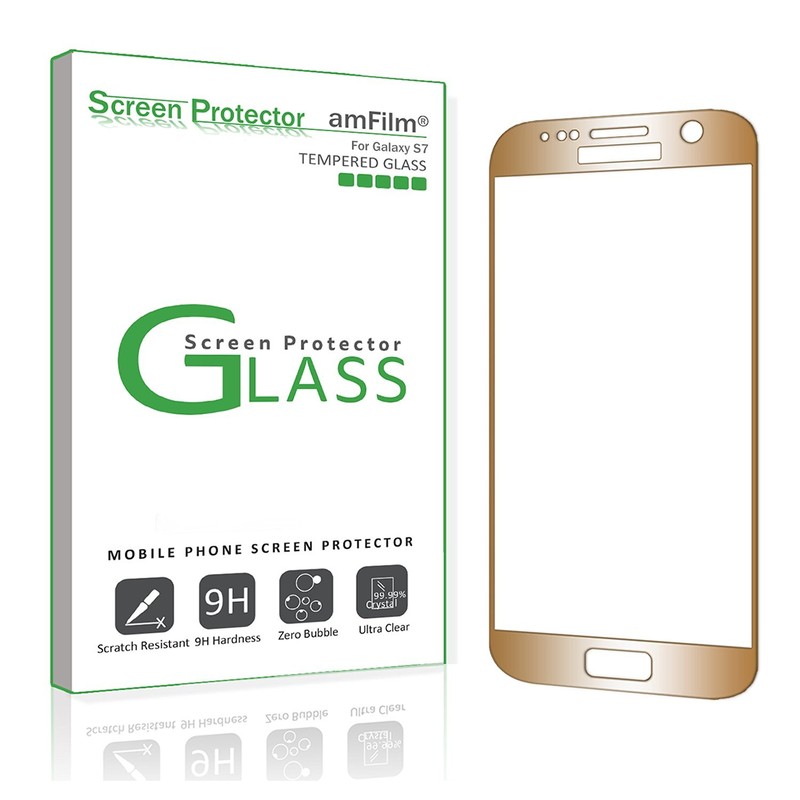
A tempered glass screen protector is an obvious buy whenever you pick up a new phone, but for your gold Galaxy S7, a plain, regular tempered glass screen protector is unacceptable. That’s why the gold screen protector from amFilm is an incredibly smart option to consider if you’re looking to protect your gold Galaxy S7 in golden harmony.
Designed to be durable and scratch resistant — with a bubble-free guarantee! — the amFilm gold tempered glass cover gives your Galaxy S7 phone top-to-bottom, full screen protection. The cover is ultra thin at around 0.3mm, and works effortlessly with your Galaxy S7 phone’s screen sensitivity.
The gold screen protector also comes with wipes and dust removal stickers for a much smoother installation.
See at Amazon
Bastex gold rechargeable battery case
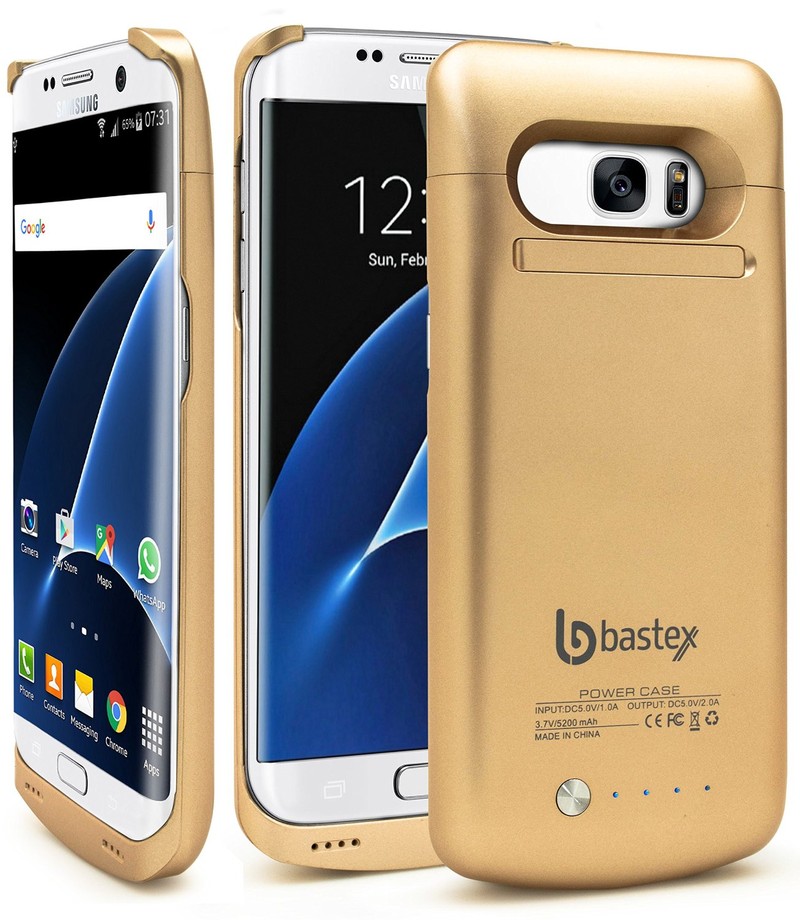
Nothing is worse than draining your battery halfway through the day. Luckily, Bastex’s rechargeable battery case can charge up to an additional 110% extra battery for your gold Galaxy S7 phone — and do it as it matches your gold device perfectly!
The Bastex gold rechargeable case doesn’t only recharge your Galaxy S7 as you kill its battery with texting, talking, social media, and games, it also protects your phone from drops and falls with its durable design. With the battery pack attached, you get up to 40 hours of audio playback, 11 hours of video playback, and up to 13 hours of extra talk time.
While there are three colors to pick and choose from, the best one to match your gold Galaxy S7 is the gold model (although the black and white versions are cool, too).
See at Amazon
Samsung Level U PRO wireless headphones
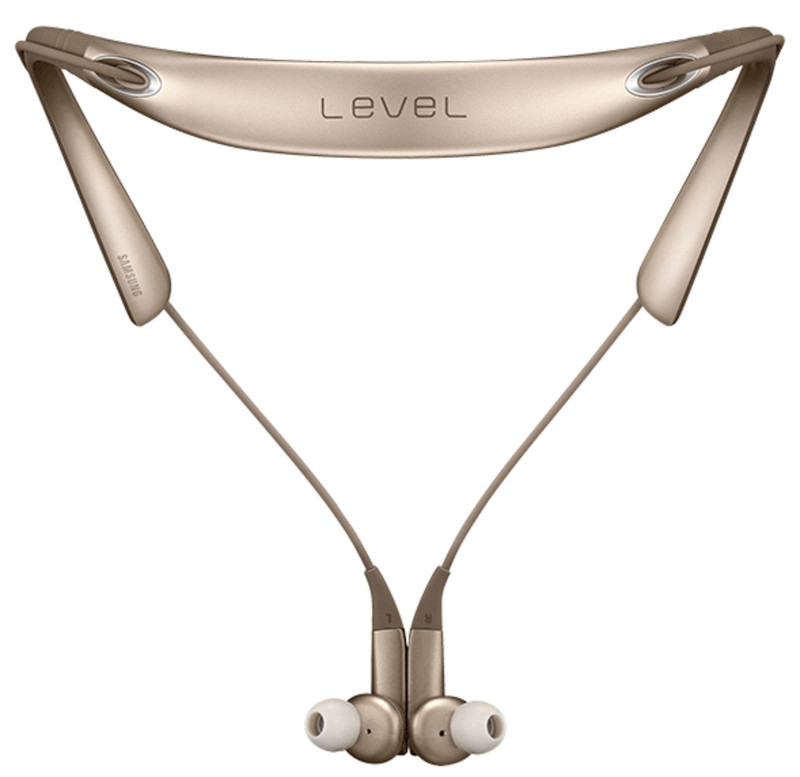
Keep the music pumping and the gold theme going (without the wires!) with the Samsung Level U PRO wireless headphones.
Designed with a two-way speaker, simple controls, and up to two times the wider frequency range that standard wireless sound, the U PRO headphones give you a luxurious listening experience right off the hop — the matching gold color is just a bonus.
Built to be sweat and splash resistant with form-fitting, gel ear pieces to make sure you’re comfortable no matter how hard or loud you’re rocking out, the Samsung Level U PRO isn’t just a great accessory for your Galaxy S7, it’s just a great piece of tech all ’round.
See at Samsung
Fasgear nylon braided gold charger
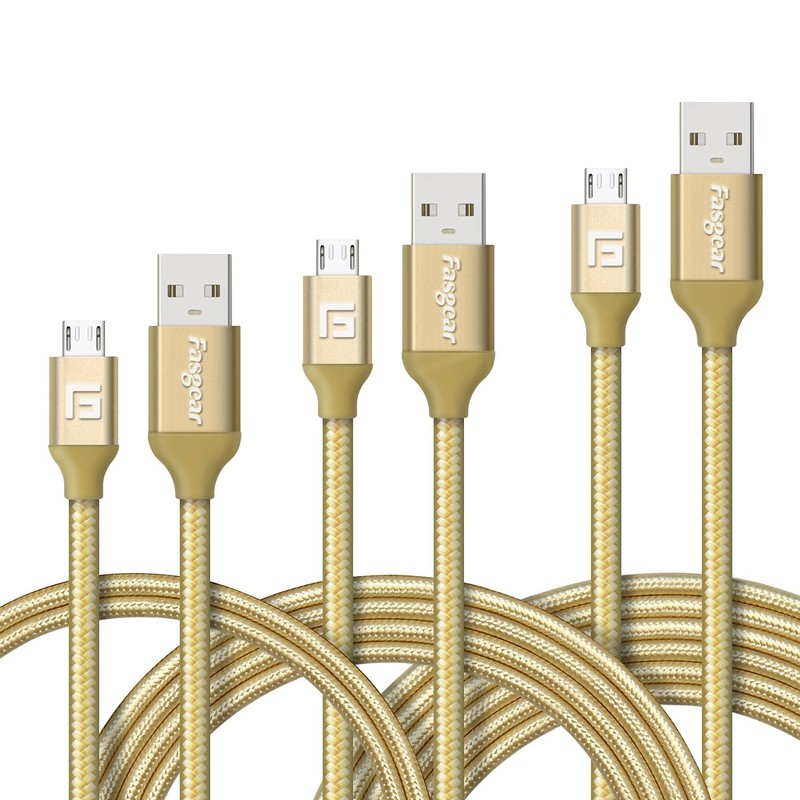
Sure, you could charge your gold Galaxy S7 with the basic cable it comes with, or you could really commit to your new gold phone and accessorize in style with the Fasgear nylon braided gold charger.
These tough, nylon cables are Fast Charge-compatible. With a braided cable jacket to protect the internal wires, the Fasgear can be bent, twisted and abused, and can function several times longer than the charging cable your Galaxy S7 comes with.
You can pick different lengths for your cable, or you could get a convenient three pack for less than $10 that comes with 3.3, 6, and 10-foot cables.
See at Amazon
How do you stay golden, ponyboy?
Is there a gold Galaxy S7 accessory that we missed that you think would be the perfect partner in crime for your phone? Let us know in the comments below.
Samsung Galaxy S7 and S7 edge
- Galaxy S7 review
- Galaxy S7 edge review
- U.S. unlocked Galaxy S7
- Should you upgrade to the Galaxy S7?
- Best SD cards for Galaxy S7
- Join our Galaxy S7 forums
Unlocked
AT&T
Sprint
T-Mobile
Verizon
Apple working on Amazon Echo-like device to control your home through Siri
Apple reportedly has plans to make its own voice controlled speaker or device, much like Amazon Echo, in order to control your smarthome kit through Siri voice control.
It has allegedly been working on the project for more than two years, which explains why we’ve heard similar rumours previously, but it is now said to have exited the research and development phase and is now in prototype testing.
People familiar with the matter told Mark Gurman at Bloomberg, who often gets Apple speculation bang on the money, that the new device will be able to control appliances, locks, lights and curtains via voice activation.
- Now Apple is thought to be making an Amazon Echo-like speaker with Siri
- Amazon Echo: What can Alexa do and what services are compatible?
- New Apple TV surfaces in FCC filing, has Bluetooth and, er, NFC?
Gurman does point out, however, that as the plans are yet to be finalised, there’s a chance Apple could scrap the project before it ever sees the light of day.
That’d be a shame as the sources claimed the Apple speaker could trump the Amazon Echo considerably. It will feature more advanced microphone and speaker technologies, they said. Early prototypes even included facial recognition sensors, using tech Apple acquired when it bought both Faceshift and Emotient in the last couple of years.
Apple has naturally declined to comment, but considering Amazon has had great success with its Echo speaker, which will be released in the UK at the end of September, we can see why the Cupertino firm is so keen to nab a slice of the smarthome assistant market.
ICYMI: All aboard the hydrogen fuel cell train!

Today on In Case You Missed It: A French company just introduced a hydrogen fuel cell train that it plans to install on a line in Germany in 2017. The train can carry 300 passengers reaching speeds of 87 miles an hour, all while emitting water rather than the usual diesel fumes that go along with such routes. We think the Casper insomnia chatbot is probably just a PR stunt by the company, but it may also be functional so you’re guess is as good as ours as to why a mattress company would want to talk about people (likely their own customers) who struggle with going to sleep at night.
If you’re interested, the truck clock video is here. As always, please share any interesting tech or science videos you find by using the #ICYMI hashtag on Twitter for @mskerryd.
Google is reportedly interested in buying Twitter
In recent months, Twitter has come in for all sorts of criticism over how it runs the company. With growth flat, profits continuing to fall and negative reactions from users over how it’s combating harassment on the platform, some have called for a bigger company to step in and help make those troubles go away. According to CNBC, that could well happen, after sources close to the company said that Google, Salesforce and other technology companies are “engaged in conversations” with the social media giant over a possible sale.
The news has investors excited; at the time of writing, Twitter’s share price has rocketed 20 percent and is climbing steadily. CBNC says that the company has “received expressions of interest” from numerous parties but has not yet received a formal bid — although one could come shortly.
Google, which has tried and failed numerous times to innovate in the social media space, has the resources to buy the company but also to accommodate Twitter’s global team. Salesforce, known for its CRM tools and cloud computing expertise, is also extremely cash rich and could add Twitter to its diverse line-up of social and cloud enterprise services. (Update: TechCrunch also reports that Engadget’s parent company Verizon, as well as Microsoft, are also in the running).
Sources have indicated that suitors may be more interested in Twitter’s data than its position as a media source, which admittedly doesn’t sound great for users. But then again, what social network isn’t monetizing its users nowadays?
Source: CNBC
 AIVAnet