


Allo: Everything you need to know

Everything you need to know to get started with Google’s new messaging service.
Allo is finally available, and it offers a first look at what’s possible with Google Assistant. Assistant is Google’s AI chatbot that answers questions by drawing on the vast trove of information it has collected over the years. It suggests replies in conversations, offers recommendations on nearby points of interest, tells bad jokes, plays games with you, and so on. Unlike Google Now, interacting with Google Assistant feels more personal and conversational.
If you’re just getting started with Google’s latest messaging service, we’ve got you covered.
Setting up Allo
Haven’t gotten around to downloading Allo just yet? Here’s the Play Store link. Once you’re done downloading the app, it’s a straightforward process to register using your phone number. We’ve covered the basics of getting started with the app below:
How to install and set up Allo
Allo and text messages
First off, Allo isn’t a Hangouts replacement. You can’t set the messaging service as the default SMS client on your phone. It does offer the ability to message a contact that doesn’t have Allo installed through Play Services, but that’s about it. You can also talk to contacts over SMS, with the message itself routed through Google’s servers, but Allo isn’t an SMS service by design. In this regard, it has more similarities to WhatsApp than iMessage.
Allo is mobile-first, which means that right now, there’s no way to access it over the web. It requires your phone number to register, and you can only use it on one device at a time. Google will add more functionality to the app over time, but for now, Allo is in the proverbial beta stage that we’ve come to expect from many Google services.
- Here’s how Allo handles text messages
- Here’s what you need to know about Allo and phone numbers
All the features of Allo
Allo is loaded with functionality that differentiates it from the slew of messaging services available today. First up is Google Assistant, which offers contextual information within chats, reply suggestions, emoji parties, and much more. Assistant is always running in the background, and is there to assist when needed. Sharing a picture of food? It’ll ask if you want to take a look at restaurants nearby. Interested in going out? It’ll offer a list of nearby attractions, events, and movies right there in the chat window.
The messaging service also offers an incognito mode for private chats, and you can choose from a variety of stickers for when words just aren’t enough.
These are the top Allo features you need to know
Traveling with Allo
Allo is tied to your main phone number, but you can switch your SIM card out while traveling and continue to use the service without any issues. As long as you don’t active Allo on another device with the same number, you’ll be able to access the service.
Here’s how SIM card switching works in Allo
Should you use Allo?
Allo is just getting off the ground, and as such there are several features missing from it. Even though it’s tied to your Google account, chats are stored locally, and don’t make their way across when you switch to a new device. That, and the lack of a desktop client, are the biggest drawbacks for me, but these issues should (hopefully) be fixed shortly. For context, WhatsApp didn’t have a chat backup feature for years. I remember transferring WhatsApp conversations in text format to my email to preserve them when switching devices.
Overall though, Google may have missed a beat by not bundling Duo into Allo. Video calling is the one feature that isn’t available on WhatsApp or Messenger, and if Google managed to bake it into Allo, it would’ve gotten a decent headstart over its rivals. Google Assistant is great, but it needs a lot of polish before it can be usable every day. While Google works on that, I have the arduous task of convincing my friends and family to switch to Allo.
Are you using Allo? Share your first impressions down in the comments!
Morning brief: Pixels in pools, S7 on Android 7 and Galaxy C in China

Day 2 of Allo, and we’re still figuring out where the new chat app fits in.
Welcome to Thursday on Android Central! We’re still just getting acquainted with Allo, Google’s new, promising but still very imperfect messaging app. Harish has an excellent roundup of everything you need to know about the app — from the phone number requirement to Google Assistant — right here. So far the AC team’s experience of Allo has mainly consisted of a messy group chat replete with stickers, GIANT SHOUTY TEXT and comically boring smart replies. Allo has promise, but there are many sticking points — no way to port chat histories, no multiple-device support, no web presence. Eventually these functionality gaps will be plugged, but it’s clearly going to take some time.
Other goings-on: We’ll have a pretty big review landing later today, so keep watching, along with more thoughts from the AC editors on the longterm impact of the Note 7 fiasco. In the meantime, on with the day’s news!
You can increase the battery limit on your explodey Note 7 to 80 percent
An update issued over-the-air limits potentially unsafe Galaxy Note 7 phones to 80 percent, up from the standard 60 percent charging limit, by changing a software setting. Of course, you should probably just return it under the recall program in exchange for one that won’t catch fire at any moment.
Galaxy S7 Nougat update to bring updated UX from Note 7
No huge surprise here: Many of the visual refinements we see in the Galaxy Note 7’s UI will purportedly be coming over to the GS7 and GS7 edge as part of their Android 7.0 update. SamMobile reports via leaks on Chinese social network Weibo that changes like the new notification area and enhanced Always-On Display will make it over, along with some performance tweaks.
There’s no firm date on when the upgrade will land, but Samsung has previously talked about a two-to-three-month window following the public code drop, which means updates should be rolling out by the year’s end.
The feature behind Allo’s “App Preview Messaging” will be opened up to developers
Google has clarified what’s going on with one of Allo’s more confusing features — the ability to send messages to Android friends who don’t have the app installed. Apparently that’s a Play Services feature that’s being opened up to third-party devs too, which is nice to see — and largely does away with the argument that Google’s unfairly using its position as a platform holder.
Lenovo’s Z2 Plus is turning out to be a great $300 phone
Lenovo launched the Z2 Plus in India, bringing great hardware for ₹19,999 ($298). The phone features a 5-inch Full HD display, Snapdragon 820, 4GB of RAM, 64GB storage, 13MP camera, 8MP front shooter, LTE, and a 3500mAh battery. It’ll go on sale starting September 26. More
Lenovo sells a whole lot of budget phones in India
Lenovo rolled out the Moto E3 Power in India earlier this week, and the company has announced that it sold 100,000 units in a single day. The Moto E series is a popular line in the entry-level segment, and the new phone offers decent hardware for its asking price of ₹7,999 ($120).
You probably shouldn’t take the upcoming Pixel phones to a pool
According to Android Police, Google’s upcoming Pixel phones will have an IP53 rating. It means that the phones will be protected against dust, but you’d best leave them out of the pool. Read our IP ratings guide for more information on how rugged ratings work.
Samsung working on Galaxy S5 Pro and C7 Pro for China
It looks like Samsung will introduce the Galaxy S5 Pro and C7 Pro in the Chinese market. Like the Galaxy C series, the C5 Pro and C7 Pro will be exclusive to China. From the specs on offer, the Galaxy C series sits one tier below the Galaxy A lineup, which is one tier below the flagship Galaxy S phones. It’ll be interesting to see where the C5 Pro and C7 Pro slot in.
How to change your wallpaper on an Android phone or tablet
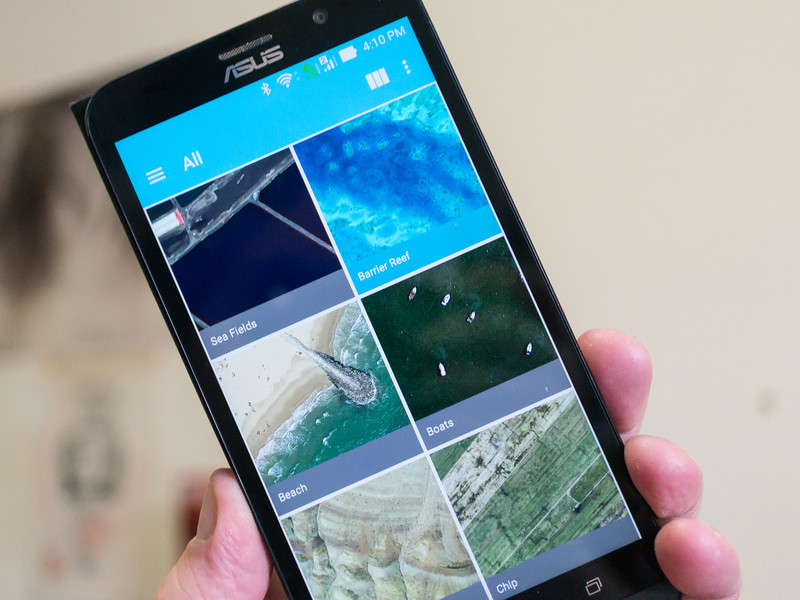
Changing your wallpaper is as easy as a tap.
Phones have in many ways becomes the nexus of our lives. They hold our most important information, let us access the internet, and store many of the photos we take during day to day life. So it’s no surprise that customizing our phones in a variety of ways is so popular. One of the easiest ways to customize your phone, is by switching up the wallpaper and we’ve got the details on how to do it.
Google Now Launcher, Nova Launcher and Action Launcher
Most phones use this method to change your phone’s wallpaper. That makes it simple to remember, and easy to do, when you upgrade your device.
Tap and hold the home screen.
Tap the wallpapers icon on the bottom left of your screen.
Choose from from the default wallpapers, or from your photos.
Tap Set as wallpaper on the upper left corner of your screen.

Samsung Phones
Changing the wallpaper on a Samsung phone is just a little bit different than the method detailed above. That’s because Samsung actually gives you a few more options than most other phones.
Tap and hold on the Home screen
Tap the Wallpapers icon in the bottom left corner.
Choose Home screen, Lock screen, or Home and Lock screen in the upper right corner.

Tap a Samsung wallpaper or choose a photo from your gallery at the bottom of your screen.
Tap set as wallpaper on the bottom of your screen.

Note: This method works with Samsung phones running Android 5.0 Lollipop and above, but due to the variations in Samsung software from country to country and generation to generation, it may look slightly different on your phone.
Your turn!
What’s you favorite wallpaper, and how often do you switch it around? Let us know in the comments below!
Sony Xperia X Compact review: Size really does matter

Small phone lovers have something to get excited about with the latest in Sony’s Compact line.
The quick take
The Xperia X Compact gives you everything you need in terms of screen, performance, battery life — plus a few nice additions like stereo speakers, a slick software experience and Sony’s latest camera technology. But this isn’t simply a flagship-level phone in a smaller size: you’re getting a plastic phone that’s also missing a fingerprint sensor and waterproofing. So for as great as the X Compact is, it sits in an odd area — offering you less than other phones, but still commanding a $499 price. You really have to want a small phone to spend that much on the X Compact.
The Good
- Small, but not cheaply made
- Solid screen, even at 720p
- Great performance and battery life
- Strong camera
The Bad
- No fingerprint sensor
- Plastic may not appeal to everyone
- No Quick Charge charger included
- Expensive for the size

A bit of a throwback
Sony Xperia X Compact Full review
Since roughly 2012, when Android phone screens really started to grow with no sign of stopping, the desire from a vocal group to have a “compact” phone available has strengthened. But not just any small phone, they all want a compact version of a flagship phone; one that doesn’t compromise on specs or features in order to fit into a smaller size. This is the holy grail for many.
Sony has been the one manufacturer that consistently offers a range of phone sizes, regularly being the example of how to do this right with its Compact series. The common era of these phones started with the Xperia Z1 Compact, with a small 4.3-inch display. We’re now nearly three years past the launch of the Z1 Compact, and we have the Xperia X Compact to carry this tiny torch.
The X Compact has gained a little screen size, now up to 4.6-inches, but it’s still working with the same formula. It has nicer components and features than you usually get in a small phone today, with a few standout items like Sony’s best available camera setup. At the same time, it sits very awkwardly just underneath the also-compact 5-inch Xperia X, which is moderately larger but with a higher-res screen and now lower price. And this isn’t necessarily a full-on flagship phone, either, as it’s missing a few high-end features. All while still charging a rather hefty $499.
So many people say they want a compact high-end phone, but few actually end up buying one. Is the Xperia X Compact the one to satisfy that thirst and rack up sales? Read on for our full review.
About this review
I (Andrew Martonik) am writing this review after just shy of a week using an unlocked Xperia X Compact, provided to Android Central for review by Sony. The phone was used on the T-Mobile network in the greater Seattle, WA area. The software was build number 34.1.A.1.198, with the June 1, 2016 security patch, and was not updated over the course of the review.

Little wonder
Sony Xperia X Compact Hardware
Ah, small phones. There’s just something refreshing about picking up a phone that you can easily cradle in one hand, reaching your thumb from top to bottom and side to side without any hesitation, shifting or fear of dropping the phone. You just don’t find phones this small anymore, especially as the budget segment has increased its screen sizes in order to offer even more perceived value for money. In this case, you have to pay more to get less in the Xperia X compact.
While the X Compact is true to its name in overall size, it is a bit larger than the 4.6-inch screen would lead you to believe. As is the case on most of Sony’s phones, the X Compact is adorned with rather large bezels, particularly on the top and bottom of the display. The overall size isn’t far off from the 5.1-inch Galaxy S7, and is similar to the 4.7-inch iPhone 7, which itself is known for large bezels.
It’s okay to dislike plastic, but this is really nice plastic.
Sony has continued its blocky, semi-rounded “loop surface” look from the rest of the Xperia X series, which is immediately distinguishable to phone fans as a Sony design — and I really dig it. Looking at the bottom of the phone you see a cross-section of the design that looks almost identical to the proportions of its USB-C port, with nicely rounded sides coming around to a flat front and back. The back is a single piece of plastic, which feels a bit cheap compared to the metal on the Xperia XZ but matches nicely to the ceramic-like coating around the rest of the phone. (It also means the NFC antenna is on the back, rather than the front, of the phone — I’ll take it.)
The phone is a little on the slick side, but the curves are friendly to your hand and the tolerances for the joins between the materials are perfect and worthy of your appreciation. The front glass is sculpted nicely into the edges and has a couple perfect cutouts for the front-facing stereo speakers, while the buttons on the side are easier to press than they look. That recessed home button feels great, but unfortunately doesn’t integrate a fingerprint sensor — a head-scratching choice for a phone with a $499 list price.

There’s an amazing simplicity and quaintness to the look of the X Compact.
Looking at the spec sheet and seeing a 1280×720 display resolution (coming in at 319 ppi) immediately makes you check to see what year it is, as even low-end phones now ship with 1080p panels, but naturally those numbers don’t tell the whole story. Sony has packed a phenomenal display in the X Compact — it’s fantastically laminated to the glass, has great viewing angles and superb color reproduction. I never touched the display settings, choosing to leave it at the default “X-Reality for mobile” mode. Though I confess I can see the slightly rough lines on some things, I never felt it detracted from the experience of using the phone. And as I’ll get to later, that lower resolution certainly helps in terms of performance and battery life.
More: Complete Xperia X Compact specs
This is decidedly not a screen for those who want to watch video on their phone more than occasionally, and you don’t really realize it until you’re holding up the X Compact watching YouTube. For some, that’s not an issue — but if you’re one to watch an episode of your favorite show on your lunch break or jump into Netflix while you’re waiting for a train, the X Compact isn’t likely to meet your needs.
But if you don’t crave a huge screen for consuming media, there’s an amazing simplicity and quaintness to the look of the Xperia X Compact, even in white as I have here but particularly in the black color that’s also available. It’s a simple, pure design without additional flourishes that get in the way, and that’s particularly important for a small phone that just doesn’t have the extra real estate for shocking design elements. There’s something nice and refreshing about holding a small phone that isn’t trying to act like it’s a massive supercomputer.

Sony keeps it simple
Sony Xperia X Compact Software
Sony can call the likes of Moto and OnePlus company when it comes to offering clean, simple and fast software. What you’re greeted by on the Xperia X Compact is not unlike a Nexus phone running Android 6.0 Marshmallow, with a few subtle changes to iconography and of course the default apps. Perhaps the biggest visual change comes with the launcher and lock screen, which I quite enjoy — and importantly, none of the changes detract from or alter the core Android experience.
I picked up the X Compact and installed my typical Google Now Launcher and Google Keyboard combination, and didn’t touch a single thing in the software thereafter. Everything works as I expect it to, and it didn’t take a bunch of tweaking or configuration to do so. Sony still includes a handful of pre-installed apps that I didn’t really care to use, but most of them can be disabled and the group is nowhere near the size I see in the app drawer on Samsung phones. Sony’s styling of the dialer, photo gallery and other apps feel very native to the platform as well, keeping a consistent look and feel across the phone.


In a very nice departure from the past two Sony phones I used, the Xperia X Performance and Xperia XZ, the X Compact is ridiculously fast. Whereas those two phones were mostly quick but still chugged along slowly at times, the X Compact hasn’t had a single slowdown or even as much as a stutter in a week of my typical use.
Of course this isn’t that surprising considering the very capable Snapdragon 650 processor and 3GB of RAM pushing just a 720p display, but as I noted above this kind of performance isn’t always a given on recent Sony phones. The X Compact performs just as well as any other high-end phone you’ve used recently with a late-model Snapdragon processor, and I wasn’t able to do anything that made it slow down. This is what you expect to get for this kind of money, and the X Compact absolutely delivers.

Getting there
Sony Xperia X Compact Cameras
Sony’s tried-and-true 23MP Exmor RS sensor is once again the core of the Sony camera experience on the X Compact, but like the Xperia XZ it was announced alongside we actually have something to get excited about here: new 5-axis image stabilization. Sony seemed pained to add OIS (optical image stabilization) to its cameras up to this point, and I’m glad it finally made the jump.

Sony’s camera interface is simple enough, though its “Superior Auto” isn’t all that superior anymore and still requires hopping over to Manual in order to toggle HDR or tweak even the simplest things. This wouldn’t be a problem if its Auto mode were truly “superior.” The X Compact’s overall software performance has extended to the camera, thankfully, and is amazingly quick to open, capture and process photos — considerably faster, in fact, than the Xperia XZ and X Performance. Puzzling.
The camera shoots 8MP downsampled (4:3 or 16:9, your choice) photos by default, mostly for file size reasons, but you can quickly jump up to 23MP full-res photos if you’d like. Unless you plan on cropping in after the fact I recommend just leaving the camera to its default 8MP resolution, which saves you storage space and a little bit of processing time.


The camera is no longer a clear weak spot, but it’s squarely average.
Photos are incredibly sharp, even when you zoom in to pixel peep a bit, and the colors tend to be accurate rather than over-saturated like some phones (though the look is a personal preference). When shooting in Superior Auto and using tap-to-focus the camera tended to over-expose photos and wash them out, leading me far too often to hop into Manual and just use HDR for a more balanced shot.
For low-light photos, the 5-axis stabilization is clearly in play to help the X Compact take solid and much improved, but just average photos. In dimly lit rooms it tended to go with longer-than-necessary shutter speeds (sometimes up to 1/8 second), often introducing blur, and still couldn’t take crisp well-balanced photos like you get from other cameras. Low-light photos sometimes took a couple of attempts, which was a departure from the “point, click, review awesome photo” experience of daytime shots.
I’m impressed by the Xperia X Compact’s camera in terms of stepping up its game considerably from Sony’s previous phones. As I mentioned in my musings about the Xperia XZ, Sony’s new camera setup is firmly in the “good” camp, still a few steps behind the “great” arena where Samsung plays. The camera is no longer a main downside or deal breaker here, and that’s a great thing — it just isn’t so great that it’ll sell phones all on its own.

All day, every day
Sony Xperia X Compact Battery life
Any time you see a spec sheet that lists less than a 3000 mAh battery in a modern phone, you get a little worried about longevity. With 2700 mAh under the hood in the X Compact — a full 200 mAh less than the Xperia XZ, which itself didn’t have stellar battery life — the X Compact has been a battery champion, though. The combination of just a 720p screen and a lower-powered Snapdragon 650 processor meant I never thought out battery life on the X Compact.
A battery that lasts all day, every single day.
My typical day out of the house, with three hours of “screen on” time, using LTE, keeping up with notifications, social networking, photography and listening to podcasts I would end the day with at least 25% battery left. On a lighter weekend day where the phone spent good chunks of time on a table or in my pocket, I would end the day with well over 50% battery. Unlike the Xperia XZ, I never had to enable Stamina Mode to extend the battery — in fact, I never once touched the 10% battery level on the X Compact.
For charging back up, the X Compact supports Quick Charge 3.0, letting you quickly replenish that 2700 mAh battery. The charger that ships in the box is a standard non-Quick Charge 5V/1.5A wall plug, though, which is a bit odd. Because battery life has been so great for me on the X Compact I’m not so worried about the charging times of the relatively small battery, but considering the price you’re paying for this phone I would’ve expected a Quick Charge charger in the box with a phone that supports the tech.

Little wonder
Sony Xperia X Compact Bottom line
Going into reviewing the Xperia X Compact, I was excited to use a “small” phone again primarily from the perspective of nostalgia; watching phones get bigger and bigger, I just wanted something more compact that didn’t make compromises in experience. Over a week using it, my view shifted entirely to real, legitimate enjoyment of this phone based on its merits. It’s amazingly quick with fantastic battery life, has a great screen, is built very well and has a solid camera. There are even a few extra perks like stereo speakers, 32GB base storage with an SD card slot, and Quick Charge 3.0 support.
The Xperia X Compact is great for fans of small phones.
Though I have a strong desire to just recommend the Xperia X Compact outright, I have some trepidation simply because the phone isn’t all roses. It commands a high price, yet lacks waterproofing, a fingerprint sensor and metal construction found in the (admittedly larger) competition; it also has a smaller, lower-resolution screen, as well as a technically slower processor and “just” 3GB of RAM. So it’s missing a few line items and features that keep it from truly being a “flagship in a smaller size” — it is instead a smaller phone that does indeed have shortcomings.
At a retail price of $499, the X Compact costs $100 more than bigger, more powerful phones with more features like the OnePlus 3 and Honor 8; and at the same time is just $50-100 less than the Galaxy S7 (thanks to recent price drops), which is a better all-around phone. With these market realities, you’re faced with having to justify paying more money for physically less phone — that’s hard for some people to get over.
The Xperia X Compact is all about the whole package rather than simply chasing line items — though it does have most of what people are looking for in a high-end phone today. It’s for those who want a smaller phone with a well-executed design, but don’t want to give up on the performance, battery life, camera or base level features they’ve grown accustomed to in other expensive offerings. And you’re going to pay a bit extra for the privilege. Those who simply look at their phone buying decision as “getting the most features and size for my money” won’t see value here. But if you’re immediately drawn to the smaller size of the Xperia X Compact, you’ll get a fantastic phone.
See at Amazon
Denon’s new in-ears use double drivers for double power
The AH-C821 in-ear headphones enter straight at the top of Denon’s in-ear models and use what the company is calling a Double Air Compression Driver.
It’s a new, patented design that places two 11.5cm drivers one in front of the other and claims to move more ait for “powerful, low-distortion bass”.
To further ensure you get only the finest sound into your ears, Denon has separated wires from the plug to each driver. Separated wires help to minimise unwanted interference to the audio signal. This new method is a world first from Denon.
The drivers sit inside an aluminium casing, which not only looks good, but helps to keep everything rigid to keep pesky vibrations at bay. There’s more technical wizardry in the form of front and rear Denon Acoustic Optimiser ports, which promise to equalise air pressure around the drivers to keep the sound as distortion-free as possible.
While the hardware should be enough to keep most listeners happy, you can adjust the sound using the companion Denon Audio app for iOS and Android. From the app you can optimise the sound of the device you’re using, as well as giving you a new player interface with access to TuneIn radio.
Denon supplies the AH-C821 in-ears with Comply foam ear-tips which expand to fill yours ears and provide a tight seal, so no sound can leak out. You’re also given four pairs of silicone tips, carry case and cable clip. They’ll be available “soon” for £169.
Inside the McLaren Technology Centre
Nestled off an innocuous roundabout on the A320 lies the McLaren Technology Centre. A bespoke building which, with its sister the McLaren Production Centre, makes up the beating heart of the company most famed for its Formula 1 success.
It’s barely visible from the road, sympathetically incorporated into the roll of the Surrey landscape, but cresting the horizon as you approach the centre, Normon Foster’s building takes your breath away.
Like everything McLaren, nothing about its technology centre is down to chance. The precision in design of the building reflects the ethos of the company. Not only is this a fully functioning headquarters building for McLaren Racing, but also for McLaren’s other businesses, including McLaren Automotive, the arm behind the production cars.
Design precision
There’s an order and extreme precision to everything that’s staggering to behold. The curved-glass front of the McLaren Technology Centre (MTC), the Boulevard, looks west out over the lake, bordered by the arched drive before running out into McLaren’s open parkland beyond. There’s a serenity, a calm, that comes from a supreme confidence. This isn’t a company stuffed into stuffy offices, this is a company that’s built an environment around it that’s both inspirational and a technological marvel.
McLaren
It’s no accident that the setting sun will bathe the interior of McLaren’s headquarters in a glittering array of colours. That lake isn’t just for decoration, it’s part of the cooling system for the building, dispelling heat generated by the wind tunnel while also feeding reed beds packed with wildlife. It was no surprise, then, that McLaren was able to declare carbon neutrality for it’s business, thanks in part to the design of the complex.
Pace across the tiled flooring of the technology centre and you’ll notice that the finish on everything is just so. The internal pillars transect the floor tiles perfectly, everything has its place, everything is considered and ordered.
In many ways, there’s a feeling that you’re stepping into something futuristic, even though the MTC is now nearly 10-years-old. You also can’t help thinking it’s a little like a Bond villain’s lair: the precision of Norman Foster’s design lines, the perfection of finish, the cleanliness, all ensconced away from prying eyes.
Hand built
“We’re seen as a secretive organisation. That comes from our Formula One side,” said Alan Foster, operations director at McLaren Automotive. “At McLaren Automotive we have to be outward facing.”
Foster oversees the sister building on the same site, the McLaren Production Centre (MPC). Opened in 2011, and connected via an underground umbilical tunnel, it’s within the MPC that McLaren Automotive’s vehicles are assembled. If you order a McLaren MP4-12C, it is in this building that the car will be built by hand – no conveyor belts, no robots, just people.
McLaren
The production centre will produce nine cars a day on the manual assembly line. Why is it done by hand? All the highest-quality things are. Like a bespoke suit, it gives McLaren the chance to strive for perfection. Most of the cars, 80 per cent in fact, are exported with 50 per cent of those heading to the USA.
- McLaren MP4-12C preview
Again, precision, neat lines, attention to detail and order prevail in the McLaren Production Centre. The glossy refection of the polished floors and the high ceilings give a light and airy feeling to the space, in which the next generation, the McLaren P1 will also be built by hand.
McLaren
Half the floor space is almost empty. “This will become the P1 supercar production facility,” Foster said, spreading his arms, before telling us that the next seven McLaren Automotive models will also be assembled here in the MPC.
Through a secure door is the paintshop, where Foster specified that rather than small viewing windows in the dividing walls, he wanted glass, so that everything inside remains visible. As we stopped to watch a 12C being painted, Alan Foster explained that the glass is cleaned only once a week, because they’d managed to ensure that an air curtain will whip airborne particles away from the glass before it settles.
McLaren
It’s mesmerising to watch, but the absence of noise is almost unnerving. Walking along the assembly lines we move from the carbon fibre tub that makes up the passenger compartment to an almost completed car. It all seems a little too clean and easy. No mess, no fuss, just efficiency. It’s something that flows from the McLaren Racing side of the business over to McLaren Automotive.
The show must go on
In the MTC there’s a secret room. Hidden behind a rotating section of wall, and behind a further sliding wall panel, and it’s in here we’re introduced to the company’s latest model, the McLaren P1. It’s expertly staged. McLaren is every inch the showman, in cars, design and presentation.
As you step around the corner, the P1 is sitting, lit perfectly, on a floor finished in carbon fibre, centre stage, with soft seating so you can sit, talk and admire the flowing lines of the hybrid supercar.
- McLaren P1 pictures and hands-on
Both the technology centre and the production centre give McLaren the chance to play showman. In both locations we saw how the company can hit you with the wow factor. “It’s like a sorbet, calms the mind,” says Foster, as he pauses in a quiet corridor before pulling open the door to the MPC and you step on to the mezzanine level overlooking the production lines, ready for your jaw to drop.
There’s an admirable balance at play around McLaren’s facilities, from the overt ecological concerns outside, to the pursuit of perfection inside. Both sides seem to mesh together perfectly, like the precision parts of one of McLaren’s cars. It isn’t some sort of hippy idealism though, performance is still very much at the forefront. As Alan Foster tells us, everything has been designed so that McLaren can “act with force and urgency”.
McLaren
Back out at the front of the McLaren Technology Centre, we up the dihedral door of the MP4-12C and slip into the carbon-clad interior. As the 3.8-litre V8 purrs behind us, we pull away from McLaren’s futuristic headquarters.
Those ethics reflected within the building are evident in McLaren Automotive design. Encased in carbon fibre, overlooking the serene beauty of the company’s complex, we breeze past the lake, the reed beds, and out on to the open road. If ever we were looking for something to sell McLaren to us, it’s here, where design and ethics, science and technology combine.
So if you’re ever passing that innocuous roundabout on the A320, just outside Woking in Surrey, it’s worth popping into the park to take a look at McLaren’s home. And if you ever get invited inside, it’s an opportunity you should jump at.
- The story behind McLaren’s chrome silver Formula 1 cars
Oppo’s UDP-203 is an Ultra HD Blu-ray playing powerhouse
Oppo has taken the wraps off its new UDP-203 Ultra HD Blu-ray player, and will join just a small number of similar players in the UK. Currently, the only UHD Blu-ray players available are the Panasonic DMP-UB900 and DMP-UB700, Samsung UBD-K8500 and the Xbox One S.
What sets Oppo’s player apart is that it could eventually support Dolby Vision with a future software update. There’s a Mediatek SoC inside the player so it can comfortably handle HDR (High Dynamic Range) content out the box, but the chip should be powerful enough to handle Dolby Vision too.
- Best Ultra HD Blu-ray players: Spinning 4K discs
Both HDR and Dolby Vision provide a wider and richer colour gamut which improves the picture by making all the colour in between the whites and blacks more accurate.
The player itself is black with a brushed metallic front plate but round the back is where the magic happens. Oppo has given the UDP-203 a generous helping of connections including two HDMI outputs, 7.1-channel surround sound speaker outputs, three USB 3.0 outputs and optical and coaxial digital outputs. You’ll also find built-in wi-fi for streaming content over a local network.
- What is HDR, what TVs support HDR, and what HDR content can I watch?
- Dolby Vision finally ready for public consumption, partners with Sharp and Netflix to bring it to market
Oppo hasn’t given a specific release date, but has said it will be available in Q4 this year, so just in time for Christmas with an expected £599 price tag, putting it right up against Panasonic’s UB900.
Blizzard finds its ‘Overwatch’ World Cup teams
Overwatch may only be four months old, but Blizzard’s multiplayer shooter has already amassed 15 million players and is gaining a lot interest from eSports fans. Many of the top eSports teams are quickly adding players to their roster as the world’s biggest invitationals find new ways to host them. However, a competition hosted by Blizzard itself may give the game the boost it needs to gain notoriety in a scene dominated by League of Legends, DOTA 2 and CS:GO. It’s called the Overwatch World Cup and we now know the 16 teams that will battle it out for global supremacy.
Over the past month, 50 national teams from around the world put forward their best players to show off their competitive skills in best-of-three online qualifiers. Teams are comprised of six members, who were either picked by a team captain or voted in by Overwatch fans themselves. Many players have made a name for themselves either through casting their games online or already belong to an eSports team and, like a real sporting championship, have been selected to represent their country based on their ability.
The final teams are Australia/New Zealand, Brazil, Canada, Chile, China, Finland, France, Germany, Russia, Singapore, South Korea, Spain, Sweden, Taiwan, Thailand and USA. Team USA is headed by Seagull, who also represents Shaq’s NRG eSports group, while Team Benelux has it’s very own Harambe. The World Cup will begin on October 29th with a round-robin group stage that opens into elimination finals on November 4th and 5th at Blizzard’s annual convention, BlizzCon, in Anaheim.
The World Cup is important for Blizzard to open up Overwatch to fans who haven’t yet entered the world of competitive eSports. By grouping the world’s best players into national teams, viewers can follow the progress of their country through the competition, exposing them to pro players that they may not have heard of. Blizzard will hope that the tournament will be an on-ramp for casual players, who will maintain that interest in Overwatch’s competitive leagues.
Source: Overwatch Blog
Earthlings get a chance to own NASA’s Golden Records
Back in the 70’s, famed astronomer Carl Sagan and a team of scientists and artists put together a collection of golden phonograph records, which were sent to space aboard Voyager 1 and 2. They contain greetings in 55 languages, a plethora of animal sounds, traditional music from around the world, Mozart’s and Bach’s masterpieces, as well as Blind Willie Johnson and Chuck Berry tracks. Now, a Kickstarter campaign wants to give us lowly Earthlings a chance to own a copy of the Voyager Golden Records as a box set.
The campaign, launched by Boing Boing’s David Pescovitz, aims to raise $198,000, which definitely looks doable. Its 1,094 backers already pledged $130,000 as of this writing. Most of what Pescovitz and his team will make from Kickstarter will be used for royalties and to pay for the snazzy-looking box set’s production. See, the team decided to remake the records as three gold LPs in a cloth-covered box with gold foil.
The set will also come with a hardbound book containing the records’ history, as well as a copy of the original diagram depicting how to play them. You know, as some sort instruction in case aliens ever get their hands on the spacecraft. Both Voyagers are still alive ’till this day, and 1, in particular, left our solar system and crossed into interstellar space a few years ago. If there’s any spacecraft that has the potential to reach intelligent beings from other worlds, it’s the Voyager.
But let’s get back to the copy we Earthlings can get. You’ll have to pledge $98 to get one box set, though you can also snag a digital copy for $25 if you don’t care for the physical LP records and their fancy packaging. Take note that NASA already released some of their tracks on SoundCloud, though. The team is aiming to ship all rewards out by August 2017, exactly 40 years after NASA’s Voyager spacecraft embarked on their journey.
Via: Gizmodo
Source: Kickstarter, Boing Boing
The first Xbox One S bundles in the UK are really cheap
Microsoft’s Xbox One S is just the right kind of mid-generation hardware update. The neater console, with a better bundled gamepad and 4K Blu-ray drive, is tempting enough without feeling like a big ol’ middle finger to OG Xbox One owners. When it launched in the UK towards the beginning of last month, though, its £350 price tag wasn’t exactly accessible. But today, the first One S console bundles (with FIFA 17 included) have launched, lowering the cost of entry to dangerous, impulse-buy territory.
Whereas the standalone console has a 2TB HDD, the bundles include boxes with only 500GB or 1TB of storage. But if that’s not a deal-breaker, then you’re in for a treat. With retailers — namely Amazon and Tesco — egging each other on in a race to the bottom, you can get yourself a 500GB FIFA 17 bundle for £224, or the 1TB bundle for as little as £274. Tesco, for a limited time, is offering £25 off a £150 spend with its eCoupon TDX-HTNK, bringing the price down below £200. Considering FIFA 17 is £37 from Amazon on its own and the cheapest original Xbox One is typically around the £225 mark, these new bundles are basically steals.
They should retail at £250 and £300 respectively, remember, so there’s no telling how long these discounts will last. But, even if you do end up paying the RRP, the launch of these cheap bundles is a clear message that the original Xbox One is all but obsolete.
Source: Amazon, Tesco Direct
 AIVAnet