


Apple Seeds First Beta of iOS 10.1 to Developers
Apple today seeded the first beta of an upcoming iOS 10 update to developers, just under two weeks after releasing iOS 10 to the public. iOS 10.1, as a major point update, will likely introduce bug fixes and perhaps bring a few new minor features to the operating system.
Registered developers can download the new iOS 10.1 beta from the Apple Developer Center. Later this week, Apple may make a public beta available for public beta testers.
It’s not yet clear what features will be introduced in iOS 10.1, but we will update this post with anything new that’s discovered in the beta.
iOS 10 has been described by Apple as the “biggest release ever” for iOS uses, with features that include a redesigned Lock screen, a Siri SDK to allow third-party apps to integrate with Siri, and a completely overhauled Messages app with stickers, a full App Store, Digital Touch, Bubble Effects, and more.
Other features include a dedicated “Home” app for HomeKit users, new facial and object recognition capabilities in Photos, and redesigned Maps and Apple Music apps.
Related Roundup: iOS 10
Discuss this article in our forums
Apple Seeds First macOS Sierra 10.12.1 Beta to Developers
Apple today seeded the first beta of an upcoming macOS Sierra beta to developers, just a day after releasing the new operating system to the public.
macOS Sierra Beta 10.12.1 is available for download through the Apple Developer Center and through the Software update mechanism in the Mac App Store.
It is not clear what improvements the first update to macOS Sierra will bring, but it’s likely to include bug fixes and performance improvements for issues that have been encountered between the time between the beta testing period and release.
We’ll update this post with any new features that are found in macOS Sierra 10.12.1.
Related Roundup: macOS Sierra
Discuss this article in our forums
Apple Seeds First watchOS 3.1 and tvOS 10.0.1 Betas to Developers
Alongside the first iOS 10.1 beta and the first macOS Sierra 10.12.1 beta, Apple has seeded new betas of watchOS 3.1 and tvOS 10.0.1 to developers, just over a week after the latter two operating systems were released.
On the Apple Watch, the software update can be downloaded through the dedicated Apple Watch app on an iPhone by going to General –> Software update.
To install the update, the Apple Watch needs to have 50 percent battery, it must be on the Apple Watch charger, and it must be in range of the iPhone. watchOS 3 also requires an iPhone running iOS 10 to install.
On the Apple TV, installing the tvOS beta requires the Apple TV to be connected to a computer with a USB-C to USB-A cable, with the software downloaded and installed via iTunes or Apple Configurator. Once a beta profile has been installed on the device through iTunes, new beta updates will be available over the air.

It is not known what new features might be included in the watchOS 3.1 and tvOS 10.0.1 updates, but they are likely to include bug fixes for issues that have been discovered since the release of watchOS 3 and tvOS 10.
We’ll update this post with any new features that are found in the two betas.
Related Roundups: Apple TV, tvOS 10, Apple Watch Series 2, watchOS 3
Buyer’s Guide: Apple TV (Neutral), Apple Watch (Buy Now)
Discuss this article in our forums
Philips Avance Collection Indoor Grill (HD6370/90) Release Date, Price and Specs – CNET

The Philips Indoor Grill makes meat grilling a smokeless affair for those living in apartments.
Aloysius Low/CNET
Apartment life can be tough. I’ve always wanted to grill a fat juicy steak at home, but I don’t have a garden and don’t want to risk filling up my place with charcoal smoke. But Philips is about to make my grilling dreams come true.
The Philips Avance Collection Indoor Grill may not look like much, but Philips has put plenty of thought into its black box design. Instead of filling up the grill with the usual charcoal, though, all you need to do is plug the Indoor Grill into a power outlet and turn it on.
The Indoor Grill uses infrared heaters, placed at sides. They’re angled to heat the top where you put the meat, but leave a clear space for the fat and juices to drip down into a tray below. This stops the fat from burning up, which is what produces much of the smoke you see coming from standard charcoal grills.
Philips claims there’s 80 percent less smoke compared to its other grill, but from what I could see at the demo, there were barely any smoke from the meat pieces being grilled at around 230 degrees Celsius. And yes, the meat has proper grill marks.
Cleaning seems to be a simple affair. Philips says the top grill and the fat-collecting tray are removable. So you can put them in a dishwasher or clean them with soapy water.
I’m looking forward to giving the grill a try when Philips sends me a unit to test. Until then, it’s the great outdoors for me if I need to cook up a wagyu steak. The Philips Indoor Grill is on sale for $299, which converts to around £230 or AU$400.
Huawei nova and nova plus review
HUAWEI recently announced two new mid-range Android smartphones: the nova and the nova plus. The nova is a 5.0 inch device with 3GB of RAM, 32GB of storage and a Qualcomm Snapdragon 625 processor. The nova plus is a 5.5 inch variant with the same basic internals. Following our hands-on first look at these two device, here is our full review.
Also check out:
- HUAWEI P9 review
- HUAWEI Mate 8 review
- Nexus 6P review
Design
On the inside these two phones are almost identical, however on the outside they are quite different. The norm until now has been that the “plus” variant of a smartphone was essentially a carbon copy of its smaller sibling except with a bigger screen (and maybe a few extras), however that certainly isn’t the case here.
Both smartphones feature full metal unibody constructions, which makes them very sturdy, and allows for a nice and solid feel in the hand. The chamfered edges and the rounded corners give both phones a premium feel. Beyond that, the Nova looks a lot like a mini Nexus 6P, while the Nova Plus borrows its design language from the HUAWEI Mate series.
Although the design language is different on each device, the overall layout is the same on both. On the front is the 5.0/5.5 inch display along with the front facing camera and HUAWEI logo. Neither have capacitive keys as the navigation controls are on screen. On the left is the dual SIM tray which also doubles as the micro SD card tray (replacing one of the SIM cards). On the right is the volume rocker and then power button. On the top is the 3.5mm headphone jack along with a microphone. On the bottom is the USB Type-C port and the speaker grill. The nova plus has two grills, but there is only one speaker on each handset. Flip the phone over and you find the rear-facing camera, the fingerprint reader, a LED flash and another HUAWEI logo.
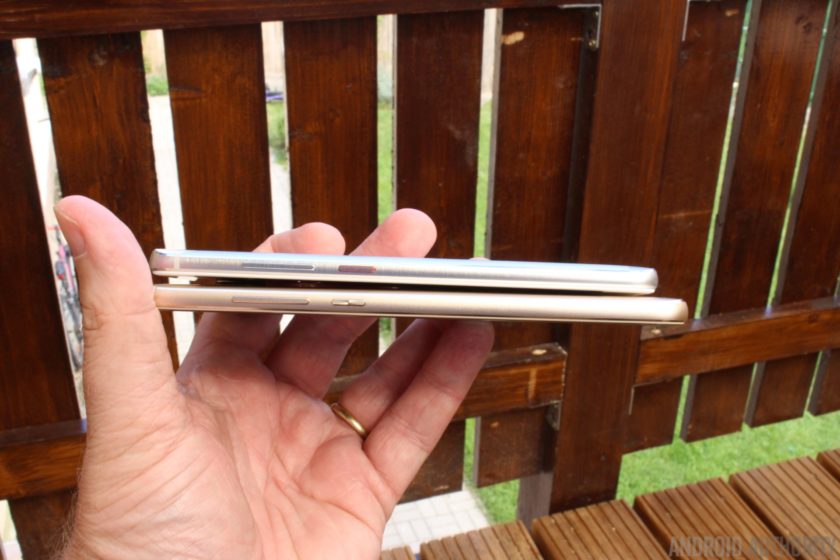
It is from the back that the two phones look most different. The fingerprint reader is round on the nova but more square on the nova plus. The camera is central (with a bump) on the plus, but flush and more to one side on the nova.
Display

On paper the displays for the phones are very similar (except the size). They are both IPS LCD panels and both have a Full HD resolution (i.e. 1920 x 1080). Both displays can be configured in the settings to alter the color temperature and both displays have the same level of brightness (450 nits). Obviously the screen on the nova plus is bigger (at 5.5 inches compared to 5.0 inches) and that means it has a lower pixel density (401 ppi compared to 443 ppi). When placed side-by-side the displays look very similar, however it I had to choose I would say that the nova plus has the better screen, but not by much.
Overall, both screens are crisp with good color reproduction that will provide a good experience regardless of what you’re doing on the screen. My only word of caution is that in very bright, direct sunlight you might find the displays a little hard to read.

Hardware and performance
The HUAWEI nova and nova plus both feature a Qualcomm Snapdragon 625 built using a 14nm process. This is certainly a mid-range processing package. That isn’t necessarily a bad thing, since today’s mid-range phones offer greater performance than some of the high-end devices of only a few years ago. In the CPU side you get eight 64-bit Cortex-A53 cores, clocked upto 2.0GHz. On the GPU side you get the Adreno 506, which supports OpenGL ES 3.1.
In terms of every day use you will find the Snapdragon 625 more than capable. The UI response was good, apps open and close quickly and with 3GB of RAM the multi-tasking capabilities are more than sufficient. If you are a power user then you will struggle with the Snapdragon 625, but for most users will handle just about everything you ask of it. Plus there is the added bonus that the Cortex-A53 core is one of the most power efficient 64-bit cores from ARM, which helps with battery life!
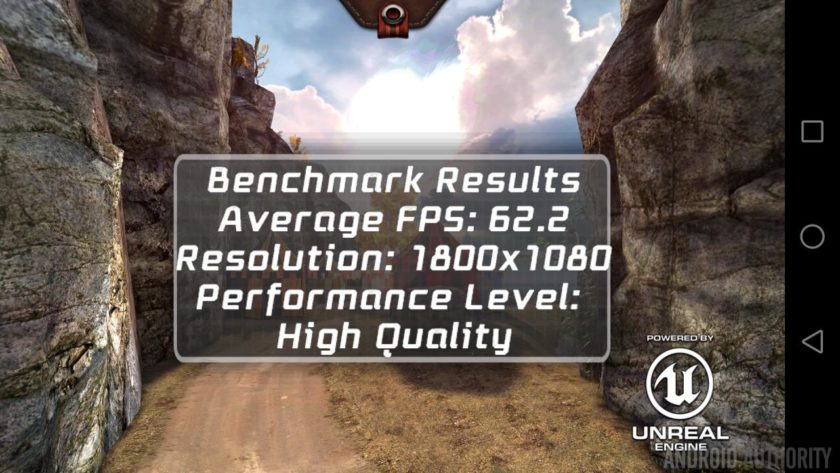
Since the internals of both phones are very similar, both score the same in the popular benchmarks. For AnTuTu you can expect scores of 64969, while for GeekBench 4 the devices scored an average of 840 for the single core tests and 3112 for the multi-core tests. As for Epic Citadel you will get around 60 frames per second in High Quality mode, which is great. However when you bump the details up to Ultra High Quality mode then the GPU starts to struggle a little, scoring just 50 fps.
What that means in real world terms is that the nova and nova plus can handle normal productivity tasks (email, social media, web browsing) without any problems. It will also play 3D games reasonably well, but don’t expect the same level of performance as you would from a leading flagship device. I played Asphalt 8: Airborne and Riptide GP without any problems.
The fingerprint readers HUAWEI’s recent phones (including the Mate 8 and the P9) have been exceptional and I have come to expect nothing less from HUAWEI. The fingerprint readers on the nova and nova plus are equally as good. Since the fingerprint reader is on the back, you can wake and unlock your phone just by putting your finger on the reader. You can also use the fingerprint reader to trigger the shutter while taking photos, to swipe left and right when viewing photos in the gallery, or to answer a call.
Both phones feature a single speaker on the bottom edge, next to the Type-C USB port. The speakers are quite loud and the sound is reasonable considering that they aren’t front facing speakers. Like many smartphones, music can lack bass and sound a bit thin. I found that at full volume some tracks tended to distort and that the sound quality improved when the volume was actually turned down a notch or two. Comparing the nova with the nova plus, the sound quality is approximately the same, however the nova plus is the better of the two.
The nova has a 3020 mAh battery, which is impressive when you consider that the Samsung Galaxy S7 and the LG G5 both have smaller battery capacities. I ran a 3D test to measure the battery life while playing 3D games. According to my calculations you will be able to play 3D games for over 5 hours from a single charge. As for simpler tasks like browsing the web and watching video you should be able to get about 11 hours.
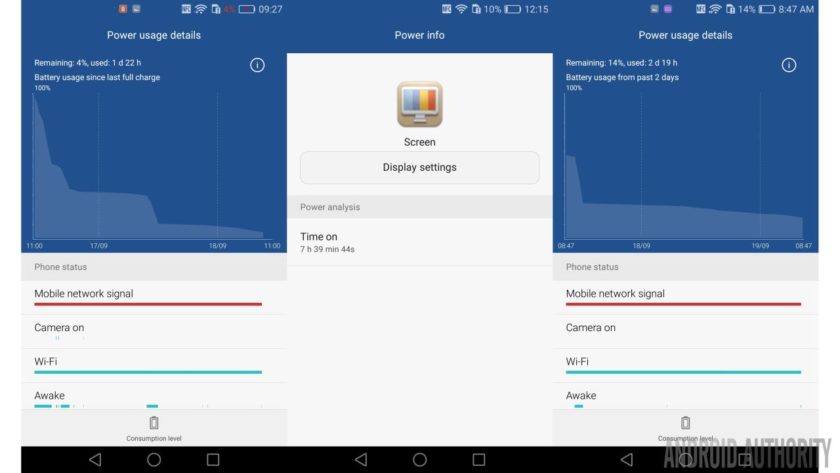
The nova plus has a 3340 mAh battery, even bigger than the nova, mainly to compensate for the larger 5.5 inch display. I ran the same 3D test to measure the battery life while playing 3D games. According to my calculations you will be able to play 3D games for over 5 hours from a single charge. As for simpler tasks like browsing the web and watching video you should be able to get 11 hours.
Overall you will easily be able to get through a full day on either phone, maybe even two. My tests show that you should be able to get around 7 to 9 hours of screen-on time for both devices during a 24 hour period, of course depending on your usage.
Software
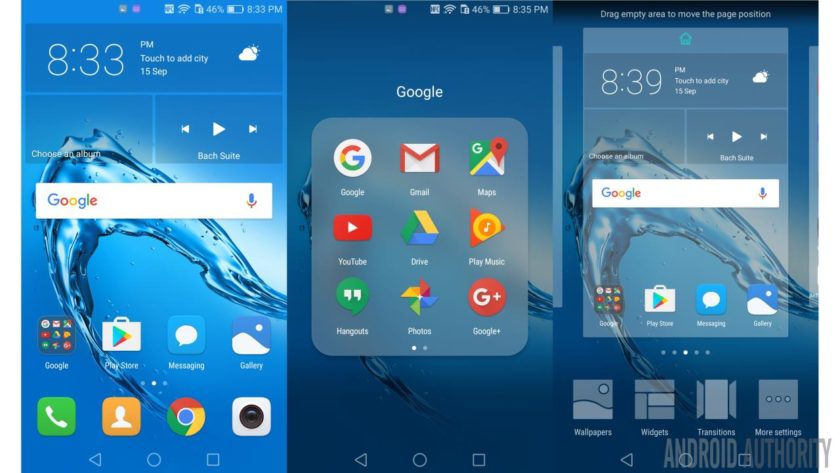
The software experience is identical on the nova and the nova plus, with both running Android 6.0 Marshmallow, with HUAWEI’s Emotion UI 4.1 on top. If you have used a HUAWEI phone before, you will know what to expect here, and once again, you get a very iOS-like user interface, with no app drawer, transparency effects, and home pages filled with colorful icons. For some people the lack of a stock Android experience will be a stumbling block, especially the lack of an app drawer.
If you lack the EMUI launcher then it is also possible to replace it with an alternative like the Google Now Launcher. The trick is to make the Google Now Launcher the default under Settings -> Apps -> Advanced -> Default app settings -> Launcher.
However besides the cosmetic UI changes there are lots of additional features that you don’t get with stock Android including a floating dock, motion gestures, voice wake-up, a one-handed mode and HUAWEI’s own take on a “do not disturb” mode.
Under motion gestures you can enable motions like flip to mute, raise to ear to answer calls, and a tilt motion to move icons and widgets. The tilt motion feature works from the home screen editing mode. If you touch and hold an icon or widget you can move it to another screen by tilting the phone to the left or right. There is also the Knuckle gestures which allow you to take a screenshot by double tapping the screen with your knuckle, or drawing a letter to open an app. Both types of knuckle gesture can be disabled if you find they misfire.
Since the nova and nova plus both use on-screen keys, HUAWEI as added the ability to customize the order of the navigation buttons. By default the recent apps is on the right and the back button is on the left. However this can be reversed. It is also possible to add a fourth button for opening the notification panel. Tapping the icon is the equivalent to dragging the notification shade down from the top.
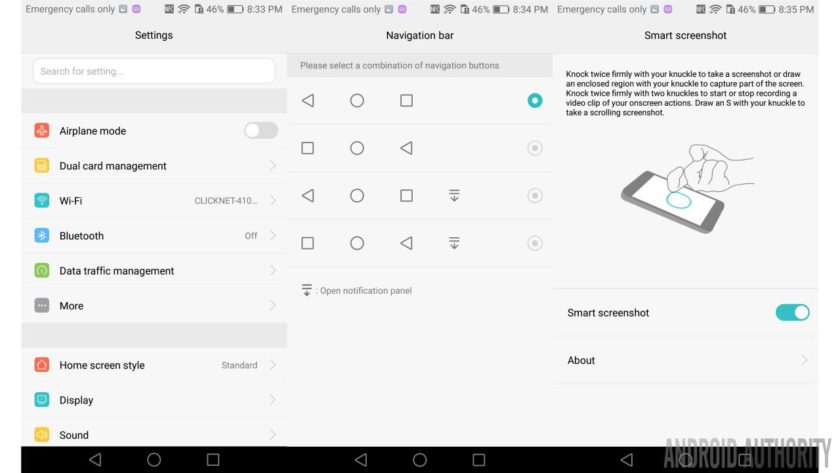
HUAWEI has included a battery manager which gives you a high level of control over battery related features. For example you can set a power plan which will tweak the CPU according to your usage (and so save battery when possible). Other battery related options include a whitelist function to ensure that certain apps keep running after the screen is turned off and a power usage firewall which warns you about power hungry apps.
There is also an ultra power saving mode which will disable everything except calls and messages plus activate a simply monochrome UI. When running low on battery power this mode can add several more hours of usage.
Camera
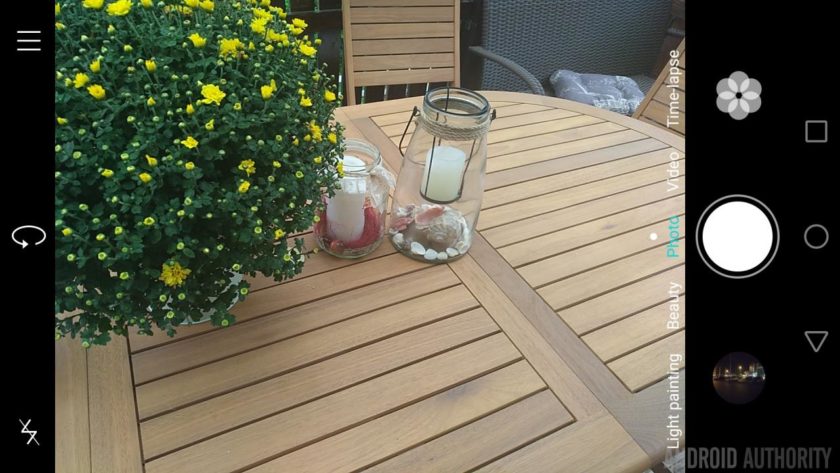
The camera is one area where the nova and nova plus differ significantly. The nova comes with a 12MP rear facing camera that can record video at 4K, plus an 8MP front facing camera. The nova plus has the better setup with a 16MP rear facing camera that includes OIS and 4K video, plus the same 8MP front facing camera.
The camera app is quite nice and includes some interesting features. As well HDR, panorama and the seemingly obligatory beauty mode, there is also a light painting mode, for long exposure shots. The built-in filters include car light trails, for capturing the trails of lights made by moving cars at night; light graffiti, for capturing trails of light in a dark environment; silky water, for silky smooth effects from running water; and star track, to capture the trails of stars and galaxies in the night! However you will need a very steady hand (or better still a tripod) to get the best results.
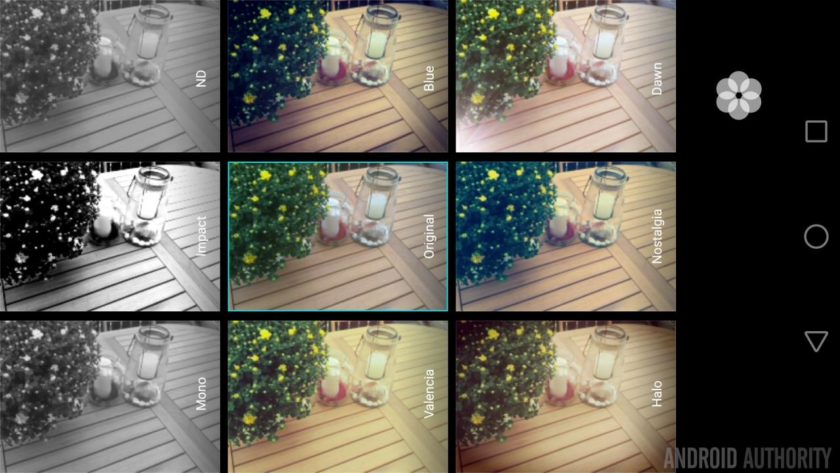
There is also a super night mode, with a long exposure time for night time photos, a slow-motion mode, plus a special Good Food mode for taking close-up shots of your food! Two other interesting modes are the All-focus mode and the full manual (professional mode). The former allows you to refocus pictures post capture and change which object is in focus. The latter gives you control over the metering mode, the ISO speed, the shutter speed, plus the white balance. It also gives you full manual focusing control.
While the camera app is very capable, the actual pictures produced by these devices leave a lot to be desired. Pictures taken in ideal conditions come out quite nice, meaning the cameras are good for outdoor use in good light. However once you move indoors and the lighting is artificial then lots of noise creeps into the pictures.

Both handsets are capable of videoing at 4K in 16:9 from both the rear camera and Full HD using the front facing camera. While the nova doesn’t include Optical Image Stabilization (OIS) it does have a software based image stabilization option when recording video.
Here are some sample shots from the nova so you can see for yourself:

And here are some sample shots from the nova plus:

Specifications
| Display | 5.0 inch IPS panel 1920×1080 resolution |
5.5-inch IPS panel 1920×1080 resolution |
| SoC | Qualcomm Snapdragon 625 | Qualcomm Snapdragon 625 |
| CPU | 8x ARM Cortex A53, upto 2.0 GHz | 8x ARM Cortex A53, upto 2.0 GHz |
| GPU | Adreno 506 GPU with support for OpenGL ES 3.1 |
Adreno 506 GPU with support for OpenGL ES 3.1 |
| RAM | 3GB | 3GB |
| Storage | 32GB + microSD | 32GB + microSD |
| Cameras | 12MP rear facing camera with 4K video, 8MP front facing camera | 16MP rear facing camera with OIS & 4K video, 8MP front facing camera |
| Battery | 3020mAh | 3340mAh |
| Features | Fingerprint scanner, USB Type C, Bluetooth 4.1 | Fingerprint scanner, USB Type C, Bluetooth 4.1 |
| OS | Android 6.0 Marshmallow with EMUI 4.1 | Android 6.0 Marshmallow with EMUI 4.1 |
| Dimensions | 141.2mm x 69.1mm x 7.1mm. | 151.8 x 75.7 x 7.3mm |
| Weight | 146g | 160g |
Gallery

Wrapping up
With 3GB of RAM, 32GB of internal storage, 4K video recording and Full HD displays then the nova and nova plus certainly have the hallmarks of a couple of upper mid-range devices. That is even more so for the nova plus with its built-in OIS and larger display. When I look at the specifications for the Qualcomm processor I myself wanting more, octa-core Cortex-A53 is very yesteryear, however the Snapdragon 625 is built using the latest 14nm fabrication process and as such it is more efficient than octa-core Cortex-A53 processors built on 28nm. I was hoping for a better Snapdragon processor from the 600 series, however after using the nova and nova plus for several days I must admit that the processor package works just fine. It isn’t the fastest and the GPU could be better, but for those looking to buy a phone in the mid-range (and not a flagship), it is more than adequate.
What do you think of the HUAWEI nova and nova plus? Do you plan to buy one, if so which one? Let us know your views in the comments below!
Xiaomi Mi VR Play review: Bringing VR to the masses

Xiaomi made fitness tracking accessible with its $15 Mi Band. It is now doing the same for virtual reality.
It’s an incredibly exciting time for virtual reality. The HTC Vive and Oculus Rift are catering to the enthusiast segment, and for those looking to experience what the medium has to offer on their smartphones, there’s the Gear VR, Homido V2, and the budget Google Cardboard.
And now Xiaomi is getting into the fray with its first VR viewer, the Mi VR Play. Like all Xiaomi products, the Mi VR Play is designed to disrupt the segment it is targeting by lowering the barrier to entry for customers looking to try out the platform. The headset costs just $15, the same price as Cardboard. And like Cardboard, the VR Play accommodates any phone with a screen size between 4.7 inches and 5.7 inches.
The shell of the Mi VR Play is made out of Lycra, which minimizes weight and makes it more comfortable to wear for a prolonged duration. It weighs 209g, which is less than the plastic-based Gear VR’s 345g. There’s a textured button at the top for navigation, and the headset features anti-reflective aspheric lenses. You slot in your phone at the front by undoing the two-way zipper, and there’s plenty of foam padding that holds the phone in place inside the headset.
The inside of the headset (the part where you stick your face in) is roomy, and it didn’t pose any problems for my admittedly large head. You can use the headset while wearing glasses, but it’ll be a tight fit. The viewer comes with a strap that wraps around your head, and a top strap that holds the headset in place and ensures that it doesn’t wobble when you move your head around.
For $15, the Mi VR Play offers tremendous value for money.
Xiaomi will introduce customized variants of the VR Play in denim, floral, leopard, camouflage, and user-generated designs at a later date, but for now, the company is selling the default black variant of the headset. Right now, Samsung has the mobile VR segment cornered, and while Xiaomi isn’t competing in the same category, it is making smartphone-based VR accessible to more customers, especially in emerging markets.

As the headset is designed for a Chinese audience, the Mi VR Play comes with a dedicated app that includes a selection of 360-degree videos from YouKu, China’s equivalent of YouTube, Conde Nast Traveller, and others. Xiaomi is investing significant resources into expanding its digital content library, which will see the addition of more VR content. Xiaomi is also going to bring VR integration into MIUI shortly, which will lead to a better experience when using the headset with the company’s phones.
The VR Play box contains a QR code that lets you download the app, but if you’re like me and are interested in using the headset outside of China, you can just download the Google Cardboard app and be on your way.
All apps and games designed for Google Cardboard work just fine on the Mi VR Play. I tried out the viewer with Xiaomi’s Mi 5 and Redmi Note 3, and the overall experience was identical on both phones.

Should you buy it? Yes!
The Mi VR Play is not as polished as the Gear VR, but at one-fifth the cost, it doesn’t have to be. Essentially, the headset is a much more robust implementation of Cardboard. It is aimed at getting customers interested in mobile VR, and by pricing it for just $15, it will succeed in doing just that. While Lenovo’s Ant VR viewer also sells for roughly the same price, it isn’t anywhere near as good.
If you’re interested in getting your hands on the Mi VR Play right now, you can do so from third-party sites like GearBest for $16.
See at GearBest
Digital Offers: Bypass geo-restricted streaming services for $39
Every year, more and more people are cutting their cable cords and turning to online streaming for all their TV and movie entertainment — and it’s clear to see why. Whether it’s for the convenience to watch what you want when you want on whichever device you want, or simply to save some money every month, the trend shows no sign of slowing.
But despite being hosted and streamed from what was once called the World Wide Web, you often lose access to all your favorite streaming services if you leave the US. Sure, you can always use a VPN — if you’re savvy enough to know how to set one up and can afford another monthly subscription in your life. And you’ll want to have it available on all of your devices, not just your laptop. If you only care about accessing your streaming services, you need to get Getflix.

Getflix calls itself a Smart DNS, because unlike VPNs that reroutes and encrypts your entire connection through overseas servers, it only reroutes the parts of your connections required for online streaming. This means you’ll be able to connect to public or hotel Wi-Fi and access a whole bunch of awesome streaming services such as Hulu, HBO GO, Amazon Instant Video and more! Best part, for a limited time only you essentially get lifetime access to Getflix for only $39!
To be clear, Getflix still requires you to have your own active subscription to the streaming services you want to use with it. And ironically, Netflix is not on the list of services supported by Getflix. But well over 60 streaming sites and services are, including popular music streaming services such as Pandora, Slacker and more. And Getflix also includes access to a free, optional VPN & SmartVPN account to encrypt all your traffic with 256Bit SSL encryption for the times when you need that, too.
Officially you get a 30-year licence to use Getflix — a value of over $800 — so you’ll want to get in on this opportunity to save 98% on this deal and never worry about get locked out of your streaming services no matter where in the world you are!
See at Android Central Offers
These are the top Allo features you need to know

‘Allo Allo.
Google’s smart messaging app Allo is now available. The service competes with WhatsApp and Facebook Messenger, both of which boast a userbase of over a billion users. Google is looking to differentiate Allo with Google Assistant, a chatbot that provides answers to your queries by drawing on the search giant’s machine learning smarts. AI is at the core of Google’s strategy, and we’ll see the assistant make its way into the Google Home and future products. And it’s all kicking off with Allo.
These are the top Allo features you need to know. If you’re just installing the app, be sure to check out our setup guide.
Your replies are now smarter
When you’re chatting with your friends and family, Google Assistant offers a series of responses based on the context of the conversation. If you’re sharing a picture of your cat, for instance, your friends will see options to reply with “Cute!”, “Adorable!”, “How fun!”, and so on. For images that contain food, you’ll see suggestions for nearby restaurants.

That’s the good part. The not-so-great bit is where most canned responses are generic right now. I had an entire conversation with my colleague Russell Holly without typing a single word. That said, most of it went down like this (exclamation points courtesy of Google):

Google Assistant learns your messaging patterns over time, and it should hopefully offer more personalized suggestions.
When in doubt, emoji
When you don’t want to type, you can use Allo’s diverse set of emojis to get your message across. There’s an emoji for most emotions (which should say a lot, really), occasions, pets, and social activities, so you’re very well catered to in this regard.

Scribble away
You can jazz up images you’re sharing with friends by doodling on them, or adding text.

Emphasize your point with text
Allo has a nifty trick that lets you make your text larger or smaller. To achieve this effect, you have to press and hold the send button, and slide it up to enlarge text, and slide down to shrink it.

Use stickers for everything else
Google has worked with “independent artists and studios around the world” to launch 25 sticker packs for Allo. Messaging app Line pioneered the use of stickers in chats, and ever since most messaging platforms have gotten into the act.

Also, for some reason that I can’t really fathom, a lot of the sticker packs are aimed at an Indian audience. There’s even one about a “little Indian girl who loves her country and relishes any occasion to be patriotic.” No clue what’s going on there, but for the most part, stickers on Allo are just like on any other platform. Some will use it, but most users won’t care.

Go incognito
Allo offers an Incognito Mode that doesn’t store a record of your conversation. You can set a timer specifying the duration of the chat, following which it will be automatically deleted. All ephemeral chats are overlaid with a grey incognito icon.

Ask Google Assistant anything
If you’re feeling bored, Google Assistant offers a variety of ways to pass the time. You can have a conversation with the chatbot wherein you can ask it to tell jokes, recite poems, play games, serve up news headlines, sports scores, and much more. You can invoke the assistant directly from within a chat window by typing @google.

And yes, you can have an emoji party with the chatbot.

Room to grow
For all of its features, Allo can’t be used as the default SMS client on your phone. It uses an SMS relay to communicate with contacts that don’t have the service installed, but it won’t be taking over Hangouts. Then there’s the fact that chat history is non-transferable (at least for now) across devices. When you switch handsets, you’re starting from scratch in Allo.
What do you guys think of Allo? Let us know in the comments.
Score an unlocked 64GB Galaxy S6 for just $389 right now!
Daily Steals is currently offering new unlocked 64GB Galaxy S6 for just $389 with the coupon code ACSEPT10. You’ll have your choice of white or blue here, and it is for model G920A which is the AT&T model. Being that the Galaxy S6 doesn’t offer expandable storage, it’s great to have the 64GB built-in and considering many 32GB versions are selling for this same price it’s great to have double the storage at no additional cost.

If you don’t need the latest and greatest, or are looking for a backup phone, you won’t want to miss out on this deal. Remember, you’ll need coupon code ACSEPT10 for the full savings here.
See at Daily Steals
Best Credit Card-Sized Battery Chargers

The benefits of a power bank in one small, compact package!
If you find your phone tapped out of battery power often, no doubt you’ve probably looked into portable power banks. If you like the idea of having extra power with you, but dislike having to carry around the extra weight, you may love these super small and thin power packs!
- GMLYE Ultra-Thin
- PowerJet Ultra-Compact pocket power bank
- TravelCard Charger
- Lankoo power bank
GMLYE Ultra-Thin

The GMYLE Ultra-Thin power pack has a capacity of 2,500mAh, which is more than enough to extend your phone’s battery life for a marathon session of Pokémon GO.
The GMYLE is only about 5mm in thickness and about the same width and height as a credit card, so you don’t have to worry about finding space to carry this thing around.
It starts around $17, and even comes with built-in Micro-USB and Lightning cables, which saves you the trouble of keeping track of your charging cords.
See at Amazon
PowerJet Ultra-Compact pocket power bank

Power Theory’s PowerJet Ultra-Compact pocket power bank manages to pack a surprisingly big capacity at 4,600mAh, more than enough power to completely charge a Galaxy S7 and have a little left over.
The PowerJet also comes with a built-in Micro-USB cable, so you don’t have to carry around a cord with you at all times. Plus, there is a little LED indicator which will flash red when it’s at 10% capacity or less, so you know when it’s time to charge it.
Due to its impressive capacity, the PowerJet does retail a bit higher than some of the competition, usually starting around $40.
See at Amazon
TravelCard Charger

Truly designed with portability in mind, the TravelCard Charger is a mere 4.7mm thick, making it actually small enough to fit inside your wallet with ease.
While its capacity is only 1,500mAh, it does have a few key features that are included in every power bank this size. The LED indicator will let you know when it’s time to fill it up again, and it even has the ability to be charged while charging your device, so you should have no problem killing two birds with one stone.
The TravelCard has a built-in cable for Micro-USB and Lightning ports, so you shouldn’t spend time having to untangle cords while you’re on the go.
See at Amazon
Lankoo power bank

The Lankoo power bank is for the serious power consumer. It’s got a capacity of 5,000mAh, meaning any phone you’ve got should be able to get a full charge from the Lankoo.
On top of its impressive capacity, the Lankoo also offers a fast charging speed. Its one USB port is certified 5V 2.1A charging speeds, meaning it shouldn’t take you too long to recharge any phone.
The added bonus of the Lankoo, it comes in all sorts of fancy designs and colors making it visibly stand out from the rest of the competition.
See at Amazon
 AIVAnet