


10 tips and tricks for TVOS 10 – CNET
 Sarah Tew
The fourth-generation Apple TV was just updated to TVOS 10, bringing several new and much-needed features to the media streamer, such as a dark mode, more Siri tricks and updated Photos and Music apps. It’s also missing one of the most important features of the update.
Prior models of the Apple TV will not receive the TVOS 10 update, as much of the update is specific to Siri or third-party apps anyway.
If you own a fourth-gen Apple TV you already know it’s capable of a lot. But here are some tips to help you make the most of the latest update.
But first, update
If for some reason your fourth-generation Apple TV has not been updated to TVOS 10 yet, don’t fret. Pushing the update through is a piece of cake. Go to Settings > System > Software Updates and click Update Software.
Enable dark mode
 David Katzmaier/CNET
No one likes finishing a movie in a dark room and returning to the Apple TV home screen only to be blinded by the white background.
Fortunately, you can now change that. Go to Settings > General and click on Appearance to toggle Light and Dark modes. Now when you break away from binging your favorite show in the middle of the night, returning to the springboard won’t temporarily blow out your vision.
Ask Siri to enable Dark mode
If you want to switch between Light and Dark on the fly, just tell Siri to switch the mode for you. Press the Siri button and say, “Light mode” or “Dark mode” and the UI will switch.
This is much faster than navigating to Settings and making the change manually, especially when the white background is blindingly bright. So you may want to get used to switching this way, as you may find yourself switching more often than you think.
Be more specific with Siri
Siri is more intelligent with the latest TVOS update, as well. Before, you could ask Siri for movies starring a certain actor, or from a specific era or genre or both. But you couldn’t ask for movies about a specific topic. Now you can.
Say something like, “Show me documentaries about coffee.” Or combine your queries to get even more specific, such as, “Find movies about boxing from the 1980s.”
Control your smart home with Siri
 Chris Monroe/CNET
Apple beefed up its HomeKit integration with Apple TV, too. Before, the Apple TV worked sort of like a remote hub. Your iPhone would control the HomeKit-compatible devices when you were in range at home. But when you were away, the Siri commands you spoke to your phone would be sent to the Apple TV back at home and it would take care of business.
Apple TV still works in the same way, but now it also works more like iOS with HomeKit. Hold the Siri button on the Apple TV remote and say, “Turn on the lights” or “Lock the front door.” Additionally, you can use the Apple TV to automate your smart home devices, such as turning on the lights or unlocking the doors as you enter a geofence around your home.
There is no special setup needed to get Home working with the Apple TV. Just setup your HomeKit-enabled devices using the Home app on iOS and the same commands that work from your phone will work with the Siri remote on Apple TV.
Search YouTube from anywhere
Previously, if you wanted to search YouTube, you would first need to open the YouTube app, scroll to the Search page at the far left and hold the Siri button or slowly type in a search. After the update, however, you can search YouTube using Siri from anywhere.
Just hold the Siri button and say something like, “Search CNET on YouTube” or “Find Rocket League gameplay on YouTube.” After the YouTube app launches, you will immediately see your search results.
It’s not a dramatically different experience from before, but it does cut a few steps out of the process. If Siri on iOS is any indicator, you can expect to see this level of Siri integration with third-party apps on TVOS in the future.
Jump to live TV
Another Siri trick that will help you get to what you want faster is the ability to jump straight to live feeds within certain applications.
For example, if you wanted to jump to the live feed in the CBS app prior to the update, you would need to find and open the CBS app and navigate to the Live tab. Now you can simply jump straight to it by saying “Watch CBS” to Siri. You can do this with the ESPN, MTV, FX and any other apps that have been updated and have a live stream.
Automatically install apps
 Screenshot by Taylor Martin/CNET
When you download a new app to your iPhone, that same app can automatically be installed on your iPad, on your Apple Watch and in iMessage. With TVOS 10, you can enable the same feature on your Apple TV. If you download or purchase a new app that has an Apple TV component, it will automatically install on your Apple TV.
To enable this feature, go to Settings > Apps and click Automatically install apps to toggle it on.
This will not retroactively install apps that are present on your iPhone or iPad, though, so you will need to head to the Purchased section in the App Store to download existing apps.
Search through photo memories
Much like the Photos update on iOS and MacOS, the Photos app on Apple TV learned a new trick: Memories. This section will gather all your photos from similar dates and locations into collections. Clicking on one of the collections will allow you to revisit those trips you took throughout the year.
In order for this feature to work, you will need to enable iCloud Photo Library in iCloud settings on your iOS devices. Once all your photos have uploaded, the Memories section will do its magic.
The best feature is still missing
If you have a cable subscription, you also likely have access to different streaming apps, such as MTV, Fox, FX, History Channel, etc. But one of the biggest frustrations I’ve had to date with the Apple TV is signing into each streaming app individually using the same credentials. Even worse is that some of these applications seem to log you out of your account at random (typically after a hard reboot of the Apple TV), meaning you’re always needing to reach for your phone or computer to sign in once again.
A feature coming to TVOS 10 is Single Sign-on, which will allow you to enter your cable subscription credentials once and automatically be signed into all of the compatible streaming apps.
Sadly, this feature was not included in the initial TVOS 10 update and is labeled as Coming soon on the TVOS landing page.
ReCore Release Date, Price and Specs – CNET

Joule, holding a Core. Hey, that’s like the name of the game.
Microsoft Studios
For a game set hundreds of years in the future, ReCore feels like a throwback. The futuristic shooter from Comcept and Armature studios has classics like Mega Man and Metroid in its DNA, after all, bringing in a development team with those old-school adventure games on their resumes. Available on Xbox One and PC, ReCore fuses gameplay elements from the action-adventure titles of old with 2016 sheen.
All the action takes place on Far Eden, an inexplicably failed attempt at terraforming another planet. You play as Joule Adams, freshly pulled out of cryosleep and ready to work out just why it all went pear-shaped (and also shoot a bunch of evil robots). As your prototypical video game “gun scientist”, Joule’s equipped with a laser rifle, rocket boosters and a reckless disregard for personal safety.
ReCore is a mix of third-person running and gunning and Metroid-style platforming and puzzle-solving. Joule’s jetpack and rocket shoes mean that on a small scale, movement feels incredibly free and fluid. That’s good, because you’ll be launching yourself up cliff faces and between hovering platforms with precision timing as you make your way around.

Use your rocket boosters and jetpack to double-jump and dash around.
Microsoft Studios
Accompanying you in your journey across Far Eden are three robotic companions. Your robo-dog will be able to dig up hidden treasures, the spider-bot can help you climb up magnetized strips along sections of wall and the giant can smash things. Pretty straightforward. All three also have different lethal abilities you can trigger in combat.
You’ll unlock one at a time, and these guys are where most of the Metroid-style exploration comes in. For example, returning to one of the first dungeons once you have the spider-bot means you’ll be able to climb up to that ledge you saw previously, but couldn’t access.
There’s a fairly extensive system for upgrading and customising your robotic sidekicks with blueprints and scrap salvaged from the less friendly robots on Far Eden. It was fun to play around with, but I never felt obliged to tinker with my pals more than very occasionally. There’s depth there, but more sense of peeking over the side and thinking “oh that’s quite deep”.

The auto-target system means you’ll be more worried about swapping to the best ammo types and sidekick in any situation.
Microsoft Studios
The third-person shooter combat becomes entertainingly frantic, and it’s far easier to play around with everything on offer than it is with the crafting system. You can fire your upgradable rifle from the hip, but you’ll be making a lot of use of the snap auto-targeting. While the ability to instantly draw a bead on enemies means the run-and-gun gameplay isn’t much to write home about at the start of the game, you’ll soon be matching different ammo types and robot companion attacks to colour-coded enemy health bars on the fly.
The other part of combat is using your arm-mounted grappling hook to pull the energy cores out of enemy robots. This usually triggers a tug-of-war fishing style minigame, where you can’t pull on a taut line, or you lose whatever you have hooked.
Even during boss fights, combat never really feels tough — the auto aim takes care of a lot of that — but there’s always a lot to do. You’ll be constantly on the move and keeping an eye on health bars, the special ammo you have selected and when to trigger your companions’ killer moves.

The exteriors are all quite stunning.
Microsoft Studios
Far Eden itself is about as desolate as a planet gets. Humanity’s attempts at colonisation lie half-buried or abandoned in the sandy wastes. There’s a stark beauty to the world linking together all of ReCore’s cavernous dungeons. It never really feels samey, which is something of an achievement for a desert wasteland.
Explore the planet, find entrances, hope you have enough keys to open the next dungeon you want to delve. There’s more variety in the environments here. While most dungeons just help the story along, some house special time trials or collection challenges, which really help sell ReCore’s old school feel.
Standing atop a cliff and looking down, it feels like things stretch on forever. Problem is, getting from A to B on foot makes it feel like things stretch on forever too. It takes just a shade too long to traverse the map, especially with the amount of backtracking and abundance of fetch quests baked right into ReCore’s design.
That there is ReCore’s downfall. It feels like a strange complaint, that a game is too expansive or too long, but in ReCore’s case, it feels like padding.
All the elements in isolation work well, but something about how they fit together means it never quite gels. When you nail the jumps on a tricky platforming sequence or bring down a tough boss, the game feels very satisfying. It’s just that those moments are strung between long spans of crossing a sparse desert on foot and tedious swarms of low-level enemies.
If you’re hungry for a throwback to classic action platformers, you’ll see some of the best of them in ReCore. But it’s a big desert, so get ready to go looking for them.
Google confirms Oct 4 launch event, teases phone ‘made by Google’
A simple, teasing video lets everyone know that October 4 is important.
In a nod to the nerds, Google just took out a TV ad during the premiere of The Big Bang Theory to tease an upcoming product launch on October 4. Set to the subtle tune of “Come And Get Your Love,” a long rectangular Google Search bar slowly morphs into the shape of a phone, then flanked by “Oct. 4” on one side and the new Google “G” logo on the other.
At the same time, Google tossed up a new website, https://madeby.google.com/, which simply shows the same imagery but with the phone-shaped outline being filled by various awesome photographs — building into the information previously leaked about a new, interesting wallpaper experience on the Pixel phones.

A tweet from the Google Twitter account also uses the hashtag #madebygoogle, lending more fuel to the fire that the phones will indeed be marketed as Google’s own without the involvement of a customer-facing company partner. The official Nexus Twitter account retweeted, cryptically.
So it’s set, then — October 4 for the launch of the latest phones from Google. What they turn out to be, and which products (if any) launch alongside them, will be the interesting part.
The Rolo Travel Bag is essential for any traveler (14 per cent off)
Packing for travel doesn’t always have to mean wrinkly shirts and socks. While it’s tough fitting all our prized outfits in one bag, cramming them into a wrinkly mess is no way to travel. Thankfully, the Rolo Travel Bag is here, and with it you can take your wardrobe on the go, wrinkle-free.
Pocket-lint readers can get the Rolo Travel Bag on sale for just £32.43 ($42.99 USD) for a limited time.
When it comes to on-the-go packing, the Rolo brings storage and portability together. The bag comes with two large and two small mesh pockets, designed to hold all your travel essentials, and it easily rolls up to save space.
When you’re ready to switch outfits, simply unroll the bag, hang it using the 360-degree hanging hook, and voila, you have an entire wardrobe at your disposal. Once you’re done, you can simply roll up the bag and sling it over your shoulder or hook it on to your backpack for easy transport.
While everyone can benefit from the Rolo’s space-saving design, campers and backpackers truly get extra bang for their buck thanks to bag’s durable and water-resistant construction. Whether you’re trudging through rivers or camping in the forest, the Rolo lets you cut down on bulk and keeps your precious clothes dry.
The Rolo Travel Bag usually sells for £37.71, but Pocket-lint readers can get their own for a 14 per cent discount, making the final price just £32.43.
Become a marketing guru with the Marketing Analytics Mastery Bundle (98 per cent off)
It’s no mystery that data is playing a larger role in the way we conduct marketing research.
However, collecting consumer data is only part of the battle. Knowing how to translate that information into useful marketing insights is critical to keeping your company ahead of the competition, and employers are willing to pay a premium for experts that can do both.
On sale for only £24.98 ($39 USD), the Marketing Analytics Mastery Bundle can dramatically improve your career prospects by teaching you the tools used to crunch data and communicate it in a digestible fashion. Mastering Salesforce, Google Adwords, Google Analytics, and more, you’ll prepare yourself for a promising future in the marketing world.
This nine-part bundle features over 60 hours of training, but here are a few highlights:
- Learn Salesforce Step by Step: Dive into the benefits of the world’s number one customer relationship management resource. Learn how to organize sales data and streamline your number crunching with automated tools
- Conversion Rate Optimization and Analytics: Understand your online marketing strategy and tweak it to boost conversion rates
- Online Retail Analytics Comprehensive Course: Immerse yourself in retail analytics and leverage your findings to improve customer relationships and promotional strategies
- Google Charts: Present your findings in a clear and organized fashion using the Google Charts library
Make your way through this course collection, and you’ll emerge a marketing analytics pro. With expertise in Salesforce, Google Adwords, and more, you’ll have no problem getting the attention of employers looking to improve their bottom line.
The Marketing Analytics Mastery Bundle retails for £2,041, but Pocket-lint readers can save over 90-per cent off, taking the final price down to just £24.98.
Dutch sports authority may track hooligans by fingerprint, GPS
When football fans get violent and charged with “hooliganism,” they wind up getting prohibited from their team stadiums for a time to prevent more mayhem. But the current system of manually checking these blocked citizens in on game day is cumbersome. To counter that, the Netherlands’ governing football association KNVB will roll out a device soon that tracks banned fans using GPS and biometrics. While it could be a technologically convenient for offenders and authorities, it’s a solution with privacy concerns.
The phone-size device is supposedly simple to use: Offenders simply put their finger on its scanner, and its internal GPS makes sure they’re nowhere near the stadium during a match. Banned fans have to ensure it’s charged and check in when prompted before, during, and after the match. But it’s seemingly easier on everybody than what’s used now: Forcing them to sign in at police stations, which takes time and manpower.
The KNVB has already tested the device at two football clubs, with positive results. No wonder: Fans who volunteered had their bans shortened by two months. When it might be fully rolled out is unclear, as they are still in discussions with teams and authorities.
What’s still up for debate is where to store all that biometric and GPS data. According to G4S, the security firm that built the devices, the fingerprint itself isn’t transmitted elsewhere and stays on it. It only checks whether a person is inside the designated area (in this case, around a football stadium), which is sent on to a public prosecutor in charge of the offender.
The technology is there, says the KNVB, but they have still yet to reach agreement with the government. Instead, national authorities would prefer to leave it as a local decision between football clubs and local police, the Ministry of Security and Justice told Vice sports in an email.
Source: VICE Sports
Google’s likely Pixel phone event is happening October 4th
Hot on the heels of rumors and whispers aplenty, Google is sending out invites to an October 4th event that’s expected to reveal, in full, new flagship Android phones, likely tagged with its Pixel branding. We’re sure the company has more than a new phone or two. Unfortunately those aforementioned rumors also suggest they may not be as handily priced as their Nexus forefathers. We’ll be there to tell you all the important stuff. That said, the teaser video (below) doesn’t show us much of anything. Maybe it’s a new vertical search box? Be still, my beating heart.
Evening brief: A day in the life of Google, Twitter, and Samsung

Google has a busy Monday, and potential Note 7 buyers may have to wait until October.
Woke up, got out of bed, ran a comb across my head. Made my way downstairs and drank a cup and, sitting up, I noticed that Google released a bunch of apps and updates on a Monday!
Seriously, Google Trips is going to be super useful when I’m visiting a city I’m not familiar with. (Google uses Barcelona in its promotional material and, after attending MWC in 2015, it’s the city I most want to explore further.) At this point, the fact that Google is trolling all of my emails to find relevant information is a well-understood compromise, and the more they justify it with experiences like Trips (which has been in beta since April), the more I am willing to give them. Of course, Google wins, too, because it can use Trips as another vehicle for advertisers, so everyone wins.
Speaking of #winning, Twitter no longer counts photos, GIFs, quotes and polls towards its 140-character limit. Can’t see myself ever being nostalgic for the days of that artificial limit, but there was always something tremendously satisfying about culling an overlong tweet just enough to fit. It was like a puzzle and a language lesson wrapped in one.
And with that, the news you need to know this evening.
Leaked photos give great look at Pixel and Pixel XL
Hints of the HTC 10 and One A9 can be clearly seen in the latest shots of the Pixel and Pixel XL as they pose for the camera. Not much new is being revealed here, but it corroborates early reports and renders of the phones’ looks, including the large glass panel on the backs. More
OxygenOS 3.2.6 now available for OnePlus 3
Changes in the latest update for the OnePlus 3 include call quality and battery fixes, along with camera and adaptive brightness improvements, according to OnePlus. The update will begin rolling out to users gradually starting today.
Samsung confirms update to limit recalled Note 7s to 60% battery, change battery icon for safe devices
The OTA will begin rolling out from September 20, limiting potentially unsafe UK Notes to 60% battery capacity, and changing the battery icon in the status bar and power menu from white to green in safe devices. As we reported earlier, the Note 7 UK exchange program also begins today. More
Google Photos makes sharing even simpler
The latest update to the Google Photos app on Android, iOS and the web lets you share to people, rather than apps, letting Photos pick the best way to share — inside Photos, email or SMS. You’ll soon have more to share as well, with a fresh set of automatic “creations” rolling out also. More
Google Trips is a great travel companion
A new Google app today brings travel documents, itineraries and recommendations into one place. Google Trips, which has been in beta since April, is a great resource for those looking to cut down on the number of apps they use while traveling — and because it has offline support, it can go anywhere. More
Samsung to re-enter U.S. market same day as LG V20 debut
We’re spreading a healthy amount of salt on these two rumors, but Evan Blass of Venturebeat suggests that the ‘splosion-free Galaxy Note 7 will go back on sale in the U.S. on October 21, the same day as the debut of the LG V20. The lead time between replacement units for existing buyers, which are expected to ship this week, and the re-release suggests to us that Samsung will be inventory-constrained for some time.
Waze partners with INRIX to help you find the best parking spot
Waze, owned by Google, helps millions of people every day avoid congestion, accidents, and other driving hazards (except maybe flying cows), and now it will help them find a great parking spot. Working with the team at INRIX, the data will improve Waze’s new “Where to park” feature, according to The Verge.
Twitter now lets you ramble for longer
Twitter finally finally finally fulfilled its promise to stop counting certain types of media — photos, videos, GIFs, polls, and Quote Tweets — towards your 140-character limit. Links still count, but that is expected to change, too, in a coming update.
Have a great evening!
Leaked Pixel and Pixel XL photos offer our best look yet at Google’s new phones
The launch is getting closer, and the photos are getting clearer.
Everyone has been speculating about the launch of the expected Pixel and Pixel XL phones, and now we have our best look yet at the unannounced Google phones. The photos, revealed by Android Police, are really the first clear look we’ve seen and show both phones side-by-side in all their glory.
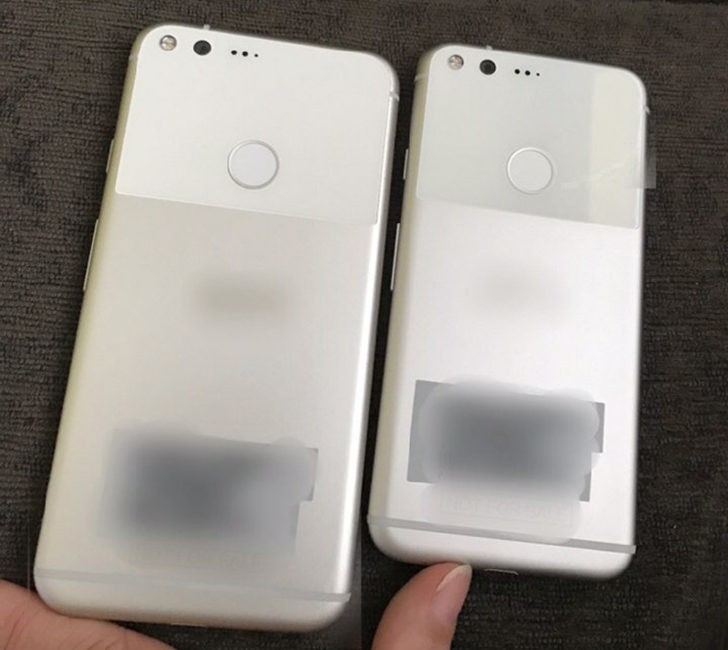
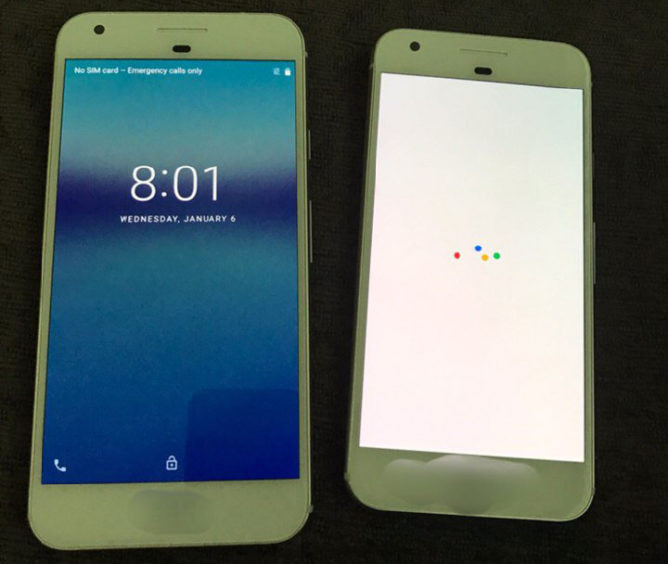
Filling in the gaps around the identifying marks that have been blurred out, and discounting the discoloration from poor lighting, we’re looking at a couple of metal phones with lots of HTC design cues. You see hints of the HTC 10 with the beveled sides and a bit of the One A9 in the rounded corners and inlaid antenna lines. Where things obviously stand out is the large glass panel that we’ve previously heard about, which is about one-third of the back panel, surrounding the fingerprint sensor and camera.
Strategically blurred portions hide a few details, but these are great new photos.
The source indicates that the Pixel XL is working with a 5.5-inch display, while the standard Pixel is a 5-incher. Physically everything else seems about par for the course and corroborates earlier leaks. There are questions about the extra set of three holes next to the rear camera, as well as the interesting placement of sensors below the speaker on the front of the phones, and we’re also wondering if that convenient blurring beneath the screen is a test device barcode, or perhaps additional branding.
There’s obviously so much more to learn about these new Pixel (if that is indeed the branding) phones, but these images give us our best look yet at the hardware and start to give weight to initial leaked information. We’re expecting Google’s official announcement in just a couple of weeks.
Samsung Galaxy Note 7: How to determine if your new phone is safe
There are three ways you can tell if a new Samsung Galaxy Note 7 is safe.
You’ve probably heard that Samsung and the US government officially recalled all sold units of the Galaxy Note 7. Now, let’s say you’re still interested in the phablet but have been waiting for safe units to hit store shelves before you buy it; you’re probably wondering how you can be sure it’s safe and not a recalled one that’s been accidentally restocked and could one day explode in your hand, in your car, or while you sleep.
Samsung said new, replacement devices will be shipped to US retail stores and customers from 21 September (28 September in UK). Thankfully, it has given us a few different ways to be sure these units are indeed safe.
Here’s everything you need to know.
Samsung
1. Check the label
Samsung has marked the packaging of all new Note 7 units with a black, square symbol to distinguish the device as safe to use. You can find this symbol in the top right corner of box’s bottom label.
DroidLife
2. Look for green
Samsung said the battery indicator on new Note 7 units will now appear green. You will see this green indicator on the status bar, the always-on display screen, and the power off prompt screen. Keep in mind Samsung reportedly said a software update will actually change the indicator to green, meaning you’ll need to install an over-the-air update to see it, according to DroidLife.
Pocket-lint
3. Enter IMEI number
Shortly after the US government followed-up on Samsung’s recall of the Note 7 by making the recall official nationwide, Samsung announced a new website that lets you enter your Note 7’s IMEI number to see if it is faulty. You can find the IMEI by entering *#06# into the phone app, or you can get it from your Note 7’s packaging (look for the bottom label).
If your device has a black, square symbol on its packaging, is able to update and show a green battery indicator on the status bar and elsewhere, and fails to show up in Samsung’s website after you’ve entered its IMEI number, then you have bought a safe Note 7. Congrats.
Want to know more?
Check out Pocket-lint’s guide about the recall, where we’ve detailed this whole saga from the get-go.
 AIVAnet