


Vizio M-Series 2016 review – CNET
Update August 10, 2016: Vizio has issued the software update allowing the P-series and M-series TVs to work with HDR10 sources like 4K Blu-ray players. It worked well in our initial tests. We expect to review an M-series TV soon.
The successor to CNET’s favorite LCD TV of 2015, Vizio’s M series, is getting improved image quality chops and a revamped smart TV system that includes a tablet remote in the box.
The 2016 version of the M series is shipping now, available in sizes from 50 to 80 inches, and starts at $850.
The new M series packs many of the same features as the more-expensive P series, which scored very well in our review.
Vizio M series features
- Full-array local dimming with up to 64 zones
- HDR compatible with Dolby Vision support
- 4K resolution
- Includes free Android tablet remote (6-inch screen, 720p)
- Google Cast compatible
Those are some pretty impressive image-quality specifications. The M series halves the number of local dimming zones on the P series, but 64 is still an impressive number (more zones generally leads to improved image quality), and twice as many as the M had last year. Vizio says “up to” 64 zones; smaller sizes will have fewer zones.
HDR is another high-end picture enhancement new for 2016, and Vizio will support both formats, as it does with the P series. One difference between the P and the M is that the M series doesn’t get the “Ultra Color Spectrum” feature, so I doubt its coverage of the P3 color space used for HDR will equal the P series’.
 Vizio
Vizio
Just like the P series, the M does away with a traditional onscreen menu system in favor of the Google Cast feature and the Vizio SmartCast app. That means it too will lack native support for Amazon’s streaming videos, including its 4K and HDR library. Amazon was the first with HDR streaming via the HDR10 format, and will offer Dolby Vision HDR later this year.
The M’s “free 6-inch tablet” has 720p resolution instead of the 1080p found on the P series, as well as a slightly worse processor (quad-core, not octa-core) and less storage (8GB vs. 16GB). Otherwise they’re very similar, and both include the slick wireless charging dock.
These TVs lack a built-in tuner, so they can’t receive local TV stations available via antenna/over-the-air broadcasts. In fact, lack of a tuner means they’re not technically “TVs” anymore, which is why Vizio’s web site calls them “Tuner-Free Displays.” If you’re someone who watches a lot of TV via antenna, rather than cable, satellite or streaming service, Vizio recommends you purchase a third-party tuner.
See my review of the P series for more details.
Here’s how the models break down.
Vizio M series 2016
| Size | Price | Dimming zones | Panel type |
| 50 inches | $849 | 32 | VA |
| 55 inches | $999 | 64 | VA |
| 60 inches | $1,249 | 64 | IPS |
| 65 inches | $1,499 | 64 | VA |
| 70 inches | $1,999 | 64 | VA |
| 80 inches | $3,999 | 64 | VA |
According to Vizio’s site, the 60-inch size in the series uses an IPS panel instead of VA. In previous testing we’ve preferred the image produced by VA panels overall, and we expect that to be the case this time around as well.
Vizio’s has also announced a new 2016 version of the less expensive E series, which lacks HDR and the tablet remote.
When is The Grand Tour on TV and how can I watch it?
It’s been a year and a half since Jeremy Clarkson was sacked from Top Gear – well, since the BBC decided not to renew his contract to be more accurate – and we’ve been waiting almost that entire time to see what he and fellow ex-presenters Richard Hammond and James May could deliver next.
We’ve known for a fair while that they were snapped up by Amazon for an extraordinary amount of money to make an all-new car show, but solid details have been few and far between.
Now the on-air date for the first episode of The Grand Tour has been revealed, so here is our handy guide on when and where you can watch Clarkson, May and Hammond attempt to grind the BBC’s refreshed Top Gear into dust.
What is The Grand Tour?
The Grand Tour is the new car show featuring Jeremy Clarkson, James May and Richard Hammond. It differs from Top Gear in that it is being filmed in different locations around the world. The studio, which houses a live audience, is based in a large tent that visits different countries and cities. These include Johannesburg in South Africa and California. It is bound to visit the UK soon too.
There are features and larks that the presenters have been filming globally in 2016 and more about the content itself will be revealed in time.
When is The Grand Tour on TV?
The Grand Tour starts on Friday 18 November, with the first episode airing globally on that day. It will then continue over the following 11 weeks, with each new episode being aired on subsequent Fridays. There are 12 episodes in season one.
How can I watch The Grand Tour on my TV?
Sadly, as Amazon paid big bucks for the exclusive rights to The Grand Tour, you will only be able to watch the show on Amazon Video. You’ll also need a Prime subscription.
As there are applications for Amazon Video across a vast number of connected devices, including Smart TVs, set-top-boxes and mobile devices, you’ll be able to watch it in a number of ways – including when out and about.
Amazon Video also allows for offline viewing for the vast majority of its in-house programming, so we expect you’ll also be able to download the show to an iPad, say, and watch it when travelling.
There are currently no indications on whether Amazon plans to sell second screening rights to conventional broadcasters.
PlayStation platformer ‘Shu’ has Vita-exclusive goodies
Sony isn’t showing the PS Vita handheld any love, but indie developers sure are. The latest example is the 2.5D platformer Shu. “Shu feels right at home on the handheld and is a great experience, especially since it’s running at 60 FPS,” a post by developer Coatsink on the European PlayStation Blog reads. More than that, the Vita version will have some exclusive bits and bobs when the game comes out sometime later this year. Coatsink says that supporting the handheld is something that the team feels “very strongly about” and it’s been hard at work ensuring that the portable version isn’t a lazy port.
Which probably explains the lack of a firm release date. The game will release October 4th on PlayStation 4, and buying it for the home console will net you a free copy of it for Vita. Maybe one of those handheld-exclusive goodies will be an avatar modeled after Sony’s head of worldwide studios, Shuhei “Shu” Yoshida. It’d be fitting, no?
Source: PlayStation Blog (Europe)
Apple Removed HomeKit Support for Third-Generation Apple TV With iOS 10
Apple is quietly phasing out HomeKit hub support for the third-generation Apple TV, meaning users who update their iPhones and iPads with iOS 10 will not be able to use the remote access feature in the Home app unless they have a fourth-generation set-top box.
Since HomeKit’s announcement in 2014, iOS device owners running iOS 8.1 or later have been able to communicate with their third-generation Apple TV over iCloud remote access, which enables the set-top box to relay commands to HomeKit accessories when they’re away from home.
However, Apple has been confirming via its Twitter support account that once users update their devices to iOS 10, only a fourth-generation Apple TV or later is able to act as a HomeKit hub using the Home app to communicate remotely with the home automation platform. Apple has updated its support document on HomeKit remote access to reflect the change.
The news will no doubt come as a blow to owners of third-generation Apple TVs who use the feature, with the lack of HomeKit support in iOS 10 signaling another nail in the coffin for the older set-top box, which lacks native tvOS features like the App Store and Siri integration only available on the later model.
@lexgardner419 We want to help. iOS 10 & HomeKit hubs are now only compatible with AppleTv 4th Gen. Check this out: https://t.co/2DyWMh9Smz
— Apple Support (@AppleSupport) September 16, 2016
Apple’s staggered depreciation of the third-gen device was also reflected in news last week that the company is pulling the device from its retail stores, with staff instructed to remove any remaining models from store shelves.
On Tuesday, Apple released tvOS 10 for the fourth-gen Apple TV, which added Siri support for managing HomeKit accessories, the ability to control HomeKit using third-party apps, and a whole host of other new features.
Related Roundups: Apple TV, tvOS 10, iOS 10
Buyer’s Guide: Apple TV (Neutral)
Discuss this article in our forums
Fess up: Who’s buying an iPhone 7 today?

Spend a night in the rain to buy a smaller version of the phone you actually wanted.
For Android people, today is Friday — a good day, to be sure. Elsewhere though, it’s iPhone launch day, a magical, revolutionary time that (usually) comes just once a year. It’s the time of year when people camp outside a glowing retail cuboid only to be told the phone they actually want is out of stock. That’s right: today is the first day actual humans, as opposed to weirdo tech bloggers, can get their hands on the iPhone 7 and 7 Plus.
The controversy this time around is that the popular iPhone 7 Plus has sold out completely, meaning you’re SOL if you’d been hoping to sacrifice your dignity in an Apple Store line in exchange for a day-one purchase of Apple’s 5.5-incher. Similarly the scratch- micro-abrasion-prone Jet Black finish isn’t available in either size — back-ordered to sometime in the mid-2050s — so you’ll have to settle for matte black like a damned caveman. (Unless for some reason you’re buying silver, gold or pink, in which congrats — case your new iPhone looks basically the same as your old one.)
Something something something headphone jack.
Anyway.
We’re not here to judge. In fact, some of us on the AC team have iPhones on the way too — makes sense to have ’em around to compare to the latest and greatest Android stuff. And all snark aside, the new iPhones have some legitimately exciting features, like the 7 Plus’s telephoto camera, water resistance (still way too rare among Android flagships, outside of Samsung’s lineup), and the option of a ridiculous 256GB of storage.
So if you’re dropping some cash on an iPhone today, be sure to let us know. Which model (and color) did you go for? Will it be your daily driver, or a secondary device? And which Android phone will you be parting ways with?
Go on — join us in the comments. All it takes is a little #courage.
Amazon’s ‘The Grand Tour’ car show launches November 18th
If you’ve been missing Jeremy Clarkson, Richard Hammond and James May, then it’s time to mark your calendar. The old Top Gear trio’s new show is called The Grand Tour, and will begin streaming its episodes on November 18th. You’ll need a subscription to Amazon Prime to watch, but there’s no word on if or where it will air in countries where the subscription video service isn’t available yet.

The Grand Tour’s new episodes will appear every Friday, and all three hosts are signed on for three seasons. A date reveal/teaser trailer asks “What could go wrong?,” and while the trio’s exit from Top Gear after Clarkson punched a producer provides a possible answer, we hope things work out better this time (and, better than they have so far for their replacements on Top Gear).
Source: Amazon
Scan photos into Office 365 with Office Lens on Windows 10
Microsoft’s Office Lens app has let folks upload photos from their iOS and Android devices since April 2015. But now your Windows 10-running phone, tablet, PC can snap photos — or even the Hololens, if that’s your thing.
With integration in the latest Windows OS, though, they’ve also added support for Office 365 if your business or personal accounts use that instead. It’s still got all the optical character recognition you’ve enjoyed with OneNote since 2013, meaning the text and figures are searchable once you’ve uploaded the images to OneDrive.
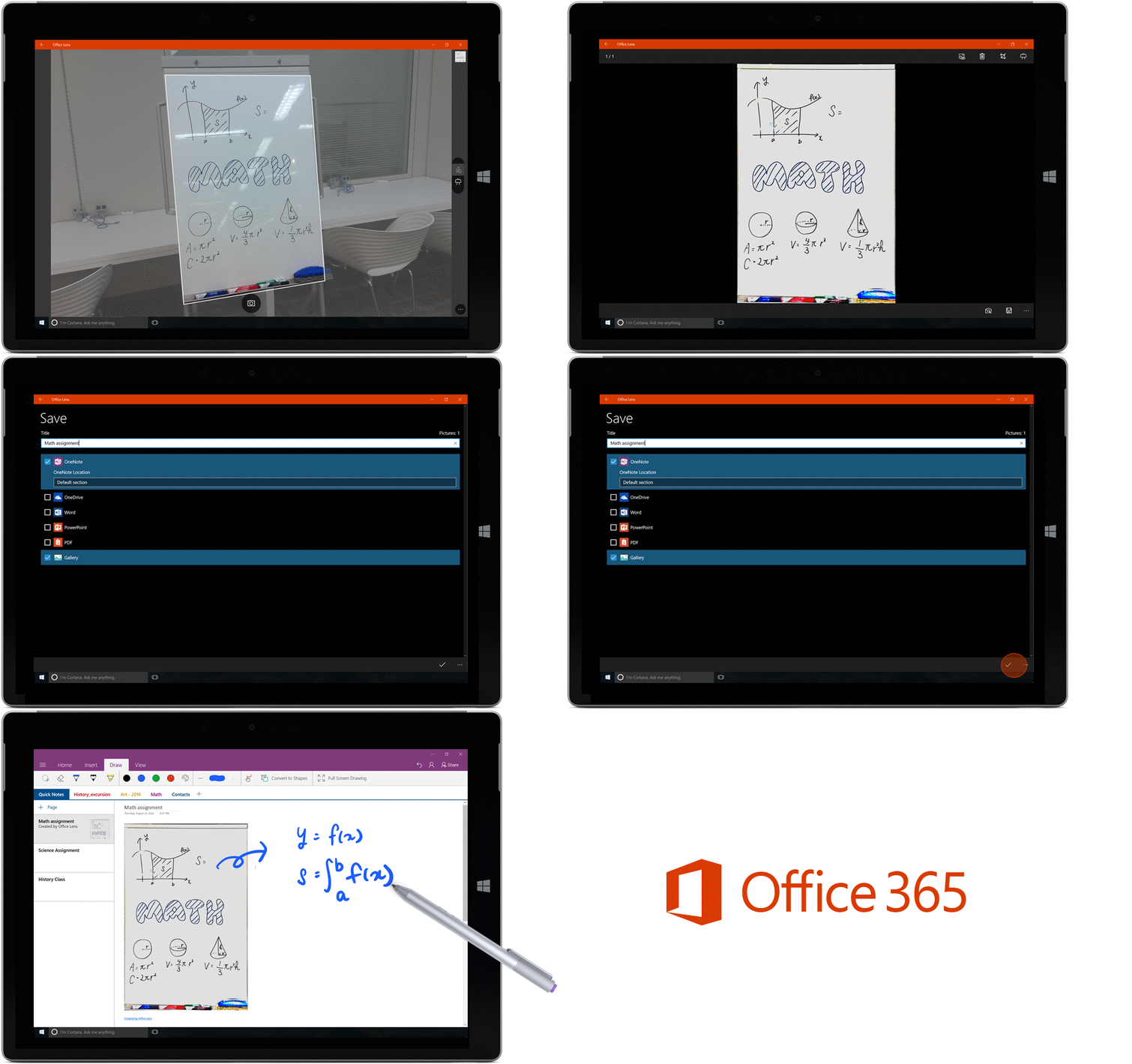
Source: Office blog
Tesla: Mobileye tried to stop our in-house chip development
Tesla and former pal Mobileye aren’t quite done airing controversial statements against each other. After the company behind Autopilot’s image recognition hardware said it severed its ties with the automaker because it was “pushing the envelope in terms of safety,” Tesla fired back with its own feisty response. A company spokesperson told Reuters that Mobileye wasn’t happy when it learned that Tesla decided to work on its own vision chips for Autopilot. She said Mobileye “attempted to force Tesla to discontinue this development, pay them more and use their products in future hardware.”
Mobileye and Tesla parted ways following the fatal Model S crash in Florida that put the carmaker’s Autopilot feature in hot water. The exchange of words started after that — Musk’s company once said that its ex-partner couldn’t keep up with its rate of innovation.
Besides revealing that Mobileye tried to dissuade Tesla from developing its own chips, the spokesperson also said that the other company started talking about safety concerns only after the EV manufacturer refused to give in:
“When Tesla refused to cancel its own vision development activities and plans for deployment, Mobileye discontinued hardware support for future platforms and released public statements implying that this discontinuance was motivated by safety concerns.”
Source: Reuters
How to Customize Favorite Contacts in iOS 10
Among the many new features in iOS 10 is a neat way to organize your favorite contacts and even access them quickly thanks to a new widget system introduced in the update. iOS 10 goes beyond general phone call-launching features, introducing ways to customize whether each contact icon will call, FaceTime, text, or email the person you tap on.
The addition makes favorites a far more useful and personal feature, superior to the 3D Touch Quick action it was limited to in previous versions of iOS (an enhanced 3D Touch option is still available). It should be noted that the basic communication preferences stored within each contact card on your iPhone will come into play when customizing your new favorites widget, so be sure to add in any phone numbers and email addresses before you start if you haven’t done so already.
Customizing Favorites in the Phone App
Once you have iOS 10 downloaded, follow these steps to navigate through the new way you can customize favorites in the phone app.
The above image represents Step 5 in the instructions below
Navigate to the Phone app.
The app should open on the “Favorites” tab, but if not tap to it.
Tap the “+” button in the top left corner of the screen.
Search for the contact you want to add and tap it.
Choose between Message, Call, Video, or Mail as your shortcut.
To pick a number or email other than the one shown as default, tap the small down arrow to the right of Message, Call, or Mail to pick from any number/email already stored in your phone for this contact.
Return to the Favorites tab and your new quick access contact will be at the bottom of your Favorites list.
Tap “Edit” in the top right corner to delete or reprioritize contacts.
When organizing your new favorite contacts, be sure to note that the first four contacts will receive top billing in the favorites widget, but a total of eight can fit.
Setting Up the Favorites Widget
The new favorites list is interesting because of its granular settings that allow you to jump into the contacts you only text with, while still accommodating those people you more often speak with on the phone. The personalization doesn’t stop there, however, thanks to iOS 10’s new and visually overhauled widgets system. Follow the next few steps to get your favorites widget up and running.

Navigate to the widgets screen by swiping right from the main iOS 10 home screen, notification center, or lock screen.
Scroll all the way down to the bottom of your widgets and tap “Edit.”
Find “Favorites” and tap the small green plus button to add it to your widgets.
Use the triple bar or “hamburger” icon on the right side of the screen to move favorites further up or down the list.
Hit “Done” to save your changes.
You’ll see your favorite contacts as a widget, with the top four contacts getting premium placement.
Tap “Show More” to expand the widget to a total of eight contacts.
Since the favorites widget can show up to eight contacts, you can return to the phone app to add and rearrange your most important friends, family members, and co-workers to see the changes reflected in the widget.
Your customization options include: adding multiple methods of communication for one person (all four if you contact one person multiple ways frequently), removing the default phone call options for message-focused contacts, and setting your top four most used contacts to save room on the widgets screen, without needing to use the “Show More” option.
 An example of the personalized layout that the new widget offers.
iOS 10 is full of other minor but useful features that are worth checking out, which MacRumors is covering in various guides and how-tos to give you a step-by-step walkthrough of each new feature. Check back for new articles, and be sure to read our forums for discussions on iOS 10, the iPhone 7 and 7 Plus, and more.
Related Roundup: iOS 10
Discuss this article in our forums
Apple Not Accepting Returns or Exchanges in Hong Kong
Apple updated its purchase policy for Hong Kong today to reflect that all Apple and Beats products purchased at its retail stores in the region cannot be returned or exchanged.
The exact reason for Apple suddenly disallowing returns and exchanges at its five Hong Kong retail locations, and whether it is a temporary move, remains unclear at this time.
Apple previously allowed customers in Hong Kong to return or exchange undamaged products with the original receipt and packaging within 14 days of the date of purchase.
The change was made on the same day iPhone 7 and iPhone 7 Plus launched in Hong Kong, where the smartphones have been reselling on the black market for up to 15,000 Hong Kong dollars, or up to $1,933 in U.S. dollars. CNBC and South China Morning Post both ran articles about these lucrative scalping efforts, which have become commonplace with every iPhone launch, earlier today.
Hong Kong is a hotbed for black market electronics due to the lack of import taxes and duties added to foreign goods purchased, as is the case in neighboring mainland China. Scalpers often attempt to illegally smuggle new iPhones across the border to mainland China to make significant profits, including one smuggler caught with 94 iPhones strapped to his body in 2015.
A tipster informed MacRumors that the return policy change also applies in Macau, another special administrative region of China.
Tags: return policy, Hong Kong, Apple retail
Discuss this article in our forums
 AIVAnet