


Seth Rogen’s sci-fi comedy ‘Future Man’ is Hulu-bound
Seth Rogen is working on a new comedy series called Future Man, which has just been picked up for broadcast on Hulu.
The show, which Rogen is working on alongside Evan Goldberg, follows a janitor (Josh Hutcherson) who just happens to be a gamer by night (of course, let’s portray someone who enjoys games as a “loser,” how original). When he’s visited by otherworldly beings, he’s asked to travel through time to prevent humanity’s extinction. Same old song and dance we’ve heard several times over, especially in countless anime and comic series.
The show is being produced by James Weaver and will span 13 episodes, premiering in 2017. The show itself doesn’t exactly sound inspired, but given Rogen’s excellent work on Preacher for AMC, it could be a surprise hit.
Via: The Verge
Source: Deadline
Chrome cracks down on sites that don’t use encryption
Chrome is embarking on a crusade to crack down on websites that still aren’t using encryption, and it starts with the latest version of the browser, Chrome 56.
Chrome 56 is launching in January, and will implement a new warning that you’ll see on any login sites that are still unencrypted. The pages will be marked as “not secure” in a small window by the address bar, which should help usher browsers away from any site that’s still not utilizing HTTPS. In the future, these pages will also be denoted with a special red triangle symbol as well.
This is in contrast to the way Chrome already warns users, as it uses a “neutral indicator,” as explained by Emily Schechter, Chrome Security Team.
HTTPS, as Schechter explains, is important because loading sites via regular HTTP opens you up to potential attacks: “When you load a website over HTTP, someone else on the network can look at or modify the site before it gets to you.” Attacks utilizing these windows of opportunity do happen, and quite a bit more often than you’d think.
Chrome is continuing a series of ongoing efforts to improve the browser’s security, but these are a couple of the most recent and important steps in keeping users and their information safe.
Via: The Verge
Source: Google
Dropbox tackles security fears surrounding its Mac app
Dropbox has already raised some eyebrows over its requests for ever-deeper access to your computer, and recent discoveries aren’t helping things much. Users now claim that Dropbox’s Mac app asks for overly broad permissions, swipes your password and even hacks the operating system. The cloud storage service is trying to allay those fears, though. Desktop app team member Ben Newhouse has responded to concerns on Hacker News with both an explanation of design decisions and a promise to improve its transparency.
The app only asks for the permissions it needs, Newhouse says. It uses the Mac’s accessibility kit for certain tie-ins (such as in Office), and demands elevated access to your OS when standard programming interfaces fall short. The permissions aren’t as “granular” as Dropbox would like, the developer adds. He stresses that Dropbox can’t see your system’s administrator password, and a privilege check on startup is only to make sure the software works consistently, especially across OS versions.
As for what the company will do to turn things around? To start, it wants to do a “better job” explaining what its software is doing and why it needs the permissions it does. Also, it’s teaming with Apple to reduce that dependence on elevated access in macOS Sierra, and will respect when people disable Dropbox’s accessibility permissions — currently, it turns the permissions back on.
The service reiterated its position in a statement that you can find below.
The effort to come clean may assuage those worried Dropbox is running roughshod over your computer. However, it’s not pleasing everyone. Hacker News users want the firm to more explicitly outline why it needs the permissions it does, and they’re worried that the broad system-level control opens the door to malware that otherwise wouldn’t be possible. It’s important to stress that Dropbox’s requests aren’t unique — apps like Chrome and Steam also demand accessibility permissions for features, such as Steam’s screen overlay. However, that might not reassure customers who believe that Dropbox’s existing approach is both unnecessary and risky.
“Dropbox, like other apps, requires additional permissions to enable certain features and integrations. The operating system on a user’s device may ask them to input their password to confirm. Dropbox never sees or receives these passwords. Reports of Dropbox spoofing interfaces, or capturing system passwords are absolutely false. We realize that we can do a better job communicating how these permissions are used, and we’re working on improving this.”
Via: TechCrunch
Source: Hacker News (1), (2), AppleHelpWriter
The best places to buy and sell a used iPhone
By Jackie Dove
With a new iPhone arriving soon, many people will look to sell their old iPhone for some quick cash. But which places offer the best return and the smoothest process? To find out, Tom’s Guide tested seven services that buy and sell used iPhones.
To find out where you can expect the best return on your dollar, we bought an iPhone from each reseller service and then turned around and re-sold that phone to same service where it came from. We also rated each service on their convenience, ease of use and responsiveness to come up with our rankings.
The key takeaways from our testing:
- Glyde and Swappa top our rankings of the best places to buy and sell a used phone.
- Walmart and Best Buy finished at the bottom.
- We resold our iPhones for an average of 52 percent of what we had paid for them.
- We got the highest rate of return from marketplace services that connect smartphone buyers with sellers; the worst return came from big-box retailers.
How we tested
To best measure how much return you can expect from iPhone resellers, we selected services that both buy and sell used iPhones, evaluating seven. In addition to Glyde and Swappa, we also looked at Amazon, Best Buy, GameStop, Gazelle and Walmart. We bought a used iPhone from each service, and then — without activating or using our newly purchased phone — sold the same model back to the seller where we purchased it.
From most resellers, we bought a 16GB iPhone 6. We purchased a 16GB iPhone 6 Plus from Amazon and GameStop due to availability issues, though we stuck with iPhones released in 2014 to get comparable quotes from resellers. Also, due to availability, some of the iPhones we purchased were tied to specific carriers, which we’ve noted below. In our experience, unlocked phones not tied to any one carrier generally fetch higher prices (though AT&T and Verizon phones have a high resale value, too).
MORE: The Best iOS Apps You’re Not Using
As you might expect, there’s a gap between what resellers will charge you for an iPhone and what they’re willing to pay out when you try selling that same phone back. Just like with cars that depreciate the moment you drive them off the lot, that iPhone you’re hoping to unload will never recoup its value. In our testing, resellers make their money by buying low and selling high.
When ranking these seven services, in addition to measuring how much we got back when reselling an iPhone, we also took the entire process into account. Were the instructions easy to follow? How quickly did it take to get a quote on our iPhone? Did the reseller offer cash or store credit? And how promptly did we receive that cash or credit after completing the sale?
Glyde: Our top pick
What we bought: Space Gray iPhone 6 (AT&T)
What we paid: $359.50
What we got back: $265.60
Rate of return: 74 percent
Cash or credit: Cash and bitcoin
Pros: Best rate of return; Clear explanation of policies with explicit breakdown of fees; Option to wait for a better price; Can verify your identity via PayPal; Flexible payment options
Cons: You’re not required to post a verification photo, a step that can help weed out scammers.

Glyde offers a straightforward, colorful and easy-to-navigate website where you can find an assortment of second-hand iPhones as well as Android models from Samsung, HTC, LG and others. To sell my iPhone 6, all I needed to do was select the website’s Sell tab and type in the phone’s model number, carrier, color and condition. Several questions from Glyde covered details about physical appearance and scratches, personalization, and whether I had included accessories like a power adapter and cable.
Note that prices can change, often from day to day. After trying a dry run, I went back to Glyde to re-enter information about the phone I was trying to sell, and the market price had dropped to $316 from $326.
The market price is what the buyer is going to pay, not the amount I would pocket. Glyde charges a 15-percent transaction fee, while a kit with packaging to ship off your phone will cost you $3. Glyde was the most transparent service when it came to spelling out fees. I wound up collecting $265.60. (That amount would have been $274.10 if I had stuck with the quote from my dry run.) That’s still the highest percentage of return from any vendor we tested, as we got back 74 percent of what we paid for the iPhone.
MORE: Upgrading to the iPhone 7? Read This Before You Do
While I was disappointed with the price drop over two days, I decided to take my profit immediately and hit the List for Sale button. From there, you type in information about the phone, enter your email and Glyde account password, and verify your identity with your credit card or PayPal account. Click the button, and your item is listed. You can post your listing on Facebook, Twitter and Google + right from Glyde’s page.
Two days after I listed my phone for sale, a buyer bit and then reneged within an hour; Glyde notified me via email about both events. The next day, another person offered to buy, which I quickly confirmed. A packing box arrived in the mail, with a prepaid label; all I had to do was drop the package into the nearest mailbox. Three days after the buyer receives and accepts the phone, Glyde posts the money into your account. From there, you can transfer the cash to your bank account, opt for Bitcoin payment or have a check mailed to you for a $2 fee.
Swappa: Runner-Up
What we bought: Space Gray iPhone 6 (Verizon)
What we paid: $465
What we got back: $325
Rate of return: 70 percent
Cash or credit: Cash
Pros: Posted items are approved quickly by Swappa; Ability to adjust listing; Solid rate of return; Added protection via PayPal purchases
Cons: Time-consuming process required for shooting photos of your phone; Agreeing to an immediate trade will lower your rate of return; Mandatory $10 PayPal transaction fee.

Swappa — as in “you wanna swappa?” — is an electronics website that features a fun interface for selling several dozen brands of phones, including Android devices as well as the iPhone. Just type in the specific search term to find the model you want to sell, and if it appears, you get an immediate idea of how much cash you’ll get.
My Verizon-tied iPhone cost $465, and from the site’s initial offer, I would have pocketed up to $307 in cash, which came to 66 percent of the total I paid for the device. Swappa also gave me the choice of selling my phone for from $340 to $559 if I wanted to wait for a better deal. I opted for a better return — and to take the deal, I had to register, either through Facebook or Google+ or via email and password.
It took longer to get my listing up on Swappa than it did with other sites. The process requires you to shoot a verification photo of the phone and its accessories using a specific, rather low-tech approach. You have to set up your shots with the site’s verification number handwritten on a piece of paper next to the phone, and then powerup the phone you’re reselling, so the screen is lit when you take your picture. You repeat the process with any included accessories. The idea is to prevent scams, and Swappa at least offers ample instruction on how to take your picture.
MORE: The Best iPhone 7 Carrier Deals
After I took the photos, Swappa took 15 minutes to verify and approve my entry. From there, it’s a matter of waiting for someone to buy your phone. If you’ve tried to get a higher price, you can revise your listing to Swappa’s lower price, which I did after waiting three days. The phone sold only after I settled on a new price: $335, which netted me $325 once I took into account a mandatory PayPal transaction fee.
That PayPal fee is the only cost — there’s no fee to sell on Swappa — and using PayPal to handle transactions felt safer than having to punch in credit card information. Swappa reviews and approves all listings before buyers can see them. Swappy promptly answered my questions about my listing when I sent queries via email and posted them to Swappa’s Facebook page. When my phone sold, I was notified that money had been deposited in my PayPal account, after which I had two days to mail out the phone.
As an extra added layer of protection, anyone who sells a stolen phone, or one with a damaged screen or water damage violates Swappa’s terms of use, giving buyers recourse through PayPal.
Gazelle
What we bought: Space Gray iPhone 6 (Verizon)
What we paid: $406
What we got back: $210
Rate of return: 52 percent
Cash or credit: Both
Pros: Quick and easy resale process; Multiple options for getting paid for your device; Inspection processensures quality selection of phones on sale.
Cons: Middle-of-the-road payment for trade-ins, compared to other resellers.

Gazelle has an attractive site that makes it easy to get started with your sale: The company trades in iPhones and Samsung Galaxy models as well as Android devices from HTC, Nokia, LG and others that cover the four major carriers.
If you take Gazelle’s offer on your phone, you have a choice of payment via Amazon gift card (which adds an extra 5 percent to your total), PayPal, charitable donation or standard check delivered within 10 days of Gazelle verifying the phone’s condition. Customers buy your phone from Gazelle, not you directly, and the company inspects the device before selling it as certified pre-owned to guarantee the condition. To ensure buyers are satisfied, there is a 30-day return policy.
After you enter your email address and a minimum amount of information about the phone’s brand, capacity and physical condition, you do not have to wait for a buyer — just accept the Gazelle offer, box up the phone and choose how you want to be paid.
As a reseller, Gazelle will appeal most if you want to unload your phone quickly and would like some options for how you’ll be reimbursed. We got back only half of the value of the iPhone we had bought, though.
Amazon
What we bought: Space Gray iPhone 6 Plus (unlocked)
What we paid: $549.99
What we got back: $265
Rate of return: 48 percent
Cash or credit: Amazon gift card
Pros: Process is clearly explained; Trade-in offer is immediate; Amazon offers free mailing label for sending in your phone.
Cons: Prices paid are fairly low; You’re restricted to store credit; Trade-in links can be hard to find.

To sell your old smartphone on Amazon’s massive website — which appears to sell a huge variety of almost every brand imaginable — requires an eagle eye and some clicking around to find the right path. In the end, typing the exact item into Amazon’s search box, clicking on a result and finding the trade-in link on the page was the quickest way to get an estimate.
For an iPhone 6 Plus that we bought for $549.99 from the e-commerce giant, Amazon offered $265 in trade — less than half of what we paid. While your phone’s appearance and condition may be acceptable to you, Amazon reserves the right to inspect the device and asks straightaway if you will accept a lower price or if you want the phone sent back if your price and Amazon’s don’t match. After my phone passed inspection, Amazon deposited the proceeds of my gift card directly into my account.
The company’s trade-in program offers an Amazon gift card in exchange for your used phone. If you don’t mind registering as an Amazon seller — which involves entering credit card and tax info — you can sell your phone on Amazon’s individual seller marketplace. But that’s a lot of hoops to jump through for a one-time sale, especially when the gift card can be used to buy any of the hundreds of thousands of things Amazon sells on its site.
GameStop
What we bought: Space Gray iPhone 6 Plus (AT&T)
What we paid: $459.99
What we got back: $240
Rate of return: 52 percent
Cash or credit: Both
Pros: Choice between cash or store credit; Simple process; In-store staff were helpful and professional during our testing.
Cons: Middling return on the value of our phone; Requires a visit to a brick-and-mortar store to complete your sale.
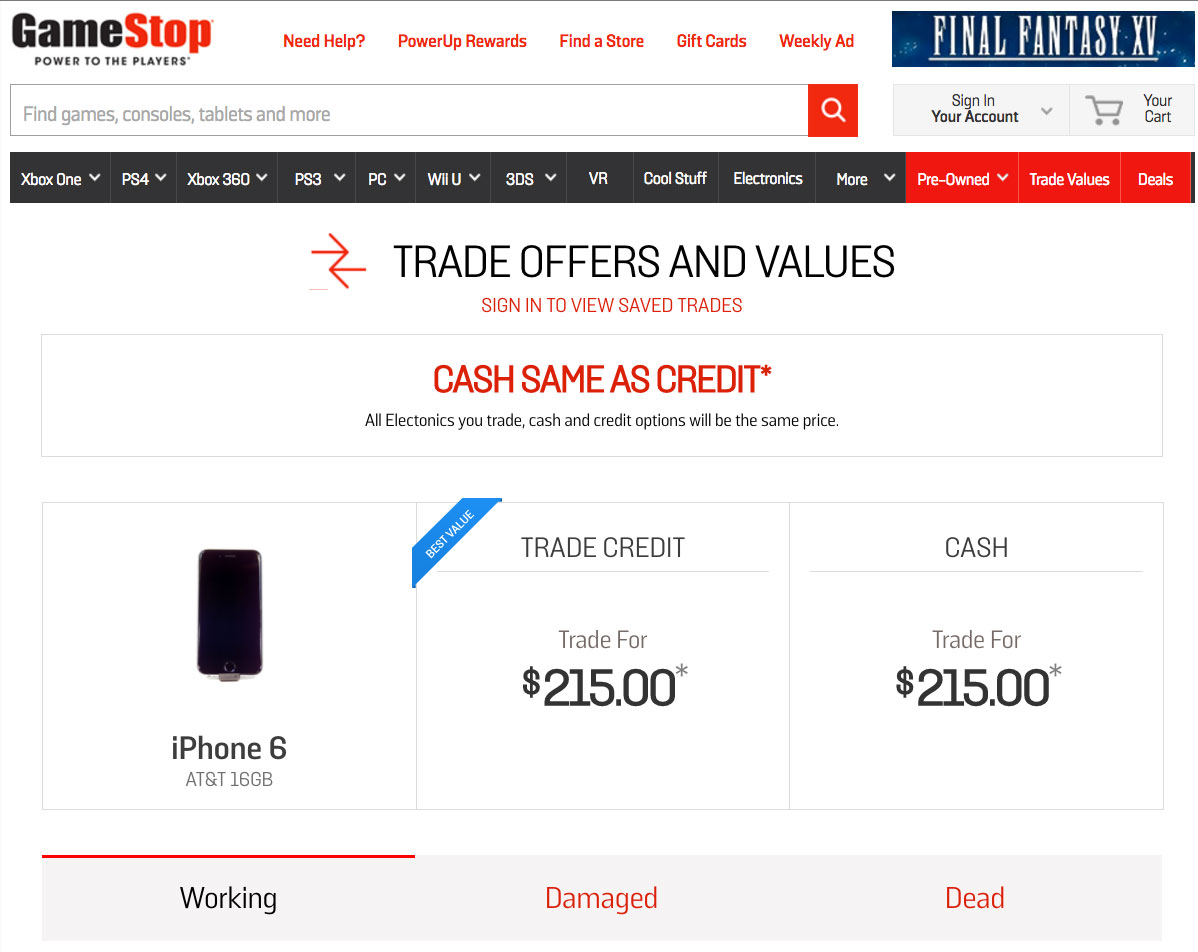
GameStop takes a different approach than other resellers because of its focus on games. While some resellers offer a mix of cash and credit, GameStop customers may be more inclined to trade in their phones for store credit in games, VR headsets and gaming systems, in addition to the refurbished iPhones and Samsung Galaxy models available on the GameStop site. The transaction is straightforward except for one thing: The final turnover of your phone for cash or gift cards must be done in person.
The website offers a list of the phone types GameStop accepts for trade. A working iPhone 6 Plus that has no missing parts, cracks or dents will trade or get cash totaling $240. That’s a little more than 52 percent of the $459.99 we had paid GameStop for the same phone the previous month. A damaged phone will trade for $95, while a dead phone gets $25.
My trade-in experience took just 15 minutes, as the pleasant and efficient clerk behind the counter tested the phone and looked up records. I walked out with a $240 gift card.
GameStop lets you search for stores within a 15-mile radius of your zip code. If there’s no retail outlet near you, you’ll want to turn to a different reseller.
Walmart
What we bought: Space Gray iPhone 6 (Straight Talk)
What we paid: $369
What we got back: $125
Rate of return: 34 percent
Cash or credit: Credit
Pros: Simple transaction requiring little information; Free shipping label supplied.
Cons: Very low return on resales; Limited to in-store credit.

You’ll find plenty of phones available for sale at Walmart, including contract, unlocked and refurbished phones available for the major carriers as well as the retailer’s in-house Straight Talk network. What you won’t find is the option to get cash back for your phone. It’s store credit and no negotiating.
It’s easy enough to go through the process, using the Gadgets for Gift Cards link. The used iPhone 6 we bought from Walmart netted a $125 offer, 34 percent of what we paid, which was the lowest return from any reseller. Interestingly, the phone was tied to Straight Talk. Had we tried selling back an unlocked phone or one tied to AT&T or Verizon, Walmart would have given us $160 in credit.
Once you approve Walmart’s appraisal, just log in to your account or create a new account with your email and mailing address. Walmart offers a printed label that you can use to pack up your phone and send it in. After that, just wait for your gift card to arrive via email, which it did within three days of receiving my phone.
Best Buy
What we bought: Space Gray iPhone 6 (AT&T)
What we paid: $599.99
What we got back: $208
Rate of return: 35 percent
Cash or credit: Gift Card
Pros: Trade-in process is simple, if you have no questions; Trade-ins at the store are handled efficiently by friendly staff.
Cons: Long wait times for answering questions on Best Buy’s 800-number; Low rate of return.

Best Buy has a busy website that features a vast variety of iPhones and flavors of Android phones for sale. But it’s still fairly easy to find the place to trade in your older iPhone. If you do, be prepared to accept payment in credit. Like Walmart and Amazon, Best Buy doesn’t deal in cash for phone trade-ins.
We paid $599.99 for an iPhone 6 that arrived in a sealed box (for an iPhone 6s oddly) but with no earbuds included, the only used phone we bought that was missing an item. That didn’t affect my trade-in price; when I turned in my iPhone for resale, the Best Buy clerk said I didn’t need to include accessories. But Best Buy’s offer was the second-lowest return from any reseller: just a $208 gift card, or 35 percent of what we paid for the iPhone.
MORE: Best Cellphone Plans for Your Money
Getting a quote from Best Buy’s website is simple enough. All I had to do was list the phone’s color, carrier and condition to get a trade-in value that I could redeem in person or by mail. Getting answers to questions proved more difficult. I called Best Buy’s toll-free number to ask about the missing earbuds and an issue with the phone’s IMEI number, and waited 20 minutes and through three transfers before I was told it would be a better idea to do my trade-in at a store. That took a much more efficient 15 minutes.
Other options
You don’t necessarily need to go through a reseller or e-commerce marketplace to unload your aging iPhone. Certainly, Craigslist offers the opportunity to find a willing buyer, and depending on your negotiating skills, you may be able to get a bigger return than you would from a reseller who’s going to offer you a set price.

That said, handling a sale on your own can be a hassle, and there’s always the risk of running into scammers. A reseller or reputable marketplace removes a lot of the headaches and potential risks.
If you’re planning on using the money you get from trading in your phone to finance the purchase of a new phone and you’re committed to a specific wireless carrier, you may want to see what that carrier will offer you for your old phone. Verizon offered us the best quote on an iPhone 6, with a $265 trade-in value. AT&T quoted us a price of $200 for a 16GB iPhone 6, while T-Mobile and Sprint offered $191 and $159, respectively. Those quotes assume a phone is in excellent condition, and the amounts can vary based on which carrier your old phone is tied to. You receive the trade-in value in the form of credit or a gift card.
Where to buy a used phone
Our testing of reseller services focused primarily on selling a used iPhone, because that’s where you’re likely to experience the greatest amount of variance, from the money you get back for your phone to the simplicity of the resale process. In contrast, shopping for a used iPhone from these sites is a pretty similar experience, though there are a few differences worth noting.

In terms of selection, you’ll generally find each service offers a wide degree of smartphone models and capacities. In our search for a used iPhone 6, we found that models tied to AT&T and Verizon were plentiful while T-Mobile and Sprint devices were in shorter supply. Amazon, Glyde and Swappa offered the widest range of phones in terms of carriers and capacities.
Used iPhone shoppers will find the best range of prices at Swappa, though lower-priced phones are likely to have been well-used. Glyde, Gazelle, GameStop and Amazon also offer attractive pricing on used phones depending on what model you’re looking for.
We found it easiest to shop for a used iPhone at Glyde and Swappa, which conveniently group iPhone models together, allowing you to drill down to the version you want. Despite its wide selection, Amazon offers very cluttered search results; type in iPhone 6, and you’re just as likely to get entries for the 6s, 6s Plus and 6 Plus as you are for the model you want. Walmart and Best Buy feature helpful filters for removing superfluous search results.
We should note that we ran into one quirk when buying our phones from Glyde and GameStop, though that’s likely a result of how we ordered our iPhones. Because we bought our phones through our corporate office and shipped them to an editor at another location, both Glyde and GameStop flagged our initial purchases, requiring us to set up a PayPal account to complete the deals. Most shoppers won’t run into that problem, though it could flare up if you’re buying a used phone as a gift for someone who has a different address than yours.
More from Tom’s Guide:
- Walmart, Best Buy Offer Worst iPhone Trade-in Deals
- The Best and Worst iPhone Trade-In Deals
- iPhone 7 vs iPhone 7 Plus: What Should You Buy?
- Why You Shouldn’t Get the iPhone 7
- iPhone 7 Camera Tech: Can Apple Be the Best Again?
Google DeepMind’s AI can mimic realistic human speech
It’s still pretty easy to tell whether it’s a real person who’s talking or a text-to-speech program. But there might come a time when a robot could dupe you into thinking that you’re speaking with a real person, thanks to a new AI called WaveNet developed by Google’s DeepMind team. They have a pretty good track record when it comes to building neural networks — you probably know them as the folks who created AlphaGo, the AI that defeated one of the world’s best Go players.
Currently, developers use one of two methods to create speech programs. One involves using a large collection of words and speech fragments spoken by a single person, which makes sounds and intonations hard to manipulate. The other forms words electronically, depending on how they’re supposed to sound. That makes things easier to tweak, but the results sound much more robotic.
In order to build a speech program that actually sounds human, the team fed the neural network raw audio waveforms recorded from real human speakers. Waveforms are the visual representations of the shapes sounds take — those squiggly waves that squirm and dance to the beat in some media player displays. As such, WaveNet speaks by forming individual sound waves. (By the way, the AI also has a future in music. The team fed it classical piano pieces, and it came up with some interesting samples on its own.)
For instance, if used as a text-to-speech program, it transforms the text you type into a series of phonemes and syllables, which it then voices out. Subjects who took part in blind tests thought WaveNet’s results sounded more human than the other methods’. In the AI’s announcement post, DeepMind said it can “reduce the gap between the state of the art and human-level performance by over 50 percent” based on those English and Mandarin Chinese experiments. You don’t have to take the team’s word for it: We’re still far from using a WaveNet-powered app, but you can listen to some samples on DeepMind’s website.
Via: Bloomberg
Source: DeepMind, WaveNet (PDF)
Anti-encryption bill changes would limit some effects on security
A Senate bill that would demand encryption backdoors may be on ice for now, but it’s now poised to come back — with a few limitations. Just Security claims to have obtained proposed changes to the bill that would scale back its requirements to placate critics of its effect on privacy and security. Some of them could make a meaningful difference, but there’s a concern that this wouldn’t change the underlying problems with the legislation.
Most notably, it would only ask that companies and individuals make “reasonable efforts” to offer technical help when law enforcement wants access to encrypted data. That could be an out for companies designing encryption that they can’t break themselves. The proposals would also limit the scope of demands to whoever is responsible for controlling the encryption process (providers would be off the hook), and would no longer require access in cases of spying, terrorism, or critical infrastructure like electrical grids.
This still leaves significant problems, though. As Just Security asks, how do you define who controls the encryption process? Does this exempt certain companies, or put them on the hook the moment law enforcement thrusts a device into their hands? The limitations on surveillance and terrorism may also be more a matter of ceding jurisdiction to other Congressional committees than a privacy-minded gesture.
Moreover, the infrastructure limitations may only serve to highlight the problems with mandating backdoors and other guarantees of access to encrypted systems. If you’re worried that weakening encryption would put power plants at risk, why is it okay to put the broader public at risk? And wouldn’t weakening security for one hurt the other? There’s no known timetable for when a revised bill would show up (after the election seems more likely), and there’s no guarantee that it’ll keep these exact changes. However, it’s clear that Senators Dianne Feinstein and Richard Burr still don’t have a firm grasp on how encryption works. It’s virtually impossible to create security holes that only law enforcement can climb through, and a toned-down proposal won’t change that.
Source: Just Security
From the Editor’s Desk: The point of no return

The Galaxy Note 7 will always be ‘Samsung’s exploding smartphone.’
It’s not been a great week for the Galaxy Note 7, following on from Samsung’s unprecedented global recall earlier in the month. The following have happened in the past seven days:
- A Note 7 reportedly caught fire in an Australian hotel room, causing AU$1,870 worth of damage.
- Midweek it was reported that a charging Note 7 may have been behind the incineration of a Florida family’s Jeep.
- The same day a charging Note 7 became a suspect in a fire which destroyed a house in South Carolina.
- It emerged that the Note 7 won’t be widely available in Europe until after Apple’s iPhone 7 has already gone on sale, after the recall scuppered the original September 2 launch date.
- Three Australian airlines banned passengers from using or charging Note 7s onboard their planes. The U.S. FAA and India’s Director General of Civil Aviation advised passengers against using or charging the phones on airplanes too. Same with many Taiwanese airlines.
- The U.S. Consumer Product Safety Commission told Note 7 owners to power down their devices and stop using them ahead of a full and “official” recall involving Samsung and the U.S. authorities.
Short of serious injury or death, it’s hard to imagine a week of more negative coverage for a piece of consumer electronics.
So begs the question: Is the Note 7 past the point of no return here? Jerry makes a good argument to the contrary, saying that now more than ever folks have short memories, and that controversies like this generally blow over with time. But most of that focuses on the future of the Note brand. In the near term, the Note 7 is no longer about selling product, it’s about isolating the brand damage as much as possible, and trying to ensure that the bad publicity around the phone doesn’t become terminal.
We’re past selling phones. Now Samsung’s job is to ensure the bad publicity around the Note 7 doesn’t become terminal.
That’s not a criticism of the way Samsung has handled itself per se. It quickly started a global recall “voluntary return” program and spread the word through the usual channels, with pop-up messages even appearing on Note 7 handsets in the U.S. The company’s official line is that you should switch your Note off, box it up and return it. (Though it took a few days for Samsung to explicitly say this.) That’s not a suggestion, and not something Samsung does lightly. Could it have shortened the turnaround time? Maybe, but swapping out over 2 million phones on a global scale is neither quick nor easy. There is however the question of whether Samsung should’ve been quicker to initiate an “official” recall, involving the Consumer Product Safety Commission, which might’ve hastened things.

But from the moment a bunch of unsafe devices made it out onto the market, the damage was already done. The Note 7 is now infamous as that Samsung phone that can catch on fire and blow up when charging. News reports picture Notes that look like they’ve been pulled out of a deep-fat-frier. Each new Gizmodo headline on the saga mockingly refers to it as “Samsung’s exploding smartphone.” That reputation, reinforced by each report of suspected Note-related fires, will be almost impossible to shift, even if future products are untarnished. (And you could easily argue that the delay in instituting an “official” recall has allowed more of these stories to come to light.)
Even post-recall, it’ll be difficult to prove to cabin crews, the TSA, or whoever else, that your newly-replaced Note 7 isn’t a fire hazard.
Soon we’ll enter the murky phase where there are both safe and unsafe Note 7s out in the wild. Samsung will add special marks to the boxes of “safe” Note 7s once these begin shipping, and the company says it’ll let customers look up their IMEI in an online database as a secondary check. That’ll go some way towards guaranteeing the safety of second-hand Notes.
But the issue with the Note 7 and air travel this past week has highlighted another point of uncertainty. It’s not clear there’ll be any way to prove to cabin crews, the TSA, or whoever else, that your newly-replaced Note 7 isn’t a fire hazard. As such, airline “bans” are unlikely to distinguish between “safe” and “unsafe” Note 7s, and that could be a serious inconvenience going forward.
True, it’s going to be almost impossible for airline staff to vet each and every glass rectangle taken onboard. However even having to think about that is extra hassle — as is potentially not being able to use your Note during a flight even after replacement phones are in-hand. If you’re a frequent traveler, maybe you’ll end up buying a different phone that doesn’t come with this baggage.
In all other respects the Galaxy Note 7 is the best Android phone you can buy right now. But the longer we continue to see reports of this or that catching fire because of a nearby Galaxy Note, and the longer the Note 7 becomes a figure of fun because of it, the the more improbable it is that this product will be salvageable.
Other doin’s a-transpirin’ this week:
- Apple’s Twitter snafu whereby it let an entire cattery of iPhone 7 details out of the bag more than an hour early was a hilarious baptism of fire for the company’s new social presence. (And one to join the ranks of TV Truck Schedule and iPhone 4 demo-Wi-Fi-gate.) Social is hard, and even with a brand as tightly controlled and polished as Apple’s, it ultimately comes down to someone pressing a button.
- That said, the new iPhones looks nice — especially the new stuff Apple’s doing with cameras in the larger model. (Particularly hot: the “jet black” color that’s already back-ordered to November — and will probably get scratched up within weeks.) For the first time on AC, we’ll actually be reviewing the iPhone this year (watch this space in the coming weeks). A major iPhone launch only comes once a year, and it’s a big enough deal to be worth some of our time to take a look.
- It was also interesting to watch Apple say absolutely nothing about Samsung’s Note 7 woes. (There’s plenty of material to work with, and the timing couldn’t have been more perfect for Cupertino.) The company came off as classier for it — and for the fact that it largely ignored Android this time as opposed to smack-talking.
- There’s a new Nougat build for the Nexus 6P, which also includes the September security patches. The old “final” build (NRD90M) was never linked on Google’s site, and doesn’t seem to have made it out to many outside the Android beta program. (According to one carrier it was pulled due to issues.) I was seeing a fair amount of jank on the old build, and the new one (NRD90U) fixes things right up.
- I got to play with the LG V20 in Berlin last week ahead of its announcement. It’s essentially a much nicer G5 in a larger form factor, and I’m pleased LG’s keeping the removable battery option around for those who want it. (Though it’s no surprise LG’s dropped the whole “modular” thing already.) Unfortunately it’s a phone I’ll probably never be able to buy — LG is waffly on if/when the V20 is ever coming to Europe, which probably means it’s had a hard time getting Euro carriers onboard after the flop of the G5.
That’s it from me for a few weeks. We’ll continue our rotating Editor’s Desk feature next week!
 AIVAnet