


TomTom’s new fitness tracker can analyze your body composition
Today at IFA 2016, TomTom revealed a trio of new wearables, including its first fitness tracker. Unlike other similar devices, the new TomTom Touch has one feature that particularly stands out: it can analyze your body composition. That’s something you typically only see on smart scales, so it’s interesting to see TomTom bring this over to a fitness tracker. Not only does the Touch show you body fat and muscle percentage, but it also monitors your heart rate continuously, as well as count your calories and steps. Pictured above, the sleek wearable will hit stores September 8th for $130/£130.
Additionally, TomTom rolled out two GPS watches for outdoor enthusiasts. For starters, there’s the Spark 3, which comes with 24/7 GPS tracking and 3GB of built-in storage for music playback. Compared to its predecessor, the third-generation Spark sports a route exploration feature, which lets you view your starting and current location and shows you the direction you’re moving in. You’re also able to manage and upload your own trails (15 max), including those from third-party services such as Strava.

The TomTom Adventurer, meanwhile, has everything that the Spark 3 does plus a barometer. This is designed for hikers, skiers, snowboarders or trail runners who want to track 3D distance, altitude, longitude, total ascent and other things like that. Most importantly, the company claims its Adventurer has a 24-hour battery life, and that’s great considering it monitors heart rate, calories and steps too. It also automatically detects your runs, in case you want to check out your max speed and more.
TomTom does have a companion app (web, iOS and Android) for its new wearables, dubbed MySports, for those who want a more detailed breakdown of their activities. Unfortunately, we didn’t get to fully test out any of these, as the devices we demoed were prototypes. That said, similar to TomTom’s Touch, the Spark 3 will also be available next week for $250, while the Adventurer is set to arrive on October 18th for $350. It’s a steep price, but both come with Bluetooth earphones in the box, which should keep you from having to spend extra cash on a pair later on.
We’re live all week from Berlin, Germany, for IFA 2016. Click here to catch up on all the news from the show.
Libratone’s Q Adapt headphones offer adjustable noise cancellation
One of the most prevalent rumors about the new iPhone(s) is that Apple will get rid of the 3.5mm headphone jack. Unfortunately, the options for Lightning-equipped wired headphones are still limited, but Libratone has a new model that fits that description. The company is getting into mobile audio after releasing a number of speakers, but the Q Adapt headphone line’s key feature is actually the ability to adjust noise cancellation based on your environment. For example, you might want to turn it down when you’re walking in a busy city when you need to hear the cues from traffic.
The headphones have a CityMix tool that sets the noise cancellation at 4 when you’re in a bustling office or coffee shop and decreases the level to a 1 or 2 during a commute on bike or on foot. Libratone’s Q Adapt in-ear headphones can also offer improved sound thanks to that Lightning connector. The earbuds also don’t need an extra heft on the cable to house the noise-cancelling components. There is still an in-line remote for calls and giving Siri commands though, in case you fancy those things. The buds themselves also have an egg-like shape that Libratone says offers a more ergonomic and comfortable fit for extended listening sessions.
In addition to the in-ear model, there’s also a wireless on-ear version of the Q Adapt. The Bluetooth headphones have touch controls for that CityMix feature, playback controls and taking calls. Those controls include Libratone’s Hush feature that stops the music by hovering your hand over the earcup. Proximity sensors on the headphones turn off the noise cancellation when you take them off to conserve battery life.
Both the in-ear and on-ear Q Adapt headphones will be available in early September in Elegant Nude, Cloudy White and Stormy Black. The in-ear model also comes in a Rose Pink color that isn’t offered for the on-ears. When the time comes, expect to part with £159 (about $208) or £219 (about $287) for the in-ear and on-ear models, respectively. Unfortunately, there’s no word on exact US pricing just yet.
We’re live all week from Berlin, Germany, for IFA 2016. Click here to catch up on all the news from the show.
O2 wants to help you spread the cost of building a smart home
Although there are plenty of smart home solutions, deciding which platform to back can be hard. Do you invest in a product from a major brand like Google’s Nest or choose a startup that cares more about its products and services than parting you from more of your money? It’s a problem that UK companies like British Gas’ Hive have tried to solve with its mix of smart appliances, but mobile carrier O2 thinks it might have the solution. The operator today launched O2 Home, a new smart home subscription service that lets customers spread the cost of devices but also the support they may require.
O2 Home consists of three customisable 24-month packages. There’s Comfort, a £30 per month package that offers a Tado smart thermostat, two smart plugs and one presence sensor. For the same price, you can ditch the smart heating option and choose Home View, a security-focused package that comes bundled with Samsung camera, a wide view camera, one open and close sensor and one presence sensor. The last of the three is Home Connect, a £20 bundle that offers two presence sensors, two open and close sensors and two smart plugs. All of the packages come with O2’s own app-controlled Smart Hub as standard.

O2 Home doesn’t stop there, though. Each of the products can be bolted on to existing packages to fill any gaps in your connected home. You can choose from products like flood sensors, Powerline adaptors, indoor sirens and even Yale’s keyfree smart lock. The operator has decided not to incorporate those additional devices into its plans, which ramps the price up considerably. However, if you do invest in a camera solution, the monthly price covers 250MB of cloud-based video storage (enough for ten 15-second clips and 250 snapshots), 24-month device warranty and ten profiles for you and your family.
Initially, O2 Home will be available in selected parts of London before rolling out across the UK. To incentivise customers, the company is offering O2 Home free for the first year, as long as you order between September 1st and September 14th. They aren’t ready just yet but you’ll also be able to check out its installations in one of four O2 Home demo spaces, located in Westfield White City, Tottenham Court Road, Kingston and Watford.
Source: O2 Home
BBC iPlayer now requires a TV licence following loophole closure
It’s been a long time coming, but from today all iPlayer viewers now need to own a TV licence to watch the BBC content. New rules have closed the so-called “iPlayer loophole,” which had previously allowed users to get out of paying if they only watched catch-up content. The BBC is in the process of updating the iPlayer website to display a message that will warn users that they must have a licence, similar to the one used on live BBC streams.
At the moment, it’s unclear how the BBC will enforce the new rules. A spokesperson says the corporation has a “range of enforcement techniques which we will use” that have already helped “prosecute people who watch on a range of devices, not just TVs.” In the future, users may be required to log into the service to prove they’ve paid and it doesn’t appear that snooping on people’s home WiFi connections, as reported last month, will ever figure on TV Licensing’s agenda.
The new rules cover all devices used to access iPlayer — ranging from smartphones and tablets to set-top boxes and gaming consoles. If you already have a standard TV licence, don’t worry as you’re already covered. Time will tell if an iPlayer-only licence will appear to cut the cost of the annual £145.50 charge.
TV Licensing law changes today, Sept 1. Head to https://t.co/RpMUqfkiQy where @tvlicensing answer your FAQs about the change.
— BBC iPlayer (@BBCiPlayer) September 1, 2016
Source: TV Licensing
DJI’s new OSMO Mobile captures pro-level selfies
Shaky cam shots are great for indie horror films and Jason Bourne-esque action sequences, but less than ideal for filming your family’s holiday. With DJI’s latest addition to its popular line of handheld gimbals, you’ll be able to perform pans and tilts like a pro.
DJI unveiled the new Osmo Mobile at IFA in Berlin today, and it works much like its predecessor, which we were very impressed with. Except that, instead of using your phone as a viewfinder for an onboard 4K camera, the Mobile uses your phone as the camera.
What’s really cool is that the Mobile employs the same Active Track technology that we saw on the Phantom 4. This allows the gimbal to automatically keep the camera trained on your face so that you can capture selfies but still be present in the moment, rather than experiencing it through a viewfinder. What’s more, you’ll be able to capture time lapse videos, panoramic and long-exposure shots on your phone without so much as a tripod or slider. These feature run through the DJI GO app, which is available for both iOS and Android. You can even livestream to YouTube Live directly through the app.

I recently had the opportunity to mess around with the Osmo Mobile and came away only marginally impressed. The device uses a basic, adjustable vice clamp to hold onto your phone while it’s being stabilized and can accommodate a variety of phone sizes. A quick survey around the office found that iPhone 5’s, 6’s and 6S’s all fit — even my gigantor Nexus 6P worked. That said, don’t expect to go cramming a tablet in there. Also, why are you trying to take photos and video with your tablet. Stop that.
Mounting the phone is a challenge. The problem is that you have to position the phone within the vice grip so that it naturally balances atop the gimbal. Apparently, on my 6P, that sweetspot is the exact point where the grip presses the phone’s volume. Suddenly I’m faced with a choice of getting wonky, lopsided shots or muting my phone and continually staring at the Doe Not Disturb dropdown menu. It’s not quite as bad on an iPhone or if your device is in a case but the fact that the Mobile fails to work with a marquee model like the 6P straight out of the box seems a pretty significant oversight.

Once you do manage to get the camera mounted, you’ll need to open the GO app and pair your phone to the gimbal via a Bluetooth connection. That’s pretty straightforward on the existing app, but DJI insisted that we use a beta version so things were a bit weird. Like half of the installation was in Chinese and a “required” firmware update failed to download which consistently caused the app to crash and reboot. I will update this post once the new version of the app goes live in case this stuff is still happening.
Pairing your phone to the Mobile allows you to control the zoom and recording functions on your phone without having to actually tap on the screen. You will, however have to touch the screen to use the app’s manual ISO, shutter and white balance controls. The Mobile also allows you to control the pan and tilt of the camera using an integrated thumbstick. Additionally, you can set the gimbal to automatically isolate movement, recenter the camera and enter “selfie mode” which, as I said, autonomously tracks your face.

While I didn’t manage to run entirely through a battery charge during my time with the Osmo Mobile, according to DJI, it lasts up to 4.5 hours. Batteries can be hot-swapped and there is an external battery extender if you need it. That’s handy given that it takes 2.5 hours to recharge a battery using the included 1 amp charging cable. I should also point out that the DJI GO app utterly ravages your phone’s battery life. It ate through 20 percent of my 6P’s charge in just 10 minutes of filming so the gimbal’s power reserves probably aren’t your biggest concern. For all this, you’re going to pay $300 MSRP when it begins shipping in two weeks.
HTC One A9s dons a familiar metallic design and cheaper tag
Last year we were left impressed with HTC’s premium mid-range One A9 smartphone: It was a good-looking phone with great build quality and great battery life, plus it was one of the first to ship with Android Marshmallow. It was apparently so “well received” that HTC decided to release a follow-up model. The new and supposedly more affordable One A9s features a near-identical metallic design plus the same fingerprint sensor on the front, with the main aesthetic changes being the earpiece is now shorter, the proximity sensor is in the middle and the front HTC logo is gone. Eagle-eyed folks will notice that the old 5-inch 1080p AMOLED display is now just a 720p Super LCD, so it better be a noticeable price drop.
The cost-cutting doesn’t stop there. The 13-megapixel main camera here has gone from f/2.0 to a slower f/2.2 (it’s likely no longer using the same nice Sony sensor) but still comes with RAW support, whereas the old UltraPixel front camera is now just an ordinary 5-megapixel imager. The old Snapdragon 617 has been replaced with MediaTek’s octa-core Helio P10 (8x Cortex-A53), but it’s hard to tell whether this is an upgrade or a downgrade just yet. At least we know that we’ll still be getting Cat 6 LTE and NFC here, just no 802.11ac WiFi.
Depending on where you’re buying the A9s, you may get either 16GB or 32GB of internal storage plus 2GB or 3GB of RAM, and you can expand storage space via microSD (up to 2TB). The built-in battery has been gently bumped up to 2,300mAh but there’s no fast charging feature this time, so here’s hoping the A9s has at least inherited the same impressive battery life optimization from its predecessor. What we do wish HTC had changed was the USB port: We’re already entering the last quarter of 2016 and HTC is still using micro-USB instead of USB-C; but then again, we’re not exactly short in micro-USB accessories, and it’s probably the least of HTC’s target audience’s worries in this price segment.
Speaking of, we’re still left in the dark in terms of actual price points: We’re only told that the A9s “will be very competitively priced at the mid-tier,” which doesn’t mean much given HTC’s track record. If priced right, the A9s’ fancy metallic design may still be compelling enough to help drive sales before the year ends.
We’re live all week from Berlin, Germany, for IFA 2016. Click here to catch up on all the news from the show.
Get ready for simple USB-C to HDMI cables
More devices are starting to ship with USB-C connectors built-in, and today groups behind HDMI and USB announced another way to take advantage of it. That method is HDMI Alt Mode, which means cable manufacturers can build a connector that plugs directly from the port on your phone, laptop or other device into the HDMI port on a TV or monitor. With this spec, there’s no additional dongle or adapter needed in the middle.
It’s all pretty simple, with just a USB Type-C cable on one end, HDMI on the other, but there are a couple of drawbacks. It supports the older HDMI 1.4b spec instead of the newer HDMI 2.0b. What that means for you is that while 4K video, 3D, HDMI-CEC and Audio Return Channel are all supported, it won’t be quite enough to send the newest Ultra HD 4K video with HDR. That’s probably not an issue if you’re just trying to play a video or two from your phone, but it’s good to know.
Logitech Unveils New Subscription Video Storage Plan for Circle Camera
Logitech released its Logi Circle home monitoring camera last September, but up until now, it has offered only 24 hours of storage, leaving users with no way to store multiple days of footage.
That’s set to change with the debut of the new Logitech “Circle Safe” subscription-based video storage plan that will let users keep and replay video footage beyond 24 hours.
Circle Safe will allow Logi Circle owners to store and access video footage for a full 31 days, keeping important moments available for a much longer period of time.
Alongside Circle Safe, Logitech is debuting improvements to Day Briefs, so subscribers will be able to create time lapse videos for the past day, week, or month. It also supports the creation of Day Briefs for specific user-inputted time frames.
Pricing for Circle Safe starts at $9.99 per account per month, and Logitech is providing all Logi Circle owners with a free 31-day trial. Introductory pricing options are also available.

Logitech’s Logi Circle home camera, which includes features like night vision, activity alerts, battery support, and two-way communication, is priced at $199.99 and can be purchased from the Logitech website.
Discuss this article in our forums
Lumsing’s dual port charger covers all of your charging needs, including USB Type-C and QC 3.0
Quick Charge, Quick Charge 2.0, Fast Charge, Quick Charge 3.0 and the list goes on and on. Android smartphones are annoyingly confusing when it comes to charging terminology. All we really care about is that our phones and tablets charge as fast as possible. We shouldn’t have to do research on what exactly each charging standard means, and hopefully sometime soon, these companies will standardize the charging types and unify it for our sake.
Until then we have to drudge through the ever expanding home chargers, cables, power banks and car chargers until they finally decide to make a change.
Today I am reviewing the Lumsing 48W dual port Quick Charge 3.0 and Type-C wall charger.
Build and Usage
I’ve been a fan of Lumsing’s for quite sometime. The company makes a wide range of mobile accessories; chargers, cables, portable power banks, headphones and more. Its philosophy is to avoid making technology more complicated and expensive than it needs to be. I’ve used its power banks and given a few away to friends who use them regularly. I still see my friends using the batteries that I gave them over a year ago.
Lumsing’s latest dual port wall charger follows the same concepts of its other products – it’s simple, well built and easy enough for anyone to use. It’s made of matte plastic that has a soft touch and comes with a foldable plug which is nice for travelling. Having a foldable plug prevents the prongs from bending when carrying in a laptop bag or backpack.
 There’s also two USB out ports, one standard USB A and one USB C. While there are more phone manufacturers making the switch to USB C, most accessory companies are far behind. Having a charger that is compatible with both is very nice to have in this USB transition.
The Lumsing USB A port has Quick Charge 2.0 and 3.0 meaning it can charge my Galaxy Note 7 at the fastest speed from the USB A port. It also charges my Note 5 and S7 edge at the fastest speeds and those devices still use microUSB as a charging standard.
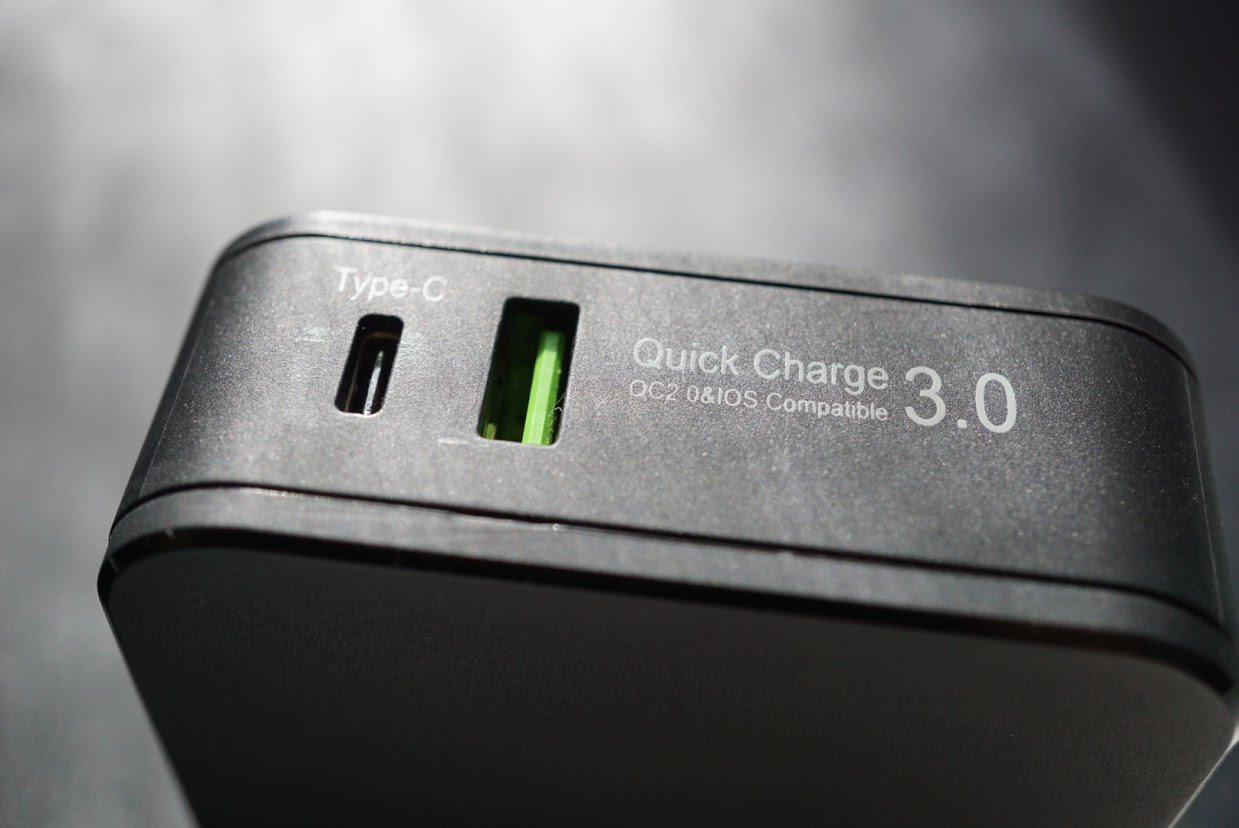
The USB C port is perfect for devices such as the Nexus 6P and 5X which have the Fast Charge standard.
Like I said before, the lack of unification standards amongst manufacturers is extremely annoying but Lumsing did its part by giving you everything with this dual port charger. Yet having the fastest charging speed available is necessary as batteries in smartphones and tablets get bigger. If you don’t have the fastest charge available, it can take extremely long to recharge a smartphone with an older charger since the batteries are much larger now.

It’s well built, reliable and it doesn’t generate excess heat like lesser chargers do.
All around the charger is just what I want in an accessory. Well-built, extremely functional, reliable and portable.
Summary
My only real gripe with the Lumsing dual port charger is the cost at $36.99 at Amazon. There are other capable chargers that have similar specs that cost less. While the Lumsing dual port 48W charger is highly capable and I love using it, I have a hard time recommending at this price. I have no doubts that Lumsing will reevaluate the price when it fills its backorders and fills inventory at Amazon.
If you’re looking for a reliable charger this is a strong contender in a sea of accessories. Just wait for the price to drop by $10 before you make a purchase.
Check out the Lumsing dual port 48W charger at Amazon.com.
‘Threes’ artist and friends reveal ‘TumbleSeed’
From the folks who brought you the deceptively simple indie hits Threes and Ridiculous Fishing comes TumbleSeed — another colorful game with a quirky premise, rolling onto PS4, Steam, macOS and Windows early next year. As developer Benedict Fritz describes the game, TumbleSeed is “a rolly roguelike” with a simple idea: to roll a seed to the top of a procedurally generated mountain.
Of course, the titular TumbleSeed character has “big plans” and its journey to the top of its mountain home is fraught with creatures possessed by a mysterious power. As the TumbleSeed, it’s your job to clean up the mountain by outwitting all of the obstacles in your path using a range of arboreal powerups. “We’ve been playing TumbleSeed for two years now,” Fritz wrote, “and the game still surprises us every day with the situations it throws at us.”
Although there’s no official release date set yet, you can keep up with TumbleSeed on the official site.
Via: PlayStation
Source: TumbleSeed
 AIVAnet