


Watch Segway’s personal robot in action
What if you could have a personal robot helper that transforms into a self-balancing scooter? That’s the appeal of the Segway robot, an adorable device which first debuted during CES. We were able to take a close look at it this week during Intel’s Developer Forum in San Francisco, and while it’s clearly a prototype (it doesn’t even have an official name yet), it still has plenty of potential. Above, check out our interview with Sarah Zhang, senior director of robotics business operations at Ninebot and Segway, who dives into what makes this little bot so special.
Using an Intel RealSense camera embedded above its “face,” the Segway Robot is able to detect depth and traverse environments without bumping into things. At the moment, its capabilities are limited to just following people around on command, but it’s not hard to see how it could be used for teleconferencing or home security. Imagine a connected helper like Amazon’s Echo that can actually follow you around your house, for example.
At IDF this week, Segway announced that it’s opening up SDKs for the robot, so that developers will actually be able to make it useful. That includes a robot SDK, giving devs access to things like vision, speech, movement and interaction, and a mobility SDK, which lets them control the bot remotely.
The Segway robot is built on the frame of the Ninebot Mini, so it’s already a capable self-balancing scooter. The company’s engineers were able to hop on and zoom about the show floor with ease. Riding the bot didn’t go so well for me, unfortunately, but that was mostly due to my inexperience with self-balancing devices.
While there’s plenty of work to be done on the Segway robot, it’s still one of the most appealing personal bot concepts we’ve seen. In comparison, the ASUS Zenbo seems like a silly toy, and Anki’s Cozmo, while cute, won’t help much when you’re away from home. Segway plans to ship developer editions of the robot later this year, and a consumer version will hit sometime in 2017.
Sprint’s new Unlimited Freedom plan is unlimited with a catch
Hot on the heels of T-Mobile’s new unlimited data plan, Sprint is launching a new Unlimited Freedom plan for $100.
The plan is meant to compare to T-Mobile, AT&T and Verizon’s offerings, giving customers unlimited data, talk and text for $60 a month for one line and $100 for two, including access charges. The option is available to both new and existing customers, though there are some caveats with the new plan that you’ll definitely want to take note of before taking the plunge to alter your plan.
The unlimited data isn’t really so unlimited, as so often seems to be the case, especially with T-Mobile’s One plan. Video streams are “optimized” at 480p resolution and music quality tops out at extreme quality, up to 500kbps. Gaming is also limited up to 2mbps. Unlike T-Mobile One, where you can simply pay extra to stream HD video, there doesn’t appear to be an option to do so with Sprint’s Unlimited Freedom plan.

While the plan is slightly cheaper than T-Mobile’s plan and certainly cheaper than others offered by the competition, the fine print once again puts a damper on what initially seems like a great deal. If you’re okay with lower-quality video streaming and even capped streaming quality for your music, it might be worth it to switch to Sprint’s new offering, but for everyone else you may want to do some shopping around in the interim.
Source: Sprint
US government cedes control of the internet in October
On October 1st, the US Government’s National Telecommunications and Information Administration will hand over control of the internet’s domain name system to the Internet Corporation for Assigned Names and Numbers (ICANN), a “multi-stakeholder” nonprofit organization. While the change will be invisible to the billions of internet users out there, starting in October, the US government will no longer control what some call the internet’s “phone book.”
The domain name system works by associating a web address or URL with a site’s IP address, and it is crucial to the way the modern web works. Since 1998, the NTIA and ICANN have had a zero-cost contract in place that gives the US government the authority over the system, although the government’s role was largely symbolic. Technically, the Obama administration has agreed not to renew the contract, which expires on September 30th. ICANN, a California-based group made up of representatives from tech giants, foreign governments and other “interested parties,” actually began the process of finally taking over the reigns when it detailed its transition plan last year.
Again, regular users won’t notice a difference in their internet come October, but the switch isn’t without controversy. In the past, some have argued the US should maintain control in order to prevent foreign governments from censoring their citizens. More recently, however, the Obama administration and the tech community believe it is a necessary move to maintain international support for the internet and a decentralized governing body.
Via: Quartz
Source: Wall Street Journal
Twitter suspends 235,000 accounts for promoting terrorism
For years, Twitter was the free speech bastion it aspired to be, maintaining a hands-off approach enabling a liberated forum yet allowing hate speech to flow across its channels. Amid criticism and pressure to stop extremist groups from using its services for coordination and recruitment, the social media company began cracking down in mid-2015. Today they announced that over the past six months, the company has suspended 235,000 accounts suspected of promoting terrorism, bringing the total to 360,000 since last year.
Over its lifespan, Twitter has avoided directly monitoring and filtering content, preferring instead to let users flag offensive tweets for it to screen at its leisure. The result has been policing that’s irregular at best, which critics claim fostered a safe haven for bullies and racists: to wit, it took years for the service to finally block one of its most reported pitchfork-rallying trolls last month. This hesitance to step in is haunting the company as evidence surfaced that it refused to take down key content posted by ISIS proponent and cleric Anjem Choudary after he was arrested in 2014. Only after news broke about it earlier this week did his account disappear.
Thus Twitter’s increasing vigilance of suspected terrorist activity: Daily suspensions for violating its prohibition on supporting extremism are up 80 percent from last year. In addition, it’s expanded its teams reviewing reported violations, is moving faster to suspend accounts and improving its ability to sniff out banned users returning with new usernames. How effectively these actions will curb terrorist support and communication on the platform has yet to be seen.
Source: The New York Times
Uber India lets users hail a ride from their browser
Uber’s found that one size does not fit all when it comes to bringing its business to other parts of the world. Take India, where the company has had to implement cash payments, panic buttons and axe surge pricing. Now, to combat the country’s weaker cellular infrastructure, you no longer need to have the smartphone app installed to hail a ride. Instead, the company is offering a browser-based service — Dial an Uber — that lets people summon vehicles from desktops, laptops, tablets or smartphones. In addition, the service can be used to request trips for people other than yourself, like relatives who can’t use or don’t have a smartphone. As The Verge reports, Dial an Uber is rolling out in the cities of Nagpur, Kochi, Guwahati and Jodhpur.
Via: The Verge
Source: Dial an Uber
The next Apple Watch reportedly won’t have cellular connectivity
Apple is widely expected to introduce the next generation of the Apple Watch before the end of the year, and today Bloomberg has some details on what to expect — and what’s getting left out. While the next-gen Watch is expected to include GPS capabilities to aid with location tracking and movement without your phone, it’ll still require your phone for most everything else. The report indicates that Apple was hoping to include a full-fledged cellular chip so the Watch could run entirely on its own, without needing to be connected to an iPhone, but that won’t happen this time out.
That’s because of the battery drain that a cellular radio would necessitate — apparently the experience would just be too compromised right now. However, it sounds like Apple was still able to add a GPS chip, itself a relatively power-hungry component. But with Apple’s focus on health and fitness tracking, a GPS chip will make the next Apple Watch far better at both navigation and determining running and walking distances.
Eventually, Apple’s goal is to uncouple the Watch and iPhone entirely, but for now it sounds like the experience of using the next-gen Apple Watch won’t be wildly different than what’s out there now. This marks a change from a rumor we heard in April, which indicated the next Watch would include a cellular chip. In all likelihood, no matter what happens, we’ll see the next Watch unveiled this fall — probably at Apple’s annual September event that’ll also take the wraps off the next iPhone.
Source: Bloomberg
Wirecutter’s best deals: $65 off an OXO coffee brewing system
This post was done in partnership with The Wirecutter, a buyer’s guide to the best technology. Read their continuously updated list of deals at TheWirecutter.com.
You may have already seen Engadget posting reviews from our friends at The Wirecutter. Now, from time to time, we’ll also be publishing their recommended deals on some of their top picks. Read on, and strike while the iron is hot — some of these sales could expire mighty soon.
ChargeTech Portable AC Power Outlet

Street price: $170; MSRP: $185; Deal price: $128 with codes SAVE25 and 15OFF
The first great deal we’ve seen on this portable power supply, and it’s a big one. Almost $50 below the street price when you combine two of their current coupons, SAVE25 and 15OFF. This deal includes free shipping.
The ChargeTech Portable Power Outlet is our pick for the best portable AC power supply. Mark Smirniotis said, “If you need to plug in your AC-based gear when you’re traveling, outdoors, or in a crowded coffee shop, this 27-Ah hardcover-book-size battery pack will seem like a lifesaver.”
For more detail about the capacity, “The ChargeTech has a roughly 97-watt-hour (Wh) capacity—that’s enough to charge most midsize laptops once or twice.”
LG LW8016ER Air Conditioner

Street price: $230; MSRP: $240; Deal price: $200
The first good deal we’ve seen on our pick this summer, though a bit too late for many people on the east coast. At $200, this is $20 below what Target sells it for when it’s in-stock, and $30 below Amazon’s usual price. If you have a REDCard, you can save an additional 5%.
The LG LW8016ER is our pick for the best air conditioner. Liam McCabe wrote, “Compared with other window ACs at this price, this LG is easier on the ears and gives you more control. It’s great for an office or den.”
For more detail on the noise, “Most air conditioners are loud, but the LW8016ER is the least-worst of the $250-ish window ACs that we’ve been able to test because it’s a bit quieter overall and sounds lower-pitched.”
Green Extreme Canon DSLR Battery

Street price: $35; MSRP: $35; Deal Price: $20
The first great drop we’ve seen on this third party battery, a full $15 below the street price. This is sold from Adorama’s Amazon store and comes with free shipping.
The Green Extreme is our pick for the best third party camera battery. The WC staff wrote that it’s a, “long-lasting, fast-charging OEM alternative” to the regular batteries.
They also wrote, “The Green Extreme and Watson units provided the largest real-world capacities and turned out to be the most reliable performers of the group; the Green Extreme’s much faster charging times made it our overall choice.”
OXO On 12-Cup Coffee Brewing System

Street price: $300; MSRP: $300; Deal price: $235
This coffee maker rarely drops in price as is, and this new sale is only a few bucks above the best price we’ve seen to date. Most of the sales on this tend to drop it $30 to $270, so it’s worth holding out for these larger discounts.
The OXO On 12-Cup Coffee Brewing System is our larger upgrade pick for the best coffee maker. Cale Guthrie Weissman said, “Like the 9 cupper, it makes a good cup of coffee that is SCAA certified. But it does something that no other SCAA-approved machine has been able to do: heat up 12 cups of water long enough to brew a good, large amount of coffee. It does this by heating up all the water before in a separate carafe, and then transporting this water over to the filter basket. In addition to being easy to fill, the water reservoir also works as a standalone kettle. That way if you have people over and want to make eight cups of coffee and save four cups of hot water for tea, you can program that into the machine using its Nest-like control dial.”
He did write about one drawback though, “A major drawback is that since the OXO preheats the water before brewing the coffee, it takes longer than many other machines. It took more than 8 minutes to make a normal eight-cup (1-liter) batch of coffee (mind you, it would take even longer if you were making the full 12 cups).”
Deals change all the time, and some of these may have expired. To see an updated list of current deals, please go to The Wirecutter.com.
Airbus reveals ambitious plan for autonomous flying taxis
If a self-flying taxi scheme didn’t come from the world’s second largest aeronautical company, we might think it was a prank. However, Airbus appears to be serious about its “Vahana” project, aimed at creating an autonomous passenger drone network, and thinks testing can begin as early as 2017. That sounds ambitious, to say the least, but “many of the technologies needed, such as batteries, motors and avionics are most the way there,” according to Airbus engineer Rodin Lyasoff.
Users arriving at, say, an airport would book a seat on a so-called zenHop “CityAirbus” drone, then proceed to a “zenHub” helipad, according to the concept. They’d be flown to their destination for about the same cost as a taxi, since the ride would be shared by several passengers. Luggage would be delivered by another service (zenLuggage, of course), and the whole thing would be safeguarded from hackers by (wait for it) zenCyber.

The company said that the CityAirbus multi-rotor, electric aircraft design has been “kept under wraps,” though it did supply an artist’s impression (above). The Airbus Helicopter subsidiary has been working on the drone-like design for two years, and it “could soon become reality without having to wait for too many regulatory changes,” according to the press release.
Airbus is also working on a drone delivery service (below) and plans to start testing it at a Singapore university by mid-2017. The cargo-laden vehicles fly automated routes in “aerial corridors,” then drop them off and send delivery notifications to customers. The goal is to “potentially increase acceptance for passenger flight testing, thus giving a boost to urban air vehicle projects,” according to the company.

The idea of an electric passenger drone isn’t new, as we’ve seen a prototype from Chinese firm EHang and a manned flight test from Volocopter. However, Airbus, with 55,000 workers and thousands of engineers, has a far more realistic shot at making it feasible. “Our group’s strength is that we have interconnected projects that together are helping to drive the upcoming revolution,” says developer Jörg Müller.
The company has already done a study and concluded that the idea has merit. It would first launch the passenger service with pilots, then proceed to autonomous aircraft once regulations and certain technologies, like see-and-avoid, fall into place. While it sounds like our dreams of a Jetsons-like urban utopia are finally falling into place, we’ll cling tightly to our skepticism until we see these taxis actually fly.
Source: Airbus
Mevolife is a well-meaning but flawed fitness app (review)
Overview
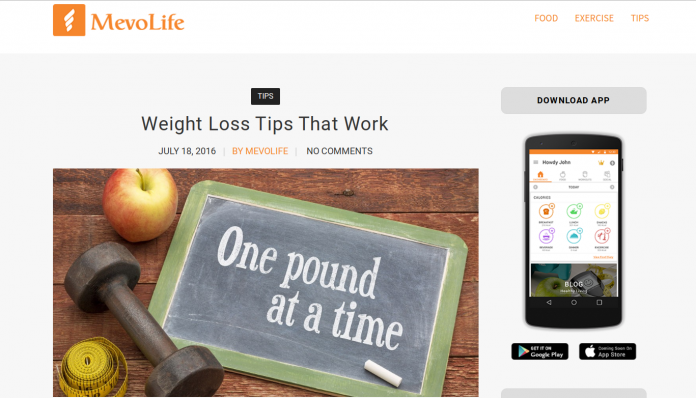
With a lot of press on fitness & healthy lifestyles in current society, the Google Play store is rife with personal options to track and trend your personal health goals. A newer option that come to this market recently is Mevolife from the developer Mevolife Inc. Mevolife (or “Mevo”, as I’ll call it going forward) is an attempt to be your all-in-one fitness diary, planner, and virtual coach. As you’ll see, Mevo does an admirable job at this task, but it is not without it’s flaws throughout.

Setup
The app is free to download from the Google Play Store. The app is free to start, though there is a bit a push from the app to purchase ‘points’ that allow you a deeper experience (more on that later). You do need to sign on with an email and adding a password to go forward, though.
Exploring the app, you will find all sorts of paths to take and available information:
Dashboard: Your personal report on how you’re doing.
Food: Your portal to your food diary, recipes, meal plans, and restaurant options.
Workouts: A comprehensive listing of workout plans, individual workouts, and exercises (including how-to’s and animations of each move).
Social: The app’s attempt to connect you to other app users to find comeraderie and motivation to keep improving.
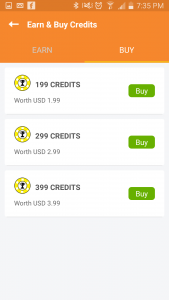
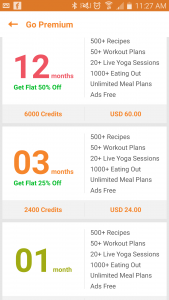
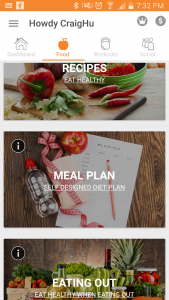
The interface is a clean, modern look, with large text and selection windows. The colors are crisp and bright, with an organic orange permeating throughout to keep it consistent.
I did state that the app is free, but to get a deeper experience out of it, there are paid ‘credits’ available that allow you to have more detailed access to meal & workout plans, recipes, and ad-free experience, and so forth.
Experience
Using the app was both easy and difficult for me. I say this because the app can be both light- and heavy-handed, so to speak.
Let’s start where I found the app to be too light. One area is in 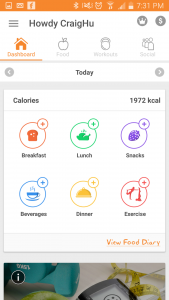 the meal diary, where you can enter what you eat throughout the day, and the app will calculate all the nutrient values based on it’s food library. The problem is in the library; from the start I found searching for foods that I eat to be commonly missing from the library, and the app would instead try to implant it’s substitute. I frequently got frustrated with attempting to accurately fill out my food diary, and often just gave up.
Also on the food side of things, sticking with the free version of the app seems very limited overall in the comprehensiveness of its use; paying for credits would likely improve the experience, but I simply wasn’t willing to go there.
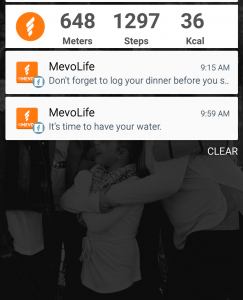 On the heavy-handed side, the app can put a lot of notifications onto your device, including a running pedometer as well as reminders throughout the day. I often checked my phone, only to find three, four, and more Mevo reminders clogging up my screen.
The biggest problem with this is that there is no discernable way in the app to edit/modify/disable notifications. This goes for the the pedometer; if you have the app installed this is omnipresent in your notification panel. Add to it that its icon looks a lot like a Facebook notification, it causes a lot of false phone checks, and quickly grows aggravating.
The pedometer itself is only as accurate as your phone and how you carry it. I often walked ‘hundreds of steps’ and burned ‘hundreds of calories’, just by sitting on my patio typing on my computer. In other words, I came to not trust it very early in my testing.
Also, inputting exercises can be labor intensive. This 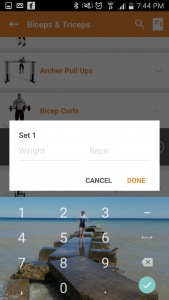 may be more from the fact that I don’t normally track my exercises, but having to add reps and sets for every single exercise got old very fast. Not only is it required to input all reps, but this must be done using a repeating interface (photo left) that you must fill out, close then repeat for every set of every workout. My patience ran thin after completing my first workout recording.
Most exercises are available, but like the food diary portion of the app, there are certain moves I do that just aren’t available in the app, leaving me with a definitive hole in my workout story.
Conclusion
I really wanted to like Mevolife. The clean interface and photo-centric design invites you to come explore and give the app a whirl.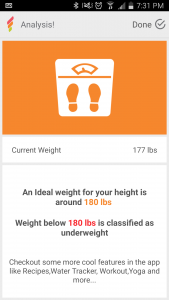 But as I dove deeper, the app’s flaws became apparent. From forcing me to look for foods that apparently aren’t there, to manually inputting every workout’s rep & set through multiple, repeating screens, to a wonky pedometer & notification system that can’t be tweaked, there’s simply too many holes to make it a trustworthy training partner.
This type of app can admittedly be a very difficult thing to get right for the masses, as you have to be 100% complete in order to satisfy different types of users. Pick 50 people, and you’ll get 50 different food and exercise routines; this makes for a very small target to hit where everybody is happy. I do hope the app continues to improve and fill out; time will tell.
Download Mevolife here.
Blu R1 HD review: Is it possible to go wrong with a $50 phone?
Announced in late June, the Blu R1 HD is predominately known for one thing: it’s the so-called $50 smartphone. Indeed, the price starts as low as $50 if you are an Amazon Prime customer. Otherwise, it’s an extra $50 for the experience.
As one of the initial phones under the new Amazon Prime discount promotion, the R1 HD positions itself as a first-time users smartphone. It’s not here to break any benchmarks or perform heavy multi-tasking. It is, rather, here to provide customers with something affordable that’s also free from carrier contracts.
As an unlocked handset, the R1 HD works with either AT&T or T-Mobile’s networks as well as any of their respective MVNO brands. It’s a dual-SIM device which means you can actually pull service from two cariers at once. Additionally, it’s breathing room for when you might travel to another country and need a local SIM card.
General Impressions
Let’s be honest – there are definitely going to be corners that need cut if you plan to offer a phone as low as $50 without a subsidy. Where does Blu trim the excess? It starts with the box itself; it feels like the least amount of cardboard you could put together to qualify as a box. The thickness is about half that of any other phone you’ll find and it’s a one-piece cutout that folds together. Think of how a pizza box might be constructed.

Get into the box and you find there are no headphones and the charger is about as “basic” as you’ll find. There’s nothing extra about what comes with the phone, however we would have never expected anything special here.
Putting this aside, you go straight to the phone and generally leave the other stuff on the shelf. Chances are a seasoned user already has some headphones they love anyhow. And, since we’re not dealing with any Quick Charge or USB Type-C cables, they’ll probably already have those where they need them, too. This no-frills cord is essentially just a spare. First time users, though, won’t be concerned with charging speeds and/or the newer standard for cables.
Hardware
Speaking in the strict terms of hardware specs, the R1 HD has the makings of a mid-to-high-end Android phone from 2014. Does that matter to you? Well, if you’re replacing your current phone from the last couple of years, you’ll find the Blu model to be a side-step or a step backwards. If you’re new to Android and the world of smartphones, you won’t even know the difference.

Those of you who have spent time with a more premium smartphone or a flagship from the last year or two will recognize the build quality differs here. We were immediately reminded of how the early Android phones from LG felt. By comparison, the R1 HD feels cheaply designed; on its own, though, you’d not really get the sense that the phone is “cheap”. There’s a difference between cheap and inexpensive, and, on the surface, Blu opts for the latter.
Key Specifications
- Android v6.0 Marshmallow
- Mediatek 6735 | 1.3GHz Quad Core Processor with Mali-T720
- 16GB/8GB Internal Storage with microSD (up to 64GB)
- 2GB/1GB RAM Memory
- 5.0-inch 720 x 1280 pixel displau
- 8-megapixel rear camera
- 5-megapixel front-facing camera
- 2,500mAh battery
-
Network:
- 2G: 850/900/1800/1900
- 3G: 850/1700/1900/2100
- 4G LTE: 2/4/7/17 (12 will be available over-the-air)
Display
The R1 HD offers up a 5-inch display with a 1280 x 720 pixel resolution. It’s technically HD, but not the same as you’ll find in the 1080p and higher phones. How does this translate to you, the typical user? It matters little in the overall scheme of things and looks totally fine for text and images.
There was a time when displays had lower resolution and nobody batted an eye. It’s only when you compare it to what else is available that you see shortcomings. This is actually a common thread for Blu phones; they are more than adequate for what they set out to be and the price is more than fair. Dig just a little deeper, though, and you uncover some of the spots where corners are cut.

Whether indoors or outdoors, we had no problem using the R1 HD. The screen size is right in line with what we like for one-handed use and it’s easy to see from all angels. The Gorilla Glass 3 protection on top ensures the phone handles scuffs, scratches, and minor drops.
General Impressions
Holding the R1 HD, you don’t get the sense that it costs as little as it does. In fact, it looks and feels like something that could fetch at least another fifty bucks. Look under the hood, though, and you see that it just doesn’t have the same horsepower as something else in the $150 space. But, taken as a whole, Blu does a great job of making sure you don’t end up with a “generic” design.
The phone is housed in a metal frame with a polycarbonate backing and matte finish. This offers up a decent grip and non-slip texture that doesn’t attract oils and fingerprints. We’ve felt much more slippery phones.

As for the configuration of the phone, the volume rocker and power buttons are on the right side of the display. Both buttons have the same metal finish and provide a decent level of feedback and response. The headphone jack is found at the top right of the phone while the microUSB port is at the bottom left.
The rear cover is removable, opening up access to the microSD card slot and dual microSIM card slots. It’s worth noting that the battery is not removable. At 2,500mAh it’s plenty to get users through a full day of use. Give the phone extended usage of LTE, such as video streaming, and you’ll find the battery ends up around 8-9 hours, or more — still respectable.
Camera
The Blu R1 HD features an 8-megapixel rear camera with a f/2.0 aperture and a 5-megapixel front-facing shooter. Both cameras offer up LED flashes to help users capture better shots in lower lighting conditions. On paper they’re right about the middle of the pack, edging toward the low end. In practicalilty, though, it’s better than it sounds.
We were impressed with the camera, especially considering the price tag of the phone. We’re certainly not trying to imply that it should replace your current setup, but you might be surprised by it. And, when you get technical about it, the camera does overexpose some photos, especially as you get into darker environments. Keeping in mind what you’re likely to do with the images, though, they suffice far more often than not.

If the camera is a main priority for you, pass on the R1 HD. That should go without saying, actually. You’re probably looking at something else for your needs anyhow. But, it has not been all that long since we had much more expensive phones that took much worse photos.
Shutter speeds were quicker than expected, even in cases of HDR. A word of caution, though as you might end up with some odd double-exposure or ghosting. Still images and slower moving things captured nicely, but be careful with the quicker subjects.

You can see from the embedded gallery that photos generally come out rather nicely. Factor in some editing and processing via Snapseed or another app and you have photos totally worthy of social media sharing. It won’t take long to figure out what you can and cannot get from the R1 HD’s camera.
As for the camera app itself, there are a number of options for shooting, including panoramic, night, face beauty, sports, and professional (manual). Each works well in their respective intended situations, but the auto is where we suspect you’ll play most often. There’s also a DualView mode which uses both cameras, leaving a selfie on top of your main photo. It’s weird, with the selfie shaped like a ‘W’, and didn’t do much to wow us.
Software
If there’s one thing we’ve come to appreciate in Blu, it’s that it doesn’t spend time messing with a custom version of Android. Essentially a stock build, this doesn’t come across as having any particular agenda. To us, there’s few things worse in smartphones than a bunch of carrier-branded apps that we rarely use.
The same goes for the R1 HD, for the most part. While it doesn’t come loaded with a host of random apps, games, or services, it does come with its share of Amazon titles. This applies to both the standard Blu R1 HD as well as the discounted Prime Exclusive one for Amazon Prime subscribers. Indeed, each has Amazon, Amazon Drive, Amazon Music, Audible, Amazon Kindle, and Amazon Video. There are just a few others between the two, but those are largely the overlapping apps.

Should you opt for the default R1 HD, that’s about the extent of the UI and app changes. Oh, and it’s worth pointing out here, that you can uninstall some of those titles, but not all. Pick up the $50 and/or $60 the R1 HD Prime Exclusive, though, and you’ll have more Amazon presence.
The Prime-exclusive version displays offers and ads, on your lock screen and in your notification shade. Moreover, they are said to be personalized deals and product recommendations so they don’t feel like random advertisements.
If you are a fan or user of the Amazon ecosystem, you probably won’t have an issue with the ads and offers. Heck, if this is your first Android phone, you probably don’t even know what it would be like without. It’s not a simple case of full screen ads every time you unlock or something random in your pull down shade. It changes every time you use it, but doesn’t ever feel so heavy that we’re upset about it. We didn’t find them any more intrusive than what we get on a Fire tablet. Really, they do seem to skew more toward things we’d use or buy.

The R1 HD runs Android 6.0 Marshmallow, which is the the lastest version available today. The 7.0 Nougat stuff comes later this year; it’s unclear whether this phone will even see it. If you absolutely expect your handset maker to support your device with an update or two, this is not going to be the route to take.
To us, if you’re looking to snag a phone for $100-$150, you might want to consider it an almost “as is” device. This doesn’t mean you have a burner, or a disposable phone, but you’ve got what you’ve got for as long as you’ve got it.
The 6.0 means you’ve got some of the latest in protection from Google, plus all of the recent design principles. It also means you can conceivably run many of the apps and games on the market. Many, but not all; the hardware might place limitations on what you plan to do.
We wager that the target audience doesn’t even know what to expect in terms of software updates, version numbers, etc. First-time buyers and casual users aren’t going to concern themselves with the various releases.
Performance
This is one of those areas where you cannot help but compare to other phones. As a site that routinely reviews smartphones, we get our hands on all sorts of devices. Typically, though, we use the more flagship stuff for ourself as we like to stay on the cutting edge. But, that doesn’t mean we necessarily have to keep up with the latest and greatest.
Using the R1 HD as a daily driver was difficult for us, particularly at first. We noticed there would be some lag in hopping around from one app to another. Get more than a few games going in the background and you’d see a little chugging happening. Nothing crazy, but stuff we notice after spending time with more powerful phones.

On its own, the R1 HD handles your typical daily tasks without much griping. Emails, calls, text, Facebook, and other stuff doesn’t present much of a challenge to it, so long as you have the 2GB RAM model.
It’s here where we implore you to consider dropping the extra $10 for the 2GB RAM and 16GB storage. Not doing so would be about the silliest thing you can do as it essentially shuts the door to apps and future capabilities sooner rather than later. Yeah, the ten bucks is all it takes to add at least a few more months of life to it. You never know when you’ll be on the edge of not being able to install a game like Pokemon Go.
Conclusion
It’s really hard to find fault with a phone that costs as low as $50 for Amazon Prime customers. Even at $99, it’s still a good choice. Why? It’s unlocked and ready to work with a variety of carriers; it supports two SIM cards. The stock Android experience and very little preloaded apps ensure you get as much as you can out of the storage.
Blu does a great job of balancing low cost with “cheap” build materials. It’s not a luxury model or anything that pretends to be more than what it has under the hood. The R1 HD is a great utilitarian phone for someone who is just dabbling in Android. Moreover, it’s a hell of a band-aid if you need something to tie you over until the next phone.

Blu is quickly becoming one of our favorite unlocked smartphone makers. The US-based company is constantly putting out new models that span the entire spectrum for consumers. It just so happens that the R1 HD is on the low end. That doesn’t mean it’s a poorly made phone or one that’s not worth considering. The opposite is true, actually.
If you’re in the market for something that’s no-frills and aimed at first-time buyers, you’ll want to start with this phone. For $50-$100, depending on how you buy, there’s nothing else to consider. Heck, you’ll probably have a tough time convincing yourself to spend more on anything else. It’s no wonder that, as of today, this is a #1 best seller on Amazon.
 AIVAnet