


Motorola Moto Z / Force vs Samsung Galaxy S7 / Edge
When it comes to flagship smartphones, consumers certainly don’t suffer from a lack of choice, but on the flip side, with so many great options available, it is quite difficult to select which device is best suited for you. In today’s comparison, we pit two of the hottest smartphones in the market right now, and they couldn’t be more different from each other.
- Samsung Galaxy S7 Edge review
- Moto Z review
On one hand is the Galaxy S7 Edge, with Samsung continuing to refine and improve what it started last year with its predecessors. On the other are the latest Motorola flagships, that are poles apart from anything we’ve seen from the company so far, and bring something unique to the table in the form of Moto Mods.
How does Motorola’s take on the Android flagship compare to one of the best and most well rounded smartphone offerings from Samsung? We find out, in this in-depth look at the Motorola Moto Z vs Samsung Galaxy S7 Edge!
Buy the Samsung Galaxy S7 / S7 Edge
Buy the Motorola Moto Z / Z Force
Design
Starting with design and build quality, both of these phones are made with some high quality materials, and not only look fantastic, but also feel extremely sturdy. The Moto Z features glass on the front and back, with a smooth metal frame holding it all together.
The corners have been rounded off to allow for a more comfortable feel in the hand, and there is a subtle curve to the glass panel up front. However, for the most part, the phone is completely flat on the front and back, save for the rather large protrusion of the rear camera.
The Galaxy S7 Edge also features a metal and glass unibody construction, but unlike the Moto Z, you get curves everywhere, including the tapers along the sides of the back, the rounded corners, and of course, the curved edge display up front.

It’s not only of the most solid and comfortable feeling phones that Samsung has ever made, but comes with a sleek and eye-catching design. Samsung has done a good job with reigning in the camera protrusion with the Galaxy S7 Edge when compared to its predecessor, and is nowhere near as prominent as what is seen with the Moto Z.
The downside to any phone made predominantly with glass is that the device becomes a complete fingerprint magnet, so either have to clean it on a regular basis or use a case, to avoid this. Motorola offers a simple solution in this regard with the Style Shell covers, that gives the Moto Z some extra flair, while also adding enough thickness to cover that camera bulge.

Without any covers or Moto Mods attached, the Moto Z is an extremely thin smartphone, with a thickness of just 5 mm, and it’s certainly very impressive how thin Motorola has managed to make it. The Moto Z Force is slightly thicker at 7 mm, which is still quite thin, and you really have to hold these phones in your hand to truly appreciate this design aspect.
That said, apart from the thickness, the Moto Z is actually larger than the Galaxy S7 Edge in every other dimension and has a much larger footprint, despite both smartphones coming with 5.5-inch displays. Samsung has managed to make the Galaxy S7 Edge the more compact phone by having a smaller top and bottom chin, thinner bezels, and adding curves to the glass on the left and right sides.
Display

Both smartphones come with 5.5-inch AMOLED displays, or Super AMOLED in the case of the Galaxy S7 Edge, with Quad HD resolution. As expected, both displays are plenty sharp, and are very vibrant, saturated, and with deep, inky blacks. The display of the Galaxy S7 Edge is a touch brighter and offers slightly better viewing angles, but for the most part, these are very comparable displays, and things like gaming and watching videos are very enjoyable on either of these screens.
One benefit of the Samsung flagship is its Always On display feature, which lights up only the necessary pixels to let you see important information like the time, date, battery life, the calendar, and notifications, with a quick glance.

While the Moto Z doesn’t come with this feature, it offers the next best thing with Moto Display, which remains one of the best features to ever grace Android. The display will periodically pulsate whenever you have any notifications, and you can manually wake it by either picking up the phone, or simply waving your hand over it.
Worth mentioning here is that the Moto Z Force comes with a shatterproof display, that makes it far more durable when compared to the standard Corning Gorilla glass 4 panels that are found with the regular Moto Z and the Samsung Galaxy S7 Edge.
Performance

Under the hood, both smartphones feature identical specifications, including the Qualcomm Snapdragon 820 processor, Adreno 530 GPU, and 4 GB of RAM. This is the same processing package that is found with almost every current generation flagship smartphone, and it’s not surprising that both these devices are blazing fast, and can handle anything, including multi-tasking, web browsing, and playing high-end games, with ease. Despite offering two very different software experiences, the overall performance with both is very smooth, and you will be hard-pressed to find a noticeable difference between them.
Hardware

Both smartphones are available with 32 GB or 64 GB of on-board storage, and both offer expandable storage capabilities via microSD card up to 256 GB, so storage will not be a concern with either device.
Sitting right below the display of both devices is a fingerprint scanner, with the difference being that while the fingerprint sensor of the Galaxy S7 Edge is embedded into the home button, that isn’t the case with the Moto Z, which uses on-screen navigation keys. This can certainly take some getting used to, especially if you are already comfortable with also using a front-facing scanner as a home button, and when using the Moto Z, you will find yourself occasionally reach for the fingerprint sensor for no reason.
As far as accuracy and reliability of the fingerprint sensors are concerned, both work extremely well, but you will find the one of the Moto Z to be a tad quicker, mainly because of the fact that is reads your fingerprint simply when you touch it, instead of needing to press down on the button as you have to do with the Galaxy S7 Edge. Even though the scanner of the Moto Z does not double as a home button, it does function as a lock key to put the phone back to sleep, which is a nice touch.

A big difference in hardware between the two is that the Moto Z comes with a USB Type C port, while the Galaxy S7 Edge features a microUSB port. The latter also comes with a headphone jack while the Moto Z does not, which is one of the compromises that had to be made to keep the sleek profile of the device. Instead, you will have to use a Type C adapter to use your regular headphones with the Moto Z.
The Moto Z does offer a better sounding speaker, with its front-facing position better than the bottom-firing speaker of the Galaxy S7 Edge. That said, neither speaker is particularly impressive, but you do have the JBL speaker Moto Mod with the Moto Z to make up for this deficiency.
Speaking of Moto Mods, there are only a few that are currently available, including the JBL speaker, the projector, and the Incipio power pack case, but there should be more coming soon, as more third-party manufacturers jump on-board and create new Moto Mods. These Moto Mods are certainly a big selling point when it comes to the Moto Z, given how they work and the extra functionality that they offer. Just keep in mind that these Mods aren’t exactly cheap, and do add a significant amount of heft to the phone.

The speaker of the Galaxy S7 Edge is also more muffled and distorted due to the built-in water and dust resistance, which many will agree is a small price to pay to keep your device protected from the elements. The Moto Z is also water resistant, but does not come with the IP68 rating that the Galaxy S7 Edge features, so while the former can survive a splash or a small spill, it certainly won’t work if submerged entirely.
When it comes to battery life, the Moto Z packs a rather small 2,600 mAh battery, compared to the 3,600 mAh unit of the Galaxy S7 Edge, but the playing field is a lot more even when considering the Moto Z Force and its 3,500 mAh battery. Battery life is obviously going to vary depending on your usage, and while the Moto Z does allow for a full day of use, you will be able to do that far more comfortably with the Moto Z Force and the Galaxy S7 Edge.
Both devices come with fast charging capabilities, so you will be up and running in no time, and in the case of the Galaxy S7 Edge, you also get fast wireless charging. If battery life is a concern, Motorola has a simple solution for the Moto Z with the Incipio power pack case, which to me, is currently the most useful and practical Moto Mod that is available.
Camera

The Moto Z comes with a 13 MP rear camera with a f/1.8 aperture, OIS, and a dual tone LED flash, while the camera of the Moto Z Force is bumped up to 21 MP. On the other hand, the Galaxy S7 and Galaxy S7 Edge come with a 12 MP rear shooter, f/1.7 aperture, OIS, and a blazing fast dual pixel auto focus system that allows it to focus much faster than any other smartphone camera currently available.
When it comes to the camera software, Motorola keeps things pretty simple by only offering the most basic of camera modes, while Samsung gives you a bevy of options with a slew of modes and camera effects to choose from. Both do offer fairly robust manual modes however.
Moto Z camera samples

If I had to pick either one of these cameras, the Galaxy S7 Edge would be my choice. The Moto Z can take some decent photos, but it really pales in comparison to the Samsung flagship. Photos taken with the latter are sharper and more detailed, and with better dynamic range, while the Moto Z has the tendency to overexpose and blow out highlights.
Galaxy S7 Edge camera samples

The Galaxy S7 Edge camera is also the much faster one overall. In low light situations, the Moto Z is quite slow to capture an image, especially if you are using HDR, while the Galaxy S7 Edge remains really fast when it comes to focusing and taking a shot. The Samsung smartphone camera does have some trouble with white balance in low light conditions, but the photos still come with a lot more detail when compared to shots taken with the Moto Z.
As far as the front cameras go, both phones are utilizing a 5 MP sensor, which work well enough for taking selfies, but the Moto Z has an advantage here with its front-facing flash, which can be extremely helpful when taking selfies in low light.
Software

One of the best parts about Motorola is that they keep the software experience pretty close to stock Android, but with a few very useful additions built in. The Moto Z is running Android 6.0 Marshmallow, and it is as close to stock Android as you are going to get without the device being a Nexus smartphone. Motorola’s customizations aren’t numerous, but they are some of the most useful features we’ve seen on an Android smartphone.
You have features like the Moto Display that we mentioned earlier, and there is also Moto Voice, that lets you call upon your Moto Z from across the room. Also available are a slew of gestures, such as the double chop to turn on the camera flash, and the double twist of your wrist to launch the camera.

The only real down side now is that the Moto Z is a Verizon exclusive, so it comes with a lot of Verizon bloatware, and a host of pre-installed games and third-party applications. An unlocked version will be coming soon though, but if you are looking to get the Moto Z right away, the bloatware is something you will have to deal with.
The Galaxy S7 Edge is also running Android 6.0 Marshmallow, but Samsung’s take on Android, with the TouchWiz UI, couldn’t be more different from stock Android. Samsung has been doing a better job with streamlining the software experience as much as possible, and what you get is a much cleaner and less bloated user interface than before.
With the Galaxy S7 Edge, you also get the Edge panels, that can give you quick access to apps, sports scores, the weather, your contacts, and a variety of other shortcuts, but just swiping in from the edge of the glass. These panels can be useful, but like any new smartphone feature, you will have to train yourself to get used to them.
Specs comparison
| Display | 5.5-inch AMOLED display Quad HD resolution, 535 ppi |
5.5-inch Super AMOLED display Quad HD resolution, 535 ppi |
| Processor | 2.15 GHz Qualcomm Snapdragon 820 processor Adreno 530 GPU |
2.15 GHz Qualcomm Snapdragon 820 processor Adreno 530 GPU |
| RAM | 4 GB | 4 GB |
| Storage | 32/64 GB expandable via microSD card up to 256 GB |
32/64 GB expandable via microSD card up to 256 GB |
| Camera | 13 MP rear camera, f/1.8 aperture, OIS, dual tone LED flash 5 MP front-facing camera, front-facing flash |
12 MP rear camera, f/1.7 aperture, OIS, dual pixel autofocus, LED flash 5 MP front-facing camera |
| Connectivity | Wi-Fi 802.11 a/b/g/n/ac Bluetooth 4.1 NFC FM Radio GPS + GLONASS USB Type-C 1.0 |
Wi-Fi 802.11 a/b/g/n/ac Bluetooth 4.2 NFC GPS + GLONASS microUSB 2.0 |
| Battery | 2,600 mAh | 3,600 mAh |
| Software | Android 6.0 Marshmallow | Android 6.0 Marshmallow |
| Dimensions | 153.3 x 75.3 x 5.2 mm 136 grams |
150.9 x 72.6 x 7.7 mm 157 grams |
Gallery

Final thoughts
So, there you have it for this in-depth look at the Motorola Moto Z and Samsung Galaxy S7 Edge! Both of these devices are two really fantastic smartphones in their own right, but what it is really going to come down to is how much you value the Moto Mods, and how easily you can get your hands on one of them. The Galaxy S7 Edge is the easier phone to get right now, with it being available from all major network carriers, and while an unlocked version of the Moto Z will be arriving soon, Verizon is your only option currently.

The Moto Z is a very solid option however, and the Moto Mods are just icing on the cake, providing a very elegant and simple way of modifying your smartphone. If you are willing to spend the extra money, you certainly won’t be disappointed. While the Samsung Galaxy S7 Edge doesn’t have any crazy bells and whistles, or extra moving parts, it’s an all around great smartphone that ticks all the right boxes, and for most people, that is going to be more than enough to suit their needs.
Buy the Samsung Galaxy S7 / S7 Edge
Buy the Motorola Moto Z / Z Force
Opera rolls out a dedicated VPN app for your phone
After integrating a built-in VPN in its desktop browser and rolling out a dedicated VPN app for iOS, Opera is now bringing the service to Android users. While there are several VPN services available for Android, Opera is looking to differentiate its offering by providing free unlimited access.
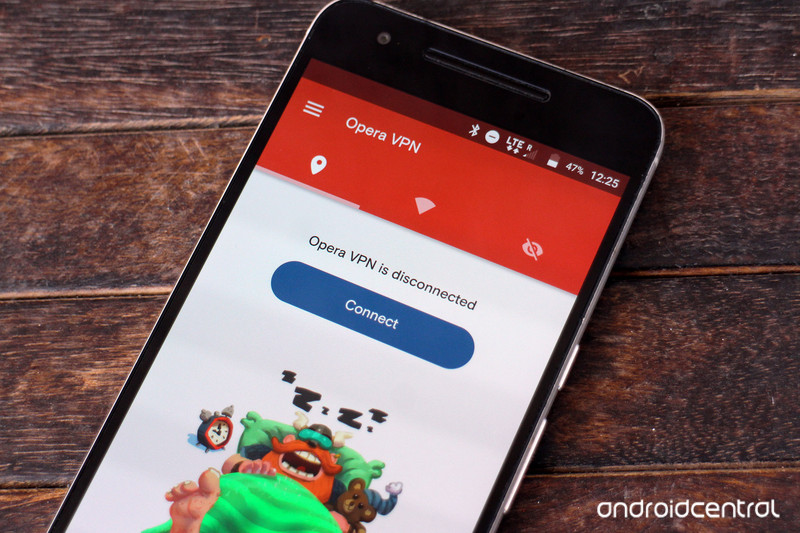
The VPN is powered by SurfEasy, a company Opera acquired last year. The app offers a quick way to mask your location, access content that’s locked to a specific region, and stave off tracking cookies (no Reebok, I don’t want to buy your CrossFit shoes).
While the service itself is free to use, you’ll find ads, and Opera will share anonymized data about your mobile usage habits with third parties:
This information is made available to third parties who are interested in better understanding the mobile ecosystem and how it’s evolving. It’s important to understand that this is not data about what you do with your phone, but rather this is data about how a large group of people use their phones.
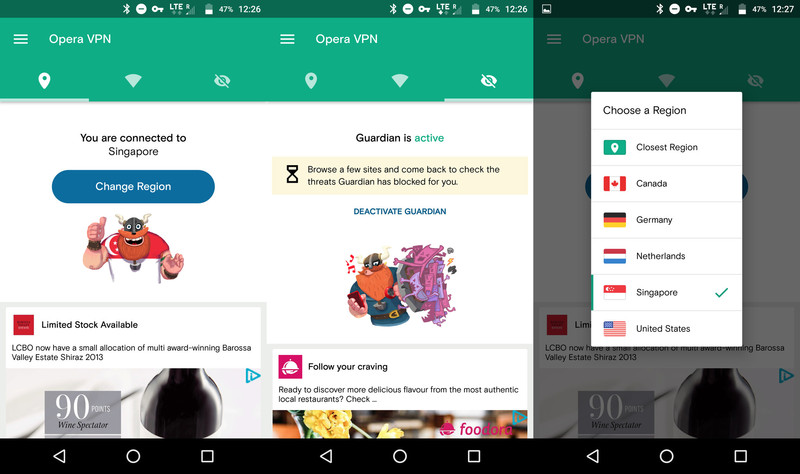
The app is very straightforward to use: you can either connect to your closest region, or select from Canada, Germany, Netherlands, Singapore, or the United States. There’s also a Guardian service that logs details of all the threats it has blocked. As soon as you’re connected to a VPN server, you’ll see a key icon in the notification bar.
Interested? Hit up the badge above or download Opera’s VPN app from the link below.
Download Opera VPN from the Play Store
The Big Android Dev Interview: Paul Lammertsma
From the Big Android BBQ Europe: Pixplicity CTO Paul Lammertsma on the importance of bouncing ideas off other developers, and Android’s future beyond apps.
The Big Android BBQ Europe, held in Amsterdam, Netherlands recently, brings together some of Europe’s top Android developers, enthusiasts and other community members in a celebration of Android, code and cooked meat. A spin-off from the U.S.-based Big Android BBQ, the European event is now in its second year.
In addition to the actual BBQ part, it’s also host to two days of talks from Android developers, and this year’s keynote was presented by Pixplicity’s Paul Lammertsma. We caught up with Paul during the event to talk social coding, how his company pivoted into app development, and what lies ahead for Android on the desktop and on your body.

Who are you and what are you doing here at the Big Android BBQ Europe?
I am Paul Lammertsma, I’m CTO of a Dutch agency called Pixplicity, based out of Utrecht, which is smack dab in the middle of the country. I always go to community events, like I always go to DroidCons and Devfests and that sort of thing whenever I can. And Big Android BBQs as well! And I kinda like to be involved in the community. I’m also one of the leads of a GDG [Google Developer Group] in the Netherlands here.
So I like to be involved in the community because it’s sorta like something you have as a passion, and you share it with other people that have the same passion. So it’s an easy way to meet people and make friends, chat about things that interest you, stay up-to-date, that sorta thing…
Also, I like compelling myself to stand on stage and take a topic that I find interesting, or something that I found challenging for myself, and translate it in such a way that it’s presentable. Like, I can break it down into bite-size bits. Most of the time I take a topic, I think is a good tool to have in your toolbelt. So to have something that is useful knowledge, present when you would use it, how to approach it — not go too much into the details because most of the time you can find that in the docs — but that’s basically it.
Something I find challenging for myself is really taking the leap to stand on the stage — you know, public speaking. It’s something I think a lot of people are fearful of doing, but then once you do it it’s fun and rewarding. And I guess I just take pleasure in challenging myself that way.
How did you get started in the world of Android development?
That’s a really interesting question. I started in 2010, I think it was. I was actually in a molecular biology startup, and we were doing software for scientists, virologists, to basically plan experiments about cloning and genetic research and stuff like that. And a colleague of mine, he came into the office one day and he had bought an HTC Desire. He was really excited about it, and said “hey, over the weekend I made this app.”
We were like: ‘What?! How can you make an app over a weekend?’
And we were like: “What?! How can you make an app over a weekend? Do you know how long we’ve been working on this [other] software?”
He said: “You know, it’s so easy, and so fun, and so rewarding.” It’s mobile and you have to think in different ways. But a lot of the things that had been chosen for Android — not just the IDE being Eclipse at the time, the language being Java — a lot of the approaches in the language about thread pooling, lifecycles — [were] very similar to what we were doing at the time.
It was through a stroke of luck that we got a client that approached us in that same building that said: Are you guys familiar with Android? I remember my colleague who had just written his first app said: Apparently! So we tried that, we got into that, and we pivoted something like a year later and we’ve done it ever since.

What are some of your favorite and least favorite things about working with Android?
That’s a tough topic. My least favorite thing — let’s start with that — is the sheer multitude of framework stuff there is out there. There’s a lot of stuff in the Android SDK itself [so] it’s really hard to keep an overview of what you need and what the right approach is — what’s good, what’s not so good.
When you go beyond that, the libraries. A lot of this stuff is kinda offloaded into open-source stuff, so what are you gonna do? Let’s take a random example like if you want to bring up an image on your phone. There are tons of libraries for that. You can write it yourself. You can [use] different libraries like Picasa or something like that or a Facebook library. What is the correct approach? There’s not necessarily one [correct choice], but making a choice has its implications.
So I think it would be nice to have an approach where you say this is the way to go; this is the only way to go. There’s something to be said for that.
But what I like about it is that it’s an open platform. You see that there’s lot of different approaches. Tons of different devices because you can basically take the Android open source platform.
I can’t put my finger on what really drives me. I think the reward factor is really quick. Most of the projects that we do are quite short-term. So they’re projects that are like a month up to several months, and each time you’re given the opportunity to take a new and fresh approach. Mobile moves very quickly, so you’re always compelled to try some bleeding-edge new tech. So that’s something I really like about the platform.
What’s the most important piece of advice you could give to someone starting out in Android development today?
I think to me it’s really important to be involved in a community of people. I see a lot of freelancers, they work by themselves — like, single freelancers working in Android. I think having that kind of mentality, working in a group — not necessarily for Android, I think it goes for any kind of software engineering — you’re not constantly compelled to challenge yourself or re-think your approach. You’re very much more inclined to go on a particular direction and reinforce yourself that that direction is the right way to go.
I think to me it’s really important to be involved in a community of people.
Whereas if you’re in a community like this community here today, or like GDG communities around the world, if you just go over to an event like that once a month or once every few months, and you just chat with somebody over a beer about the things that you’re working on, some challenge that you have. Just bouncing an idea off somebody is invaluable, especially if you’re working alone as a freelancer.
So yeah, just the constant reinforcement, challenging your own ideas. I think that’s a really important aspect of being a good developer.
Where do you see Android development, or Android in general, headed in the next few years?
So Android has been around for like five years. (Laughs) So what are we gonna expect in the next five years? I have no clue. Even predicting a year ahead is a challenge.
Instant Apps is a great way to step into basically having a mix between a native app experience and a web experience.
We’re seeing this movement towards more wearables. I think we’re also seeing a movement of combining web and mobile more. I think the notion of apps is going to be gradually on a decline. The notion of heading over to an app store, to Google Play and installing apps is going to be on a decline.
Instant Apps, for instance, is a great way to step into the cross-platform world of having basically a mix between a native app experience and a web experience. I think we’ll see more of that. Of course we’re also going the direction of Android apps on Chromebooks. We’ll probably see that much more. Maybe Chrome altogether will start to run Android apps, kinda like in the style of ARC (Android Runtime for Chrome.) I think that ARC was a very premature first step, but we might see more of that. It’s hard to say; I’m not going to make speculations.
I think more concretely in terms of hardware and things, you’re going to see more wearables. I’ve always had this mentality of people walking around like this (Gestures looking down at phone)
This is not the future anymore. People don’t walk around with their eyes pointed down onto this little handheld device. It’s not gonna be Google Glass. Google Glass is wonky and weird too. But there’s something there that Google can fill in for us I suppose — or somebody else — to figure out what does work.
Paul Lammertsma is the CTO at Pixplicity. Follow the studio on Twitter at @dotpixplicity.
Go Time! Episode 6: Dab like Spark

Go Time is back for Episode 6!
We’re back for another week of discussing Pokémon Go with a member of Valor, Mystic, and Instinct. This week Jen and Russell are joined by a guest: Serenity from iMore. We start out by discussing the day we all knew was coming: Niantic has started banning cheaters. We also talk about catching Pokémon at conventions, and discuss gym battles in better detail.
We’re gonna keep coming back every week to talk about Pokémon, and we’re hoping you’ll join us!
- Google Play
- Soundcloud
- iTunes
- Or add us to your podcatcher of choice!
You can also join our Facebook page to keep up on all things Pokémon Go. See you in the world!
Pokémon Go
- Join our Pokémon Go forums!
- How to deal with GPS errors in-game
- Which team should you choose?
- How to play without killing your battery
- The Ultimate Pokémon Go Game Guide!
- Listen to the Pokémon Go podcast!
How to build a custom website with zero code
Whether you’re trying to build a brand or launch a business, having a streamlined website is key to surviving in the digital space. However, not all of us have the tech background necessary to build customized websites from the ground up–not without a little help that is.
With Dragify Website Builder, you can build your own custom website without having to stumble over lines of code. For a limited time, a lifetime subscription to Dragify is on sale for only £38.98 ($29.99 USD).
Designed for the everyday user, Dragify cuts down on coding time by letting you drag and drop 44 pre-designed HTML blocks to build the site that fits your needs. Using the built-in style editor, you can easily change font and text sizes, and you can upload images with zero hassle. Dragify also lets you add in SEO as well, so you can boost your site’s web ranking.
For the code savvy, Dragify offers complete access to the source code of every block, allowing for even more customization. Plus, you can edit your webpage’s links to boost searchability and interlink them with the rest of your site’s pages. On top of all that, Dragify also lets you transfer your site to webhosting with a single click.
With Dragify, anyone can build the website they need to get their web presence up and running. Normally retailing for £388.70, a lifetime subscription to Dragify on sale to Pocket-Lint readers for only £38.98 ($29.99 USD), saving nearly 89 per cent off the total retail price.
Safeguard your browsing with a top-rated cybercrime-fighting duo (61 per cent off)
The web might seem harmless on the surface, but its depths are teeming with hackers and cybercriminals eager to steal your precious information. With even major companies like Blizzard and Sony being hit by attacks, investing in your own online protection is a smart move.
With Dashlane Premium and HotSpot Shield Elite, you can secure two major points of entry hackers use to steal data, and you can get three years of both on sale for only £90.98 ($69.99).
Rated 5/5 stars by PC Mag, Dashlane Premium protects all your online accounts by storing your passwords in a military-grade encrypted vault. It not only remembers your login credentials, but it also seeks out weak links among your passwords and generates tougher ones to replace them. What’s more, Dashlane lets you quickly fill out online forms with Autofill.
Meanwhile, Hotspot Shield Elite bolsters your browsing security. This top-rated VPN masks your movements with its encrypted network, hiding you from hackers and government agencies. HotSpot Shield also lets you bypass geo-restrictions wherever you are, so you can Netflix and other streaming sites abroad. And this VPN even comes with free cloud-based malware protection.
When it comes to your online security, you can’t afford to take any chances. That’s why investing in security on multiple fronts is essential. For a limited time, you can get three years of Dashlane Premium and HotSpot Shield Elite VPN for over 60 per cent off, taking its £233.85 price down to only £90.98 ($69.99).
HoloLens’ 24-core chip makes vivid AR possible
Microsoft has revealed more details about its HoloLens headset at the Hot Chips conference in Cupertino. The augmented reality (AR) device marries video games with the real world, so it needs to calculate your location, head position and gestures extremely rapidly. We now know more about the so-called holographic processing unit (HPU) that does that — the 24-core chip has near-supercomputer levels of performance, performing a trillion operations per second.
The 28-nanometer process “Tensilica” chip, built by TSMC, has 65 million logic gates, 8MB of ultra-fast static RAM (SRAM) and 1GB of DDR3 RAM, all crammed into a 12mm x 12mm (half-inch square) package. It’s designed to process input from the inertial chip, environment cameras, depth camera and other sensors. By speeding up calculations 200 times over software alone, it provides ready-to-use position data to the headset’s main Intel “Cherry Trail” CPU, freeing it to run apps and games.
If you live in the US or Canada and have $3,000 between your couch cushions, you can actually buy a HoloLens developer model. If not, we tested it recently and found it fun, immersive and not nearly as disorienting (or nausea-inducing) as a VR headset. It’s very hard to say how much the final product will cost, considering that it has a highly custom chip on board. We’ll likely have to wait a while to find out, though, as there’s no indication yet on when the retail version will arrive.
Source: The Register
Capture ‘The Witness’ with NVIDIA’s Ansel camera
The Witness drops you on a beautiful island full of mind-melting puzzles that subtly feed into one another. It’s a relaxing, picturesque locale that you can now photograph with NVIDIA’s Ansel in-game camera. Unlike a regular screenshot tool, which simply captures what you’re looking at, this software allows you to reposition the camera almost anywhere. That freedom can produce some incredibly artistic shots — to get an idea of what’s possible, just look at these screenshots taken with a similar system inside Uncharted 4 (courtesy of Engadget’s own Tim Seppala).
With Ansel, you can capture screenshots beyond your monitor’s maximum resolution, which is great for high-res wallpapers and art prints. You can also capture 360-degree panoramas, which are viewable with Google Cardboard, and tweak the final image with a variety of filters and color enhancements. All you need is a supported NVIDIA GPU and the latest NVIDIA drivers installed on your gaming PC. Once you’re up and running, it’s just a matter of pressing alt-F2 to bring up the relevant control panel. Now you can be a video game photojournalist. Or photographer. Or whatever we’re calling this lovely new form of video game documentation.

Source: NVIDIA
Lyft says it listened to offers, but is not for sale
Lyft is disputing reports from The New York Times and other sites (including Engadget) that the company is actively seeking a buyer. “Getting approached and then having it characterized as us wanting to sell the business and failing to do so is a large mischaracterization,” President John Zimmer told Business Insider.
The NYT reported that Lyft tried to sell itself to Apple, Google, Amazon, Uber and Didi Chuxing, Uber’s new partner in China. However, it added that the company has $1.4 billion cash in the bank and is not exactly desperate. Lyft recently cemented a partnership with GM on self-driving vehicles to keep up with Uber, which is developing its own fleet.
We need to let people know that we’re not looking for a buyer, so that’s not a legitimate part of the story.
Lyft reportedly hired a bank specializing in takeovers, but said it had multiple offers and was obliged to check them out. Zimmer said that the company never put itself up for sale, though. “We need to let people know that we’re not looking for a buyer, so that’s not a legitimate part of the story.”
Furthermore, Zimmer blasted rival Uber for telling Bloomberg that it would pay no more than $2 billion for Lyft, despite a valuation estimated at around $5.5 billion. “I think it shows a bit of overstepping on Uber’s part … that fully demonstrates who is behind this,” he said.
Despite the denial, Zimmer wouldn’t discuss which companies wanted to buy Lyft or for how much. However, he did say the company had its best July ever and is on track to hit $2 billion in sales for the year. “We’re focused on being an independent business and having the largest impact on car ownership as we possibly can,” he stressed.
Source: Business Insider
Lyft President Says ‘We’re Not Looking for a Buyer’ Following Reports of Attempted Sale
Lyft co-founder and president John Zimmer today refuted reports from over the weekend that the ride-hailing company was seeking out buyers for a potential purchase — reportedly including Apple — outright telling Business Insider that “Lyft is not seeking a buyer.” According to Zimmer, Lyft itself was approached for a purchase opportunity, which was misconstrued in reports by The New York Times and Bloomberg as Lyft actively seeking out to be bought by a major company, including potential candidates like Amazon, General Motors, and even rival Uber.
Zimmer said these reports “crossed a line,” leading to the company needing to address them head-on and break its usual silence on these types of rumors focused on mergers and acquisitions. The most ire seems to be aimed at the Bloomberg angle on the story, which specifically stated that Uber “wouldn’t pay above $2 billion for Lyft,” coming in far below Lyft’s reported $9 billion estimated value.
Lyft president John Zimmer (left) and Uber CEO Travis Kalanick (right)
“We have to be careful with this type of thing for confidentiality reasons until Friday, when we feel like the line was crossed in that it was characterized as us trying to and failing to sell the business,” Zimmer said. “And as Friday happened, with both that characterization and the Bloomberg report, we said enough is enough. We need to let people know that we’re not looking for a buyer, so that’s not a legitimate part of the story. I think it shows a bit of overstepping on Uber’s part with the Bloomberg story that fully demonstrates who is behind this.”
Zimmer’s language targets Uber and its CEO Travis Kalanick as the catalyst behind Lyft’s M&A rumors, although he didn’t go into specific details regarding how he believes its rival began the chain of rumors that led to the reports over the weekend. Zimmer also declined to tell Business Insider which companies did in fact approach Lyft with a purchasing opportunity, with the publication saying that Lyft “isn’t quite ready to be transparent” due to apparent confidentiality agreements set in place at the company.
Lyft is currently the second-largest ride-hailing app in the United States behind Uber. Although Zimmer believes this rivalry makes it easy for outsiders to view the company as bitter, he mentioned that he and the company are happy with Lyft’s current trajectory. “We’re focused on being an independent business and having the largest impact on car ownership as we possibly can,” Zimmer said. “I don’t think [independence] is a requirement, but I believe right now it’s the best path.”
Tag: Lyft
Discuss this article in our forums
 AIVAnet