


UberEats drivers are revolting in London
Established food delivery service Deliveroo and recently launched UberEats might be competitors in the UK, but their drivers have found a common enemy in the businesses they work for. UberEats couriers have planned a protest outside Uber’s London HQ today, over changes to their pay structure they say could lead to them earning less than the minimum wage, The Guardian reports.
Drivers now get paid £3.30 per delivery plus £1 per mile travelled, with Uber taking a 25 percent cut of that total. A bonus of £3 or £4 is then added depending on the day of the week and whether the delivery is during peak or off-peak hours. Before last weekend, though, that bonus reward was a flat £5. Uber says this was a “very generous” incentive offered to drivers while the customer base was growing. Now business has picked up, these incentives have been lowered.
Uber also claims that since the change to bonus pay was made, couriers are still making, on average, over 10 percent more per hour than they were — because the number of orders, and therefore the total they can make in a shift, is still rising. UberEats drivers speaking to The Guardian tell a different story, though, and are urging Uber to ensure they receive at least the London living wage of £9.40 per hour (set by the Living Wage Foundation).
Discontent among UberEats couriers follows a similar situation playing out in the Deliveroo driver community. Earlier this month, Deliveroo announced it was going to begin trialling a new payment structure among a small group of its drivers, moving them from a flat rate of £7 per hour plus £1 per delivery to no hourly pay and £3.75 per delivery. Fearing the trial preempted a company-wide change, drivers were quick to strike, claiming the new structure would leave them dangerously out of pocket.

Though Deliveroo asserts drivers can theoretically make more money under the new scheme, it apologised for poor communication and gave assurances that the trial was opt-in, not compulsory. The damage was already done, however, and the protests continued. They generated enough attention that the government even chimed in. A spokesperson for the Department of Business, Energy and Industrial Strategy commented: “An individual’s employment status is determined by the reality of the working relationship and not the type of contract they have signed.”
“Employers cannot simply opt out of the national living wage by defining their staff as self-employed,” they added. Just to be clear, this commentary doesn’t reflect any formal involvement in the Deliveroo situation on the government’s part. That would a matter for HMRC and would likely occur off the back of court rulings, if the dispute were to go that far.
Uber is no stranger to unrest that seems characteristic of the gig economy, of course. The kind of companies that offer these flexible working relationships believe they are empowering people by letting them set their own hours. However, they typically don’t offer any standard employee benefits — though Uber seems to be moving in that direction (sort of), if only for show — and common worker criticisms include a lack of income security and unpaid downtime while they wait on jobs to come through.
Whether or not these workers classify as employees (thus being entitled to certain benefits) is a grey area Uber is all too familiar with. Several lawsuits brought against the company in the US have unsuccessfully attempted to redefine Uber contractors as employees en masse, and a couple of similar legal challenges have been launched in the UK. Even if Uber drivers wanting to be classed as employees were to eventually get their way, though, many could find themselves obsolete in the not-too-distant future.
[Inline image credit: Bloomberg via Getty Images]
Source: The Guardian
Russian cyberthief convicted of stealing millions of CC info
Roman Seleznev, the son of a Russian parliament member, could face up to 40 years in prison for hacking into point-of-sale computers and stealing millions of credit card details. A federal jury has convicted him of 38 out of 40 counts of wire fraud, intentional damage to a protected computer, obtaining information from a protected computer, possession, unauthorized access of devices and two counts of aggravated identity theft two years after he was arrested in the Maldives. According to the Department of Justice, Seleznev broke into the point-of-sale systems of various small businesses, including delis and restaurants in Western Washington. He then installed malware that could steal credit card details and send the data it pilfered to servers in different parts of the globe.
Authorities found 1.7 million CC numbers on his computer when he was arrested, but prosecutors said he stole as many as 2.9 million between 2009 and 2013. Seleznev sold those CC details in bundles on forums and websites, which were then used for fraudulent purchases. In all, his scheme led to $169 million in losses for banks and other financial institutions. ‘
Seleznev’s lawyers plan to appeal his case and argue that his 2014 arrest was basically a kidnapping. They also claim that authorities didn’t secure the laptop they took from him, so they’ll challenge the evidence collected from the computer, as well. He is scheduled for sentencing on December 2nd, 2016 and will be imprisoned for four years at the very least.
Source: Department of Justice
Save 50% o this protective HTC 10 case today!

Want a protective case for your HTC 10 that doesn’t add a ton of bulk to it? If so, Seidio’s Surface case may be a perfect option. The case is made a hard polycarbonate that will ensure maximum protection and has a built-in kickstand as well. Right now you can save 50% on the purchase, making it just $14.95.
How to fix Google Now Launcher on the Galaxy Note 7 after using Secure Folder

Samsung’s Secure Folder gets in the way of Google’s launcher.
Google Now Launcher is one of the most popular third-party launchers out there, but it unfortunately doesn’t always play nicely with the Galaxy Note 7. It turns out that Samsung’s KNOX security platform causes issues with Google Now Launcher when both are in use. That actually shouldn’t be a surprise if you’ve used the Galaxy S7, Note 5 or S6, either — this longstanding issue has annoyed plenty of people over multiple generations of phones.
We have a couple of tips to hopefully get them both working together, though. Let us show you what you can do about it.
Fixing Google Now Launcher on the Note 7
So if you downloaded Google Now Launcher, and use Samsung’s KNOX security features in any way — including its new “Secure Folder” system — you may have run into issues. Chief among them being that Google Now Launcher won’t be able to see any apps, so the app drawer will appear blank and you can’t configure your home screen. Here’s how you can fix it.
Disable KNOX and Secure Folder first
The first step is to stop using Samsung’s KNOX features, at least for a little bit. We’re going to show you how to turn off Secure Folder, which is the most popular new use of KNOX on the Note 7.
Open the phone’s Settings.
Tap on Lock screen and security.
Tap on Secure Folder.
Tap on Uninstall.
Tap on Back up and Uninstall if you wish to save your Secure Folder data.
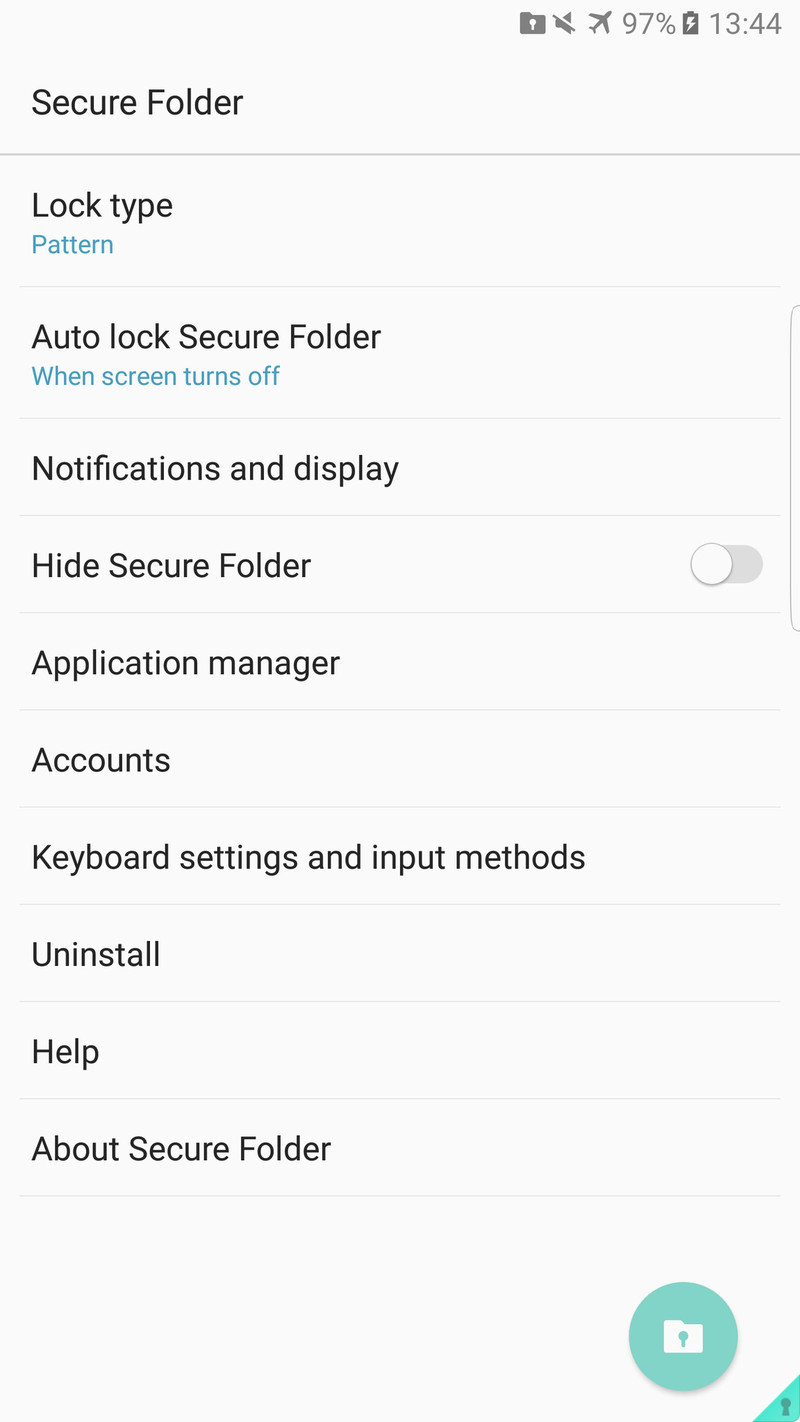


If you’re using a full KNOX installation instead, perhaps because of a security policy set by your work’s IT department, you’ll have to follow the appropriate (and more convoluted) steps to stop using KNOX in that situation.
Download and install Google Now Launcher
Now that KNOX is no longer active on your Note 7, you’ll want to install Google Now Launcher. For the most friction-free experience, it’s best to uninstall and reinstall the app if you already tried to (unsuccessfully) use it before.
Open Google Play on your phone.
- Or, view it from this Google Play link.
Search for Google Now Launcher.
Tap Install.
After installing, press the Home button.
Now that you installed Google Now Launcher without KNOX being active, the app will be able to see your app list and you can configure and use it as you’d like.
Re-enable Secure Folder on the Note 7
So here’s the thing: while you can re-enable KNOX and then continue to use Google Now Launcher, chances are the victory will be short lived. If any of the involved apps are updated or you have to restart your phone, chances are you’ll end up right back where you started with a non-functional Google Now Launcher.
We wouldn’t recommend expecting to use Google Now Launcher and KNOX or Secure Folder — but you can always uninstall it once again if you find it doesn’t work.
Open the phone’s Settings.
Tap on Lock screen and security.
Tap on Secure Folder.
Follow the on-screen instructions for setup.
You’ll now have a Secure Folder shortcut on your home screen and app drawer.
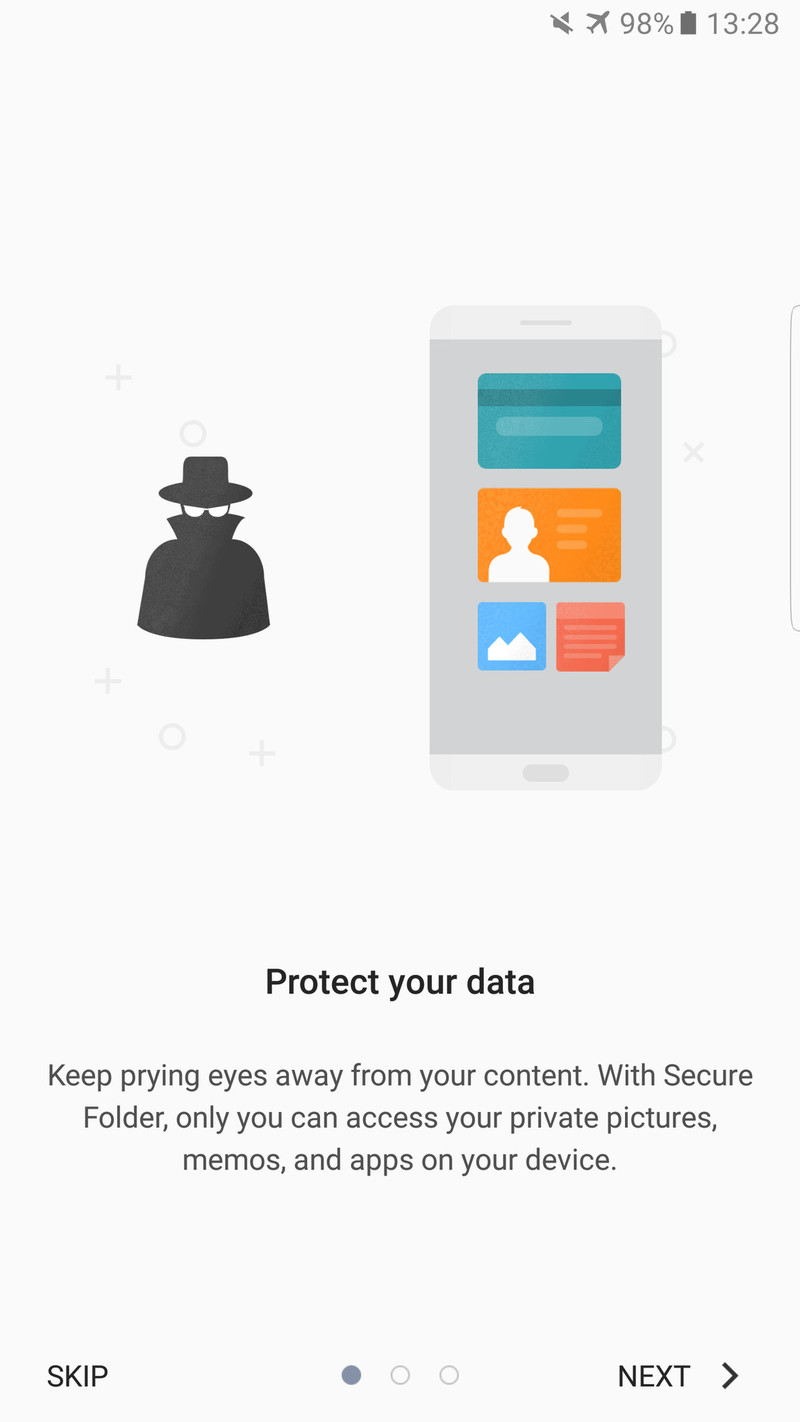

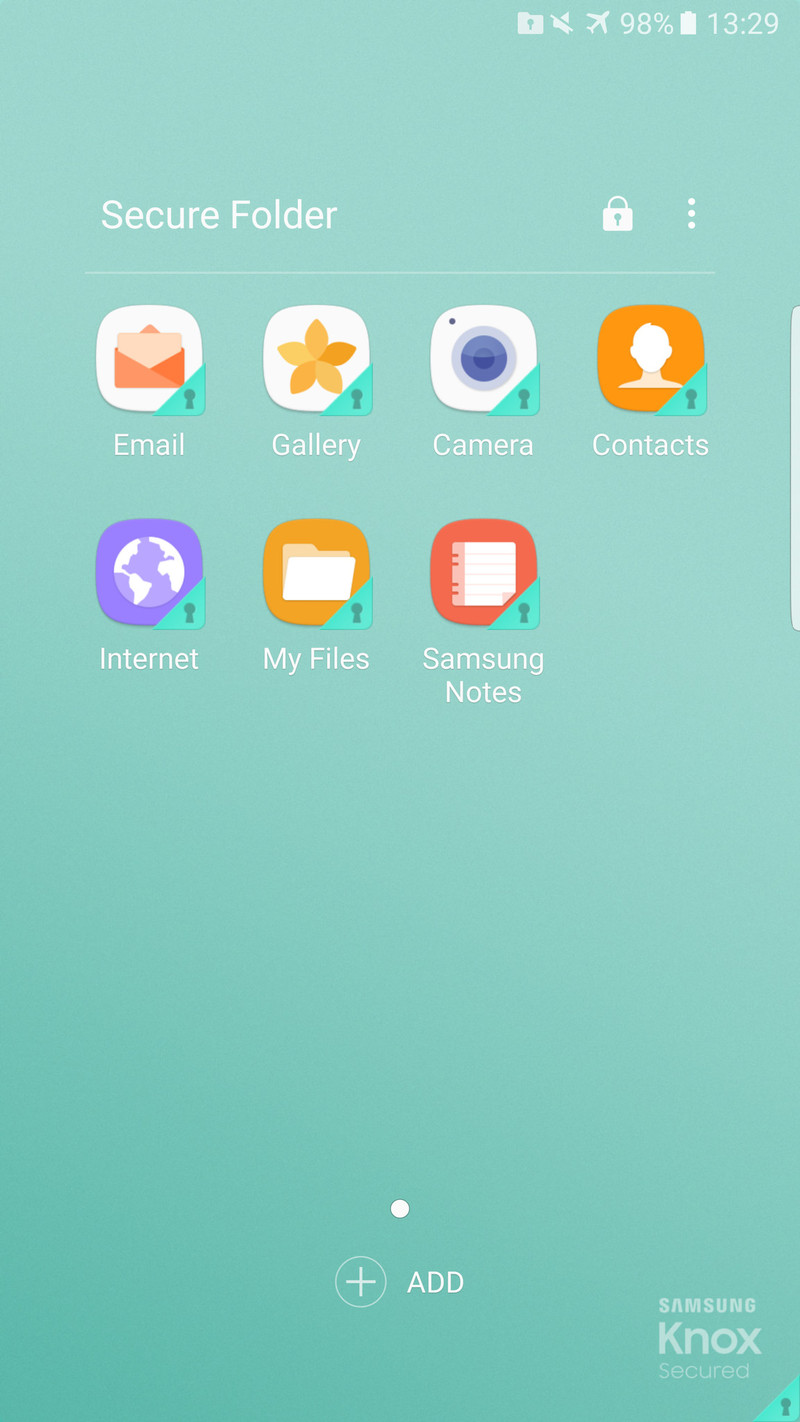
The Secure Folder can now be accessed like any other app, and you can manage Secure Folder settings from the same Lock screen and security settings area that you used to set it up.
For some, having their familiar and consistent Google Now Launcher experience across multiple phones and tablets is worth more than being guaranteed that they can also use the Secure Folder — but for others, the instability and uncertainty just isn’t an option. Until Google and Samsung work out a fix, we’re going to be in a limbo of workarounds and issues. At least now, you have the knowledge to understand what’s going on, and how to deal with it best you can.
Samsung Galaxy Note 7
- Samsung Galaxy Note 7 review
- The latest Galaxy Note 7 news!
- Here are all four Note 7 colors
- Complete Galaxy Note 7 specs
- Join the Note 7 discussion in the forums!
Verizon
AT&T
T-Mobile
Sprint
Huawei phones to come with Truecaller pre-installed, starting with the Honor 8
Truecaller has announced that its dialer app will be pre-installed on all Huawei phones. The Honor 8 will be the first phone to offer the dialer app, following which Truecaller integration will be rolled out to all Huawei handsets sold in America, Middle East and North Africa, Southeast Asia, and India.

Truecaller’s dialer is already pre-installed on Cyanogen and BLU handsets, but the deal with Huawei is its most significant yet. Truecaller uses a crowdsourced approach to identify spam callers, with the company processing over half a billion calls every month.
While it isn’t popular in Western markets, Truecaller is a must-have service in India, where unsolicited calls are a major nuisance. Spam call detection is a major feature, but Truecaller’s raison d’être is its caller ID service. The company crowdsources contact details from its users’ address books, and uses that information to provide live caller ID for incoming calls.
Meanwhile, Huawei shipped 61 million smartphones in the first half of 2016, repesenting a 25% increase from the same period last year. With the Chinese vendor making an aggressive push for Western markets, it is looking to services like Truecaller to differentiate its handsets. From George Zhao, president of Huawei’s Honor division:
As we were planning the launch of our flagship device Honor 8, we were looking for partners who can truly redefine the user experience, Truecaller was an obvious choice to help improve the native calling functions. They provide an indispensable service for millions of users each day. We are joining hands to ensure that respective brands get the best of both worlds.
Truecaller is closing in on 200 million global users, and the move with Huawei has the potential to effectively double its userbase over the coming years. While the app provides a valuable service, the inherent nature of its business means that even if you don’t have Truecaller installed, your number may be stored in its database provided one of your contacts has the app installed. That said, Truecaller has made it easy to unlist your number from the service.
What do you guys make of the move?
EE’s latest perk is six months of free Apple Music
Hot on the heels of EE giving subscribers free access to BT Sport’s app for six months — big spenders get it for the length of their contract, too — the carrier is adding yet another tantalising perk. Starting September 1st, any new or upgrading pay-monthly customer on a handset or SIM-only plan can also enjoy a free, six-month Apple Music subscription. It’s the standard win-win scenario for both companies. EE hopes it’ll tempt users to stick with or move to the network, with Apple hoping you’ll cough up £10 each month to keep your subscription active after the trial period ends.
It’s not the first music streaming perk the network has offered. You may remember that once upon a time EE customers got a free Deezer account, which like Apple Music, could also be used across various devices. The new perk lineup isn’t altogether original, either. In fact, it’s very similar to Vodafone’s selection, with the carrier offering between six months and two years of either free Spotify, Sky Sports or Now TV access on most pay-monthly contracts.
Source: EE
Google is killing off the Device Assist app on Nexus handsets
Google is killing off its homegrown Device Assist app that helps navigate the ins and outs of certain phones. That means tools like speed tests, settings for battery saving and live tech support are going away in favor of website with tips and tricks. Affected fpolks with Android One, Google Play Edition or Nexus handsets will notice a “detected issue” card within the app, according to Android Police, with a link for Google Support when they try to use the application. It has already been removed from the Play Store, and 9to5Google writes that the app is still semi-functional and that no new tool tips will be added.
Via: 9to5Google
Source: Android Police
‘Don’t Starve Together’ arrives on PS4 with a huge bundle
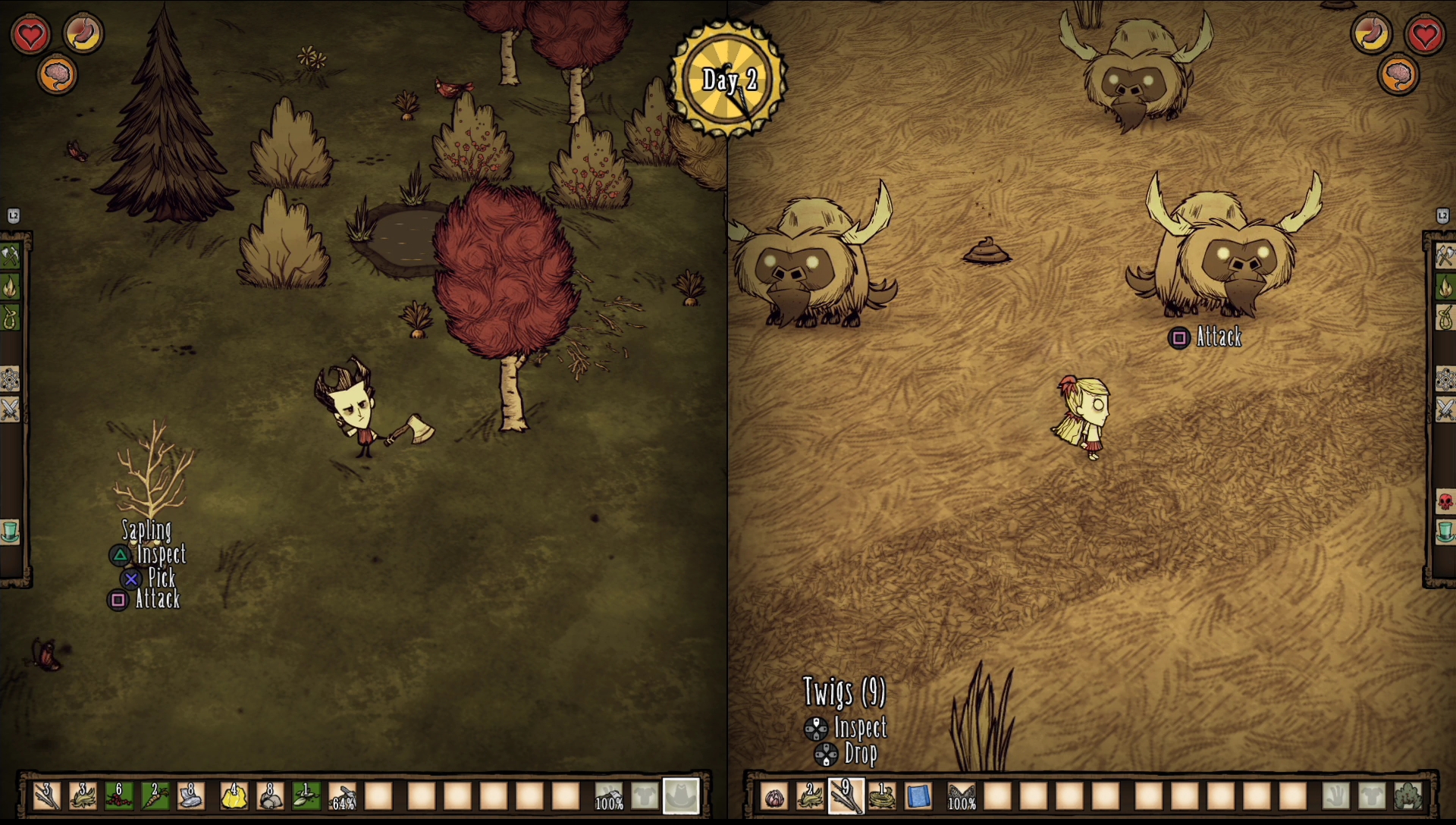
Thanks to being a freebie for PlayStation Plus subscribers, Don’t Starve earned a solid following on PlayStation 4. To reward that, the developers at Klei Entertainment have put together a massive bundle headlined by the console version of the multiplayer expansion, Don’t Starve Together. The Don’t Starve Mega Pack includes previous expansions Shipwrecked, Reign of Giants, the base game and a few themes based on Autumn and the nautical Shipwrecked pack.
Klei’s Corey Rollins writes on the PlayStation Blog that the console version of Together features split-screen co-op both locally and online (for Share Playing!), while online-only multiplayer is good for up to six people.
“We loved hearing stories about friends and families finding creative ways to share the controller while playing the original single-player Don’t Starve,” Rollins says. “Now players will be able to survive together on the same couch, and even take their split-screen game online if the want and create or join an existing game to play with others.”
If you’re one of the folks who grabbed Don’t Starve when it was a free download, the Mega Pack will only cost $10.79. For everyone who doesn’t already own the first game, via PS+ or otherwise, the price is $26.99.
Source: PlayStation Blog
LG OLEDE6P series review – CNET
The Good With the exception of other 2016 OLED TVs, the LG E6 outperforms every other TV we’ve tested. It evinced perfect black levels, wide viewing angles, accurate color and a brighter picture than last year. It’s compatible with both types of HDR TV shows and movies, Dolby Vision and HDR10. Its striking design features a super-slim, glass-bordered panel.
The Bad The E6 is more expensive than the B6, which performs about the same.
The Bottom Line Unless you have even more money to burn than the typical OLED TV shopper, you should choose the less expensive version of this TV.
In 2016 LG greatly expanded its selection of OLED televisions, but not in the way that many buyers who want to take home one of these world-beating TVs have hoped.
You see, OLED TVs aren’t getting any cheaper. A perfect example is the E6 reviewed here. The image produced by this TV is phenomenal, head-and-shoulders better than any LCD-based television I’ve tested. So it should be a no-brainer recommendation for high-end TV shoppers who don’t want something larger than 65 inches, yes?
No. There is another.
The B6 I reviewed at the same time has pretty much the same picture quality as the E6, for a lot less money (relatively). The E6’s advantages over the B6, namely 3D capability, a sleeker picture-on-glass design, better sound courtesy of a speaker bar along the bottom and a redesigned remote, aren’t enough to be worth the substantial price difference. I would only recommend it to people who have money to burn, and those lucky folks might as well buy a G6. Perhaps they can put it in their other G6.
LG OLEDE6P (pictures)
See full gallery


1 – 5 of 26
Next
Prev
The rest of us still have a hard time convincing ourselves that high price of any OLED TV is worth it. That’s not going to change unless LG gets serious about making OLED affordable, which probably won’t happen until some other TV maker brings OLED TVs to market. Until then, if you can’t wait for prices to fall and you’ve managed to convince yourself to spring for an OLED TV, make it the B6.
Editors’ note: I tested a 65-inch LG E6 and a 55-inch B6 at the same time, and most of what I saw was very similar, so large parts of the two reviews are identical. Differences are noted where appropriate, but the main takeaway is that both have very similar picture quality.
Series information: I performed a hands-on evaluation of the 65-inch LG OLED65E6P, but this review also applies to the 55-inch OLED55E6P. Both have identical specs and according to the manufacturer should provide very similar picture quality.
For more information on LG’s other OLED TVs, see this section of the B6 review.
 View full gallery Sarah Tew/CNET
Super-slim TV goes glass
Not content to let the ultra-slim panel OLED panel speak for itself, in 2016 LG augmented it with what it calls a picture-on-glass design on the E6 and G6 TVs. The OLED module — the thing that creates the picture — is applied to a glass back panel, leaving the edge of the TV made of a quarter-inch of glass bordering the black around the image. One result is that the thinnest part of the TV, the upper two thirds above the bulge housing the electronics, inputs and other stuff, is actually slightly thicker (by about 0.06 inches) than the step-down B6. The back of the TV is also subtly patterned.
Further separating the E6 from less expensive versions like the B6 is a horizontal strip of silver lines along the bottom, a grille of sorts, that fronts a more powerful sound system. It adds another touch of style, although personally I prefer the minimalist, more all-picture look of the B6.

View full gallery Sarah Tew/CNET
Nonetheless, the E6 is one stunning-looking TV, whether you mount it on the wall or use the low-profile stand. Unlike earlier LG OLEDs, which required a special add-on wall bracket, the B6 and other 2016 models can work with a standard VESA wall mount.
The remote is another design departure from other OLEDs. Longer, thinner and silver, it rearranges some of the buttons and trades the slightly bulbous shape for a ribbed bottom. LG kept its trademark motion control, which allows you to whip around the menus with a responsive cursor rather than a plodding directional keypad. That keypad is still available, too, if you want it, along with a slick rubberized scroll wheel. I like the new clicker, although if I had to choose between the two I’d probably opt for the older version because of its better-differentiated buttons and more compact size.

View full gallery Sarah Tew/CNET
Key TV features
| OLED |
| N/A |
| 4K |
| HDR10 and Dolby Vision |
| Flat |
| Web OS |
| Motion |
| Yes (Passive) |
Features and connectivity
OLED is the dark star of the show here. Its basic tech is closer to late, lamented plasma than to the LED LCD (SUHD or otherwise) technology used in the vast majority of today’s TVs. Where LCD relies on a backlight shining through a liquid crystal panel to create the picture, with OLED and plasma, each individual sub-pixel is responsible for creating illumination. That’s why OLED and plasma are known as “emissive” and LED LCD as “transmissive” displays, and a big reason why OLED’s picture quality is so good.
New for 2016 LG is claiming 25 percent higher light output and a wider color gamut compared with previous models like the EF9500. Interestingly, it also says all of its new 2016 OLED TVs, including the B6 and E6 I tested, have the same picture quality. In my tests all of those claims were essentially true; see Picture Quality below for details.

View full gallery Sarah Tew/CNET
The other big improvement over last year is support for both types of HDR video: Dolby Vision and HDR10. Today at least, that means TVs like the E6 can access more HDR TV shows and movies than other devices. The E6 and B6 share the same Web OS Smart TV system and access to the same streaming services, including Netflix, Amazon and Vudu with Dolby Vision HDR. See my B6 review if you’d like more details on that.
Unlike the B6, the E6 can support 3D, technically making it the cheapest (gulp) non-curved 2016 OLED with 3D. LG includes two pairs of passive 3D glasses. Note that I didn’t test 3D on this set, but I expect it to work as well as it did on the EF9500, which was the best-performing 3D TV I’ve ever reviewed.
The only other features difference between the B6 and E6 is the latter’s superior sound system.
- 4 HDMI inputs with HDMI 2.0a, HDCP 2.2
- 3 USB ports
- 1 component video input
- 1 composite video input (shared with component)
- Ethernet (LAN) port
- Optical digital audio output
- RF (antenna) input
- Remote (RS-232) port (minijack)
The selection of connections is top-notch. Unlike many of Samsung’s sets, this one actually has an analog video input for legacy (non-HDMI) devices.
Picture quality
If you’re looking for a reason to pay extra for the E6 over the B6, keep looking. The differences are pretty slim according to my tests, and neither had a clear advantage. In fact, most of the words below are identical in both reviews.
Both 2016 LG OLEDs evinced the same dominance over other TVs in my test lineup, with slightly better overall images than the EF9500 from last year, especially with HDR sources. The E6 did show a slightly brighter image than the B6, but I can’t say for sure whether that was due to the size difference between my review samples. The B6, for its part, did a bit better in a couple of video processing tests.
All of these OLEDs beat the best LCDs I’ve tested. To be fair, however, my comparison crop didn’t include the very best 2016 LCD TVs from Samsung (the KS9800) and Sony (the Z9D), so I can’t say for sure whether the E6 is better than them.
And in case you’re looking for a link to my picture settings, I’m not going to provide them for this review. Check out my calibration and HDR notes for details.
Comparison models
- LG 65EF9500 (65-inch OLED TV)
- LG 55EG9100 (55-inch OLED TV)
- LG OLED55E6P (55-inch OLED TV)
- Samsung UN65JS9500 (65-inch LCD TV)
- Samsung UN65KS8000 (65-inch LCD TV)
- Vizio P65-C1 (65-inch LCD TV)
Dim lighting: OLED was king here. All four of the OLED TVs in my lineup produced equally perfect black, compared with the variously lighter shades of black found on the LCD TVs. As usual the difference showed up most in dark scenes, for example in “The Revenant” Chapter 21 where Hugh emerges into the searchers’ torchlight. The black bars above and below the image, the shadows among the trees, and Hugh’s silhouette all appeared in true black or very dark shadow, and all looked blacker and more realistic than any of the LED LCD sets.
Another big difference between the OLED and LED LCD TVs was OLED’s immunity to blooming. The best LCDs, like the ones in my lineup, all use local dimming to improve contrast and deliver deeper black levels, but all suffer to a greater or lesser extent from stray light that leaks from bright areas into dark. It showed up most in onscreen graphical elements, like my Blu-ray player’s icons or the subtitles against the lower black bar in Chapter 4 of “The Revenant,” but also some normal program material. The KS8000 was the worst while the Vizio and JS95000 were very good, if not perfect. The issue worsened from off-angle and brighter picture settings, including HDR.
Dropbox Requiring Users to Change Old Passwords Dating Back to Mid-2012
Dropbox yesterday emailed users who have not changed their passwords since mid-2012 to inform them they will be prompted to do so the next time they log in.
The cloud storage firm called the action a “preventative measure” and said that there was no indication user accounts had been improperly accessed. Users who held passwords created after mid-2012 were not affected, said the company.
In a blog post explaining what prompted the step, Dropbox said it had learned about an old set of user credentials (email addresses plus hashed and salted passwords) that were stolen in an incident the company reported in 2012.
Based on our threat monitoring and the way we secure passwords, we don’t believe that any accounts have been improperly accessed. Still, as one of many precautions, we’re requiring anyone who hasn’t changed their password since mid-2012 to update it the next time they sign in.
The incident is likely related to the huge LinkedIn hack which saw 117 million account credentials posted online. It’s thought that hackers tried the login details on other websites under the assumption that some people use the same passwords across different online services.
Dropbox has taken the opportunity to urge its users to consider enabling two-factor authentication when signing in, and has warned about the risk of re-using the same password across multiple sites.
Tag: Dropbox
Discuss this article in our forums
 AIVAnet