


Baidu’s all-electric self-driving car is a modified Chery EQ
Baidu’s plan to make self-driving cars a consumer reality by 2018 just changed gears, so to speak. According to Business Insider, the company has swapped out its modified BMW 3-series test vehicles for an all-electric car designed for the Chinese market: the Chery EQ. Unmodified, the diminutive EV can drive about 120 miles on a full charge. Baidu intends to use it to further test its driverless tech in China.
The Chery EQ isn’t quite as small as Google’s self-driving pod, but it’s quite a bit smaller than Baidu’s self-driving BMW. It costs a lot less, too: after cashing in government incentives, the Chery EQ can be had for 59.800 Yuan (about $9,000 in greenbacks). Don’t expect to see the little car stateside, though — if Baidu ever does bring its tech to the US market, it’ll probably partner with a local automotive firm.
Source: Business Insider
MacRumors Giveaway: Win a Luxury Leather Briefcase From Pad & Quill
For the next four weeks, MacRumors is running a special giveaway event, which will see us highlighting and giving away high-quality luxury bags from manufacturers like Pad & Quill, Intrepid Bag Co, Whipping Post, and Saddleback Leather Company. We’ve got all of these bags on hand so we can give clear details on construction, quality, utility, and more.
For today’s giveaway, we’ve partnered with Pad & Quill, a company that makes a whole line of luxury Apple accessories from cases to Apple Watch bands to leather bags. We’ll be giving away the Luxury Briefcase in Galloper Black with Chestnut accents.
Pad & Quill’s Luxury Briefcase, priced at $495, is a large bag (15 inches by 11 inches by 4.2 inches) with enough pockets to hold whatever you might need to carry on a day to day basis.
There are two outer pockets for holding papers or other small, flat accessories, along with a main interior pocket that can hold up to a 15-inch MacBook. The main pocket has several smaller pockets inside (two dividers with five pockets total), perfect for holding all kinds of accessories.
I was able to fit my MacBook Pro, Retina MacBook, iPad Pro, iPad mini, iPhone in the bag along with various sundries like a hairbrush, a water bottle, a battery pack, pencils, two notebooks, and more. It holds a lot. There’s a full nickel zipper at the top and a flap that folds over and snaps, so the contents within the bag stay safe and protected while you’re hauling it around. When full, this is not a light bag – it weighs in at three pounds by itself.
Made of a thick, durable full-grain American cowhide leather, the Luxury Briefcase is immaculately constructed with features like careful hand stitching, rigid but comfortable leather handles and a removable shoulder strap with a leather pad. Out of the box, the Luxury Briefcase is stiff and pristine, but with use, it’ll loosen up and develop a unique, worn in look. The leather has been tanned so it’s resistant to stains and water, and the interior is made from a durable pigskin that looks like it’s going to hold up well to daily abuse.
Pad & Quill’s bags are all handmade and it shows in their construction. This looks like a $500 bag, and it’s nice enough to take to the office, but casual enough that it doesn’t look out of place in a less formal setting.

One MacRumors reader will be able to win a Luxury Briefcase from Pad & Quill. To enter to win, use the Rafflecopter widget below and enter an email address. Email addresses will be used solely for contact purposes to reach the winner and send the prize.
You can earn additional entries by subscribing to our weekly newsletter, subscribing to our YouTube channel, following us on Twitter, or visiting the MacRumors Facebook page.
Due to the complexities of international laws regarding giveaways, only U.S. residents who are 18 years of age or older are eligible to enter. To offer feedback or get more information on the giveaway restrictions, please refer to our Site Feedback section, as that is where discussion of the rules will be redirected.
a Rafflecopter giveawayThe contest will run from today (August 26) at 11:00 a.m. Pacific Time through 11:00 a.m. Pacific Time on September 2. The winner will be chosen randomly on September 2 and will be contacted by email. The winner will have 48 hours to respond and provide a shipping address before a new winner is chosen.
Tags: giveaway, Pad & Quill
Discuss this article in our forums
Spotify Punishing Artists Who Offer Apple Music Exclusives
Spotify and Apple Music are becoming increasingly bitter rivals, and according to new reports from The New York Times and Bloomberg, the feuding is now affecting artists. Spotify has been punishing artists who agree to Apple Music exclusives, displaying their content less prominently and offering fewer promotional opportunities.
Spotify has explicitly told artists who offer Apple Music exclusives that their music won’t be included on featured playlists, and Spotify has also “buried” their songs in its search rankings. The music streaming service has reportedly been using these retaliatory tactics for about a year.
Spotify has been retaliating against musicians who introduce new material exclusively on rival Apple Music by making their songs harder to find, according to people familiar with the strategy. Artists who have given Apple exclusive access to new music have been told they won’t be able to get their tracks on featured playlists once the songs become available on Spotify, said the people, who declined to be identified discussing the steps.
Spotify’s tactics may not affect major artists in a significant way, but according to Bloomberg, the service has also threatened smaller acts who introduce their music on Beats 1 Radio with Zane Lowe.
Since Apple Music launched last year, Apple has been using exclusive content as a way to lure new subscribers to the service. Artists like Drake, Frank Ocean, Dreezy, Taylor Swift, and Katy Perry have debuted content exclusively on Apple Music, something both Spotify and record labels have become increasingly uncomfortable with.
Earlier this week, Universal Music Group CEO Lucian Grange told employees that UMG is now prohibiting its artists from offering music exclusives, meaning popular content from Taylor Swift, The Weeknd, Kendrick Lamar, and more, will no longer be eligible for debut solely on Apple Music. UMG’s new policy has already affected Apple, preventing Apple Music from inking a deal with Lady Gaga.
At its one year anniversary in June, Apple Music boasted more than 15 million subscribers, and should it continue its rapid growth rate, the service could eventually eclipse Spotify as the most popular streaming service. Spotify continues to have approximately twice as many subscribers but the music service continues to struggle because it has yet to become profitable.
Discuss this article in our forums
Adverse Ruling Against Apple Expected in European Tax Probe
The European Commission is poised to hand down an adverse ruling against Apple next week following a three-year inquiry into the company’s tax arrangements in Ireland, according to Financial Times.
Expectation of an adverse ruling gathered pace this week after the US Treasury issued a stinging attack on the commission’s investigation, saying the EU executive was becoming a “supranational tax authority” that threatened international agreements on tax reform.
The Brussels-based body, led by competition commissioner Margrethe Vestager, has been investigating whether Apple’s alleged “sweetheart deal” with Ireland constitutes illegal state aid, which it determined based on its preliminary findings in 2014.
The commission has accused Apple of sheltering tens of billions of dollars by transferring revenue to multiple subsidiaries in Ireland, where it pays a significantly lower tax rate of around 2%, compared to the country’s headline corporate tax rate of 12.5%.
An adverse ruling could result in Apple owing up to $21.2 billion in back taxes, although a previous study placed the figure around $8 billion, and some analysts believe the amount could be as low as $1 billion.
Apple is one of several large corporations accused of tax avoidance in Europe over the past three years, joining the likes of Starbucks, Fiat Chrysler, Amazon, Google, IKEA, and McDonald’s. Starbucks in particular is currently appealing its case in Netherlands, where it was ordered to pay as much as 30 million euros in back taxes.
Apple CEO Tim Cook, who has insisted that his company fully complies with international tax law, said last month that it would appeal any unfavorable ruling in European courts. Apple has also said it is the largest taxpayer in the world.
Earlier this week, the U.S. Treasury department warned that an adverse ruling against Apple could “set an undesirable precedent.” It also said the European Commission is becoming a “supranational tax authority,” going beyond acceptable enforcement of competition and state aid law.
Note: Due to the political nature of the discussion regarding this topic, the discussion thread is located in our Politics, Religion, Social Issues forum. All forum members and site visitors are welcome to read and follow the thread, but posting is limited to forum members with at least 100 posts.
Tags: corporate tax, European Commission, Europe
Discuss this article in our forums
How to opt out of WhatsApp sharing your information with Facebook

How do I stop WhatsApp from sharing my information with Facebook? There are two ways!
In 2014, Facebook bought WhatsApp for a whopping $21.8 billion. WhatsApp users everywhere went, “Oh, no. This can’t be good.” That feeling has finally come to fruition in that WhatsApp will now start sharing your information with Facebook – including your phone number.
If you don’t want Facebook getting ahold of your WhatsApp info, you can opt out in one of two ways.
Here’s how!
Note: If you have already agreed to the terms of service, you have 30 days to use the second method below to opt out.
How to opt out of sharing your WhatsApp information with Facebook in the WhatsApp terms of service
When WhatsApp updates, you’ll have to agree to its terms of service all over again, but before you tap agree, you can read more and opt out of sharing your information.
Launch WhatsApp from your home screen or the app drawer.
Tap the upward arrow in the bottom right corner to read more.
Tap the checkbox to opt out of sharing your information with Facebook.

If you go looking for the Share my account data option in your settings afterward, it won’t be there, since you’ve already opted out.
How to opt out of sharing your WhatsApp information with Facebook if you’ve already agreed to the new terms of service
If you’ve already tapped “Agree”, you can still opt out:
Launch WhatsApp from your home screen or the app drawer.
Tap the more button in the top right corner. It looks like three vertical dots.
Tap Settings.

Tap Account.
Tap the checkbox next to Share my account info.

Now you’re opted out and Facebook isn’t getting your phone number, and won’t share any information with its parent company to influence the ads you see.
Questions?
Let us know in the comments below!
Reigns: a beginner’s guide
Rule over your kingdom for as long as you can in Reigns.

If you’ve never heard of the game Reigns before, allow us to introduce you to one of the most popular games of the year. Available for $2.99 in the Google Play Store, Reigns is a game that will likely have you playing for not only for hours on end, but over years and generations — more on that in a bit.
The game is formatted sort of like those Choose Your Own Adventure books you probably remember from your childhood. Load up the game and you’re instantly thrown in. You start out as a young king taking control of his kingdom in the first year of his reign. Advisors, citizens and animals appear as cards, coming to you with issues and questions that require a ruling — swipe right for yes, swipe left for no.
But choose wisely, because your decisions will affect one of four aspects of your kingdom: the church, the people, the army or the treasury. They are tracked with meters at the top of the screen, and your goal as king is to ensure no meter becomes entirely empty or full — allow that to happen and your fate is sealed.
It may sound complicated, but it’s really not. Your goal is simply to keep things balanced and reign over your land for as long as possible. If — or rather when — you die, the game doesn’t end. Instead, you simply take on the role of your successor and take over where the last king left things. But remember, everything is occurring on a linear timeline. Every decision you make is logged by the game, and may well come back affect your fate down the line, so choose wisely.
If we’ve convinced you already to check out the game, great! Hit up the Google Play Store and get your hands on this game while avoiding any of the spoilers to follow. If you still need some convincing before dropping money on the game, or have some questions regarding the gameplay mechanics, we’ve broken out this handy guide to maximize the length of your reign.
- A guided tour through your first reign as King
- How to duel
- Completing objectives
- Effect cards
- Mistakes will be made
A guided tour through your first reign as King
To explain Reigns’ gameplay mechanics, which is sort of a meshing between Choose Your Own Adventure storytelling and Tinder-style controls, there’s no better way than to simply showing a progression through the very first reign, as King Edward the Young. I’ll be including commentary along the way to explain my rationale.
Spoilers ahead: No matter how early the content I’m showing you is in the overall arc of the game, if you want the full, going-in-blind experience (highly recommended), stop reading now and just buy this game from the Play Store. It’s absolutely worth it.
Still reading? Let’s go!
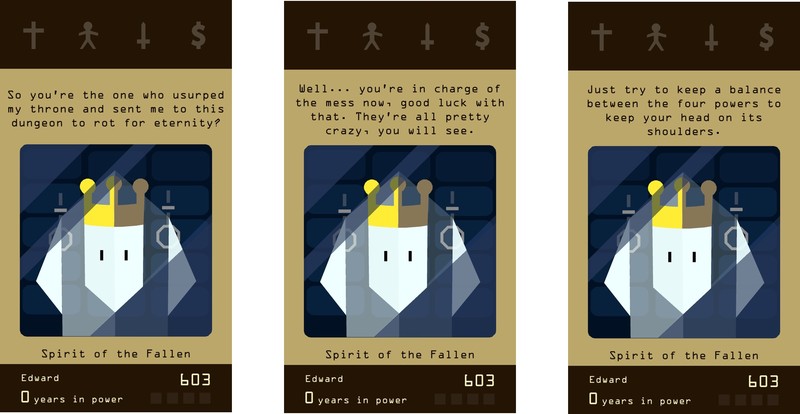
The game opens with you speaking to the “Spirit of the Fallen” who accuses you of usurping his throne. He gives you a heads up about keeping the four powers (marked with the cross, stick figure, sword and dollar sign) balanced to survive. Again, you simply swipe to the right or left to move on to the next card.
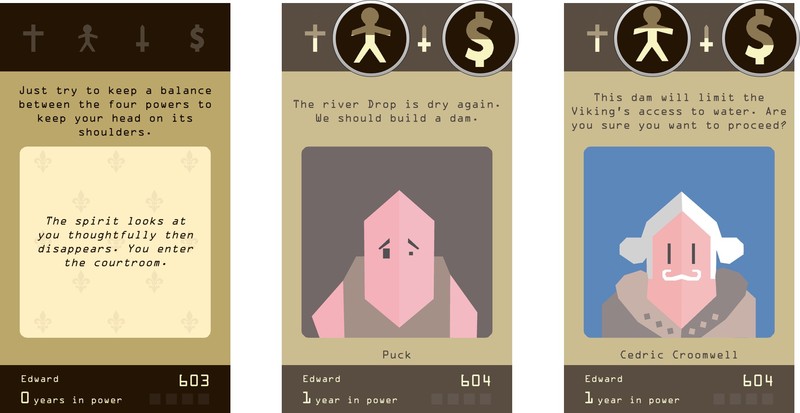
So, when I first started playing Reigns, I figured I’d try and be a nice king to my people. When my first card introduced me to Puck the peasant telling me we needed to build a dam, I figured “that’s a no brainer” and just went ahead and had it built.
Note the callouts on the screens above. In my haste, I didn’t even bother to see how that decision might affect the kingdom’s power balance. The people’s power went up a bit, but the treasury went down as well, given I had spent the royal family’s wealth. This early on in a king’s reign, one hasty decision won’t have too major an impact on how things play out. But as you progress through different reigns, things do tend to add up or disappear quite quickly if you’re not smart.
What’s more, the very next card called into question the decision I had just made! And we’re just getting started, folks!
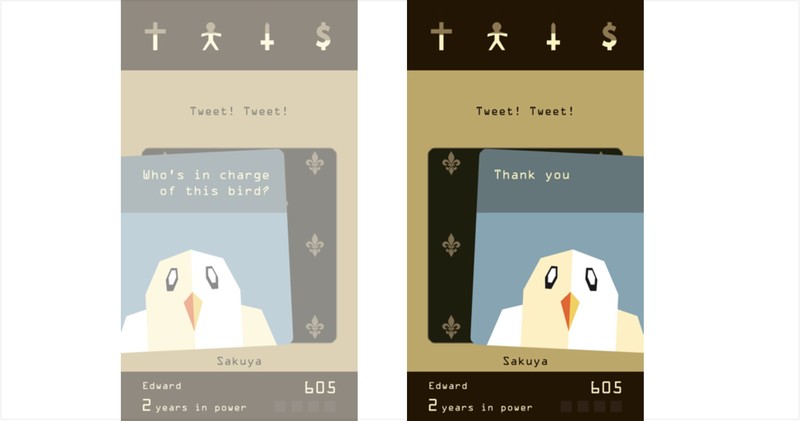
“Tweet! Tweet!”
So, the next visitor was… a bird. Not knowing what to make of this, and not seeing any markings above any of the power balances (more on that shortly), I decided to opt with politeness. Again, as you’ll discover, this game loves to delves into absurd, or go off on delightfully Non Sequitur tangents.
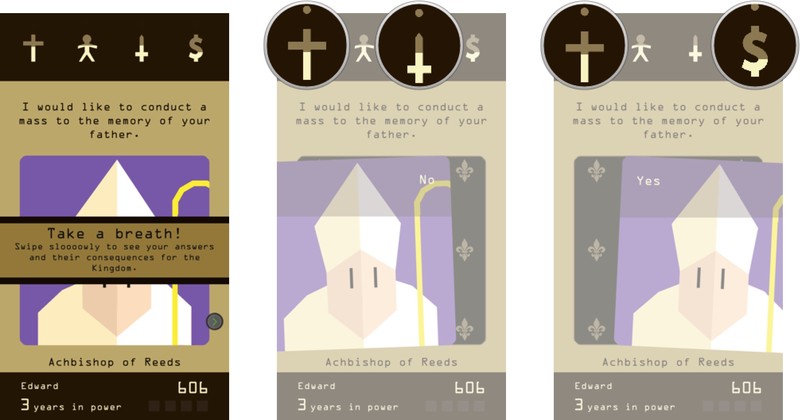
After slowing down and seeing what the options were for responding to the bird, the game does remind you to take your time and swipe slow to read both responses and see the consequences of your decisions on the kingdom.
Next up, the “Achbishop (sic) of Reeds” asked if he could conduct a mass to the memory of my father. Having not known who exactly my father was in this context, and also noticing that saying ‘No’ would have an effect on the church and military — you’re almost never outright told whether it will be positive or negative — while saying yes would have an effect on the church and the treasury, signified in the call outs above by the dot above each signal. I opted to be fiscally conservative and forgo the mass.

So uh… about that absurdity again. You quickly learn how twisted and dark the humor gets in this game. From determining how to best handle a plague of meowing nuns, to playing fetch with the royal dog for, as I learned, as long as you would like to with seemingly no consequence, to then immediately deciding whether to call in the army to help execute citizens — every new card is a potential twist down a bizarre path. Just another day as a monarch, I suppose.

“There are too many people to execute! I need help from the army.”
To the issue of whether to call in the army to help executing citizens… Uh, how about no? Again, looking at the effects on the power balance I noted that saying ‘No’ would affect the people’s power, while saying ‘Yes’ would affect both the people’s power and the army’s power. The king decrees ‘No’.

“The estuary of the river Drop is a dangerous swamp for travellers. We should sanitize the whole area.”
The next card jumps back to the decision to dam the river. It has created a swamp that’s apparently dangerous for travellers. I care about people’s safety, so sure. Let’s sanitize the whole area. No matter the cost.
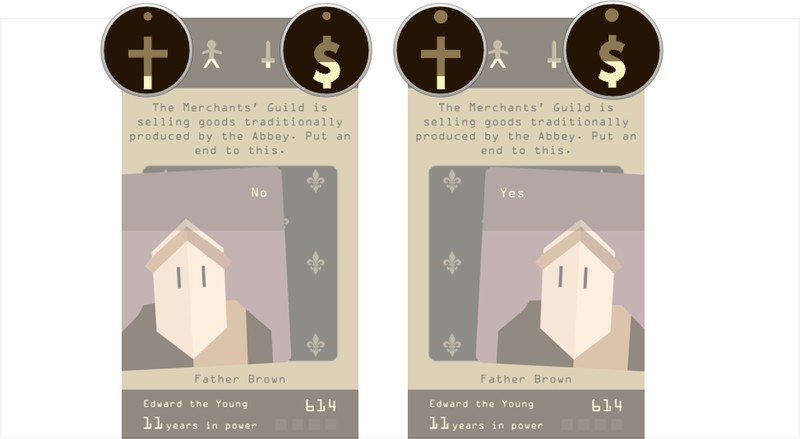
“The Merchants’ Guild is selling goods traditionally produced by the Abbey. Put an end to this.”
OK, so here’s another important note. The size of the dot above each power category determines how big the effect will be — either positively or negatively. See the callouts in the screen above to see the difference between ‘Yes’ and ‘No’ here. I went with ‘Yes’.
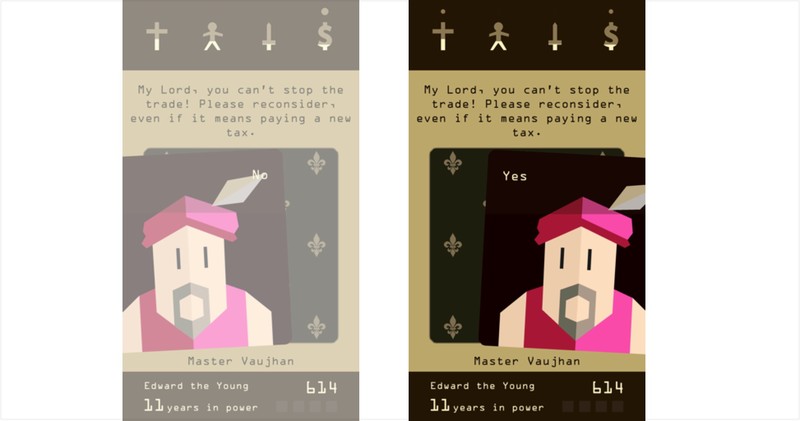
“My Lord, you can’t stop the trade! Please reconsider, even if it means paying a new tax.”
Whoa. My treasury took a major hit, but the church was also pretty low, so good call, right?
But now I’ve annoyed the merchants. Okay, well some damage control via taxation should help my treasury a bit.

“The miners are refusing to dig in the mine. They want a raise.”
Again, I’ve decided to be a man of the people here, so give them a raise!
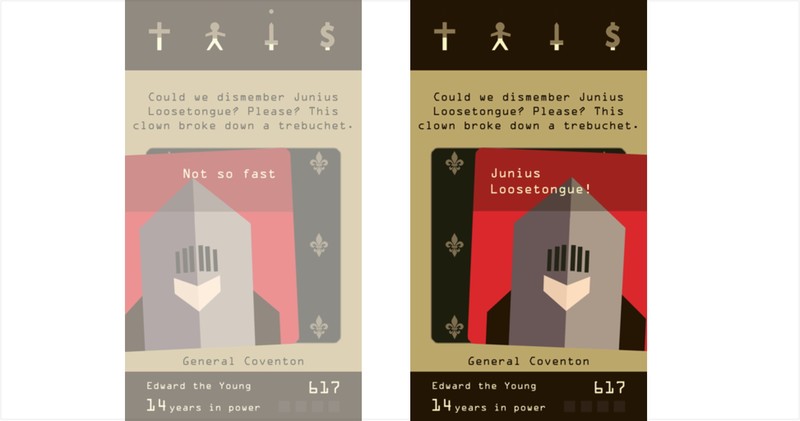
“Could we dismember Junius Loosetongue? Please? This clown broke down a trebuchet.”
Man, this guy again? Always with the killing and dismembering. That said, we are too low on money to be messing with our weapons… Bring him to me now!
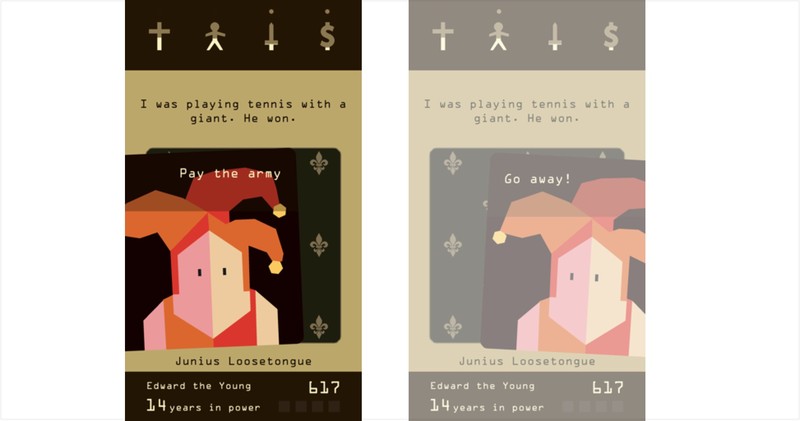
“I was playing tennis with a giant. He won”
Haha, oh he’s the jester? That’s pretty funny. Sure let’s just pay the army.
But wait. My treasury…
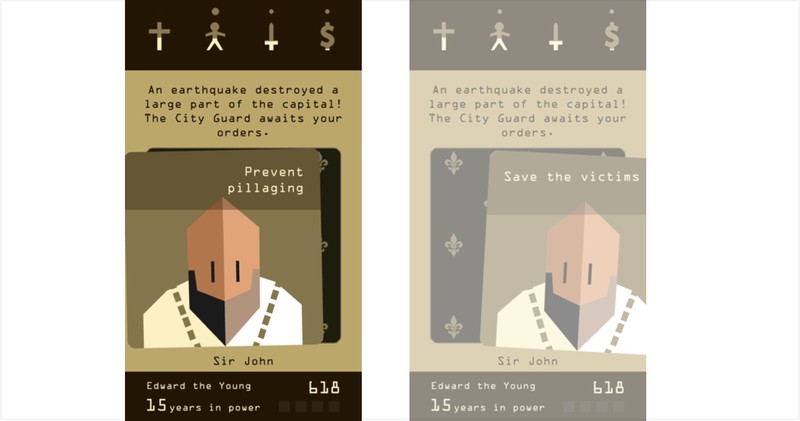
“An earthquake destroyed a large part of the capital. The City Guard awaits your orders.”
An earthquake? Uh-oh. That sounds expensive. Both options show an effect on my treasury.
This might be the end. I guess let’s prevent pillaging?
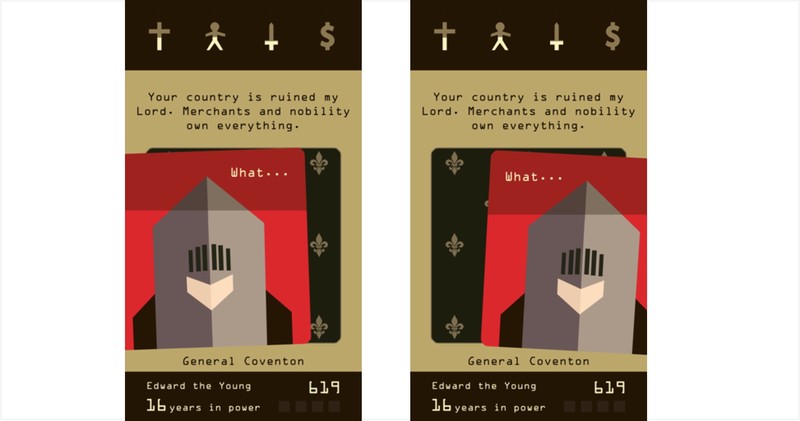
“Your country is ruined my Lord. Merchants and nobility own everything”
So we’ve reached the end of my first reign, as my treasury has been depleted. You know your king is about to die when both the ‘Yes’ and ‘No’ responses are both ‘What…’ or something similar.
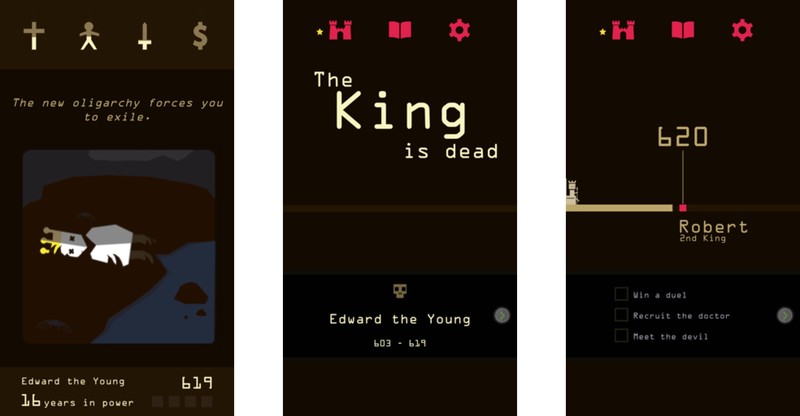
Well, it was a good run while it lasted. Your final card shows how the king died. 16 years for my first reign, not too shabby — I think? And hey, maybe King Robert will do a better job than his predecessor.
How to duel
As you progress through the game, occasionally you will be challenged to a duel. The gameplay itself doesn’t change much at all, as you’re still either swiping right to attack, or to the left to retreat/dodge. The four trackers at the top are replaced by a rudimentary battle arena, where your attacks and retreats are previewed by swiping and holding the card. Take time when considering your next move.

After completing your first duel, you can ask General Conventon to explain the duel mechanics. Here’s what he says:
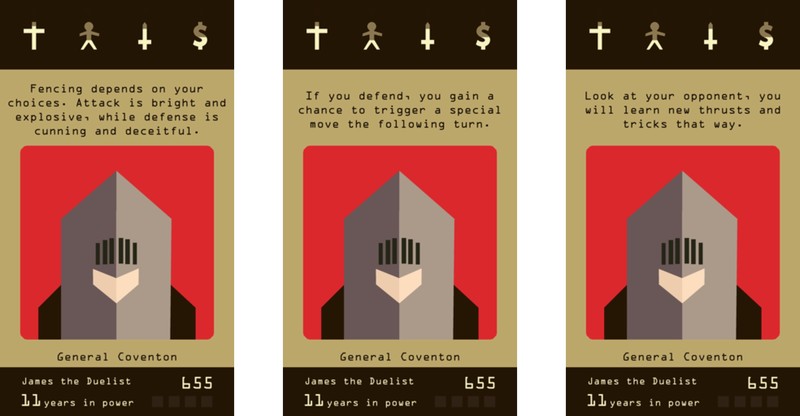
In other words, it’s typically best to mostly be aggressive in duels and swipe to the right. However, if the card hints at your duelling partner planning a nasty attack, you might want to opt for a defensive swipe to the left. If you guess wrong, you might meet an untimely end, but time your defensive move right and you’ll get an attack bonus on the next round. Ultimately, duelling seems like a 50/50 mix of strategy and luck.
Completing objectives
Every time a king dies, a new king rises to take his place — with three objectives you should aim to complete during his next reign.
These objectives really range in variety and, occasionally, seem quite absurd. But as you quickly discover once you dive into Reigns, it’s a game that’s full of wonderful surprises. Occasionally it will come down to your intuition and close reading for clues to figure out when you might be able to complete an objective. Other times, the game will simply throw you down a random path and you’re taken on a wild ride towards the conclusion of an objective. All told, there are currently 40 objectives in Reigns.

A common example of an objective you will see is seeking out a new character. Occasionally a card will hint at introducing a new character advisor, so it’s typically worth responding affirmatively to such cards. Once you’ve unlocked a new character, you’ll start to regularly hearing from them, signified by new cards being added to your deck. Every new character adds a new layer to the overall game, and not all characters are to be trusted — but on the other hand, you may also earn the opportunity to have certain characters executed for one reason or another. Reigns features 37 unlockable characters.
Effect cards

Occasionally as you play through Reigns, you will trigger an effect. These will affect the game in a multitude of different ways. See the screens above for just a few examples I’ve run into so far. Once you uncover an effect card, you’ll see its icon in one of the four boxes in the bottom right corner for as long as they are in effect. I really don’t want to give away too much on them because they are really some of the most surprising and hilarious parts of the game. Given there are four effect slots, they will also stack on top of one another if you let them. They may reset whenever a king dies, they may run out after a set amount of time, or they might remain in effect for as long as you keep playing.
Mistakes will be made

Here’s the thing: while your goal in Reigns is to survive for as many years as possible, there might be some Kings that serve for pitifully short reigns. This may be due to your own poor decision making, or it could just be the game throwing you for a loop. In the example section above, looking back, I made some pretty costly mistakes that significantly shortened my reign.
But it’s okay! Not every king you play as is going to have a long and fruitful reign. Besides, if you’re struggling being a fair and just ruler, maybe it’s time to try being a ruthless tyrant. There’s no wrong way to play Reigns.
Have you played Reigns?
What have been your favorite moments playing the game? Got any tips we should include in our guide? Let us know in the comments!
Watch Fox Sports Go on Apple TV, if you have cable
The start of both NFL and college football seasons are imminent and Fox Sports is giving viewers another option for streaming the action. The network announced today that its Fox Sports Go app is now available on the 4th-gen Apple TV. Yes, you’ll need a cable subscription in order to stream events spanning NFL, MLB, UFC, NASCAR, Big 12 and Pac-12 Football, Big East Basketball, FIFA World Cup and UEFA Champions League soccer. Though they aren’t specifically listed in the announcement, a MLS and Bundesliga soccer match are part of the weekly lineup during their respective seasons as well.
All of that action is spread across streams from FOX Sports, FS1, FS2, FOX Sports regional networks, FOX College Sports, FOX Deportes and FOX Soccer Plus, hence the pay-TV plan requirement. In fact, your cable plan must include those channels to unlock streaming access. Fox says that the move to Apple TV also adds in some new features that weren’t previously available elsewhere. First, you can stream up to four games (or shows) at once thanks to a Multiview Display tool. All of the action is streamed at 60 frames-per-second as well which should improve views of high-speed action across that range of sporting events. Both of those features are items Apple discussed last fall as part of its tvOS software.
Fox Sports Go is also available on Roku, Android TV and Sony smart TVs in addition to apps for Android, iOS, Kindle Fire and Windows. The network has said that Chromecast support is coming this summer, but it has yet to be added to the app.

Source: Fox Sports
Sprint offers ‘Unlimited Freedom Premium’ for heavy video users
Not long after introducing its “Unlimited Freedom” option, Sprint has announced a new plan called “Unlimited Freedom Premium,” which offers high-definition video for $20 more than the vanilla plan.
Users will pay $80 for a single line for the HD video access and $140 for two lines. Previously when the original Unlimited Freedom plan was announced, we lamented the lack of option for special data plans like this one, so it’s an interesting move to offer it now after already rolling out a new plan so recently.
This likely comes in response to T-Mobile’s recent launch of T-Mobile One, which offers unlimited calling, texting and data for $70 a month in exchange for throttling video bandwidth for lower-quality video. It’s a cheaper plan, but it’s likely not tolerable for anyone looking to consistently stream HD video.
The Unlimited Freedom Premium plan includes HD music and streaming in addition to HD video at up to 8 megabits per second, and right now if you sign up for a new Unlimited Freedom account you can get Premium for free through October 31st to take it for a test drive and see if it’s worth the extra $20 for you.
Source: Sprint
Twitter is working on a keyword tool to combat harassment
Harassment is one of the biggest problems facing Twitter right now. Some of the company’s most popular and influential users have been driven off the platform because of some truly horrific, hurtful tweets. The problem hasn’t gone unnoticed. Twitter has promised to do more to combat trolls, making it simpler to flag abusive tweets and banning controversial figures such as the conservative writer Milo Yiannopoulos. Now, according to Bloomberg, it’s working on a keyword filtering system that would allow users to hide tweets containing specific terms and phrases. If you’ve muted keywords before on TweetDeck or Tweetbot, you’ll get the idea.
Twitter has been weighing the new feature for “about a year,” Bloomberg claims, and would “screen out” any keyword specified by the user, including swear words and racial slurs. Instagram introduced a similar feature for photo and video comments last month, giving people word filters and the ability to turn off comments entirely. My colleague Dana Wollman wrote an excellent piece about why these tools should have been introduced years ago — I’m sure many feel the same way about Twitter.
The platform’s public and open nature is why it’s become such an important utility. But it’s also fostered a community which, at times, can feel toxic and uninviting. That’s dangerous, because if people feel they can’t use the service without receiving an avalanche of abuse, they’ll leave, diluting Twitter’s user base and the amount of thoughtful, beneficial Tweets being published every day. It’s a big problem for Twitter — the company has long-struggled to explain the service’s purpose, and bad press regarding celebrity departures isn’t helping. To reverse its stalling user growth, Twitter needs a feature like keyword filtering, and fast.
A spokesperson for Twitter declined to comment.
Source: Bloomberg
Amazon to open bookstores in Chicago and Portland
For an independent bookstore, few threats are bigger than Amazon. With its e-book store and brutally competitive print book prices, it can be hard for a family-run business to compete. Well, it’s only going to get tougher now that Amazon is expanding its footprint of physical stores. The company has confirmed it’ll be setting up shop in Chicago and Portland — these locations will be joining Seattle, which opened in November, New York and San Diego. The details of each store is under wraps, but it’s safe to assume they’ll be packed with Kindles and Kindle Fire tablets.
Amazon has built its business online, but seems to be learning that there’s value in having a physical presence too. Sales assistants can explain the advantages of a particular product or service — something that’s increasingly useful as it builds a whole range of Prime perks and premium, quick-turnaround delivery services. As for books, well, there’s something to be said about visiting a store and plucking an interesting novel off the shelf. Gazing at the cover, reading the blurb and flicking through the pages. (Sigh.) It’ll be a while before Amazon’s stores have that old, musty feel to them, but hey, they beat looking around a website for hours on end.
Source: Financial Times
 AIVAnet