


Russia hopes ‘clean’ rockets are the future of spaceflight
If you ask Russia, modern rockets are hindered by not just their engines, but their fuel — the chemicals just aren’t powerful enough to carry increasingly heavier loads and keep costs in check. To that end, the country’s Advanced Research Foundation has conducted what it says is the first successful test of a full-size pulse-detonation engine (where rapid-fire detonation waves combust the fuel and oxidizer) running “clean” fuel. The oxygen-kerosene mix isn’t so much eco-friendly (although it does burn more cleanly) as very efficient. Its high thermodynamic performance, combined with the extra efficiency of pulse-detonation itself, would let rockets either carry more cargo into space or reduce costs by getting vehicles into orbit faster.
The concept of a pulse-detonation engine isn’t new. The concept reportedly originated in Russia in the mid-20th century, and the US Air Force even tested one aboard an aircraft in 2008. However, it has largely been the stuff of sci-fi in rockets, in no small part due to the added risk of stress. You are producing continuous explosions, after all. Russia’s test shows that the technology could finally be practical for spaceflight. If scientists can translate their experiments to practical rockets, you could see more frequent (not to mention more ambitious) space missions going forward.
Via: RT
Source: FPI (translated)
Swing states don’t want DHS to protect its voting machines
Some states’ electronic voting machines are antiquated, insecure and vulnerable to potential attacks from hostile attackers. But despite this, states like Georgia and Pennsylvania would prefer to take the risk than allow the Department of Home Security anywhere near them. NextGov is reporting that those states have rejected an offer from DHS chief Jeh Johnson to inspect the equipment for ways in which hackers could rig the vote. It comes just days after Johnson openly mulled demarcating voting machines as critical infrastructure — meaning that they’d be defended with the same ferocity as power stations.
Georgia’s secretary of state Brian Kemp feels that the Department of Homeland Security is overreaching in its attempt to, uh, preserve homeland security. The report quotes Kemp as saying that moves to guard voting machines is a “vast federal overreach” that “would not equally improve the security of elections.” There are some who would disagree, including UNC professor Zeynep Tufekci, who told reporters that Georgia’s voting machines are “more than a decade old” and “falling apart.” Then there’s the fact that the hardware is running that most secure of operating systems: Windows 2000.
There’s never been a proven attack on a US voting machine before, but such equipment is often targeted by hackers. The fact that Russia is suspected to have hacked the Democratic National Convention (amongst other things) suggests that the country is meddling in the 2016 general election. Protecting digital infrastructure, especially some of the most vital components of the democratic process, would seem like a no brainer. For most people, at least.
Source: NextGov
T-Mobile ONE Now Offers Unlimited 4G LTE Tethering for Extra $25 Per Month
T-Mobile recently introduced a new plan called T-Mobile ONE that offers unlimited talk, text, and 4G LTE data for $70 per month. A second line can be added for $50 per month, while up to six more lines can be added for an additional $20 per month each. The total cost for a family of four, for example, would be $160 per month.
At the time, T-Mobile said mobile hotspot tethering would be limited to 2G speeds, with 5GB of high-speed tethering available as a $15 add-on. But today, the carrier has changed its tune and announced that T-Mobile ONE will now include unlimited tethering at 3G speeds in the U.S. at no additional cost.
Or, customers that want high-speed tethering can upgrade to the new T-Mobile ONE Plus plan, which includes unlimited tethering at 4G LTE speeds, unlimited HD video streaming, and Simple Global international data roaming at up to 3G speeds where available for an extra $25 per month per line. The carrier previously planned to charge an extra $25 per month just for the unlimited HD video streaming upgrade.
The regular T-Mobile ONE plan will continue to limit video to 480p standard definition across all services, but the carrier is also now introducing HD day passes for $3 per day that allow unlimited HD video streaming for 24 hours.
T-Mobile ONE will also now be available on September 1, five days earlier than the company previously announced.
Tag: T-Mobile
Discuss this article in our forums
Fitbit Announces Charge 2 With 4x Larger Display and Flex 2 With Swim Tracking
Following image leaks of two new Fitbit fitness trackers, the company today officially announced the Fitbit Charge 2 and Fitbit Flex 2. In addition, the Fitbit Blaze and Fitbit Alta wearables will receive a software update soon that brings new notifications, clock faces, and move reminders.
Fitbit Charge 2 (left) and Fitbit Flex 2 (right)
Starting with the Fitbit Charge 2, the new device comes with a large OLED screen that includes a built-in tap display and is intended to capture all-day activity, including the usual statistics like step count, heart rate, calories burned, and more. Like other Fitbits, the Charge 2 allows for sleep tracking and wake alarms, and will also remind users to move in order to stay ahead of activity goals. When not working out, Fitbit is giving Charge 2 users a chance to dress their device up with all-new luxe leather bands and other premium accessories.
Improving on the original Fitbit Charge HR, the new OLED display is 4-times larger, “so you can see more activity stats and keep your fitness goals on track with just a glance.” In addition to basic fitness readouts, the screen will also show smartphone-connected information such as text messages and emails. All of the Fitbit Charge 2’s features will be able to last up to 5 days depending on usage, according to the company.
 The luxe leather collection for the Charge 2
Similar to the Breathe app coming to WatchOS 3 on the Apple Watch, Fitbit also announced “Relax,” a mindfulness experience on the Charge 2 that will guide users through breathing exercises daily to help relax them. Relax will read each user’s heart rate to determine the most comfortable breathing rate for each exercise, with sessions customizable from 2 to 5 minutes.
The Fitbit Flex 2, which is 30 percent smaller than the original model, follows in its predecessor’s footsteps with a minimalist design that houses a row of LED lights instead of a traditional tap display. As a result, the Flex 2 is more rugged and the device is even water resistant up to 50 meters, letting it “automatically track your pool swims as exercise in the Fitbit app, capturing your laps, the duration of your workout, and caloric burn.”
 The luxe collection of bangles and pendants for the Flex 2
Due to the Fitbit Flex 2’s small design, the actual tracker is also able to be housed in a variety of new wearable accessories created by the company. These include basic wristbands, fashionable bangles, and even necklaces. Fitbit will also be launching “designer collections” of new wearable accessories, including stainless steel bands and nylon bracelets that cost a more premium price, up to nearly $300.
The Fitbit Flex 2 is available for pre-order as a wristband in black, lavender, magenta, and navy for $99.95, and will launch in November. The Fitbit Charge 2 has a few more color options: black/silver, plum/silver, blue/silver, teal/silver, lavender/rose gold, and black/gunmetal, the latter two of which are considered “special editions.” The Charge 2 is not yet up for pre-order, however, but those interested can opt-in for email notifications for when the new device will go on sale, presumably alongside the Flex 2 in the fall.
Tag: Fitbit
Discuss this article in our forums
ANZ Expands Apple Pay Support to MasterCard in Australia
Australian bank ANZ will enable Apple Pay support for MasterCard cardholders starting August 30, four months after adding support for Visa and American Express cards, according to The Australian Business Review.
From today, about 500,000 more ANZ customers will have the opportunity to use Apple Pay, as MasterCard is added alongside Visa and American Express.
Eligible cards, including the ANZ Low Rate MasterCard and ANZ Low Rate Platinum MasterCard, can be added to Apple Pay by tapping the “Add Credit or Debit Card” option in the Wallet app on iPhone 5 and later running iOS 8.1 or newer.
MasterCard support has been listed as “coming soon” on the Apple Pay website in Australia since earlier this year.
ANZ is the only bank that accepts Apple Pay in Australia as competing “Big Four” institutions in the country, including Commonwealth Bank, NAB, and Westpac, so far unsuccessfully fight to negotiate with Apple over access to its NFC-based digital payment technology. The trio of banks want their customers to be able to use digital wallets they have already financed and developed.
August has seen a number of banks and financial institutions enable Apple Pay support around the world, including Tangerine and PC Financial in Canada, BEA and Tap & Go in Hong Kong, and Clydesdale Bank, Yorkshire Bank, and B in the United Kingdom.
Related Roundup: Apple Pay
Tags: Australia, MasterCard
Discuss this article in our forums
Iran launches the first part of its national data network
Iran made a lot of fuss about creating a national data network way back in 2005, and after 11 years it’s finally ready… sort of. The country has launched the first phase of the network, which promises speeds up to 60 times faster than conventional internet in the area thanks to both local data centers and high-speed fiber optic lines. It’ll only truly be finished by March 2017 (when the second and third phases will be in place), but the government claims that it’ll be a “reliable, stable and safe” network that improves Iran’s economy and overall independence.
Those statements are true on a basic level, as Iran has generally been at the mercy of sanctions (including after its nuclear shutdown deal) that limit what it can do. However, this is as much about maintaining the status quo as anything. A national network makes it harder for countries like the US to plant malware. Infiltrators would have to slip rogue code on to a computer inside the country, like what happened with Stuxnet. And of course, it’s much easier for Iran to censor ideas on a domestic network — it doesn’t have to worry about foreign companies that are beyond its control. Iran’s internet access isn’t going away, but there’s no doubt that officials would prefer to wean people off of it and assert more control.
Via: Iran Front Page, Today.az
Source: Tasnim News Agency
Sky Q review: The live TV box you don’t use for live TV
It’s more than a decade old, but Sky+HD remains one of the leading set-top boxes available to subscribers in the UK. YouView, TiVo and others all have their merits, but in terms of longevity, speed and ease of use, Sky’s had it all sewn up for years. But while internet-connected boxes like Now TV are Sky’s future, it needed a new piece of subscriber gear to get it through the next decade. The result is Sky Q, a family of devices that ensure you’ll never think about cancelling Sky and going to Netflix ever again. But here’s the gag: after years of development and a glitzy launch, Sky Q is a TV box that actively discourages you from watching TV. No, that’s a good thing.
Ecosystem

Sky Q isn’t a single set-top box, but a collection of products that, together, form an ecosystem of gear with gratingly similar names. Replacing the Sky+HD box under your TV is the Sky Q, which comes in either Black or Silver models. Silver is the premium option, offering 4K support (and channels), a 2TB HDD, five tuners and the ability to stream content to up to two mobile devices at once. The Black, meanwhile, tops out at 1080p, comes with 1TB storage, four tuners and streaming to just one mobile device.
If you previously wanted to watch Sky in more than one room of your home, you’d need a second set-top box wired directly to the same dish as the primary box. Q ditches this archaic system in favour of the Sky Q Mini, which piggybacks on the main Q box to stream live channels or recorded shows to a second TV. You can buy up to four Mini boxes with your subscription (first free, £99 each thereafter) if you’ve added the £12 per month multiscreen bundle, but be aware that you can only sustain two of them at a time, or just one if you have the Black box. You’ll also need the multiscreen add-on to stream to mobile devices using the Sky Q app.
Rounding out the lineup is the Q Hub, a revamped wireless router that’ll sit next to your phone line. This is only available to Sky Broadband customers, and choosing one gets you vastly improved WiFi performance. That’s because all of the Sky Q-branded devices in your home will form a mesh network that should banish any black spots without the use of additional boosters. Although, privately, Sky will supply extra boosters if your home is somehow incapable of sustaining a blanket WiFi network. Unfortunately, your humble reviewer lives in a Virgin area, and the Hub was unavailable for review.
Hardware
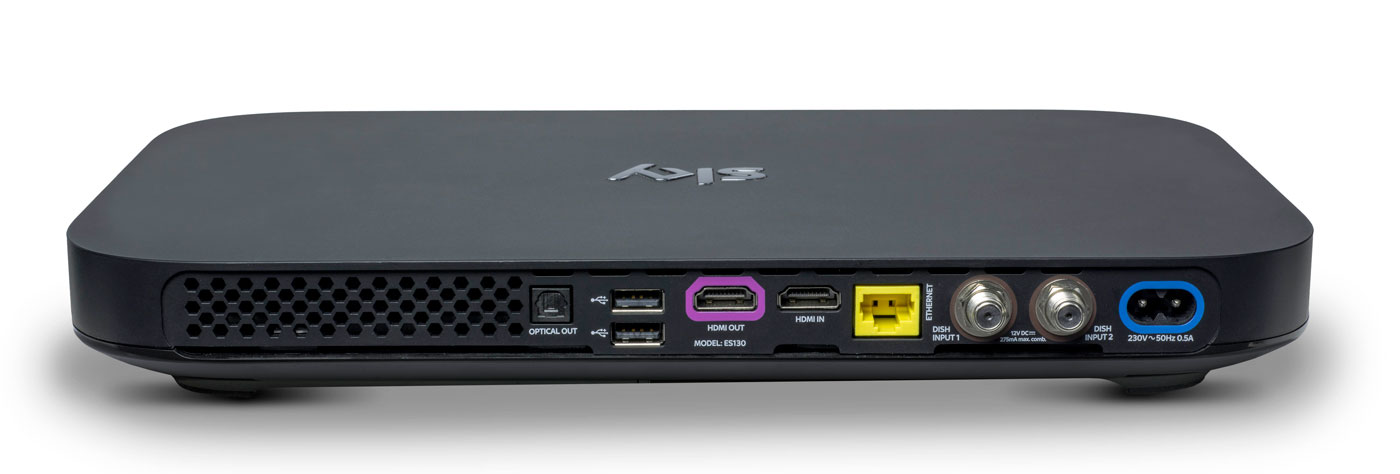
Do you remember how massive the original PlayStation 3 looked, and how tiny the PlayStation 4 was by comparison? The Sky Q boxes are similarly eeny-weeny, to the point where it’s almost shocking to see them side-by-side with the older model. The hardware measures just 330 x 210 x 43mm, down from the 364 x 255 x 73mm of the Sky+HD. In order not to break the sleek, elegant lines of the front, the viewing card slot is now hidden on the right-hand side. Up front, you’ll find a WPS button, the Q logo (which, when pressed, will cause your remote to bleep to make itself known) and an IR sensor. Round back, you’ll find the usual coterie of ports, including power, HDMI (x2), USB (x2), Ethernet, two dish connectors and an optical audio-out.
The Mini, meanwhile, measures in at 232 x 155 x 35mm and looks like a version of the main Q that’s been shrunk in the wash. Round back you’ll find slots for Ethernet, HDMI, 3.5mm audio-out, optical out and USB. If there’s one negative thing I could say about the Q Mini, is that I expected it to be smaller. Sky is an investor in Roku and the latest Now TV box (with a Freeview tuner) is a lot more diminutive than its wider and thicker cousin.
Remote

Here’s the bad news: your existing Sky remotes (even the branded ones) will not work with Sky Q. Except for the Sky Accessible remote, that is, which is designed for people with reduced dexterity and/or poor vision. For the rest of us, the company actually makes two controllers for the new gear: the futuristic Touch Remote, and a more traditional button remote that comes with the Mini.
For the purposes of this review, Sky let me borrow both a Touch Remote and a spare Mini remote that was paired with the Silver. This has turned out to be a Very Good Thing, because the former handset, for all of its bells and whistles, is going to be very divisive. Even Sky employees, off the record, have admitted that they struggle to use the newer handset and sometimes find themselves reaching for the simpler alternative.
The top third of the Touch Remote is dominated by a black, circular clickpad that you’ll use to gently scroll through the Q’s vast menus. The clicks are satisfying and the swipes have a real weight to them, and the further you pull south, the faster you scroll. That’s fine, and it’s really the only way to get around the significantly more dense UI that Sky Q is offering.
The issue comes with the capacitive playback controls that are housed in a half-ring above the clickpad. The bar offers a Play/Pause button and two arcs that end in a Rewind or Fast Forward command. Rather than a hard press, a dainty tap is all you need to get things moving, and you can actually slide across the arc to dictate the speed of play. Those with long memories will be reminded of the jog dial wheel that you’d find on super-expensive VHS players, updated for the 21st century.
Written down, it sounds fantastic, and futuristic, but in reality there are problems with how subtle the remote requires you to be. Linger too long, or press too heavy on the buttons, and you’ll find yourself picking the wrong option. Or you’ll press play, and follow through and put it back on pause again because the sensitivity is far too high. I’ve also had the remote on the sofa beside me, and my upper thigh brushing the controls is enough to jerk the picture into a frenzy of rewinding.
The Mini remote ditches the clickpad and capacitive controls for hard buttons, and I’ve asked plenty of visitors to try the both on for size. While I find the Touch Remote to be problematic, others have struggled to use it altogether, and express a liking for the simpler, nicer Mini remote. It’s less elegant for pawing through all of the Q’s menus, but it’s certainly easier to use in general.
I’ve always had a soft spot for the Sky+HD remote, with its easy-to-memorise control scheme and clear separation of sections. The Q remotes are a challenge to that muscle memory, not to mention that the “Back Up” button, an easy way to dismiss menus and overlays, is now a thing of the past. Instead, you have the “Home” button (which takes you to the Q Menu) and “Exit,” which lets you walk backwards one step, like a browser’s back button.
The other button below the clickpad is the apps menu, which lets you access apps for Sky News, Sky Sports News, Photos, Weather and Sky Help. I’m not sure that the menu deserves such a prominent button placement, especially given the limited utility of those features. It’s my hope that, down the line, Sky will let you add and remove other apps to the panel at your whim. For instance, it makes perfect sense to add YouTube to that list, given that’s where so many videos people look for are now housed.
Another annoyance is the loss of a dedicated subtitles button, great for when you need to translate a mumbled line of dialogue in a TV show. Previously, you could simply rewind a moment, hit subtitles and finally understand what the actors are saying when they move away from the microphone. Now, you have to come out of the show you’re watching, dive into the overall settings menu, find the accessibility panel and activate subtitles for all programs, forever. Suffice to say, it’s too involved to bother with, so I just live a life of ignorance.
Software

Shortly after the launch of Sky Q, BSkyB allegedly received a complaint from the BBC saying that Sky was deliberately burying public service channels. I can see why the BBC would feel this way, and there may be some legitimacy to its complaint, but the whole point of Sky Q is to bury all TV channels. Enter the home screen and you’ll be first presented with the Top Picks section rather than the channel menu. Hit the silver Sky logo at the top of the remote, and you’ll be dropped straight into your recordings.
It’s here that Q really earns its keep, simply by using My Q and Top Picks as a way of serving up content straight to your eyeballs. The latter is curated by flesh-and-blood humans at Sky HQ, while the My Q menu looks at what you’ve already watched and will make suggestions based on that. Every time I’m bored and begin to think about channel flipping, I never have to bother, because some new tidbit is being offered to me. If there’s one complaint, it’s that the content is skewed towards commercial stations and Sky’s own output. For instance, I’m currently being offered shows from the likes of ITV, Channel 4, Sky Atlantic, Nickelodeon and Disney XD. Part of that, I hope, is because it’s not yet learned that, as an adult, I’m not Nickelodeon’s typical audience.
There’s also an on-demand layer which will give you access to the catch-up TV platforms from all the main channels, including BBC iPlayer. But, while I’m not going to assume malice here, it does seem strange that BBC shows aren’t seen inside any of the curated pages. Unless there’s some technical or legal boundary that’s preventing proper integration, it’s enough to propel a half-decent conspiracy theory.
Sky’s previous channel menu was already vastly superior to pretty much everything else on the market. As such, the firm has taken the “if it ain’t broke” approach to the Q’s navigation menu, which has had a minor polish. The video preview has been moved from the top right corner to the left rail, leaving more vertical room for the channel list itself. It also uses smaller, clearer fonts that allow Sky to fit several more entries on the screen without scrolling.

Whoever’s in charge of channel ordering at Sky really does need to have a long think about user experience. It’s 2016, and I’d wager that HD is dominant enough now to end the days when HD channels are ghettoized in the channel order. It’s insane to think that channels 101 and 103 — BBC One and ITV One — are broadcast in SD. Their high definition counterparts, meanwhile, languish as channels 115 and 178. Clearly, there are contractual, technical and legal wrangles that probably prevent this being changed on Sky’s part, although I wish there weren’t. Perhaps the company should offer a setting that lets us re-order the list to end such a user-hostile move.
What has changed, and for the better, is the in-channel selection, for those moments when you don’t wanna stop watching your current show but are curious what’s about. Pressing up or down lets you sift through the channels in chronological order, but brilliantly, each one now comes with a video preview of what’s going on. I foresee this being a great way to avoid commercial breaks during your favorite shows, by switching to something else and using the preview as a second screen.
There are plenty of neat little touches, like being able to download a HD film in full if you catch it part-way through on a Sky Cinema channel. Similarly, hitting record on a show now presumes you want a series link, rather than just to catch that one individual instalment. Similarly, watching the first episode of a TV series on-demand will prompt the Q to download the second, ensuring you can bingewatch as if you were engrossed in your favourite Netflix show. Pushing shows to your tablet is relatively easy, although it’s an annoyance that the Sky Q app can’t be used on smartphones as well. After all, I do most of my remote TV watching on my 5.5-inch smartphone rather than on a 9.7-inch tablet.
Pricing
Sky Q, with all of its whizzes and bangs, now occupies the rarified space on top of the firm’s product line. But, as much as +HD is now the norm, Q is already getting cheap enough that people will begin to upgrade as a matter of course.
A Black Q (aka the 1TB box) will currently cost you £32 a month, but that doesn’t include any other channel bundles such as HD, box sets, movie or sport packs, and you can’t use the multiscreen feature either (an extra £12 per month). Silver (aka the 2TB box) is no costlier, but the one-off setup cost jumps from £49 to £99.
To give you an example of a fully featured package, a 2TB box with all the HD, movie, sports channels and multiscreen (with a free Mini thrown in) costs £86 per month with a £10 setup fee. Depending on what options you select, though, this or that will be discounted, like the £10 one-off charge (as opposed to £49 or £99) if multiscreen is included in your package. The pricing structure is an absolute mess right now. The fact 4K channels are included with the most basic of Silver subscriptions, yet you have to pay extra for HD channels, is a testament to that.
I know plenty of people for whom a Sky subscription with all the trimmings is a sacred part of the family budget. A sum like that, however, may be on the fringes of many people’s purchasing power — though a £74 per month Sky+HD subscription is equivalent to an £86 Sky Q package, albeit without the Q’s fancy value-added features. If you can afford it and you want the best, then go knock yourself out. If you can’t, then I wouldn’t suggest worrying over it, as I’m sure patience will ensure you’ll get cheaper access to it soon enough.
Wrap-up
I like watching TV, and my home setup can access Virgin Media, Netflix and Amazon Prime, which I have on almost constantly. Since I’ve been testing Sky Q, I can count the amount of times I’ve felt compelled to open Netflix and Amazon Prime on a single hand. And most of those were to watch the latest episodes of (AMC’s new Amazon Prime exclusive) Preacher. I already had access to a compelling list of movies and TV shows, and Sky’s content library isn’t so much better that I’m being swayed unnecessarily.
In fact, it’s more that the Q hardware is very specifically designed to serve up fresh, relevant stuff that I’ve not yet come across. Every time I go back to the home screen, it’s pulled up some new treat to dangle in front of my eyes, knowing that I’ll bite. Aside from watching the coverage of the European Championships, I’ve barely scrolled through the TV guide at all. Why would I need to? After all, why spend hours looking for something to watch when my set-top box can do the work for me?
This is the killer feature of Sky Q, and the hardware’s bells and whistles are secondary to simple editorial and algorithmic curation. By keeping you constantly hooked on a drip feed of stuff that the box thinks you’ll like, you very quickly forget all about the chore of scrolling through channels. With Sky Q, on-demand video really is king.
Fitbit’s new Charge and Flex track every type of workout
It’s no surprise that Fitbit’s been planning a major update to its fitness trackers. And about time, too. The two-year-old Charge and three-year-old Flex are in dire need of a tune-up to help the company maintain (or grow) its narrow lead in the industry, after it lost a significant amount of market share to newer rivals. As a result, the new Charge 2 and Flex 2 boast a decent set of aesthetic and functional upgrades that could help take on the competition, including specific workout tracking (finally) and guided breathing exercises.
Despite the improvements, the Charge 2 and Flex 2 will cost the same as their predecessors when they arrive this fall: $150/£130 and $100/£80 respectively. I’ve been wearing preview versions of both new trackers for a few days and while I’m impressed by the improved functionality, I still wish they didn’t look so… Fitbit.
Cosmetically, the biggest change to the Charge is its screen size. The Charge 2’s display is four times larger than the original. Instead of one thin horizontal strip near the top of the band, you now get a much more useful oblong that takes up nearly all of the device’s front. It looks like a more blocky Gear Fit 2.
This extra screen space allows for a selection of watchfaces that can display more useful information at a glance than before. I picked one that showed the time, steps taken and current heart rate whenever I lifted my wrist — which more than satisfied my endless desire to know how my ticker was doing.
That heart rate sensor is one of the biggest appeals of the Charge 2 and its predecessor. Fitbit’s “PurePulse” optical HR sensor and app combo can tell you how much time you have spent in specific cardio zones. In the past few days, the app said I spent most of my activity in Fat Burn, and some time in the Cardio and Peak zones.
Cardio zone information is useful for those who are serious about their fitness, but not so much for the average sidewalk slogger. To make the feature more meaningful for the rest of us, Fitbit’s added a Cardio Fitness Score component that lets you gauge your heart health against people of your age range and gender. Luckily for my ego, it turns out my resting heart rate is considered average to fair for women my age. Sorry to those of you who fall below average on this curve.
Steps are forgettable, but seeing my hear’s performance right there actually spurs me to do something about my health. It’s this type of personal info that will ultimately keep me wearing the Charge 2. But the new tracker isn’t just there for your workout. It’ll help you recover after. Fitbit implemented a new Guided Breathing mode that, like other stress-fighting wearables, will coach you through breathing exercises to help you wind down.
It’s a well-intentioned feature that’s quite poorly executed. You get the option of two- or five-minute sessions that you launch from your wrist. During these session, you’ll have to look at the screen, inhaling when a circle expands, exhaling when it contracts. Throughout this, the Charge is measuring your pulse to tell how quickly and deeply you should be breathing.

Maybe I should be more fit than I am right now, but holding up my arm for two (not to mention five) whole minutes while trying to breathe in sync with the Charge was more strenuous than it should be. I couldn’t comfortably see the circle unless I held the my wrist up in front of me, and the device had to be on me to detect my pulse. Fitbit could easily put this tool in the app to let audio guide you and still have the tracker send heart rate information to your phone.
Other Charge improvements include auto exercise recognition and multi-sport tracking to record more meaningful data for specific workouts such as running, biking and weights. The wearable can now tap your phone’s GPS to show stats such as pace and distance in real time, as well as save a map of your route to the app. The Charge 2’s battery lasted about three days on a half charge, which is similar to the Charge HR’s touted five-day endurance. The new-gen tracker also maintains its sweat and rain resistance. A lot of the abovementioned features already exist in other trackers, however, so Fitbit isn’t doing anything really groundbreaking.
Many of these tools — such as auto exercise recognition and auto sleep tracking — are also available in the Flex 2, which got quite a major redesign. Instead of looking like a smaller, thinner Charge with a horizontal row of LED lights at the top, the new Flex looks more like a Jawbone Up or Misfit Ray, with a more rounded, cylindrical tracker housed in a narrower band.
I really don’t have much to complain about the Flex 2. It’s now swim-proof so you can use it to record laps at the pool or keep it on in the shower if you wish. During my time with it, the Flex 2 was comfortable and accurately measured my activity and sleep, which is all its target audience would really care about anyway. The most interesting change for the Flex 2 is the set of attractive, interchangeable metal and leather accessories that it will launch with.
Although the new trackers still adhere pretty much to the brand’s familiar “Fitbit” shape, I applaud the company for at least knowing the importance of a wearable’s design. It has partnered with fashion houses such as Tory Burch, Public School and Vera Wang to make better-looking accessories to up its sartorial appeal. I also love the upcoming new finishes and bands for the Alta and Blaze, which definitely earn the company some style points.
Unfortunately, Fitbit has failed to impress me aesthetically. Even though its new bangle and necklace cases for the Flex 2 are prettier than Misfit’s similar accessories, Fitbit is simply playing “Who Wore It Better” with its competitors. As an industry leader, Fitbit could easily be setting trends, but it seems to be lagging.
Beyond aesthetics, the Charge 2 and Flex 2 are decent, well-rounded fitness trackers that seem to do what they promised. But there are plenty of other companies out there that do the same, or maybe even better. Fitbit doesn’t only have to contend with the likes of other fitness brands such as Jawbone, Misfit, Nike or Garmin, but also powerhouses such as Samsung, Microsoft and Apple. Even the upcoming series of Pebble smartwatches for 2016 focus on fitness, promising to do what the Charge 2 can and more. Fitbit needs to prove it can do better than its rivals if it hopes to recoup its lead in the game, and the new Charge and Flex just don’t seem to be enough.
T-Mobile tweaks its One plan to address your complaints
T-Mobile’s One plan rubbed a lot of people the wrong way: sure, you got unlimited on-device data, but anything better than 480p video or 2G hotspot tethering was going to cost you an arm and a leg. The (un) carrier isn’t deaf to your complaints, though. It’s modifying its strategy to not only tackle key gripes with the One plan, but add a second plan that covers what gaps are left. The base One plan (still $70 per month for the first line) now includes 512Kbps unlimited hotspot data instead of 128Kbps — still pokey, but you can at least do more than check your email. Also, you’ll have the option of daily HD passes that, at $3 per day, are decidedly more affordable when you only want high-quality video for a weekend trip.
As for that second plan? It’s called T-Mobile One Plus, and it really amounts to bundling all the previous add-ons into one more reasonable package. The $25 extra per line that you would have paid just for HD video now gets you unlimited HD passes (you have to turn it to always-on yourself, oddly enough), LTE hotspot data and twice-as-fast data roaming in over 140 countries.
Both the modified One plan and the new One Plus tier will launch on September 1st, or 5 days earlier than originally planned. Clearly, T-Mobile is feeling the heat from rivals who’ve stepped up their game — all four major networks now have at least ‘overage-free’ plans, and Sprint’s unlimited HD video plan is still less expensive than One Plus at $80 per month (albeit capped at 8Mbps for video and game streams). Not that we’re about to object to T-Mobile changing its tune. The One Plus plan doesn’t cap anything beyond the potential for throttling after 26GB, and those who stick to the base One plan are getting a much better deal before it’s even available.
Source: T-Mobile
Amazon and Pandora Nearly Ready to Launch Apple Music Rivals
Amazon and Pandora are closing in on licensing agreements with the world’s largest record labels to launch their own streaming music services later this year, reports Financial Times.
Both subscription-based services are expected to cost $9.99 per month, a price that has become the industry standard, and compete with heavyweights like Apple Music and Spotify.
Amazon’s offering could launch as early as September, according to the report, while Pandora is said to be making progress towards debuting its service later this year.
Reuters first reported Amazon’s plans to launch a standalone streaming music service in June, followed by a Recode report last week claiming the online retailer is also working on a $5-a-month subscription music service that will be exclusive to owners of the company’s internet-connected Echo speaker.
Amazon currently sells individual songs or albums through Amazon Music, while Amazon Prime subscribers can stream Amazon music, playlists, and radio stations for free, but the selection is limited compared to Apple Music and Spotify.
Pandora’s ambitions to launch its own subscription music service, likely based on its acquisition of “key assets” from Rdio in 2015, were first reported by The Wall Street Journal earlier this month. The company plans to offer two price tiers by also slightly tweaking its existing $5 per month ad-free option with select new perks like skipping songs and offline listening, the report said.
Pandora currently offers customers in the U.S., Australia, and New Zealand the ability to listen to free, ad-supported radio stations centered around particular artists or songs, rather than offering on-demand listening like Apple Music. By offering only randomized, radio-like stations that prevent users from playing specific songs, it has been able to bypass licensing agreements with major record labels.
Tags: Amazon, Pandora, Apple Music
Discuss this article in our forums
 AIVAnet