


Now Google Cast is built into every Chrome browser
Like Gmail prior, it honestly seems like Google Cast has been in beta forever. Well, it’s actually only been two years according to Google, and that test period ends now. Cast is directly built into Chrome as of today and anyone can use it without having to install or configure additional add-ons or extensions. Now everyone can throw individual browser tabs to your Chromecast — or even your desktop — in addition to services like Netflix or Google Play Music.
Maybe now that the software is out of beta we can get a totally new Chromecast that has stronger innards all around. Maybe. The folks who Google says watched and listened to 50 million hours of media using the HDMI dongle in the last month would probably appreciate it.
Source: Chrome Blog
New iPad Pro With Faster Display and Wider Apple Pencil Support to Launch Next Year
Apple is planning new hardware and software features for iPad that cater to professional users, according to Bloomberg, including a a new iPad with faster display technology that allows for smoother on-screen zooming, panning, and scrolling.
KGI Securities analyst Ming-Chi Kuo previously said Apple would release a 10.5-inch iPad Pro model next year alongside a 12.9-inch iPad Pro 2 and a “low-cost” 9.7-inch iPad model. The fate of the iPad mini remains uncertain, but it is presumable that Apple could discontinue the 7.9-inch tablet due to its lack of Apple Pencil support and relatively close proximity in size to 5.5-inch Plus-sized iPhones.
The new hardware will be completed by wider iOS support for the Apple Pencil, the report adds. Apple is reportedly planning to introduce the new software features in a subsequent iOS 10 update in the first half of 2017, but may decide to hold back on the improvements until iOS 11 is released later in the year.
Apple has considered allowing users to annotate objects in many applications across the whole operating system, including in Mail, the Safari web browser, and iMessage, similar to what Samsung Electronics Co. offers on its Note smartphones, the person said. Currently, Apple only supports Pencil functionality in specifically developed apps.
Apple saw its iPad revenue grow slightly for the first time in 10 quarters in July, and these improvements could help the company continue that trend.
Related Roundup: iPad Pro
Tags: bloomberg.com, Apple Pencil
Buyer’s Guide: 12.9″ iPad Pro (Neutral)
Discuss this article in our forums
Apple to Release New MacBook Pro and Air as Early as October, AMD iMacs and 5K Display With LG Also in Works
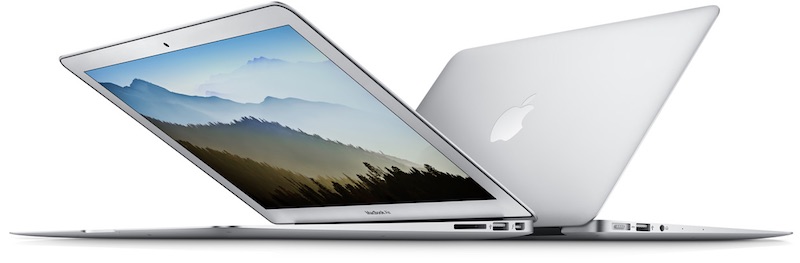
Apple is planning to refresh its Mac lineup, including the MacBook Pro and MacBook Air, as early as October, according to Bloomberg. The report also claims Apple is working on a standalone 5K display in partnership with LG Electronics, while it plans to update iMac models with an option for new graphics chips from AMD.
The report reiterates that the new MacBook Pro will be thinner and include an OLED-based touchscreen strip along the top of the flatter keyboard, which will present functions that dynamically fit the current task or application, as well as integrate Touch ID to enable users to quickly log in using their fingerprint.
For example, if a user is on their desktop, the screen will show a virtual representation of the standard function row, which includes brightness and media controls. When in an application, the virtual row will show options specific to the task at hand, but volume controls and a switch to show the default functions will always be present.
Apple has reportedly named the feature “Dynamic Function Row” internally, but its official name may differ when announced.
The tweaked MacBook Air models, meanwhile, are said to include multipurpose USB-C ports, which makes the inclusion of Thunderbolt 3 a possibility. No other details were shared about the planned MacBook Air and iMac refreshes.
Apple’s plans to work with LG on a standalone 5K display surface two months after it discontinued the five-year-old Thunderbolt Display. It remains unclear if the monitor will be based upon the Retina 5K iMac, and it is also unclear if the report’s broad late 2016 timeframe for “some of the new Mac products” includes the display.
The report makes it nearly certain that the focus of Apple’s just-announced September 7 media event will be on the iPhone 7 and the second-generation Apple Watch, the latter of which has now been confirmed for the event. Apple will also provide updates about its software, including iOS 10, macOS Sierra, watchOS 3, and tvOS 10.
Related Roundups: iMac, MacBook Air, Thunderbolt Display, MacBook Pro
Tags: bloomberg.com, LG, USB-C, AMD
Buyer’s Guide: iMac (Don’t Buy), MacBook Air (Don’t Buy), Displays (Don’t Buy), Retina MacBook Pro (Don’t Buy)
Discuss this article in our forums
Garmin Fenix Chronos Release Date, Price and Specs – CNET
Garmin isn’t the first name that comes to mind when you think of luxury, but the fitness company is trying something new with its latest sport watch. The Fenix Chronos is a $1,500 (£1,100) multisport GPS watch with a titanium body and band, an ultra-durable sapphire crystal display, heart-rate sensor and a ton of tracking features. It’s strong, yet lightweight, but also very expensive and very big.
The Chronos also comes in a stainless steel option that is slightly more affordable: $900 (£850) with a leather strap or $1,000 (£950) when paired with a 316L stainless steel band. Aside from the titanium and stainless steel casing, all units are based on Garmin’s high-end Fenix 3 HR watch and have the sapphire crystal display, heart-rate sensor and other features.
Unboxing Garmin’s elegant Chronos sport watch…
See full gallery


1 – 4 of 21
Next
Prev
Features
The Chronos has an omni-directional GPS and GLONASS antenna for tracking a variety of different activities, including running, biking, swimming, triathlons, hiking, climbing, skiing, rowing, paddle boarding and golfing.
Other features include all-day activity tracking for things like steps, distance, calories burned, sleep and heart-rate, as well as smartphone notifications when connected to an iPhone or Android phone. The watch also includes auto stop, auto pause, running dynamics (a feature that can provide feedback on your runs when using a special heart rate chest strap), a recovery advisor, an altimeter, barometer and compass, and is waterproof up to 100 meters (about 328 feet).
 Sarah Tew/CNET
The Chronos is essentially a Fenix 3 HR (a watch I like a lot but find a bit too big) in a slimmer and more premium shell with some key differences. The optical heart-rate sensor on the back doesn’t bulge out as much, which makes it a little more comfortable to wear. It also doesn’t include Wi-Fi (it relies solely on Bluetooth to upload data) and has a smaller battery (180mAh on the Chronos compared to 300mAh on the Fenix 3 HR).
Battery life
You’re trading style for performance with Chronos when it comes to battery. Battery life is good, but not as good as the Fenix 3 HR. The Chronos will last up to 13 hours with an active GPS signal (3 hours less than the Fenix 3 HR) and up to a week as a watch and activity tracker.
A special UltraTrac mode will extend battery life to 25 hours when using GPS, but it disables the heart-rate sensor and reduces how often the GPS is pinging the satellite.
 Sarah Tew/CNET
Premium from the start
The Chronos is like no other Garmin device before it. Similar to the Huawei Watch and higher-end Apple Watch models, all three Chronos watches are packaged in a premium wood box. In addition to the watch, the box contains an instruction manual, charging cable and a second silicone watch strap (the straps have a quick release which makes swapping them quick and easy).
I’ve really enjoyed wearing the stunning Chronos the past few days. It has all of features that you could ever need for training, competing or walking around town, plus it doesn’t look like a normal sport watch. The Chronos can easily be paired with a dress shirt or suit jacket, although it is big and could look a little funny on smaller wrists.

Here’s the Chronos with the silicone watch band on.
Sarah Tew/CNET
Should you buy it?
Almost everyone reading this is better off getting a Fenix 3 HR or one of Garmin’s other watches. Technology is changing at a rapid pace, and $1,500 (or even $900) is a lot of money to spend on a device that will be outdated in the next two or three years.
The Chronos doesn’t do anything new, but if you put a premium on design and have some extra cash laying around, the watch has everything a budding athlete with a large checking account could ask for.
Alcatel Fierce 4 Release Date, Price and Specs – CNET
 Alcatel
Who says a big phone has to cost the moon? Alcatel’s Fierce 4, a 5.5-inch beast, offers large-screen lovers a budget deal. Really budget. In the US, it sells for $69 with prepaid carrier MetroPCS. T-Mobile will sell it in the fall, but we don’t have pricing yet.
That’s a shockingly low price. And with it comes the typical specs trade-offs to make the phone more affordable. Like the 720-pixel screen resolution, which is low for an expansive display, an 8-megapixel camera and the lower-powered processor. This is a phone for first-timers, for casual users and for people who really just need an inexpensive phone.
Hardware inside
- 5.5-inch HD display with 1,280×720-pixel resolution
- 8-megapixel camera
- 5-megapixel front-facing camera
- 1.1GHz quad-core Qualcomm Snapdragon processor (MSM8909)
- 16GB storage; 2GB RAM
- 2,500mAh battery
- MicroSD card up to 128GB
- Android 6.0 Marshmallow
Sensor tech predicts when senior citizens are at risk of falling
Falls are dangerous for anyone, but they can be particularly worrying for senior citizens whose bodies aren’t as resilient as they used to be. University of Missouri scientists may have a way to prevent those slips. They’ve developed a sensor system that measure changes in your gait speed and stride length to predict likely falls up to 3 weeks before they happen. If you slow down or shorten your stride in a significant way, it can alert health care workers (complete with imagery) so that they can take action before there’s an injury.
Unlike many motion sensors, you don’t need to wear anything on your body. You could string devices around the home, and wouldn’t have to change your behavior or remember to charge a device. And that’s particularly important given the team’s goals. The invention could not only save lives, but extend the independence of seniors by another few years — they could walk with greater confidence.
Via: EurekAlert, TechCrunch
Source: University of Missouri
8 Pokemon Go myths you should stop believing – CNET

The truth is, you can get crappy Pokemon from any egg.
Screenshot by Alina Bradford / CNET
There are a lot of Pokemon Go tips out there. Some are helpful and a bunch of them are just fiction. I tried out a handful of tips and did some research to zero in on the stinkers. Here’s what I found.
Myth: Hatch this egg to get that Pokemon
There have been a bunch of charts circulating the internet that list what types of Pokemon hatch from the 2 km, 5 km and 10 km eggs. These charts are useless.
While you are more likely to get a rare Pokemon from a 10 km egg, according to Niantic, there have been plenty reports of people getting rare Pokemon from 2 km eggs. I have also personally found that you can get commons in a 10 km egg and rarer Pokemon in the 2 km and 5 km eggs.
Myth (sort of): Water types pop up near water and grass types pop up in grassy areas.
Niantic says, “Some wild Pokémon appear only in certain environments and climates. For example, some Pokémon may appear only near lakes, oceans, or other bodies of water.” Since Niantic said it, I’m sure it’s true, but look at the wording. They say “some” Pokemon.
The majority of Pokemon seem to spawn in totally random places that have nothing to do with their type. For example, I keep catching Staryu, a water-type Pokemon, in parking lots.
Myth: You can catch legendary Pokemon; here’s how.
If I had a Pokemon for every time I saw this myth I would have caught ’em all by now. Nope. Legendary Pokemon haven’t been released in the game, so no matter what someone tells you, you aren’t getting one. Some people have gotten their hands on some, but Niantic told IGN this was a mistake and the Pokemon were revoked.
Beware of third-party apps or hacks that claim to allow you to catch legendary Pokemon. These can get you banned from the game.
Myth: Get the ball through the target.
This one comes up a lot in forums. Some say that to capture a Pokemon your ball needs to go through the colored target ring. Aiming for the circle is fine, but you don’t need to get your ball inside the hoop to make a capture. This isn’t basketball.
Niantic says to throw your ball when the target is at its smallest and to fling your ball at the Pokemon, not the target. When the target is the smallest you can’t throw a ball through because the hole is too small for the ball to fit through.
I’ve found for better catches you need to hold your finger on your Pokeball until the target shrinks, flick the ball and aim for the Pokemon’s rump or shoulders. This throw skims the top of the target hoop.
Some argue that you get Nice, Great or Excellent throws if your Pokeball hits the Pokemon inside the colored inner ring. I can’t say this is 100 percent true or false, but I haven’t really seen any evidence to prove it. In fact, Nice, Great and Excellent throws seem to be somewhat randomly doled out.
Myth: You can get your Pokeball back.
I’ve tested this one so much over the last month that my finger hurts. After you throw the Pokeball, your ball count goes down and no matter how enthusiastically you tap the rolling ball, your ball count doesn’t go back up.
Myth: Incense doesn’t work unless you walk around.
I particularly enjoyed this research. Incense still attracted Pokemon while I was lying in bed or on the couch. The myth is partially true, though. If you move around, the incense does work better than if you’re standing — or sitting — still.
A Reddit poster found the code that governs spawning with incense to shed some light on the mystery. The code says that people who stand still will find a Pokemon every 300 seconds. People who are moving, though, will find Pokemon every 60 seconds. The distance you need to travel to find Pokemon more quickly is 200 meters (.2 kilometers).
Now, people can argue that this code may not be in use or the code might not actually work the way the poster suggests. I’ve done some testing and it seems to work out. Others on Reddit and other forums have also found that walking around does seem to make the incense work better.

Pokemon Go code proves that Pokemon are attracted to incense when you’re sitting still.
Screenshot by Alina Bradford / CNET
Myth: Don’t waste your time on Weedle, Pidgey, Caterpie and Rattata Pokemon.
Weedle, Pidgey, Caterpie and Rattata Pokemon seem pretty impractical for battle, but they still have their uses. There are tons of them everywhere and they are easy to catch. Catching a lot of Pokemon in a short amount of time will help you level up faster. If you waited to catch only “good” Pokemon it would take a very long time to level.
Plus, they take only 12 candy to evolve, so you can do many more evolutions and collect massive XP. Save all of your evolutions and fire up a lucky egg while you’re mass-evolving to double your XP.
Myth: You’ll never be able to catch ’em all because some Pokemon are only found in certain locations.
Yes, there are region-specific Pokemon, but don’t give up hope. You can still get these Pokemon by hatching eggs, supposedly. This Reddit thread is full of people who have claimed to hatched region-specific Pokemon from other countries. There are also YouTube videos and many other forum posts and reports about getting region-specific Pokemon from eggs. This isn’t exactly proof, but Niantic is keeping quiet on this aspect of the game.
These are the coolest Pokemon collectibles…


1 – 5 of 19
Next
Prev
The new Fitbit Flex 2 and Charge 2 are worth your time

What are the new Fitbit Charge 2 and Fitbit Flex 2 and where can you get them?
Fitbit always seems to offer the right product at the right time. It anticipated the rise of fitness wearables all the way back in 2008, when it debuted the original titular product, and has slowly iterated on that basic design since its first commercial undertaking, the Ultra, in 2011.
Fitbit had its iPhone moment in 2013 when it debuted the Flex, its first wrist-worn wearable, to much acclaim. The proposition was simple: a small module that lived inside a comfortable rubberized band, that tracks steps and sleep and uploads them to the cloud through an Android app.
Since then, the company has enjoyed plenty of success with follow-up products like the Charge and Charge HR, and no shortage of controversy (and lawsuits) from people complaining that the metal in them causes irritation. Fitbit even fully recalled its Force band in 2014 stemming from a high number of complaints.
But through all of this, it has maintained a strong dominance in the fitness tracker market, even as companies like Apple and Google have encroached with more expensive and far more capable (and confusing) alternatives. Now, Fitbit is debuting two new products, sequels to its two most popular lines, the Flex 2 and Charge 2, and they feel like the products that, in many ways, should have happened years ago.
Read more at iMore
Save $160 on the Nougat-ready 32GB Nexus 5X right now!
Right now you can pick up the 32GB Nexus 5X for just $240 at eBay, a savings of $160 from its regular price. Google has already pushed the updated factory images out of Android Nougat for the phone, so if you are looking for an inexpensive way to get the latest version of Android, this is a great option. With its 5.2-inch display and 32GB of internal storage, this deal makes for a great way to save some money on a new phone or a backup phone even more affordable.

You can pick between carbon and quartz, but unfortunately the Ice is already sold out. If you are looking for the 16GB model, you can also find that on sale for $240, so it’s probably best to just get the extra internal storage since you can’t add a microSD card to it.
See at eBay
Nexus 5X
- Nexus 5X review
- 5 things to know about the Nexus 5X
- Read the latest Nexus 5X news
- Learn about Nexus Protect insurance
- Learn about Project Fi
- Join the Nexus 5X forums
- Nexus 5X specs
Google
B&H Photo
Amazon
What you need to know about DT Ignite, the hidden bloatware your carrier may have installed
What the heck is going on with this app called DT Ignite?
Right about now, half of us are ready to jump to the comments and start hollerin’ about DT Ignite, while the other half is scratching their heads wondering what we’re talking about.
We’re talking about a piece of carrier bloatware named DT Ignite. It’s an application written by Digital Turbine (thus the DT part) that’s used to pre-load other applications onto your phone. Some folks are having issues with a recent Verizon HTC 10 update and DT Ignite re-enabling itself or running after it’s been disabled, but the app itself is not new. And yes, it’s something you would never install yourself and is bloatware in any and every sense of the word, but it’s not the demon some make it out to be.

As mentioned, DT Ignite is used to install other apps onto your carrier-branded phone. While people tend to point fingers at Verizon when talking about it, DT Ignite is used by a good number of carriers — AT&T, Verizon, T-Mobile, US Cellular, America Movi, Deutsche Telecom, Vodaphone, Singtel, Cloudphone, MTS and more according to the Digital Turbine website.
Some folks seem sure that the technology is licensed to Sprint for the Sprint Zone app, but I can’t find any evidence either way. Folks using Rogers are also saying they see DT Ignite installed, but the company is not listed on DT’s page. Not all phones from these carriers have DT Ignite installed, but many — including the Galaxy S7 that most people are buying — do.
People tend to point fingers at Verizon when talking about DT Ignite, but is used by AT&T, Verizon, T-Mobile, US Cellular, and carriers in Europe and Canada
About those Verizon HTC 10 update bugs some people are saying they see — we’ve heard three different issues:
- DT Ignite re-enables itself after the recent 1.82 update. This may be expected behavior if a new version of the app is installed. Just disable it again.
- DT Ignite hides from the App Manager after the 1.82 update. It doesn’t — you have to show system apps in the App Manager to see it.
- DT Ignite runs intermittently in the background even if disabled after the 1.82 update. Only a few people are seeing this bug. This isn’t normal behavior and more troubleshooting is needed. Or just reset your phone and let DT Ignite do its thing again, then start uninstalling and disabling.
Carriers use DT Ignite to install the apps they want you to see when you set up your phone for the first time or after it’s been factory reset. It also can spam your notifications with ads for suggested apps at any time. You also agreed to allow it to do both when you clicked accept without reading during setup. It doesn’t install any apps on its own after the initial setup, but it does run in the background.

Why it sucks: It installs apps you don’t want using your monthly data allotment to do it. It also spams your notification bar with ads for apps like Soda Crush.
Why it doesn’t suck: Soda Crush doesn’t have to be pre-installed to get you to know it’s there.
We agree that having an application that can install crap you don’t want is not a good thing. Not at all. But the alternative is worse. DT Ignite has one very redeeming property: using it is better than the old method of installing this crap into your system partition where you can’t remove it. And while we hate having it, we have to remember that we agreed to it being there.
The good news is that once it’s done doing its setup shenanigans, you can disable it. If you head to the App Manager section of your phone settings and allow it to show system apps (look in any menus or overflow areas) it’s right there where you can click the button to shut it down. And that’s the first thing you should do after you’re done uninstalling the apps it randomly dropped onto your phone.
We can wave pitchforks and bundle kindling as we rail against carriers and shoddy practices like this, but the fact remains that we keep buying phones with this sort of thing installed. If you just can’t deal with DT Ignite or any other bloatware app, you should stop buying carrier phones. If you want or need to buy carrier phones, you should accept the fact that it happens and will continue, then judiciously uninstall or disable them and stop worrying about it.
 AIVAnet