


The best cheap compact camera
By Amadou Diallo
This post was done in partnership with The Wirecutter, a buyer’s guide to the best technology. Read the full article here.
If you want to buy a decent and basic point-and-shoot camera at an affordable price, the Canon PowerShot Elph 350 HS (the IXUS 275 HS outside of the US) is the camera you should get. After 32 hours of research, considering 24 different models, and doing some real-world shooting with the best of them, we found that the 350 HS is both simple to use and capable of delivering sharper photos with more-vibrant colors and cleaner images in low light than the competition. The PowerShot Elph 360 HS is the newer model, but the two cameras are virtually identical in features and performance. We recommend either camera equally, so keep an eye on pricing and buy whichever one is cheaper.
Who should buy this

The Canon 350 HS is nowhere near as thin as an iPhone, but it is still compact enough to slide into a loose-fitting pants pocket. Photo: Amadou Diallo
The low-end point-and-shoot market has been all but destroyed by smartphones, but for some people, a dedicated camera still makes sense. The major advantage of a stand-alone camera is that it has a zoom lens, which makes a world of difference when you can’t get physically close to your subject. Cheap cameras like this also have the advantage of being extremely simple to use, and their low price means that if the camera is lost or damaged, it’s a lot less painful, making these models great first-camera choices for kids and teens.
How we picked
If you’re looking to buy a digital camera for about $200, it’s mostly a matter of separating the wheat from the chaff—and you’ll find a lot of chaff. For years, camera makers have pumped out what feels like dozens of near-identical models that get bargain-binned almost immediately and are generally worthless. Lately they’ve slowed down the pace because fewer people are buying these cheap cameras, but you still have a lot to wade through.
We spent dozens of hours looking at more than 20 widely available sub-$200 cameras. We quickly dismissed a great number of them due to specs that just didn’t measure up to those of some of the more competent alternatives. Cameras with CCD sensors, in particular, are best avoided, as they’re usually limited to just 720p video, have slow shooting rates of around one frame per second, and generally don’t go beyond an ISO of 1600. With these limitations in mind, we removed the vast majority of the cheap cameras. We also eliminated cameras that had lower-resolution 230,000-dot screens, because 460,000-dot screens allow for sharper images on playback. We also cut any cameras that didn’t feature optical image stabilization (which helps you take steadier images), as well as those with poor user reviews on Amazon.
Our pick

The Canon 350 HS produces reasonably accurate colors when shooting outdoor scenes.
For most people looking for an affordable, basically decent camera, the pocketable Canon PowerShot Elph 350 HS—with an impressive 12x zoom—is the way to go. It takes sharp, brightly colored photos with minimal effort and produces cleaner low-light images than the competition. It keeps image noise to a manageable level up to ISO 800 (and even ISO 3200 is acceptable if you’re only going to post photos to Facebook). Plus, Canon’s engineers have set exposure parameters to prioritize faster shutter speeds in low light to avoid camera shake and blurry photos.
Though Canon’s DSLRs get all the attention, the company has long been a go-to brand for basic, affordable low-end cameras. If you want a solid option on the cheap, you can trust a Canon to be good for whatever price you paid for it. That hasn’t really changed over the years, and the 350 HS offers much of what you might expect in this class of camera. It covers the basics, and its flaws are more forgivable than much of the competition’s.
Canon updated the 350 HS with the release of the PowerShot Elph 360 HS, which is identical to the 350 HS apart from the color selection, so we suggest buying whichever model is cheaper.
Touchscreen selfie master

The Nikon S6900 has a fold-out rear stand that lets you take hands-free selfies.
If our main pick and its newer variant are both unavailable, we also like the Nikon Coolpix S6900. It suffers in low light because the camera stubbornly chooses slow shutter speeds, which can lead to blurry photos (the main reason it isn’t our top pick). But the S6900 does have a tilting and touch-sensitive rear screen and a faster high-resolution burst speed than our main pick. It also comes with a clever built-in stand that lets you prop the camera up in portrait-shooting position on a flat surface, which is great for taking selfies without having your arm in the picture.
Greater zoom and battery life
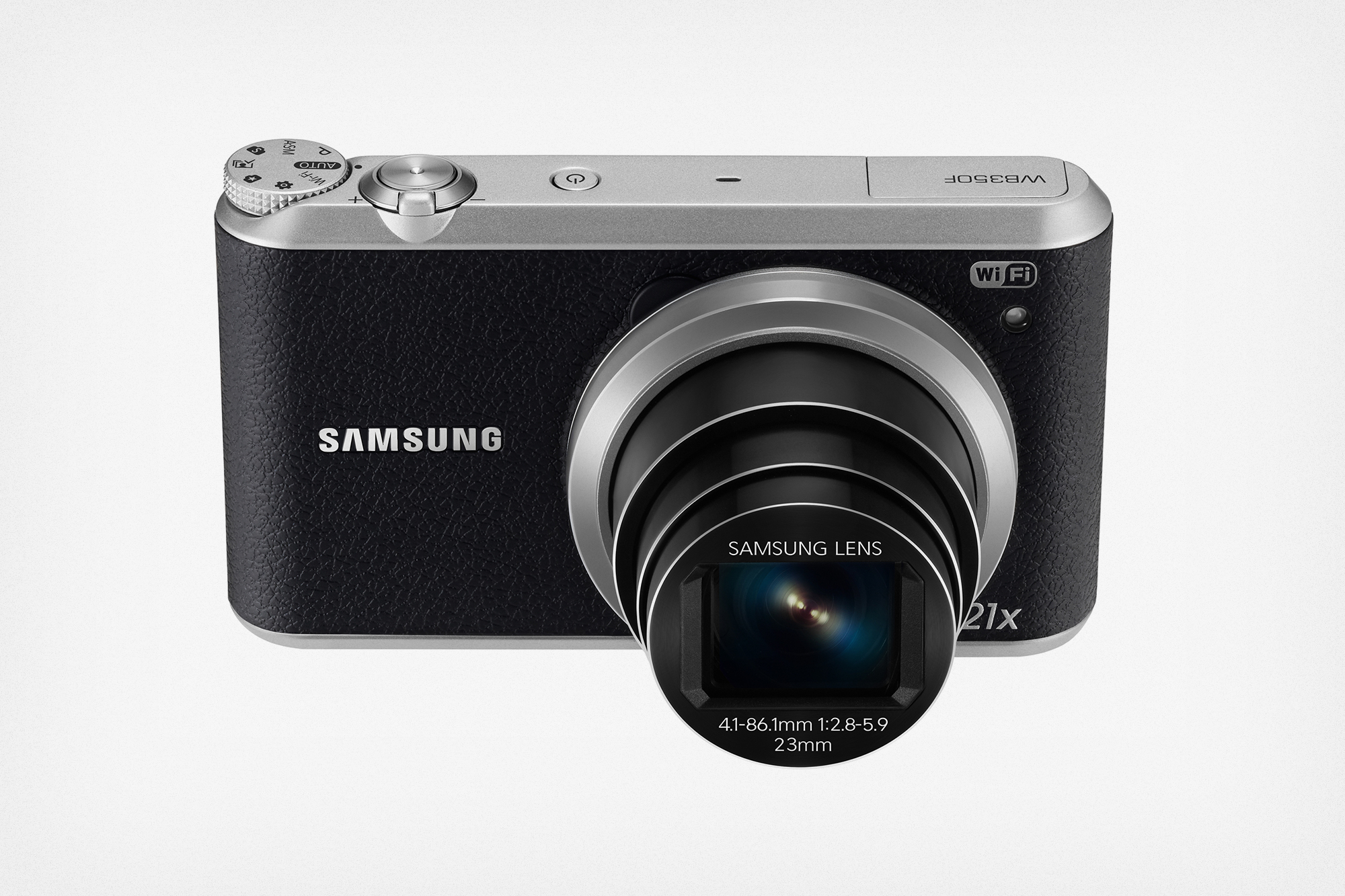
The Samsung WB350F is a solid option if you’re itching for something with a longer zoom.
If you’re willing to carry a slightly bulkier camera and sacrifice a bit of image quality for much greater zoom range, the Samsung WB350F is solid. Its 21x zoom range is bigger than that of any other camera in this class, its battery lasts 60 percent longer than the one in our main pick, and it has a wealth of wireless connectivity options.
What you get by paying more
If you’re willing to spend more cash, you can give yourself a huge image-quality boost by getting a compact camera geared more toward experienced shooters. We cover those upgrade models in our guide to the best point-and-shoot camera under $500. Those mid-tier cameras have significantly larger sensors and lenses that let in much more light across their entire zoom range, giving you the ability to capture sharp, clean images indoors and at night.
This guide may have been updated by The Wirecutter. To see the current recommendation, please go here.
Photo-editing app VSCO is turning off its sync feature today
Almost two years ago, the popular photo-editing and sharing app VSCO released a big iOS update that, among other things, brought the app to the iPad. At the same time, VSCO added a sync feature: if you imported a photo into your VSCO library and made edits on your iPhone, the same photo and edits would appear on your iPad (and vice versa). It was a handy feature, letting you make changes on the iPad’s big screen while sending them to the iPhone for easy sharing to apps like Instagram. However, as of today, that sync feature is going away.
VSCO announced the change with an email to users a few weeks ago, but today is doomsday for the feature. At the moment, sync appears to be working, albeit in limited fashion. I’ve been able to import photos into my VSCO library on both my iPad and iPhone and have edits stay in sync. That’ll probably disappear before long, however, so don’t necessarily rely on it. The good news is that none of your images will be deleted and there’s an “export all” feature to save them to your camera roll. But if you delete the app from a device, those images and edits will be gone for good, so make sure they’re backed up somewhere.
Despite the quality of VSCO’s edits, the app has always been a little confusing, so removing sync might actually make for an easier experience in some regard. And while the experience of making edits on one device and having them appear on another was nice, you can always export your edited photos to the camera roll and have the same image appear on another device thanks to iCloud’s photo library or Google Photos. Given the amount of photo syncing and backup options out there, it does make sense for VSCO to stay firmly focused on editing.
VSCO also recently pushed out a visual redesign in the iPhone app, but most of those changes haven’t come to the iPad yet — maybe as the company removes its sync feature, it’ll put the apps back on par from a visual standpoint.
Source: VSCO
Hillary Clinton is co-hosting a podcast about her campaign
On top of serving as Secretary of the State and New York Senator, Hillary Clinton can now add “podcast host” to her list of many accomplishments. The Democratic presidential nominee is co-hosting With Her, a new show which will chronicle her historic run for office. It’s also the first podcast launched by a presidential campaign. Pineapple Street Media is producing the show, and it’s also co-hosted by that company’s founder Max Linsky, who’s also known for the app and website Longform.
The first episode, which was published today, features Clinton talking about getting the Democratic Party nomination, as well as her frustration with Congress’s inability to fund Zika prevention measures. You can expect eventual appearances from Clinton’s VP choice, Tim Kaine, as well as other staffers and supporters.
While podcasts still have a fairly limited audience, launching a show of her own is a smart way for Clinton to speak directly to her most ardent supporters. And while opponents are still playing up issues around her private email server, the podcast lines up with her strong tech policy stance, which includes plans for increasing broadband internet access, STEM education availability and student loan help for budding entrepreneurs.
This is the very first episode @pineapplemedia has put out in the world! And @WBJenna made it all happen 🙏🇺🇸🍍 pic.twitter.com/YSVHCbq91T
— max linsky (@maxlinsky) August 12, 2016
Via: 9to5Mac
Source: “With Her” (iTunes)
Reuters: Congressional leaders were briefed on DNC hack last year
As new details emerge on the hacks of the Democratic Party, we’ve yet to learn the scope of the damage. Yesterday, Bloomberg reported the people behind the DNC hack had much larger aspirations that included NATO and top security officials. Reuters now reports that Congressional leaders were briefed on Russian cyberattacks that targeted the Democrats last year. Sources tell the news outlet that due to the top secret nature of the information, those officials weren’t able to inform the targets about the issue. The FBI confirmed publicly that it was looking into Russia’s involvement in the ordeal in late July after Wikileaks published thousands of DNC emails.
Reuters explains the reason for withholding those details was due to the fact that the US government was continuing to monitor the efforts of the culprits. Disclosing any info would have revealed its sources and methods for doing so. All of the details on the matter were kept to a small number of government officials who needed to be alerted that US intelligence had determined that two Russian agencies or their proxies were attempting to breach the Democratic National Committee.
The report’s sources also indicate that DNC officials weren’t told about the initial security breach until months after the first Congressional briefing. Even then, no ties to the Russian government were mentioned. Following the attack on the DNC, cyberattackers went on to access information at the Democratic Congressional Campaign Committee and Hillary Clinton’s presidential campaign. What’s more, the attackers are said to have used a method known as “spearphishing,” or accessing private email accounts of the organizations’ employees, to gain access to more sensitive info.
Reuters also reports that interim DNC chair Donna Brazile sent out a memo this week detailing a plan to create a “Cybersecurity Advisory Board” within the committee. The memo explained that the board would work to prevent future attacks and make sure that the DNC’s cybersecurity measures are the best they can be. With new information coming out seemingly every day, we likely have a long way to go before we know how long this went on, what information was accessed, who knew about it and which government organizations were affected.
Source: Reuters
Virgin Media TiVo update adds smarter Series Link+ feature
While we wait for more details on Virgin Media’s new V6 set-top box and the 4K service arriving with it, the company’s showing it hasn’t yet forgotten about those aging HD TiVos currently sitting beneath TVs across the UK. Several new features are being bestowed upon these boxes as part of a platform update, the most notable of which being Series Link+. This not only tells your TiVo to record every subsequent episode of a series, as you’d expect, but also searches on-demand platforms (including Netflix) for any episode of the same show, collating it all in the one folder in the My Shows tab — should you need to start from the very beginning, say.
Another handy new feature lets you bookmark shows or movies — whether you find them on live TV, on-demand or through Netflix — to revisit later, either via a new dedicated folder or the familiar My Shows tab. Other, minor tweaks include a more visually driven UI that swaps on-demand programme lists for images and channel names for logos, as well as a better smart search feature within the on-demand and catch-up menus that’ll start working after being fed a single letter. Finally, you’ll be able to pick up where you left off if you have to bail on an on-demand session early — a convenience that was previously only available when watching recordings.
When Virgin Media customers will get access to these new features is a bit of a gamble. The update has begun rolling out today, but it’ll be a couple of weeks before it reaches every last set-top box.
Via: Pocket-lint
Source: Virgin Media
Your hard drive’s sounds could help hackers crack your system
File this under a totally bizarre and improbable way to hack someone. Security researchers have recently demonstrated a way to use the sounds of your computer’s hard drive to possibly transmit information. In short, they can use it to gather your data without you knowing.
Weirdly enough, the DiskFiltration hack, as it’s called, works by taking control of a hard drive’s actuator. Much like the arm of a record player it moves back and forth across a hard drive’s platters to read and write data, and while it moves it makes a series of various sounds. Using the right type of malware, hackers can use those very sounds for some extremely shady machinations. If the right person is listening for the right thing, those noises can let go of a lot of information like an encryption key.
The DiskFiltration method only works up to about six feet and it’s limited to a data rate of about 180 bits per minute. That’s obviously not very fast at all, but it’s quick enough to capture an encryption key in about a half hour. The entire idea and method of execution is massively impractical but it does work, except with solid-state drives. Still, it’s a very weird and very real way of intercepting data. As if people needed another way to do so.
Via: Gizmodo
Source: Cornell University Library
iPhone 7’s Secondary Speaker Holes May Be Purely Cosmetic
While multiple sources and leaked components have pointed towards iPhone 7 models having dual speakers, which could very well be the case, a new design drawing spotted by French website NWE suggests the additional holes may be purely cosmetic to give the bottom edge a symmetrical design.
The text in the documents refers to the area that occupies the 3.5mm headphone jack on current iPhones as having simply a microphone and microphone mesh, with no mention of a speaker in that location. Most of the secondary holes would be non-functional, except for the one furthest to the right, which would double as a microphone.
The veracity of the photo cannot be confirmed, and the rumor conflicts with some previous reports, but at least one previous iPhone 7 design drawing has depicted the left speaker grille as ornamental. In the photos, the secondary holes are not cut all the way through except for what would be normally be the microphone hole.

The inclusion of dual speakers or lack thereof will be known for certain in less than a month. Apple is expected to announce the tentatively named iPhone 7 and iPhone 7 Plus on September 7, likely followed by pre-orders on September 9 and retail availability on September 16 in first-wave launch countries.
Related Roundup: iPhone 7
Tag: nowhereelse.fr
Discuss this article in our forums
Apple Rumored to Be Pursuing Massive Office Expansion in Seattle Area
Apple might be looking to further expand its presence in Seattle, Washington following its acquisition of Seattle-based machine learning and artificial intelligence startup Turi. The news comes from reports of a “large California company” looking to purchase a big piece of office space in the city, with most believing that it’s Apple (via GeekWire).
Last week, Apple paid $200 million to acquire Turi, which bills itself as a “machine learning platform for developers and data scientists,” helping them build apps using the capabilities of artificial intelligence. Although the company’s acquisition of Turi helps justify the rumor of Apple’s expansion in Seattle, nothing has yet been solidified and, according to GeekWire, the Seattle rumors “pre-date Apple’s acquisition of Turi.”
Specifically, the “large California company” is looking at properties in downtown Bellevue, particularly in the Schnitzer West’s 16-story Centre 425 building. Schnitzer West is under construction, with an opening expected towards the end of 2016, so if Apple makes a move it could begin increasing its Seattle presence by the end of the year.
At this point, we’ve been unable to confirm exactly where Apple may be headed in the Seattle area, but multiple sources say the footprint could be huge, several hundred thousand square feet. The rumors we’ve heard also pre-date Apple’s acquisition of Turi.
If a deal in downtown Bellevue were to go through it would be a big shot in the arm for an area that was looking at some sizable office vacancy over the next few years. In addition to the office buildings set to open soon, Expedia is leaving downtown Bellevue for Seattle in 2019. But the Valve and Salesforce deals, combined with a possible Apple move, would show that there are plenty of companies ready to step up to fill the void.
Last summer, Apple leased 30,000 square feet of office space in the Two Union Square skyscraper in downtown Seattle, which housed 120 to 200 employees, based on standard corporate leasing ratios. The work spaces now being looked at are over ten times as big, with the Bellevue location housing 354,000 square feet of office space, with the potential for approximately 1,400 to 2,300 employees. Apple originally expanded into Seattle in 2014 with a small team of more than 30 workers stationed in the city.
Tags: Seattle, Apple real estate
Discuss this article in our forums
Apple’s Chairman and Top Lawyer Cash in Combined $10M in Stock Bonuses
Apple chairman Arthur D. Levinson and general counsel Bruce Sewell recently sold approximately $7.6 million and $2.5 million worth of company shares respectively, according to SEC documents filed electronically this week.
Levinson sold 70,000 shares of common stock on August 9 for an average price of $108.68, while Sewell disposed of 23,305 shares for an average price of $107.49 on August 5. The combined return was slightly over $10 million.
Levinson, CEO of biotech company Calico, a subsidiary of Google parent Alphabet, has served as chairman of Apple’s board of directors since November 2011. The former Genentech executive has served on the board since 2000, with CEO Tim Cook praising his “enormous contributions to Apple” and “incredibly valuable” insight and leadership.
Sewell has served as Apple’s general counsel, or chief lawyer in layman’s terms, since September 2009. He oversees all company-related legal matters, including corporate governance, intellectual property, litigation and securities compliance, global security, and privacy, including a recent high-profile court battle with the FBI related to the intersection of national security and smartphone encryption.
Apple’s senior executives and directors are commonly awarded generous stock bonuses based on performance and tenure. Last August, Cook and services chief Eddy Cue received 560,000 and 350,000 restricted stock units respectively, worth a combined $93.8 million at the time. Later in the year, Apple’s recently promoted hardware chief Johny Srouji was awarded nearly $10 million in restricted stock units.
Tags: AAPL, SEC
Discuss this article in our forums
Apple TV Universal Search Now Supports ‘Stan’ in Australia
Apple has recently added Australian streaming service Stan to the universal search function on the fourth-generation Apple TV, marking the first third-party service outside of the U.S. beyond Netflix to be supported.
For those unfamiliar with universal search, it’s a feature that allows users to conduct Siri voice searches or text-based searches to find TV and movie content across a wide range of channels. At launch, universal search only supported a few channels, but Apple has been rapidly expanding the feature to encompass additional channels.
Universal search is available for a wide number of apps in the United States, but the feature is limited to iTunes and Netflix in Canada, France, Germany, and the United Kingdom. In Australia, universal search on the fourth-generation Apple TV supports movies and TV shows in iTunes, Netflix, and Stan.
Related Roundups: Apple TV, tvOS 10
Buyer’s Guide: Apple TV (Neutral)
Discuss this article in our forums
 AIVAnet