


‘Stranger Things’ and ‘The Get Down’ Albums Debut Exclusively on Apple Music
Netflix has released the soundtracks for both its popular sci-fi series Stranger Things, and its new musical drama The Get Down, exclusively on iTunes and Apple Music. There are 36 total songs rounding out the “Volume 1” soundtrack for Stranger Things, and on August 19 a “Volume 2” is expected to launch on Apple’s music services as well, with both volumes getting physical CD treatments on September 16 and September 23, respectively (via Consequence of Sound).
The music from the Stranger Things soundtrack was created by Kyle Dixon and Michael Stein, members of an Austin-based band called Survive. The two musicians helped craft the feel of the show’s score by balancing “a classic tone,” without going so far as to make it “’80s cheese.”
“We discussed having a classic tone and feel to the music for the show but being reserved enough that it wasn’t ’80s cheese, while offering a refreshing quality so that felt modern,” Stein said in a press release. “This was one of the qualities that drew them to our music in the first place. Having a familiarity with classic synths worked, but with an overall forward thinking approach.”
Netflix has yet to say when or if the two volume soundtrack will hit other streaming platforms. Apple Music has netted plenty of exclusives over the past few months, but the TV soundtrack for Stranger Things marks an interesting new addition of content for the service’s users. Earlier in the week, artist Kyle Lambert detailed his process of creating the poster art for Stranger Things, which involved the use of an iPad Pro and Apple Pencil.
The Get Down’s soundtrack is one “Deluxe Version,” adding up to 24 total songs from the new series. Artists on the album include Christina Aguilera, Leon Bridges, and Janelle Monáe, who contribute to the “musical panorama of New York City from the ’70s to the ’10s.” Apple Music is even curating playlists for songs from each episode of the show, and has so far debuted collections for the first two episodes, each with about a dozen tracks.
The Get Down (Original Soundtrack from the Netflix Original Series) can be streamed on Apple Music or purchased for $13.99 on the iTunes store. [Direct Link]
Stranger Things, Volume 1 (A Netflix Original Soundtrack) can also be listened to on Apple’s streaming music service, in addition to being available for purchase on iTunes for $9.99. [Direct Link]
Tags: Netflix, Apple Music
Discuss this article in our forums
Ooma Telo review – CNET
The Good The Ooma Telo is affordable hardware that delivers basic landline-like service without monthly fees, with few compromises.
The Bad Calls and basic service is toll-free, but you still need to pay a few bucks a month in local taxes. Wi-Fi support requires you to buy an additional dongle.
The Bottom Line Ooma one-ups cable company internet phone plans with better call quality and a basic calling plan that starts at free (before taxes).
Visit manufacturer site for details.
Landlines aren’t dead — they’re just the freebies that come with your cable TV and broadband internet now. (Yes, many so-called “triple play” services are actually cheaper than if you pass on the included phone service.) But going with a third-party provider instead of your cable company’s default VoIP (voice over internet protocol) box can get you better hardware, better service and better options. That, essentially, is the pitch for the Ooma Telo.
Like other VoIP services, the Telo plugs into your broadband router and routes your calls over the internet, which allows for updated features like HD Calling (better sound quality for voice calls). You can either port your existing phone number over to Ooma or get a new number from the company.
Ooma Telo: Hands-on with the internet phone…
See full gallery


1 – 5 of 8
Next
Prev
The first investment is in the box itself, which costs $100. (It’s not supported outside the US and Canada, but if you plug it into a network anywhere in the world, it’ll probably work — albeit with a US number.) Then you’ll have to choose between basic or premium service. The basic service is free, but you’ll be stuck paying some state-imposed monthly fees. (It was $4 per month in New Jersey.) That gets you toll-free nationwide calling, call waiting, caller ID, 911 service, a call log history and voicemail. These last two can be accessed from Ooma’s online dashboard.
Ooma also offers a premium service for $9.99 per month, which includes several additional features, including voicemail via email, call screening, do not disturb and call forwarding. You can forward calls to an Android phone or iPhone. Ooma’s app is quite good and much more reliable than some other VoIP companions apps I’ve tried, such as the Invoxia Voice Bridge and MagicJack.
Best cases for the OnePlus One

What is the best case for the OnePlus One? Let’s take a look at some of the great choices.
Whether you want to keep your OnePlus One protected, add a thin layer of grip to the phone, or turn it into a wallet, there are cases for all of your needs. Hunting down cases can be a daunting task, but don’t worry — Android Central is here for you. Everyone’s preferences are different, some are looking to keep their phone the same size while adding a bit of protection, and others want full protection to prevent drops from damaging it.
Let’s take a look at some of the different options and see which will work best for you.
OnePlus Flip Cover

Cases do a great job of protecting the back of the phone but not always the front. With OnePlus’ Flip Cover, you’ll have protection for the front and back, so when you put the phone in your pocket, purse or elsewhere it will be able to prevent scratches on the screen. The flip cover doesn’t add much bulk to the phone either, and the case will unlock and lock your phone as you open and close it. Adjusting the volume and accessing the power button is easy thanks to the great fit and cutouts for the ports.
See at Amazon
CruzerLite Bugdroid Circuit

CruzerLite has been around for years with its popular Bugdroid Circuit cases that offer a fun look to the back of its thin case. Available in a variety of colors, the case has a Bugdroid at the bottom of it with various lines coming off of it in a fun pattern. The thin profile of the case offers a form fit to the phone with easy access to its ports and buttons. Its TPU material is more cut and tear resistant than rubber, while still being stronger than silicon skins and remaining flexible. You can pick from a variety of colors like black, red, blue, white, and many others.
See at Amazon
TUDIA Ultra Slim

Cases aren’t for everyone, but the protection they provide sure is nice. TUDIA’s Ultra Slim TPU case offers a clear thin layer to the phone so it doesn’t add much bulk or detract from the look of the phone itself. The case itself is very durable and has a soft touch feel to make it comfortable to use. It offers a form fit and easy access to all your ports. You can pick one up in clear, black or blue for just around $10 at Amazon.
See at Amazon
iThrough Dual Layer

If you are worried about your OnePlus One not being able to hold up to the abuse it sees daily, you’ll want to pick up a protective case. iThrough’s Dual Layer case offers a TPU layer and a solid plastic layer to ensure that the phone is well protected while in the case. It will bulk the phone up a bit, but for some that will make it easier to hold. The back of the case has a built-in kickstand so you can prop the phone up while you aren’t holding it. Keeping your phone protected for just $7 is a no-brainer.
See at Amazon
E LV Wallet Flip Case

Cases don’t only have to provide protection, sometimes they can also offer some additional functionality. The E LV wallet flip case will provide protection to the front and back of the phone, as well as give it a way to be propped up to watch videos and more. The case also has a number of slots to carry your credit cards, ID and more, as well as a slot for carrying cash. This means you won’t have to lug around your phone, wallet and more for a night out, and instead can just carry around the phone with the rest attached to it.
Your favorite?
Do you have a favorite case for the OnePlus One that isn’t mentioned here? If so, be sure to let us know in the comments, along with a link to where you can pick it up!
See at Amazon
ICYMI: This rock-armored insect could change medicine

Today on In Case You Missed It: Researchers at the University of California, Berkeley discovered that an insect called the caddisfly spins strong, stretchy silk that works like a biological sticky tape. The caddisfly uses it to attach stones to its body to protect it underwater; humans are more interested in the fact that the waterproof adhesive might have medical applications. The publication Deep Look made a great video of the bug’s underwater life that’s worth a full watch if you’re interested.
South Korean researchers developed a hydrogel touchpad that can be stretched more than 1000 percent of its normal state and still function like a conductive pad.
There were plenty of interesting stories from the week; we are most interested in seeing what will happen in the latest Tesla car crash investigation. As always, please share any interesting tech or science videos you find by using the #ICYMI hashtag on Twitter for @mskerryd.
GM reportedly tried to buy Lyft
General Motors is serious about gaining a foothold in the ride-sharing industry. Not only has the company established its own car-lending app and purchased the defunct Uber competitor, Sidecar — but according to The Information, it’s also been toying with the idea of buying Lyft. An interesting idea, but it isn’t happening. Sources familiar with the matter say that car-hailing service has already turned GM down.
If GM were to buy its way into the on-demand driver industry, Lyft would be the obvious choice: the company has already has $500 million invested in the company as part a partnership to build an self-driving taxi service. Sources from both The Information and TechCrunch say GM went as far as to put money on the table, but to no avail. For now, Lyft is holding fast to its independence.
Source: The Information
Conviction overturned for one of the ‘Making a Murderer’ subjects
Late last year Netflix’s true crime series Making a Murderer brought attention to the case of Steven Avery, and now his nephew’s conviction has been overturned. Along with his uncle, Brendan Dassey was convicted of the murder of Teresa Halbach in 2006. Unlike his uncle, there was no physical evidence connecting Dassey to Halbach’s disappearance, however, the then 16-year-old confessed to helping his uncle with the crime. Now, Judge William Duffin says his videotaped confession was involuntary under the fifth and fourteenth amendments, claiming techniques used by investigators made it difficult to evaluate what Dassey really knew.
Judge William Duffin:
Most significantly, however, the (state) court of appeals erred when it focused on the statements of the investigators in isolation to conclude that they did not make any promises of leniency. True, no single statement by the investigators, if viewed in isolation, rendered Dassey’s statement involuntary. But when assessed collectively and cumulatively, as voluntariness must be assessed, it is clear how the investigators’ actions amounted to deceptive interrogation tactics that overbore Dassey’s free will.
The documentary focused on the conduct of law enforcement involved with the case, and while it does not appear to have impacted the judge’s decision, his ruling reflects similar concerns. According to Judge Duffin, state courts were in error by deciding that investigators never made promises to Dassey. Now, the state can decide to retry him, appeal, or it will have to release him within 90 days.
Conviction Against Brendan Dassey of ‘Making a Murderer’ Is Overturned https://t.co/L9BB5dRDdD
— Making A Murderer (@MakingAMurderer) August 13, 2016
Source: Milwaukee Journal-Sentinel, Buzzfeed, ABC
10 ways to customize the taskbar in Windows 10 – CNET
We were all excited to get the Start menu back in Windows 10, and we wasted no time in customizing it to the best of our abilities.
But what about the poor, neglected taskbar, who never left us in the first place? Here’s how to make the taskbar look pretty and work for you.
Add some shortcuts
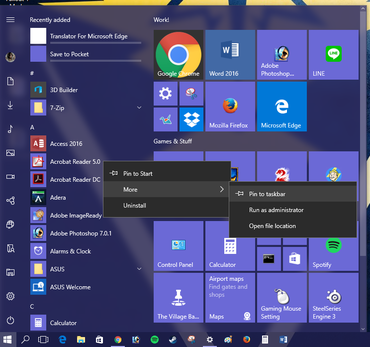 Enlarge Image
Sarah Jacobsson Purewal/CNET
Smaller taskbar buttons

Enlarge Image
Sarah Jacobsson Purewal/CNET
Are the buttons on your taskbar unnecessarily large? Make them smaller by right-clicking on the taskbar, clicking Settings, and turning on Use small taskbar buttons. Checking this option will also remove the date from your taskbar clock.
Clean up the System Tray

Enlarge Image
Sarah Jacobsson Purewal/CNET
The System Tray is the part of the taskbar where all those pesky notification icons and useless things like clocks show up. Good news — you can get rid of all of these icons, including the built-in system icons like the clock, volume and network icons.

Enlarge Image
Sarah Jacobsson Purewal/CNET
To start cleaning it up, right-click the taskbar and click Settings to open the Taskbar settings menu. Under Notification area, click Select which icons appear in the taskbar. Here, you can either choose to always show all program icons in the taskbar, or you can turn icons on/off individually.

Enlarge Image
Sarah Jacobsson Purewal/CNET
To turn off system icons, such as the clock, volume control, or the action center, click Turn system icons on or off. You can toggle off just about everything, including the power, location and Windows Ink Workspace icons.
Get rid of Cortana

Enlarge Image
Sarah Jacobsson Purewal/CNET
Cortana is sweet and all, but her search icon takes up valuable taskbar real estate. Right-click the taskbar, hover over Search and click Hidden to remove Cortana’s button from the taskbar completely.
Get rid of the Task View button

Enlarge Image
Sarah Jacobsson Purewal/CNET
Task View is a new Windows 10 feature that lets you see and use virtual desktops. The Task View button is a small button on the taskbar that lets you quickly access these desktops. To get rid of it, right-click the taskbar and click Show Task View button to toggle it off.
Taskbar buttons, your way

Enlarge Image
Sarah Jacobsson Purewal/CNET
If your taskbar is looking cluttered — because you love having 64 Firefox windows open at once — maybe it’s time to customize your taskbar buttons. Right-click the taskbar and click Settings. Under Combine taskbar buttons, click the dropdown menu and choose your flavor: Always, hide labels (this will combine one program’s windows into one taskbar button); When taskbar is full (this will only combine a program’s windows into one taskbar button when there’s no more room on the taskbar); or Never.
If you have multiple displays, you can choose separate options for how the taskbar on your main display is presented (versus the taskbars on your secondary displays).
Hide it

Enlarge Image
Sarah Jacobsson Purewal/CNET
If you hate the way the taskbar looks, you can set it to automatically hide whenever it’s not in use (move your mouse over the taskbar area to see it again). Do this by right-clicking the taskbar, clicking Settings, and turning on Automatically hide the taskbar in desktop mode.
Lock it

Sarah Jacobsson Purewal/CNET
If you love the way the taskbar looks, and you don’t want to accidentally resize or move it with your clumsy mouse handling, you can lock it in place. To do this, right-click the taskbar and check Lock all taskbars from the menu that pops up.
Add toolbars
In Windows 10, you can add toolbars, as well as folders, to the taskbar. There are three toolbars already created for you: Address, Links, and Desktop. The Address toolbar is an address box — type a URL into it and hit Enter, and your default web browser will open that page. The Links and Desktop toolbars are just folders — the Links toolbar lets you see all the files in your Links folder; the Desktop toolbar lets you see all the files on your desktop.

Enlarge Image
Sarah Jacobsson Purewal/CNET
To add a toolbar, right-click the taskbar, hover over Toolbars, and then check the toolbars you want to add.
You also have the option to add a New toolbar, which is essentially just a folder that you’ll be able to quickly access from your taskbar. Click New toolbar… and navigate to the folder you want to add. Click Select Folder and your new toolbar will appear on the taskbar.
Change the color and transparency
To change the color and transparency of your taskbar, open the Settings menu and go to Personalization > Colors. Scroll to the bottom of the screen and make sure Show color on Start, taskbar, action center, and title bar is turned on. Choose the color you want to use and your taskbar will change to reflect your choice.

Enlarge Image
Sarah Jacobsson Purewal/CNET
To make the taskbar transparent, scroll down to the bottom of the screen and turn on Make Start, taskbar, and action center transparent.
Editors’ note, August 12, 2016: This article was originally published February 11, 2016, and was updated to reflect changes made in the Windows 10 Anniversary Update.
Fan-made ‘Goldeneye 007’ multiplayer-only HD remake released
Veterans of the Nintendo 64 likely remember Goldeneye 007, a surprisingly great adaptation of the James Bond film released in 1997 that changed shooters forever. After the 2004 release of Half-Life 2, itself a milestone propelling the genre forward, fans started toying with remaking their favorite old game with the graphics engine powering their new one. While they’ve sporadically released versions of Goldeneye: Source since then, the team is finally unveiling its first update in three years, a full overhaul that’s free to download and play.
There have been other reimaginings of the N64 classic, but like this remake of the “Facility” level in the Unreal 4 engine, they’ve all been tech demos rather than wholly updated versions. (As purists, we refuse to consider the 2010 redux for the Wii or its subsequent Xbox 360 and PS3 ports, which merge the old story with Daniel Craig’s likeness and harder style of the current Bond films.) Goldeneye: Source has 25 multiplayer maps, 10 game modes and all 28 weapons from the original game: Fire it up and you can blast your friends just like you did almost two decades ago when it was first released.
Unfortunately, a complete nostalgia trip is impossible, as there’s no single player mode. According to the FAQ, the team just doesn’t have the resources or number of developers to create one — which makes sense, as nobody was paying the team to create this labor of love. But it is the most holistic version of the classic shooter, a great trip down memory lane… And a reminder of how far we’ve come in the 19 years since it first came out.
If that doesn’t make you feel old, scroll down to the bottom of the FAQ, where the team answers why crosshairs aren’t visible — because back in the day, games had auto-aim and you just sort of shot in front of where your character was facing… It was a different time, okay?
Source: The Verge
The Elio three-wheeler is now available for $7,000 pre-order
Elio’s crowdfunded 84 mpg three-wheeled two-seater is now street legal and ready to take your pre-orders. While the company doesn’t have a firm delivery date for the vehicle yet, eager first adopters looking for a low-cost alternative to car ownership can now “lock in” the price at $7,000 for a base model — provided they sign a binding agreement to buy their Elio regardless of when it goes on sale.
That quirky pricing scheme is actually the result of the Department of Energy’s Advanced Technology Vehicles Manufacturing loan program, which promotes projects that create jobs while also reducing the country’s dependency on foreign oil. According founder Paul Elio, “the ATVM program is not a breaking point for Elio Motors,” but it will help his company bring the quirky vehicle to market. And Elio will needs firm agreements in hand in order to satisfy the Department of Energy’s requirements.
So, for now, the company is offering two pricing tiers: the aforementioned, contractually-obligated $7,000 tier and a slightly more expensive $7,300 tier which is also non-refundable, but doesn’t include the binding contract. (For those keeping score, the pricing is slightly more expensive than the $6,800 MSRP promised during the crowdfunding campaign.) Buyers who already put in an earlier refundable order can also lock in a lower price by converting their reservation, and everyone will receive their vehicles based on their deposit type and amount. Also, options like an automatic transmission, retro fenders, parking assist or a premium entertainment system will cost anywhere from $380 to $2,000 extra.
Per the company’s website, Elio currently has over 56,000 people signed up to buy and the $7,000 pricing level will only be available until it reaches 65,000 total reservations from all its various tiers, so this pricing scheme may not last beyond the first batch of Elios to hit the road. When last we heard that should happen sometime in 2017.
Via: Roadshow
Source: Elio Motors
 AIVAnet