


U.S. International Trade Commission Says Fitbit Didn’t Steal Trade Secrets From Jawbone
Back in 2015, Jawbone sued Fitbit for “systematically plundering” confidential information, stealing patented technology, and acquiring trade secrets from former Jawbone employees, and since then, the two have been embroiled in an ongoing legal dispute.
It looks like Fitbit is temporarily off the hook, though, as the United States International Trade Commission today said Fitbit did not steal Jawbone’s trade secrets, putting an end to Jawbone’s efforts to win an import ban against Fitbit. Without the ban, Fitbit will be able to continue importing and selling its fitness trackers in the United States.
U.S. judge Dee Lord ruled there was no violation of the Tariff Act and that neither party “has been shown to have misappropriated any trade secret.” The International Trade Commission previously invalidated Jawbone’s patent claims and said Jawbone was “seeking a monopoly on the abstract ideas of collecting and monitoring sleep and other health-related data.”
In a statement given to Business Insider, Jawbone said it would seek a review of the ruling before the full Commission and will proceed with its trade secret case against Fitbit, which is set to be heard by a jury in California.
Both Jawbone and Fitbit make popular fitness tracking devices, but while Fitbit has continued to produce new activity trackers, Jawbone has not released a new fitness-related product since 2015. Earlier this year, following reports suggesting it was going out of business, Jawbone said it was committed to creating new wearable products. Jawbone is now said to be working on a clinical-grade health tracking device related to heart monitoring.
Tags: Fitbit, Jawbone
Discuss this article in our forums
CLARO changes your Android wallpapers for you (review)

Have you ever looked at your home screen picture and thought….that has been the same forever? It has become easy than ever to change just about anything you want in android. Changing your wallpaper while not difficult just plain gets forgotten. The fix, automatic wallpaper changers! They take pictures from the internet or your gallery and display them on you home screen changing automatically at specific intervals that you set.
I have been using IF THIS THEN THAT to change my wallpaper to the newest Reddit post in the comicwalls subreddit for a while now. This can get kind of tricky since I am not the one putting the data in the subreddit; I have to watch what it’s getting changed to and have often had to change it manually because of an inappropriate post or just something that I didn’t like.
A new app that has come out that makes this less tricky and lets me be in control of the images on my background is CLARO. Lets go through some of the options we get, as well as a gallery of pictures from the into in the app.
With CLARO I pick the content from the gallery on my phone and tell the app:
- What color to make the pictures, Original, Greyscale,Sepia or random
- What days I would like these particular pictures to display
- How often I would like the pictures to change
- When to start the schedule and when to stop it
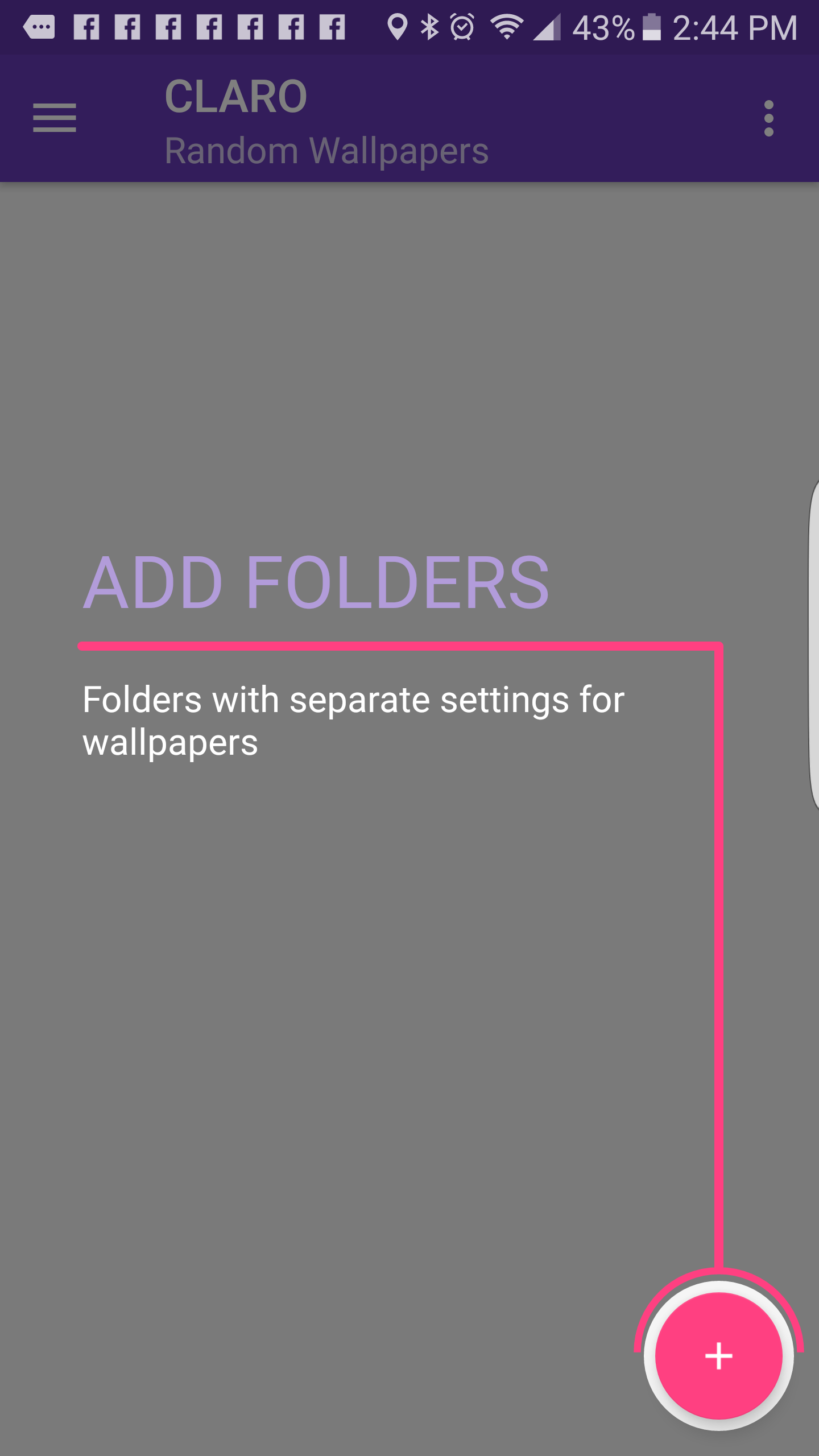
Adding Folders
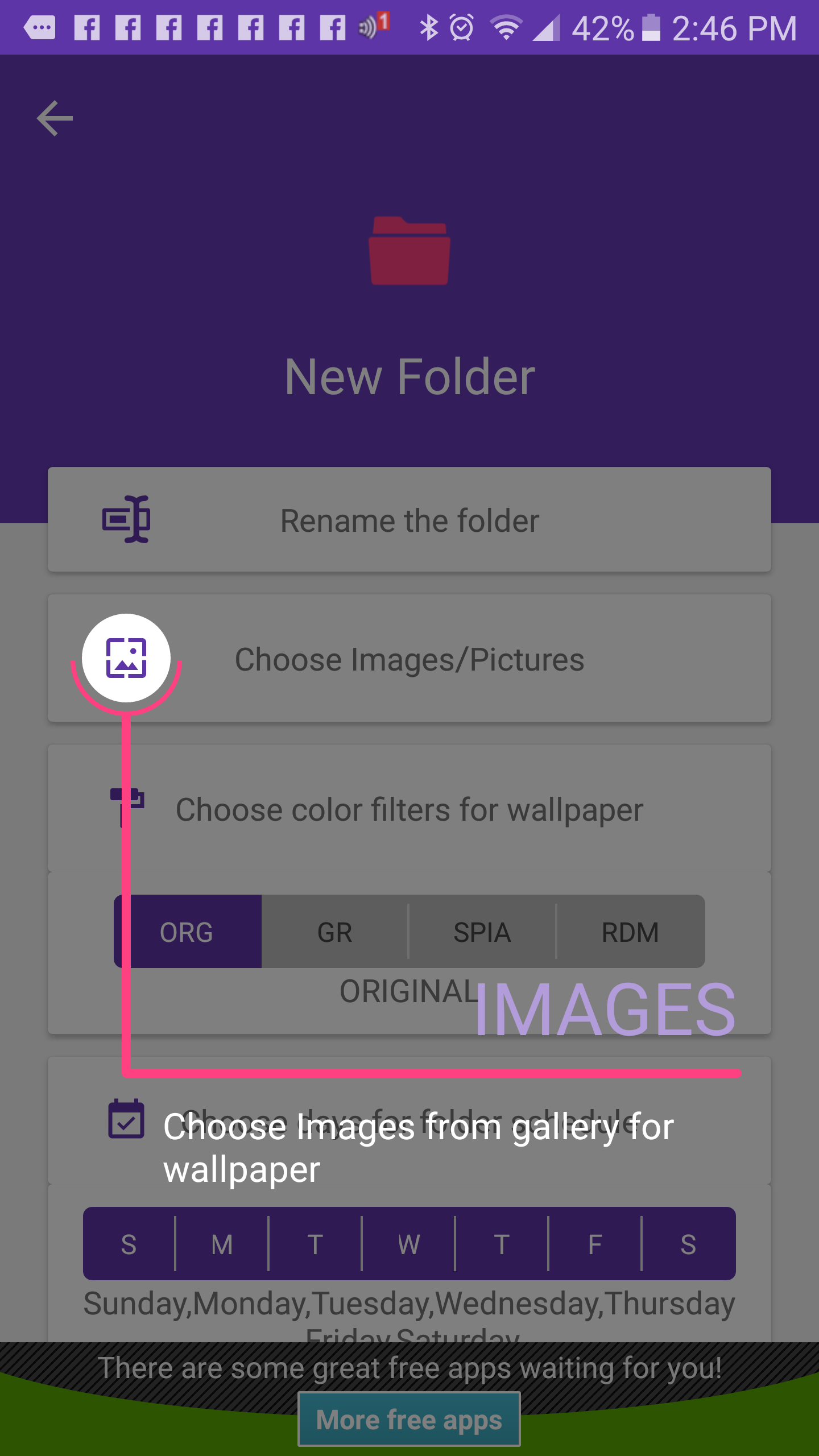
Add the Images you want
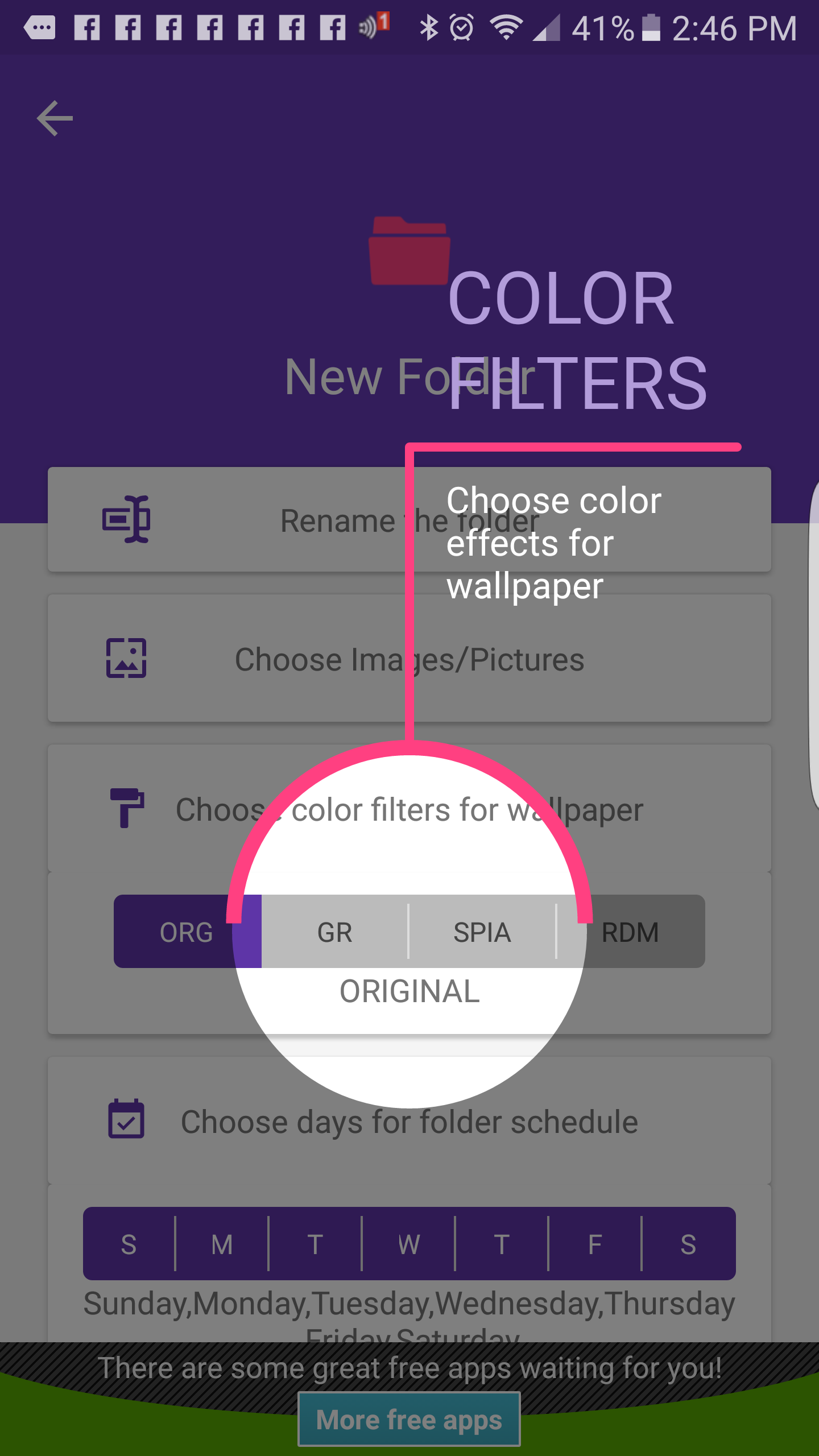
Pick how the pic shohuld look
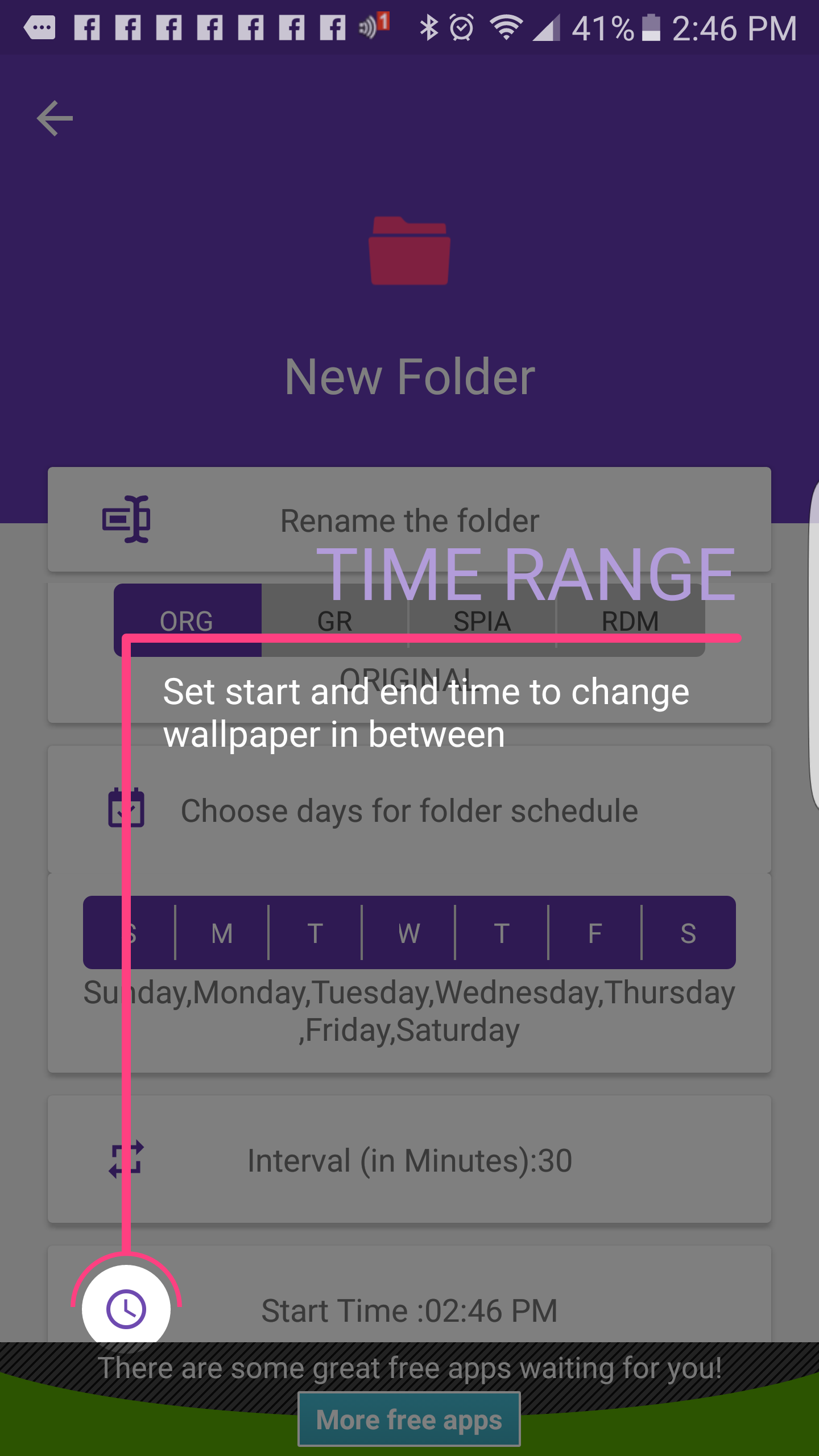
Pick a time range
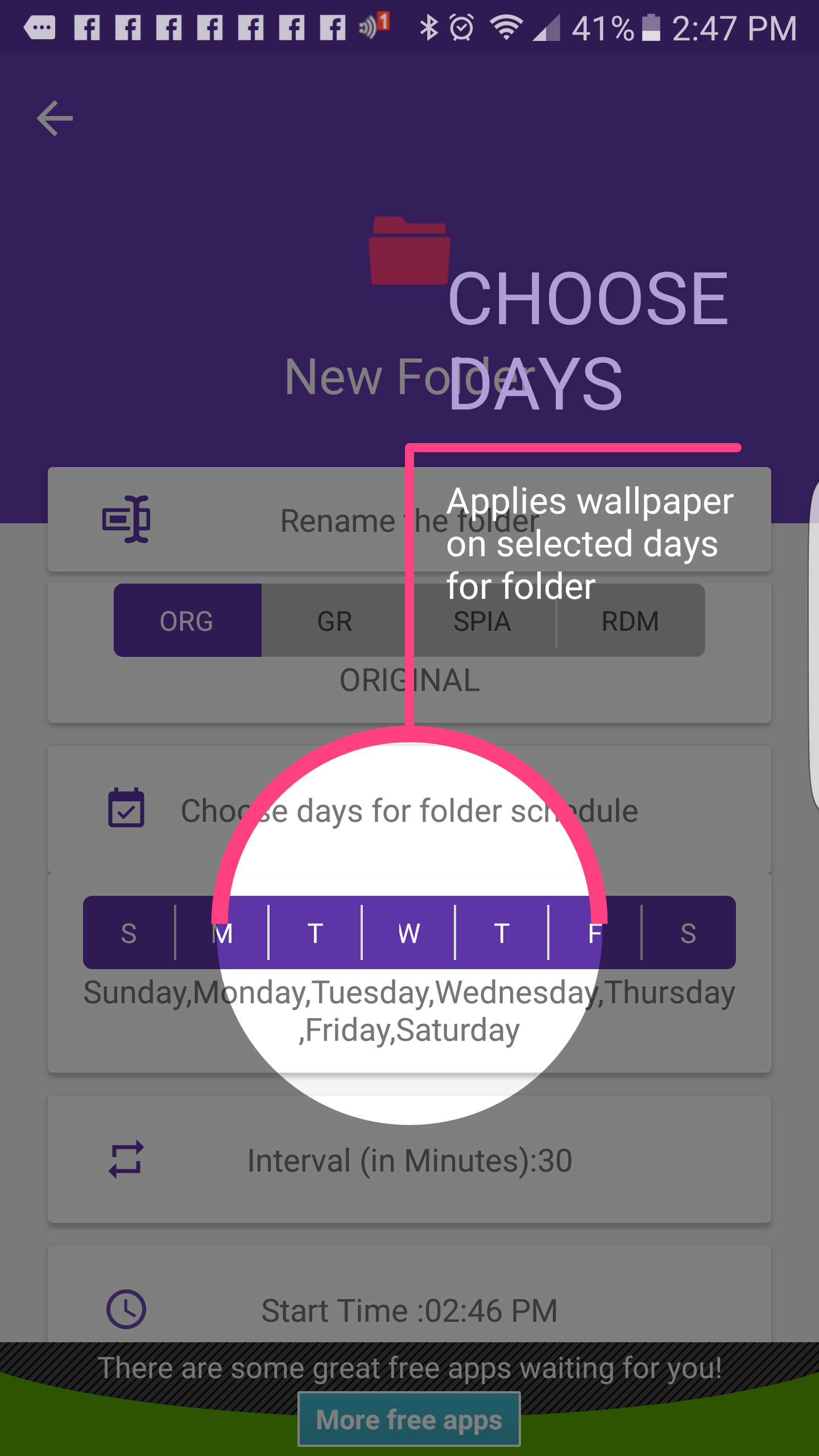
Pick the days of the week it should run
There are also action settings that include:
- Showing the wallpaper picker so I can pick manually
- Showing a Notification in the shade when it changes
- Playing a sound when it changes
- Vibrating when it changes
- Waking up the phone when it changes
- Make several different folders with different pictures in them on different schedules
- Blurring the image
- Pick what order to switch the wallpaper, either in a specific sequence or randomly.
The app employs Google’s Material Design principles, which I love, so it gets brownie points in the category. I have been using this app for a few days changing the wallpaper every three minutes and it does not seem to have much effect on the battery and it is also nice to see something different from my gallery every time I look at my home screen.
There are some ads the pop up when you are setting things up, but they are not terrible; users do not spend much time setting things up most and do not see them very often. A Heads up, though, as the developer’s first language is not English so some of the menus and wording in other places in the app are not quite what you might expect.
The developer claims this app is different because the service in CLARO only runs when it is scheduled to change the wallpaper whereas other “live” wallpaper apps run the service all the time draining the battery and using CPU. According to the developer, this has a benefit over using services like Muzei Live Wallpaper and its various tie-ins. I am not sure how to verify this without digging deep into the Android system but what I can say is I have not noticed any CPU, memory, or battery performance slow downs since installing this app.
Thus far, CLARO seems to be a solid alternative for me and allows me to be in control of the wallpaper will still having it change automatically.
- Developer:Yogesh Dama
- Price: Free with $0.99 in-app purchase to remove ads
- Link: CLARO RANDOM WALLPAPER
Galaxy S7 Active Review: #1 in almost every category

Exclusive phones suck. Period. More people need access to a phone like the Galaxy S7 Active, which is currently locked down to just AT&T users like myself. After using the Galaxy S7 Active for a couple weeks, one thing has become clear to me. This phone is the best Android phone… wait, the best phone in general in four out of the five categories I am judging it on.
Build
This phone isn’t aiming to be in the hands of today’s designers or fashion experts, so don’t expect this device to blow you away with how good it looks. Grab a Galaxy S7 Edge if you’re going for a stunner. What Samsung sought out to do with this phone is build a tank of a device that will withstand anything. And they succeeded.


I’ve left this phone in the sink with the water running over it while I fixed myself a drink, I’ve dropped it out my car window going about 25 mph, and I even got bored and buried the thing under half a foot of dirt and left it there for a little while. All of these actions left the phone unscathed and ready for more.
The downside is this is a pretty ugly phone to say the least. The phone is made of rugged plastic that makes no attempt to match the sleek style of the regular Galaxy S7. The navigation buttons stick out too much, and remind me of a messaging phone before smartphones got popular. This phone was built for the outdoors, not for getting compliments.
I can’t tell you the extent of how the glass will hold up after so many drops (however there are videos out there showing some amazing results), but after dropping it out of a moving car window onto pavement with not even a scratch on the glass… I think you’ll come to trust this phone’s durability. Major props to Samsung for creating a phone like this, it easily competes with Motorola’s Droid Turbo 2 and the Moto Z Force.
Display
There’s not much to be said here that hasn’t already been said by Nick Schiwy in his Galaxy S7 review. Samsung continues to make the best smartphone displays in the world, and the S7 Active is no exception. We’re seeing the same panel put on the regular Galaxy S7, which is a 1440×2560 Super-AMOLED display, with an added layer of glass for durability. This added layer does make the regular S7 slightly more attractive, as the Active has slightly worse viewing angles when you tilt the phone to its side. The screen still amazes me with how bright it gets outside and how impressive games and movies look on it, as the AMOLED panel on this trumps all other AMOLED screens on the market because of Samsung providing its latest screen technology exclusively to its own premium phones.

Camera
The S7 Active shares the same incredible camera that the Galaxy S7 and S7 Edge have, which have been continuously praised as the best smartphone cameras in the world. I used this phone around the same time I was testing the OnePlus 3 and Moto Z Force, and neither of these two truly compare with the S7 Active’s camera.

I don’t really like taking videos on smartphones because the stabilization generally looks bad, but the S7 phones are on a whole new level. While taking 1080p 60 FPS video, I truly realized why so many people love Samsung cameras. The fluidity of 60 frames per second on top of Samsung’s stabilizing mode (which can be toggled, but I don’t see why you would turn it off) creates a video-recording experience I’ve never used before. This phone creates the perfect opportunity to hike, mountain climb or even swim while taking some of the best photos possible on a phone.
Performance
This is the section where I’ll calm down a bit and not give Samsung every award. With the help of AT&T, the S7 Active comes with apps I’ll never use that I’m unable to uninstall. The phone gave me suggestions on what AT&T services I should use like connecting to DirectTV. I was not a fan…
However, I recommend you check out our guides to installing a new launcher to avoid all of AT&T’s services and bloatware if you prefer. These launchers allow you customize your homescreen and hide apps you never want to see again.
Anyway, only after using the OnePlus 3 did I notice a couple jitters when using the S7 Active, and it just wasn’t the same smoothness I was use to, nor the memory management. This phone comes with 4GB of RAM, but when multitasking it feels identical if not slower to switch between apps than my Idol 4S, which only has 3GB of RAM. This is frustrating because memory management has been a problem for Samsung for a long time. I will say, coming from using the OnePlus 3 to the S7 Active is vastly different from someone upgrading to this phone from a device a year or two old. All-in-all, you’re going to be satisfied with the performance on the S7 Active.
Battery
If you’re on AT&T, and you’re sick of your phone not lasting you half-way through the day, you are going to be dumbstruck with how good battery life is on this phone. To give you an idea, the Galaxy S7 Edge has a 5.5 inch screen with a 3,600 mAh battery. More screen size means more power consumption. The Edge has incredible battery life, giving most users around 5 hours of on screen time. The Galaxy S7 Active has a 5.1 inch screen – with a 4,000 mAh battery. This is a huge battery even for phones with much bigger screens. I’ve been consistently getting around seven hours of screen on time, which is ludicrous for me.
Easily, I’ve been making it into the evening of the second day of usage on a single charge with around 8-12% battery left, with heavy usage (not even you can kill my phone this time, Snapchat). There’s not much else to say here folks. Take this thing camping for a night or two, and you might find yourself not needing an extra battery pack at all.
Conclusion
Like I said in the introduction, whether you’re looking for a phone with the best display, best camera, best durability, or best battery life, The S7 Active covers all those areas in one rugged package. Performance isn’t the best out of all the offerings, but with the Snapdragon 820 chip it’s still extremely close to every other high-end Android phone.
Of course, this phone isn’t for everybody (not that a lot of people have a choice, AT&T…) because it’s not the prettiest phone out there and some people may prefer a bigger screen or less ugly navigation buttons at the bottom of the phone, but if looks aren’t an issues for you, you literally cannot go wrong choosing this phone over any other at the AT&T store.
LG InstaView Door-in-Door Refrigerator Release Date, Price and Specs – CNET

Knock twice on that right door, and it’ll turn translucent to show you the groceries inside.
LG
Want to know what’s in the fridge? With the newest models from LG, you won’t even need to open the door.
They’re called “InstaView” refrigerators — they’re French door models with translucent panels over the right fridge door. Give that panel a double knock, and the tinted glass will fade translucent, allowing you to see inside without letting the cold air out. The four-door model seen here will sell for a cool $4,500 when it arrives on retail floors, though you’ll also be able to buy a three-door model without the extra drawer for $4,300.
All InstaView models come with a black stainless steel finish and also with LG’s Door-in-Door feature, which lets you push a button on the door handle to open the door’s front panel. That lets you access the in-door shelves without actually opening the fridge.
 LG
LG
LG makes a lot of other Door-in-Door fridges, including models that look virtually identical to these new ones. An equally-sized, black stainless steel four-door model without the InstaView feature retails for $4,200, so you’re looking at a $300 upcharge for that translucent door.
As for see-through fridges themselves, they’ve been in the works for a while now. We spotted our first one, a motion-sensing model from Haier, at the 2015 IFA appliances trade show in Berlin, Germany. Then, at CES 2016 in January, LG debuted its “Signature” refrigerator, a luxury model with the same knock-to-see-inside trick seen here. That fridge is still yet to debut, though we expect to see it sometime before the end of this year.
LG’s InstaView fridges are expected to arrive at retail this fall. Both the three- and four-door models will come in both standard-depth and -counter-depth varieties. Expect a full review just as soon as we can get one into our fridge testing lab.
Boomerang uses AI to help you write emails people will read
Why don’t you get a response to every email you write? It’s possible your recipient is busy. Maybe it didn’t reach them. Or maybe, just maybe, you didn’t write a quality email in the first place.
Boomerang’s Respondable widget that you can download right into your browser to be used within Gmail. Its aim? To help you craft better emails that improve your response rates. Using machine learning algorithms that improve based on how you pen your various emails to different recipients, it uses that intelligence to assist you when it comes to how you write your messages.
When you activate Boomerang, you get a new bar inserted into the window you use to compose messages that will change in real-time depending on what you write. Clicking on it brings up a new menu that offers suggestions based on the text in the window. Subject length, word count, question count, and reading level are available for free users, with positivity, politeness, and subjectivity measurements available for anyone who springs for the Advanced Features options.
I put Boomerang Respondable to the test and it did a decent job of measuring the message I sent to a willing Engadget guinea pig. I kept it short to a few paragraphs, asked one question, and kept my subject line to a reasonable length. With a few tweaks I was able to swing the “response” meter to “likely,” which was in the green zone. I didn’t reach “Very likely,” which is a cool teal that I feel a little disappointed I didn’t try enough to reach.
Respondable is an interesting tool that could absolutely help you compose better emails, but I also wonder how well these algorithms actually work. I’m going to be utilizing it to see if I start to get responses in a more dependable manner.
If you’re interested in trying out the free version, you can get it for both Gmail and Outlook.
Source: Boomerang
The surprisingly effective way I solved my computer eyestrain problem – CNET
Like a lot of people — many people? most people? — I spend a good chunk of my day in front of a computer. Because I work from home, I often move from room to room, just to change up the scenery, and even alternate between standing and sitting.
But no matter where I go, I suffer from eyestrain. And recently it’s gotten a lot worse: On some days my eyes are so tired and achy, it’s hard to continue working. (Thankfully, I have the world’s most forgiving editors.)

EyeLeo
I tried lubricating eye drops; no help. Then I remembered the 20-20-20 rule I’d read about many times, the idea being that every 20 minutes, you should take a 20-second break and focus on something 20 feet away.
I’d always scoffed at this. Interrupt my workflow every 20 minutes? No, thank you. And, really, like a 20-second break was really going to help.
But I was desperate, and realized I was going to need some kind of automated timer. That’s when I discovered EyeLeo, a freeware utility designed to help computer users reduce eyestrain.
Let me just say I was extremely skeptical at first, because the program is even more intrusive than 20-20-20: It hits you up with eye exercises every 10 minutes and imposes a 5-minute break every 50 minutes. As a writer, I find it difficult to cope with interruptions, and I fully expected to hate EyeLeo.
Guess what? I love EyeLeo.
Every 10 minutes, a cute little leopard face appears onscreen and gives me an 8-second exercise to do: look left/right, blink my eyes, roll my eyes in circles, and so on. Turns out those interruptions are brief and innocuous enough, I don’t mind them at all.
When I hit the 50-minute mark, EyeLeo gives me the option of taking a full break or, if I’m right in the middle of something, waiting another three minutes. (All these timers are user-adjustable.)
The very first day I used EyeLeo, I experienced almost zero eyestrain. Still skeptical, I used it for a full week before writing this post; it’s still doing the trick. Color me gobsmacked.
Although I don’t like being “forced” to stop my workflow, EyeLeo made me realize that I previously stared at my screen for very long stretches. When those 50-minute breaks come up, I think, “Wow, already? Feels like I just had one.” That’s how I know I was my eyes’ worst enemy. And I use those breaks to accomplish things I normally put off, like walking the dog, emptying the dishwasher, etc. Nice little productivity boost!
Your mileage may vary, of course, but if you’re experiencing eyestrain issues, I definitely recommend giving EyeLeo a try. I haven’t loved a leopard this much since “Bringing Up Baby.”
Best Samsung Galaxy S6 cases

With all the options available to protect your Samsung Galaxy S6 from damage, how is one to decide which case is best?
We all have different needs to be met, but there are particular covers out there that stand out among the rest, providing both quality protection and exceptional design.
After careful consideration and input from members of the Galaxy S6 forums, we’ve selected cases that have made the biggest impression. These choices aren’t limited by their size, manufacturer or price — only tried and true options that keep your Galaxy S6 safe from the inevitable drop.
- OtterBox Defender Series Case
- OtterBox Commuter Series Case
- Ringke Slim Case
- Urban Armor Gear Composite Hybrid Case
- Spigen Slim Armor Case
- Speck CandyShell Grip Case
- Spigen Neo Hybrid Case
- Obliq Thin Bumper Case
- Verus Card Case
- Supcase Unicorn Beetle PRO
- Caseology Wavelength Series Case
OtterBox Defender Series Case

First up, we have the OtterBox Defender Case for the Galaxy S6. Easily the most rugged of the bunch, this hybrid case comes loaded with 3 layers of protection along with a tough belt-clip holster to keep on your belt or pocket. Its size isn’t meant for everyone, but those who do use it are keeping their Galaxy S6 safe from the worst impacts.
Speaking of its size, the Galaxy S6 OtterBox Defender is actually the slimmest version we’ve seen to date, and that’s really saying something. You’ve still got all the familiar features of the Defender series, including an interior foam that seats your device safely, port covers to keep out dirt and other debris, an exterior slipcover that helps absorb impacts while enhancing your grip around the case, topped with a high-impact polycarbonate shell that keeps it all together.
Let’s not forget the built-in screen protector, either — great for shielding against those pesky scratches. The Defender’s holster holds the Galaxy S6 with the case on, allowing quick and easy access when you need answer a call, text or email while you’re out and about. Many users opt out of utilizing the holster, but it’s definitely handy for certain occasions.
See at Amazon
OtterBox Commuter Series Case

The slimmer option of the OtterBox series is the Commuter Case, providing just about everything you’d need to protect your Galaxy S6 from scratches, drops and dirt intrusion.
Surprisingly lightweight for its design, the Commuter Case features a smooth polycarbonate shell on top of a shock absorbing silicone interior that slides together for a compact fit. It comes with port covers pre-installed to keep out dust and other debris, but are able to be permanently removed if they’re more annoying than useful.
With this hybrid case around your Galaxy S6, you can enjoy an enhanced grip thanks to the skinned edges and easy-press side buttons. It comes in black, blue or glacier color combinations and even includes a self-adhesive screen protector.
See at Amazon
Ringke Slim Case

There’s always a total transparent option that makes it to the top of the list, and the Ringke Slim Case is ranked most popular this time around. And, if clear’s not your thing — there are 6 other colors to choose from.
Perfect for slim, casual protection, this clear cover keeps bulk out of the equation and the good looks of the Galaxy S6 in. There’s complete access to the side buttons, ports, camera and display while the case is worn, too. Included with the Ringke Slim Case is a complimentary HD film for shielding the back and front of your Galaxy S6 from unwanted scratches — so that’s a plus.
Keep in mind, however, that you’re not getting a huge amount of protection with this case. It’s slim, yeah, but when it comes to more serious impacts — don’t expect a whole lot. For everyday use and minor drops it’ll do the job, though.
See at Amazon
Urban Armor Gear Composite Hybrid Case
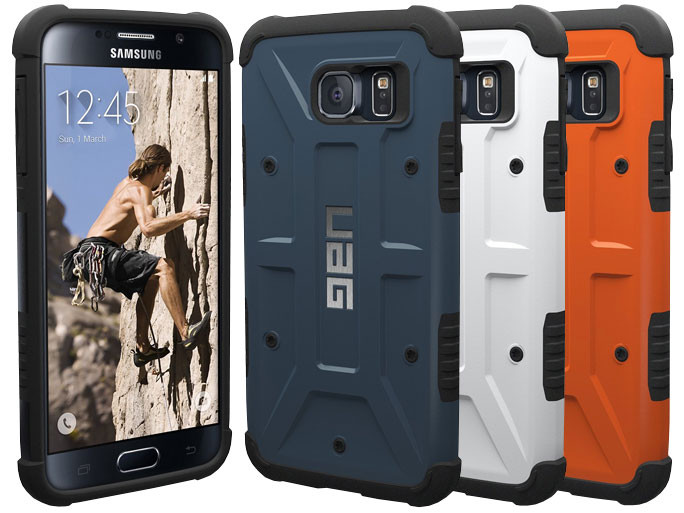
If you’re into rugged looks, the Composite Hybrid Case from UAG Read our hands-on review is definitely worth considering. Don’t be put off by its damage-resistant design, though, because it’s actually slim for the level of protection it provides. Both the TPU and polycarbonate shell are fused together with extra impact protection around all 4 corners.
There’s obviously a lot to grip with the Composite Hybrid Case, between the TPU side grips and busy pattern on the back shell — dropping your Galaxy S6 becomes a rare occasion. There aren’t any port covers to get in the way, but the case meets military drop-test standards — including a screen protector to ward off any scratches.
This case comes in some pretty cool color options, too. Solid colors include: black, white, rust and slate — for more transparency, there’s ice and ash.
See at Amazon
Spigen Slim Armor Case

An all-around favorite is Spigen’s Slim Armor Case, sporting dual layers in an incredibly low profile. It’s no secret that Spigen has been at the forefront of the popularity list for quite some time now, and for good reason. They’re consistent with their quality and design, offering options for both heavy duty and average users.
What’s great about the Slim Armor Case is its ability to shield against impacts without bulking up the Galaxy S6 to the point that it’s no longer attractive. It leaves precision cutouts for everything you’d need, including the camera, flash and ports. The side buttons are raised for a more uniformed look, and are easy to press.
On the back shell is a fold-out kickstand for convenient viewing when you need it, and it doesn’t protrude from the rest of the case like we’ve seen with the Trident Kraken AMS. It’s designed to allow you to face your Galaxy S6 down on any flat surface while elevating the display, keeping away any possible scuffs or scratches. The Slim Armor Case comes in gunmetal (as shown), metal slate, shimmery white, and blue topaz.
See at Amazon
Speck CandyShell Grip Case

Speck’s CandyShell Grip is back by popular demand with the Samsung Galaxy S6. It’s got serious grip, and we can’t blame users for enjoying that level of security.
Featuring an easy, snap-on installation the CandyShell Grip Case provides a soft, rubbery interior that keeps your Galaxy S6 safe from wear. Each corner has been reinforced to help handle impacts if and when they occur, while the raised bezel keeps the display from touching flat surfaces.
The polycarbonate shell is glossy, so fingerprints and smudges can be an issue over time, but are easily manageable. The most notable feature of the CandyShell Grip is its rubber stripes that wrap from side to side, enhancing grip in the most important areas. The symmetrical pattern has a unique look, too. If the black and grey (pictured) isn’t your style, choose from 5 other color combinations.
See at Amazon
Spigen Neo Hybrid Case

Sporting excellent grip with its textured TPU skin is Spigen’s Neo Hybrid Case for the Galaxy S6. This slim cover combines a thin polycarbonate bumper with a shock absorbent skin that’s design to keep things slim yet protective. Metal coated buttons along the sides add to the case’s good looks, too. Bumper colors include slate, gold, blue, and silver.
See at Amazon
Obliq Thin Bumper Case

This slim bumper case for the Galaxy S6 is designed to offer easy installation and removal while keeping you safe against minor impacts. The back cover rocks a brushed aluminum finish that looks amazing around the Galaxy S6 in any color. Ports and buttons are left open for easy access as well. Take your pick from 7 different color combinations.
See at Amazon
Verus Card Case

Who says a wallet case has to be a flip cover? The Verus Card Case for Galaxy S6 features a dual-layer design that provides optimal protection against impacts while adding storage under the shell for your personal items. Keep your ID, credit card, even some cash in your new case by sliding it open when you need. Available colors include silver, red, yellow, gold, and dark silver.
See at Amazon
Supcase Unicorn Beetle PRO

The next best thing to an OtterBox is the Unicorn Beetle for Galaxy S6. This rugged case turns your device into a beast that’s ready for anything. Between the textured exterior shell, built-in screen protector, and shock absorbent skin inside, impacts don’t stand a chance in damaging your Galaxy S6. Also included is a rugged belt holster for keeping your protected device at your side. The Unicorn Beetle comes in black, blue, green, pink, and white.
See at Amazon
Caseology Wavelength Series Case

If you’re after grip, then Caseology’s Wavelength Case for Galaxy S6 is right up your alley. This incredibly slim cover utilizes both polycarbonate and TPU materials to handle impacts. The grippy “wave” patterned skin on the back is what makes this case stand out. Choose from a handful of different color combinations to find the Wavelength that suits you and your Galaxy S6 best.
See at Amazon
Which is your favorite case?
How do you keep your Galaxy S6 protected? Let us know in the comments!
Beyond Nougat: What’s next in Developer Previews, post-Android 7.0

Android is getting even more Developer Previews, as it moves towards a new ‘maintenance release’ schedule beyond version 7.0.
Following the official release of Android 7.0 Nougat, there’s a lot going on around the Android Beta Program, which started back in March with the first “Android N” Developer Preview build. The short version is this: We’ll be seeing more Developer Previews in future versions of Android — and in the short term you might want to stay enrolled in the Beta program, even on the stable 7.0 firmware.
The Android Beta program isn’t going away. If you’re already enrolled in the Beta program, you’ll be among the first to get the final, stable Nougat update. As for future updates, if you stay in the Beta program you’ll eventually be updated to the Developer Preview build of the first Nougat maintenance release. (More on that later.) So if you still want to be on the cutting edge of Android, you don’t need to do anything after getting updating from Developer Preview
Right now the Beta program is a a reliable way to skip the queue for over-the-air updates and get your Android 7.0 update. And if you un-enroll after taking the final, stable 7.0 OTA, you won’t need to factory reset. (In contrast to the situation during the Nougat Beta, where unenrolling on a Developer Preview build would wipe your phone via an over-the-air update from Google.
Read: How to get Android 7.0 on your Nexus right now
Android has always had maintenance releases, but they haven’t always been this visible.
As we move beyond Android 7.0, the Beta program will evolve into a way to test new Maintenance Releases (MRs) of Nougat.
Maintenance releases aren’t new in Android, they just haven’t always been this publicly visible. (For example, Marshmallow MR1 landed in December 2015, MR2 in April 2016 — both were Android 6.0.1.) Sometimes these have involved new API levels (and new features for developers to use), and a new Android version number — for example in Android 5.0 to 5.1. Other times MRs have focused on bug fixes under-the-hood tuning, as in Marshmallow.
From Android Engineering VP Dave Burke on the Android Developers blog:
We’re moving Nougat into a new regular maintenance schedule over the coming quarters. In fact, we’ve already started work on the first Nougat maintenance release, that will bring continued refinements and polish, and we’re planning to bring that to you this fall as a Developer Preview. Stay tuned!
So maintenance releases in the Nougat era are partly about codifying Android’s smaller updates, and partly about giving developers more of a chance to prepare for these changes before they land. With the arrival of new Developer Preview builds in the future, it’s more likely that Nougat’s maintenance releases could introduce a new API level, and maybe a bump to Android 7.1.
If you stay in the Android Beta program after getting the final 7.0 update, you’ll automatically get updates to the MR1 Developer Preview when it’s available. Presumably it’ll work just like the earlier March-to-August Nougat preview program. According to the Android Beta program site, you’ll then receive Android’s regular over-the-air updates once the program ends.
Even as Android matures as a platform, the pace of development hasn’t slowed — if anything, the new push behind transparent, regular maintenance releases could accelerate things even further.
Android 7.0 Nougat
- Android 7.0 Nougat: Everything you need to know
- Will my phone get Android Nougat?
- All Android Nougat news
- How to manually update your Nexus
- Join the Discussion
Google might launch its Daydream platform soon with new VR hardware
A few months after introducing Daydream at its I/O conference, Google is reportedly now ready to launch the mobile virtual-reality platform.
Bloomberg has claimed that Google is “investing hundreds of thousands of dollars apiece in virtual-reality films and programs”. It also plans to promote VR projects from Hulu, fund the production of 360-degree videos from YouTube stars like Justine Ezarik (iJustine), and it’s partnered with video game producers and sports leagues, all with the purpose of launching Daydream with a lineup of exclusive VR content.
Google has apparently spent a lot of money in recent months, because Daydream already faces stiff competition in the crowded VR headset space from likes of Facebook’s Oculus Rift, Sony’s PlayStation VR, Samsung’s Gear VR, and HTC’s Vive, among others. The company wants apps, shorts, and games to fill up a hybrid store in order to attract users, encourage growth, and create a highly engaging environment.
Google is reportedly spending “high six figures on video games” and offering “low five figures to low six figures” for projects with filmmakers and online talent. Also, YouTube is slated to be one of dozens of apps available at launch, alongside HBO’s streaming service, Hulu, and apps from the NBA and MLB. Keep in mind the latest version of Android, called 7.0 Nougat, began rolling out this week with support for Daydream.
In fact, Android Nougat has VR-enhancing features including faster graphics processing and quicker head tracking. It’s therefore only matter of time before Google gives its new mobile VR platform a proper launch. Bloomberg said Daydream will even be introduced simultaneously with new Android phones, VR headsets, and controllers. Google has only developed reference designs for headsets and controllers, though.
The plan is that other companies will build their own VR devices, such as smartphones, which can run Daydream. We still don’t know much about the mobile VR platform, including what Google is demanding of hardware partners, as we’ve only seen a concept of a prototype headset design and have heard that Daydream phones will require key components like specific sensors and screens.
That said, we know Google has partnered with Samsung, LG, Xiaomi, and HTC on building Daydream-compatible phones that would work with Daydream headsets to serve up a mobile VR experience.
- What is Daydream and when is it coming?
Google’s Daydream VR could debut in the next few weeks
With the release of Android Nougat this week, Google’s mobile VR platform Daydream couldn’t be far behind. And that indeed seems to be the case, as Bloomberg reports that Daydream will launch in the “coming weeks.” You can also expect some brand new VR media from the likes of Hulu and YouTube stars like Justine Ezarik and the Dolan twins to accompany the platform.
At this point, the search giant is dabbling in different types of VR content to see what sticks, according to Bloomberg. It’s shelling out in the “high six figures” for video game-related VR experiences, and in the “low five figures to low six figures” for projects involving filmmakers. Facebook, in comparison, has poured millions into producing VR media for its Oculus platform. That’s also one of the biggest strengths of Samsung’s Gear VR, which was built in partnership with Oculus.
While Daydream seems like a far more ambitious VR initiative than Google Cardboard, there’s still plenty we don’t know about it. For one, we’ve only seen a sketch of a prototype headset design, which looks very similar to Samsung’s Gear VR. It’s also unclear what, exactly, Google will demand of its hardware partners. All we know is that Daydream compatible phones will require “key components” like “specific sensors and screens.” (Based on conversations with people in the VR industry, I’d bet that OLED displays will play a major role.) The company has at least managed to get Samsung, LG, Xiaomi and HTC onboard with building Daydream-compatible phones.
Source: Bloomberg
 AIVAnet