


PowerEgg is a £1290 drone offering gesture controls
PowerVision has officially launched PowerEgg, a rethinking of consumer drones, offering a dramatically different design, along with some innovative features.
The PowerEgg itself has a design that explains the name, with the legs and arms folding to the egg-shaped form for storage, giving a refreshing alternative to the squared design that’s so common.
However PowerVision isn’t only showing off a clever design, it’s also aiming to deliver a consumer-friendly experience, offering gesture control.
The idea is to allow one-handed control to position the drone, allowing up, down, left, right and near and far movements. The PowerEgg has an optical positioning system allowing for indoor flight, using ultrasonic sensors to detect the ground.
Flight time is said to be 23 minutes.
There’s a stabilised 4K camera included, on a three-axis gimbal, allowing photo and video, with support for live video streaming up to 5km.
There are a range of flight modes to aid capture of the photos and video you want, so you can have the drone follow you, take selfies, orbit and so on.
The PowerVision PowerEgg is now on pre-order over at https://store.powervision.me, with delivery expected in October 2016.
PlayStation Now comes to Windows PC, with wireless DualShock adapter in support
PlayStation Now, the service that will let you play PS3 games on other devices, has made a big move to Windows PC, meaning you can play games like Uncharted and The Last of Us on your computer.
PlayStation Now offers over 400 titles to subscribers for a price of £12.99/$19.99 a month, with unlimited playtime on other older titles. The new Windows PC app makes it possible to play these PlayStation exclusives.
Supporting the move to PC, you can now buy a DualShock 4 wireless adapter to give you a link to your computer (you can use a USB cable if you prefer). That means you’ll be able to get all those PlayStation controls on your PC.
The adapter will also work with Mac, so you can use the DualShock controller for PS4 Remote Play and it will cost you $24.99.
The recommended minimum specs for PS Now on your PC are as follows: Windows 7 or higher, 3.5GHz Intel Core i3, 3.8GHz AMD A10 or faster, 300MB storage, 2GB RAM, sound card and USB connection.
The minimum recommended 5Mbps broadband connection remains the same as it was before.
The PS Now app for Windows PC launches in UK, Belgium and the Netherlands on 24 August, followed by North America soon after.
LG V20 design possibly revealed by case manufacturer
The timeline of a device leak follows a predictable path. In the case of LG, it’s no secret that the V20 is coming: there have been invites to a launch event, a few early details about the sound quality and the fact it will run Android Nougat.
When it come to design though, we’re often at the mercy of either leaks, or case manufacturers. Some device designers release details of their devices to accessory manufacturers so that the accessories can be designed and made, and, most likely, leaked through an online store.
It’s perhaps in the accessory manufacturers interest to leak such things, as it garners attention from the wider media, exposing the brand as enthusiast fish for details on new devices.
That brings us back to the LG V20. These cases from Petra purport to show the forthcoming V20 and the rendered device within the company’s cases bear a passing resemblance to that revealed by @OnLeaks and Android Authority.
It might be that they come from the same source, it could easily be that this case company has used the details revealed in that previous render to give an idea of what the phone will look like.
There are two apertures on the front of the handset.: this could be two front-facing cameras as found on the V10. There are also two cameras on the rear, and we suspect a pairing like the G5.
There’s also a question over modularity on the V20. Will it follow the design of the G5 and offer connections to modular accessories? There’s button on the lower right-hand side that could do that: equally, it could be dedicated camera button.
We’ll know more on 6 September, when the LG V20 is due to launch at a New York event.
- Want to follow the full story of the LG V20? We’ve been tracking the rumours, leaks and all the official announcements right here.
- LG V20 is the first confirmed Android 7.0 Nougat phone, coming in September
Explore indie puzzler ‘The Witness’ on Xbox One in September
“Ideally we want the game to be in as many places as we can get it, but since we are a small developer and it’s a complicated game, we can only do so much at once.” That’s The Witness developer Jonathan Blow describing to us his desire for the indie puzzler to be available on more than just PlayStation 4. All the way back in February 2013. Now those dreams are coming to fruition as The Witness will make its way to Xbox One on September 13th — two and a half years after that interview with my coworker Jessica Conditt and six months after its debut on PS4 and PC. In a post on Xbox Wire, Blow lays out what new players should do when they get their hands on it.
Basically, if you get stuck on a puzzle, don’t look up solutions on YouTube or from a text-based walk through. Instead, explore another part of the island and you might find the solution while you’re at it. If you’ve avoided the game’s spoilers since January, it shouldn’t be too hard to resist the urge for a few more weeks, should it?
Source: Xbox Wire
Google Drive for Android now creates file and folder shortcuts
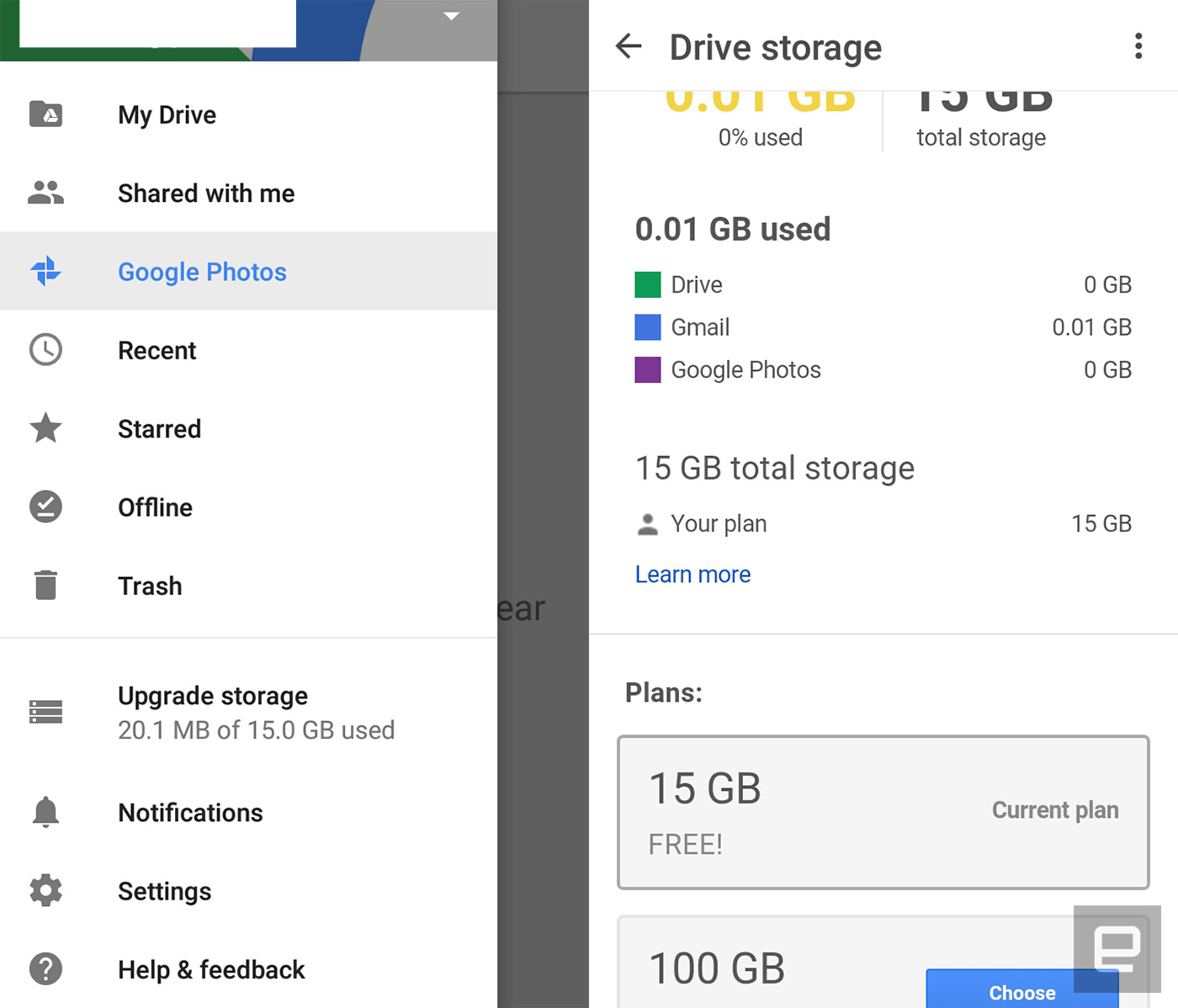
Google’s latest Drive update makes it easy to access your favorite files on Android. It adds the ability to add file and folder shortcuts to your homescreen, so you don’t need to launch the app every time there’s something in there you want to open. You can do that by going to your device’s Shortcuts menu and choosing Drive shortcuts, which could be next to the Drive scan and toolbar options. That might sound minor, but it could help you become more productive if you use the app as your primary cloud storage.
Besides the ability to add shortcuts, the latest version also adds an “Upgrade storage” option in its menu drawer. It shows your current plan and makes it a cinch to upgrade if you need more space. While the update comes a couple of small but useful features, it also serves as the bearer of bad news if you’re stuck on Android Ice Cream Sandwich. This is the last ICS-supported update, which means you won’t be getting any more new features after these.

Via: 9to5google
Source: Google Drive
Amazon now offers unlimited cloud storage for £55 per year
One of the benefits of being an Amazon Prime member is unlimited cloud storage for photos, as well as 5GB of space for other file types. If you own any of the retailer’s Fire devices, too, you get unlimited storage for photos taken with that product, as well as 5 gigs for whatever else. Amazon’s latest offer is altogether more simple: For £55 per year, you can get unlimited cloud storage, full stop.
Amazon Drive’s unlimited plan first launched in the US last year, not long before iOS and Android apps arrived to make the service a serious competitor to the likes of Dropbox, Google Drive, Box and others. It’s also accessible through browsers and dedicated Mac/PC programs. There’s no Prime favouritism here — anyone with an Amazon account can sign up for the £55 yearly unlimited plan, and most will be able take advantage of a three-month free trial to get themselves settled in.
Source: Amazon
Thunderbolt Device Promises Desktop-Class GPU Performance For MacBooks
A Kickstarter project for a high-performance desktop GPU that can plug into a MacBook via Thunderbolt and is compatible with the Oculus Rift VR headset has raised its backing target of $50,000 in less than 24 hours.
The Wolfe is a portable box that contains an Nvidia desktop-class graphics card and connects to a MacBook or other laptop via Thunderbolt 2 (or potentially Thunderbolt 3), and promises vastly improved performance for gaming, virtual reality, graphic design, and video editing.
The team behind the Wolfe claims owners of newer laptops can expect performance increases up to 500 percent when using a Wolfe box, or up to 1000 percent with the Wolfe Pro, while older computers are said to see even more dramatic performance gains.
- The Wolfe contains an NVIDIA GTX 950 GPU – 768 cores operating at 1024MHz, for a peak compute power of 1.57 TeraFLOPS.
- The Wolfe Pro runs on an NVIDIA GTX 970 GPU – 1664 cores operating at 1050MHz, for a peak compute power of 3.49 TeraFLOPS.
What about NVIDIA’s 10-series GPUs? As of right now, The Wolfe Pro includes an NVIDIA GTX 970. However, it’s more than likely that Wolfe Pro level backers will be able to opt for the new GTX 1060 in our post-campaign survey for even better performance.
The box runs off a 220W PSU and has three DisplayPort 1.2 connections, one HDMI 2.0 and one DVI-I port. The Thunderbolt connection also offers the potential for more than one Wolfe box to be used with one laptop, for building a render farm or for a multi-monitor setup, say the makers.
Kickstarter early-bird pledges of $399 or more get backers a Wolfe box powered by a GTX 950 with the option of Thunderbolt 2 or 3 connectivity, while a standard pledge costs $449. An early-bird pledge for the Wolfe Pro is $549 ($599 for a standard pledge). A Wolfe DIY pack for modders who want to use their own GPU costs $269.
The makers note that while the Wolfe will increase laptop display performance, the best results are expected to come with using an external monitor or VR headset, due to the inherent bandwidth restrictions in Thunderbolt 2.
The project was conceived by a group of Harvard computer science graduates and Mac-owning gaming enthusiasts, after they hacked together a prototype GPU box in a DeWolfe dorm room at Harvard.
The team has continued to improve the hardware and software at the Harvard Innovation Lab, with the aim of making Macs “performance powerhouses” and “to stop big companies from charging outrageous prices for minuscule upgrades” by letting users take control of their computer’s performance. The Kickstarter project page quotes a shipping aim of February 2017.
The project comes five months after Oculus Rift founder Palmer Luckey suggested VR headset support for the Mac was “up to Apple,” and that the company needed to “prioritize higher-end GPUs.” If Apple builds a machine that can handle the hardware, Oculus VR would “love to support Mac,” said Luckey.
Tags: Kickstarter, Wolfe
Discuss this article in our forums
Photo Editing App ‘Prisma’ Now Supports Offline Picture Processing
Popular photo manipulation app Prisma has been updated to allow offline processing of images for the first time.
The photo app recreates images in the style of famous artists and gives shots a painterly aesthetic using neural networks, but up until now users needed an internet connection and had to wait for the app’s Moscow-based servers to process their pictures.
The latest update doesn’t bring offline mode to the whole collection of Prisma’s filters, but the developers say more is to come on that front, and the change means server-side video manipulation is just around the corner.
“Now that we’ve implemented neural networks right to the smartphones, we have enough server capacity to run full videos on them in the near future,” said the Prisma team.
Prisma Labs says “repainting” times have been reduced to five seconds on Apple’s latest iPhones and that there should be no increase in handset battery usage.
Prisma is a free download on the App Store for iPhone and iPad. [Direct Link]
Discuss this article in our forums
Tim Cook Reaches Five Years as Apple CEO, Unlocks Over $100 Million in Bonuses
Today marks the fifth anniversary since Tim Cook was named Apple CEO on August 24, 2011, the same day that late co-founder Steve Jobs stepped down as chief executive for the final time and recommended the board of directors appoint Cook as his permanent successor.
Upon reaching the five-year mark, Cook has today unlocked previously awarded stock bonuses currently worth over $100 million. The bonuses are tied to both his tenure and Apple’s performance under his leadership, including its total shareholder return relative to the S&P 500 index.
Cook’s bonus includes 700,000 tenure-based restricted stock units that vested today as part of a larger compensation package of over 4.7 million shares awarded on August 24, 2011, in addition to his first of six annual installments of 280,000 tenure-based restricted stock units that vested today. The combined 980,000 shares are valued at nearly $106.7 million based on AAPL’s closing price of $108.85 on Tuesday.
Cook’s bonus could be even higher if Apple’s total shareholder return is in the middle third or top third relative to other companies in the S&P 500 from August 25, 2013 through August 24, 2016. He will receive another 140,000 RSUs for middle third performance, or 280,000 RSUs for top third performance. AAPL has risen around 52% since August 25, 2013, while the S&P 500 has risen around 32% in the same time period, making at least a middle third finish a strong possibility.
A restricted stock unit, or RSU, is a form of compensation valued in terms of company stock, but the stock is not issued at the time of the grant. Instead, the recipient gets shares of stock at a later date, generally only if they are still employed by the company. Cook personally requested that his award be modified to adhere to a more performance-based compensation system in 2013. Another 700,000 of his RSUs are scheduled to vest on August 24, 2021, plus 280,000 RSUs each August 24 through 2021.
Cook’s net worth, assuming he remains with the company through August 24, 2021 and meets performance targets, is estimated to be over $500 million based on his current stock options and RSUs awarded. He has previously pledged to donate the vast majority of his wealth, including these stock bonuses, to charities in his lifetime. In May 2015, for example, Cook donated approximately 50,000 shares of Apple stock, then worth approximately $6.5 million, to undisclosed charities.
Cook has overseen the launch of the Apple Watch, MacBook Pro with Retina display, ultra-thin 12-inch MacBook, iPad Pro, several iPhone and iPad models, Apple Maps, Apple Music, Apple Pay, Siri, and many other products and services since taking over the reigns in 2011. Apple became the world’s most valuable company in 2012 under his leadership, and it continues to hold that title today. Apple stock has risen over 132% since Cook was appointed as CEO five years ago.
Tags: Tim Cook, AAPL
Discuss this article in our forums
PowerVision PowerEgg Release Date, Price and Specs – CNET
It’s very difficult to say “PowerEgg” and not smile or giggle, and that’s sort of the point.
Robotics company PowerVision was looking for a drone design that is friendly and approachable and not intimidating to anyone — and the result is the PowerEgg. When closed up, it looks like a giant shiny white egg, roughly the size of a rugby ball. Press a button to drop its legs, pull up each of its four propeller arms and it’s transformed into, well, a flying egg. A 4.6-pound (2 kg) one at that.
Under a cap on the bottom is the PowerEgg’s 4K-resolution camera on a 3-axis motorized gimbal that, once flying, is completely unobstructed and can rotate 360 degrees. The quad’s visual positioning system is then also uncovered, to assist with indoor flying up to 13 feet (4 m) above the ground.
PowerVision PowerEgg is not your ordinary…
See full gallery


1 – 4 of 25
Next
Prev
When flying outside, the drone relies on GPS to keep it stable and to assist with a handful of automated shooting modes. Included are a Follow Me mode that tracks the moves of the controller, another that orbits a subject, one for waypoint navigation and one for selfies.
Those things aren’t unique to the PowerEgg, but the drone’s controller is. PowerVision made it modular by breaking out the flight processor and base station into a separate unit. Bundled with the quadcopter is a fairly typical gaming-style two-stick controller as well as the one-handed, gesture-based PowerEgg Maestro. The Maestro basically lets you point to where you want the drone to fly and it follows.

The Maestro controller lets you use gestures to guide the PowerEgg where you want it to fly.
Joshua Goldman/CNET
The drone is capable of delivering real-time video transmission up to 3.1 miles (5 km) to a smartphone or tablet (Android or iOS). The battery, which loads vertically in the top, has a maximum flight time of approximately 23 minutes, which is disappointing but understandable given the drone’s weight and size.
The PowerEgg can be ordered now for $1,288 (approximately AU$1,700 or £975) through the PowerVision site, but won’t ship till October. That price gets you the drone, the Maestro and two-stick controllers, a battery, a charger and a light-up base station that does nothing more than display your PowerEgg. If you order before the end of September you get a backpack for everything, too.
We did see the PowerEgg in action, and it did manage to take off and land on its own and fly around a loft space if nothing else. We didn’t get to see any video off the camera, so I can’t say what the quality is like. Or how it will behave outside. The price seems too high to me, given how much competition is out there. However, it does offer a couple interesting features, such as its rotating camera and modular controller, and a distinctive design that is made for travel and starting conversations.
 AIVAnet