


Machines at War 3 is a quality strategy game for Android (review)

Overview
Machines at War 3 is a recently released strategy game for Android by developer Isotope 244. It’s a game with a futuristic/mechanical feel that features a lot of strategic base/infrastructure building for acquiring enough money and electricity/power, as well as troop deployment and engagement to conquer you enemies. It can be played by gamers from school-age on up, though more mature folks will have an easier time with what can be a more sophisticated interface.
 Setup
Setup
The game can be downloaded from the Google Play Store, but it does cost $6.99. After download you simply open the game and you’re off & running. At the first screen you have several options with which to go with:
- Campaign: 20 levels of objective-based gameplay. More on this mode in a bit.
- Skirmish: Take on the AI in a almost limitless combination of difficulty, landscapes, and climate.
- Multiplayer: Take on up to three other players for map supremacyTutorial: A full-on tutorial that can play almost as long as a standard game.
 Gameplay
If you’ve played any strategy game before, this will feel pretty familiar in terms of play. Your success relies heavily on raising our army’s capital in terms of money, electrical power, and resources.
Money you gain over time and activity.
Electrical power you create through construction of various generators & turbines.
Resources can be found throughout the map you are playing on….these are not just game fodder, but truly important and needed to advance and win. They are key in building mega-units that are particularly effective in battle and tactics.
 And yes, units. Units are the battle vehicles (there’s over 130 ones to access & build) that you create and utilize as you build your capital. Each unit has a set combination of features that can (and should!) be exploited to their maximum effect, such as ‘explore’, ‘fight’, ‘range’, etc.
Once created, you can amass multiple groups of units over your game map to set up offensive, defensive, and exploratory positions. You can only build facilities (factories, storage buildings, fixed weapons, lookout posts) where you already have units, but you can only get units by building from your facilities…..so having a good sense of balance is key.
 And this building takes time; you need to and get rewarded for planning ahead in this game. And this planning and building can take some time in and of itself. It works and is very cohesive as you progress, but for me it can be a bit tedious.
Plot/Story
The plot line to the ‘Campaign’ mode goes like this: You are a military leader tasked with investigating the mysterious disappearance of an elite group of scentists and researchers known as the Omicron Initiative from their top-secret lab. The staff are missing, the lab’s been ransacked, and years of research data is gone. Your investigation mission quickly turns into a rescue mission, and you progress through the game exploring the world attempting to find the parties responsible, with the ultimate goals being 1.) rescue your scientists, 2.) recoup the lost data, and 3.) vanquish your newfound enemies.
Graphics and Sound
it’s evident that this game is originally a PC/Mac creation, ported to a mobile interface. Both the visuals and sound are very PC-esque. The controls are even more so; there are literal “keyboard & mouse” options in the setting menu. Also, while playing, there are areas of the screen where a mouse and click-and-drag & right click-ability is evidently the native option; but with a touchscreen, you end up swiping and pinching-to-zoom like a crazy person to get where you want to go quickly.
All in all it works on a touchscreen, but it’s also clear that the game didn’t start with mobile in mind.
 Conclusion
I did enjoy playing Machines at War 3, but only for a little while at a time. As stated earlier, the game takes a long time to ramp up, as you spend hundreds of clicks building your facilities and units solely in preparation to actual combat. For me the combat was the great fun and easily the most fun, but that admittedly has more to do with my general patience than the actual game.
To each their own, and this game would be a great fit for gamers who enjoy building their empire in addition to defending and growing it.
Download for Android here.
Download for iOS here.
Dash Charge for OnePlus 3 explained
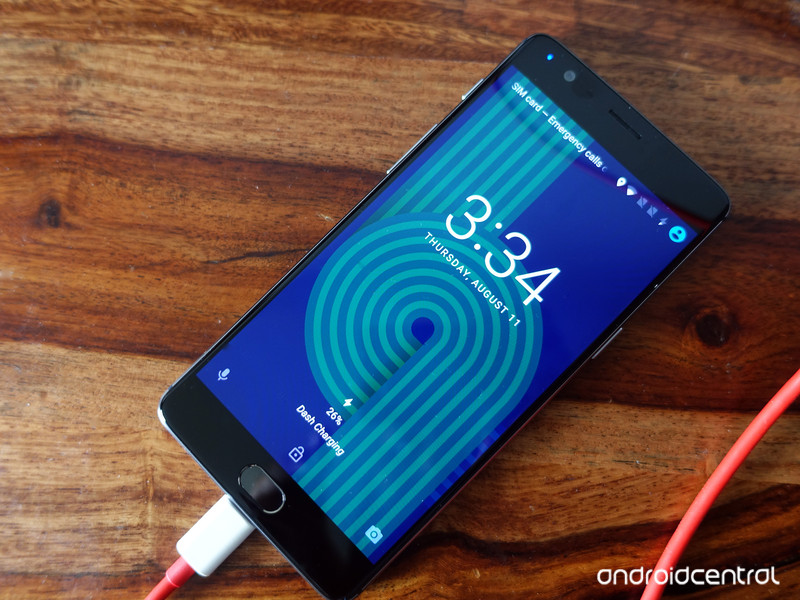
Dash Charge is awesome.
OnePlus rolled out its Dash Charge fast charging option in the OnePlus 3, which allows the phone to go from 0 to a 60% charge in just 30 minutes. Dash Charge is licensed from OPPO, the parent company of OnePlus, and is different from the majority of quick charging options available today, most of which leverage Qualcomm’s Quick Charge technology.
Here’s what you need to know about Dash Charge.
A primer on fast charging

A standard LiPo battery (which is what’s inside your phone) is highly reactive, which is why phone manufacturers have several safeguards built into the charging circuitry. Based on the depletion level, batteries can take in more power, and it is on this principle that fast charging works.
Qualcomm’s Quick Charge technology relies on delivering a higher voltage to the battery to expedite charging time. With Quick Charge 3.0, Qualcomm introduced optimizations that allow devices to constantly adjust voltage over the course of the charging cycle. Quick Charge 3.0 certified chargers can deliver voltages ranging from 3V to 20V in 200mV increments.
Quick Charge 3.0 is widely used, with the likes of the HTC 10 and LG G5 offering the fast charging option. The chip vendor licenses the technology to third-party OEMs for free, which is how companies like Samsung can offer Adaptive Fast Charging on the Galaxy S7, and more recently the Galaxy Note 7 — though those models use the older, slightly less dynamic Quick Charge 2.0.
Qualcomm uses high voltages, whereas OPPO pushes more amperage.
Meanwhile, OPPO has its own fast charging solution called VOOC (Voltage Open Loop Multi-step Constant-Current Charging). The fast charging system is used in the Find 7, the F1 Plus, the R7, and other OPPO phones, and now on the OnePlus 3 as Dash Charge. OPPO uses dedicated circuity in the wall unit for heat management and dissipation, which is why you can only get Dash Charge speeds with the bundled wall charger (or the $30 Dash Charge car charger) on the OnePlus 3.
The key difference between the two fast charging technologies is that while Qualcomm uses higher voltages to charge batteries, VOOC relies on delivering a higher amperage. For instance, Quick Charge 3.0 goes up to 6.5V at 3A, creating 19.5W, whereas VOOC delivers 5V at 4A to attain 20W. And that has a few advantages.
It’s all cool

One of the main benefits of VOOC (and Dash Charge) is its ability to keep temperatures low while charging. The fast charging option allows you to watch videos or play games while the phone is charging, with no net drop in charging speeds. That isn’t the case with Quick Charge, as the higher voltages invariably lead to the phone reverting to normal speeds to prevent overheating.
With Dash Charge, you can play games or watch videos while charging your phone without worrying about overheating.
Even though the OnePlus 3 can charge up to 60% in 35 minutes, it takes slightly over 40 minutes to go from 65% to a full charge. That’s to prevent damage to the battery (and in a way, to you), with the wall charger limiting output at 2A after hitting 75% and going even lower after reaching 85%. The microcontroller unit inside the phone constantly monitors the charge level to determine the desired amperage to be delivered.
The main disadvantage with Dash Charge is that you need to use the bundled wall unit to charge the OnePlus 3, as OPPO is yet to license the technology to third-party vendors. Also, as the technology pushes more amps to your phone, so you should probably stick to using the provided cable as well.
However, you can use your Dash Charge wall unit to charge other phones. I regularly use it to charge the LG G5, and it is just as fast as using Aukey’s Quick Charge 3.0 charger.
Your turn
What do you think of Dash Charge on the OnePlus 3? Let us know in the comments.
OnePlus 3
- OnePlus 3 review: Finally, all grown up
- OnePlus 3 specs
- OnePlus 3 vs. the flagship competition
- Latest OnePlus 3 news
- Discuss OnePlus 3 in the forums
OnePlus
Homido’s V2 headset is a huge upgrade to your VR experience!

Homido V2 brings some much needed upgrades to a great VR headset.
It shouldn’t be a surprise that we’ve started to see more elegantly designed headsets as we move into the future of VR. Manufacturers are starting to figure out how to improve their initial VR experiences, and as an early mover in this space the folks at Homido are well positioned to deliver an upgrade of their initial offering. The creators have taken the time to deliver a larger, better designed, and more comfortable headset for your VR adventures.
Read more on VR Heads!
Motorola talks redesigning its phones, building Moto Mods and more
Motorola has been working on Moto Mods and Moto Z for more than two years, and the company now explains some of the processes that took place behind the scenes. Building a phone that had good battery life and was more durable and thinner than previous phones was quite a task for the company to conquer. Between developing a liquid cooling system and using aircraft grade stainless steel, Motorola was able to keep the phone super thin while not compromising on quality.

From Motorola’s post:
Up until now, your smartphone experience has been limited by your phone’s hardware and software capabilities. When it came to developing Moto Mods, we set out to remove those barriers by creating a phone that changes as your needs change, and does so in a truly seamless way. For example, we wanted to make sure the process for swapping out Moto Mods was as fluid and natural as possible. Our solution: very strong magnets and an automatic connection process that doesn’t require additional steps or rebooting.
It doesn’t end with Motorola though. The company has opened up its Moto Mods Developer Program so that developers will be able to create their own Mods for the phone. To make it even easier to get started, Motorola is offering the same hardware and software development kit it uses internally with those who are interested.
Moto Z and Moto Z Force
- Our Moto Z review!
- Moto Z specs
- Moto Mods custom backs
- Moto Z and Moto Z Force will be Verizon exclusives until the fall of 2016
- The latest Moto Z news
- Discuss in our Moto Z forums
Motorola
Verizon
This modder turned an Xbox One S into a 19-inch laptop you can buy
If you search the web, you’ll discover several hardware hackers (aka modders) who specialise in turning bulky consoles into portable machines such as laptops, but it’s not very often that you’re able to buy these custom form-factors.
Modder Edward Zarick, who created the ‘Xbook One’ laptop, has gone back to his shop with the newer and slimmer Xbox One S and produced what he has dubbed the ‘Xbook One S’. It basically has the guts of the Microsoft’s latest game console and a 19-inch (720p) screen from Samsung. For some reason, the screen has been downgraded, as the original Xbook One had a 22-inch (1080p) display from Vizio. Bummer.
According to Zarick, he was unable to get his hands on a 1080p screen at that size. There’s also no integrated battery, so you’ll need a power source nearby in order to use this thing. Still, his Frankenstein includes two loudspeakers pointed at the player and a strong acrylic case. If this interests you, you’ll need to have deep pockets, because the 500GB one goes for $1,495.
There’s also a 1TB version for $1,545. Shipping is separate, and international shipping will supposedly cost “much more”. You’ll also have to pay a $750 non-refundable deposit upfront to cover the cost of parts, as Zarick makes all these by hand and takes up to three weeks on each.
Yes, ‘No Man’s Sky’ has a few issues
No Man’s Sky landed on PlayStation 4 this week and it wasn’t perfect. Cue a rash of backlash on Twitter, a few dozen angry Reddit threads and a handful of YouTube videos calling creator Sean Murray a liar and a fraud. Ah, the internet. Let’s break down a few of the high-profile glitches that people have found so far:
Those who pre-ordered the game receive a few perks, one of which is a ship that has a hyperdrive pre-installed, negating the need to find a hyperdrive blueprint like the rest of the plebeian galaxy. These cool cosmonauts then rush across the universe and eventually find a new ship to buy — but new ships don’t come with hyperdrives pre-installed. And without the hyperdrive blueprint, these players are out of luck in building a new one. This isn’t a bug, per se, but it is a major problem and a pretty large oversight from the developers at Hello Games.
There are a few workarounds for this issue, until Hello can roll out a fix. If you’re a pre-order superstar, don’t claim your bonus ship until after you’ve finished the hyperdrive tutorial and acquired the blueprint. If it’s too late for that, make sure to transfer your hyperdrive from your current ship to any new ships that you purchase by manually storing it in your exosuit or using the option that moves all upgrades to the new craft.

The second big issue feels like something we’d find in the Destiny forums: a resource exploit. Atlas Stones are one of the most valuable items in the game, since players need 10 of them to reach the center of the galaxy and experience the closest thing the game has to an “ending.” They’re tough to craft, but one glitch outlined by Eurogamer allows players to double their inventories, Atlas Stones and all, simply by reloading a previous save. Once you die in your ship, the game allows you to collect all previous inventory from your grave marker. But, reload a previous save and you’ll have that inventory plus the ability to reclaim the same items from your point of death. If you have an Atlas Stone or another valuable item in your bag, that number is suddenly doubled.
This is a simple glitch to avoid. If you don’t want to cheat, don’t cheat.
And then there’s a question of the game’s “multiplayer” elements. Two players discovered they were near each other (an unexpected feat in a universe of 18 quintillion planets) and staged a meet-up, but their paths never crossed. They streamed the entire thing, and though they encountered the same space stations and landmarks on the same planet, they never saw each other. Even stranger, one player saw a daytime landscape and the other saw night.
Hello Games hasn’t explained why these players didn’t see each other. Murray has said that players would be able to cross paths, theoretically, but it would be highly unlikely to see another player in such a vast game universe. On Twitter yesterday, Murray wrote, “Two players finding each other on a stream in the first day — that has blown my mind,” and, “We want people to be aware they are in a shared universe. We added online features and some Easter Eggs to create cool moments.”
It’s unclear why these two players couldn’t actually find each other during this particular livestream. The players may have been on the same planet, but perhaps they weren’t on the same server (also known as: a cooler version of The Lake House).

These are the biggest issues facing No Man’s Sky in its first week on the PS4. For a game as vast as the universe itself and filled with all manner of neon-stained, Frankenstein planets, creatures and plants, this isn’t a bad starting point. As we’ve discussed at length, the internet has changed how video games exist in the public eye. Players expect games, even boxed console titles, to be updated, patched and improved over their lifetimes. No Man’s Sky is no different — in fact, it’s remarkable.
No Man’s Sky is a massive, unprecedented game created by a small team of developers, and it’s been sold to the public as a AAA experience. This doesn’t excuse any issues with the game, but it does explain them. No game should launch as a completely busted, unplayable experience, but sometimes this happens — and these titles deserve to be called out, especially if they cost $60 and come from AAA studios with budgets of millions.
Despite the marketing hype, No Man’s Sky is not a AAA game. And, more importantly, it’s not busted. The pre-order ship problem is its largest issue and hopefully Hello Games figures out a fix soon. However, by and large, the game works. Not only does it work, but it’s gorgeous, technically astounding, innovative and engaging. And it’s only going to get better.
 AIVAnet