


One month after going free, ‘Evolve’ averages 15,000 players
Pick a random moment in June and you’d likely find about 100 people playing Turtle Rock Studios’ Evolve on Steam. That’s not a lot of players in general, but this number is especially sad for a game billed as an online multiplayer extravaganza. One and a half years after launch, it looked like Evolve was dying. And then, in July, Evolve’s active player base shot up to an average of 15,400 at any given time on Steam, according to current lead designer Brandon Yanez.
This didn’t happen by accident: Developers at Turtle Rock knew they had to take drastic action to save Evolve and so, on July 7th, they did. They made the game free on PC.
Evolve originally cost $60, the standard price of a AAA video game, and it launched alongside a bevy of pricey downloadable extras. This flood of day-one DLC was one reason the game simply didn’t resonate, even though it received a ton of pre-release buzz from critics and players alike.
“There was a ton of conversation in the community with regard to business models rather than discussion on the game itself,” Yanez said.

When Turtle Rock released Evolve into the wild, it landed smack in the middle of a “DLC shitstorm,” according to studio founders Chris Ashton and Phil Robb. It was early 2015, and gaming forums and blogs were rife with conversations about developers overloading their titles with pricey downloadable content. Many players were sick of it and extremely vocal about their displeasure. Any mention of DLC, especially tied to a $60 AAA game, instantly ignited comment sections and Twitter.
And Evolve certainly had a lot of DLC from day one. Players lambasted it for this fact, which surely influenced some people’s decision to not buy the game. However, DLC wasn’t Evolve’s only problem.
The game had a steep learning curve, Yanez said, meaning many players couldn’t jump in and have fun right off the bat. On top of that, the game simply wasn’t fun until late in each round. Evolve used an asymmetrical multiplayer strategy where four players acted as hunters, each with an individual skill, and one person embodied a Lovecraftian kind of monster that attempted to evade capture and take down the other players. It looked like a fast-paced, hectic kind of game, but Yanez said it was criticized for being a “running simulator” before the monster gained all of its abilities.
Basically, until that point, Evolve was boring.

“After seeing our original player base decline and after reviewing a ton of feedback, we realized we needed to change the game so that it was faster-paced, less role dependent and more accessible,” Yanez said.
Going free was always on the table for Turtle Rock. Plenty of team members were fans of other free multiplayer games and they talked about the option early on in Evolve’s development. Some of the most successful online multiplayer games in recent memory have been free, including League of Legends, Dota 2 and Hearthstone. Shooters, however, tend to have an entry price — think Overwatch, Counter-Strike, Call of Duty or Destiny. Evolve was well within its genre’s boundaries when it launched at $60. However, its sluggish gameplay simply didn’t support a large, captive audience.
Evolve Stage 2, as developers dubbed the free version, didn’t just include a price drop; it reworked how the entire game operated. The hunters were overhauled, lending them all a more robust set of skills, rather than rigidly defined roles. For example, originally, only the hunter known as a “trapper” could deploy a dome that caught the monster, but Stage 2 gave that power to all hunters. Plus, monsters started with enough skill points to unlock all of their abilities right away.
The message was clear: No more running simulators.

“That has probably been the most exciting thing about this first month [as a free game] so far, is how much has changed simply because our community asked for it,” Yanez said. “We feel that has been the biggest difference. You still find wonderful people who become exceptional members of the community, but now there are way more opportunities for community growth and engagement with a much wider audience we could’ve never reached if we remained a ‘paid’ community.”
Evolve Stage 2 hit Steam for free on July 7th, bringing with it all of the content that Turtle Rock had previously released for the game. Since then, more than 1 million people have tried it out, and it hit a peak of 25,000 concurrent players just two days after going free. One month in, an average of 15,000 active players means Evolve certainly isn’t dead just yet.
The game still has a base price on consoles, for now. Turtle Rock said that if the PC experiment goes well — meaning, if Evolve can sustain a large and steady player base — it’ll go free on Xbox One and PlayStation 4 as well.
To that end, the studio is focused on regularly updating and tweaking Evolve on PC in a bid to keep players interested. Turtle Rock recently kicked off “Shear Madness,” a month-long event that will introduce three new characters, three fresh map variants, a new game mode and a bunch of community-requested features.

This is a far cry from where the game would be if it had remained a paid product.
“We’d be reaching the tail end of our life cycle,” Yanez said. “It’s exciting for us to see people giving the game another chance, but we know this is only the beginning.”
MacRumors Giveaway: Win a Smart Home Starter Kit From Yonomi
For this week’s giveaway, we’ve teamed up with smart home app Yonomi to give away a Smart Home Starter Kit consisting of a Sonos Play:1, an Amazon Echo, and two LIFX Wi-Fi connected lightbulbs, all of which can be controlled together using the Yonomi app for iOS devices.
Yonomi is designed to connect to more than 60 smart home products from companies like Withings, Philips, Quirky, Sonos, Nest, Belkin, and more, allowing users to group and control devices that normally would not work together.
Smart home products come from a wide range of manufacturers and usually require their own dedicated apps that don’t interface – Yonomi bridges them all together and makes it possible to create Routines for a true automated smart home experience. Yonomi also includes easily accessible favorites options and customized smart home recommendations.
With Yonomi and the products in the giveaway, for example, a “Wake Up” routine can be created that’ll turn both the LIFX light bulb and the Sonos speaker on at the same time through a voice command to the Amazon Echo. Yonomi is highly customizable and routines can be created for all kinds of situations.
A “Bed Time” routine might dim the LIFX bulbs to night light level and turn on soft lullabies on the Sonos for the kids, while a “Party” routine might set the bulbs to different colors and play the appropriate music. All of the routines can be initiated through the Echo, which is super convenient, and the Echo can also control other connected products and respond to individual commands.

As for the products themselves, the Sonos Play:1, LIFX bulbs, and Amazon Echo are all popular smart home choices that tap into a home’s Wi-Fi network. The Play:1 is one of Sonos’ most popular speakers, the LIFX bulbs can turn any color, and the Amazon Echo is a central hub that can play music and respond to a huge range of voice commands.

Yonomi’s app is available directly from the App Store for those who would like to try it out with their existing products, and one MacRumors reader will also win the full Smart Home prize pack. To enter to win, use the Rafflecopter widget below and enter an email address. Email addresses will be used solely for contact purposes to reach the winner and send the prize.
You can earn additional entries by subscribing to our weekly newsletter, subscribing to our YouTube channel, following us on Twitter, or visiting the MacRumors Facebook page. Due to the complexities of international laws regarding giveaways, only U.S. residents who are 18 years of age or older are eligible to enter.
a Rafflecopter giveawayThe contest will run from today (August 5) at 11:00 a.m. Pacific Time through 11:00 a.m. Pacific Time on August 12. The winner will be chosen randomly on August 12 and will be contacted by email. The winner has 48 hours to respond and provide a shipping address before a new winner is chosen.
Tags: giveaway, Yonomi
Discuss this article in our forums
Incipio Acquires Griffin Technology
Accessory maker Incipio today announced that it has acquired Griffin Technology, a company known for its wide range of accessories for Apple’s line of devices. Incipio and Griffin did not disclose the terms of the deal.
“Griffin has a 25-year history of designing, manufacturing and distributing iconic mobile accessories,” stated Andy Fathollahi, Founder and CEO of Incipio Group. “As part of Incipio Group, Griffin strengthens our product development and manufacturing capabilities, complements our existing product lines in rugged cases, power and connectivity, and allows our brands to reach a broader domestic and international audience through enhanced distribution in the business-to-business, enterprise and education verticals.”
Under Incipio, the Griffin Technology brand name will be maintained and it will continue to retain its global headquarters in Nashville, Tennessee. Products, such as Griffin’s Survivor series, will still be sold.
Incipio has made a number of acquisitions in recent months, purchasing brands that include Skullcandy, Clamcase, and Incase.
Tags: Griffin, Incipio
Discuss this article in our forums
Beoplay H5 Review: B&O’s Bluetooth Earbuds Sound Great, but They’re Pricey
With the controversial removal of the headphone jack from Apple’s upcoming iPhone range a seeming inevitability, audio companies are already ramping up Bluetooth headset options ahead of the devices’ launch in the fall.
In June, premium audio heavyweight brand Bose debuted a wireless version of its flagship over-the-ear headphones with the QuietComfort 35’s. Not to be outdone, last month Danish audio big hitter B&O entered the fray with its Beoplay H5 Bluetooth buds, a pair of high-end magnetized earphones designed “for music lovers who live to move.”
Design and Features
As with most products bearing the Bang & Olufsen moniker, the Beoplay H5 buds aren’t exactly cheap at $249, but apart from the luxury brand cachet that comes with them, they promise premium performance in a compact package whatever your lifestyle, designed to segue seamlessly between a fitness routine and a daily commute, for example.
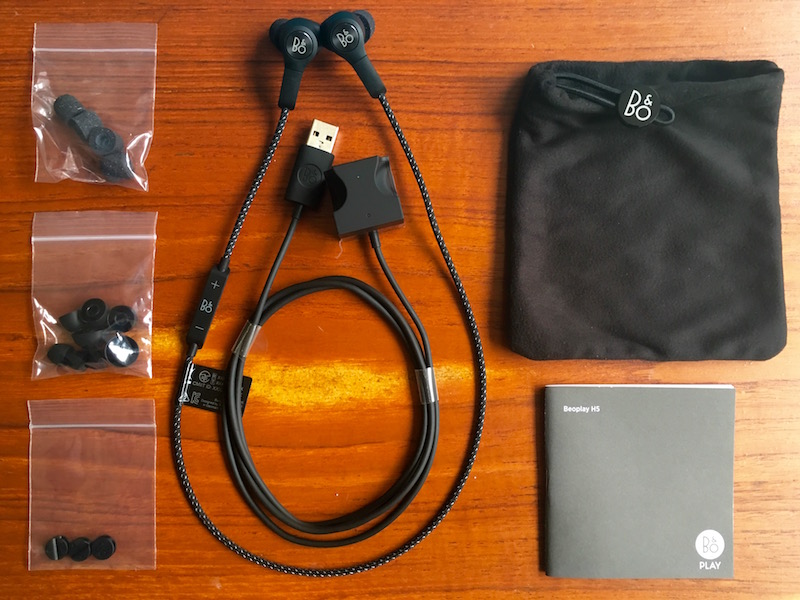
The dust and sweat-proof earpieces are made of a featherweight polymer-rubber compound with a branded aluminum disc on the rear, and each bud has a neck about an inch in length, with the power/pairing LED on one ear.
The buds are connected by a 52 cm (~20 in) cord sheathed in a soft braided textile that sits over the nape of your neck during wear, with an inline remote on the left-hand side and a hidden omnidirectional mic built in for taking calls.
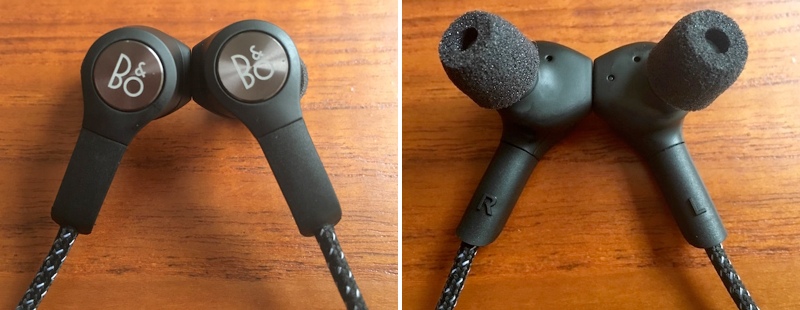
Each earpiece contains a magnet, so you can clasp them together securely for them to rest around your neck when they’re not in use. In another neat design feature, clicking the magnets together also auto-powers down the earphones to save battery.
Seven pairs of eartips come supplied – three sizes of Comply Sport memory foam tips offering a malleable seal, and four sizes of standard silicone molded tips.
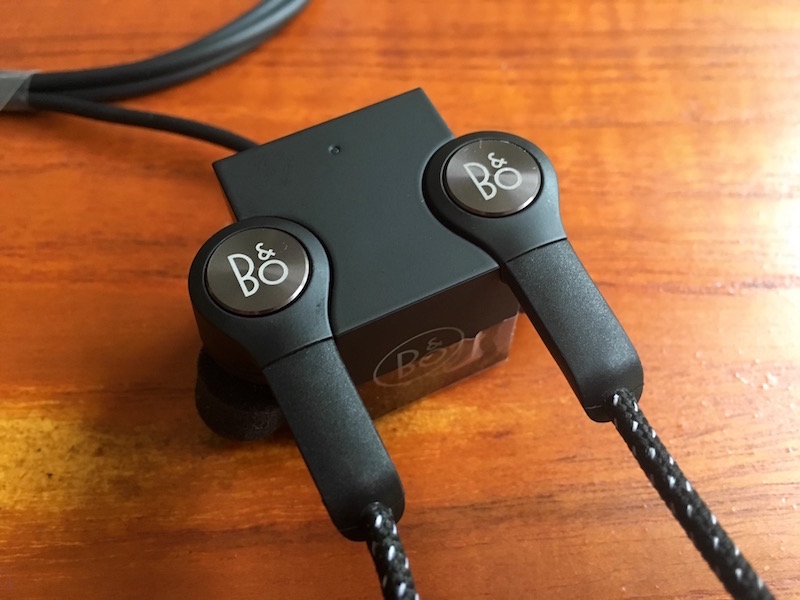
Also included in the box are cable clips, a carry pouch, a quickstart guide, and a unique magnetized “cubic charger” with two molded recesses that the earpieces snap into, with a cable running out the rear with a USB connector attached.
The earbuds connect to a source device using the latest version of Bluetooth (4.2) and support high-quality AAC and aptX codecs – only newer MacBooks, not iPhones, support the latter as of writing.

Audio output can be adjusted via the easy-to-use Beoplay iOS (or Apple Watch) app, which offers four presets for different activities (workout, commute, clear, podcast) and a ‘Tonetouch’ graphical equalizer to customize the sound further.
Once you’ve adjusted the output to your liking, you can save the audio profile directly to the earbuds, allowing you to set and forget. If you’re an Apple Watch wearer, you can choose between presets from your wrist, too.
Performance
Pairing the buds was a one-click affair of the power button on the inline remote, and the volume buttons proved to have the typical dual-functionality for moving between tracks, with the power/pair button also taking and ending calls.
Out of the box, the H5’s sound decent enough, offering a flat, natural reproduction and a close, friendly soundstage. Treble was a tad too crisp at times, but with a bit of adjustment via the accompanying app it was easily dealt with, and once I had a custom profile set, they really came into their own.
The controlled bass and clearly defined mid- and high-range detail of the H5’s serve rock, hip-hop, and instrumental genres extremely well, with jazz tracks reminding me of Vibe’s eminently balanced Brass Ba11 buds and their intimate, inclusive sound. As for the mic, it had no trouble picking my voice out over the din of a typical commute on public transport.
The earphones remained comfortable to wear, whether I was working out or casually listening to music, although the left earpiece had a habit of slowly loosening when I was on the move which broke the insulating seal and let sounds leak in from outside.

That got annoying after a while, so I switched to the Comply eartips and chose a larger left tip (I have odd-sized lugholes, apparently) which solved the problem.
I loaned the H5’s to a friend who complained that the left bud kept flying out of her ear during a high-intensity exercise routine due to the added weight of the inline remote, even after she swapped the tips for a bigger size. I couldn’t replicate the issue myself using the memory foam tips and the buds stayed securely in place whatever I was doing, but this should serve as a warning to potential buyers.
I was underwhelmed by the stated five-hour battery life of the H5’s (confirmed in my own tests) given that buds in Jaybird’s wireless range offer up to eight hours’ listening time, but in practice I only wore the H5’s two hours a day on average and it wasn’t a huge inconvenience to charge them for a couple of hours every other night – your mileage may vary.
Bottom Line
$250 earbuds will be a hard sell for many people. Personally I couldn’t justify it, but if you have the spare cash and are fond of luxury kit, then I suppose it’s not a deal breaker. Overall, the Beoplay H5 earphones are a lovingly designed, solid bit of kit. To be fair, it’s the least I’d expect at this hefty price, and happily they deliver.
The magnetized buds and auto-off feature are signature B&O design wins, as is the supplied charging cube – it’s just a shame the charge doesn’t last a few hours longer. I’d also advise to be careful not to lose the charger; it’s not like you’d be able to replace it with a standard micro-USB cable, as with some other wireless buds.
My only real design gripe was with the inline remote – its surface smoothness made it hard to find which was which volume control when out of my line of sight. After a while though, I became familiar with the layout and it became a non-issue.
Sonically the H5’s are rich, well-balanced, and pack a satisfying punch, and with some subtle audio profile manipulation you can easily adjust the output to your musical taste. Still, this is a significant investment, and for that reason I’d recommend you try the buds before you buy, even if that’s just to see if the tips play nice with your earholes. If they sound great and sit securely – and you can live with the middling battery life – then this luxury wireless headset could be an ideal match for your iPhone, headphone jack or no.
Pros
- Slick, comfy, considered design
- Plenty of supplied eartips to choose from
- Decent built-in mic and excellent audio output
- App presets that make a difference
Cons
- Battery life isn’t spectacular
- Inline remote mold unhelpfully smooth
- Achieving a secure eartip fit may be an issue for some
- Very expensive for earbuds

How to Buy
The Beoplay H5 earbuds cost $249, are available in black or dusty rose, and can be ordered on the B&O PLAY website.
Note: B&O PLAY provided the H5 earphones to MacRumors free of charge for the purposes of this review. No other compensation was received.
Tag: Bang & Olufsen
Discuss this article in our forums
Apple Acquires Machine Learning and AI Startup Turi
Apple recently purchased Seattle-based machine learning and artificial intelligence startup Turi, reports GeekWire. Apple is said to have paid around $200 million to acquire the company, which was known as “Dato” until earlier this month.
Turi is designed to help developers build apps with artificial intelligence capabilities that automatically scale. It has developed the Turi Machine Learning Platform, GraphLab Create, and Turi Predictive Services, used for functions like recommendations, fraud detection, sentiment analysis, and more.
Turi toolkits simplify development of machine learning models. Each incorporates automatic feature engineering, model selection, and machine learning visualizations specific to the application. There is no faster way to build performant models.
Citing people familiar with the acquisition, GeekWire says Turi employees will remain in the Seattle area, where Apple has been establishing a presence over the past few years.
Apple confirmed the acquisition with the standard purchase statement it gives to media outlets: “Apple buys smaller technology companies from time to time, and we generally do not discuss our purpose or plans.”
It is not known what Apple will do with Turi’s technology, but Apple has made several AI-related purchases in recent months including VocalIQ, Perceptio, and Emotient.
Tags: Apple acquisition, Turi
Discuss this article in our forums
Apple May Build $1 Billion Research and Development Center in Vietnam
Apple may be planning to build a research and development center in Vietnam, reports Vietnamese site BizLive. Work on the R&D center, which will be located in the Vietnamese central province of Da Nang, was uncovered following a local government meeting on foreign direct investment.
Da Nang, image via VnExpress
Rumors earlier this year suggested Apple would invest up to $1 billion to build an Asia-focused research and development center in Vietnam, designed to “enhance its competitiveness over major global electronic manufacturers present in the country.” Last October, Apple also established an Apple Vietnam LLC in Ho Chi Minh City, led by Gene Daniel Levoff, Apple’s VP of corporate law who is also in charge of international operations.
Companies like Microsoft, Intel, and Samsung have had investment projects in Vietnam for several years, but the R&D center will be Apple’s first major project in the country.
A final decision on whether the research center plans will move forward is expected in late August.
Discuss this article in our forums
Score a free Samsung phone from T-Mobile with the purchase of another on August 6
T-Mobile has announced that it will be running a promotion this Saturday, August 6, that will score you a free Samsung phone with the purchase of another. That’s right, if you purchase a Galaxy S7, Galaxy S7 edge, any of the Galaxy S6 line or a Galaxy Note 5 you can get another for free with the addition of a new line to the account. If you have a few lines that need upgrading, this is a great way to get more for your money.

The carrier detailed some of the rules of the promotion. They include:
- Get a free Samsung Galaxy superphone when you buy a Samsung Galaxy superphone with T-Mobile’s Equipment Installment Plan (EIP), and add a line of service
- Customers will be credited on their monthly bill over the 24-month EIP term for the full amount of the 2nd eligible device of equal or lesser value, after paying any down payment (they’ll be credited for that, too!)
- Qualifying devices: GS7, GS7 edge, GS6, GS6 edge, GS6 edge+, Note5
Remember, this deal is only good for Saturday, August 6, so don’t let the day pass by without taking advantage of it.
Alcatel Idol 4 with free VR goggles now available at Cricket for $200
AT&T’s no-contract subsidiary Cricket Wireless has started selling the Alcatel Idol 4 for $199.99. The phone comes bundled with free VR goggles.

The 5.2-inch Alcatel Idol 4 has Android 6.0 Marshmallow installed. Inside there’s a Qualcomm Snapdragon 617 processor, along with 16GB of internal storage and a 2,610 mAh battery. It also has a 13 megapixel rear camera and an 8 MP front facing camera, Owners can access VR content with the goggles via the phone’s Alcatel VR Store or from VR content pioneer Littlstar. The Alcatel Idol 4 is available with all of Cricket’s smartphone plans.
See at Cricket Wireless
Verizon is taking online orders for the HTC Desire 530
Verizon Wireless is the latest carrier in the U.S. to sell the HTC Desire 530. Orders are being taken at Verizon’s website and the phone will also be available in its retail stores starting on August 11.

Verizon states that it will offer a variety of prices and payment plans for the phone:
The HTC Desire 530 in Blue Lagoon is available for $6 a month for 24 months (0% APR; $144 full price). For a limited time, customers who activate a new line of service can purchase the Desire 530 on device payment for just $2 a month for 24 months (0% APR; $48 full price). Looking to upgrade? Get the Desire 530 on an existing line and, for a limited time, receive $50 off the $144 retail price when ordering online with device payment. If prepaid service better fits your lifestyle, get the Desire 530 in Stratus White for $99.99 with Verizon’s prepaid plans.
The Desire 530 was one of number of smartphones that were first revealed by HTC during the 2016 Mobile World Congress trade show in February. The 5-inch Desire 530 has an interesting “micro-splash” design for its case that is supposed to give each phone a completely unique pattern of dots. Inside there’s a Qualcomm Snapdragon 210 processor, 1.5GB of RAM, 16GB of onboard storage, an 8 megapixel rear camera and a 5 MP front facing camera. Audiophiles can experience the phone’s “BoomSound” enhancements.
Check out our hands-on impressions of the HTC Desire 530
See at Verizon
Get your bad guy on with these Suicide Squad themes!

‘Don’t forget: we’re the bad guys.’
We’ve featured themes for a lot of good guys, from Iron Man and Spider-Man to Batman and Superman to Deadpool — “I’m no hero!” Get out, Wade! — but it’s good to be bad sometimes, too! And while we all prepare to let our bad selves out attending a Suicide Squad screening, we can put some of that delicious badness on our home screen.
Harley Quinn Theme

Harley Quinn is bright, perky, and unbalanced, and so, too, is her theme! This theme is based around not one, but two icon packs, two custom KWGTs and a little Nova (or Action Launcher) magic. Here’s everything you’ll need:
- Harley Quinn wallpaper by sherill018
- Harley-tinted Material Music Komponent-based KWGT preset
- Twisted Harley Quinn time/date KWGT preset
- KWGT Pro ($3.50)
- UIcons blue (Free)
- UIcons red (Free), which should really be relabeled UIcons pink.
- File manager app such as Solid Explorer to move KWGT presets to Kustom/KWGT folder in device storage
- A home screen launcher that supports icon packs, individual custom icons, and re-sizeable home screen grids. The ability to recolor folders and drawers is a bonus, but not required. These instruction were written for Nova Launcher but the theme could easily be enacted on Action Launcher, Apex Launcher or dozens of other capable launchers out there.

Download Harley Quinn wallpaper by sherill018 from deviantart by long-pressing the image on mobile and selection Save image (right click image on desktop and Save image as…).
Long-press a blank space on your home screen and select Wallpapers. Pick image and navigate to your downloaded Harley Quinn wallpaper.
Position the wallpaper so that Harley is on the left side of the screen with the butt of her bat almost touching the edge of the screen and Set wallpaper.
In Nova Settings, open Look & feel, the set UIcons Blue as your Icon theme.
Go back to the main Nova Settings menu and open Folders.

Set Background to Pink (second row, second column). I like to keep the Transparency around 40%, but you can crank it up or down to your preference.
(Optional) In Nova Settings, open Desktop settings and set Page indicator color to either Pink (second row, second column) or Holo Blue (third row, third column).
(Optional) In Nova Settings, open App & widget drawers settings and set Background to Pink (second row, second column).

Return to the home screen and long-press the first shortcut in your dock and Edit it.
Tap the icon to edit it and select UIcons Red as the source for your new icon.
Find the corresponding icon for your shortcut. It should hopefully be at the top.
Confirm the change by selecting Done.
Repeat steps 7-10 on the third, fifth and if applicable seventh icons on your dock. For the app drawer shortcut scroll down in UIcons to SYSTEM icons and look for a skull under an X icon.

Harley Quinn Kustom Widgets

Download the Harley-tinted Material Music Komponent-based KWGT preset and Twisted Harley Quinn time/date KWGT preset and copy them into Kustom/widgets in your file manager. Note: if you don’t see the Kustom folder in your internal storage, it’ll show up once you install KWGT.
Long-press a blank space on your home screen and select Widgets. Add a 2×2 KWGT widget to the top right side of your home screen by pressing and dragging the widget into place from the widget list.
Tap your KWGT widget to configure it.
Swipe from the Installed KWGT presets page to Exported and select harley-clock-widget.
Save the widget using the floppy disk icon at the top of the screen.
Return to the home screen and resize your KWGT to your preferences.

Long-press a blank space on your home screen and select Widgets. Add a 4×1 KWGT widget to the bottom row your home screen by pressing and dragging the widget into place from the widget list, and stretch it to cover the bottom row or two of the screen.
Tap your KWGT widget to configure it.
Swipe from the Installed KWGT presets page to Exported and select harley-music-widget.
Save the widget using the floppy disk icon at the top of the screen.
Return to the home screen.
Deadshot theme

Deadshot’s theme is a straight-shooter, just like him. It’s got some simple icons and a simple KWGT that hides in Deadshot’s sights. Here’s what we need for it:
- Deadshot poster wallpaper
- Deadshot Clock KWGT preset
- Deadshot-tinted Material Music Komponent-based KWGT preset
- KWGT Pro ($3.50)
- Zwart – Black Icon Pack (Free)
- File manager app such as Solid Explorer to move KWGT preset to Kustom/KWGT folder in device storage
- A home screen launcher that supports icon packs, individual custom icons, and re-sizeable home screen grids. The ability to recolor folders and drawers is a bonus, but not required. These instruction were written for Nova Launcher but the theme could easily be enacted on Action Launcher, Apex Launcher or dozens of other capable launchers out there.

Download Deadshot poster wallpaper by long-pressing the image on mobile and selection Save image (right click image on desktop and Save image as…).
Long-press a blank space on your home screen and select Wallpapers. Pick image and navigate to your downloaded Deadshot wallpaper.
Zoom in and position the wallpaper to that #SuicideSquad fits across the top of the screen and the Deadshot tattoo taking up the center of the screen, then Set wallpaper.
In Nova Settings, open Look & feel, the set Zwarte as your Icon theme.

Return to the home screen. Long-press the app drawer shortcut in your dock and Edit it.
Tap the icon to edit it and select Zwart as the source for your new icon.
Head down to S for Sniper and tap the sniper scope icon.
Confirm the new icon by selecting Done.
Go back to the main Nova Settings menu and open Folders.
Set Background to a custom color by pressing the the three dot option in the fifth row fifth column of the color presets. Set the color to #90680800.

(Optional) In Nova Settings, open Desktop settings and set Page indicator color to a custom color by pressing the the three dot option in the fifth row fifth column of the color presets. Set the color to #680800.
(Optional) In Nova Settings, open App & widget drawers settings and set Background to a custom color by pressing the the three dot option in the fifth row fifth column of the color presets. Set the color to #90680800.

Deadshot Kustom Widgets

Download the Deadshot-tinted Material Music Komponent-based KWGT preset and and Deadshot Clock KWGT preset and copy them into Kustom/widgets in your file manager. Note: if you don’t see the Kustom folder in your internal storage, it’ll show up once you install KWGT.
Long-press a blank space on your home screen and select Widgets. Add a 4×2 KWGT widget to the bottom row your home screen by pressing and dragging the widget into place from the widget list, and stretch it to cover the bottom row or two of the screen.
Tap your KWGT widget to configure it.
Swipe from the Installed KWGT presets page to Exported and select deadshot-music-widget.
Save the widget using the floppy disk icon at the top of the screen.
Return to the home screen.

Long-press a blank space on your home screen and select Widgets. Add a 1×1 KWGT widget right on top of the sights on Deadshot’s forehead by pressing and dragging the widget into place from the widget list.
Tap your KWGT widget to configure it.
Swipe from the Installed KWGT presets page to Exported and select deadshot-clock-widget.
Save the widget using the floppy disk icon at the top of the screen.
Return to the home screen. If you need to re-position the date and time to better line up with the crosshairs, tap the widget to edit it, then tap either the time or date item and edit its Position. Remember to always Save before exiting the Kustom editor.
 AIVAnet