


Panasonic Lumix GX85 (GX80) review – CNET
The Good It delivers excellent photo and video for a Micro Four Thirds camera, especially at its price, plus a great feature set and fast performance.
The Bad The continuous autofocus occasionally fails to lock at all in burst mode, and the batter life is poor.
The Bottom Line LIke other Panasonic models before it, the Lumix GX85/GX80 packs a lot for its price, including great photos, 4K video and speed.
There’s a lot in the Lumix GX85 to appeal to family photographers and first-time mirrorless buyers as an alternative to a decent (as opposed to cheap) first dSLR like the Nikon D5500. It’s got a great feature set, very good photo and video quality for its class, pretty fast performance, and an attractive, relatively compact design.
With an electronic viewfinder, fast continuous shooting and 4K video, it fits right into that camera’s demographic: an enthusiast-friendly model with a feature set that should also appeal to families and travelers at a reasonable price.
The kit with Panasonic’s collapsible 12-32mm f3.5-5.6 (24-64mm equivalent) lens runs $800 and AU$1,200; in the UK, the model is the GX80, and costs £600 for the same kit. Like many Panasonic cameras, it’s not available in the US as a body-only version, but you can get it that way in the UK and Australia for £510 and AU$1,100. And in the UK, you can get it in a dual-lens configuration with the 12-32mm and 35-100mm lenses for £730.
A sharper image
Although it’s 16 megapixels rather than the new 20.3MP sensor that’s in the higher-end GX8, it’s a version of the Four Thirds-size sensor that forgoes an antialiasing filter (aka OLPF). Cameras use them to blur edges slightly, which removes some color artifacts (moire and false color) that would normally appear, but you sacrifice sharpness. The new version of the company’s Venus image-processing engine which is in the GX85 has moire-reduction built in to compensate.
Panasonic Lumix GX85 (GX80) full-resolution…
See full gallery


1 – 5 of 9
Next
Prev
As a result, JPEGs remain clean through ISO 1600, and depending upon light and subject, usable through the top of the camera’s ISO sensitivity range. It’s noticeably better than the Olympus OM-D E-M10 Mark II in this respect. If you process raw files, you can eke out some more detail at all sensitivity levels; the default Standard Photo Style applied to JPEGs pushes the saturation and contrast enough that you’ll lose some detail in highlight and shadow areas.
Its color rendering and white balance is excellent. The automatic white balance delivers some of the best results I’ve seen, even in cloudy weather, low light and multiple light sources, which are three of the trickiest conditions you’ll encounter.
The video looks great, too, though because of the sensor you’ll see moire on high-frequency patterns, which are surprisingly common on clothes. But even in high-contrast lighting (such a bright subway platform and dark track area) at midrange sensitivities, it does a good job.
Analysis samples

Because its sensor doesn’t have an antialiasing filter, it can retain detail at higher ISO sensitivities better than a Four Thirds sensor with an AA filter. JPEGs look very clean through ISO 1600.
Lori Grunin/CNET

You can see a little more loss of detail in JPEGs at ISO 3200 (there’s slight blurring in the white bristles), but it’s still pretty good. Noise and artifacts become a lot more obvious at ISO 6400.
Lori Grunin/CNET

Overall, the GX85’s colors look very good at the default settings, and it handles white balance extremely well even under cloudy conditions. It does push the contrast and saturation so you lose a little detail in highlights and shadows. It delivers almost perfectly neutral results in our lab tests, though.
Lori Grunin/CNET

You can regain some detail by processing raw at all ISO sensitivities, though the tradeoff is some grain.
Lori Grunin/CNET
Panasonic’s DFD (Depth from Defocus) autofocus technology is generally fast and accurate, and that holds true in the GX85 for individual shots; it locks focus and shoots quickly enough for most uses in bright and dim light. Its tested continuous shooting rate of 6.6 frames per second with autofocus for more than 40 shots or raw or JPEG is better than average, and even sustains a solid burst with raw+JPEG.
Grab a six pack of USB-C cables for just $13
If you are looking to pick up some extra USB-C cables, you won’t want to miss this deal on a six pack of cables for just $13 with coupon code SFZTCYAP. Most deals we’ve seen on cables bring the price of a single cable to around $6, so this deal scores you six times the amount of cables, for just over double the price. The coupon saves you $7 on this pack of Choetech cables that vary in length.

The kit includes the following breakdown of cables:
- (1) 1.6-foot cable
- (4) 3.3-foot cable
- (1) 6.6-foot cable
If you’ve recently picked up a new USB-C phone, or will be (like the Galaxy Note 7), you’ll want to make sure you are stocked up on cables. Remember, you need coupon code SFZTCYAP for the full savings here.
See at Amazon
Should you upgrade to the Galaxy Note 7 from the Galaxy Note 4?
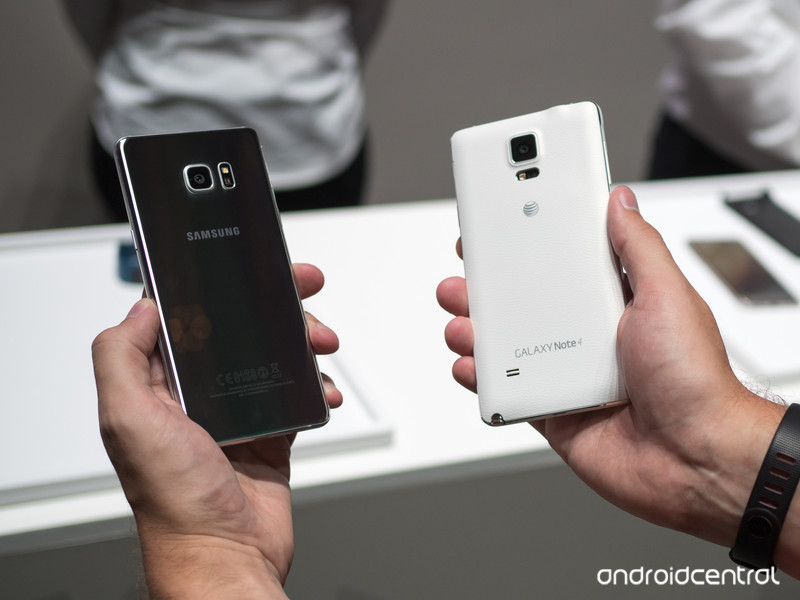
The big question a lot of people are asking.
Though traditional two-year contracts are all but gone now, the 24-month cycle of upgrading to a new phone is still very much in play. So when we see a huge phone release like the Galaxy Note 7, there are millions using a Galaxy Note 4 who perk up and take notice.
With more powerful internals, an improved camera, better screen, new S Pen features and an amazing leap in design, the Galaxy Note 7 definitely has a lot going for it … but is it enough to give up a Note 4, which likely still works very well two years on? We’re going to tell you all you need to know about this upgrade.
Let’s start off by analyzing the most obvious and experience-forming changes: the hardware of these two phones. While the Note 4 was revolutionary at the time for its stark difference in design from the Galaxy S5, it looks downright dated next to the sleek and more compact Note 7. The smooth, curved metal on the Note 7 that perfectly marries up to front and back Gorilla Glass 5 panels feels great and looks fantastic (yes, even with the added fingerprint accumulation), and even though this is an evolution of a design that started with the Galaxy S6 it still looks extremely modern.
The Note 7 shows just how far we’ve come in smartphone design since 2014
Of course the looks are nice and you should be proud of the high-end phone you buy, but how it actually feels and operates as a large-screened phone is just as important. The changes in design all around, with smooth edges and a subtly-curved screen on the sides, have made the Note 7 even easier to handle and manipulate with just one hand. The dimensions alone start telling the story, with the Note 7 being thinner, but also almost 5 millimeters narrower — a big difference when you want to reach across the 5.7-inch display. The curved display is part of that, of course, but the bezels around the screen have also shrunk — and you shouldn’t be immediately worried about the display curve having an effect on how you use your phone.
Then you have waterproofing, which was absent on the Note 4 after being included in the Galaxy S5 but is back on the Note 7. It’s hardly a feature you’ll take advantage of on a regular basis, but the one time you really need your phone to survive contact with water you’ll realize just how important it is. Especially when you pay this much for a phone.
| Operating System | Android 6.0 Marshmallow | Android 6.0 Marshmallow |
| Display | 5.7-inch 2560x1440Super AMOLEDDual edge screenGorilla Glass 5 | 5.7-inch 2560x1440Super AMOLEDGorilla Glass 4 |
| Processor | Quad-core Snapdragon 820 (U.S.)Octa-core Exynos 8890 (international) | Quad-core Snapdragon 805 (U.S.)Octa-core Exynos 5433 |
| Storage | 64GBmicroSD up to 256GB | 32GBmicroSD up to 256GB |
| RAM | 4GB | 3GB |
| Rear Camera | 12MP f/1.71.4-micron pixelsOIS | 16MP f/2.21.12-micron pixelsOIS |
| Front Camera | 5MP f/1.7 | 3.7MP f/1.9 |
| Charging | USB-CFast chargingQi wirelessPowermat wireless | Micro-USBFast charging |
| Input | S Pen stylus4096 pts of pressure sensitivity | S Pen stylus2048 pts of pressure sensitivity |
| Battery | 3500 mAhNon-removable | 3220 mAhRemovable |
| Water resistance | IP68 rating | No |
| Security | One-touch fingerprint sensorIris scanner | Swipe fingerprint scanner |
| Dimensions | 153.5 x 73.9 x 7.9 mm | 153.5 x 78.6 x 8.5 mm |
| Weight | 169 g | 176 g |
You could definitely make arguments about losing features or at least not making many advancements when looking at the Note 4 and the Note 5 together, but the Note 7 has brought back much of what was lost last year to have an overall substantial internal update. In what is often an important fact for power users the Note 7 has brought back an SD card slot, while also bumping up internal storage to 64GB over the Note 4’s 32. And with it the Note 7 has also increased battery capacity to 280 mAh more than the Note 4, which is also aided by a more efficient screen and processor inside. The battery isn’t removable, of course, but you do have built-in wireless charging to help you keep topped up through heavy use days.
A lot of small spec bumps add up to a nice improvement in experience
The rest of the spec bumps aren’t revolutionary, but two years of incremental updates are definitely notable. A faster processor will lead you into the future of more intense apps, as will one more gigabyte of RAM and the new USB-C port on the bottom. And we can’t forget the dramatic improvement in daily usability that comes with a new one-touch fingerprint sensor, which is preferable in every single way to the old swipe-style scanner. Yes the Note 7 includes an iris scanner as well, but until that proves to be useful every day, we can’t say it’s a reason to upgrade from any phone.
The next bit of the experience is in the cameras. The Note 4 had a considerably better camera than the Galaxy S5 with its change of sensor and addition of OIS, but that camera was blown away in every aspect by the Galaxy Note 5’s in 2015. Now in 2016 the camera setup found in the Galaxy S7, S7 edge and Note 7 is even better than the Note 5’s, though not as massively as in previous years. The differences in daylight quality are subtle, but the low-light camera performance on the Note 7 will be a great step up over even the very capable Note 4. You’ll also enjoy faster launch, focus and capture speeds on the latest Note, which can’t be understated.
And we can’t get through this discussion without also talking about the upgrade in the S Pen. Externally it’s effectively the same, but the pen is now faster to track on the display, more accurate, and is waterproof just like the phone — you also can’t overstate how important having double the pressure sensitivity (now 4096 levels) is for all kinds of stylus work. The software suite has been improved as well, with all of the S Pen functions being pulled into just the Samsung Notes app and Air Command. There are new features like being able to translate text with the stylus and also create GIFs out of any content on the screen — if you’re a big S Pen user, this upgrade will be worth considering.
At this point most Note 4 owners have received an update to Android 6.0 Marshmallow, which brings with it a much improved experience that Note 5 and Galaxy S7 owners have been using for months now. There isn’t any individual upgrade in the Note 7’s software that would lead you to be clamoring for yet another update, but a handful of fresh features and a new design ethos in much of the interface is indeed an improvement over previous software builds.
More important to consider is the software upgrade cycle for the Note 4 itself, and how many more major updates it stands to receive. We could definitely see it getting a bump up to a newer version of Marshmallow with the Note 7’s new S Pen features and interface design, but will the Note 4 receive Android 7.0 Nougat over two years after the phone was released? We certainly wouldn’t guarantee it will. As it gets further along in its lifespan the Note 4 will likely fall off in software update priority, we just don’t know where the cutoff will be at this point.
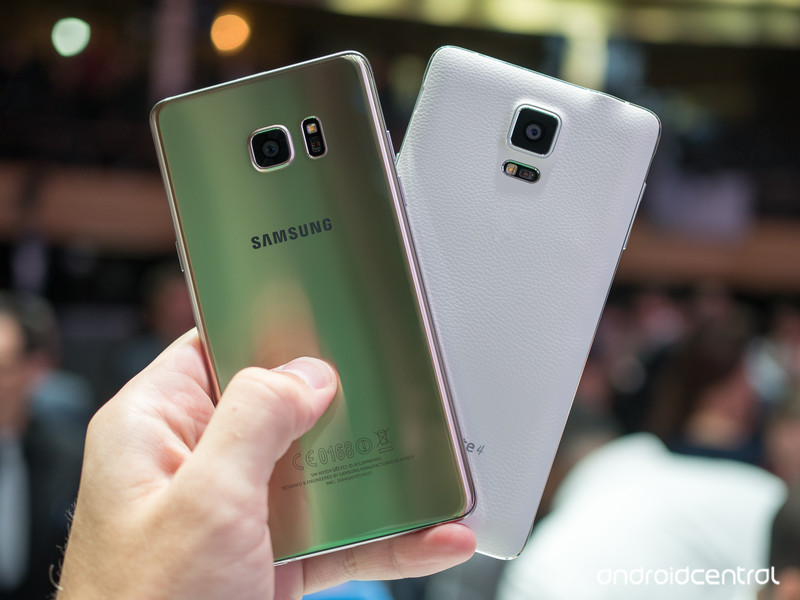
No matter the upgrade potential, thinking about moving from your current phone that cost you several hundred dollars to a new phone that’s going to cost you $800+ once again will always be a decision predicated on the cost. The Note 4 has decent resale value and all of the major carriers offer some sort of financing plan, but it’s still going to be a big outlay of cash to upgrade to the latest Note.
If you’re someone who appreciates the vast improvements in the hardware and design, you’re likely already down the path of being sold on the upgrade. You’ll be able to see other features like a better fingerprint sensor, USB-C port, upgraded internals, new software, better cameras and an improved S Pen to help justify the cost as well.
But if you think the Note 4’s hardware has held up just fine over the last two years, there’s a decent chance you’re also happy with how the internals and software have performed as well. There’s no doubting that even today the Note 4 is a very powerful and capable phone — as it should be considering what it cost — and there’s no shame in holding onto it a while longer to see how the software update story plays out. You can always upgrade to a Note 7 in a few months if you change your tune.
You now have the proper tools to make an informed decision, no matter what your choice is in the end.
Samsung Galaxy Note 7
- Samsung Galaxy Note 7 hands-on preview
- The latest Galaxy Note 7 news!
- Here are all four Note 7 colors
- Complete Galaxy Note 7 specs
- The Galaxy Note 7 uses USB-C
- Join the Note 7 discussion in the forums!
Verizon
AT&T
T-Mobile
Sprint
Pokémon Go developer reveals why it is banning third-parties from accessing its servers

Pokémon Go developer Niantic Labs has offered an explanation on why it has decided to ban third-party apps and services from accessing its servers.

Many developers have tried to access that data ever since the popular augmented reality game launched in July. Some of those apps were made for cheating in Pokémon Go. In a blog post, Niantic says those efforts actually delayed the launch of the game in Central and South America due to too much server resources being used by these outside apps and services. It even showed a chart that revealed just how high server resource usage was before and after the ban on third-party access:

In addition to hampering our ability to bring Pokémon GO to new markets, dealing with this issue also has opportunity cost. Developers have to spend time controlling this problem vs. building new features. It’s worth noting that some of the tools used to access servers to scrape data have also served as platforms for bots and cheating which negatively impact all Trainers. There is a range of motives here from blatant commercial ventures to enthusiastic fans but the negative impact on game resources is the same.
Niantic added that there are also attempts to flat out hack its servers. It also doesn’t expect to see this kind of activity to end. However, it’s very interested to learn that this kind of unwanted access could result in real delays in Pokémon Go’s expansion to other markets.
Pokémon Go
- Join our Pokémon Go forums!
- How to deal with GPS errors in-game
- Which team should you choose?
- How to play without killing your battery
- The Ultimate Pokémon Go Game Guide!
- Listen to the Pokémon Go podcast!
Best microSD cards for the Samsung Galaxy Note 7

What’s the best microSD card to use with the Samsung Note 7?
After abandoning expandable storage for 2015’s flagship releases, Samsung has righted the ship in 2016 by reintroducing of microSD slots on both the Galaxy S7/S7 edge and Galaxy Note 7.
If the 64GB of internal storage on the Note 7 just ain’t going to cut it, you’ll want to invest in a quality microSD card and add up to 200GB of additional storage. That means you’ll have more space for all your music, 4K videos, photos, and animated gifs, and you can save the phone’s internal memory for your favorite apps and games.
SanDisk Ultra 200GB microSDXC Card

If you’re serious about maximizing your storage, you’ll definitely want to consider this 200GB microSDXC card from SanDisk. With write speeds up to 90MB/s, you’ll be able to record in HD or 4K to your heart’s content. And you’ll still have room to spare for all your movies, music and other data. Amazon regularly has this one on sale for under $80, so this is your best value for sure.
See at Amazon
Samsung MicroSD EVO+ 256GB

Since we’re talking about a Samsung phone, we’d be foolish not to mention Samsung’s best option for microSD. With read speeds up to 95MB/s and write speeds up to 90MB/s, this card should be able to handle whatever you throw at it. Better yet, Best Buy is offering a Galaxy Note 7 pre-order deal, where you can get the card for free! It’s a pretty good deal, but if you’ve already got the Note 7 you’ll want to get this card via Samsung’s website.
See at Samsung
SanDisk Extreme PLUS 64GB microSDXC

Looking to double your available storage without breaking the bank? This 64GB card from SanDisk is UHS speed class 3, with write speeds up to 50MB/s — more than enough to handle 4K video. With transfer speeds of up to 95MB/s, you’re able to add your favorite music and media in a flash with the included SD card adapter. This card is designed to withstand anything life throws your way — including x-rays — and comes with a lifetime limited warranty.
See at Amazon
Kingston Digital 64GB microSDXC Card

This Class 10, UHS-I microSDXC card from Kingston features a 64GB capacity and advertises a read speed of 90MB/s and write speed of 45MB/s. Included is an SD adapter which the microSDXC card slides into when using on a computer or other standard SD device. The Kingston Digital 64GB microSDXC card is currently available for $30.
See at Amazon
Will you be expanding your Note 7 with a microSD card?
If you’re considering on upgrading the Note 7’s storage, let us know in the comments how much space you think you’ll need, and how you plan on using that extra storage.
Samsung Galaxy Note 7
- Samsung Galaxy Note 7 hands-on preview
- The latest Galaxy Note 7 news!
- Here are all four Note 7 colors
- Complete Galaxy Note 7 specs
- The Galaxy Note 7 uses USB-C
- Join the Note 7 discussion in the forums!
Verizon
AT&T
T-Mobile
Sprint
You can save $190 on an unlocked LG G5 right now!
Right now you can score an LG G5 for just $410 at eBay, which is a savings of $190. The unlocked phone is available in gold, silver and titan currently, and the listing is for a brand new unit, so you won’t be dealing with refurbs here. Between the 5.3-inch display, the 32GB of internal storage and the ability to swap different modules, this savings makes for a pretty sweet deal.

If you are interested you’ll want to act quickly, as it likely won’t be available at this price for long. Which color will you pick up? Let us know in the comments!
See at eBay
Galaxy Note 7: The 7 new features you need to know about!

Why should you buy the Galaxy Note 7? Here are seven reasons.
The Samsung Galaxy Note 7 is going to be out on August 19, which means that millions of people are mulling whether to sink their hard-earned dollars into what is likely Samsung’s best, and most expensive, phone to date.
While the Korean giant didn’t elaborate on many of the software changes found in the Note 7 during the keynote, we were able to uncover some unique and interesting additions that will take your Note-ing to a new level.
The camera app is all new

Samsung’s camera app has come a long way since the admittedly dreadful experience of the Note 3 era. Things started improving with the Note 4 and S5, but even today there are things that could stand to be improved.
Starting with the Note 7, Samsung has taken a gesture-friendly approach to the camera app, letting you switch between modes like Pro and Video using a vertical swipe, as well as filters and other settings using a horizontal swipe.
The UI has also been cleaned up, with a much clearer delineation between the viewfinder and the buttons, all of which have been simplified, too. I got to use the new app briefly during my time with it, and have to say it’s a big jump from Samsung’s previous efforts, and will at the very least make switching between back and front cameras considerably easier.
Power-saving mode actually lowers your resolution

Like most phones today, the Note 7 has a great power-saving mode. But unlike most phones, turning it on actually lowers the resolution of the phone to make the screen use less power.
That’s right: when you first enable the medium power saving mode on the Note 7, your QHD resolution screen drops to 1080p, in addition to the standard toggles like lowering CPU speed and adjusting background processes. The maximum power saving mode lowers the resolution even further — to 720p.

This is certainly the first time we’ve seen something like this, and it’s unclear how much battery this will save in the long run, but it’s a very interesting idea.
The S Pen doubles as a magnifying glass

There are a lot of very cool new features in the Note 7’s S Pen, but one of the coolest is its Magnifying feature. Yes, it’s mainly for accessibility, but that makes it especially important, since it’s one of the easiest ways for someone with less-than-perfect vision to see the finer details of an on-screen object.
The feature allows for up to 300% magnification, and the great thing is that even at that level the screen doesn’t appear pixelated, thanks to the high-density QHD display.
The S Pen at a glance

Here’s another unique use case for the S Pen: Glance, which generates a small thumbnail of an app that can be maximized when the stylus hovers over it.

Think of the possibilities, especially for apps that don’t support Multi Window: you need to refer to an email or text message but don’t want to constantly switch back and forth between apps, so you minimize the client and hover over it when you need it. Very cool idea, and one that I think I’m going to use a lot.
There’s a blue light filter to save your eyes

Blue light filters are certainly not new to smartphones, but Samsung’s implementation in the Note 7 is not only good, it’s customizable.
It can scheduled to turn on at sunset — or any time you want — to save your eyes the indignity of all that sleep-affecting blue light. It’s also possible to adjust the intensity of the filter, so you can find just the right level to suit your late-night reading needs.
Samsung’s browser has extensions

While many browsers have extensions support, Samsung’s bundled version comes with two pre-loaded ones that hope to entice you away from Chrome. The first is a QR code reader, which is useful in a pinch.

The second is a video assistant, which perfects the color and sound of a web-based video. Not necessarily the most exciting add-ons, but the fact that Samsung has created a single place for all it’s extensions means that it is doubling down on its homegrown browser, which runs counter to the majority of other manufacturers in the industry that have accepted Chrome as their default.
You can turn off those awful icon frames

For some reason, the Note 7 burdens the natural beauty of Android’s app icons with white “frames”, something we’ve bemoaned from the likes of Huawei for years. While many of Samsung’s redesigned icons have been designed to look good encased in white, the vast majority of others do not.

Thankfully, Samsung offers a toggle to return back to the blissful simplicity of the status quo. Because some things shouldn’t be changed.
Your turn
What’s your favorite feature of the Note 7, hardware or software? Does the iris scanner interest you, or is it the updated software experience that is getting your attention? Let us know in the comments below!
Samsung Galaxy Note 7
- Samsung Galaxy Note 7 hands-on preview
- The latest Galaxy Note 7 news!
- Here are all four Note 7 colors
- Complete Galaxy Note 7 specs
- The Galaxy Note 7 uses USB-C
- Join the Note 7 discussion in the forums!
Verizon
AT&T
T-Mobile
Sprint
Ting made its pay-for-what-you-use data rates cheaper yet
Folks looking to save a few bucks on their cellphone bill might want to take a look at Ting. It’s an alternative to the likes of pre-paid offerings from the big carriers and the company’s approach might be enough to sway you. Ting operates on a pay-what-you-use basis, and it recently announced drops in rates ranging from $2 to $10 for its data plans. Specifically, using less than 500 MB per month will run $10 rather than $12, below 1 GB is $16 versus $19 and up to 2 GB will cost $20. Should you need more than that, each additional gigabyte will be $10.
The move brings Ting in line with other contract-free carriers. But, if you aren’t careful, it could end up costing more than you expect if you’re a heavy talker or texter.
 AIVAnet