


Sonos public beta 6.4 update adds new features: Here’s what they are and how to get them
Sonos is rolling out a new public beta software update today, which adds plenty of new features to the apps.
Music playback has been simplified, via your queue or from individual tracks and albums. There are also some new playlist functions.
So here’s what’s new in the latest public beta build of the Sonos software and how to get it.
Sonos public beta 6.4 features
The software adds several new features and tweaks, here are some of the highlights:
- Keep the music going: If you just tap one song, after it has finished playing the Sonos apps will now continue to play the next track on an album, playlist or in your queue.
- Tap to play: You no longer have to choose “Play Now” or “Play Next” after tapping on a song. One tap and it’ll start playing immediately.
- New queue build: The queue has changed a bit. To add songs you now tap on three dots that appear next to them, rather than the song itself. That opens up a menu to “Play Now”, “Play Next” or “Add to End of Queue”.
- Quicker access to “Play All” and “Shuffle”: Both of the options now appear at the top of the album and playlist screens for easy access.
- Room grouping simplified: The app makes sending songs to different rooms more easy.
How to get the Sonos public beta software
To get the public beta app updates you need to register for the beta program. This is very simple. Just follow the steps below:
- On your phone or tablet, head to Settings in the Sonos app.
- Click on “Advanced Settings”.
- Now click on “Beta Program”.
- Here you will be asked if you want to opt into the program. You can also leave it again at any time.
- Whenever there is new software to be downloaded, you will be able to “Update Now” from the music menu.
Samsung Galaxy Note 7 vs Galaxy Note 3: What’s the difference?
Samsung has announced its latest Note, adding to its 2016 flagship smartphone line-up. The Galaxy Note 7 brings a fabulous design and some serious power with it, something that has come to be expected from the Note range.
The latest Note device to come to the UK was the Note 4 after Samsung chose not to launch the Note 5 in certain regions. The company skipped the Note 6 name in order to minimise confusion, but the Note 7 is still a long time coming, especially for those with a Note 3 who wanted to upgrade last year and were denied the chance.
If you are one of those, this feature is for you. Here is how the Galaxy Note 7 compares to the three-year old Galaxy Note 3. Is it worth the wait?
Samsung Galaxy Note 7 vs Galaxy Note 3: Design
The Samsung Galaxy Note 7 has a beautiful design featuring a curved glass front and rear that is symmetrical from almost all angles. It measures 153.5 x 73.9 x 7.9mm, weighs 169g and it has a water and dust resistance rating of IP68.
You’ll find a fingerprint sensor within the main button on the front, as well as an iris scanner at the top of the device. A re-designed S-Pen stylus sits within the device in the bottom right, also waterproof, and USB Type-C is featured next to it.
The Galaxy Note 3 has a squarer design than the Note 7, featuring straighter edges and a flat front and rear. It has a metal frame and a plastic removable rear, allowing users to remove the battery.
The Note 3 measures 151.2 x 79.2 x 8.3mm so it is wider and thicker than the Note 7, but around the same weight at 168g. The Note 3 is charged via Micro-USB 3.0 and like the Note 7, the S-Pen sits to the right of the charging port, though it is larger than the new device. There is no waterproofing on the Note 3, nor is there a fingerprint sensor or iris scanner.
- Samsung Galaxy Note 7 iris scanner: What is it and how does it work?
- Samsung Galaxy Note 7 preview
Samsung Galaxy Note 7 vs Galaxy Note 3: Display
The Samsung Galaxy Note 7 has a 5.7-inch curved Super AMOLED display with a Quad HD resolution. This puts its pixel density at 515ppi, which is the same as the Note 5 and the Note 4.
The new Note has 4,096 levels of pressure, which is said to make it super responsive when it comes to the S-Pen, and it also brings the Always-on display technology from from S7 edge and S7 with it. Samsung has also included a technology called Mobile HDR, which makes the Note 7 the first smartphone capable of playing mobile HDR content, something that Amazon has just launched.
The Galaxy Note 3 also has a 5.7-inch Super AMOLED display, but as we mentioned, it is flat rather than curved. Its resolution drops to Full HD too, meaning its pixel density is quite a bit lower than the Note 7 at 386ppi.
- What is Mobile HDR? Why Samsung’s Note 7 screen is a window into high dynamic range’s future
Samsung Galaxy Note 7 vs Galaxy Note 3: Camera
The Samsung Galaxy Note 7 borrows its camera capabilities from the Galaxy S7 and Galaxy S7 edge. That puts it with a 12-megapixel rear camera and a 5-megapixel front-camera, both of which have auto HDR and an aperture of f/1.7.
Both the S7 and S7 edge have been praised for their performance in the camera department so the Note 7 has some high expectations on its head. There is phase detection auto focus on board the rear, along with 4K video recording capabilities and an LED flash.
The Galaxy Note 3 has a 13-megapixel rear camera coupled with a 2-megapixel front camera. The rear camera has an aperture of f/2.2, while the front camera features an aperture of f/2.4, both of which are narrower than the Note 7, unsurprisingly.
The rear camera on the Note 3 has auto focus, as well as 4K video capture, being the first Note to offer the latter. The camera performance was better than the Note 2 by far, but the Note 7 will no doubt be better, despite the slightly lower resolution sensor on the rear.
Samsung Galaxy Note 7 vs Galaxy Note 3: Hardware
The Samsung Galaxy Note 7 will feature an octa-core Exynos processor or the Qualcomm Snapdragon 820 depending on the region, both of which are supported by 4GB of RAM. Storage options have yet to be detailed but microSD support for expansion will be present.
As we mentioned, there is a fingerprint sensor on board, as well as an iris scanner and USB Type-C. The Note 7 sports a 3500mAh battery, which can be wirelessly charged, as well as topped up quickly with fast charge.
The Galaxy Note 3 features the Qualcomm Snapdragon 800 chip under its hood, coupled with 3GB of RAM. It comes in storage options of 16GB, 32GB and 64GB, all of which have microSD support for further expansion.
The battery capacity within the Note 3 sits at 3200mAh and it is removable, unlike the Note 7’s. There is no fast charging on board, but the Note 3 was a solid performer in terms of battery life when we reviewed it.
NFC is on board both the Note 3 and the Note 7, but Android Pay isn’t available on the Note 3 so if you want to pay for something using your Note device, you’ll need to upgrade.
- Samsung Galaxy Note 7: Release date, specs and everything you need to know
- Samsung Galaxy Note 7 design: Rumour vs reality
Samsung Galaxy Note 7 vs Galaxy Note 3: Software
The Samsung Galaxy Note 7 launches on Android Marshmallow with a refined and more subtle version of the TouchWiz software over the top. It also comes with the Edge UX, which is also found on the Galaxy S7 edge, utilising the curved screen as an access point.
Additionally, there are also a number of new features available with the Note 7, all of which you can read about in our separate feature, but they include improvements to the S-Pen software, as well as a separate Samsung Notes app.
The Galaxy Note 3 launched on Android Jelly Bean and it has since seen updates to the latest version of Android. It still features the TouchWiz software and it too offers its own functionality and features when it comes to the S-Pen. The experience will be familiar but it won’t be identical to the Note 7.
It’s also not clear whether the Note 3 will be updated to Android Nougat when it arrives later this year, whereas the Note 7 is sure to get that update at some point.
- What are the new S-Pen features for the Galaxy Note 7? New Air Command and features explored
- Samsung Galaxy Note 7: What’s new?
Samsung Galaxy Note 7 vs Galaxy Note 3: Conclusion
The Samsung Galaxy Note 7 trumps the Galaxy Note 3 in every area, but that was to be expected. For those wondering whether to upgrade to the Note 7 from the Note 3, we’d say that’s probably a no brainer if you have the budget.
You get more powerful hardware, a beautiful and significantly improved design, as well as a very good chance of better camera capabilities. You lose out on a removable battery and chances are your wallet will take a beating, but you will get a device that is up there with the latest tech.
You can see how the Note 7 compares to the Note 5 and the Note 4 in our separate feature in case you’re considering upgrading but you aren’t sure you want to stretch to the latest and greatest.
Artisto transforms your videos into moving paintings
Artisto is like Prisma, but for videos. You either take a fresh video or select one from your gallery, choose the 10-second section you want to use and wait for the app to transform it into a version that reflects the styles of popular artists like Vincent van Gogh and Pablo Picasso. According to Russia Behind the Headlines (RBTH), Artisto was created by Russian tech titan Mail.ru for both Android and iOS. The company then published it under its American brand My.com, which has been developing games and other apps for the US over the past few years.
We’ve taken Artisto for a spin and found that it still has quite a few kinks that need to be ironed out. For starters, there’s a very limited number of filters to choose from, and there’s no guarantee that they will work. It takes forever to apply each filter — some take longer than others — and the app crashed on us more than once while it was in the middle of doing so. We’ve gotta say, though: when it does work, it makes videos look pretty sweet.
Mail.ru VP Anna Artamonova posted about the app on her Facebook page, and according to RBTH’s translation, it took the company only eight days to develop it. “We decided to play with neural networks, which have become increasingly popular, and ventured to create a video-editing app,” she wrote in her status update. We’ve also embedded her samples that showcase what the application is capable of below. You know, in case you don’t have the time or the patience to wait for Artisto to transform your own video into a Picasso.
Source: iTunes, Anna Artamonova (Facebook), Google Play
Wall-riding robots spin carbon fiber hammocks
You can mock impractical architecture, but there’s no denying it pushes design and technology in new directions. Case in point is a project from the University of Stuggart’s Institute for Computational Design (ICD) called the “Mobile Robotic Fabrication System for Filament Structures.” Created by grad student Maria Yablonina, it uses robots that crawl on walls to weave carbon fiber filaments into Spirograph-like forms. “Its main advantage is that you can build entirely new structures that would be impossible to materialize otherwise,” ICD director Achim Menges tells Dezeen.
Two robots pass carbon fiber threads back and forth to weave the pattern, then attach it to wall anchors, as shown below. The web-like structures can be built on up to four walls simply by adding more bots. The powerful vacuum fans require external power, so the team’s next step is to extend the range and the number of robots that can be used.
The “swarm construction” method is good for more than creating really strong hammocks. ICD has already built architectural roofs and high-tech building envelopes out of carbon fiber using traditional methods and industrial robots. However, Menges thinks the smaller, Roomba-like devices will expand the possibilities. “One can conceive more intricate, differentiated and larger architectural systems beyond the limits of the workspace and the reach of typical industrial machinery,” he says.
Via: Techcrunch
Source: University of Stuttgart
OPPO F1s launches in India with an insane 16MP front camera
OPPO’s latest phone in the Indian market is the selfie-focused F1s. Much like the OPPO F1, the F1s’ raison d’être is the front camera, which is now a 16MP affair. However, unlike the ZenFone Selfie, there’s no front-facing flash module.

The specs include a 5.5-inch 720p display, MediaTek MT6750 SoC, 3GB of RAM, 32GB storage, microSD slot, 13MP camera at the back, LTE, and a 3075mAh battery. The hardware looks decent, but with the phone running Android 5.0 Lollipop out of the box, things aren’t so great on the software side of things.
The phone will be going up for sale starting August 11 for ₹17,999. Want to know more about the OPPO F1s? Be sure to check out our review.
OPPO F1s review
Polar M600 is a fitness-focused Android Wear smartwatch
Android Wear smartwatches offer basic step counting and heart rate monitoring, but fitness accessory maker Polar believes there’s room for a more comprehensive solution. The Finnish company has launched the Polar M600, which offers an optical heart rate sensor with six LEDs, 1.3-inch TFT screen with a resolution of 240 x 240.
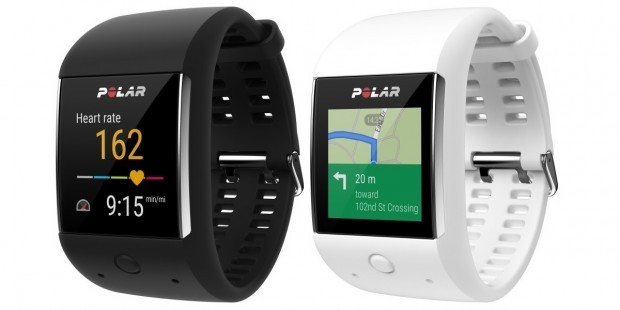
The Polar M600 is a far cry from the likes of the Moto 360 when it comes to looks, but that’s not the main function of the watch. The M600 is designed to offer extensive fitness tracking and coaching features to get you moving.
The 1.3-inch display is housed in an interchangeable silicone band, and the M600 features integrated GPS, GLONASS, 4GB internal storage, and a 500mAh battery that’s good for 48 hours of use when paired with an Android phone. The M600 has a companion app called Polar Flow that lets you view your activity history and create personalized training routines.
From Polar’s Chief Strategy Officer Marco Suvilaakso:
Polar is known for bringing smarts into sports. Polar created the first heart rate monitor, the first activity tracker and now we’re the first true sports wearables company to announce a smartwatch truly made for sports. Powered by Android Wear, Polar M600 offers our customers countless opportunities to customize their smartwatch and still rely on the unique Polar sports wearable experience that is at its core.
Polar mentions that the M600 will be available in Charcoal Black and Powder White for $329.90 or €349.90 later this year. In addition to the black and white bands, a red color option will also be made available.
Best cases for NVIDIA Shield tablet

Which cases are best for the NVIDIA Shield tablet?
We know that you love your NVIDIA Shield tablet and that means you want to keep it looking like you just took it out of the box. To do that, you need a good case, and we’re here to help you find the perfect one for you. Here are our favorites.
- ProCase Premium Folio Cover Case
- NVIDIA SHIELD Tablet Cover
- Poetic NVIDIA SHIELD Tablet Case
- Fintie SmartShell case
- ProCase SlimSnug case
ProCase Premium Folio Cover case

You’ll love the refined feel of the ProCase Premium Folio Cover case and how well it protects the NVIDIA Shield tablet without adding a lot of bulk or weight — you’ll love the price, too: under $20 for a leather case.
Its exterior is made from leather and the inside is made of a soft material to prevent scratches. The cover folds into a stand that can be secured in numerous angles for comfortable viewing or gaming. Its elastic strap closure secures the lid when the tablet is not in use — it also turns the tablet’s screen off when closed and turns it on when opened.
If you’re looking for a case that’s made of leather, supports auto sleep and wake, and that’s priced affordably, then the ProCase Premium Folio Cover case is the one you want.
See at Amazon
NVIDIA SHIELD Tablet Cover

NVIDIA’s own Shield Tablet cover is made for its tablet, so there’s no question about whether or not it will fit.
It’s made with a polyurethane faux leather exterior and a microfiber interior for preventing scratches. Its lid has a magnetic closure and can fold over to become a stand for a viewing, gaming, or using the keyboard.
The NVIDIA Shield Tablet cover supports auto sleep and wake, which means that when you close the cover, the tablet’s screen turns off, and when you open the cover, it turns on.
If you want a case for your NVIDIA Shield tablet that you know will fit, then choose the NVIDIA Shield Tablet cover.
See at Amazon
Poetic NVIDIA Shield Tablet Case

The Poetic NVIDIA Shield Tablet case is a heavy-duty protective case built to shield your tablet from impacts and dings.
Its body is composed of food grade silicone, which is very easy to keep clean — all you need to do is rinse it off with water and wipe it with a clean cloth. It has rounded edges that make it very comfortable to hold and a raised bezel along the edges of the screen to protect it from scratches.
There’s also this other cool thing about the NVIDIA Shield Tablet case — it’s got built-in channeling chambers designed to direct sound from the speakers up toward your face so that you can hear it better. Isn’t that awesome?
If you’re looking for a heavy-duty protective case that’s easy to keep clean and that helps to direct the sounds of the speakers toward you, then the Poetic NVIDIA Shield Tablet case is a great option.
See at Amazon
Fintie SmartShell case

The Fintie SmartShell case is a combination of style and protectiveness. Amazon reviewers love how it feels and looks, and how it protects while remaining lightweight. It also comes in a variety of colors to suit every taste.
Its cover is made of polyurethane synthetic leather, with a soft microfiber interior, and a hard polycarbonate back shell. This keeps its weight down while protecting the device from scratches and dings.
The cover turns into a stand for propping up the tablet to read, watch videos, or play games. It has a magnetic closure and will turn the tablet’s screen off when it is closed and turn it back on when it is open.
If you’re looking for a case that is colorful, lightweight, and protective, then the Fintie SmartShell case might be the one for you.
See at Amazon
ProCase SlimSnug case

The ProCase SlimSnug case is slim, form-fitting, and yet protects the NVIDIA Shield tablet quite well. You’ll love how its texture makes it easier to hold with one hand and how it protects the corners.
The case itself is composed of a hard polycarbonate shell back, a synthetic leather cover, and the microfiber interior. It comes in many bright colors, and when the cover is closed, it turns the tablet’s screen off — when it’s open, it turns the tablet’s screen on.
If you’re looking for a form-fitting case that is light, protective, and comes in bright colors, then the ProCase SlimSnug case is right up your alley.
See at Amazon
NVIDIA Sheild Tablet K1
- Shield Tablet K1 hands-on
- Original Shield Tablet review
- Latest news
- Shield Tablet K1 specs
- Forums discussion
Newegg
NVIDIA
Amazon
BestBuy
Samsung Galaxy Note 7 now available for pre-order in the U.S.

You can now pre-order Samsung’s latest handset from the major U.S. mobile operators!
Itching to secure your Samsung Galaxy Note 7? Buyers in the United States can now pre-order the phone ahead of the Aug. 19 street date. The Note 7 is available to pre-order on AT&T, Verizon, T-Mobile and Sprint, with U.S. Cellular following on Aug. 4. All four carriers are offering the phone in black, blue coral and silver color options.
You’ll find full pricing details across all supported carriers on our Galaxy Note 7 U.S. availability page — as usual, there’s a mix of outright and pay-monthly prices from the major operators.
See Galaxy Note 7 at Verizon See Galaxy Note 7 at AT&T See Galaxy Note 7 at T-Mobile See Galaxy Note 7 at Sprint
Next up is Europe, with the Note 7 going up for pre-order in European countries from Aug. 16 ahead of the Sept. 2 street date.
Samsung Galaxy Note 7
- Samsung Galaxy Note 7 hands-on preview
- The latest Galaxy Note 7 news!
- Here are all four Note 7 colors
- Complete Galaxy Note 7 specs
- The Galaxy Note 7 uses USB-C
- Join the Note 7 discussion in the forums!
Verizon
AT&T
T-Mobile
Sprint
Jumping on the Note 7 bandwagon today? Shout out in the comments and let us know!
What does Samsung Galaxy Note 7’s IP68 waterproofing mean?
Alongside its gorgeous, rounded 5.7-inch screen and iris scanner, the other Samsung Galaxy Note 7 feature that is capturing plenty of attention since its official launch is its waterproofing.
Indeed, Samsung had set up an enormous tank of water at the London leg of its Unpacked unveiling, just to show how effective the phone is when submerged. The S Pen too.
We have to say it’s very impressive. It’s not the first phone with IP68 water and dust proofing – the Sony Xperia Z5 and Samsung’s own Galaxy S7 and S7 edge handsets are similarly rated, for example – but it’s the first time we’ve seen a stylus working with a normal consumer device under water.
But what does the IP68 rating actually mean in real terms? And does it mean the phone will survive a dunking in the toilet? Here is our short and handy guide.
- Samsung Galaxy Note 7 vs Note 5 vs Note 4: What’s the difference?
- Samsung Galaxy Note 7 preview: Take note, this is the big-screen phone to beat
- Samsung Galaxy Note 7 iris scanner: What is it and how does it work?
- Best Galaxy Note 7 cases: Protect your new Samsung device
Pocket-lint
What is an IP68 rating?
An Ingress Protection (IP) rating is awarded to a device to give a simple, clear indication of how protected it is from foreign bodies, whether that be moisture of some kind or dust.
The first number signifies, on a scale up to seven, how protected the device is from intrusion. The second, on a scale up to nine, gives an indication of how protected it is from moisture.
The number “6” means that a device is “protected against dust that may harm equipment”, while the second number, “8”, means that it is also protected against temporary immersion in water.
The Note 7 therefore, with its IP68 rating, is rated as “dust tight” and can be immersed in water for a prolonged but not indefinite period of time.
So will the Galaxy Note 7 survive a drop down the toilet?
During the launch keynote it was joked that you can even drop the Note 7 down a toilet and it will survive. We haven’t tried it yet, but there’s no reason to think that’s not true.
Samsung claims that the Note 7 can be submerged under water down to a depth of around 1.5 metres (5 feet) for 30 minutes, which is impressive.
More impressive still is that it remains water resistant even when the S Pen is removed from the handset. The hole where it usually slots in is also protected.
The S Pen too is IP68 rated, so can also be submerged under water.
So it’s very likely the phone with survive a drop into a loo, although we wouldn’t recommend it as the case isn’t rugged and it might be physically damaged in the fall.
Pocket-lint
Is the Galaxy Note 7 good for the beach then?
Thanks to the “6” in the IP68 rating, the phone is also resistant to sand, so is far better suited to take along on a beach holiday than many handsets.
However, just because something is resistant to some of the elements doesn’t mean you should purposely expose it to them. Drop the phone on a pebble, for example, and you could have an issue.
We’d still advise you protect it further in a decent case.
The Samsung Galaxy Note 7 will be available for pre-order from 16 August and will ship from 2 September.
Pocket-lint Adventures: Out on the water with the Sea-Doo RXT-X 300 with the TomTom Bandit
When you think of personal watercrafts, or Jet Bikes as most of us refer to them, you picture sunny times off a beach in the Caribbean going at a slow leisurely pace and looking forward to sipping a Pina Colada once you return to the resort bar.
But that shouldn’t be the case, there are plenty of ways to enjoy them in the UK, as we found out for our latest Pocket-lint Adventure with the TomTom Bandit on a visit to Sussex Marine Water Sports near Brighton.
The TomTom Bandit is fully waterproof from the get go and comes with a dive lens cover included in the box ensuring water isn’t a problem to have to worry about. The cover and the device are IPX8 rated which means it is protected to go down to 40 meters without any bother, and that makes it perfect for all types of watersports.
Pocket-lint
Because we weren’t diving and were worried that the Bandit might go flying into the deep blue sea, we also fitted the action camera with the TomTom Bandit accessory the company dubs Floaty. It’s a £14.99 optional buoyancy aid that ensures that if you do drop the camera overboard you won’t have to go diving to retrieve it. Handy when you are out at sea.
TomTom Bandit kit secured and ready to record we headed out on the Sea-Doo RXT-X 300 with Marcel, a Frenchman who’s been doing this for over a decade.
The RXT-X 300 is the company’s latest offering and packs a 300 horsepower Rotax 1630 Ace engine to ensure maximum fun and as we found out “air”. And yes we had the performance limiter turned off.
With nowhere to really affix the action camera to the machine that has been designed so you “become one with it”, we rather precariously, at times, opted to use the TomTom Pole Mount (£54.99) to get not only greater stability in our shots, but also a better angle on the action. Watching the video footage, we certainly feel it helped.
The RXT-X 300 is incredibly capable as you would expect, it’s the company’s £15,699 flagship watercraft after all, and that means you can really pick up speed, something the TomTom Bandit was able to record thanks to its ability to overlay speed and other metrics like G-Force on the videos you record. At one point we experienced over 2.5g, which is akin to what a Formula 1 driver experiences when accelerating.
Sea-Doo
Bored of us sitting on the back or driving, badly we must add, Marcel kicked us off (on to a nearby craft controlled by Sea-Doo owner Joe) to show us “extreme”.
He didn’t hold back either, jumping through the air and performing tight turns that most of us could only ever dream about performing. The weather might have been turning nasty, but Marcel was enjoying the waves the squall that was quickly forming around us was creating. This really is a muscle car on the water.
Back in the harbour and recovering from the adrenaline rush, we were able to easily check out the action from the warmth of our car. With instant sharing from your phone, and the ability to edit in an instance, the Bandit will make sure that everyone gets to see just how much fun you’ve been having, even straight away.
The TomTom Bandit has been a great companion for this Pocket-lint Adventure and we can’t wait to tackle the next.
 AIVAnet