


How to manage Snapchat Memories on Android
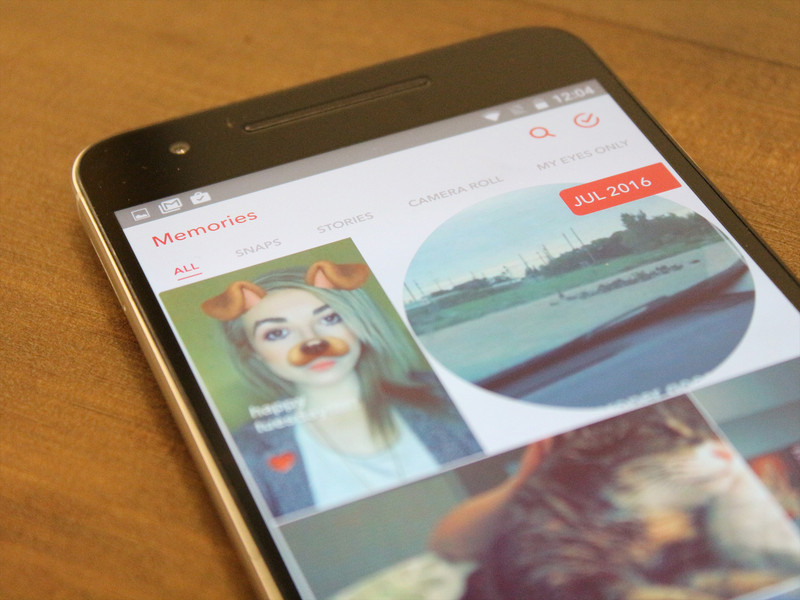
How do I use Snapchat Memories?
Now that you’re getting used to using Snapchat Memories, learn how to navigate and edit old snaps, store videos and photos in a protected My Eyes Only section, and so much more!
Here are a few ways to manage Snapchat Memories for your Android phone.
- How to edit an old Snap in Memories on Android
- How to move a Snap to My Eyes Only in Memories on Android
- How to rename a Snapchat story in Memories on Android
- How to move your Story to My Eyes Only in Memories on Android
- How to export individual Snaps from Memories on Android
- How to delete photos and videos from your Memories on Android
How to edit an old Snap in Memories on iPhone and iPad
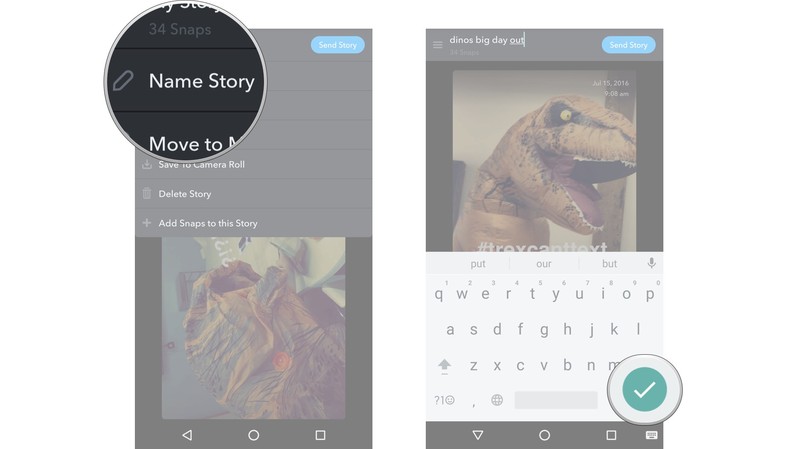
Launch Snapchat from your home screen.
Tap on the smaller white circle underneath the shutter button to access Memories. You can also swipe up anywhere on the screen.
Tap on the photo or video you would like to edit.

Tap and hold the photo. A black border will appear around the photo.
Tap the little white pencil in the lower left corner.
Tap stickers, text, or doodles in the upper right corner to edit your photo like you would a standard Snapchat.

Tap the timer in the lower left corner to adjust how long the Snap will show for.
Tap the arrow in the blue circle in the lower right corner.

Just like sending a standard Snap, select My Story or the contacts you would like to share your photo/video with.
How to move a Snap to My Eyes Only in Memories on iPhone and iPad
Launch Snapchat from your home screen.
Tap on the smaller white circle underneath the shutter button to access Memories. You can also swipe up anywhere on the screen.
Tap and hold the photo or video you would like to protect.
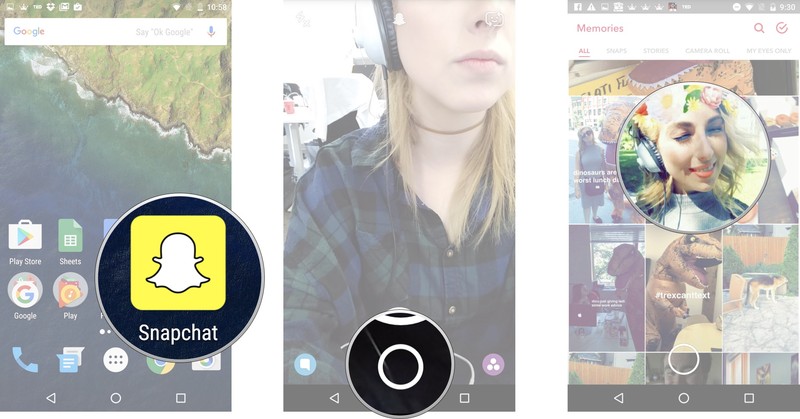
Tap My Snap in the upper lefthand corner
Tap Move to My Eyes Only
Tap Move.
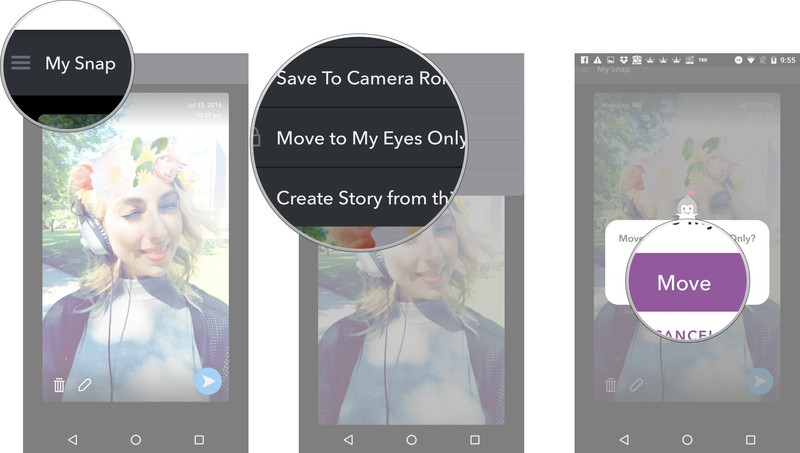
The Snap will then be moved to your password protected My Eyes Only section.
How to rename a Snapchat story in Memories on iPhone and iPad
Launch Snapchat from your home screen.
Tap on the smaller white circle underneath the shutter button to access Memories. You can also swipe up anywhere on the screen.
Tap the Stories tab at the top of the screen to access your saved stories.
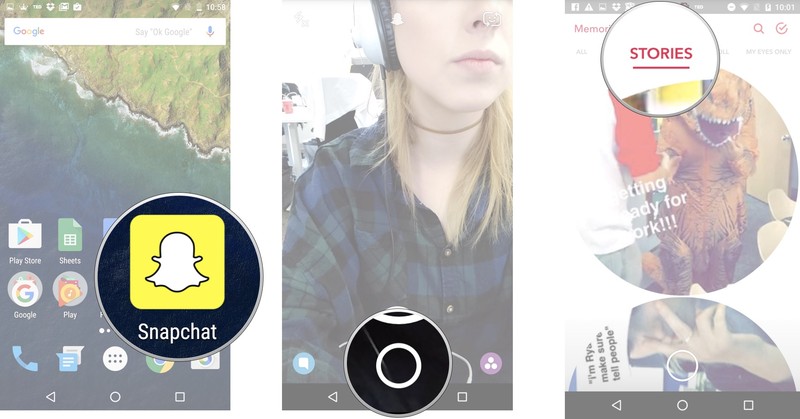
Tap and hold the story bubble you would like to rename.
Tap My Story in the upper left corner next to the menu (☰).
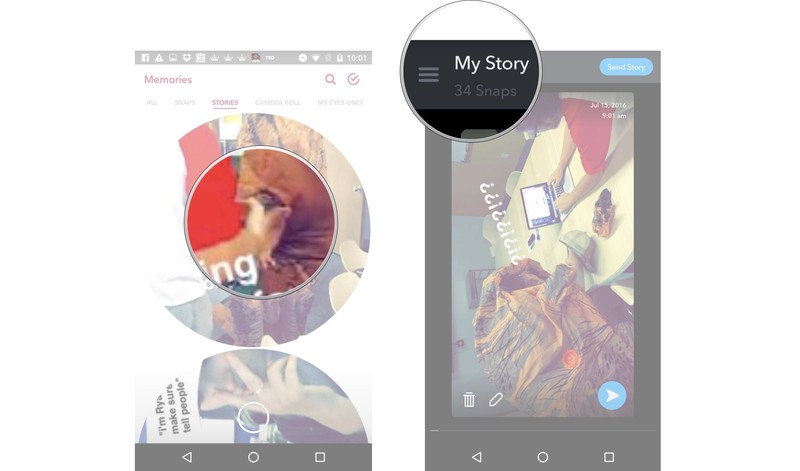
Tap Name Story and title your story.
Tap the check mark in the green circle in the lower right corner.
How to move your Story to My Eyes Only in Memories on iPhone and iPad
Launch Snapchat from your home screen.
Tap on the smaller white circle underneath the shutter button to access Memories. You can also swipe up anywhere on the screen.
Tap the Stories tab at the top of the screen to access your saved stories.
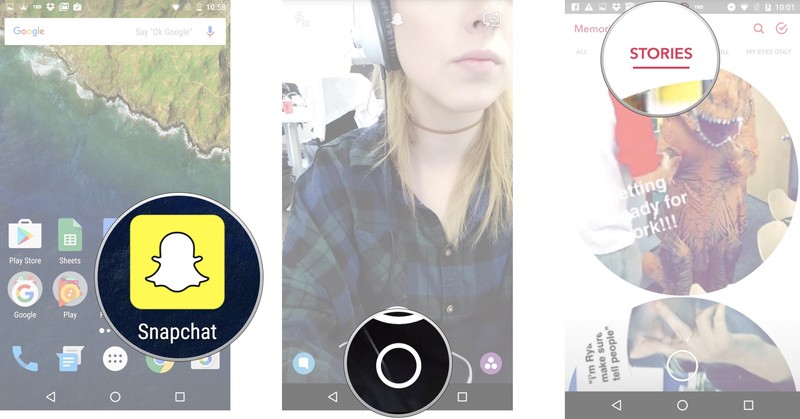
Tap and hold the story bubble you would like to make private.
Tap the menu (☰) in the upper left corner.

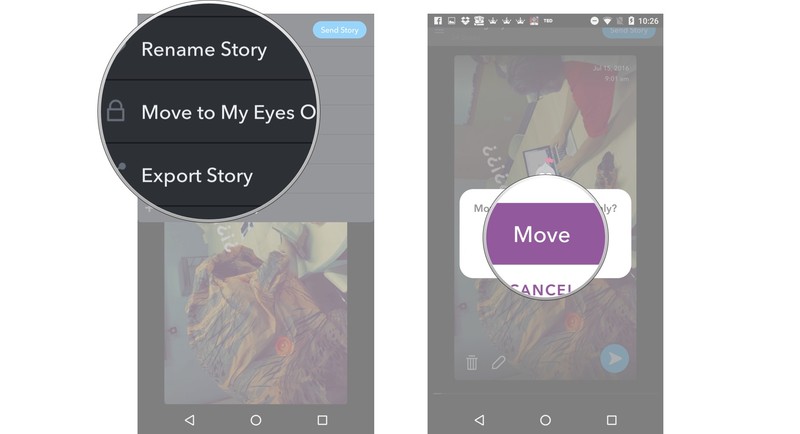
Tap Move Story to My Eyes Only.
Tap Move.
How to export individual Snaps from Memories on iPhone and iPad
Launch Snapchat from your home screen.
Tap on the smaller white circle underneath the shutter button to access Memories. You can also swipe up anywhere on the screen.
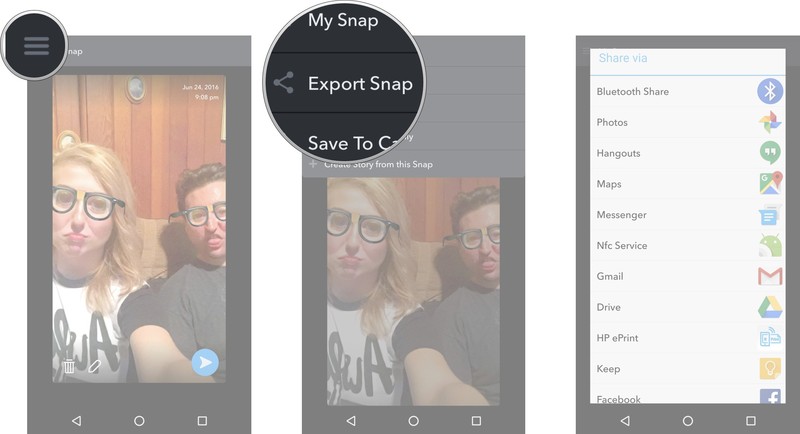
Tap and hold the Snap you would like to export.

Tap the menu (☰) in the upper left corner.
Tap Export Snap.
Select what you would like to do with that exported photo.
How to delete photos and videos from your Memories on iPhone and iPad
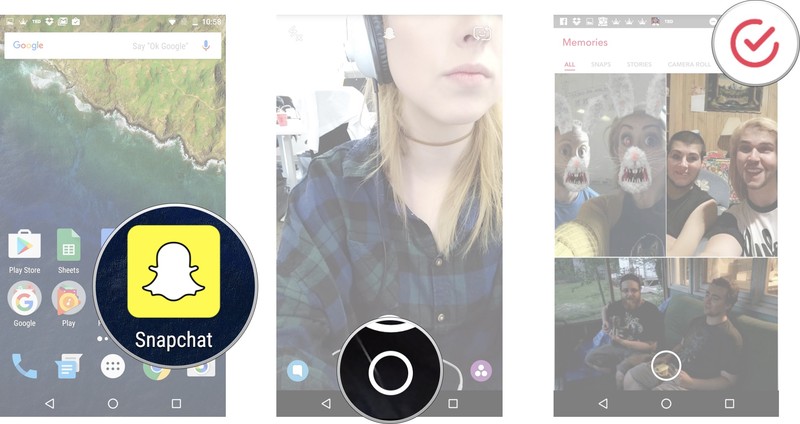
Launch Snapchat from your home screen.
Tap on the smaller white circle underneath the shutter button to access Memories. You can also swipe up anywhere on the screen.
Tap the red check mark in a circle in the upper right corner of the screen.
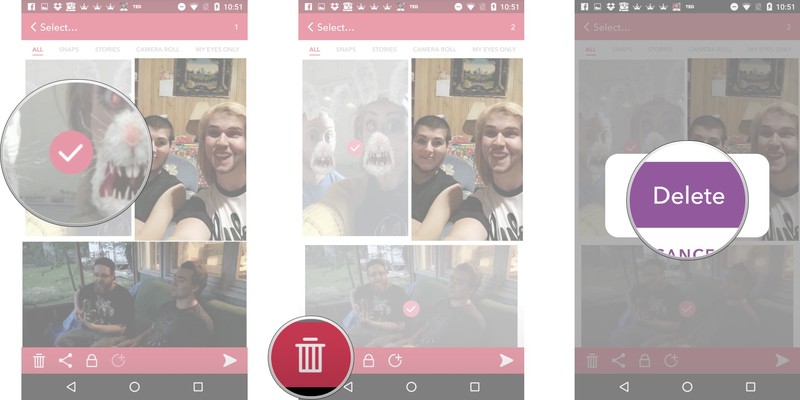
Tap on the photos and videos you would like to select. A red check mark will appear on the selected photo/video.
Tap the garbage can in the lower left corner.
Tap Delete once the prompt appears.
Best cases for ASUS Chromebook Flip

What are the best cases for the ASUS Chromebook Flip?
Cases for your ASUS Chromebook Flip come in many styles, from the briefcase to the minimalist sleeve. Take your pick from the cream of the crop.
- Rogue Theory laptop case
- iPearl mCover hard shell case
- Evecase Neoprene slim briefcase
- Navitech canvas laptop sleeve
- Case Star Neoprene sleeve
- AmazonBasics laptop and tablet bag
Rogue Theory laptop case

You can get laptop cases from Rogue Theory in a wide range of solid colors and patterns, but right now we’re loving the blue and white Chevron pattern pictured here. The leather straps add a nice detail to the gentle snap closures on the front that keep your ASUS Chromebook Flip covered and safe.
The fabric is stiffened and custom fit to your Chromebook so that it fits nice and snug. For a little extra storage space for things like cords or a USB you can add a color coordinating zippered pouch to your order.
Rogue Theory cases are manufactured in the U.S. and are a handmade, totally unique option for bringing your ASUS Chromebook Flip wherever you go.
See at Etsy
iPearl mCover hard shell case

This hard shell case from iPearl mCover is ideal for those who want a case for their ASUS Chromebook Flip but don’t want to deal with zippers, snaps, or sleeves. The translucent PC material comes in seven color options as well as a clear version.
This two-piece case is easy to snap on and off, and for a reasonable price, you can grab two covers and change up the look of your Chromebook on a regular basis.
iPearl mCover cases won’t add loads of bulk but do still act as great protection if you’re a little hard on your Chromebook or if your commute is a little less than smooth.
See at Amazon
Evecase Neoprene slim briefcase

Handles are pretty handy. The slim briefcase from Evecase lets you quickly grab your laptop case by the handles when you’re in a hurry or lets you tuck them away when the case needs to fit into a larger bag. The Neoprene material keeps your ASUS Chromebook Flip safe from incidental spills or the occasional rainy jaunt.
The secure zipper closure and soft, cushioned interior keep your Chromebook protected, even if your day is keeping you on the run. The front pocket is ideal for cords, paperwork, or even your phone; just keep everything all in one place and you won’t waste your day searching for odds and ends.
The Evecase Neoprene slim briefcase comes in six solid colors, or six kid-friendly patterns that are too cute to pass up.
See at Amazon
Navitech canvas laptop sleeve

Canvas is an excellent choice for laptop sleeve material; it’s durable and less flexible than other fabrics, so your ASUS Chromebook Flip will stay safe and sound. It comes in solid red, black, or the nautical blue and white stripe pattern pictured here.
It’s slim and lightweight enough to toss into another bag if you’re traveling or commuting. The secure snap closure won’t fly open and the interior pocket is a perfect storage spot for a cord and a USB. The soft fabric lining keeps the exterior of your Chromebook scratch-free, too.
Durable, simple in its design, and made just for the ASUS Chromebook Flip, the canvas laptop sleeve from Navitech is a solid choice.
See at Amazon
Case Star Neoprene sleeve

You want something simple, straightforward, and on the inexpensive side? Look no further than the Neoprene sleeve from Case Star. It comes in eight solid color options that fit like a glove on your ASUS Chromebook Flip.
The zippered closure is secure and the sleeve features just a little bit of extra interior space for bringing along a charging cord. The super slim design will let you tuck the sleeve easily into a backpack or your carry-on luggage and the Neoprene material adds a little barrier against accidental spills.
For a sleeve that’s easy on the wallet and an easy choice, Case Star’s Neoprene sleeve is it.
See at Amazon
AmazonBasics laptop and tablet bag

If you need your ASUS Chromebook Flip to travel well with other accessories and gear, go for the AmazonBasics laptop and tablet bag. It comes in basic black with a removable long shoulder strap that’s awfully convenient for travel.
For good measure, go for the slightly larger size featured here; an extra inch or so means it’s easier to slide your Chromebook in and out of the bag. The large zippered front pocket holds cords, your phone, your wallet, you name it; the narrower third pocket is perfect for documents.
The AmazonBasics bag is inexpensive and carries your ASUS Chromebook Flip along with all of your essential accessories in safety and go-with-everything-style.
See at Amazon
Best case scenario
Are you using one of our top picks for ASUS Chromebook Flip cases? Tell us all about it in the comments below, or shout out with your personal favorite.
Chromebooks

- The best Chromebooks
- Should you buy a Chromebook?
- Google Play is coming to Chromebooks
- Acer Chromebook 14 review
- Join our Chromebook forums
Four people in Florida likely contracted Zika from US mosquitoes
Florida health officials warn there’s a high likelihood that four cases of Zika in the state were transmitted by local mosquitoes carrying the disease, a first in the continental United States. The Florida Department of Health believes that active transmission of Zika, meaning direct mosquito-to-human infection, is occurring in a small area in Miami-Dade county, north of the downtown area (as shown above). Other Zika cases in the US have been the result of people traveling to regions where the disease is prevalent and then re-entering the country already infected.
So far, no mosquitoes trapped by the Florida health department have tested positive for Zika, but officials say it’s highly likely these four cases were transmitted via local mosquitoes. The department is going door-to-door notifying and testing residents in the affected area, and blood donations are on hold in the region until screening protocols can be established.
The Zika virus is particularly problematic for pregnant women, as the Centers for Disease Control and Prevention has confirmed it causes severe fetal brain defects such as microcephaly. Zika can be spread via infected mosquitoes or through sex with someone carrying the disease. In June, the CDC warned that certain breeds of mosquitoes in the US could spread Zika if they came in contact with an infected person. The organization laid out a five-step plan to contain active transmission sites in the US.
There are more than 1,300 travel-related cases of Zika across the continental US. Florida health officials have confirmed 331 cases of Zika not involving pregnant women and 55 cases involving pregnant women. The health department urges Floridians to drain standing water weekly and use mosquito repellent when outdoors. There’s a Zika Virus Information Hotline set up in the state for anyone, local or visiting, who has questions about the disease. Reach the hotline at 1-855-622-6735.
Via: NYT
Source: Florida Health
Disney Officially Lays Out Plans for Cessation of ‘Disney Infinity’ Services
After announcing the discontinuation of the Disney Infinity franchise in May, Avalanche Studios and Disney Interactive Studios — the game’s developer and publisher, respectively — remained relatively quiet on the specific timeline of the game’s imminent demise. After the announcement, Disney still launched three new characters from Alice: Through the Looking Glass, and introduced its first play set with non-bipedal characters, based on Finding Dory.
Today, in an email sent out to fans subscribed to Disney Infinity-related news, the game’s team specifically laid out the upcoming timeline of when and what features will be turned off in the coming weeks and months. A few in-game purchase options for Disney Infinity 2.0 have been turned off beginning today, in both the iOS and Apple TV versions of the game, but most of the bigger changes hit on September 30.
From that date onwards, users will no longer be able to log into their accounts and play the iOS, Google Android, Amazon Android, and PC editions of any entry in the series, as they “will no longer be available on the respective app stores.” This means the game will only be available to play on consoles and Steam, but even there “all online services and community features” will be down.
The end of the timeline shared by Disney Infinity comes next year, on March 3, 2017, where Apple TV and Windows 8/10 versions of both Disney Infinity 2.0 and 3.0 “will no longer be available, supported or playable.” That’s the termination point for any straggling servers of the game still online as well, since Avalanche Studios will also pull the plug on “all Disney Infinity online services and community features for all versions.”
Since announcing that we will discontinue the production of Disney Infinity, we’ve been exploring timelines for the closure of the game’s online versions and community features. Our goal has been to offer extended access to these services, while also providing clear communication about what you can expect.
Although Disney Infinity 3.0 launched on the fourth-generation Apple TV last fall, offering a comparable gaming experience to the console versions, Disney eventually abandoned updating the game on Apple’s new set-top box, making fans wired into that version of Disney Infinity 3.0 miss important new features.
Due to the termination of development on tvOS, fans lost the chance to play with new figures that released for the toys-to-life game and weren’t included as disc-locked content at launch (the basis of Infinity’s gameplay loop), including Baloo from The Jungle Book and a few new Marvel superheroes. Although the Apple TV has received a handful of other, notable gaming apps, Disney and Avalanche’s move made it hard to view the fourth-generation device as a true gaming platform, despite Apple’s attempts to promote it as such with heavy, App Store-focused messaging.
Disney encourages fans to keep checking the game’s official website for updated information on the closures of Infinity’s various servers and features as the timeline progresses. There’s also a Closing FAQ page on the company’s website for any users who don’t see answers to their questions regarding the game’s discontinuation.
The Disney Infinity team also made two important notes in today’s update: firstly, the console version of the game will “continue to operate as usual,” even beyond March 2017, with players able to gain full access to the figures and play sets they’ve amassed over the past three years. Only the social and community aspects of the game will be expectedly absent. Secondly, until September 30, 2016, the game’s Community Content will remain available, so players will be able to upload and download Toy Box levels until then.
Related Roundups: Apple TV, tvOS 10
Tag: Disney Infinity
Buyer’s Guide: Apple TV (Neutral)
Discuss this article in our forums
Inside the Gigafactory: Tesla’s most important project
Journalists sit in cars and a shuttle as a guard checks to make sure every passenger is on his list. They’re the security guards for Tesla’s biggest and most important endeavor, the Gigafactory. When completed, it will occupy space equivalent to 107 football fields. The automaker has invited us for a tour of the largest battery-manufacturing factory on the planet.
To construct the enormous three-floor factory and meet the goal of producing 400,000 preordered Model 3s by the end of 2018, Tesla is building the Gigafactory in phases. A section is completed and equipment is moved in while the next portion is being erected. It’s not so much a single building but a series of connected structures.
Section A is already cranking out battery packs for Powerwalls. Sections B and C have battery cell manufacturing equipment being installed and are being primed for production. Section D has one exterior wall and floors, but it’s still mostly steel girders and rebar. Meanwhile, two days before we arrived, work started on Section E, which is currently just a skeleton of steel.

This section-by-section process continues inside. For example, the third floor will be one long cell assembly line. There’s already one line installed and being prepped for testing. The next room over is being readied for identical equipment. And the next room over from that, and again, and again until the length of the third floor is a series of cell-producing juggernauts.
With each new setup, the process will be tweaked based on what Tesla and Panasonic have learned from the machines already pumping out batteries. It’s about optimization, according to CEO Elon Musk, something that been part of the factories’ DNA from the beginning. Since the original plans, the partnership has figured out that the Gigafactory will be able to produce three times as many battery packs as thought.
But it needs to move quickly and start building the 400,000 preordered Model 3s. “We need to get roughly a third the size of the original building to support half a million cars a year,” Musk said at the event. Those orders forced the company to push up its Gigafactory plans by two years, and now Tesla believes it can meet the production schedule for entry-level Teslas in 2018.
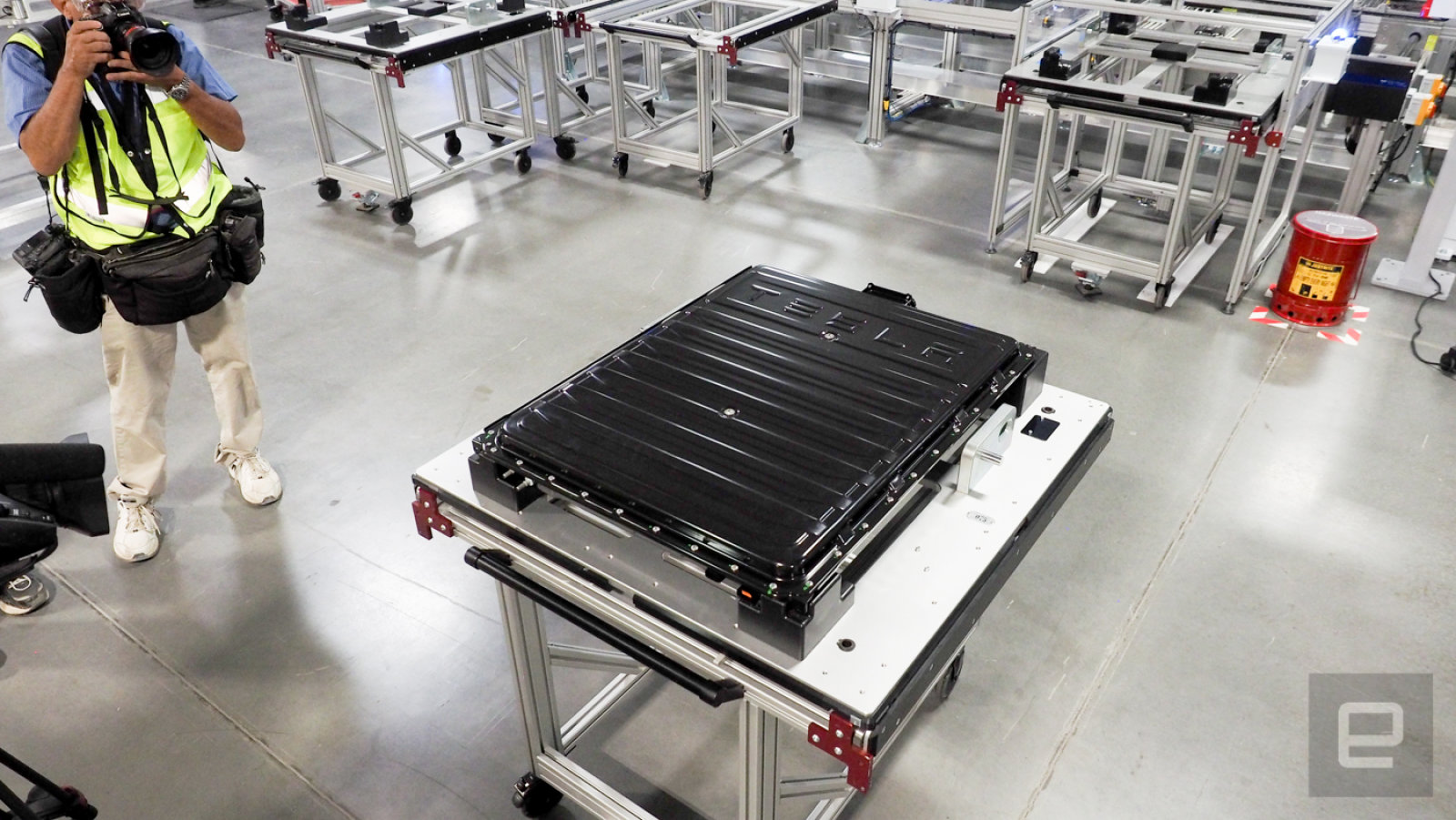
Musk notes that the Gigfactory is more than just a way to get batteries into its cars. He said, “the factory itself is considered to be a product. It’s the machine that builds the machine and actually deserves more attention from creative problem-solving engineers than the part that it makes.” Tesla will gradually transition a majority of its research to improving its factory’s workflow.
That efficiency will drive the battery price per kilowatt hour down at least 30 percent by 2020, according to Musk.
It’s all going to start in this already-massive Gigafactory, 30 minutes outside Reno. When complete, it will produce enough battery packs for 1.5 million cars a year. In 2015, Tesla sold only 50,580 EVs, which means it has plenty of room to grow. If demand explodes outside the United States, the automaker plans to open additional Gigafactories that will also build the automobiles.

Today’s factory — even though it’s not even 20 percent completed — is a remarkable undertaking not only by Tesla, but by Panasonic, which jumped on board at the planning phases and hasn’t looked back. And while the goal is to wean people off fossil fuels and get more electric cars on the road, the Gigafactory’s output will be only for Tesla products. Other automakers will have to get their batteries elsewhere. Musk talked about the importance of being faster than anyone else. “Speed is the ultimate defense,” he said. The CEO is acting more like an early settler out to get the best piece of land than the leader of a company. But it’s not just about being first or the quickest to him. He seems to really enjoy what he’s doing.
The best multiroom wireless speaker system
By Chris Heinonen
This post was done in partnership with The Wirecutter, a buyer’s guide to the best technology. Read the full article here.
We’ve spent hundreds of hours over several months using six multiroom wireless speaker systems in every possible room and even outside, and determined that Sonos is the best. It has a class-leading music ecosystem, excellent sound quality, and unparalleled ease of use. Because Sonos has a variety of great-sounding speakers at different prices, just about anyone can get into a Sonos system with room to grow.
Who should get this
Multiroom wireless speaker systems are for people who want to be able to play music all over their house and easily control it from their phone, tablet, or computer. They let you play different songs on each speaker, or group speakers together to play the same song in multiple rooms. They support both local media libraries and streaming services, allowing you to play music from almost any source. They make it easy to expand your system by just adding another speaker or zone.
If you care only about music in a single room, or don’t care about multiple sources, other options—like Bluetooth and AirPlay speakers—will work for less money, although they require your phone, tablet, or computer to be the streaming source. (Multiroom wireless audio solutions access the music sources directly, so they won’t wear down your phone’s battery life.)
How we picked and tested

We spent several months using six speaker systems in every room (and even outside) to find the best multiroom wireless speaker system. Photo: Chris Heinonen
We looked for audio systems that could be set up in multiple rooms, either as speakers or as sources for an existing audio system. We wanted systems that could play back local music (your MP3s, for example) and stream music from online sources (Spotify and the like) completely from your smartphone or tablet so that you would never need to physically access the speaker. Each speaker, or “zone,” needed to be able to play from a different source than other speakers, or to be grouped with those other speakers for all of them to play from the same source. The ideal multiroom wireless speaker system is reliable and easy to install and update. It should also offer a large variety of products at a wide range of prices, as well as support for Bluetooth or AirPlay.
We researched all the models currently available, and we spoke to Ty Pendlebury of CNET and Darryl Wilkinson of Sound & Vision, who review multiroom wireless speaker systems. We then picked the most promising systems, and for each one we brought in at least two zones’ worth of equipment for testing.
Once we got everything in, we put the speakers all around the house, from the basement to upstairs, to make sure range wasn’t an issue. We listened to local files and the main streaming services (Spotify, Pandora, Amazon, Apple Music) on all of the contenders. In the case of soundbars, we watched movies and TV as well. With systems that had a 3.5-millimeter line-in, we used a switcher to send the same music to all the speakers and directly compare them.
Our pick

Sonos has done the multiroom wireless speaker system thing longer than anyone, and the company’s experience shows. Photo: Chris Heinonen
Sonos is the best multiroom wireless speaker system because it supports the most streaming services, has a wide selection of great-sounding speakers, offers thorough search features, and comes with a well-organized app that runs on almost all major platforms. Sonos keeps its platform current by adding more services regularly, introducing new features such as Trueplay room-correction technology, and updating its models. The Sonos user experience is the best of any of the multiroom wireless speaker systems available.
Sonos offers speakers that start at the low end with the small Play:1 and extend to the Playbar soundbar for use with a TV. You can use a single speaker, combine two into a stereo pair, or even build a 5.1-channel home theater system using the Playbar, two other speakers for surrounds, and the matching Sub. If you already have speakers that require an amp, you can use the Connect to add them into a Sonos system. The Connect also has a stereo input if you want to connect a turntable, tape deck, or Bluetooth receiver. Passive speakers, like our favorite bookshelf speakers, can be added by using the Connect:Amp, but if you’re looking for a stereo solution you can get a pair of the impressive Play:1s for less. The most serious audiophiles might consider upgrading to a pair of Play:5s.
Currently, Sonos supports 48 streaming services, whereas many other multiroom systems offer a half dozen or fewer. That selection covers all the major ones, including Spotify, Pandora, Amazon, Google Play, and Apple Music. You can also play back your local music library and subscribe to podcasts. No matter how or where you get your music, the odds are that Sonos will support it. Plus, Sonos keeps all of its services inside a single, well-designed app for your computer or smartphone, which makes it easy to search across every service you subscribe to.
Budget pick

Google Chromecast Audio makes it easy to affordably convert sound systems around your house into a whole-home audio system.
If you aren’t ready to invest a few hundred dollars into a Sonos system, the Google Chromecast Audio offers an affordable and compelling alternative. You get an Oreo-sized puck with a single 3.5-mm output that is both analog and optical. It lets you stream from a huge number of iOS and Android apps (Spotify, TuneIn, Google Play, Plex, Pandora, and more), supports grouping rooms together, and offers high-resolution audio.
However, it doesn’t have the simple, single app that Sonos offers (instead, it’s integrated into individual apps and browsers). Also, some services still don’t work with it, and because it isn’t a unified hardware-and-software system, you’ll need to turn on a separate speaker each time you want to listen. Sonos handles all of that directly inside the app. But you can forgive a lot of its downsides at this price.
This guide may have been updated by The Wirecutter. To see the current recommendation, please go here.
Wearable tech will be everywhere at this year’s Olympics
It’s almost time. The 2016 summer Olympics are less than a week away, with the opening ceremony scheduled for August 5th. This year’s event, which runs through August 21nd, takes place in Rio de Janeiro, Brazil, where the organizers have reportedly struggled to prepare for the games. Whether Rio is ready or not, some of the world’s best athletes will be there to compete for gold medals in just a few days. Naturally, technology will have a presence at the Olympics. That includes wearables designed to make life easier and safer for Olympians as well as others supposed to help in training. Read on in the gallery below to learn about eight different pieces of gear the athletes will be using.
Democrats at the DNC were divided on last week’s email hack
On Wednesday, Republican presidential candidate Donald Trump stared directly into a camera during a press briefing and said: “Russia, if you’re listening, I hope you’re able to find the 30,000 [Hillary Clinton] emails that are missing. I think you will probably be rewarded mightily by our press.” This remark came after thousands of hacked emails from the Democratic National Committee were released by Wikileaks; the FBI has indicated it believes Russia was behind the attack. Trump has since said he was being “sarcastic” and his campaign manager denied claims that the candidate was calling for Russia to hack anyone.
But that didn’t stop Democrats from denouncing his language in the strongest of terms. “This has to be the first time that a major presidential candidate has actively encouraged a foreign power to conduct espionage against his political opponent,” said Hillary Clinton’s campaign. (What the Clinton campaign didn’t mention is that this sort of maneuvering isn’t entirely unheard of, even within the Democratic party.)
And at least two speakers at the Democratic National Convention directly took Trump to task for his comments. “This morning, [Trump] personally invited Russia to hack us,” said retired Navy Admiral John Hutson. “That’s not law and order. That’s criminal intent!” Former secretary of defense Leon Panetta said: “[Trump] asked the Russians to interfere in American politics. Think about that for a moment. Donald Trump is asking one of our adversaries to engage in hacking or intelligence efforts against the United States to affect our election.”
If the tone from speakers at the DNC was severe, the sampling of delegates and attendees that I talked to on Wednesday were resigned to Trump saying whatever he wants with essentially no backlash. “It’s Trump, so you never know what his one-liner is going to be,” said Patricia Slovacek, a longtime Clinton supporter and delegate from Austin, TX. “It’s like crying wolf: You call so many times that even if something he said was true we wouldn’t know.”
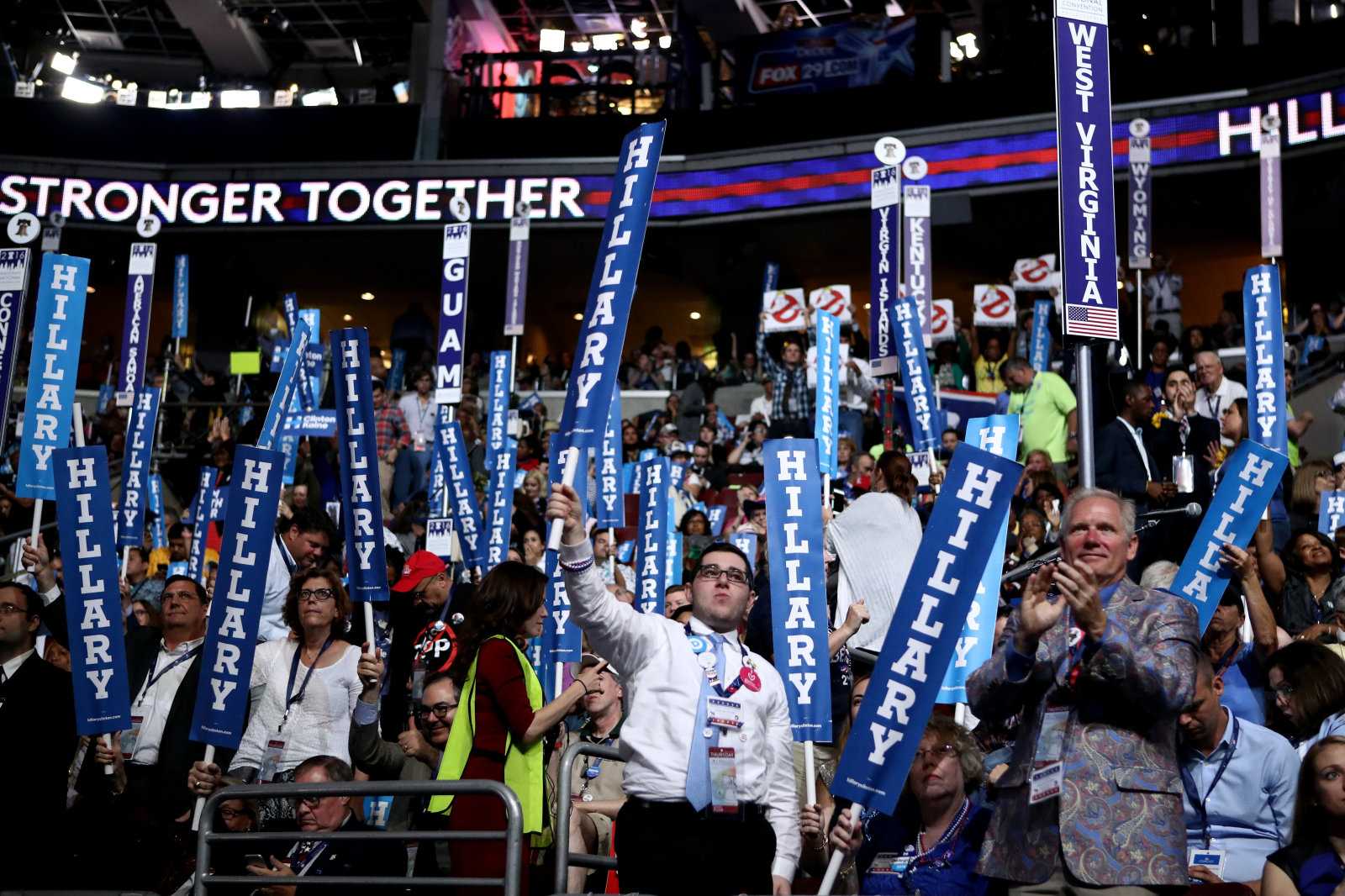
Image credit: Jessica Kourkounis/Getty Images
That sense that Trump can say whatever he wants and suffer no consequences was a common thread among people I interviewed. “What is he thinking? That is going to help us how? Yes, let’s promote state-sponsored terrorism,” sighed Stacey Anderson, a Hillary Clinton supporter and delegate from Montana. Along with that resigned feeling, attendees felt this was just another example of Trump “trying to use fear to get people to vote for him,” as Anita Green (a Bernie Sanders delegate from Montana) put it.
This was a point on which Clinton and Sanders supporters aligned. “He’s still a buffoon, he’s still a quasi-fascist authoritarian xenophobic racist piece of shit,” said Zachary Benton of Washington, “but no, my opinion hasn’t really changed [because of his comments].” Benton and his companion Megan Little from Washington described themselves as the type of people who would support a “true progressive” despite how Sanders’ campaign for president ended.
Unsurprisingly, most Bernie Sanders supporters I spoke with had very different feelings about the impact of the leaked emails. Some of those emails revealed what can easily be interpreted as favoritism from the Democratic National Committee for Clinton over Sanders. “It was validation for how I was already feeling,” said Little. “It kind of proves to the rest of the country that there was some serious wrongdoing.” Tony Floria, a Sanders-supporting delegate from Indiana, was a bit more measured in his criticism. “Here’s a slight political scandal in which some officials of the DNC behaved in ways that were highly unprofessional, maybe unethical, when they were supposed to be neutral,” he told me.
But it didn’t really change his opinion of Clinton: He prefers Sanders, but was willing to admit that Clinton isn’t the devil she’s made out to be by a pocket of Sanders supporters. “I’m highly critical [of Clinton], that’s why I’m a Sanders supporter. I think she has been at the center of some of the worst decisions — for instance, she was one of the many suckered in on the Iraq war vote.” But then Floria gave her some surprising credit. “There’s been a number of other decisions she’s made in her career that I support and admire, like her advocating for healthcare reform,” he says.

Image credit: Patrick T. Fallon/AFP/Getty Images
Most Clinton supporters didn’t take major issue with the content of the emails that got some Sanders backers so angry. “I think that we have all said things and emailed things that we regret,” said Stacey Anderson, the Clinton supporter and delegate from Montana. “I don’t feel like any of those were showing any across the board cohesive conspiracy plan.” Mark Glaze, a consultant working in Washington, DC on reducing gun violence, agrees. “I’m a Hillary supporter, and still it’s an outrage that the DNC didn’t retain neutrality,” he said. “But even so, it’s clear it had no effect on the race and it’s not a reason for the kind of agitation the Bernie supporters are showing.”
Ultimately, many people I talked to said despite the email controversy, the party needs to pull together if it wants to have a shot of winning the election this November. “It’s time for the party to unite and get together, because it’s the only way we’re going to defeat Donald Trump,” said Ernest Morris, a delegate from the US Virgin Islands. “And as a country, we must defeat Donald Trump.” After two weeks of conventions in which both the Republicans and Democrats showed more internal dissent than is usually seen at these events, it feels like whichever party can overcome that tension and pull its supporters together will have a good shot at success this fall.
Broods used the Microsoft Band to create music-video magic
Microsoft is no stranger to collaborating with musicians to show off creative uses for its technology. With the Music x Technology project, the company has worked with acts like Big Grams, Neon Indian, KEXP, Phantogram and others to use its Kinect to enhance the musical experience for fans. I got a first-hand look at “Realiti: Inside the Music of Grimes” back at Moogfest in May, an exhibit that let fans remix parts of a song by interacting with a mesh surface. With the help of creative agency Listen, Microsoft teamed up with electropop duo Broods to produce a music video using the Microsoft Band.
In the past, the Music x Technology initiative has done a lot of motion tracking using the Kinect camera’s depth sensors. This time around, Microsoft’s wearable is the key to the project, tracking Georgia Nott’s movements during the video shoot for the song “Heartlines.” In fact, this is the first time the project has used the device while working with an artist. After gathering heart-rate and body-temperature data during the filming process, the team created geometric visuals based on the stats that were overlaid on top of actual footage. Why do this? Hint: It’s about more than just showing off what the Microsoft Band can do.
“The goal is trying to communicate on another emotional level, not just through audio and facial expressions,” Caleb Nott, Georgia’s brother and the other half of Broods, told Engadget. “There are all sorts of ways that emotion can translate into something else. If you can communicate your emotions through your temperature and heartbeat, that’s a more sensual experience.”
With that in mind, Broods wanted a subtler way to capture the heart-rate data, because their previous video had a more industrial feel. Using a device like the Microsoft Band that’s worn on the wrist like a watch did just that. “A piece of medical equipment would have been more invasive, so I think this was a really cool way of doing it,” Nott said. “It’s really awesome to get biodata and visualize it in an interesting way.”

A still from the “Heartlines” video with the Microsoft Band-generated graphics added.
At certain points in the video, you’ll notice the pink-hued geometric shapes that look like they’re pulsing from the torsos of the musicians. Given the title of the song, the choice to track heart rate seems obvious, but the way it’s used in the video isn’t too on the nose. The added graphics aren’t present in every shot in which one of the Broods appears; they show up only to emphasize words and action at specific spots in the video. “I want to feel your heartlines, I want to feel your heart,” the song’s lyrics plead, and the pulsing shapes allow the viewer do just that as the graphics rotate around the performers.
The process of tracking vitals during the video shoot wasn’t without its challenges. Nott said one entertaining part of the process was watching the poor production person who had to stay within range of Georgia’s wrist while also being careful not to step into the frame. “There was a guy running around with a laptop dodging and darting trying to stay out of the shot,” he said. “He was so stressed out, the poor guy.”
Caleb Nott also said this was his first time trying a fitness tracker; prior to the project with Microsoft, he hadn’t worn one. His sentiments about having the Band on his wrist echoed what I’ve heard from wearable owners before: It’s hard getting used to the gadgets for long periods of time if you don’t wear a watch on the regular. “I don’t wear watches or any kind of jewelry, so it was pretty different,” he said.

Explaining how the Microsoft Band is used live during the LA event.
In addition to the video, Broods will use the Microsoft Band to generate visuals during performances on their upcoming tour. Starting next week, the duo’s heart rate and temperature will be tracked and translated into on-stage lighting and visuals in real time. Steve Milton, of creative agency Listen, said what concert-goers can expect to see during the tour will be different from what’s in the new video, but the wearable will still be keeping tabs on Georgia’s stats as she moves around the stage.
“On tour, the band has a really great lighting display, so we’ve worked with the tour production team to use the Microsoft Band to capture Georgia’s biodata during her performance and effect the lighting display on stage,” Milton said. As a preview of how the Microsoft Band will be used live, Broods did a small performance at Capitol Records in Los Angeles this week.
What’s next for the Microsoft Band in terms of the Music x Technology project? Milton says the team of collaborators has yet to find the limits of the wearable device when it comes to more creative uses. “The Microsoft Band can track a number of things: heart rate, calorie burn, sleep quality and exercise,” he explained. “We focused on heart rate given the creative direction of the project, but we have really just started scratching the surface here. We’re excited to see where we can take this and how we can move beyond visuals to music and sound.”
Speaking of controlling music and sound, Caleb Nott already has his eye on using the Band to manipulate a drum machine. In some behind-the-scenes footage detailing the making of the music video, he said that connecting the gadget so that heart rate controls the kick and body temperature can manipulate a snare or hi-hat isn’t beyond the realm of possibility.
“It’s something that I’d like to do, but I think first on the list is integrating it into our live performance,” Nott said. “We have to see where that takes us, because [using the Band to make music] could be quite different depending on how you’re feeling.”
Who knows — maybe on the duo’s next tour the siblings will employ a Microsoft Band to create a new version of a song, live on stage? One thing’s for sure: We haven’t seen the last of the company using its wearable in a musical setting.
All images courtesy of Microsoft Music x Technology. Video shoot photos by Nils Erik Vogth-Eriksen and LA event photo by Mekael Dawson.
Source: Microsoft Music x Technology
Evernote’s CEO on ‘unlocking the potential of every idea’
Evernote carved out a name for itself in the startup world with its relentless focus on productivity, synchronization and mobility (it debuted on the iPhone with the App Store’s launch in 2008). Today, almost 10 years since it was founded, the company has more than 200 million users. It wasn’t an easy path to success, though: For years its customers complained about unstable apps, it suffered a major security breach in 2013 and recent pricing changes caused an uproar by removing key free features. I sat down with the company’s new CEO Chris O’Neill, who replaced longtime exec Phil Libin, to chat about where things are headed.
It’s been a year since you joined Evernote. What’s the progress been like, and where do you see the company headed?
I’m tremendously pleased. I was pretty quiet when I showed up. I was focused on the core product, the team and the path to sustainability. We’ll be relentless and continue to invest in the editing experience, search experience and other features. The team is just amazing. We’ve put in place a world-class leadership team, people who have experience navigating from startups to more mature companies.
I’ve spent over half my time building the team. Not just the leadership team, but the next level down, rounding out our technical side, building up marketing and design. Also, I’ve been articulating the values about how we’ll operate as a company, as well as being clear about why we exist as a company.
On the path to sustainability, we’ve raised a lot of money [over $200 million], we’re an early on pioneer in a very attractive area. Over 2 billion notes are taken every day. We’re seeing a surge in cloud-based acquisitions and productivity apps. But I didn’t want to raise any more money. I wanted to control our own destiny without dipping into anything beyond the cash we have in the balance sheet. We’re prioritizing monetization. We’ve had our first cash-flow positive month in March, Q3 is shaping up to be the best in the history of the company.

So, how has the response been to the new pricing?
Any time you make changes to prices, there’s going to be an uproar, true as night follows day. We saw some noise for a few days … It’s pretty much died down. In terms of the response, it’s been fantastic frankly. I’d say equally sized group of people saying “I love this product, I use it quite extensively and I’m willing and happy to pay.” Incidentally it’s the only time we’ve raised prices in the history of the company.
We have an obligation to our users to be a sustaining company that lasts forever. We call it Evernote for a reason. If we want to invest and make the service incredible, we need to make decisions on how to sustain the business model. Freemium is fantastic to build scale, but ultimately we felt it was the right move for the company to set us up for the long term … There’s social media noise, but then people vote with their feet. And we’re far, far ahead of our expectations.
We’re not being bashful about it — we’re being open. We’re being transparent and saying we have something of value. We have a free tier to the product; it’s quite generous and robust, and people who use the product extensively we’re not being shy about asking them to pay. There’s no such thing as a free lunch in life.
Are you worried about not attracting as many users if the free offering is more limited? Or is the focus now more on trying to get the people who actually use it to pay?
You need to invest across all stages of the funnel. We haven’t seen noticeable changes to our registered user count, which are hovering north of 75,000 every day … We’ll continue to invest in that, we’ll continue to invest in engagement with the product, which is in many ways the biggest challenge. That’s true for ourselves and any productivity-related app. How do you introduce someone, explain the value, it doesn’t happen right away. The benefits pay off over time. But once the people use the product, they’re generally more than happy to pay.
Evernote used to have a lot of side apps and other aspects that have been shut down over time. Were those decisions more about focusing on the core product?
At the heart it’s about being true to what the original mission of the company was, which was really to solve information overload. In our case it was to help you remember things. But in terms of the side apps, companies take risks, and there was a point where it was the game to have many apps covering lots of different use cases. And what we found was that it made sense to embed a lot of the functionality of these side apps. For example, some of functionality in Penultimate or Skitch, you’re finding a lot of those things in the actual app. They’re really valuable things that users want, as opposed to having a side thing.
“Once the people use the product, they’re generally more than happy to pay.”
There are others, like Evernote Hello or Food, those were more geared towards a lifestyle sort of brand. Each of those apps had a great and passionate following. Ultimately, business sometimes is about making tough decisions. In order to make the core as incredible as it could possibly be, I have a belief you can only do one or two things really well. So you really need to double down on that. A relatively controversial choice, which I thought was even easier, was shutting down the physical goods market.
It was a nice thing to have for a while, but it never made much sense.
Well, it didn’t to me, but that doesn’t mean it wasn’t a wise bet at the time. I think good companies take bets, but they also have the discipline afterwards to look back and see if it panned out as they expected. That’s what all that was about: getting laser focused, reinvesting in the core and adding new experiences.
The syncing stuff, which by definition is almost invisible, we’re fundamentally overhauling it. Search upgrades, like with the quick switcher [Press Open Apple + J on Mac], you’ll fall in love with. It’ll actually learn over time to find things more easily.
How are you evolving Evernote’s security? Are you looking at encryption or anything like that?
I think about three things around Evernote, the scale, the global aspect and the user trust. And nothing else really matters more than the latter. We’re looking at a world-class security team, and we’re also exploring what moves to a public cloud might look like. There’s been a whole bunch of innovation when you look at Microsoft and AWS. The amount of encryption and security have evolved in incredible ways. I think that’s where we’ll see the biggest amount of pickup, wrapped together with our security.
Can you tell us any more about the behind the scenes changes you’re making?
Basically, we put quality at the very front and center, and with sync we track crashes, latency, and in all those cases many of those are down by 95 percent. Ultimately, I want to get those things to zero. People trust us with their memories, their ideas big and small, Evernote just has to work every time. The proof is in the pudding, we see fewer people reaching out to us in our customer support centers. That’s one pretty tangible bit of evidence … We’ve hired a new CTO [Anirban Kundu] — he’s in the midst of rethinking sync to take advantage of new technology.
How does your vision for Evernote differ from what [former CEO] Phil Libin was talking about? He had ideas around augmented reality and Evernote spreading across devices easily.
I was having lunch with Stepan [Pachikov], the founder of the company, who really likes to focus on memory. He wanted to build a place to keep things he wanted to recall, he viewed it as an extension of his brain. I think he was very prescient in predicting information overload. He figured we’d see mobile phones explode, and he was right.
We’ve consistently delivered on this idea of being a digital archive, because your brain is just a terrible place to store things … If you think of evolving from just sort of remembering things, but to remembering and thinking. My vision is we should facilitate the thinking process. So what does that mean? The digital archive needs to be there, and we basically need to allow ingestion at the speed at which thought happens. You’re typing right now, but clearly voice is tomorrow … There’ll be a world where we can tap into the synapses, I don’t know when that’ll be, but you’ll have a thought and it’ll just go to Evernote.
The opposite of that is surfacing information … We’ll find a new word for what it means to have just the right information at just the right time. It’ll really tap into the context graph.
The thinking process evolves in a couple different ways to me. One is that there’s so much shallow work, like Twitter feeds and Slack messages. Work has changed fundamentally in a couple different ways, in many ways for the better, but in many ways for the worse. Talking about the better side, we collaborate across borders within companies, and teams are the primary unit of actually getting things done. I primarily believe the company you build is the team you build.
The bad side is, knowledge workers are spending 80 percent-plus of our time in meetings, responding to email, creating email, communicating to death. Research shows that typically a third to 40 percent of meaningful collaboration happens with 5 percent or less of people. So you have your stars being drown out by asking for opinions. There’s this idea that real work usually happens at night, usually after all of your other responsibilities. That just really stinks.
In a society laden with distractions, we envision that uncluttered space, where you can work on ideas that change the world in big or small ways. The mission we have is to unlock the potential of every idea … So going from remembering to thinking, when I’m in a meeting, I basically don’t want to have my next meeting suck because no one captured the notes, or no one captured the action items. Everything should be captured, whether it’s voice, whether it’s written, or a transcription. There’s task management software out there, but I think in a lightweight way, I see a world where the collection and management of information is tied to tasks. Not in a heavy way, though: Our research suggests that’s just another thing to manage.
This interview has been edited and condensed.
 AIVAnet