


Robotic exoskeleton for babies can help prevent cerebral palsy
University of Oklahoma’s robotic exoskeleton for babies does two things: (1) make the kiddos look like tiny Dr. Octopuses and (2) help prevent cerebral palsy. The motorized device has power steering that gives babies at risk of the illness a little push needed to be able to move and crawl like their peers can. See, the condition can be caused brain damage, infections and injuries early in a person’s life. To combat the illness, therapy must start as early as possible — unfortunately, it’s not typically diagnosed until a child turns one year old.
The good news is that one of this team’s original members developed a method to detect which babies between two and eight months old are most likely to develop cerebral palsy. Since children at risk of the disease can’t move their bodies the way they want to, they stop trying to crawl after a while, causing the brain to stop developing new motor skills. This machine provides the push they need to crawl normally, promoting brain growth and the formation of motor skills.
The team has been developing this exoskeleton for a while now, but they admit that there’s still much to be done before it’s ready. According to IEEE, they’ve only just begun a large trial comprised of 56 infants and are the midst of collecting real-time brain activity data through the baby Dr. Octopuses’ EEG caps.
Source: IEEE
ICYMI: Robosurgeon, wigglebot and a very cute penguin

Today on In Case You Missed It: A robot from the Ben-Gurion University of the Negev produces a wave-like motion that can propel itself across a floor or through water, only with one motor. Also a robotic surgeon called Flex can snake its way down throats or other orifices and perform surgeries in a less-invasive way than traditional means.
But you should probably take in Purps the penguin and her 3D-printed boot, and also the robotic massager we all wish we had. As always, please share any interesting tech or science videos you find by using the #ICYMI hashtag on Twitter for @mskerryd.
Xiaomi Announces ‘Redmi Pro’ Smartphone With 5.5-Inch OLED Display and Dual-Lens Camera
Chinese smartphone manufacturer Xiaomi today announced a new smartphone, called the Redmi Pro, during an event in Beijing, China, where it also surprised attendees with the ‘Mi Notebook Air’. As TechCrunch pointed out, the company’s Redmi line of smartphone devices angle toward the low-cost spectrum of handsets, with most models costing around $150, allowing the company to move over 110 million models in the last three years.
A few additions to the Redmi Pro place it on the higher-end of that spectrum, since the new smartphone is the first in the Redmi family to have an OLED display, a larger 5.5-inch screen, and — perhaps most notably — pack in a dual-camera system. Specifically, the two lenses are a 13-megapixel Sony IMX258 sensor and a 5-megapixel Samsung sensor, and will result in image quality on par with DSLR-style cameras, according to the company.
Other than these features, the Redmi Pro also has a 4050 mAh battery, a USB Type-C charging port, up to 4GB of RAM and 128GB internal memory, an expected fingerprint sensor for biometric security, and three color options: gold, grey, and silver. Pricing for the Redmi Pro begins at $225 (1,499 Yuan) for 3GB RAM with 32GB of storage, $255 (1,699 Yuan) for 3GB RAM with 64GB of storage, and $300 (1,999 Yuan) for 4GB RAM and 128GB of storage. According to Xiaomi, the difference between the 3GB and 4GB RAM models is a faster and more powerful GPU and Helio X25 chipset.

The Redmi Pro — which will launch on August 6 in China — is debuting at a time when higher-quality smartphone cameras have begun to stand out as a major sticking point for consumers deciding on which device to purchase. Apple’s own upcoming iPhone 7 Plus has been the perpetrator behind dozens of dual-lens camera rumors since the beginning of the year, with a handful of design renderings and images of the smartphone leaking this summer, all showing off the large, pill-shaped enclosure purported to lead to DSLR quality photos as well.
For those interested, Gizchina has a collection of images taken with the Redmi Pro’s dual-camera system on its website.
Tag: Xiaomi
Discuss this article in our forums
Xiaomi Surprises With MacBook Lookalike ‘Mi Notebook Air’
Chinese smartphone manufacturer Xiaomi had a surprise in store for attendees of its new Redmi Pro smartphone launch event today, unveiling its first ever PC laptop, named the “Mi Notebook Air”.
The familiar-named aluminum notebook closely resembles a MacBook and features a 13.3-inch 1080p display, up to 2.7GHz Intel Core i5-6200U processor, 8GB RAM, 256GB solid-state storage, and a discrete Nvidia GeForce 940MX graphics card.
Connectivity-wise, there’s a USB-C port included for charging, 2x USB 3.0 ports, 1x HDMI, and a headphone jack. Xiaomi claimed a 9.5 hour battery life for the notebook, which weighs 2.82 pounds.
The company also announced a smaller 12.5-inch (2.36 pounds) model with an Intel Core M3 CPU, 4GB RAM, a 128GB SSD, and integrated graphics, costing $540 in total. Both laptops have a full-size backlit keyboard. The Windows-installed machines will be available in China from August 2, but no details regarding global availability have been given.

According to CNET, Xiaomi partner Tian Mi will manufacture the Mi Notebook Air. Rumors that the smartphone maker was seeking to enter the PC laptop market have been bubbling for a while, and its unapologetically titled debut offering leaves no doubt the company is seeking to emulate – not to mention compete against – Apple in the Chinese market, albeit in the form of a more budget-conscious package.
Xiaomi saw flat revenues last year, with the struggling smartphone sector making up 90 percent of its sales. The move shows the company sees untapped potential in the Chinese consumer notebook market despite suggestions that it may be on the verge of contracting, which indicates the company is also willing to take a risk as it attempts to justify its $45 billion valuation.
Tags: China, Xiaomi
Discuss this article in our forums
Apple Progressing on First Retail Stores in Singapore and Mexico City
In addition to expanding its retail footprint in China over the past few years, Apple is moving ahead with new stores in other countries.
Photos obtained by MacRumors from reader Myles today reveal progress on Apple’s first retail store in Singapore, a location that has been confirmed by Apple since November 2015 and under renovation since earlier this year. Construction of the store’s glass facade and canopy is now well underway.
The project allegedly has an expected completion date of October 31, 2016, suggesting that the store could open as early as November.
Additional photos sent to MacRumors by reader Rodrigo show an Apple-like large, black construction barrier at Mexico City’s Via Santa Fe, an upscale wing of Centro Santa Fe, the largest shopping mall in Latin America. The store will be located on the upper level of the shopping mall and is likely in the early stages of renovations.

In January, an anonymous tipster said Apple is planning a major retail expansion in Latin America, starting with stores in the Mexican cities of Mexico City, Guadalajara, and Monterrey. The tipster said Apple will subsequently open its first retail stores in the countries of Chile, Peru, and Argentina.
Related Roundup: Apple Stores
Tags: Mexico, Singapore
Discuss this article in our forums
How to recover deleted text messages on Android

How do I recover deleted text messages on Android?
Sure, there are many sites that claim to offer recovery services, but you’d need to be running a rooted device. As noted by AC’s Jerry Hildebrand, Android has used TRIM on the internal storage since 2012, so deleted data is constantly being overwritten. Chances are, unless you acted immediately after deleting the messages, they will be gone forever, in short order.
But if you want to make sure you never lose texts again — whether by mistake or when switching over to a different device — here’s how to do it, using an app appropriately called SMS Backup & Restore by Carbonite.
How to backup your SMS messages
The first thing you’ll need to do is download the free SMS Backup & Restore app from the Google Play Store.
Launch the Google Play Store from your home screen or app drawer.
Tap the search bar and search for SMS Backup and Restore.
Tap SMS Backup & Restore by Carbonite, which should be the top result.
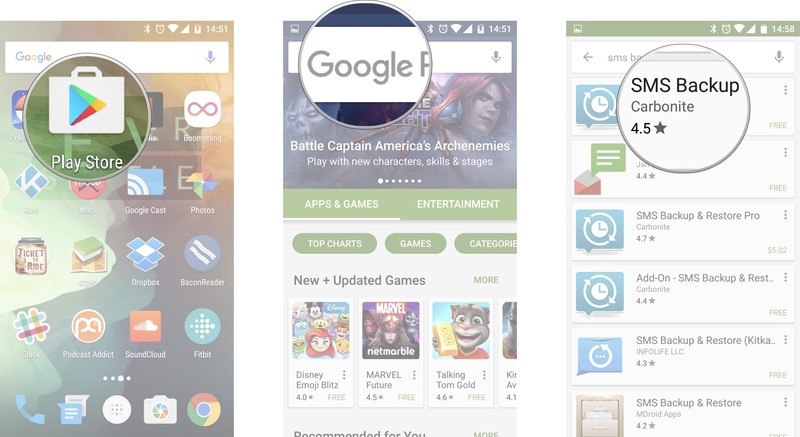
Tap Install.
Tap Accept.
Tap Open once the app has been installed.

Tap Backup once the app has opened.
Tap OK if you’re fine with using a default folder on your device, or tap Custom Folder if you want to store your backups on a MicroSD card or in a specific folder on your phone.
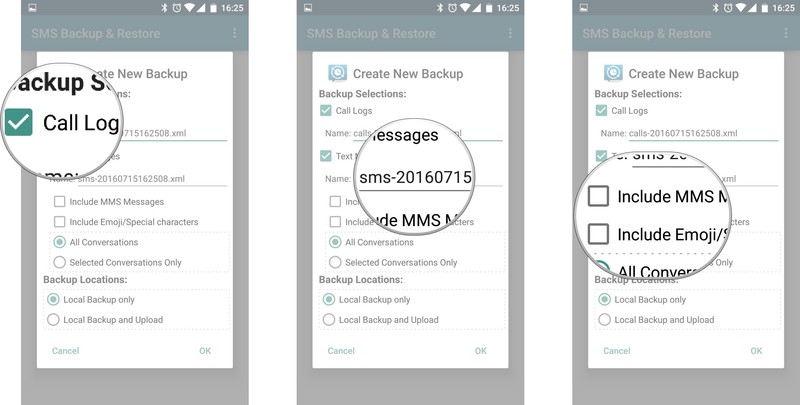
Tap the checkbox next to the things you want backed up, especially the text messages (it’s why you’re here, right?).

Tap the checkbox next to Call Logs if you want them backed up.
Tap the file name next to Text Messages if you want to re-title it yourself.
Tap the checkboxes next to Include MMS Messages and/or Include Emojis/Special characters if you want those included in the backups.
Optionally, tap Selected Conversations Only if you only want specific text conversations backed up. A window will pop up that lets you select the specific convos you want backed up.
Tap your choice between Local Backup only or Local Backup and Upload, which reveals options to upload to Google Drive, Dropbox, or to Email. To upload your backup, you’ll need to install an Add-on for SMS Backup & Restore.
Tap OK.
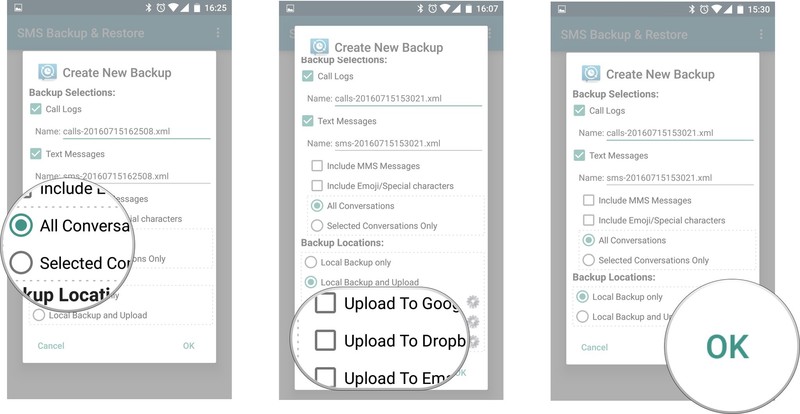
If you decide to only back up your messages locally, you’ll get a message warning that you risk losing your backups if you lose or damage your device. You’ll also be warned that if you set backups to be stored in the default internal storage, you’ll want to transfer them to an external storage device whenever you decide to switch phones.
Your text message conversations will now automatically be backed up to wherever you chose to back them up!
How to restore your SMS messages
Once you’ve got your SMS messages backed up (again, if you just found this article and didn’t have your messages backed up somehow, you’re essentially out of luck), you can restore them on a new device or on the same one.
Launch SMS Backup & Restore from your home screen or app drawer.
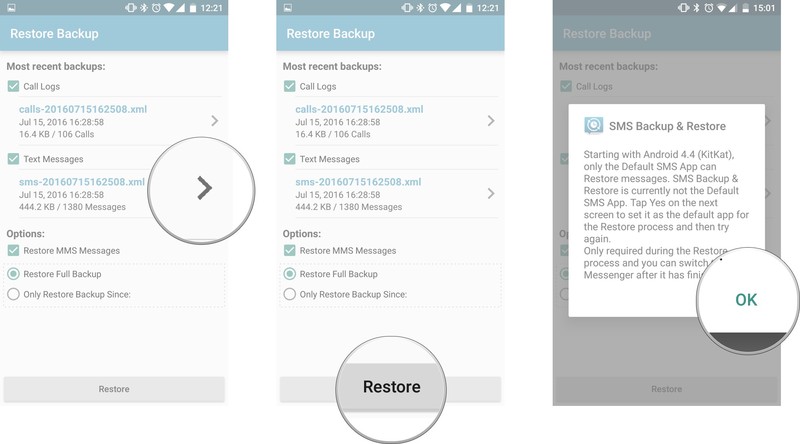
Tap Restore.
Tap the checkboxes next to the backups you want to restore. Depending on what you chose to back up, you may have both call logs and SMS messages.
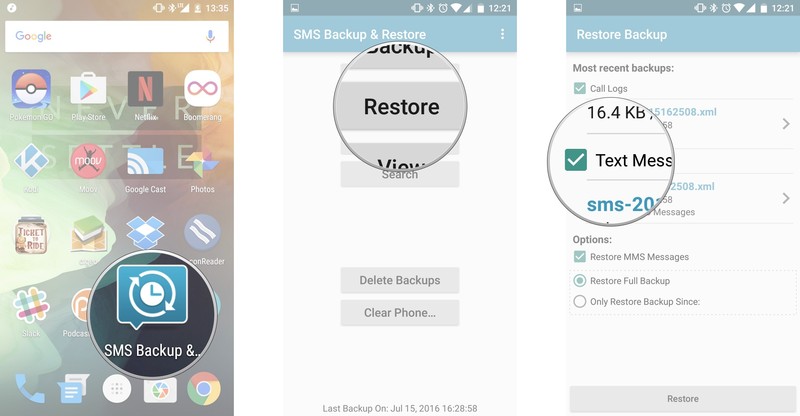
Tap the arrow next to the SMS messages backups if you have multiple backups stored and want to restore a specific one.
Tap Restore.
Tap OK. This info box informs you that to restore your messages you’ll need to temporarily set SMS Backup and Restore as your default messaging app.
Tap Yes. Your messages and/or call logs will start restoring.
Tap Close once the restore is completed.
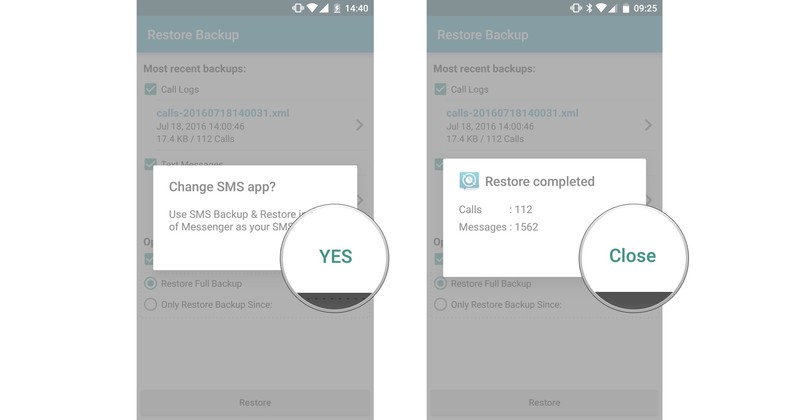
And there you have it! Your messages (and maybe even your call logs) have been restored! If you’ve decided to back up your data to a cloud service, you should also be able to restore your old messages onto a new phone by following the same steps. Since the data is stored in an XML file, it’s compatible with any Android device, no matter the make or model.
Pokémon Go Plus accessory won’t arrive until September
Nintendo UK has announced that the Pokémon Go Plus accessory won’t be arriving until September. The company confirmed the delay in a Twitter response, thanking trainers for their patience. The small device can be deployed by players for $34.99 to help them detect and catch Pokémon.

The accessory aids players in slinging Pokéballs at virtual Pokémon as they head out the front door and explore their surroundings.
The #PokemonGO Plus accessory will arrive in Sept. instead of the originally expected end of July. Thanks for your patience, Trainers!
— Nintendo UK (@NintendoUK) 27 July 2016
The device itself connects to the smartphone via Bluetooth, which should help those playing to be alert when creatures are near without having to pull out their phone every few seconds to check.
Pokémon Go
- Join our Pokémon Go forums!
- How to deal with GPS errors in-game
- Which team should you choose?
- How to play without killing your battery
- The Ultimate Pokémon Go Game Guide!
- Listen to the Pokémon Go podcast!
Nintendo NX: Completely portable, powered by Nvidia Tegra chip, and games that come on cartridges, claim sources
Nintendo NX rumours continue to swirl ahead of any official details of the confirmed new console from Nintendo.
The latest rumour plays on previous expectations that it would involve a portable controller allowing gamers to play on the go, and away from their TV at home.
However, according to a number of sources talking to gaming site Eurogamer, it is not just the controller that will be portable, but the whole games console.
“Nintendo’s upcoming NX will be a portable, handheld console with detachable controllers,” the site is claiming. “On the move, NX will function as a high-powered handheld console with its own display. So far so normal – but here’s the twist: we’ve heard the screen is bookended by two controller sections on either side, which can be attached or detached as required.”
Eurogamer
Earlier in July, a patent filed by Nintendo in December last year was uncovered suggesting an NX handheld console was very much on the cards.
These latest rumours suggest that those patents rather than just referring to the controller as previously expected, could now be the actual console itself.
Eurogammer’s sources also suggest the console will come with a docking station to allow users to connect the console to their TV to carry on gaming on the big screen when they get home.
The site also claims that the console will be powered by an Nvidia Tegra chip, with development kits rumoured to be currently using the Tegra X1 chip found in the Shield Android tablet and the Google Pixel C tablet.
In what could be a strange move, but one that will no doubt flood gamers with waves of nostalgia, Nintendo is even supposedly complementation using cartridges for games rather than opting purely digital downloads as found on the Apple iPad or Shield, or discs as found the PS4 and Xbox One.
If the console is handheld focused, as the rumours suggest, a cartridge based system would make sense to appeal to a younger gift receiving audience, but with every other manufacturer in the market moving towards digital downloads as fast as they can, time will tell if the move makes sense or whether Nintendo should have gone for a cleaner digital only device instead.
My Passport Ultra hard drive lets you store up to 177 hours of 4K footage
This is sponsored advertising content in association with Western Digital.
If you’re into video, you know how quickly your hard drive can fill up. A 1080 shoot here, a 4K shoot there. It soon goes. For most of us, a laptop with 128GB or 256GB of hard drive space just isn’t up to scratch.
The Western Digital My Passport Ultra range of external hard drives delivers a number of features for your storage needs, making sure you’ve got plenty of space, a small enough device to fit in your bag, and one that is safe too.
Here are five reasons you should get one:
Size
The WD My Passport Ultra range comes in a variety of storage sizes, You can get 500 GB, 1 TB, 2 TB, 3 TB and even 4 TB capacities, giving you plenty of storage space for your video files. A minute of 1080p HD video at 60fps is around 200MB, while a one minute 4K video is 375MB. That means the 4 TB WD My Passport Ultra drive can store over 177 hours of 4K footage.
Backup
If you’re not planning on using your My Passport Ultra hard drive to carry around video footage, you can use it as a backup device. The included software allows you to easily schedule backups to the drive, making sure your videos, photos, documents, and other files are backed up frequently. The system can even work out what has or hasn’t changed and backs up accordingly, so you get faster backups.
Security
With all those personal files on such a portable device, you don’t want them to get into the wrong hands because you’ve left it on a bus or in a coffee shop. The WD My Passport Ultra range of hard drives come with a number of security features, including the ability to set a password and 256-bit AES hardware encryption. WD Security is hardware based and built into the drive. Your files are accessible and safe, even when you plug your My Passport Ultra or My Passport for Mac into a computer that does not have WD Security installed. All you’ve got to do is enter your password and the self-contained security application on the drive kicks into operation.
USB 3
It’s amazing what a difference a fast transfer can make, and the WD My Passport Ultra drive helps on that front by featuring USB 3.0 compatibility. USB 3 offering 5 Gb/s transfer speed (3X faster than USB 2.0). Plus, you can power up your My Passport Ultra without carrying a bulky power cord and plug.
Accessories
Hard drives can look cool too. And rather than just give you a boring black or beige box, the WD My Passport Ultra range comes in a range of four colours; black, brilliant white, noble blue, and wild berry. Furthermore you can accessorise your hard drive with either a soft carry case for when you are on the go, or a further splash of colour with the WD Grip Pack. It adds a protective coloured bumper around the drive and comes with a flat USB cable to match. Colours include fuchsia, grape, sky, smoke, and slate.
Microsoft’s new Editor and Researcher tools help you easily write the perfect essays
Microsoft has unveiled two new Word features for its Office 365 users. Researcher and Editor are two tools which harness machine learning to help you create better work.
Microsoft is aiming the first of its new tools at those who need to write quality essays, by giving them a single-click tool for adding in properly formatted citation. The second is for tidying up any grammatical errors once you’re finished.
Microsoft Researcher
Researcher makes use of Bing Knowledge Graph to pull in relevant content from around the web which is “structured, safe and credible”. In other words, it shouldn’t just give you a bunch of links from Wikipedia to throw in to your thesis.
As the service develops, Microsoft will increase reference materials to include information from national science centres, respected encyclopaedias and history databases among others to ensure that all the information you could need is reliable, and easy to get to.
Microsoft Editor
A few months ago, Microsoft purchased SwiftKey, the company most well known for its predictive Android keyboard app. And it seems as though it’s putting the company’s expertise in natural language processing to good use right away with Editor.
Editor uses machine learning and natural language processing to make suggestions that help improve your grammar and choice of words.
In its early state it will help you by simplifying any written work by flagging complex words, or phrases which aren’t clear. An example given by Microsoft is something like recommending “most” instead of “the majority of”.
Because it’s cloud-based and uses machine learning, Editor will get better over time. From autumn this year it will be even be able to tell you why words or phrases may not be accurate in your Word documents, teaching you how to write better, as well as correcting you.
Microsoft Outlook – Focused inbox and @ mentions
Microsoft’s Outlook apps for both iOS and Android have a really neat focussed inbox feature which helps filter out emails you want to read, moving them away from the spam you don’t want to read.
This feature is now making its way to Outlook for both Windows and Mac as well as Outlook on the web.
In addition, Microsoft is rolling out @metions to Outlook on Windows and Mac. This lets you flag actions for other users just by typing the @ symbol in the email. Then you just choose the person you want to flag, and it’s done. That person will then know that an action is required.
What’s more, you can filter emails based on which ones you are flagged in, to find actions you need to complete more easily.
PowerPoint Zoom
Lastly, Microsoft announced a new Zoom feature for PowerPoint which lets you create interactive and non-linear presentations.
It’s essentially a way to smoothly transition from one slide to another, even if they’re in different sections of the presentation. It’s no longer a case of going from one slide to the next in sequence.
 AIVAnet