


Invisibility ‘cloak’ hides objects by making them seem flat
Humanity is still some distance away from a real, honest-to-goodness invisibility cloak, but British scientists are that much closer to making it practical. They’ve developed a coating that uses graded refractive index nanocomposite materials (just rolls off the tongue, really) to reduce an object’s electromagnetic signature. Ultimately, it makes curved surfaces seem flat — electromagnetic waves leave almost as if there were no object at all.
Any real-world use is still a ways off, but it wouldn’t just be limited to stealth. It could allow for oddly-shaped antennas or acoustics that work just as effectively as their straight-laced counterparts. Cloaking would just be the most dramatic use of a technology that could help in many, many fields.
Via: Gizmodo
Source: QMUL, Scientific Reports
How to level up fast (and catch rare Pokemon) without spending money in Pokemon Go – CNET
Pokemon Go is free, to a certain degree. If you run out of Pokeballs and other supplies, you’ll need to run around to various PokeStops to get more. That can take a while and make leveling difficult.
The other obvious option would be to buy what you need from the game’s shop, but no one wants to spend money when there is another option. Luckily there is.

One more lure to go!
Alina Bradford/CNET
Level fast with this technique
First, gather up a group of Pokeplayers for a leveling party. Next, drive (with the game off, of course) to an area that has multiple PokeStops in one small area.
Some places that typically have a high concentration of Pokestops are historical districts, town squares, tourist attractions and locations that have many churches in one area.
Once you’ve found a good spot, walk around and harvest all of the PokeStops for their goodies. Then, have one person set a lure at each PokeStop. Once the lures are in place, walk from PokeStop to PokeStop catching the hoard of Pokemon that appear.
Running out of Pokeballs or other items? Don’t worry. Setting a lure at a PokeStop makes it refresh with new items every couple of minutes. So, by the time you make a loop around all of the nearby PokeStops, they will be ready for you to spin again.
Collecting droves of Pokemon in a short amount of time will level you up quickly without a lot of searching, driving while Pokemon Go-ing (a big no-no) or buying gear like incense.
Bonus: Rarer Pokemon
Be ready for your Pokeparty to be joined by dozens of other players. This is great, though. There’s a theory that the more people that are located in a PokeStop area, the more likely a rare Pokemon will be to show up.
I tested this theory. Sure enough, I was able to catch a Magmar, Exeggutor and a Nidorina in the span of an hour. While not the rarest Pokemon, they were a lot better than the dozens of Pidgey and Rattata creatures I usually get.
‘Kerbal Space Program’ arrives on Xbox One
Squad teased that Kerbal Space Program was reaching the Xbox One when it announced the PS4 launch, and it made good on its word just a few days later. The spacecraft construction and exploration game is now available through the Xbox Store. As with the PS4 version, this port preserves the challenge of designing and flying ships across the Kerbals’ star system, often with unintentionally hilarious results — the biggest change is simply adapting KSP to the realities of playing with a gamepad. There’s no mention of when the promised Wii U edition will arrive, but it might not be far behind given that Squad aimed to ship that title at the same time as the PS4 and Xbox One versions.
Source: Xbox Wire, Xbox Store
AC editors’ apps of the week: Vivino, Bloomberg, TunnelBear VPN and more
It’s Appday Sunday and that means we’re back with more of our favorites to share. Every week we bring a handful of great apps to the table and share them with everyone. Sometimes they are new apps, sometimes old standards, but every time they are apps we love to use.
Give these a look and then take a minute to tell us all about the apps you are using and love so we can give them a try. We all find some of our favorites right in the comments on these posts!
Daniel Bader – Vivino Wine Scanner

I love wine. Specifically, I love red wine. Maybe I’m getting old, but give me a great bottle of Spanish red and I’m as happy as a Twitter user in a fight.
Vivino helps me keep track of the bottles I drink since I try to keep to a strict diet of diversity. The app uses your Android phone’s camera to scan the label, and if the bottler, variety, blend and vintage is in its database, Vivino shows you everything you need to know about what you’re drinking. That includes local price (if applicable), tasting notes, user reviews, and information about the winery and grape.
In early 2015, Vivino transitioned, like so many revenue-strapped startups, from a free/premium app model to a more sustainable yearly subscription model. But, like so few of those startups, its $50 annual membership is actually worth the cost. That’s because Vivino publishes a members-only bi-weekly wine guide that is not only useful, but a pleasure to peruse; and the premium subscription also includes expert ratings of individual bottles, and a great wine cellar management tool for those with growing collections.
Free users benefit from recent additions, too, though. The wines list scanner, which uses OCR technology to summarize entire restaurant or bar lists in one fell swoop, is really useful (when it works, which is about half the time); and the user reviews are some of the most extensive in the industry.
Download: Vivino Wine Scanner (Free)
Andrew Martonik — Bloomberg

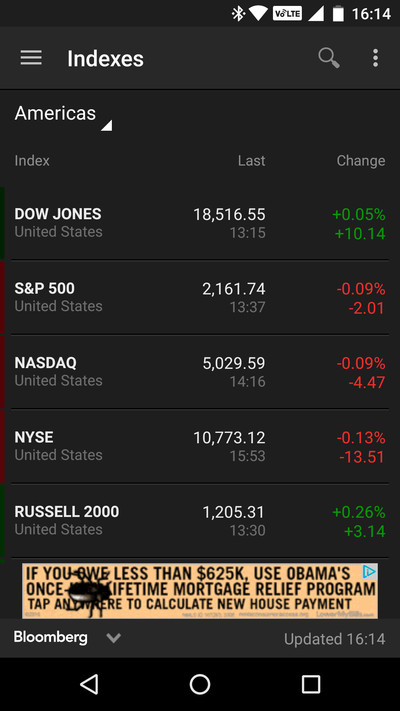
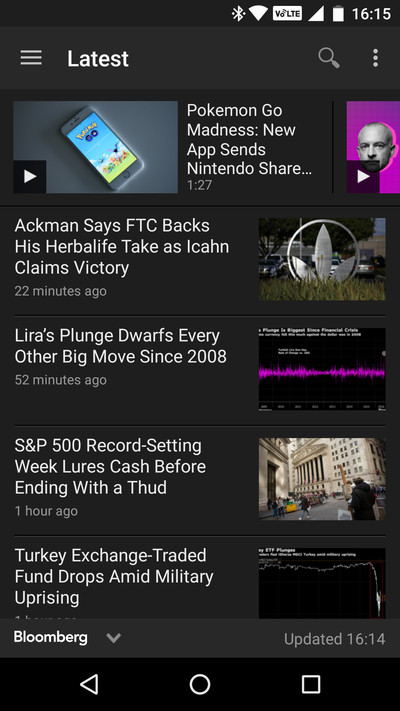
I live and breathe technology every day, but I also like to keep up on the business world (something that stuck with me when I finished my business degree in college). Bloomberg is the name synonymous with coverage of business and the markets, and it also has a really nice and simple app that makes it super easy to keep up with the business world, as well as politics, world news and technology from a financial perspective.
You can check out the latest stories, dive down into specific genres or just see what the latest indexes are doing at a glance. From the home screen, with one tap you can jump to a live feed of Bloomberg TV as well, which is important when news is breaking. My one tip is to turn off the push notifications, which can get to be a bit much throughout the day.
Download: Bloomberg (Free)
Ara Wagoner – Disney Emoji Blitz

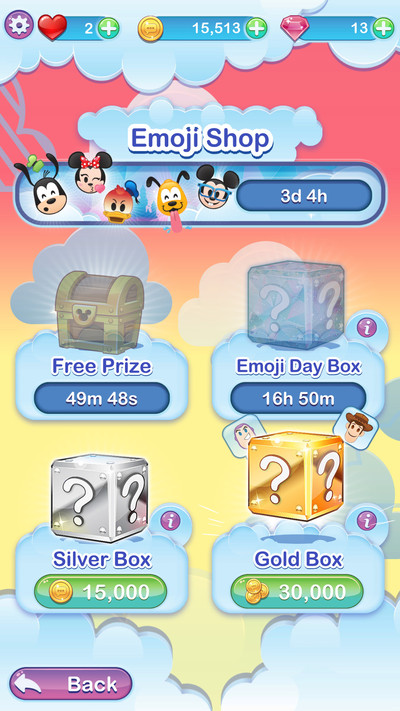

I’m a fan of emoji, and I’m a fan of Disney, so if this felt like a no-brainer, not so fast. This game is quite similar to the Disney Tsum Tsum game that LINE puts out, but instead of the haphazard pile of plushies, you have the orderly grid of a Bejeweled-style match-3 game. Instead of jewels, you match Disney emoji.
The game is easily playable for free, but you’ll run out of lives fairly quickly if you’re not careful. Also, what I’m really interested in here, the emoji themselves, are awkwardly implemented. See, when you unlock an emoji in the game, you can use it on the Emoji Blitz keyboard. So if there are particular characters you want, you need to rack up coins to unlock them (or buy enough) through a random box you buy in the emoji store. So if I want Genie (and do I ever), then I’ve got to spend 30,000 coins and I have a 1/20 chance of getting it.
Then there’s using the emoji themselves. You switch to the Blitz Emoji keyboard, which means you’re giving this app all the permissions and data you give any other keyboard, and then you put together your emoji string … And then, since these aren’t system emoji, you share your emoji string as an image to an Android app of your choosing. This is clunky and it’s not Disney’s fault (it’s Android’s), but at least the emoji string images are transparent and easy to share. Just be prepared to spend a lot of time grinding this game to get the emoji you want. At least this is easier to grind than Pokémon Go.
Download: Disney Emoji Blitz (Free, in-app purchases)
Alex Dobie — TunnelBear VPN
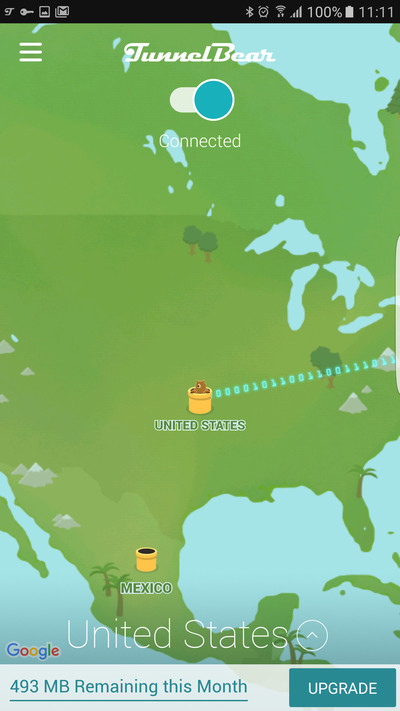


There are a bunch of different reasons why you might want to use a VPN (virtual private network) on your Android devices. They often let you get around region-blocked services or websites — for example, BBC iPlayer outside the UK. They can help you send data more securely over open WiFi networks.
TunnelBear is the simplest VPN service I’ve come across, and the dedicated Android app makes it simple to use on your phone. Simply sign in , then select the country you want to tunnel to. In a few seconds, the VPN will be connected, and you’ll be able to use other apps as if you were in that country — complete with a world map and, yes, an animated bear that literally tunnels between countries. TunnelBear gives you a free 500MB of data each month, or for unlimited data, it’s $7.99 per month ($4.16 if you pay yearly). TunnelBear also has discounted pricing if you’re just using the service on your Android devices.
Download: Tunnelbear VPN (Free)
Russell Holly — Go Messenger
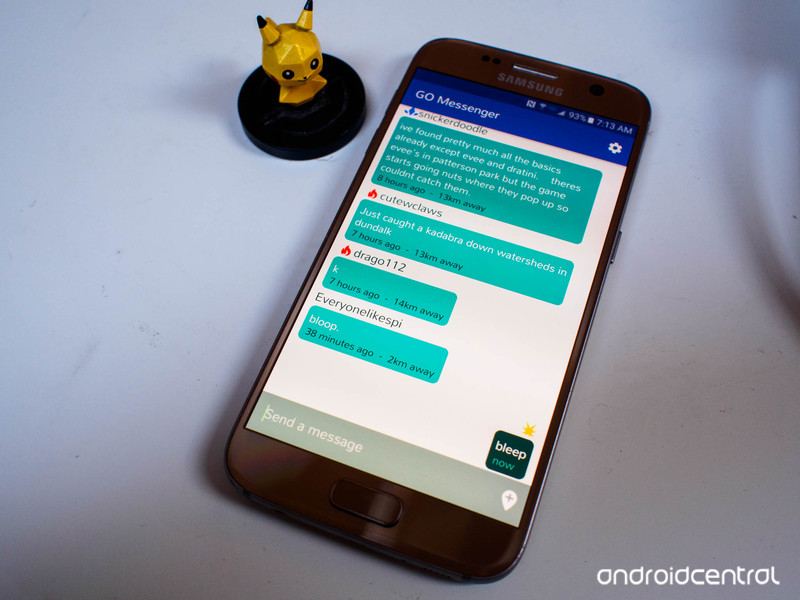
You didn’t think my contribution here would be about something other than Pokemon Go, did you? You silly goose.
Go Messenger fills in a much-needed gap in the Pokemon Go experience — chat. It’s not easy to coordinate attacks with strangers because it’s not easy to know who your team members are until you meet them in person and ask them. While that works well enough for populated areas, it makes strategic attacks on other locations more complicated. Taking down a Gym is not enough, you must raise it to an even greater level in your team color!
It’s a simple chat app that indicates your team color and user name, with a Facebook Chathead-esque bubble that can float over everything for when you’re actually playing the game. You can only chat with other folks who have the app, and you chat is limited to 20km around your current location, but it’s a good start.
Download: Go Messenger (Free)
Twitter was quick to pull extremist tweets following Nice attack
Twitter’s response to online extremism has changed a lot in the past few years. Observers at observer groups like the Counter Extremism Project report that the social network was exceptionally speedy in removing pro-extremist accounts and tweets in the hours following the truck attack in Nice, France on July 14th. It moved with “swiftness we have not seen before,” CEP says. Twitter hasn’t commented on the specific actions, but it’s apparent that the company is serious about its ban on terrorism.
The rapid takedowns are a sharp contrast with Twitter’s former hard line on free speech. While it still tends to value freedom of expression as a rule (particularly in countries where Twitter restrictions are mainly used to stifle dissent), it’s now eager to scrub tweets instead of waiting until officials step in. Twitter isn’t the only tech company taking a more active approach — talks with the US government have led to a broader anti-extremism push that includes Facebook and Google. However, its breakneck pace this time suggests that it may be one of the first (if not the first) to purge extremist material from now on.
Source: Reuters
Watch SpaceX try its second ground landing at 12:45AM Eastern
Now that sea-based rocket landings are relatively commonplace for SpaceX, the company is hoping to achieve repeat success with ground landings. Elon Musk and crew are launching a Dragon capsule full of cargo to the International Space Station on July 18th at 12:45AM Eastern, and they’re using this nighttime mission to attempt the second-ever ground landing of a Falcon 9 rocket. You can watch SpaceX’s live stream below starting at 12:25AM.
There’s a lot riding on this besides bragging rights. The mission is carrying an international docking adapter that the ISS would have received last year if not for a Falcon 9 breaking up on launch. As you might gather, SpaceX really can’t afford to lose that part a second time — it’d not only hurt the ISS’ supplies, but cast doubt on its attempts to improve reliability.
Source: SpaceX (YouTube)
Android malware — should you be worried?

Is the threat of malware on Android overblown? Yep. But there’s more to it than that.
Malware on Android phones is a pretty sensational subject. If you write about it or talk about it, you’ll get plenty of attention from people that are concerned or interested in learning more as well as people who just want to do a little bit of internet trolling in any comments section they can find. That means you’ll find plenty of “news” that’s playing funny with numbers, only telling part of the story or just confused about the whole thing in an attempt to sensationalize it even more. Scary headlines get clicks, and clicks get money. That’s how this business works.
Let’s talk about the situation and you can better decide how much you need to worry about your privacy and your phone’s security.
There are big numbers, and then there are huge numbers

Some of the scariest things you’ll see written about Android malware are the numbers of devices supposedly affected. Even when you get past any type of squirrelly math that was used to get them (and that happens when you’re estimating — things like numbers can easily be inflated) some of the totals you see when a new threat is uncovered can be crazy high. While any number higher than one isn’t good, you have to remember a couple of things.
- There are well over 1,600,000,000 Androids in the wild.
- Most threats attack apps from places other than Google Play.
Google says there are about 1.6 billion Android devices. That number isn’t right — the real number is even bigger. The way Google counts Android activations is through Google Play. The first time anyone visits Google Play with a new Android, it gets counted as an activation. If you wipe your phone or sell it to someone else, it’s not counted again. It’s a one-shot deal based on an identifying number embedded in the device.
That means phones that didn’t come with Google Play installed aren’t accounted for in that 1.6 billion number. And there are a lot of them. Worldwide, there are millions and millions of Android phones and tablets and computers that never get counted as an activation. These two things can help put those malware numbers in perspective.
10 million Android phones are less that 1% of the total.
Using a big scary number like “10,000,000 Android devices infected” can help visualize things a bit. 10,000,000 devices out of 1,600,000,000 is 0.625%. That means 10 million devices is still less than one percent of the 1.6 billion total. That number is still way too high for my taste, but it’s less sensational to say “Less than 1% of Android phones” instead of “10,000,000 Android Phones.” You need to remember that both those things are the same.
Back to the activation numbers. The vast majority of malware issues come from people who are getting apps somewhere other than Google Play. You can download and install apps from anywhere on your phone — even if you have access to Google Play — but most people aren’t and just use the easy way to get the latest and greatest app or game. What this all means is that the 1.6 billion number is not really the total number of Androids, and the percentage of devices infected with any malware instance is even lower. We don’t know exactly how much lower, so we aren’t going to guess at a number.
I just want to make sure everyone has an idea of how this all works when you scale the number of activated devices past the billion mark. There is a shit-ton of phones and tablets running Android. More than we know. Malware infections have to have huge numbers to hit anyone’s radar.
What is malware, exactly?

Malware is any software on your phone that does something you didn’t allow it to do. A lot of people get loose with the term and apply it to crappy apps that do crappy things like spam your notifications or put ads and pop-ups in your browser after you gave them permission to do it. Those apps suck and the people developing them need a swift kick in the groin, but they aren’t malware.
The fault lies in the permissions model. Google is too vague when it comes to the wording of what you’re agreeing to, and developers who are scumbags will exploit a normal permission and do crummy things with it. When you say it’s OK to display ads when you get a free game or app, you didn’t mean it’s OK to put ads in the notifications or the web browser. Some of the folks writing the Android code know this is an issue, but Google hasn’t said anything publicly that they are working on changing it. Let’s hope they do.
In the meantime, take a few minutes and read the latest reviews. Mixed in with the obvious shilling and ludicrous nonsense you’ll quickly see if an app does anything silly. Nobody who downloaded ES File Explorer before they backed away from their horrible tactics read the comments. Don’t be that guy or gal — listen to what other folks are saying and skip that app. And when you read about “malware” that turns out to be nothing more than really shitty ads from a free app, know that this isn’t malware at all. It’s an unfortunate side-effect of a more open policy in Google Play.
But malware is real

I’m not going to try and paint a rosy picture of anything here. Malware for Android exists, and in much higher numbers than many folks are comfortable with. Using the numbers from our example, 0.625% is 0.625% too much. That’s why I’m always complaining about big companies who make Android phones and aren’t spending enough of their billions in profits to bother updating the software on the phones they sell. Google has programs and entire teams dedicated to finding and fixing exploitable holes in Android. They make the necessary fixes for both the phones they sell as well as for phones from others in Android and deliver them to the companies who build and sell them. Not taking advantage of this is silly, and most companies who make Android phones should be ashamed of their track record. Software support is hard, but it’s also pretty important — and well worth spending some money on.
While you’re reading about a report from a company who makes money trying to sell you on the idea that you’re at risk and has huge numbers of infected devices, remember to put the numbers in scale, then get a little frustrated because the numbers are still too high. Or let me be frustrated for you — I probably feel enough to cover for a few you.
What should you do about it?

Here’s the real meat of the issue. While you can be concerned about malware on devices in China (or wherever) when it comes to the phone in your hands you can actually do something.
- Don’t be stupid. No sugar-coating here. If you’re going to install apps from outside of Google Play, find places that everyone agrees are trustworthy. And if you’re trying to save $2 by pirating a paid app from somewhere else, you deserve whatever you get. It sounds cliche, but you really can skip a Starbucks or drink one less beer Friday evening to get the $2. The people who worked hard enough to make an app you want to download deserve to get paid.
- Look at a company’s track record on security updates before you give them money. Samsung, for example, will probably support a phone for two years — but only if you bought one of their high-end models. If you need a budget-friendly phone, buy one from someone else. The only way companies will get better at software support is if it’s good for their bottom line.
- Virus scanners and assorted security apps aren’t necessary, but they don’t hurt anything. Look for ones that don’t do a bunch of extra stuff like fiddle with things to try and free your memory. People ask me which is the best anti-virus app for Android all the time. I have no idea which is the best, but I always recommend Lookout. I know people who worked with the company, and I like the things I hear about the way Lookout handles your data. Past that, I just don’t have an answer.
- Stay informed. Read the comments and reviews for anything you download and install. Read system notifications from the people who made your phone or Google or your carrier. Check the support pages for your phone’s software once in a while to make sure you’re current. Read Android Central as well as other online publications whenever you see headlines about malware — get several opinions then pick the one that makes the most sense to you.
What you don’t need to do is get sucked into the idea that Android as a platform is riddled with malware. It’s not true — it just makes money to talk about it.
Pokémon Go now available in Canada

Official launch means Canadians can wrangle a snorlax without sideloading.
Right alongside the iOS launch today, Pokémon Go is now available in Canada through Google Play. While Canadians could previously play by directly installing the APK file from a third-party source, the official launch means they don’t need to worry about running across fake apps or malware.
Since the app has only just become available in Canada, it might not be showing up for everyone in the Play Store just yet — so hold tight if you’re not seeing it to begin with.
A word of warning, though: Actually playing the game may be a challenge, as the Pokémon Go servers have been creaking under the strain of millions of players around the world — no doubt worsened by many new territories being added over the weekend.
Once you are able to log in, be sure to check out our Pokémon Go guide to get up to speed.
Pokémon Go
- Join our Pokémon Go forums!
- How to deal with GPS errors in-game
- Which team should you choose?
- How to play without killing your battery
- The Ultimate Pokémon Go Game Guide!
Ben Heck’s Hackmanji board game, part 3
 The last piece of the Jumanji-esque puzzle falls into place as Ben, Karen and Felix complete the Hackmanji puzzle board — and with your help. Putting the finishing touches on the board involves combining the mechanical with the electronic as Ben ensures the servos line up and the player pieces don’t clash, all while making sure the micro-controller doesn’t run out of RAM and I/O. We get to hear what Felix sounds like as he announces the status of the game while Ben distresses it by hitting it with a hammer. Meanwhile, Karen’s design changes make the game more accessible. Tell us what you think of Hackmanji over at the element14 Community, where you will be able to find the code and files, as well as chat with The Ben Heck Show team.
SpaceX picks its first rocket to fly a second time
Sure, SpaceX promised to reuse a rocket sometime in September or October… but which rocket? At last, we know. As part of a NASA presentation, SpaceX has revealed that it will be using the second Falcon 9 to make a successful landing (in this case, on a drone ship). Why not the first, you ask? If you’ll recall, Elon Musk sees it as a museum piece. He doesn’t want to lose the most historically important machine.
It’s important to remember that SpaceX is a latecomer to reusing rockets. Jeff Bezos’ Blue Origin managed that feat at the start of 2016, and has done it four times so far. However, this still fills in a missing piece of the puzzle for SpaceX. So long as there are no significant hitches, SpaceX will have some serious bragging rights: it’ll have reused rockets and set them down on both land and sea.
Via: The Verge
Source: NASA (YouTube)
 AIVAnet