


A day with BlackBerry’s all-touch DTEK50 smartphone
BlackBerry pulled back the curtain on its new DTEK50 smartphone a few days ago, and soon after gave hungry journalists units to play with. I’m still working on my full review of BlackBerry’s $299 Hail Mary pass, but since I spent a day playing with it, here’s a peek into an evening of nutso, BlackBerry-centric thinking. Long story short, it’s all at once a perfectly adequate phone with serious security chops, a shrewd business move and a lesson in lousy marketing.

1:00PM: After a handy Q&A session, I’m given a DTEK50 of my phone to play with. First impressions: Yep, this feels like an Alcatel phone. In case you missed it the other day, the DTEK50 is based on the TCL reference design that ultimately gave us Alcatel’s (still-unreleased) Idol 4. Both share a 5.2-inch, 1080p screen, a Qualcomm Snapdragon 617 chipset, 3GB of RAM, a 13-megapixel main camera, a 2,600mAh battery and even a convenience key on the phone’s right side to which you can assign shortcuts. (Alcatel called it a “Boom” key, but BlackBerry’s naming choice was the right one.) If you’re like me, though, you’d keep trying to wake up the phone using that button, which doesn’t work unless you specifically set it to.
Oh, and there’s more. There’s no fingerprint sensor, and it only has 16GB of internal storage. (You can at least you can flesh it out with a microSD card.) The DTEK50 is startlingly light too, lacking the reassuring density of the high-end BlackBerry Priv.
I’m torn. It’s a BlackBerry in name and in functionality, but this is the first time I can remember the company leaving hardware design almost entirely up to someone else. Even the low-cost Leap we first met last year felt more substantial. There was a certain level of aesthetic pride that went into BlackBerrys, but the company’s shift in strategy has given us a phone that doesn’t feel special in the way the company’s older phones did.
2:30PM: Ran down to St. Marks to get some footage of the DTEK50 for our hands-on video. Setting up the phone was business as usual, but the phone got noticeably warm for reasons that weren’t readily apparent. At the same time, battery drain kicked into high gear for a spell, even though few apps were running at the time. Weird. My hopes for this phone start to sink a bit.
4:30PM: Hustled back to the office to give the DTEK50 a much-needed charge. Thankfully, Qualcomm’s QuickCharge 2.0 tech got the phone back on its feet within minutes and I let it regain about a half charge. I fiddled with it more in the meantime; it’s a pretty smooth little machine, and the DTEK50 seemed like a decent, slightly underpowered workhorse. It would’ve been nice to see BlackBerry choose a reference design with a beefier chipset like a Snapdragon 652, but the company wanted to keep costs down. I haven’t yet gotten a great feel for the camera but early test shots seemed in line with other devices that cost the same, and the screen’s pretty decent, to boot. Meanwhile, my boss Dana says the DTEK50’s textured back reminds her of a cat’s scratching post.

6:30PM: My latest meeting ends and I’m back at the office contemplating the DTEK50 again. BlackBerry insists that the DTEK isn’t a rebranded device — it’s a standalone smartphone with security as its biggest selling point. From security keys baked into the processor during manufacturing to the full disk encryption that’s enabled by default, It’s clear that BlackBerry’s security know-how is one of its most powerful assets.
You won’t notice much of that in practice, though. The phone’s namesake DTEK app gives you a quick look at how secure your device is and how you can lock it up even further, but that’s really all the insight you’ll get. On the plus side, though, DTEK also gives you the option to manages your apps’ permissions from inside it, which is a nice touch made possible by Android Marshmallow.
If you’ve used a Priv before, you’ll feel immediately at home with the DTEK50’s software features. As usual, you can manage your messages from the BlackBerry Hub and swipe up on app icons to see their widgets. The DTEK50 is another mostly-stock-Android affair and I’m warming up to it more because of it. It certainly doesn’t hurt that the company’s secure software approach hasn’t impeded performance; it’s as fast as the new Moto G4, but I wonder if there’s anything here regular consumers would respond to.

8:30PM: After a beer — fine, a few beers — the DTEK50 makes perfect sense. As a business move, it’s a great idea: BlackBerry gets a new device on the market without spending loads of money on product development. It’s also an appropriate follow-up from the Priv, if you think about it. BlackBerry’s first Android phone dealt with some serious scrutiny from critics and security buffs alike, and for the most part the company is pleased with how it all turned out. Now that it had a better sense of how responded to an Android-powered BlackBerry, the company was free to take that formula and apply it to a device that meant to be sold in bulk — to businesses, say, or governments. The DTEK50 is, as company spokespeople called it, a “fleet” device. If the DTEK50 finds a foothold with regular people, great! If not, so be it. As long as those corporations snap them up.

11:00PM: It’s late, I’m tired and the DTEK50 is still hanging on — 15 percent battery to go. And seriously, this thing is actually called the DTEK50? BlackBerry says it’s meant partially to evoke the numbers used by BB10 devices — the company topped out with the Z30 before switching back to proper names, so “50” was the next logical step. Still, it’s straight-up gibberish without a nuanced understanding of BlackBerry’s recent history.
I’m growing fonder of this thing, though, partially because it’s a solid little phone, but also because it’s a symbol of John Chen’s shrewdness. He’s said countless times before that BlackBerry will bail out of the hardware business if it’s not profitable, but dangit, the company just keeps trying anyway.
Technicolor is building VR and AR projects for companies
For several years Technicolor has been providing video content for Hollywood movie studios. Now, it’ll be working on virtual reality and augmented reality projects as well. The company is opening the Technicolor Experience Center in Culver City, California, to develop technology, platforms, and content for VR and AR.
What makes it special is that it will be a place where all of Technicolor’s disciplines — from the movie and television team, to those who work with satellite and cable providers — meet to work together on VR and AR projects. The media center will be led by Marcie Jastrow, who has been named Senior Vice President of Immersive Media for Technicolor.
“We feel that the big differentiator for the Technicolor Experience Center revolves around the fact that Technicolor owns neither content, nor the distribution pipeline,” Jastrow told Engadget. “This puts us in the unique position to create a new open community that is agnostic and can leverage best practices to meet the challenges and opportunities that immersive experiences will demand.”
Upcoming VR releases for Suicide Squad and the Ben Hur remake are examples of the type of content the media center will produce. However, both projects won’t replicate the films. Instead they will be short scenes that will promote the movies.
“The brief VR scenes highlight what it is like to be ‘inside’ the stories of Suicide Squad and Ben-Hur,” Jastrow said. “In these cases, the scenes have been created specifically for the VR experience.”
Source: Technicolor
SMS two-factor authentication isn’t being banned
Another week gone by, and the place is in cybersecurity shambles again. A years’ old hacking issue, unencrypted wireless keyboards, being featured in an upcoming Defcon talk mystifyingly became a hot new Internet of Things threat. Obama gave us a colorful “threat level” cyber-thermometer that no one’s really sure what to do with. Ransomware is hitting hospitals like there’s a fire sale on money. And the DNC-Wikileaks email debacle exploded, splattering blame all over Russia.
Just when I thought I’d picked the wrong week to stop sniffing glue, a U.S. National Institute for Standards and Technology (NIST) report came out that included recommendations about the inherent risks in two-factor authentication, upon which the tech press basically lost their minds and told everyone to assume crash positions because the password sky was falling. Again.
What actually happened was, the NIST released the newest draft version of its Digital Authentication Guidelines. In its public preview, the agency included language that hinted at the depreciation of SMS-based Two-Factor Authentication (2FA) because, basically, phone numbers can be hijacked, and SMS can be intercepted — making the NIST impetus sensible for government employees or those dealing with sensitive medical information or state-level secrets.
But for normal people, 2FA is still going to limit the ability of an attacker to intercept or alter both your password and your SMS code. (Which is, incidentally, the point.)

Using a text message-based code is what would have prevented what happened to tech journalist and editor Mat Honan. In August 2012, a malicious hacker logged into just one of his online accounts and reset the password.
Then the attacker went to town resetting and taking over the rest of Honan’s accounts, remotely erasing (forever) everything on his iPhone, iPad and MacBook, including photos of deceased in-laws and the first year of his daughter’s life. That attacker also deleted Honan’s Google account and took over his Twitter account to post a bunch of racist and homophobic tweets under his name.
With two-factor activated, Honan would’ve gotten an SMS alerting him that someone was logging into his account. In fact, the only reason he realized something was wrong was because his iPhone prompted him for a reset code.
But neither the practical use cases for 2FA nor the emphasis on a draft recommending depreciation were what came out in this week’s mainstream news. Hardly anyone seemed to mention that NIST’s guidelines aren’t legally binding (we did!), though government agencies often follow them.
Defense Daily pointed out the obvious thing that everyone missed — this is a work in progress, directed at government. It said, “This new NIST draft was released as a public preview wherein it is considered a stable draft illustrating what the agency has learned through public comment periods, public workshops, and industry collaborations.” However, it is “neither complete nor perfect-and it’s not intended to be.” They added, “This is the point where the agency is articulating the direction it is going but seeks comments from stakeholders on what is right, wrong, and entirely missed in the guidelines.”
Headlines cried out that the freewheeling halcyon days of 2FA were soon to be forbidden fruit. CNET claimed, “SMS-based two-factor authentication will soon be banned.” Dabbing away tears, we were told, the age of 2FA is over and we should “Say Goodbye to SMS Two-Factor Authentication.”
Suddenly, news outlets and tech blogs were telling us, bizarrely, that Apple was under attack by NIST. Apple wasn’t actually targeted in the NIST document, but headlines proclaimed “U.S. to ban Apple and others from SMS two-step authentication.” Here at Engadget we came this close to making a video, our mascara running as we sobbed into the camera begging NIST to leave Apple alone!
Ultimately, the anti-2FA mob mentality out-crazied our craziness. We were simply outdone when people started telling the public that SMS authentication was now deemed “no longer safe.”

The punchline? No, I think we’ve been punched enough, thanks.
Still, there’s always room for a little insult added to injury. While CNET was telling readers that 2FA was decreed dangerous and about to be banned, government publications bothered with the details and got to the truth.
The coming two-factor apocalypse was only really coming for government agencies, and the recommendation to depreciate SMS would be for new implementations on the road ahead. “The SP-800-63 document set provides technical and procedural guidelines to agencies,” Defense Daily wrote. “The recommendation includes remote authentication of users (employees, contractors, or private individuals) interacting with government information technology (IT) systems over open networks.”
The public may be none the wiser after this week. If they’re reading Apple Insider or Sci Tech as gospel, the logical next step would appear to be quitting two-factor altogether. Or, just setting fire to your laptop and throwing it out the window.
Either way, it’s a bad message to send. As many people as possible should be adding this second step to logging in because they are not edge cases, and 2FA is actually making the general public safer.
The real problem here is, as usual, people freaking out about security issues that require more than a “hot take.” It’s a phase in our collective infosec adolescence I worry we’ll never grow out of.
Blizzard’s next ‘Heartstone’ adventure is a magical disco party
Even though Blizzard’s light-hearted digital card game, Hearthstone, just got a new expansion back in April, rumors of new content just around the corner have been proven true. At an event in Shanghai, China, the studio announced a new adventure, One Night In Karazhan, that will add hours of single-player content and 45 new cards to the mix when it launches on August 11th. Best of all, the first prologue mission is free for everyone.
First, specifics: as the game’s adventures have gone, Karazhan won’t be as full-fledged as a proper expansion like April’s Whispers Of The Old Gods, which added 100 cards and made quite a few changes. Instead, the upcoming content addition will introduce a new single-player experience released in weekly episodes, known as “wings.” Every Thursday, players who have paid admission (in real-world money or in-game gold) get a new slew of mini-bosses that, if defeated, award cards.
Like the previous adventures, Karazhan is a multi-person dungeon raid from World of Warcraft. In the MMO, players explored the spooky, abandoned tower of the treacherous-but-now-redeemed wizard Medivh. In Hearthstone’s upbeat side universe, gamers are invited to a disco-infused dance party, but strange things are afoot for them to investigate.
To keep the game fresh, Blizzard introduced new competitive rules with the last content addition, Whispers Of The Old Gods, splitting constructed player-versus-player into two modes. Standard only allows cards released in the last year, and as the de facto mode for tournaments and professional play, keeps top-line competitive play fresh. Wild, on the other hand, is a catchall of every card from the beginning set, two full expansions, and three adventures released to date — a total of 832, not including Karazhan.
Each new content release’s cards typically adhere to a unique synergistic theme, but aside from an intriguing handful of new additions featured on Polygon’s post, it’s unclear how Karazhan will change the face of Hearthstone. Entire decks seen in professional play have been built around single cards released in the last expansion, last year’s League of Explorers, so it’s a good bet that the new ones will shake up the deck balance that’s been settling since Whispers dropped in April.
But best of all, everyone can try out the first level of Karazhan for free. The prologue and first wing will be playable on August 11th, with each of the three others becoming available on subsequent Thursdays. Players can buy the entire adventure for $20, or each wing for $7 or 700 in-game gold, with Blizzard promising a money-saving bundle should folks purchase them piecemeal. And lest you think you’ll skirt the adventure and just drop dollars on a few packs…you can’t. The only way to get all the new cards is to earn them by buying a new section and beating it. Good luck, and may the groove be with you.
Via: Polygon
Source: Blizzard
Orion spacecraft may fall behind schedule, go over budget
Going to space is expensive. Really expensive — which is why every now and then, Congress has the US Government Accountability Office (GAO) perform a non-partisan, independent review of NASA projects. The latest GAO report looks at the space agency’s Orion crew capsule program, and the verdict isn’t good. According to the study, the Orion program runs not only the risk of going over budget, but of missing its proposed August 2021 launch date, too.
The report harshly criticizes the program for for failing to use best-practice methodology for its cost and schedule predictions — warning that NASA’s estimated $11.3 billion budget and 2021 unmanned launch deadline may have been informed by unreliable data. The program isn’t over budget yet, but it could easily veer off course if NASA doesn’t perform a new cost and schedule analysis that falls in-line with best-practice guidelines.
Much of the review reads like a back and forth praise and scolding. The GAO report praises the Orion program for mitigating challenges, such implementing a fix for problems found with the capsule’s parachute system, only to then criticize the team for racking up potential cost overruns of $707 million. NASA says it’s holding enough of its budget in reserve to cover these kind of unforeseen costs, but the GAO warns that “the program’s ability to address other technical issues that may arise with its reserves could be limited.”
Moreover, the GAO asserts that NASA aggressive schedule may cause it future delays down the line. In order to keep pace with its 2023 manned launch date, the Orion Program has made a habit of deferring work that increase the risk of straining its budget to a later date — potentially saddling the project with an unexpected blow to the budget when those tasks are picked up again at the end of the Orion’s production cycle. This could increase costs and even cause delays to the planned launch date.
It’s not a glowing review, but that doesn’t mean the project is doomed. If NASA performs an updated cost and schedule confidence analysis, it can develop a better idea of how deferred work and unexpected challenges will affect the program in the long-term. That’s important — with a new presidential administration on the horizon, NASA may need to defend its budget.
Via: ArsTechnica
Source: GAO
Apple Watch 2 Said to Include Thinner ‘One Glass Solution’ Display
The second-generation Apple Watch will feature “One Glass Solution” (OGS) display technology instead of Glass on Glass (G/G) technology, reports DigiTimes citing information obtained from Apple supplier TPK Holding.
One Glass Solution technology eliminates one of the layers of glass from a traditional G/G display that features two pieces of glass, replacing one layer with a thinner material. Making the switch from G/G, used in the current Apple Watch, to OGS could potentially allow Apple to save a small amount of internal space in the Apple Watch 2 and make slight reductions in the weight of the device.
According to TPK Holding, production of the OGS panels for the second-generation Apple Watch has seen some unexpected technical issues, resulting in low yield rates. It is not clear if this will affect overall production of the second-generation Apple Watch.
The large loss for the second quarter was mainly because touch panel orders for iPhones continued to decrease, and Apple will change touch panel technology from G/G to OGS (one glass solution) in the new Apple Watch to be launched in the second half of 2016, TPK said. The change in touch panel technology involved unexpected technological difficulties and therefore yield rates for OGS touch panels were much lower than expected, TPK explained.
The Apple Watch 2 is rumored to feature only minor design changes with primarily under-the-hood spec improvements. Cellular connectivity, a faster processor, and an improved battery are possibilities for the device.
As for a launch date, rumors suggest we can expect to see the Apple Watch 2 in the fall of 2016. A release alongside the new iPhone 7 and iPhone 7 Plus is a possibility, and if Apple plans to launch the Apple Watch 2 at that time, it could debut on September 16, 2016, with pre-orders to start on September 9.
Related Roundups: Apple Watch, watchOS 2, watchOS 3
Tag: digitimes.com
Buyer’s Guide: Apple Watch (Caution)
Discuss this article in our forums
This Quick Charge 2.0 car charger is just $6 at Amazon!
Right now you can pick up Aukey’s Quick Charge 2.0 car charger for just $6 with coupon code CZO24P8M. This is a $5 savings from its normal $11 price tag, which makes it an even better value. The charger has two ports, one of which will allow you to take advantage of the Quick Charge 2.0 speeds. You can plug in the USB cable of your needs to either port, making it extremely versatile and able to keep all of your gear charged.
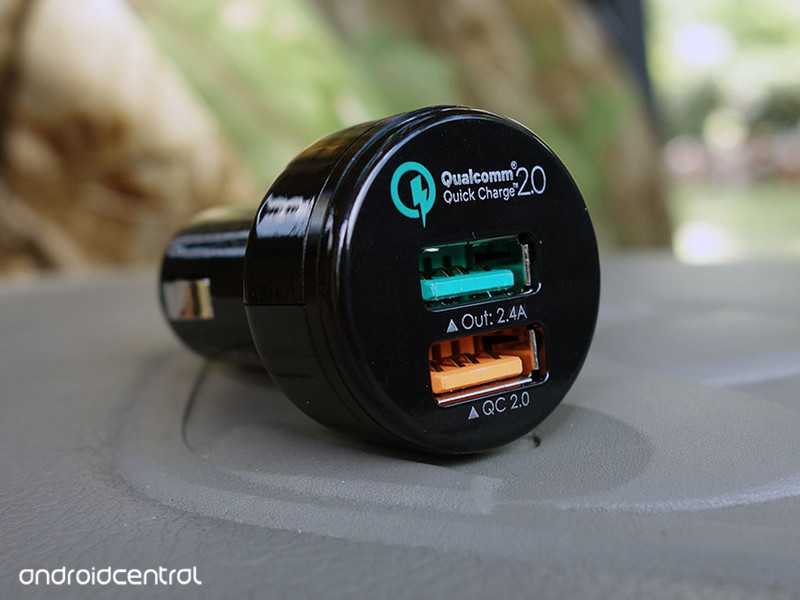
Remember, you need to use coupon code CZO24P8M at checkout for the full savings. This deal will run through August 4, but don’t wait too long if you are interested, just in case it happens to sell out.
See at Amazon
Google is offering a new way to explore Rio de Janeiro from your house
With the Olympics making their way to Rio de Janeiro in the coming weeks, Google is now offering a new way to explore the city from the comfort of your own home. From its beautiful beaches to awesome landscapes, this city is one you will want to check out, even if you can’t get there in person. Google has taken the time to map the whole city, so you can even explore the areas that previously weren’t even registered with addresses.


From Google’s announcement:
The collection includes 360° panoramas with Street View technology, some 3,000 images from photo archives and art exhibits, virtual reality tours with Google Cardboard and videos showcasing a new generation of Cariocas making their mark in the city’s cultural landscape. From iconic monuments and spectacular views, to the history of Guanabara Bay and the majestic Theatro Municipal, these online exhibits capture Rio from every angle.
You can begin exploring Rio de Janeiro right now from the comfort of your own home. What do you think about this? Let us know your thoughts in the comments.
How to manage Snapchat Memories on Android
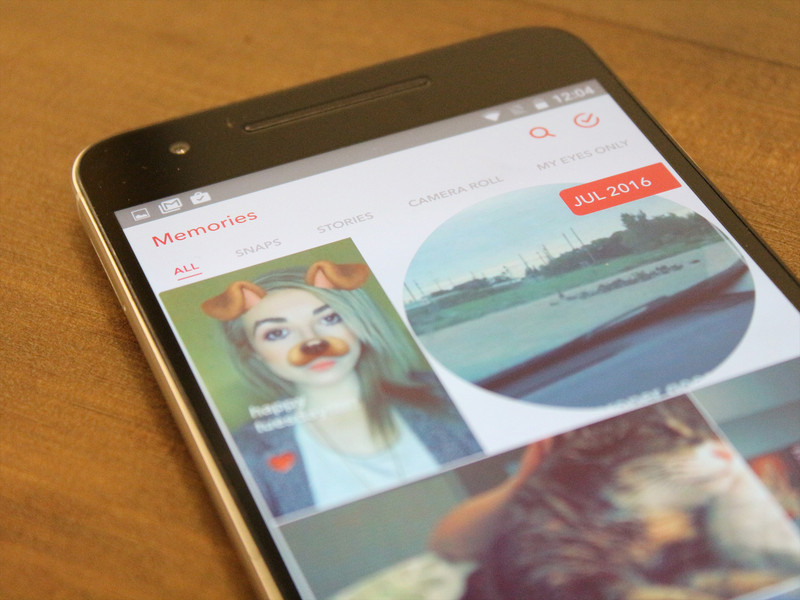
How do I use Snapchat Memories?
Now that you’re getting used to using Snapchat Memories, learn how to navigate and edit old snaps, store videos and photos in a protected My Eyes Only section, and so much more!
Here are a few ways to manage Snapchat Memories for your Android phone.
- How to edit an old Snap in Memories on Android
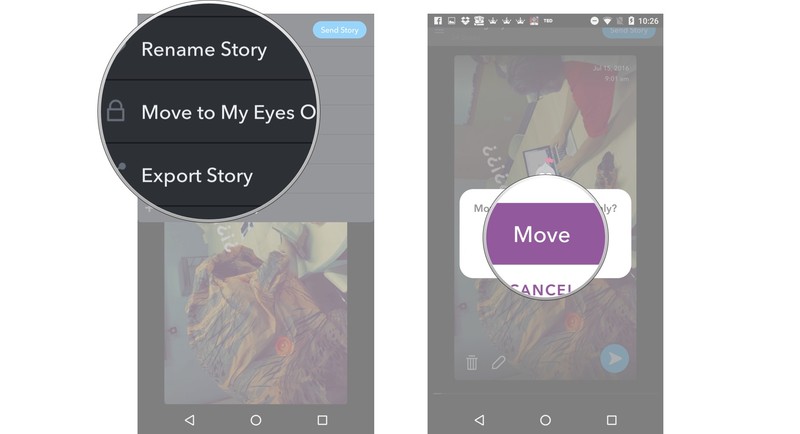
- How to move a Snap to My Eyes Only in Memories on Android
- How to rename a Snapchat story in Memories on Android
- How to move your Story to My Eyes Only in Memories on Android
- How to export individual Snaps from Memories on Android
- How to delete photos and videos from your Memories on Android
How to edit an old Snap in Memories on iPhone and iPad
Launch Snapchat from your home screen.
Tap on the smaller white circle underneath the shutter button to access Memories. You can also swipe up anywhere on the screen.
Tap on the photo or video you would like to edit.

Tap and hold the photo. A black border will appear around the photo.
Tap the little white pencil in the lower left corner.
Tap stickers, text, or doodles in the upper right corner to edit your photo like you would a standard Snapchat.

Tap the timer in the lower left corner to adjust how long the Snap will show for.
Tap the arrow in the blue circle in the lower right corner.

Just like sending a standard Snap, select My Story or the contacts you would like to share your photo/video with.
How to move a Snap to My Eyes Only in Memories on iPhone and iPad
Launch Snapchat from your home screen.
Tap on the smaller white circle underneath the shutter button to access Memories. You can also swipe up anywhere on the screen.
Tap and hold the photo or video you would like to protect.
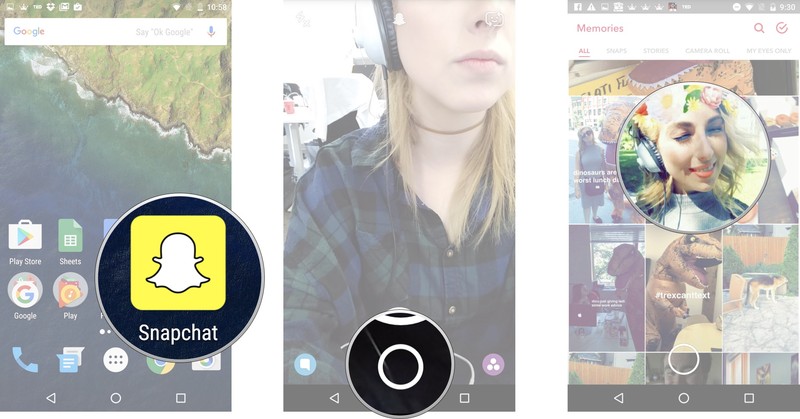
Tap My Snap in the upper lefthand corner
Tap Move to My Eyes Only
Tap Move.
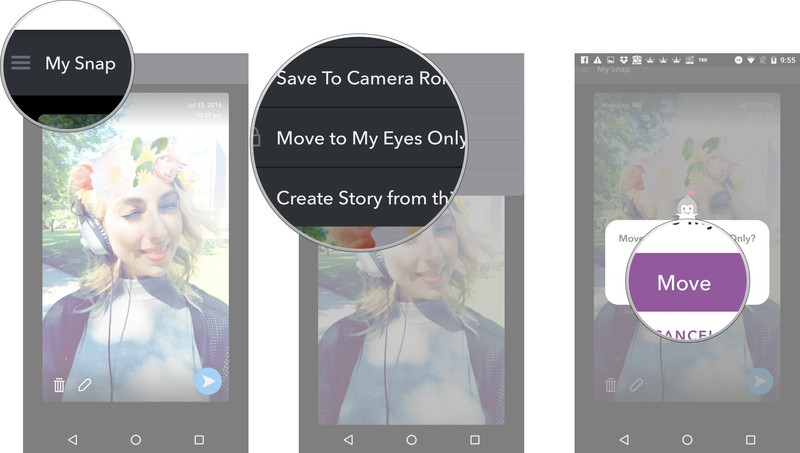
The Snap will then be moved to your password protected My Eyes Only section.
How to rename a Snapchat story in Memories on iPhone and iPad
Launch Snapchat from your home screen.
Tap on the smaller white circle underneath the shutter button to access Memories. You can also swipe up anywhere on the screen.
Tap the Stories tab at the top of the screen to access your saved stories.
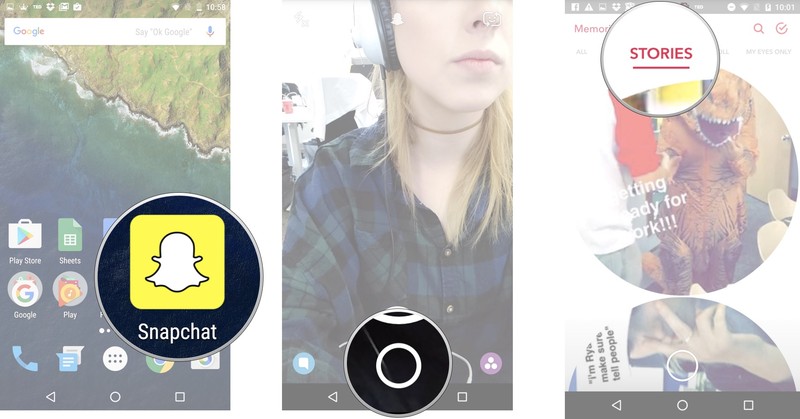
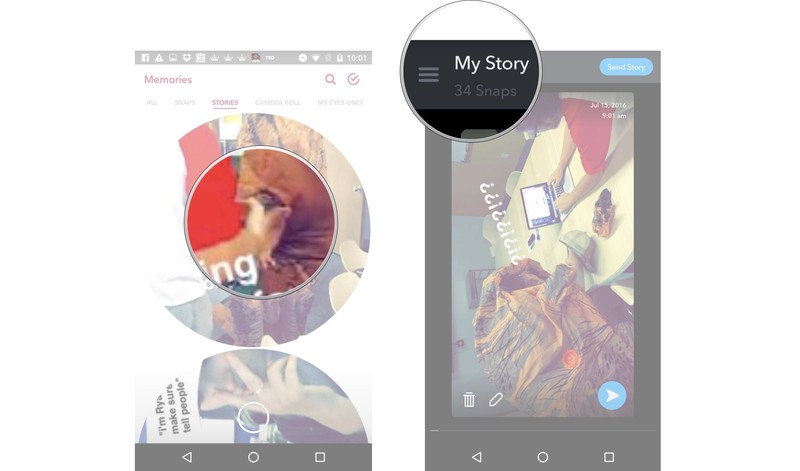
Tap and hold the story bubble you would like to rename.
Tap My Story in the upper left corner next to the menu (☰).
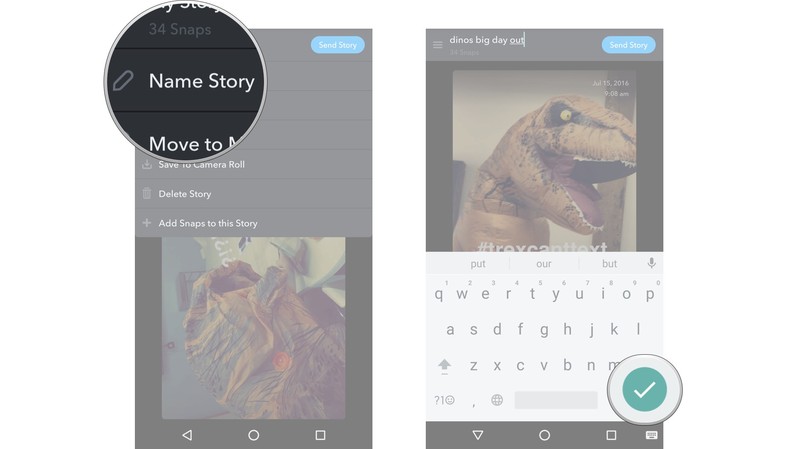
Tap Name Story and title your story.
Tap the check mark in the green circle in the lower right corner.
How to move your Story to My Eyes Only in Memories on iPhone and iPad
Launch Snapchat from your home screen.
Tap on the smaller white circle underneath the shutter button to access Memories. You can also swipe up anywhere on the screen.
Tap the Stories tab at the top of the screen to access your saved stories.
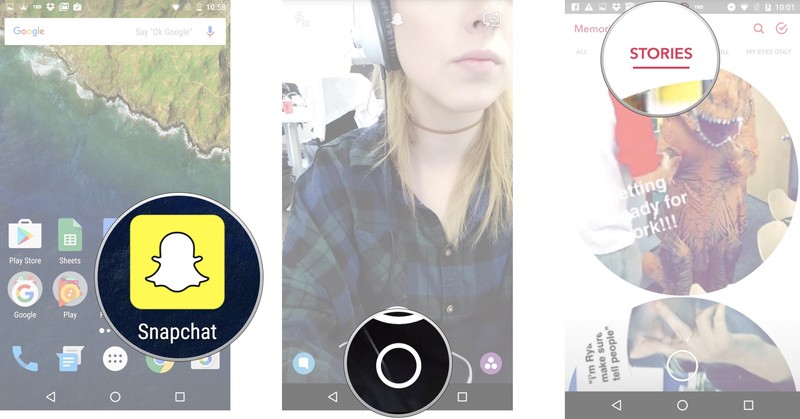
Tap and hold the story bubble you would like to make private.
Tap the menu (☰) in the upper left corner.

Tap Move Story to My Eyes Only.
Tap Move.
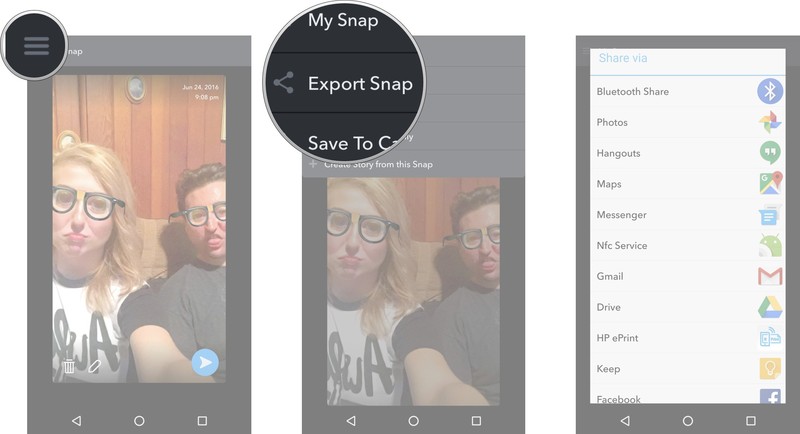
How to export individual Snaps from Memories on iPhone and iPad
Launch Snapchat from your home screen.
Tap on the smaller white circle underneath the shutter button to access Memories. You can also swipe up anywhere on the screen.
Tap and hold the Snap you would like to export.

Tap the menu (☰) in the upper left corner.
Tap Export Snap.
Select what you would like to do with that exported photo.
How to delete photos and videos from your Memories on iPhone and iPad
Launch Snapchat from your home screen.
Tap on the smaller white circle underneath the shutter button to access Memories. You can also swipe up anywhere on the screen.
Tap the red check mark in a circle in the upper right corner of the screen.
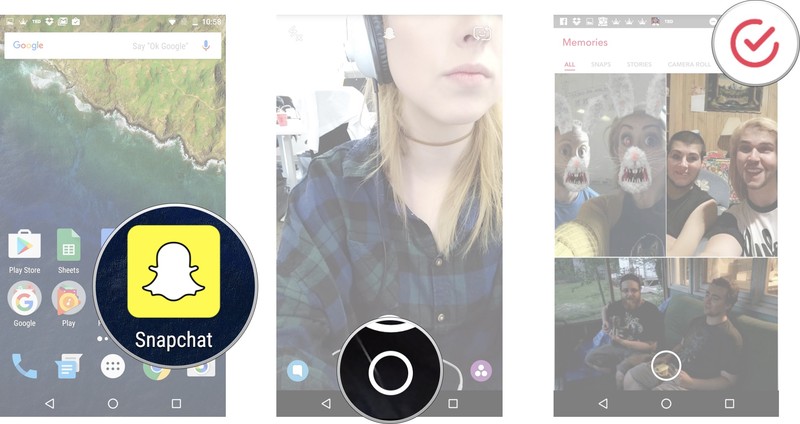
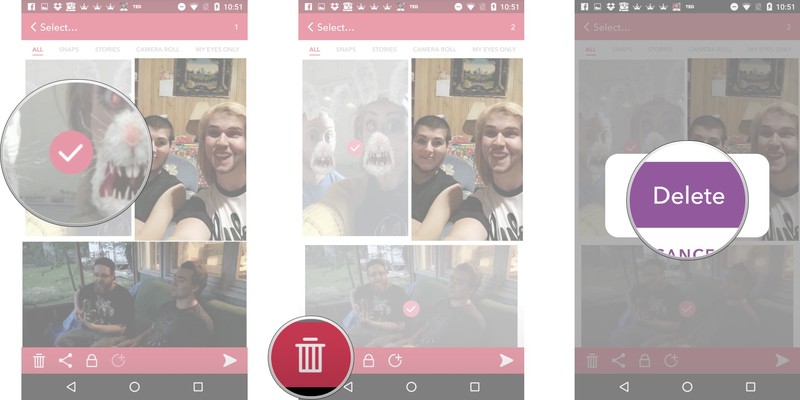
Tap on the photos and videos you would like to select. A red check mark will appear on the selected photo/video.
Tap the garbage can in the lower left corner.
Tap Delete once the prompt appears.
Best cases for ASUS Chromebook Flip

What are the best cases for the ASUS Chromebook Flip?
Cases for your ASUS Chromebook Flip come in many styles, from the briefcase to the minimalist sleeve. Take your pick from the cream of the crop.
- Rogue Theory laptop case
- iPearl mCover hard shell case
- Evecase Neoprene slim briefcase
- Navitech canvas laptop sleeve
- Case Star Neoprene sleeve
- AmazonBasics laptop and tablet bag
Rogue Theory laptop case

You can get laptop cases from Rogue Theory in a wide range of solid colors and patterns, but right now we’re loving the blue and white Chevron pattern pictured here. The leather straps add a nice detail to the gentle snap closures on the front that keep your ASUS Chromebook Flip covered and safe.
The fabric is stiffened and custom fit to your Chromebook so that it fits nice and snug. For a little extra storage space for things like cords or a USB you can add a color coordinating zippered pouch to your order.
Rogue Theory cases are manufactured in the U.S. and are a handmade, totally unique option for bringing your ASUS Chromebook Flip wherever you go.
See at Etsy
iPearl mCover hard shell case

This hard shell case from iPearl mCover is ideal for those who want a case for their ASUS Chromebook Flip but don’t want to deal with zippers, snaps, or sleeves. The translucent PC material comes in seven color options as well as a clear version.
This two-piece case is easy to snap on and off, and for a reasonable price, you can grab two covers and change up the look of your Chromebook on a regular basis.
iPearl mCover cases won’t add loads of bulk but do still act as great protection if you’re a little hard on your Chromebook or if your commute is a little less than smooth.
See at Amazon
Evecase Neoprene slim briefcase

Handles are pretty handy. The slim briefcase from Evecase lets you quickly grab your laptop case by the handles when you’re in a hurry or lets you tuck them away when the case needs to fit into a larger bag. The Neoprene material keeps your ASUS Chromebook Flip safe from incidental spills or the occasional rainy jaunt.
The secure zipper closure and soft, cushioned interior keep your Chromebook protected, even if your day is keeping you on the run. The front pocket is ideal for cords, paperwork, or even your phone; just keep everything all in one place and you won’t waste your day searching for odds and ends.
The Evecase Neoprene slim briefcase comes in six solid colors, or six kid-friendly patterns that are too cute to pass up.
See at Amazon
Navitech canvas laptop sleeve

Canvas is an excellent choice for laptop sleeve material; it’s durable and less flexible than other fabrics, so your ASUS Chromebook Flip will stay safe and sound. It comes in solid red, black, or the nautical blue and white stripe pattern pictured here.
It’s slim and lightweight enough to toss into another bag if you’re traveling or commuting. The secure snap closure won’t fly open and the interior pocket is a perfect storage spot for a cord and a USB. The soft fabric lining keeps the exterior of your Chromebook scratch-free, too.
Durable, simple in its design, and made just for the ASUS Chromebook Flip, the canvas laptop sleeve from Navitech is a solid choice.
See at Amazon
Case Star Neoprene sleeve

You want something simple, straightforward, and on the inexpensive side? Look no further than the Neoprene sleeve from Case Star. It comes in eight solid color options that fit like a glove on your ASUS Chromebook Flip.
The zippered closure is secure and the sleeve features just a little bit of extra interior space for bringing along a charging cord. The super slim design will let you tuck the sleeve easily into a backpack or your carry-on luggage and the Neoprene material adds a little barrier against accidental spills.
For a sleeve that’s easy on the wallet and an easy choice, Case Star’s Neoprene sleeve is it.
See at Amazon
AmazonBasics laptop and tablet bag

If you need your ASUS Chromebook Flip to travel well with other accessories and gear, go for the AmazonBasics laptop and tablet bag. It comes in basic black with a removable long shoulder strap that’s awfully convenient for travel.
For good measure, go for the slightly larger size featured here; an extra inch or so means it’s easier to slide your Chromebook in and out of the bag. The large zippered front pocket holds cords, your phone, your wallet, you name it; the narrower third pocket is perfect for documents.
The AmazonBasics bag is inexpensive and carries your ASUS Chromebook Flip along with all of your essential accessories in safety and go-with-everything-style.
See at Amazon
Best case scenario
Are you using one of our top picks for ASUS Chromebook Flip cases? Tell us all about it in the comments below, or shout out with your personal favorite.
Chromebooks

- The best Chromebooks
- Should you buy a Chromebook?
- Google Play is coming to Chromebooks
- Acer Chromebook 14 review
- Join our Chromebook forums
 AIVAnet