


Amazon teams up with the UK to make drone delivery a reality
Amazon has found a staunch ally in the British government in its quest to use drones for delivery. This new partnership with the UK gives the company a chance to test its drones the way it can’t in the US. For one, the UK is allowing Amazon to deploy beyond line of sight tests in both rural and suburban areas. In the US, Amazon can only fly drones if they’re within the pilot’s line of sight, which makes it impossible to deliver parcels to farther locations. The e-commerce company will also use this opportunity to make sure its UAVs’ sensors can identify and avoid obstacles and to deploy operations wherein one person controls multiple highly automated drones.
Despite the looser rules, the test flights will still be limited to an altitude of 400 feet and aren’t allowed to operate near airports. They will also concentrate on ferrying packages weighing five pounds and below. Amazon says the experiments they’ll perform across the pond will give them a better understanding of how the flying machines can be used safely for Prime Air. Further, it will help them identify and conjure up the rules and safety regulations needed to “move the drone industry forward.”
Source: Amazon
Oculus update preps Rift for room-scale VR, motion controls
When virtual reality fanatics argue about what headset is best, two arguments tend to prevail: “The Oculus Rift is more comfortable,” and “only the HTC Vive does roomscale VR.” Soon, that second argument won’t matter as much. Thanks to a recent update, the Rift’s Oculus Home software now boasts support for up to four tracking sensors — doubling one of the basic requirements the hardware needs to be used for accurate, room-scale virtual reality.
It’s great to see the support for room-scale VR show up in Oculus’ software suite, but it doesn’t mean a lot just yet. The Rift only shipped with a single tracking sensor, and there’s currently no way for consumers to purchase extra sensors directly from Oculus — at least not without buying another Rift headset, too. Still, developers who happen to have multiple sensors (and the unreleased Oculus Touch controllers) have already tested the new functionality out, and have confirmed that room-scale SteamVR games can now be played with Oculus hardware.
Still, it’s a good indicator that Oculus is getting closer to launching its long-awaited Touch controllers — the other half of the Rift’s room-scale puzzle. For Rift owners, that’s great news.
Netflix is popular, but most of you subscribe to more than one service
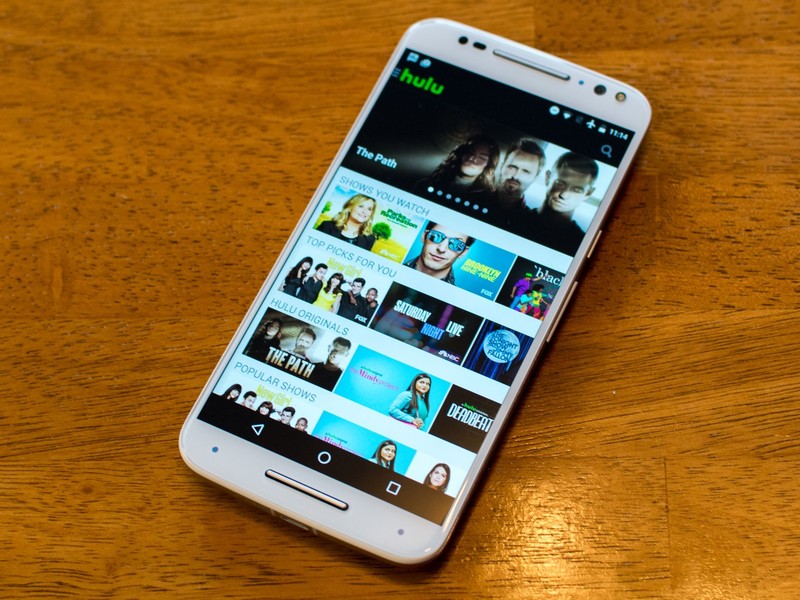
Watching television on an app doesn’t mean it’s the only place you’re watching.
In last week’s poll we asked how you prefer to watch your television and movies. We live in a world filled with options for how you want to watch. You can keep using cable, download an app like Netflix or Hulu, or even grab yourself a Tivo to record your shows off of cable so that you can watch them at your leisure later.
That’s why we wanted to know how you watch your movies and television. There is no wrong way to watch your favorite shows, and all of the options available today means that you can watch however you prefer to.
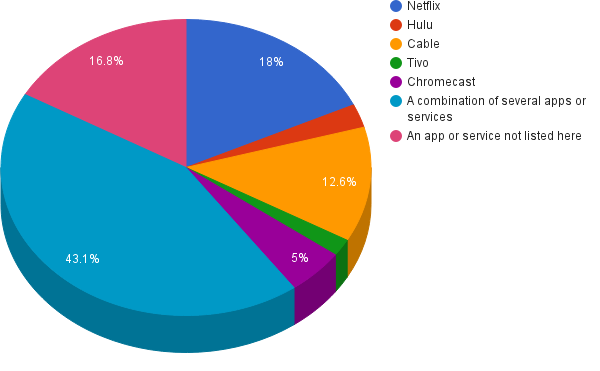
So how do people watch their shows?
“A combination of apps and services” – 43.1%
Netflix – 18%
“An app or service not listed here” – 16.8%
Cable – 12.6%
Chromecast – 5%
Hulu – 2.6%
Tivo – 1.9%
Your turn
Didn’t get a chance to vote? Did your vote fall into the “app or service not listed?” Let us know in the comments below!
Do you agree with our results? Did we miss your favorite app for catching television shows? Hop into our comments below and let us know about it!
Best cases for Moto G4 and Moto G4 Plus

What are the best cases you can buy today for the Moto G4 and Moto G4 Plus?
The Moto G4 and G4 Plus are still pretty new on the market, but savvy case designers are keeping up with these latest offerings from Motorola. We’ll keep updating as more cases become available, but in the meantime we’ve got some great suggestions to match your new phone.
- Orzly FlexiCase
- Cimo Premium Sim Protective case
- KuGi Moto G 4th generation case
- CoverON Chrome Series case
- Abacus24-7 wallet with flip cover
- Begoos sleeve case
Orzly FlexiCase

The FlexiCase from Orzly is made of flexible silicone gel, so it’s easy to install and won’t move around on you. The slim fit won’t add bulk to your Moto G4 or G4 Plus, but the non-slip gloss finish makes the phone much easier to grip.
All of your ports, buttons, and screen features remain available while the case is on. The case is available in a clear finish, or you can choose colors like black, blue, red, or purple. Orzly is well-reviewed and popular with Motorola users, and the FlexiCase is a great example of why.
If you’re looking for a stylish case that you can keep a grip on without adding bulky bumpers onto your phone, the Orzly FlexiCase is for you.
See at Amazon
Cimo Premium Slim Protective case

There are six color variations of the case from Cimo, including solid colors or clear and color hybrids. Want to look a little more polished with a matte finish? Go for the solid. Want to have a little fun? Grab the clear back and colorful bumper combination.
The anti-slip TPU provides better grip in your hands and extra protection against the everyday bumps and jostles you can’t avoid. The case provides slightly raised bezels to help keep your screen safe from hard surfaces if you tend to place your Moto G4 or Moto G4 Plus face down.
The Cimo cases don’t block any buttons or functions, and at its reasonable price point, you might want to snag more than one.
See at Amazon
KuGi Moto G 4th generation case

If colorful cases aren’t your thing, KuGi has a clear case designed with you in mind. Show off the original look of your Moto G4 or Moto G4 Plus with a slim, clear, protective case that you can amp up just a tiny bit with hints of color, like the Rose Gold tint pictured here.
KuGi’s case features a hard plastic backing with a soft bumper frame, perfect for keeping a good grip on your phone. The coating is scratch-resistant so it won’t start to look muddied or discolored after some wear and tear.
For simplicity, protection, and quality, KuGi’s case is an easy choice.
See at Amazon
CoverON Chrome Series case

There’s something about chrome that looks so good on the Moto G4 and Moto G4 Plus. The Chrome Series case from CoverON is a unique case that gives your phone that little extra something.
The faux metal look is brushed, industrial, and classic. The two-piece backing is made of rubber and hard plastic, but it’s not going to add weight to your phone; it’s only going to look heavy. The material combination protects against the little bumps and shocks that happen from time to time, and the case fits nicely over a screen protector.
If you want that heavy look with a light feel, the CoverOn Chrome Series will do the trick.
See at Amazon
Abacus24-7 wallet with flip cover

Your Moto G4 or Moto G4 Plus usually travels with your cards and your cash, right? The wallet with flip cover by Abacus24-7 has a stylish look and keeps all your necessities in one handy case.
It comes in four colors and is made of vegan synthetic leather that’s durable and feels like the real deal. There are pockets for three credit cards, including one with a clear window that’s perfect for your ID, and there’s a separate spot for your cash. Your Moto G4 or Moto G4 Plus will stay secure and the screen will be protected.
For the classic look of a wallet with all the little extras that you need when you’re on the go, the wallet case from Abacus24-7 is an excellent option.
See at Amazon
Begoos sleeve case

How about a totally different approach to a case for the Moto G4 and Moto G4 Plus? Check out this creative offering from Begoos, a unique, handmade case that can be custom made to fit your phone, even if you’re thinking of using an additional slim case for everyday use.
The sleeve is made of dark denim on the outside, which is durable, and soft cotton on the inside with a padded layer of fleece to protect your phone. It features an additional external pocket that’s ideal for cards, cash, or even your earbuds. A handy magnetic closure keeps everything nicely in place.
If you want something entirely different with a handmade touch, check out the sleeves from Begoos.
See at Etsy
State your case
Are you using one of our recommended cases for your Moto G4 or Moto G4 Plus? Tell us how you like it, or if you’ve found another that’s list-worthy, shout it out in the comments below.
Moto G4 and G4 Plus
- Moto G4 Plus review
- Moto G4 and G4 Plus specs
- The latest Moto G4 news
- Join our Moto G4 and G4 Plus forums!
Moto G4:
Amazon
Motorola
Moto G4 Plus:
Amazon
Motorola
Pokemon Go: How to raise your XP level, power up and evolve your Pokemon
There are lots of elements to Pokemon Go. There’s finding and collecting all the Pokemon, there’s battling in Gyms, there’s hatching eggs and visiting PokeStops.
Then there’s the whole world of powering up your Pokemon and raising your Trainer’s XP. These two elements have a huge impact on how all the parts of Pokemon Go fits together, and they are quite closely linked together, so let’s take a look.
What is Pokemon Go XP and what are levels?
Pokemon Go XP is basically a reflection of your character’s experience in the game. As you progress through Pokemon Go, you’ll gain XP for completing various tasks and move up through levels. XP is good though, because it unlocks a lot of elements of the game as you progress.
For example, reaching level 5 gives you the chance to join a team. Subsequent levels, gained through acquiring more XP, unlocks things like Great Balls, gifts you Lure Modules and gives you additional incubators for your eggs.
Each time you step up a level, you’ll be given a bonus pack of items to help you on your way.
Why do I need Pokemon XP?
Aside from the obvious point of demonstrating that you’re a more experienced player and the rewards you might get for progressing through levels, earning a lot of XP and being a higher level player has a huge advantage when it comes to capturing, evolving and powering up your Pokemon.
What advantage is that? That’s simple: the higher level you are, the better you are as a trainer, the more likely you are to hatch powerful Pokemon and the larger the gains when evolving Pokemon. Basically, when you’re level 15, you get much more from your efforts than you do when you’re level 5.
How do you raise Pokemon XP?
XP is delivered for a lot of normal Pokemon Go activities. In the normal course of playing the game, you get XP for capturing Pokemon, with bonuses awarded for catching new Pokemon or good throws of the Poke Ball, for example.
But there’s a lot more XP awarded for finding new Pokemon, evolving new Pokemon, hatching eggs and visiting Poke Stops. One of the best ways to get all these things working for you is go to a new place, like a town or city centre, where there are lots of Poke Stops, lots of people and lots of Pokemon.
Then simply go from Poke Stop to Poke Stop, collecting it all, catching it all and gobbling up the XP.
Double up with Lucky Eggs
One of the best ways to raise to your XP quickly is using your Lucky Eggs. These are awarded sometimes as you level up, but are also a great way of leaping through levels. The best time to drop a lucky egg – which will double your XP earned for 30 mins – is when you know you’re going to have a big Pokemon Go session.
If you’re heading somewhere new, or going out to do battle, or basically you know you have 30 minutes of undisturbed Pokemon Go action, then that’s when you should use a Lucky Egg. It will mean that everything you do is extra rewarding. Want more Pokemon too? Drop some incense too.
Train up, or knock down Gyms
There are XP rewards available in Gyms, but you need victories. If you don’t win, you don’t get anything. Find a Gym, line up your Pokemon squad and hit it hard. As you knock the prestige down you’ll be rewarded with XP for your efforts, especially if you can take out multiple rivals.
The same applies on the other side. Train hard in friendly Gyms, and get XP for your efforts. Again, remember to enter a fight that you’re going to win, because there are no rewards for losing the first fight.
How much XP do I need to level up in Pokemon Go?
That varies from level to level, increasing incrementally as you progress through the levels. To begin with you’ll only need a few thousand to step up a level, but as you get to higher levels, you’ll find you need more and more XP to move up to the next level.
Does that matter? Well, in the early stages you’ll hit level 5 pretty quickly, but it can then take longer to get to level 10. But at the same time, with each level you step up, the potential rewards are greater as you can hatch better eggs and so on.
Why do I need to power up Pokemon?
When you start Pokemon Go, most of the Pokemon you catch have a low value – something like CP10. This relates to their combat power and is loosely linked to health and together those values make up how a Pokemon will perform in a battle.
Powering up a Pokemon is how you raise its CP and health and raise its effectiveness when in battle.
How do I power up Pokemon?
To power up a Pokemon you need two things: Stardust and Candy.
If you have the required quantity of both, when you look at the information screen for an individual Pokemon, you’ll see the option to “power up”, above the option to evolve.
Evolving only needs Candy, but lots of it.
What is Stardust and where can I find it?
Stardust is generically collected as you capture Pokemon and the amount of Stardust you’ll need to power up a Pokemon increases as it gets more powerful. You might initially need 200, but as Pokemon develop, you’ll start needing in excess of 1000.
Stardust, and the need for Stardust, is one of the reasons you need to keep catching all those common Pokemon you find, or you need to sit in a bunch of Gyms for a long time for the Stardust reward you’ll earn every 21 hours – which seems to be the more difficult option.
What is Candy and where can I find it?
As for Candy, each Pokemon family has its own type of Candy. When you catch a Pokemon, you also get some of its type of Candy too. You’ll need Candy to power up, as well as the Stardust. In the case of Candy to power up, you typically only need a few, so if you have the Stardust, it’s a fairly simple process.
If you need more Candy, you can transfer Pokemon back to the professor. This will award you 1 Candy of that family type. So, if you need Candy, you can safely transfer those CP10 Rattata to the professor, take the Candy and power up your more powerful Raticate.
When should I power up and when should I evolve a Pokemon?
Pokemon have evolution paths. Although these aren’t fully revealed in Pokemon Go until you have the relevant Pokemon in your collection, they are well documented elsewhere in the Pokemon world.
Deciding whether to power up or evolve depends on your long-term strategy and each individual Pokemon you have. If you’re at the top of the evolutionary path, with a Pigeon, for example, then power up is the obvious option.
As tempting as it is to power up as soon as you have the Stardust and Candy, it’s almost not worth it. When you have a low level trainer, with low XP, the gains are minimal. However, at the same time, you need to develop Pokemon that can be effective, so there’s a balance to be struck here.
With that said, it also doesn’t make sense to evolve Pokemon in the early stages of the game, because the evolution is much more rewarding when you have a more powerful trainer. It’s a little boring only gaining XP and levelling up your Trainer, so if you take one thing from this guide, it’s not spend the early stages levelling up weak Pokemon. Ultimately it’s a waste of Candy and Stardust.
How many Pokemon do I need to power up or evolve?
Ultimately, one of the biggest reasons to evolve a Pokemon is because you get a new Pokemon and you want your Pokedex to be fully stuffed with every character.
But the reality of Pokemon Go is you need a fighting portfolio. Each battle you enter lets you take in six Pokemon and ultimately, you want to be able to pick those fighters who will be effective against the enemy you’re faced with.
In reality you’ll end up with champions – those powerful Pokemon you keep powering up because they help you win battles – and the short supply of Stardust (especially) will mean you have to choose which Pokemon you spend it on. Don’t neglect those chaps though, as when your champion falls after a string of victories, it’s going to be your second or third ranked Pokemon that see you through to final victory.
What happens when I use Transfer in Pokemon Go?
This is a common question, because the warning associated with it is a little stark: you’re warned that transferring to the professor means you can’t get the Pokemon back.
This only means that individual Pokemon: it doesn’t bar you from developing more, catching more and keeping more. Transfer is a way to clear those early weak CP10 Pokemon out of your collection, in exchange for Candy that can be used to power up those later Pokemon you caught or evolved.
- Pokemon Go: How to play and other tips and tricks
- Help! Pokemon Go isn’t working: How to fix common Pokemon Go problems
- Can’t get Pokemon Go in your country yet? Here’s how to download it now
- What is Pokemon Go and why is everyone talking about it?
- Pokemon Go: Best, worst and craziest places people have found Pokemon
- London through the eyes of Pokemon Go
- Pokemon Go top tips: Master the Pokemon mayhem
Best Comic-Con 2016 trailers: Justice League, Wonder Woman, and more
Although Comic-Con 2016 is done and dusted, you can relive some of the convention’s best highlights via trailers and teaser clips.
San Diego Comic-Con is an annual comic convention held in, well, San Diego. This year’s SDCC kicked off with Preview Night on 19 July, and it ran through to 23 July. During the week, we were gifted a bevy of trailers for some of the most anticipated films, superhero franchises and series, and even some oddball surprises like Oliver Stone’s Edward Snowden biopic.
We also got teasers and behind-the-scenes looks at upcoming seasons of popular series, including Game of Thrones. Pocket-lint has collected all the trailers and teasers and everything in between – and we listed them below.
Comic-Con 2016: Best film trailers
Justice League
- Premiere: 17 November 2017
- Director: Zack Snyder
- Writer: Chris Terrio
- Starring: Ben Affleck, Gal Gadot, Jason Momoa, Ezra Miller, Ray Fisher, J.K. Simmons, Willem Dafoe, Amber Heard, Henry Cavil
Wonder Woman
- Premiere: 2 June 2017
- Director: Patty Jenkins
- Writers: Geoff Johns, and Allan Heinberg
- Starring: Gal Gadot, Chris Pine, Connie Nielsen, Robin Wright, David Thewlis, Danny Huston, Elena Anaya, Ewen Bremner, Saïd Taghmaoui
Suicide Squad
- Premiere: 5 August 2016
- Director: David Ayer
- Writer: David Ayer
- Starring: Margot Robbie, Will Smith, Jared Leto, Margot Robbie, Cara Delevigne, Joel Kinnaman, Jai Courtney, Adewale Akinnuoye-Agbaje, Adam Beach, Jay Hernandez, Ike Barinholtz, Common, Scott Eastwood, Karen Fukuhara, Viola Davis
The Lego Batman Movie
- Premiere: 10 February 2017
- Director: Chris McKay
- Writers: Seth Grahame-Smith, Chris McKenna, Erik Sommers
- Cast: Will Arnett, Michael Cera, Zach Galifianakis, Rosario Dawson, Mariah Carey, Ralph Fiennes
Kong: Skull Island
- Premiere: 10 March 2017
- Director: Jordan Vogt-Roberts
- Writers: Max Borenstein, Derek Connolly, John Gatis, and Dan Gilroy
- Starring: Tom Hiddleston, Brie Larson, Samuel L. Jackson, John Goodman, John C. Reilly, Tian Jing, Corey Hawkins,Jason Mitchell, John Ortiz, Thomas Mann, Shea Whigham, Toby Kebbell, Eugene Cordero
King Arthur: Legend of the Sword
- Premiere: 24 March 2017
- Director: Guy Ritchie
- Writers: Joby Harold, Guy Ritchie, and Lionel Wigram
- Starring: Charlie Hunnam, Jude Law, Astrid Bergès-Frisbey, Eric Bana, Djimon Hounsou, Aidan Gillen
Blair Witch
- Premiere: 16 September 2016
- Director: Adam Wingard
- Writer: Simon Barrett
- Starring: James Allen McCune,Callie Hernandez, Brandon Scott, Valorie Curry, Corbin Reid, Wes Robinson
Legends of the Hidden Temple
- Premiere: November 2016
- Director: Joe Menendez
- Writers: Stephen Brown, Zack Hyatt
- Starring: Kirk Fogg (original TV show host), Dee Bradley Baker, Isabela Moner, Colin Critchley, and Jet Jurgensmeyer
Fantastic Beasts and Where to Find Them
- Premiere: 18 November 2016
- Director: David Yates
- Writer: J.K. Rowling
- Cast: Eddie Redmayne, Katherine Waterston, Allison Sudol, Dan Fogler, Ezra Miller, Samantha Morton, Jon Voight, Ron Perlman, Carmen Ejogo, Jenn Murray, Faith Wood-Blagrove, and Colin Farrell
Doctor Strange
- Premiere: 4 November 2016
- Director: Scott Derrickson
- Writers: Scott Derrickson, C. Robert Cargill, Jon Spaihts
- Cast: Benedict Cumberbatch, Tilda Swinton, Chiwetel Ejiofor, Benedict Wong, Mads Mikkelsen, Rachael McAdams, Michael Stuhlbarg, Scott Adkins, and Amy Landecker
Snowden
- Premiere: 16 September 2016
- Director: Oliver Stone
- Writer: Kieran Fitzgerald, and Oliver Stone
- Starring: Joseph Gordon-Levitt, Shailene Woodley, Melissa Leo, Zachary Quinto, Tom Wilkinson, Rhys Ifans, and Nicolas Cage
Comic-Con 2016: Best TV show trailers
Luke Cage (Season 1)
- Premiere: 30 September 2016 Network/On-demand: Netflix
- Creator: Cheo Hodari Coker
- Starring: Mike Colter, Theo Rossi, Frank Whaley, Mahershala Ali, Rosario Dawson, and Sonia Braga
Iron Fist (Season 1)
- Premiere: 2017
- Network/On-demand: Netflix
- Creator: Scott Buck
- Starring: Finn Jones, Jessica Henwick, David Denham, Jessica Stroup, Tom Pelphrey, and Carrie-Anne Moss
The Defenders (Season 1)
- Premiere: 2017
- Network/On-demand: Netflix
- Creators: Douglas Petrie, and Marco Ramirez
- Starring: Charlie Cox, Krysten Ritter, Mike Holter, and Finn Jones
Game of Thrones (Season 7)
- Premiere: Summer 2017
- Network/On-demand: HBO
- Creators: David Benioff, D.B. Weiss
- Starring: Emilia Clarke, Peter Dinklage, Lena Headey, Kit Harrington, Sophie Turner, and Maisie Williams
American Gods (Season 1)
- Premiere: 2017
- Network/On-demand: Starz
- Creators: Bryan Fuller, and Michael Green
- Starring: Ricky Whittle, Ian McShane, Emily Browning, Gillian Anderson, Yetide Badaki, Peter Stormare, Dane Cook, Bruce Langley, Cloris Leachman, Pablo Schreiber, Jonathan Tucker, Crispin Glover, Orlando Jones, and Kristin Chenoweth
The Walking Dead (Season 7)
- Premiere: 23 October 2016
- Network/On-demand: AMC
- Creator: Frank Darabont
- Starring: Andrew Lincoln, Melissa McBride, Jeffrey Dean Morgan, and Khary Payton
Fear the Walking Dead (Season 2B)
- Premiere: 21 August 2016
- Network/On-demand: AMC
- Creators: Dave Erickson, and Robert Kirkman
- Starring: Kim Dickens, Cliff Curtis, Frank Dillane, Alycia Debnam-Carey, Mercedes Mason, Lorenzo James Henry, and Colman Domingo
Ash vs Evil Dead (Season 2)
- Premiere: Autumn 2016
- Network/On-demand: Starz
- Creators: Sam Raimi, Ivan Raimi, and Tom Spezialy
- Starring: Bruce Campbell, Lucy Lawless, Ray Santiago, Dana DeLorenzo, Lee Majors, Ted Raimi, and Michelle Hurd
The Flash (Season 3)
- Premiere: 4 October 2016
- Network/On-demand: CW
- Creators: Greg Berlanti, Andrew Kreisberg, Geoff Johns
- Starring: Grant Gustin, Candice Patton, Danielle Panabaker, Jesse L. Martin, and Keinyan Lonsdale
Arrow (Season 5)
- Premiere: 5 October 2016
- Network/On-demand: CW
- Creators: Greg Berlanti, Mark Guggenheim, Andrew Kreisberg
- Starring: Stephen Amell, Katie Cassidy, and Willa Holland
Legion (Season 1)
- Premiere: 2017
- Network/On-demand: FX
- Creator: Noah Hawley
- Starring: Dan Stevens, Rachel Keller, Jean Smart,Katie Asleton, Jeremie Harris, Amber Midthunder, Bill Irwin, and Aubrey Plaza
Son of Zorn (Season 1)
- Premiere: 25 September 2016
- Network/On-demand: FOX
- Creators: Reed Agnew and Eli Jorne
- Starring: Jason Sudeikis, Cheryl Hines, Tim Meadows
Sherlock (Season 4)
- Premiere: 2017
- Network/On-demand: BBC
- Creators: Mark Gatiss and Steven Moffat
- Starring: Benedict Cumberbatch and Martin Freeman
Justice League Action (Season 1)
- Premiere: Autumn 2016
- Network/On-demand: Cartoon Network
- Creators: Butch Lukic, Alan Burnett
- Starring: Kevin Conroy, Mark Hamill, Diedrich Bader, Lacey Chabert, John DiMaggio, James Woods, Michael Dorn, Tara Strong, Ken Jeong, and Josh Keaton
You can buy the OnePlus 3 in gold on 1 August in UK, 26 July in US
OnePlus is really good at making you want to buy their phones, with the latest example being its OnePlus 3 in “soft gold”.
The company has introduced the colour variant for its new OnePlus 3, emphasising in a blog post that it’s not your “typical gaudy gold” but rather a more “low-profile take on gold”. It threw in plenty more adjectives and phrases, such as “a light, elegant look”, “a subtle texture reminiscent of holding fine, silky-soft sand”, and “press photos and product renders don’t do it justice”.
This phone, it claimed, you’ll have to experience for yourself, and starting 26 July, you can do just that. OnePlus will kick off sales for the new variant in the US at 12 pm EST on OnePlus.net. It will become available in other regions on 1 August, including the UK, Canada, and Hong Kong. But the company of course warned that supply is limited: “We recommend ordering yours before the first batch of devices runs out.”
OnePlus began grabbing headlines in 2014, when it launched its first smartphone, for a couple of reasons: first, the OnePlus One delivered flagship specs for significantly less cash, and second, the Chinese company made the “flagship killer” desirable by introducing an invite system that made the OnePlus One harder to get hold of than other smartphones.
Since the OnePlus One, we have seen three more smartphones from OnePlus: the OnePlus 2, the OnePlus X, and most recently, the OnePlus 3. All three follow the same lead as the OnePlus One by offering decent specs for a decent price. The OnePlus 3, for instance, has a unibody design cut from a single block of aluminium, which is the sort of thing you’d expect from HTC or Apple.
Watch OnePlus’ promo video below to learn more about the OnePlus 3 in gold.
- Best smartphones 2016 under £350
- OnePlus 3 tips and tricks: Master your 2016 flagship killer
- Best smartphones 2016: The best phones available to buy today
- OnePlus 3 review: The flagship killer we’ve been waiting for
Get a lifetime subscription to Stone River Academy and access over 2,000 hours of premium tech training (93 per cent off)
The world around us is growing and changing at blinding speeds these days, and new opportunities are always around the corner for motivated and ambitious professionals.
Keep up with an ever-evolving set of technical requirements, from new programming languages to 3D game development with a lifetime subscription to Stone River Academy – a robust resource featuring over 90 courses and more than 2,000 hours of online training for a massive range of focus. For a limited time, you can gain access to this training for 93 per cent off from Pocket-lint Deals.
You never know when a new opportunity can arrive in your path, potentially changing the trajectory of your career and future. Stone River Academy provides the resources necessary to stay on the cutting edge of training and qualification to be fully prepared for opportunity’s coveted knock.
Dive into tutorials on a wide range of web disciplines, including web and mobile programming, game app creation, 3D animation, web design, and more. Need to polish up on program languages or various development platforms? Not a problem, as deep-dive courses are available in Bootstrap, Unity 3D, Java, Python, MySQL, node.js, CSS and many more.
A large part of Stone River Academy’s value is their efforts to stay up to date with the latest professional standards in any field. Up to 5 new courses are added each month, ensuring that you’re on the razor’s edge of developing programs, languages and technologies – an essential feature for ambitious professionals looking to improve their careers.
Take advantage of the virtually unlimited resources available from Stone River Academy’s incredible catalogue of tech training courses, with a lifetime subscription available at £67.45 ($89) from Pocket-lint Deals.
Pay what you want for a huge archive of top-quality design assets in the 2016 Summer Design Bundle
A designer’s utopia awaits in the Pay What You Want: 2016 Summer Design Bundle, offering an unprecedented deal for the year’s top design assets: you can get them all at a price of your own choosing!
An incredible archive of top-quality add-ons, tools and assets are available at combined value of £1,879 (U.S. $2,480), with no tricks, no gimmicks or bait-and-switches. You decide the cost for an incredible compilation of vectors, fonts, and backgrounds from designer Pier Francesco Martini, as well as 80 of Creative Market’s top icons from designer David Appleyard.
You’ll also have access to a massive portfolio of flat designs, glyphs, icons, illustrations, UI kit, and vectors from designer Jack Lande, with the ability to maintain all original files to return to the scratch drawing board whenever you see fit.
Additionally, a super commercial license accompanies your access to 19 font families and 247 total fonts for use in any commercial project, allowing you to cleanly and attractively get your message across to clients, potential readers and beyond.
You’ll also pick up 3 packs of professionally edited SMART PSD files for mockups, as well as over 2,000 premium, high quality icons for professional-quality designs on iPhone 6 and iPad 2 Air.
Your Summer Design Bundle includes:
- Top 80 Design Icons
- 5 Vectors; 2 Fonts; 11 Backgrounds
- 19 Creative Comic Fonts
- Pixlsby Full Portfolio
- Device Mockup and Icon Library
- Port and Bohema Font Families
- 8 Vectors; 9 Templates; 9 PSD Packs; 20 UI Kits/Web Elements
- 50 Badges, 1 Mockup Creator, 8 Hand-Drawn and Commercial Fonts
- 2,086 Icons
How Pay What You Want works: for as little as you want to pay, you can pick up the last two sets of design assets listed above. And if you beat the average price paid, you’ll get the entire 9-part bundle. On top of that: if you beat the leader’s price, you’ll get entered into our epic Thunderbolt Workstation Giveaway!
Take your designs to the next level, and set your own price with the Pay What You Want: 2016 Summer Design Bundle, now available on Pocket-lint Deals.
‘Kingsglaive: Final Fantasy XV’ gets its first English trailer
A new theatrical trailer is out for Kingsglaive: Final Fantasy XV, the film companion to the upcoming video game. This is the first time audiences can hear the CG movie’s star-studded English-language voice talent.
Breaking Bad’s Aaron Paul stars as Nyx, a member of a magic-wielding royal guard called Kingsglaive who has to protect an oracle named Lunafreya, voiced by Game of Thrones’ Lena Headey. Sean Bean, also of Game of Thrones fame, plays King Regis, the father of the game’s main character Noctis.
The film will be in limited theaters in North America on August 19th, and you can purchase it as a digital download on August 30th and on Blu-Ray and DVD on October 4th. Kingsglaive is also part of Final Fantasy XV’s Deluxe and Ultimate Collector’s Editions, which will be released on September 30th.
 AIVAnet