


Dashlane Business Updates With Simpler Personal and Work Password Management
Password management company Dashlane today announced an update to its iOS and Android business apps, Dashlane Business, centered around a way for its users to easily navigate between personal and work passwords on their mobile devices. Called “Spaces,” the new tool lets company employees keep track of important enterprise information within Dashlane, while simultaneously allowing for the storage of equally important personal passwords and data.
A desktop version of Spaces hit Dashlane earlier in the summer, along with Dashlane Business itself, introducing similar capabilities for companies to encourage increased privacy among its employee base. The new addition works as a button on the top left corner of the app that users can tap to bring up their Spaces, and either showcase every password stored in Dashlane, or only those in a particular Space.
Thanks to the new update’s multitasking ability, more than ever the company said that Dashlane offers “a best-in-class onboarding process, employee experience, and functionality.”
“Password management blurs the line between home and work. If an employee practices safe password habits at home, that same mindset will carry over into his or her workplace,” said Emmanuel Schalit, CEO of Dashlane. “The majority of notable breaches stem from password hacks, so it’s critical that companies educate their employees on how to manage their passwords and provide them with tools such as Dashlane that make secure password management simple and effective.”
While the new update is mainly for its enterprise-focused app, Dashlane did confirm that anyone who works for a company that uses Dashlane Business will in turn be able to get all of the advantages of Spaces in the regular consumer app. Those interested in the basic features of Dashlane can check it out for free on the App Store [Direct Link], and the company said that users can expect to see the Spaces update rolling out today.
Tag: Dashlane
Discuss this article in our forums
Nintendo shares plummet as investors find out it doesn’t make Pokémon Go
Investors scrambled to buy Nintendo stock after the release of Pokémon Go saw millions of players worldwide fire up the app while out and about to catch their favorite Pokémon. Now shares in Nintendo have fallen after the company revealed the game would have limited impact on the bottom line. That’s due to the game being developed by Niantic, which Nintendo holds a stake in alongside other companies.

However, as reported by the BBC, shares are still up considerably since Pokémon Go was released on mobile platforms.
“Even with the decline, Nintendo shares are still up 60% since the release of Pokemon Go on 6 July. The sharp drop was the biggest decline since October 1990, leaving the stock down by 5,000 yen – the maximum daily limit allowed. The gaming company is due to report first-quarter results this week and said it did not plan to revise its earnings outlook for now.”
Some analysts believe investors have overreacted to Nintendo’s statement, while others are clearly concerned about the room for growth with Nintendo’s limited hold on Niantic and The Pokémon Company. That said, it’s a strange move, especially when one considers this isn’t revelation exactly news to anyone. The company’s earnings report is expected to be released on Wednesday.
Pokémon Go
- Join our Pokémon Go forums!
- How to deal with GPS errors in-game
- Which team should you choose?
- How to play without killing your battery
- The Ultimate Pokémon Go Game Guide!
- Listen to the Pokémon Go podcast!
Prisma app over capacity or slow? Help, tips and tricks for quicker artworks
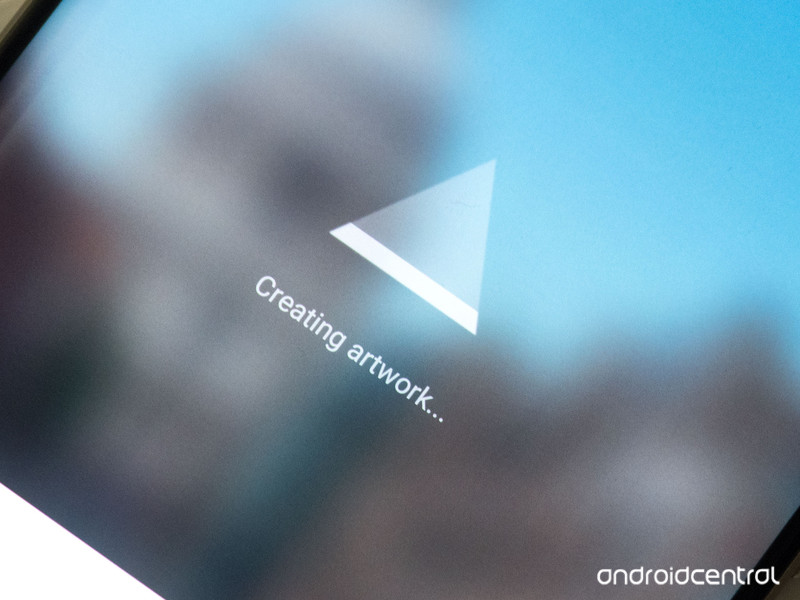
Getting the “Prisma is over capacity” error? Slow performance? Prisma isn’t your average photo-filtering app — and that means it can take a little time to do its thing.
If you’re one of the many people trying out AI-powered artwork app Prisma in recent days, you’ll no doubt have run into the app’s main pain point — speed. Or rather, lack of speed. Prisma’s intelligent, artistic filters are impressive for sure, but they can take a lot of time to apply — particularly at peak times.
Let’s take a look at why Prisma can be so slow, and what you can do about it.
How Prisma works — and why it might be ‘over capacity’
Unlike Instagram, Snapseed or any other photo editing app with filters, Prisma doesn’t process your photos on your phone itself, but instead uploads them to its servers and applies artificial intelligence to them in the cloud. The results are then piped back down to your phone for you to share and enjoy.
In essence, that’s the main reason why you’ll have to wait significantly longer to apply a Prisma filter compared to something like Instagram. Prisma does much more than just apply a uniform filter to your photos, as Instagram does. It uses AI to intelligently interpret your photos and redraw them accordingly — and so way, way more computation needs to happen, which is why this task is offloaded onto Prisma’s servers.
But that comes with its own set of trade-offs. If you’re offline completely, Prisma won’t work. If your data connection is slow, it’ll take longer to upload and download images. And the number of other people using Prisma will also determine how quickly the servers can handle your pics. At the time of writing lots of people are trying Prisma for the first time, which is why it might appear to get stuck on “Creating artwork…”
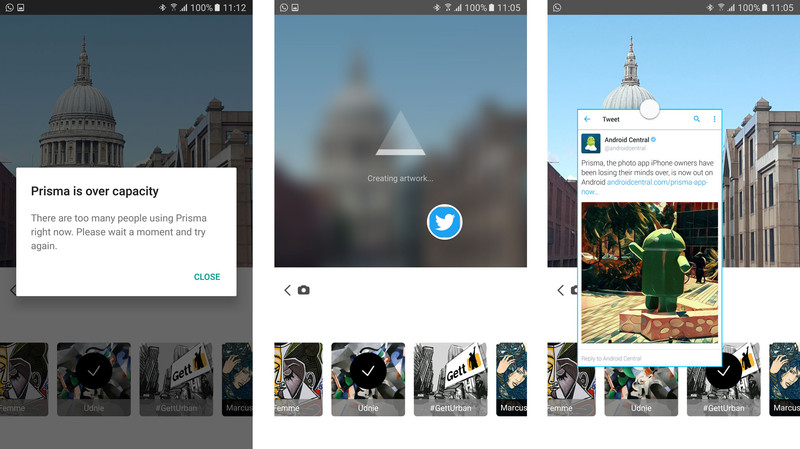
At peak times, you might even see a message telling you that the servers are too busy:
Prisma is over capacityThere are too many people using Prisma right now. Please wait a moment and try again.
Tips, tricks and workarounds to make Prisma faster
The only real solution is for Prisma to build out its infrastructure and add more cloud computing power, meaning everyone’s photos can be processed more quickly. That’s not something regular users like us have any control over, but there are a few things you can do:
Make sure you’ve got a reliable data connection. If you’re on a slow Wi-Fi network or patchy cellular coverage, wait until you’re somewhere with better connectivity before using the app.
Don’t hit the home or app-switching keys while Prisma is processing. If you go to your home screen or switch to another app while the “Creating artwork…” message is displayed, the process will usually freeze, and you’ll have to reselect your filter and try again.
Prisma doesn’t support multi-window — whether it’s Android’s built-in split-screen mode in Nougat or Samsung’s multi-window on Galaxy phones. That means you’re stuck looking at a loading screen while your photo processes — not much fun.
However, Samsung owners can use pop-up view! You can’t open Prisma itself in pop-up view — Samsung’s “floating window” mode that lets you collapse apps down into a scaled view. But you can load up apps like Twitter and Chrome into pop-up windows before using Prisma, and use them in the foreground while Prisma is doing its thing in the background. To put a supported app into pop-up mode, swipe inwards from the top left or right corner, or long-press the app in the Recent apps menu.
If in doubt, wait a little while. At peak times of the day you’re more likely to experience slow processing times, as well as the dreaded “Prisma is over capacity” message. Have a cup of coffee. Make a sandwich. Check out the day’s Android news. Prisma should be back up and running before too long.
Prisma users, how have you been finding the app’s performance? Are you seeing the “over capacity” message a lot? Share your experiences down in the comments!
How to access and use Memories in Snapchat for Android

How do I use Snapchat Memories?
Snapchat has announced yet another feature as they continue to expand their platform that originally was created to simply send and receive temporary pictures.
This new feature is called Memories, and it’s essentially a cumulative archive of all of the snaps you’ve saved to your phone since you downloaded the app.
But how exactly do you navigate Snapchat Memories, and how does this new feature work? Here’s how to use Snapchat Memories to your fullest advantage.
- How to access Memories in Snapchat on Android
- How to access Snaps in Memories on Android
- How to access Stories in Memories on Android
- How to access your Camera Roll in Memories on Android
- How to access My Eyes Only in Memories on Android
- How to post an old Snap to your Snapchat on Android
- How to post part of a saved story to your Snapchat on Android
- How to post a photo from your Camera Roll to your Snapchat on Android
How to access Memories in Snapchat on Android
Launch Snapchat from your home screen.
Tap on the smaller white circle underneath the shutter button to access Memories. You can also swipe up anywhere on the screen.

How to access Snaps in Memories on Android
Launch Snapchat from your home screen.
Tap on the smaller white circle underneath the shutter button to access Memories. You can also swipe up anywhere on the screen.
Tap the Snaps tab at the top of the screen to access your saved snaps.

How to access Stories in Memories on Android
Launch Snapchat from your home screen.
Tap on the smaller white circle underneath the shutter button to access Memories. You can also swipe up anywhere on the screen.
Tap the Stories tab at the top of the screen to access your saved stories.

How to access your Camera Roll in Memories on Android
Launch Snapchat from your home screen.
Tap on the smaller white circle underneath the shutter button to access Memories. You can also swipe up anywhere on the screen.
Tap the Camera Roll tab at the top of the screen to access your Camera Roll.

How to access My Eyes Only in Memories on Android
Launch Snapchat from your home screen.
Tap on the smaller white circle underneath the shutter button to access Memories. You can also swipe up anywhere on the screen.
Tap the My Eyes Only tab at the top of the screen to access your protected, private snaps.

Type in your password to access your My Eyes Only. Keep in mind that if you have to reset your password, all of the snaps saved to My Eyes Only will be erased.
How to post an old Snap to your Snapchat on Android
Launch Snapchat from your home screen.
Tap on the smaller white circle underneath the shutter button to access Memories. You can also swipe up anywhere on the screen.
Tap the Snaps tab at the top of the screen to access your saved snaps.

Tap on the photo or video you would like to post to your Snapchat story or friend.
Tap and hold the photo. A black border will appear around the photo.
Tap the arrow within the blue circle in the lower right corner.

Just like sending a standard snap, select My Story or the contacts you would like to share your photo/video with.
How to post part of a saved story to your Snapchat on Android
Launch Snapchat from your home screen.
Tap on the smaller white circle underneath the shutter button to access Memories. You can also swipe up anywhere on the screen.
Tap the Stories tab at the top of the screen to access your saved stories.

Tap and hold the story bubble you would like to select.
Swipe left or right to pick a specific snap in the story bubble to post.
Tap the arrow within the blue circle in the lower right corner.

Just like sending a standard snap, select My Story or the contacts you would like to share your story photo/video with.
How to post a photo from your Camera Roll to your Snapchat on Android
Launch Snapchat from your home screen.
Tap on the smaller white circle underneath the shutter button to access Memories. You can also swipe up anywhere on the screen.
Tap the Camera Roll tab at the top of the screen to access your Camera Roll.

Tap and hold the photo or video you would like to post from Camera Roll.
Tap the arrow within the blue circle in the lower right corner.

Just like sending a standard snap, select My Story or the contacts you would like to share your story photo/video with.
Verizon agrees to buy Yahoo for $4.83 billion
Yahoo has agreed to sell its core business to Verizon for $4.83 billion, signaling an end to one of the internet’s most pioneering companies as a standalone entity.
Under the deal, Verizon will acquire Yahoo’s search, mail and instant messaging services, along with its ad platform and a few real estate holdings. Yahoo’s ad business and digital content services — including Yahoo Finance and Yahoo Sports — will be of significant value to Verizon as it looks to expand its offerings in this space following the acquisition of AOL last year for $4.4 billion. The move puts Verizon behind Google and Facebook in the U.S. digital ad segment, with a total share of 4.5%.

Yahoo will retain its stake in Chinese internet giant Alibaba and Yahoo Japan, which have a combined value of over $40 billion. CEO Marissa Mayer isn’t likely to join Verizon, but she will receive a severance package valued at $57 million.
Verizon to acquire Yahoo’s operating business
BASKING RIDGE, N.J., and SUNNYVALE, Calif., July 25, 2016 — Verizon Communications Inc. (NYSE, Nasdaq: VZ) and Yahoo! Inc. (Nasdaq: YHOO) today announce they have entered into a definitive agreement under which Verizon will acquire Yahoo’s operating business for approximately $4.83 billion in cash, subject to customary closing adjustments.
Yahoo informs, connects and entertains a global audience of more than 1 billion monthly active users** — including 600 million monthly active mobile users*** through its search, communications and digital content products. Yahoo also connects advertisers with target audiences through a streamlined advertising technology stack that combines the power of their data, content and technology.
Lowell McAdam, Verizon Chairman and CEO, said: “Just over a year ago we acquired AOL to enhance our strategy of providing a cross-screen connection for consumers, creators and advertisers. The acquisition of Yahoo will put Verizon in a highly competitive position as a top global mobile media company, and help accelerate our revenue stream in digital advertising.”
Yahoo will be integrated with AOL under Marni Walden, EVP and President of the Product Innovation and New Businesses organization at Verizon.
Marissa Mayer, CEO of Yahoo, said: “Yahoo is a company that has changed the world, and will continue to do so through this combination with Verizon and AOL. The sale of our operating business, which effectively separates our Asian asset equity stakes, is an important step in our plan to unlock shareholder value for Yahoo. This transaction also sets up a great opportunity for Yahoo to build further distribution and accelerate our work in mobile, video, native advertising and social.”
Mayer added, “Yahoo and AOL popularized the Internet, email, search and real-time media. It’s poetic to be joining forces with AOL and Verizon as we enter our next chapter focused on achieving scale on mobile. We have a terrific, loyal, experienced and quality team, and I couldn’t be prouder of our achievements to date, including building our new lines of business to $1.6 billion in GAAP revenue in 2015. I’m excited to extend our momentum through this transaction.”
Tim Armstrong, CEO of AOL, said: “Our mission at AOL is to build brands people love, and we will continue to invest in and grow them. Yahoo has been a long-time investor in premium content and created some of the most beloved consumer brands in key categories like sports, news and finance.”
Under Armstrong, AOL has invested in and grown global premium brands, including The Huffington Post, TechCrunch, Engadget, MAKERS and AOL.com, and market-leading programmatic platforms — including ONE by AOL for both advertisers and publishers.
Armstrong added, “We have enormous respect for what Yahoo has accomplished: this transaction is about unleashing Yahoo’s full potential, building upon our collective synergies, and strengthening and accelerating that growth. Combining Verizon, AOL and Yahoo will create a new powerful competitive rival in mobile media, and an open, scaled alternative offering for advertisers and publishers.”
The addition of Yahoo to Verizon and AOL will create one of the largest portfolios of owned and partnered global brands with extensive distribution capabilities. Combined, AOL and Yahoo will have more than 25 brands in its portfolio for continued investment and growth. Yahoo’s key assets include market-leading premium content brands in major categories including finance, news and sports, as well as one of the most popular email services globally with approximately 225 million monthly active users****. Additional technology assets in the advertising space include Brightroll, a programmatic demand-side platform; Flurry, an independent mobile apps analytics service; and Gemini, a native and search advertising solution.
The deal is subject to customary closing conditions, approval by Yahoo’s shareholders, and regulatory approvals, and is expected to close in Q1 of 2017. Until the closing, Yahoo will continue to operate independently, offering and improving its own products and services for users, advertisers, developers and partners.
Verizon will generally issue cash-settled Verizon RSUs for Yahoo RSUs that are outstanding at the close.
The sale does not include Yahoo’s cash, its shares in Alibaba Group Holdings, its shares in Yahoo Japan, Yahoo’s convertible notes, certain minority investments, and Yahoo’s non-core patents (called the Excalibur portfolio). These assets will continue to be held by Yahoo, which will change its name at closing and become a registered, publicly traded investment company. Yahoo will provide additional information about the investment company at a future date.
Yahoo intends to return substantially all of its net cash to shareholders and will determine and communicate a specific capital return strategy at an appropriate time.
Vainglory gains improved bots and more ways to get Sunlight in summer update
The development team behind Vainglory has unleashed version 1.20 (referred to as the Summer Update), which introduces improved bots, more convenient play options, as well as easier ways to obtain Sunlight. Those of you who may not be familiar with the title of this iOS and Android game, it’s a Multiplayer Online Battle Arena title, similar to the likes of DOTA 2 and League of Legends. The only difference being Vainglory is played on your smartphone.

The improved bots is quite the major enhancement in Vainglory, enabling players to choose from five difficulty levels (from very easy to very hard). The team has also teased both hard and very hard difficulties will be further improved in future updates to make the bots even more of a challenge. As well as the aforementioned, Vainglory now sports kill streak announcements. Those who shatter the hopes and dreams of two or three players will be awarded a double and triple kill, respectively.
We highly recommend you see the official announcement for a full run through of everything that has been changed in 1.20.
You can save $100 on various Nexus 6P models at Newegg right now!
Newegg is currently offering $100 off the Nexus 6P in all storage capacities, dropping the price of the base model down to just $399. Whether you’ve missed out on previous deals, or are getting excited for the upcoming release of Android Nougat, you won’t want to pass up on this special. You’ll have your choice of multiple colors for each size, so you can pick the one that you prefer.

This deal won’t last long, and some of the colors and sizes are already sold out. If you are interested be sure to hit the link below to pick one up for yourself right now!
See at Newegg
Nexus 6P
- Nexus 6P review
- 5 things to know about the Nexus 6P
- Read the latest Nexus 6P news
- Learn about Project Fi
- Join our Nexus 6P forums
- Nexus 6P specs
Google Store
Huawei
Best Buy
Galaxy Note 7 iris scanner instructions leak, this is how the scanner will work
With the Galaxy Note 7 due to be announced in the next couple of weeks, leaks are suddenly getting more detailed. The latest leak virtually confirms one of the features we’ve long heard will be part of the next flagship phablet’s spec list.
Along with the usual fingerprint scanner, the Note 7 is expected to have an iris scanner. In use, the iris scanner is likely to be used for the same purposes as the fingerprint sensor. That’s to say, it will be used to recognise the user, and ensure no one unauthorised can use the device.
Galaxy Note 7 Iris Scanner: What is it?
The best way to describe it simply is to say the iris scanner is essentially a camera with a very specific function. The sensors required will almost certainly sit on the front panel of the phone, at the top, near the earpiece. Previous leaks have shown an extra ‘window’ in the front panel, which looks like the perfect space for an additional camera or sensor.
Android Authority
Galaxy Note 7 Iris Scanner: How will it work?
In the Lumia 950 XL, a device on the market which already has the feature, there’s an infrared camera as well as a secondary camera. The infrared sensor lights up the user’s eye, so that the second camera can snap a good image and record the data, then turn it in to an encrypted piece of information stored on the device. We can only assume the Note 7’s will work in a very similar manner.
Leaked instructions and disclaimers mention an LED light, suggesting that a light will work in conjunction with a high-resolution camera to detect and recognise the iris.
The leaked setup instructions state the following:
- Use the recognition indoors or away from direct sunlight
- Remove glasses or contact lenses
- Hold the device 23-35 cm away from your face
- You can choose to register only 1 iris
The most recent leak also shows part of the security settings menu, and includes a disclaimer explaining the many, many conditions that may cause the scanner to fail at recognising your iris.
Those conditions include wearing glasses, contact lenses, having narrow or “puffy” eyes, shaking or tilting the device, covering the scanner or LED with a screen protector, dirt on glasses, when your iris is registered in bright light and you try to scan them in low light (or vice versa), when light reflects on to your eyes or glasses, or just when you’re in bright sunlight or low light conditions.
In other words, the fingerprint sensor is going to be the easiest, least frustrating way to unlock your phone. It sounds as if the only way the iris scanner works flawlessly is if you’re in good (but not too good) light, with the phone level with your face and pointing directly at wide-open, glasses-free and contact lens-free irises. In short: It’s going to be a pain.
Galaxy Note 7 Iris Scanner: What can it do?
Much of what the iris scanner well be used for – presumably – is security related. That means unlocking your phone, and perhaps purchasing goods online using Samsung Pay, or downloading apps from the Galaxy Apps store.
The Galaxy Note 7 is being officially unveiled on 2 August, at which point we’ll get our first look at exactly how the iris scanner looks and works, and what Sammy thinks we should use it for. Stay tuned until then be sure to read up on all we know about the Note 7 so far.
US military creates ‘Space Mission Force’ to wage satellite war
If a major war ever happens, low-Earth orbit could turn into a combat zone. To that end, the US Air Force Space Command has created the “Space Mission Force” to train soldiers to operate military satellites in response to threats. “Adversaries have developed and fielded capabilities to disrupt and deny the space systems we operate on behalf of the United States and our allies,” writes US General John Hyten. “Consequently, [we] must organize, train and equip our space forces in a way that maintains our vigilance.”
The Air Force already has Space Command squadrons to defend and attack military satellites, but wants to jack up the number of personnel. The goal is to provide airmen with up to six months of training, then have them work four to six months with experienced Space Command personnel. “Our space forces must demonstrate their ability to react to a thinking adversary and operate as warfighters in this environment,” says Hyten.

Schriever Air Force Base’s Standard Space Trainer Integrated Training Center
The paper was light on the specifics of the training, but clear on the goals. Hyten said that the US military must stay ahead of potential enemies by taking a hard look at its current practices and, if necessary, overhaul its space defense systems. Two squadrons have already started training, and the space wing that mans the Air Force missile warning satellites will move over to the Space Mission Force next, year, according to Space News.
Via: Space.com
Source: Space News
Verizon is buying struggling giant Yahoo for $4.83 billion
After months of gesturing and negotiations, Yahoo has finally found a buyer: Verizon. The mobile operator, which is also the parent company of AOL and Engadget, confirmed today that it will pay $4.83 billion for Yahoo’s web business. All of the company’s advertising, content, search and mobile operations will be transferred to Verizon and merged with AOL.
As you may already know, Yahoo has a solid portfolio of services and websites. The Yahoo homepage is the default destination for over 43 million people and its Weather and Finance portals are also very popular. The company also owns blogging service Tumblr and photo-hosting site Flickr.
The deal will leave Yahoo with its existing cash, a 15 percent stake in Alibaba and investment in Yahoo Japan. Once everything has been given the green light, the company will then change its name and become a “registered, publicly traded investment company.” Yahoo CEO Marissa Mayer, who has spent the last year looking to “unlock shareholder value” won’t lead the merged entity forward, that will be the job of Verizon EVP Marni Walden, who also oversees AOL’s role within Verizon.
In a statement, AOL CEO Tim Armstrong says that the buyout “will create a new powerful competitive rival in mobile media, and an open, scaled alternative offering for advertisers and publishers.” Yahoo’s finance, news and sports brands are listed as particular draws, as is the company’s popular email service, which counts more than 225 million monthly users.
As with any major takeover, the acquisition will need to be given approval by regulators, but also Yahoo’s shareholders — the people who have been waiting for Marissa Mayer to “unlock” Yahoo’s inherent value. Verizon expects the deal to close in the first quarter of next year, with Yahoo continuing to “offering and improving its own products and services for users, advertisers, developers and partners” in the meantime.
Source: AOL
 AIVAnet