


Rare US N64 disk-drive retail prototype found in Seattle
If you subscribed to Nintendo Power in the 90’s, you probably remember reading about the Nintendo 64DD, a console disk-drive add-on design to bring higher storage capacity, a real-time clock and internet connectivity to the Nintendo 64. You may also remember that it flopped in Japan, badly. The N64DD never made it to the US market — but it may have come closer to hitting store shelves than we previously thought. A collector in Seattle has stumbled upon a working US Nintendo 64DD prototype.
At glance, the unit looks almost identical to the Nintendo 64DD that hit Japan in 1999 — so much so that when Jason “MetalJesusRocks” Lindsey found it, he assumed it was merely a US developer kit. Turns out, it’s even more rare: the unit boots up without the aid of the “partner cartridge,” developers needed to get devkits running. It also features an english-language menu screen, something not present in official development units or the original Japanese retail model. The unit is even region-locked to the US, and won’t play japanese N64DD games. Lindsey (and Ars Technica) reached out to Mark DeLoura, a former Lead Engineer at Nintendo that worked on the n64DD, to figure out what was going on. The answer? This is most likely an unreleased retail unit, or at least a retail prototype.
That alone makes it a rare collectors item, but there’s one more mystery surrounding this retail prototype: it came with a unreadable, blue game disk. The development cartridge is unlabeled, and Lindsey has been unable to get it to boot so far — but DeLoura says the disk could contain a US retail-ready N64DD game or some of the demos he used to show the device to developers when he still worked for Nintendo. Lindsey says he’s working with the gaming community to find a way to read the disk. With any luck, we’ll have one more piece of Nintendo history to admire sometime in the near future. Until then? Check out Lindsey’s YouTube channel for a full rundown of the rare, retail hardware.
Source: NintendoLife, YouTube
Space X delays its Hyperloop competition until next year
Contestants in Space X’s upcoming hyperloop pod competition now have some extra time to prepare their entries. The Elon Musk-owned company announced on Friday that the design contest will be moved back to late January, 2017. This decision comes in response to requests from multiple independent and student-led teams asking for additional time to better refine their submissions. 22 groups in all are competing in this second round, down from 115 initial applicants. The competition will be held along a one-mile test track set up in Hawthorne, CA, come January. Should the technology come to fruition, travellers may one day be able to get from Europe to China in a fraction of the time and cost of conventional high-speed rail.
Via: Re/Code
Source: Hyperloop
Trademark Filings Seemingly Confirm Apple’s Work on Upcoming ‘AirPods’
With it looking more and more like Apple is going to remove the headphone jack on the iPhone 7, we’ve seen considerable speculation and discussion about the transition to either wired Lightning headphones or Bluetooth options. Looking at the wireless possibilities, the first iPhone 7 headphone jack rumors immediately reminded us of an “AirPods” trademark filing we discovered last October that seemed likely to be linked to Apple, although conclusive proof could not be found at the time.
That AirPods trademark application was filed by a previously unknown company by the name of Entertainment in Flight LLC, which carried many of the hallmarks of being a shell company operated by Apple for the purposes of hiding its true identity. Apple has used such companies on many previous occasions, including for “iPad” and “CarPlay” that were ultimately used in product names and others such as “iWatch” that ended up scrapped in favor of other names.
As the AirPods trademark has continued through the U.S. Patent and Trademark Office review process, additional documents have been filed that we believe confirm Apple is behind the filing while providing evidence Apple continues to have interest in protecting the name.
Just this week, the applicant amended its description of the goods to be covered under the AirPods trademark, responding to a January request from the trademark examiner to clarify some of the overly broad terms used in the original description. This week’s filing was signed by Jonathan Brown, a “manager” for Entertainment in Flight, and it’s the first time we’ve seen a name associated with the trademark application other than outside attorneys handling the case.
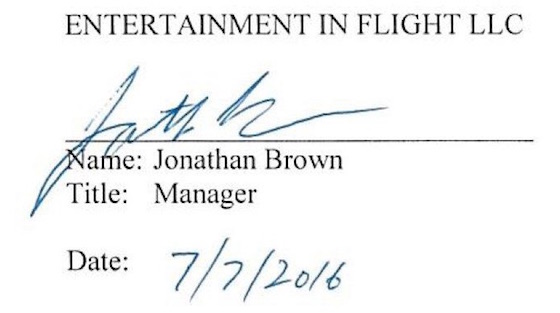 Jonathan Brown’s signature on AirPods trademark case filing
As a matter of fact, Apple employs an attorney by the name of Jonathan Brown in the role of “Senior Standards Counsel.” While Brown describes his role as primarily dealing with technical standards organizations and open source software initiatives, he is involved with intellectual property matters and in prior positions at chipmaker Rambus he handled trademark and patent maintenance and litigation.
Given that Jonathan Brown is a fairly common name, we dug a little further to try to determine whether the manager at Entertainment in Flight and the attorney at Apple and Rambus are indeed the same person, and we came across a court filing from a 2010 civil case involving Rambus that includes a pair of Brown’s signatures. While there is some variation among those two signatures and the one on the AirPods trademark document, they have enough in common that we believe these Jonathan Browns are the same person and thus Apple is behind the AirPods trademark application.
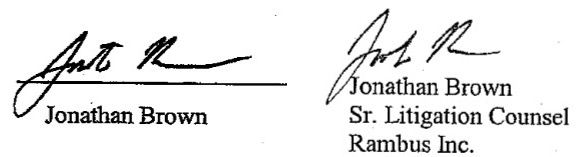 Jonathan Brown’s signatures on 2010 Rambus court filing
This week’s amendment came one day prior to the six-month deadline for responding to the trademark office’s request for clarification, indicating Apple remains interested in protecting the name but suggesting it is interested in stretching out the review process as long as possible with no product yet released.
Trademark protection ultimately requires that a “Statement of Use” be filed to prove the name is actually being used, and lengthening the review process gives the applicant additional time as it continues working on its product. By regulation, a Statement of Use must be filed within six months of the trademark being allowed, although five six-month extensions are permitted.
If Apple is indeed working on an AirPods product, it is likely a set of wireless earphones that would be a natural accessory for the iPhone, Apple Watch, and other devices. Given the cost of wireless earphones, it is likely the iPhone 7 would instead ship with Lightning-enabled wired earphones, with wireless AirPods sold separately. Apple was reportedly looking to launch wireless earphones this fall alongside the iPhone 7, but it’s possible that timeline could be pushed back if the accessory is not ready for market.
Related Roundup: iPhone 7
Tags: trademark, AirPods, Jonathan Brown
Discuss this article in our forums
Yelp Gains New Filter for Listing Venues Near PokéStops
Yelp is getting in on the Pokémon Go action, adding a new filter that will let users discover restaurants and other businesses located near PokéStops to make it easier to find new Pokémon and other bonuses.
Added via an over-the-air update going out today, Yelp’s new Pokémon filter is available at the top of the app when searching for a venue to visit, right alongside other filters like “Good for Lunch,” “Price,” and “Open Now.”
Searching for locations by PokéStop is available on Yelp for the desktop and in Yelp’s mobile apps, including its iOS app. Yelp is also asking customers to help identify businesses that have a PokéStop located nearby by checking in.
In order to leave no PokéStop unturned, we need your help! To identify a business that’s in the vicinity of a PokéStop, check-in to that location on Yelp and answer a quick question to let fellow Yelpers and trainers know that this is the place they want to be. In just the past 24 hours, Yelpers have already identified thousands of PokéStops! With your help, we’ll become Pokémon masters in no time.
Yelp’s new PokéStop feature is available in the United States, Australia, and New Zealand. Yelp can be downloaded from the App Store for free. [Direct Link]
Tag: Yelp
Discuss this article in our forums
MrMobile is a fan of Motorola, and now he has a Moto Z!
It’s no secret that MrMobile has been a fan of Motorola phones for the past few years, enjoying what the Moto X series had to offer. So now that he has a Moto Z in his hands — a clear departure from the X line — how is he finding the differences? That’s what his latest video is all about, and you can see it right above.
When you’re done, be sure to subscribe to MrMobile on YouTube if you enjoyed this video!
Moto Z and Moto Z Force
- Our hands-on preview
- Moto Z specs
- Moto Mods custom backs
- Moto Z and Moto Z Force will be Verizon exclusives until the fall of 2016
- The latest Moto Z news
- Discuss in our Moto Z forums
Motorola
Best Buy
Amazon
How to free up storage space on Android

How do I free up space on my Android phone?
There are a couple of super simple, straightforward ways to instantly give you more room for music, apps, photos, and more.
- Check your storage usage
- Uninstall old or unused apps
- Check and delete your unnecessary downloads
- Clean up your playlist
- Remove large videos
- Use cloud storage for photos
- Investigate adoptable storage options or a microSD card
Check your storage usage
The best way to begin freeing up your storage space on Android is to know what exactly is taking up so much space in the first place. Take some time to do a little investigating before you make any hasty decisions.
Launch the Settings app from your home screen, the Notification Shade, or the app drawer.
Scroll down and tap Storage & USB.
Check the apps and processes listed to see how much storage is being used by each.

Uninstall old or unused apps
There’s a very real possibility that an excess of apps is guilty of taking up tons of storage. We’re all guilty of downloading the fun free stuff that seems like a good idea in the moment, but what happens when we get bored with them or just forget to use them as time goes on? They just sit there and waste space. Such a shame.
Launch the Settings app from your home screen, the Notification Shade, or the app drawer.
Tap Applications or Apps.
Tap the app you wish to uninstall.
Tap Uninstall to remove it.

Check and delete your unnecessary downloads
If everyone you know is in the habit of sending you files to download or if you’ve habitually selected “OK” every time an item wants to be downloaded, chances are you’ve got a boatload of files that you may have only briefly needed or used that can be canned. Keep in mind that not all phones have an app called Downloads; yours might be called My Files or something along those lines. But all phones have a dedicated app where all your downloads are stored.
Tap the app drawer.
Tap Downloads.
Tap the file to highlight it.
Tap the trash can to delete the downloaded file.

Clean up your playlist

Music lovers out there may be guilty of loading up their phones with full albums, which can take up more storage space than you might imagine. Of course, you want to take the soundtrack of your life with you everywhere you go, but you could afford to lose a couple of albums you don’t regularly listen to.
Alternatively, you can opt to use music streaming services; these are much lighter on storage than downloading albums or even singles. Google Play Music, for example, has numerous pre-selected playlists to suit every mood and activity, as well as artist-themed radio stations.
Remove large videos
You don’t have to be an amateur director to have a phone filled to the brim with videos; cute or amazing things happen all the time, and you just happen to be the person with a phone at the ready, recording all of the action. Lengthy videos do require a good amount of storage, though, and the more of them you keep, the more storage space you’re giving up.
You have a few options: you could transfer the videos to your computer if you really want to hang onto them. You could also upload them to YouTube if they’re not private or sensitive, and if they are, you can set up the privacy settings on YouTube so that only selected guests can view it. That way, you can get rid of the hard copy that’s living in your phone’s storage space.
Use cloud storage for photos
Similar to the problem of videos taking up space, your ever-growing photo collections will take up a good deal of storage. Many newer Android phones come with Google Photos ready to use. If you’re not yet using cloud-based storage for your photos, now would be a prime time to start. As long as you’re connected to the storage you choose, you’ll have access to all of your photos at the size and quality you prefer.
You can choose to set up a Dropbox account, or dive in and check out the perks of Google Photos. Both eliminate the need to store your photos locally, freeing up a good amount of space on your phone.
Use a microSD card, potentially with adoptable storage

Keep in mind that, firstly, not all Android phones support adoptable storage, and if it does you’ll need to use a microSD card that will run fast enough to keep up with your phone. Our in-depth look at adoptable storage explains the process in more detail. If your phone offers it, and you’re low on storage, you can consider using the adoptable storage option to expand the storage space available on your phone. When your phone “adopts” the space available on the microSD card it becomes part of the phone’s storage system, rather than just adding a separate pool of available storage.
If your phone doesn’t support adoptable storage, you can still transfer apps, games (sometimes), and other large content onto a microSD card and free up quite a bit more storage space without having that card become part of the phone’s storage system. Move files using a file management app or your computer, set the default storage area for your camera and music apps to the microSD card, and manually move apps to the card from your application settings
Make some room
These basics should help you get a handle on your storage issues. If you have a tip or a trick you’ve found helpful, let us know about it in the comments below.
 AIVAnet