


Philips SceneSwitch 60W Equivalent LED Release Date, Price and Specs – CNET
Dimmable light is a nice little luxury for modern living spaces, but it typically means hardwiring special switches into your walls or upgrading to smart bulbs with app-enabled dimming. Now, Philips thinks it has an easier solution: LED light bulbs that switch between three brightness settings each time you flip the switch.
They’re called SceneSwitch LEDs, and they’re intended to be an affordable, no-hassle means of adding dimming to just about any fixture in your home. Philips isn’t confirming pricing just yet, but an out-of-stock listing at Home Depot for a similar-looking SceneSwitch LED with a daylight setting prices a standard 60W equivalent at $9 — about AU$12 in Australia, or roughly £7 in the UK.
With the SceneSwitch LED’s plug-and-play approach, all you’ll need to do is screw one in. From there, the brightness will cycle between 100, 40 and 10 percent brightness each time you flip the switch off and then back on. Specifically, that comes out to 800, 320, and 80 lumens, or the rough equivalent of a 60W bulb, a weak 40W bulb, and an accent/mood light, respectively.

Philips
You’ll notice a subtle shift in color temperature, too, with the brightest setting in coming in at a yellowy default of 2,700 K, and the dimmest setting clocking in at an orangey 2,200K.
Essentially, it’s the same effect you’ll get with a traditional three-way incandescent. The difference is that incandescents like those use two separate filaments inside the bulb — one for the lowest setting, another for the middle setting, and both at once for the brightest setting. That requires you to use them in a special socket with an extra electrical contact. That isn’t the case with these SceneSwitch LEDs: They’ll work anywhere, with any common on/off switch.
It isn’t the first LED to offer built-in dimming trickery. The unique-looking Nanoleaf Bloom LED took a similar approach back in 2014 — it gradually fades to full brightness when you first turn it on, and by flipping the switch off and on during that fade, you can lock in a lower light setting. That bulb impressed us, but was tough to recommend at $40 each (about AU$55/£30). A similar LED that costs a lot less sounds pretty appealing to me.
In addition to the standard A-shaped, 60W-equivalent version, Philips says that spotlight and flame-shaped SceneSwitch LEDs are on the way this fall. That’ll bring candelabras, sconces and recessed lighting fixtures into play, and help shore up the “add dimming to any fixture in your home” part of the pitch.
Philips tells us to expect to start seeing the new SceneSwitch LEDs in the US on August 1, a few weeks after they’re slated to arrive in Europe and the UK. You can expect a full review just as soon as we’re able to get our hands on one.
What you need to know about the FCC’s 5G vote
Tomorrow morning, the five chairpeople of the Federal Communications Commission are expected to take their seats behind a long wooden table and vote on a foundation for a 5G future. That might sound a little dry, but consider the obvious: We demand richer, better content on our mobile devices by the moment, and we’re demanding faster speeds than ever before.
There’s still room to grow with existing LTE and LTE-Advanced networks, but the push for fifth-generation wireless tech is a push for a future with faster data speeds, less latency and coverage for more people. And beyond just smartphones, 5G could prove to be the connective tissue that more firmly binds together the Internet of Things and power mass augmented reality experiences. Who doesn’t want that? The FCC is due to deliver their thoughts at 10:30AM Eastern tomorrow, but here’s a quick rundown of what’s been going on from the beginning.
The Process

If you’re looking for speedy execution of ideas, the FCC might not be the best example. This whole process began in October 2014, when the FCC issued what’s called a Notice of Inquiry — basically a request for input — about using spectrum bands above 24 GHz for “Mobile Radio Services.” After getting feedback and chewing on it for a year, the commission then released a Notice of Proposed Rulemaking (also known as an NPRM) to define the use of those new swaths of spectrum for wireless service, “including for next-generation, or 5G, networks and technologies.” More specifically, the commission is considering usage rules for using the 28 GHz, 37 GHz, 39 GHz, and 64-71 GHz bands, as well as for network security and the licensing frameworks that would define who gets access to what.
It’ll take years of engineering and prototyping and licensing and agreeing before the 5G standard emerges.
After the NPRM was published (along with statements that either wholly or partially agreed), the FCC basically opened the floor to comments from the public and affected companies, held a workshop to elaborate on some of the more technical details and listened to a bunch of industry talking heads bicker. This long slog hasn’t been without its road bumps either: Countries attending the World Radiocommunication Conference in Geneva last year rejected feasibility studies for the 28GHz band. That said, that band is gaining steam because it’s been marked for use during a 5G test at the 2018 Pyeongchang Winter Olympics. Just remember: tomorrow’s vote is mostly about identifying 5G bands for exploration and experimentation. Much of the real legwork is happening elsewhere.
The Tech

One of the central issues at play here is that 5G as a standard doesn’t exist yet; it’ll take years of engineering and prototyping and licensing and agreeing before that happens. That said, the FCC is trying to establish the frameworks to let tech and networking giants figure out what works best with the available spectrum.
Now, flash back to those spectrum bands I mentioned earlier: It’s frankly pretty cool they’re even on the table. A few years ago, it didn’t seem likely that we’d be able to tap into frequencies above 28GHz. As Commissioner Mignon L. Clyburn put it, “their wavelengths were too short and the signal propagation losses were too high,” making them unsuitable for mobile service. While that so-called “millimeter-wave” spectrum is naturally short-range, it also allows for much faster data transfers and speeds. Think: up to 1 Gigabit per second. Since those wavelengths are so short, one of the prevailing ideas for 5G deployment is using lots of “small cells” that act like tinier, less expensive cell towers to form much denser networks.
Naturally, wireless companies have already started their 5G testing. Samsung completed its first outdoor 5G wireless test in 2014, and partnered up with SK Telecom to test 5G transmissions on that contested 28GHz band earlier this year. Verizon is working with Samsung on 5G trials, and just recently published its first 5G radio spec. AT&T plans to get its first outdoor 5G trials up and running by the end of the summer. Sprint demoed a 5G implementation last month in Philadelphia using a slice of 15GHz spectrum that delivered downloads speeds of up to 4GBs.
The Debate

Commissioners Jessica Rosenworcel and Mignon Clyburn, along with FCC Chairman Tom Wheeler, voiced their full support for the notice of proposed rulemaking. That left two commissioners, Ajit Pai and Michael O’Rielly, to only partially approve the intended plan.
Commissioner Pai is concerned that the FCC isn’t moving aggressively enough to maintain America’s position as a vanguard of 5G tech. Coincidentally, the commission turned down his proposal to consider more spectrum bands for exploration. He’s also worried that some of the licensing setups that define access to these new swaths of spectrum are just too complicated, and could impede crucial investment down the road. Commissioner O’Rielly takes a similar stance, but also questions the need for overwrought security requirements and new access schemes when the FCC has successfully run spectrum auctions for years.
There are, of course, other objections beyond those laid out by commissioners Pai and O’Rielly. The most heated public debate so far hasn’t been between members of the commission — it’s between a mobile industry that’s eager to expand into 5G territory and a satellite industry that already has a foothold there.
Here’s the gist: Satellite operators (think: Avanit and Inmarsat, among others) took issue with the FCC eyeing up spectrum in the 28 GHz band because it’s already being used for earth-to-space communications systems — they don’t want to risk any interference, after all. Others, like EchoStar, don’t mind operating their fixed-satellite service systems alongside consumer wireless networks, just as long as both are given primary status. These companies obviously aren’t on the same page, but on some level there’s still an “us vs. them” dynamic at play here.
It’ll be up to network companies, carriers, satellite operators and lots of engineers and lawyers to eventually knit together the world’s next-generation wireless services.
Meanwhile, the consumer wireless industry pushed back by outlining a way for everyone to share that slice of the airwaves. AT&T, Nokia, Samsung, T-Mobile and Verizon gave the FCC results of a preliminary, Nokia-run simulation pointing out how interference could be addressed — it would require satellite earth stations to abide by a power limit. Believe it or not, there’s quite a bit of shade-throwing going down here too. The parties who submitted that Nokia report alleged that the technical studies submitted to the FCC by firms O3b and ViaSat have “been relatively simplistic and worst case and does not provide a sound engineering basis upon which to make policy decisions with respect to sharing.” Burn.
While all of these debates, screaming matches and moments of quiet contemplation will result in a vote tomorrow, the one thing to remember is the FCC’s actions are just one step. It’ll be up to network companies, carriers, satellite operators and lots of engineers and lawyers to eventually knit together the world’s next-generation wireless services. Here’s hoping all those people don’t forget we’re in this together.
Want a free Samsung Galaxy Note 7? Enter this giveaway!

All eyes are currently on the Samsung Galaxy Note 7, due for arrival sometime before the end of the year. While we don’t currently know a lot about this new addition to the Note family, we do want to give everyone the opportunity to win one, before it even hits the store shelves! We’ve teamed up with VRS Design to do just that! Read on for all the details.
THE PRIZE One grand prize winning Android Central reader will be taking home a brand new Note 7 (once released) plus a bundle of cases for it! Two runners-up will receive a bundle of cases for their android phone of choice. Cases will be an assortment of simple PC/TPU cases, protective dual-layer PC+TPU cases + kickstand, wallet cases, genuine leather wallet cases, and card storage cases.
THE GIVEAWAY Head down to the widget at the bottom of this page. There are multiple ways to enter, each with varying point values. Complete all of the tasks for maximum entries and your best shot at winning! Keep in mind that all winning entries are verified and if the task was not completed or cannot be verified, a new winner will be chosen. The giveaway is open until July 27th, and winner will be announced right here shortly after the close date. Good luck!
Want a free Samsung Galaxy Note 7? Enter this giveaway!
Please note that service is not included with the phone.
AT&T pushes Marshmallow update to BlackBerry Priv
AT&T is now rolling out Android 6.0 Marshmallow to the BlackBerry Priv. While the update has been available to unlocked Priv’s for a while now, and even hit the T-Mobile variant in mid-June, it’s good to see it landing for the AT&T model.

From AT&T:
Effective July 13, 2016, AT&T released a software update for the PRIV™ by BlackBerry® (STV100-1). You can download the update via Firmware Over The Air (FOTA). A Wi-Fi connection is required.
Once downloaded, you can expect the usual Marshmallow goodies, including granular app permissions, adoptable storage, and better battery life thanks to Doze mode.
In any case, if you haven’t yet received an update notification, you can manually check by heading to the “About device” section of your Settings.
AT&T is experimenting with drones to make its network better
AT&T has announced that it is currently experimenting with drones in order to make its network better. The carrier is currently using them for cell tower inspections and to gather real-time information, and in the future it may use them as flying towers for additional coverage. By being connected to its network, AT&T can use the drones to gather information and make immediate changes based on the needs that are being shown.

From the announcement:
Connecting drones to our nationwide LTE network lets us capture data and feed it directly to our systems. In turn, this can allow us to make changes to our network in real time.
By using drones to inspect a cell site, we’re able to conduct inspections more quickly and safely – and even access parts of a tower that a human simply could not. We anticipate this will allow us to improve our customers’ experience by enhancing our cell sites faster than ever before.
It is worth noting that drones don’t offer great battery life currently, so fly time is rather limited. Also, odds are that people are not going to take well to a drone flying over their head at a concert, even if it means they can send that Snapchat or Instagram a little faster with the additional coverage. Either way, it will be interesting to see if AT&T can do anything of use with these drones in the future.
OnePlus 3 vs. Moto G4 Plus: What’s $100 between rivals?

The ultimate low-cost Android phone showdown is here!
How much difference does $200 make in the smartphone market? What about $100? At some point, these figures become both fundamental and meaningless to a person’s buying decision, especially when tacked on to phones categorized “mid-range” or “entry-level”.
It is with this lens that I approached a comparison I was initially reticent to do: the OnePlus 3 and the Moto G4 Plus. Why would it be necessary, given the $150 difference between mainstream models? And what is gained by trying to push some sort of narrative from two devices aimed at increasingly diverging markets?
A lot, in fact. Because, like the OnePlus 3, the Moto G4 Plus is a great phone at $199, $299, and $399. But coming in at the lower end of that spectrum means that it will inevitably come into the purview of those who are “just buying a phone,” which not only expands its potential audience but challenges its place in the enthusiast market — where OnePlus sits comfortably.
How do these two devices compare? And would there ever be a world where we’d suggest the Moto G4 Plus over the OnePlus 3 (tl;dr: no, but almost)? Let’s take a look.
Hardware
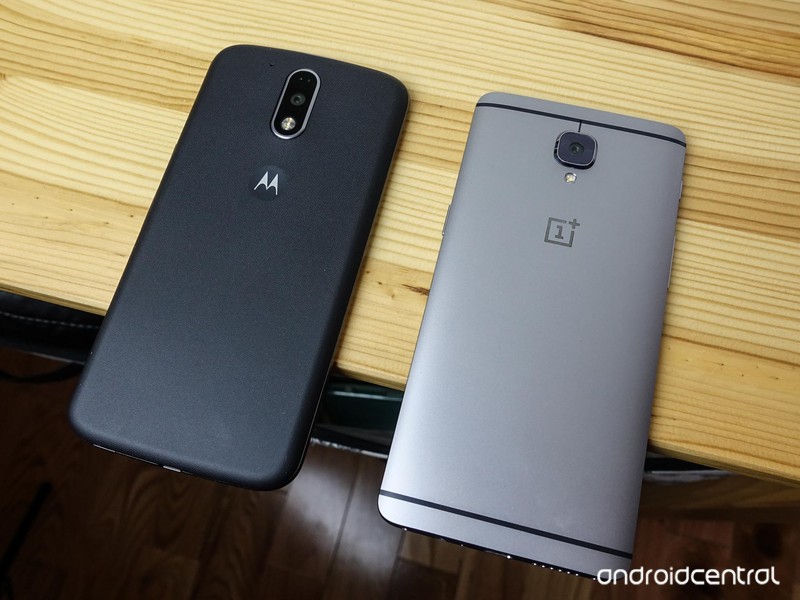
Before we get started, a quick note on options. Unlike the OnePlus 3, which graciously is offered in only one 6GB RAM/64GB storage/$399 option, the Moto G4 Plus has two:
- a 2GB RAM/16GB storage/$249 option
- a 4GB RAM/64GB storage/$299 option
But things get complicated when you consider the model I’m using, which is neither of those, but a Canadian-specific 2GB RAM/32GB storage/$400 CAD option. Here’s how we can hedge: all Moto G4 Plus models use the same Qualcomm Snapdragon 617 processor, and while I am confident an extra 2GB of RAM would offer some performance legroom, I am also sure, based on my extensive experience with Android in general and Motorola devices in particular, that the processor is largely the bottleneck here.
Complete OnePlus 3 specs
Complete Moto G4 Plus specs
Anyway, let’s talk hardware, because other than the processor this is where the bulk of the differences are. The OnePlus 3 is beautiful, crafted with a single piece of aluminum in a way that belies it’s true price. There are chamfers on the back edges and nicely-calibrated buttons on the sides. It feels robust, significant, but not heavy.
The Moto G4 Plus is, while better than its predecessors in most ways, very plasticky. Its buttons rattle in their sockets, and it’s very clear from the moment it is picked up that the sides are plastic. A removable back cover, also plastic, smudges easily, though after many a removable and reapplication it re-adheres with a nice snap.
The two devices are roughly the same height, though the OnePlus 3 appears considerably wider due to its less rounded corners. But the more expensive device is also thinner, lacking the roundness of the Moto G4 Plus’s back. That they both have 3,000mAh batteries is interesting, because, as you’ll see later they perform quite differently.
Another similarity is the size and resolution of the two devices’ screens: 5.5-inches at 1080p, making for a pixel density of 401ppi. Now that OnePlus has resolved the controversy around the OnePlus 3’s Optical AMOLED screen, releasing an over-the-air update to address the inaccurate and unnaturally wide color gamut, we can use the new SRGB mode to compare to other devices. But be careful what you wish for: the new setting mutes the display’s vibrancy and, to my eyes, isn’t nearly as pleasant as the default.
The Moto G4 Plus is, while better than its predecessors in most ways, very plasticky.
Comparing the two devices’ screens side by side, as impressed as I was by the OnePlus 3, I was even more struck by the bright, vivid and responsive panel on the Moto G4 Plus. For a device that starts at $249 ($199, in fact, for the regular Moto G4, which has the same screen), it’s one of the better displays I’ve interacted with.
Both phones also have fingerprint sensors below their displays, but the OnePlus 3’s is far better: wider, faster and considerably more accurate. Don’t let that impugn the G4’s too much, though: while small, and slower, it still gets the job done, despite its awkward square shape.
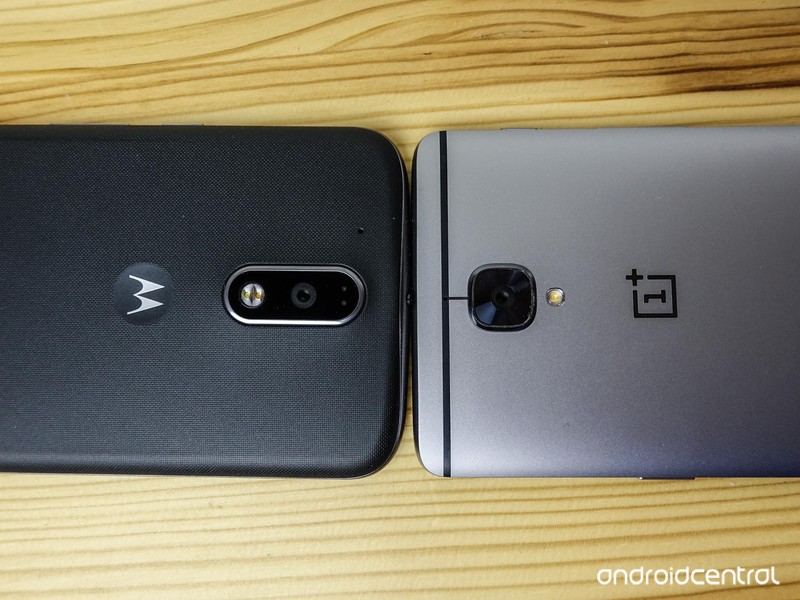
Around back, the both phones have centered 16MP rear camera sensors, jutting slightly from their respective casings. And while we’ll see later on that both cameras are more than capable (though one is clearly better), I far prefer the OnePlus 3’s design, its over-sized square module fitting better with the phone’s overall aesthetic than the G4’s oblong protrusion.
One area of differentiation is the OnePlus 3’s mute toggle, which my colleague Andrew Martonik loves, and I, frankly, do not. As I said in my previous comparison, I just don’t see the point when, for years, a combination of volume buttons and intuitive software have done a fine job.
Software and performance

In software, the phones are remarkably similar, with each taking Google’s stock version of Android 6.0.1 Marshmallow and augmenting it ever so slightly.
On the Motorola side, we get what is still the G series’ pièce de résistance, Moto Display. While most phones have some sort of ambient display feature built in these days, the G4’s is actually useful, pulsing notifications that can be activated or dismissed without unlocking the phone. Motorola has refined Moto Display to near-perfection, and to this day it’s one of my favorite smartphone features, period.
The phones’ differences aren’t as stark as they would appear on paper.
Unfortunately, Motorola didn’t see fit to retain its Moto Voice feature for the G line this year, remanding it relative obscurity in the more expensive (and likely far less popular) Moto Z. Ultimately, though, it’s not a huge loss considering the Google Now launcher supports “OK Google” hot-word support from any screen, but Moto Voice was/is a bit more robust and customizable. Thankfully, Moto Actions — double-chopping to turn on the camera, double wrist-flicking to open the camera — is in good shape, and works like a charm.
More importantly, the Moto G4 Plus performs beautifully for a phone under $300, and rarely feels bottlenecked — even on my 2GB RAM model — by the Snapdragon 617 processor. There were times I yearned for the camera app to open more quickly, or the shutter to engage a beat earlier, but those moments did not dampen my enjoyment.
The software on the OnePlus 3 has a bit more flair to it, with a number of gestures, shortcuts and display settings built in, but none of them are essential to enjoying the phone. What the company has been able to do with OxygenOS, especially after its false start on the OnePlus One and early bugginess on the OnePlus 2, is remarkable. Being able to use either the capacitive navigation buttons (which can themselves swap places with a toggle) or virtual makes for an ideal compromise, and OnePlus’s gesture-friendly launcher is outstanding.
Obviously, when it comes to performance, the OnePlus 3 trounces the Moto G4 Plus. With the fastest processor on the market today and between 2GB and 4GB of extra RAM over the G4, there’s just no competition. Games are buttery smooth; apps load considerably faster; keyboard lag is non-existent; and the camera never wavers.
But those differences aren’t as stark as they would appear on paper. As fast as the OnePlus 3 is, the Moto G4 Plus never feels sluggish, even when tested with the most onerous multitasking tests. It’s for this reason I believe it to be one of the better smartphone deals around.
Unfortunately, the Moto G4 Plus fails to compete with the OnePlus 3 in one more key area: battery life. Despite both phones having 3,000mAh batteries, the Moto fell behind the OnePlus 3 by at least two hours every day. Whereas I never worried about the latter going dead before bedtime, I often had to recharge the Moto G4 Plus during the day to keep it chugging. Like the OnePlus 3, it does boast fast charging — a variant of Qualcomm’s Quick Charge 2.0 — which is certainly useful.
Camera
The cameras on these two devices are a lot closer than they have any business being.
While the OnePlus 3 has an optically stabilized 16MP sensor that excels in low-light situations, they are fairly evenly matched in daylight scenarios. In fact, the OnePlus 3 adds far more sharpening to its well-lit photos that, while resolving smaller details better, distract from the overall fidelity of the photos.


OnePlus 3 (left) / Moto G4 Plus (right) — click image to view larger








The Moto G4 Plus captures slightly cooler colors with its 16MP sensor, but does not inject its shots with much post-processing, resulting in softer, more neutral photos. It’s an effect I prefer.
In low light, the OnePlus 3 does pull ahead, but not by much — the Moto G4 Plus holds its own, again impressing for such an inexpensive product. But whereas the Moto G4 Plus is limited to video capture at 1080p / 30fps, the OnePlus 3’s Snapdragon 820 chip enables 4K capture at the same frame rate.

Their camera apps, simple as they are, expose some major differences in strategy. The OnePlus 3 has a powerful manual mode that allows for granular tweaking of ISO, shutter speed, exposure, and even focus; the Moto G4 Plus goes as far as adding a timer and HDR toggle, but not much else.
Speaking of HDR, the OnePlus 3’s implementation is far more subtle than Motorola’s, as seen in the shot below. While the company has come a long way to improving the performance of its camera app, in particular its HDR setting, don’t expect shots that look overly-processed or vibrant. Whether that’s a good thing will be a matter of taste, since the Moto G4 Plus swings almost completely in the other direction.


OnePlus 3 HDR sample (left) / Moto G4 Plus HDR sample (right) — click image to view larger
Like most aspects of these two devices, I prefer the OnePlus 3’s overall experience, but the Moto G4 Plus, especially in daylight, manages to capture some unbelievably good photos that are impressive, period — not just at its price point.
Bottom line

Both of these phones represent the best of their respective price points, with the OnePlus 3 justifying its higher cost with a better design, stunning build quality, excellent performance, and great camera.
The Moto G4 Plus, though, manages to keep pace for most of the race, and does so between $100 and $150 less than its OnePlus counterpart. That both phones are available primarily online and unlocked in the U.S. also means they lack bloatware and other carrier-induced issues, and they are updated directly from their manufacturers.
Ultimately, what these phones prove is that the high-end Android market is no longer secure in its high-margin, $699 ivory tower, and companies like Samsung, HTC, LG and others are going to have to do a lot more to continue justifying those prices going forward.
OnePlus 3
- OnePlus 3 review: Finally, all grown up
- OnePlus 3 specs
- OnePlus 3 vs. the flagship competition
- Latest OnePlus 3 news
- Discuss OnePlus 3 in the forums
OnePlus
I made a pizza and charged my phone with a camp stove because the future is amazing

This is hands-down my new favorite camping accessory.
My family is full of people who enjoy camping. Sometimes that means hiking the Appalachian Trail for a few days with no tech at all, and sometimes that means renting a few campsites together with a cooler full of tasty drinks and a fire that regularly encourages Park Rangers to come check on us. When I go hiking, the BioLite Camp Stove is usually in my pack. It’s great for making a small fire and I like knowing I can charge a phone in an emergency. At a campground you already have grill tops and fire pits, so for me there’s never been a need to bring something else for cooking before.
I stand before you a changed camper. This weekend I cooked the perfect pizza while charging my phone on the larger BioLite BaseCamp stove, and I’m unlikely to go family camping without this stove ever again.


For the uninitiated, BioLite’s BaseCamp stove is really just a bigger, more capable version of their portable Camp Stove. It holds more wood and offer a larger, sturdier cook surface, but the basic concept is the same. You start a fire in the front opening, and when the orange box on the side of the stove has converted enough heat into electricity a small fan will kick on. That fan keeps the stove hot, which keeps delivering more power to the 2200mAh battery contained within. After 20 minutes or so, you can connect just about anything to the USB port on the side and receive 5 watts of power at five volts. That’s enough to power anything you’d need in an emergency situation, but is also means you can charge a phone or tablet if you’re inclined to use one of those while camping.
Not only had I made dinner for the family, but my phone had been charged 20% while I was cooking.
All of this has been around for a while already. The new thing here today is the Pizza Stove. This accessory adds a Pizza Stone, heat spreader, and a lid to the Base Camp. This means you can create a small oven to bake a pizza in, which isn’t as easy as it sounds when you’re camping. I’ve made more than my fair share of “campfire pizzas” with dutch ovens and disposable foil packs. The end result usually tastes something like a pizza, but is frequently either a greasy mess or at least a little charred. Using a pizza stone offers the promise of pizza you would make at home, only you’re outside and using sticks.
Much to my surprise, the end result was amazing. As long as I kept a steady supply of firewood moving into the stove, maintaining a mostly constant temperature was easy. After 11 minutes in the Pizza Dome, I had a flawless wood-fired pizza that was ready to be eaten. The burning wood from the stove added a nice flavor to the crust, and everything cooked evenly. Not only had I made dinner for the family, but my phone had been charged 20% while I was cooking and the battery on the stove had another 50% left to offer. Five minutes of cleanup and wiping down later, and the stove was ready to be used again.

It’s rare for camping gear to offer an experience like this, and while this is hardly an accessory for hiking up a mountain it seems perfect for anyone looking to enhance the stereotypical family campout at a local campground or offer a little extra cooking prowess to an actual camping base camp. You don’t necessarily need pizza while camping, but everyone around you will be pretty glad the option is there if you have one of these Pizza Domes.
Check out the BioLite BaseCamp and its Pizza Dome accessory!
One frightening live sex show and the state of 360 video
NSFW Warning: This story may contain links to and descriptions or images of explicit sexual acts.
A woman with an enormous, warped vagina stands over you, attempting to situate a pair of naked coeds just so on an overstuffed sectional. Their faces distort and sporadically disappear as they pleasure each other and themselves. Their movements are sometimes smooth, sometimes staccato, like a couple of gyrating marionettes on Ecstasy. They moan with pleasure and talk dirty to no one in particular, but their mouths don’t move.

The room is largely empty save for one of those shitty IKEA floor lamps, a frat-house couch and a handful of empty exercise equipment. A woman stands behind you, hula-hooping in a dated leotard, like some voyeuristic bargain-basement Jane Fonda. A screen above the couch displays an error message and a chat room where men bark out explicit commands for the marionettes and their well-endowed puppet master.
This is not a nightmare. This is reality or, more accurately, a live 360-degree recording inside Camsoda’s model house, an always-on content farm for live amateur sex. If you ask the company’s president, Daron Lundeen, it’s the future of adult entertainment. However, as we’ve learned from mainstream examples like the first live 360-degree performance from Dawn Richards and YouTube, the medium still has a long way to go.
Like YouTube, Camsoda is banking on the promise of 360-degree video, live streaming and, yes, virtual reality, to usher in a new era of user-generated content. Problem is, no one cares about 360-degree video. At least not yet.
Instead of some sexual fantasy land, I was transported back to the dingy college apartments of my youth.
Like so many first times, my first time watching a live cam show in VR was clumsy, overhyped and over before it started. The hourlong performance was scheduled for a Wednesday afternoon. Having checked the company’s site for compatible devices, I was there, Samsung Gear VR in hand, ready to go. I’d been able to play the video on my desktop, but, due to Oculus’ closed-garden approach to content and Camsoda’s use of YouTube’s open source 360-degree player, it would have taken me nearly the entire hour to get it up and running.
Two weeks and a handful of emails back and forth with the Camsoda crew later, I was ready for a second try. Instead of hacking my way into this immersive, interactive sex scene, I went the path of least resistance and grabbed a generic Google Cardboard from the office. This time, the setup was simple. I loaded the link on the site’s VR page, pressed the Cardboard icon and slotted my phone into the headset. Just like that, I was there, dead center in the poorly furnished romper room I described earlier.
Instead of some sexual fantasy land, I was transported back to the dingy college apartments of my youth. Decor has never been porn’s strong suit, but virtual reality can and should take us places we’ve never been before. I’d been in places like this, and I never want to go back. But who cares about paint swatches and track lighting when you have a room full of hot, naked women, ready to do anything you say, right?
Unfortunately, it’s not that simple. Yes, Camsoda brought together some of its best performers for the shoot. They even seemed to keep a handful of onlookers engaged for a majority of the performance. But when it comes to 360-degree live video, success is measured in more than a few good nuts.
The show was plagued by slow connections, poorly synced audio and pixelated private parts. The models spent an excessive amount of time trying to figure out where the camera was and how to play to it once they found it. In a previously recorded video, I even saw a large, male crew member step on set to adjust a piece of equipment. Talk about breaking the fourth wall.
In a perfect world, users would not only be able to see what their favorite performers are doing in real-time, but to feel it too.
Live 360-degree video requires a fair amount of bandwidth and battery power on the part of the viewer. If you’re watching in VR, it also requires specialized hardware and a heavy dose of patience. And what of the live cam show’s killer feature? With a VR headset strapped to your face, how does one ask a performer to finger her co-star, pucker her butthole or reach for the rubber fist? Even for the most adept touch-typist, single-handed key pecking is a time-consuming undertaking.
I won’t fault Camsoda or its handful of competitors for trying. Porn’s ability to shape new technology has become legend and created a new class of technologically minded entrepreneurs. Add to that an immersive new medium that promises to put the viewer right where the action is, and you seemingly have the recipe for the next big thing in adult entertainment.
When the tech and consumer interest finally catch up, early adopters like Camsoda will be there, ready to cash in, and I have no doubt that they will. The trouble is, we’re still a long way from figuring out how to use these amazing new tools, and the sight of one giant warped vagina combined with the squeals of two faceless banshees aren’t exactly the stuff wet dreams are made of.
Late last week, Camsoda announced a partnership with Kiiroo, the teledildonics platform that gave me the power to fuck myself. In a perfect world, users would not only be able to see what their favorite performers are doing in real-time, but to feel it too. VR, teledildonics and live 360-degree streaming all present amazing ways of thinking about and having sex, but putting them all together before anyone one of them is ready for prime time is just one big technological boner-killer.
If you can figure out how to hold a Google Cardboard in place, type commands to your dream girl and pleasure yourself with an internet-connected stroke sleeve all at the same time, I’ve got about 500 Camsoda tokens with your name written all over them.
ABC launches new streaming original and throwback content
ABC is looking to revamp its push into the exclusive subscription content game, relaunching its free streaming service with a wealth of new content and classic shows for viewers to binge on.
The network has opted for free on-demand content over heading down the same subscription route its competitors have chosen such as NBC’s Seeso comedy offering and CBS All Access. The network is launching digital shorts under the ABCd moniker, and include new shows like Boondoggle, starring Ty Burrell from Modern Family, and comedian Iliza Shlesinger’s Forever 31.
There are currently 40 additional series coming down the pipeline that will eventually be added to the mix, with full seasons of shows like 8 Simple Rules, My So-Called Life, The Neighbors and Ugly Betty being added in the meantime. If you’re looking for a new source for classic shows and new ones going forward, this might be a good bet.
Via: Variety
Source: iTunes
Behind Facebook’s efforts to make its site accessible to all
Earlier this year, Facebook launched a new feature for iOS screen readers called automatic alt text. Powered by artificial intelligence and machine learning, it recognizes the objects in a photo and then describes them, which is incredibly handy for users who are blind. It arrived on Android soon after, and two weeks ago, the social network officially made the tool available in 20 other languages. These are just a few recent examples of how Facebook is attempting to make its products — as well as the internet as a whole — more accessible to those with disabilities.
It all started five years ago when Jeff Wieland, who worked in the company’s user research team at the time, discovered that there were people with disabilities who were having a rather terrible experience with Facebook. For example, he found out that screen readers — software used by blind users to know what’s happening on a page — would interpret a button on a site as simply, well, “button.” It would have no information on what the button does. “This is a really simple example,” he said. “For an engineer, adding a label to a button is one line of code. But it changes everything.”
The problem, he said, was that developers were not designing the web experience with screen readers in mind. It seems like a “No, duh” explanation, but as Wieland tells me, accessibility is not a subject that’s often taught in computer science classes. “It’s not part of the core curriculum. You have people graduating from great programs, but who have no exposure to accessibility. It’s a real tragedy.” Indeed, he says that almost all incoming engineers have no prior exposure to the subject.

And the fact is, the community that needs this tech is a large one. According to the World Health Organization, about 285 million people worldwide are visually impaired, and of those, around 39 million are fully blind. And that’s just those who suffer from vision loss. “Accessibility is about more than that; it’s about serving those who have varying ability,” said Wieland. “I discovered there was this vast community we were underserving.”
In response to this, Wieland set about creating an accessibility team at Facebook with the company’s blessing. “Philosophically, people got it,” he said, adding that the goal aligns with Facebook’s mission for connecting the world. “But the big question was, how do we do this?”
Over the years, the team has worked to raise awareness of accessibility issues and assistive technologies within the company. It started out with two people, but now it’s grown to more than 20. It’s a cross-functional group made up of people in design, user research, data science, operations and more. Remember those unlabeled buttons? Now, Wieland said, that’s a mostly solved issue (though, given the scale of Facebook, there are probably still a few unlabeled ones here and there). The key factor? Working with existing teams on Facebook to integrate accessibility across the board.

That automatic alt text photo captioning, for example, required the assistance of Facebook’s artificial intelligence team. “There’s this concept of alt text for photos, which used to be provided by the site owner or web developer,” said Wieland. “But now the internet is all photos … The only way we could really provide the text for photos at our scale, would be to use computers to do this.” Fortunately, Facebook’s AI team has been working on computer vision for at least a year and a half already and had the technology and expertise to work on the project.
According to Crista Earl, the director of Web Services for the American Foundation for the Blind, most sites have incorrect or poorly designed forms. “For example, when trying to book a flight on a travel site … the manner of selecting choices poses an obstacle to users of assistive technology.” Inadequately labeled videos and images are also a problem. Other common issues are low-contrast images and tiny fonts for those with low vision.
“During my experience online with accessibility issues, I have struggled with a lot of different things,” said Kevin Cao, a visually impaired tech support employee for the New York Institute for Special Education. Examples include the lack of voice descriptions for images and text. A few of his favorite sites are YouTube and Applevis.com, a community website for low-vision Apple users, which he said have “clear label buttons, links and heading recognition.”

As for how he thinks Facebook is doing, he believes it’s good for now, but it could use improvement. “I would like to add more picture descriptions with faces, people,” he said. That’s the same feedback Wieland heard as well. “They want to know what a person’s hair is like, et cetera. A human can describe a full context, but we’re just returning a list of objects … Hopefully in the future we can tell a richer narrative.”
Facebook’s work on accessibility encompasses more than just vision loss. Back in 2014, the company added the ability for users to provide closed captions to videos. It’s currently working on a more automated captioning system with the help of Facebook’s language-and-speech-technology group.
“The real lion’s share work that we do is to prepare our teams to write and design applications that are accessible, to make it foundational,” said Wieland. “We want to embed accessibility into all of the steps along the way, from ideation to actually shipping the product.” To help this along, Facebook has now integrated accessibility to the QA process that Wieland says has been useful. “It helps push accessibility earlier in the process, without waiting to hear user feedback.”
As part of the education process, the accessibility team has done a lot internally to raise awareness of the issue. There’s an Empathy Lab located in the middle of the Facebook campus that’s partially designed to simulate disabilities to engineers and developers. On display are assistive technologies such as a Braille display for phones, a computer that uses eye tracking for control as well as screen-reading software. “It allows them to play with some of the technologies that people use day in and day out,” said Wieland. “It makes it feel real and close to home.”

As an extra step to increase accessibility training, Facebook joined a bunch of peers including Google, Yahoo, Microsoft and IBM, along with leading academic institutions like Stanford and MIT, to tackle the challenge of bringing it into the classroom. The initiative is called Teach Access, and the idea is to make sure students of technology will be able to graduate with more exposure and understanding of the needs of disabled users.
Just last Thursday, Facebook released a Teach Access tutorial on GitHub that aims to teach developers best practices to writing accessible code and designing accessible experiences. It’s free, and anyone can use it and edit it.
Other companies have increased their accessibility efforts too. Twitter recently enabled users to add alt text to images. Google and Apple have made their products more accessible across the board. For example, Google introduced voice commands to Docs a few months ago, allowing users to type, edit and format text just by talking. Swift Playgrounds, an iPad app that teaches coding skills to kids, had the input of a blind engineer at Apple so that even kids who can’t see could learn to program.
“Our long-term goal is that we want systemic changes to happen in schools,” Wieland said. “Every computer science program should include accessibility to some degree. We don’t expect people to be experts. But we want them to have at least some level of understanding of what accessibility is about.”
 AIVAnet