


London is lending its Tube payment tech to other cities
The London Underground is renowned for its iconic stations and world famous Tube map. However, millions of travellers have also come to rely on its technological expertise, which includes the ability to swipe in and out of barriers with a bank card, mobile phone or even a smartwatch. Some metros around the world employ their own version of the Tube’s contactless system, but under a new deal announced by Mayor of London Sadiq Khan, many more will soon be outfitted with payment technology first pioneered by Transport for London.
The deal, which is worth up to £15 million, will see Cubic Transportation Systems (CTS) adapt London’s contactless ticketing system to work with existing systems in other cities. It helped TfL introduce the Oyster card and then adapt barriers to support contactless cards, but also create a backend that is capable of combining millions of swipes into easy payments. It’s now possible that passengers in Sydney, Brisbane, Vancouver and Chicago, where CTS also operates, will soon enjoy the same freedom of travel.
While commuters all over the world are set to benefit from the new system, Londoners won’t miss out. Sadiq Khan says that the money earned from the new licence will be used to freeze fares across Transport for London services over the next four years and is just the start of a number of planned agreements.
“I made a firm commitment to sell Transport for London’s expertise around the globe,” says Khan. “We will use the income from those deals for further investment in new infrastructure and to freeze TfL fares.”
Xbox Live now supports high-quality PC Twitch streaming
If you want to use the Xbox Live network to tell followers you’re streaming Xbox One games on Twitch, there’s just one way: Stream from the console’s Twitch app. The problem is that the quality and options are very limited, since the Xbox One isn’t exactly a TV production studio. However, Microsoft and Twitch have teamed up to make it possible to use Xbox Live when you’re streaming from a PC using a capture card — all you need to do is link your Xbox Live and Twitch accounts.
That’ll let you use a card or standalone box like the Elgato HD60, AVerMedia GC550 or other on a PC, along with an app like OBS (open broadcaster software), to get higher quality streams, keying, graphic overlays and other options not supported on the Xbox One itself.

At the same time, your content will show up in the “activity feed on Xbox One and Xbox apps on Windows 10, iOS and Android,” according to Xbox’s Major Nelson. Followers will also receive notifications on the Xbox One and Xbox apps, and on the “product details” page of the game in the Xbox Store. In other words, you’ll be able to get the word out about your Xbox One game streaming without giving up video quality, graphics, Skype guests and other options. The feature is now up and running, so to make it work, you’ll just need to link up your Xbox Live account from the connections section in your Twitch settings.
Source: Xbox (Major Nelson)
How to get Poké Balls in Pokémon Go
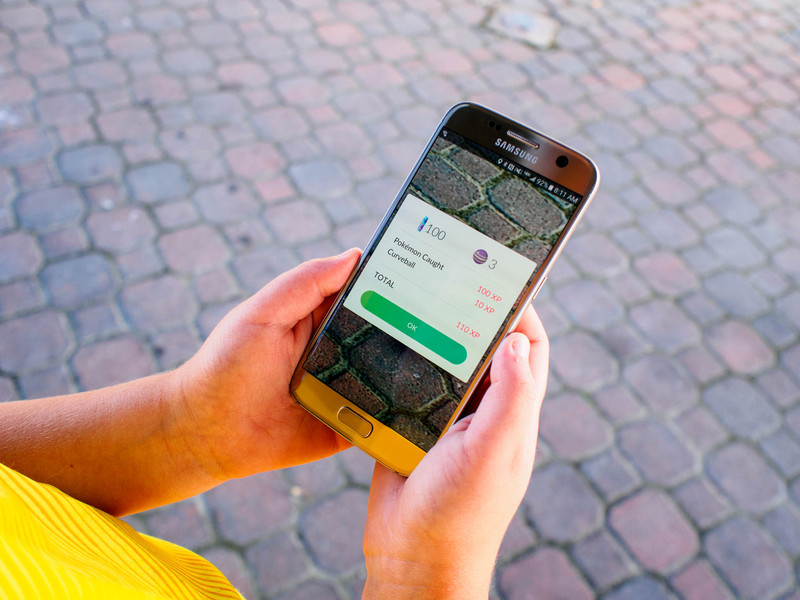
How do I get Poké Balls in Pokémon Go?
You need Poké Balls in order to capture those elusive Pokémon out in the world. If you run out, here’s how to get more.
Find PokéStops
PokéStops are special locations in the world where you can get random items, including Poké Balls, Eggs, Revives, and more. They appear as blue squares on your map and are always located in public places — look for them in areas where people gather, near distinct architecture in your region, landmarks, or public art.
Launch the Pokémon Go app from your home screen or the app drawer.
Find a PokéStop in Map View. They looks like blue squares.
Approach the PokéStop. When you are near enough to search it, it will open and present you with a wheel.
Tap on the wheel to spin it.
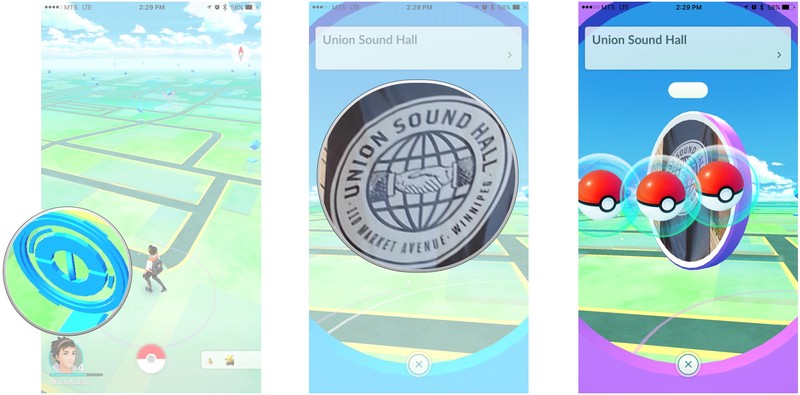
That’s it. your Poké Balls or any other items you get will appear in your Bag.
Buy Poké Balls with PokéCoins
The easiest way to get more Poké Balls is to buy them with PokéCoins. PokéCoins cost real money, so don’t go crazy with this.
Launch the Pokémon Go app from your home screen or the app drawer.
Tap the Main Menu button in Map View. It’s the Poké Ball at the bottom of the screen.
Tap the Shop button. Your PokéCoin balance appears on the top of the screen.
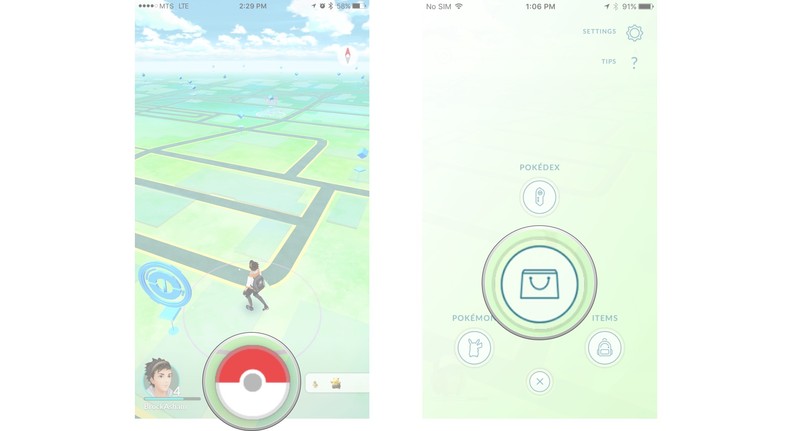
Tap a Poké Ball pack to select it.
Tap the Exchange For to complete your purchase.
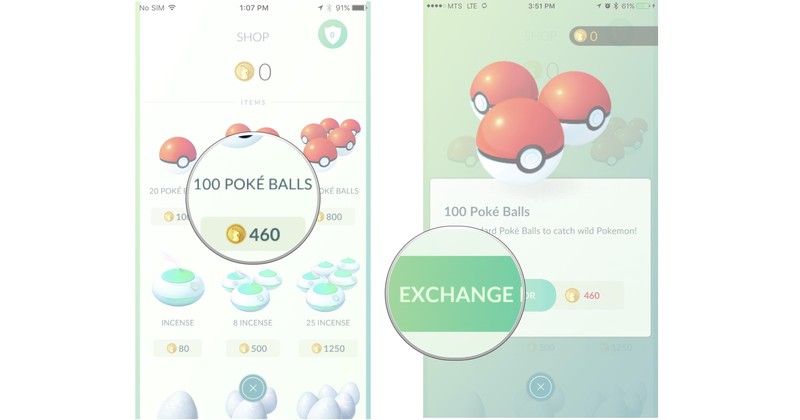
That’s it. Your Poké Balls will appear in your Bag after a short delay.
What about you?
Do you have any tips for getting more Poké Balls? If so, share them in the comments below.
Pokémon Go
- Join our Pokémon Go forums!
- How to deal with GPS errors in-game
- Which team should you choose?
- How to play without killing your battery
- The Ultimate Pokémon Go Game Guide!
Seeing a Spanish update message on the Nexus 7 (2013)? Don’t install it just yet
Several users are receiving an update message in Spanish on the Nexus 7 (2013) configured for English. The update includes the July security patch and comes in at 12.1MB, but the description is in Spanish and it looks like there isn’t a way to clear the update notification. According to Google’s issue tracker, the update is being received by users across regions.

Per the discussion in our forums, Google is aware of the issue:
Just got off the phone with a Google representative about the same issue. After contacting a specialist with the details of the problem, they recommended that I wait to install the update until further information. After hearing that others on the forums are having the same problem, she said she would bring it to Google’s attention that multiple Nexus 7 marshmallow users were having the same issue.
We’ll update the post once we hear back from Google, but for now, hold off on updating your Nexus 7 (2013).
Continue the discussion in the Android Central forums
Thanks Charlie!
Google acquires content sharing service Kifi to boost its Spaces collaboration app
Google has acquired Kifi, a startup that makes extensions allowing users to share, analyse and collaborate on links from social apps and across the internet. The startup also has a link recommendation service, which will be integrated into Google’s Spaces group chat and collaboration service in the coming weeks along with the rest of Kifi’s technology.

Commenting on the acquisition, the Kifi team wrote on Medium:
The mission at Kifi has always been to connect people with knowledge. We created a service that seamlessly enables organizing, sharing, discussing, and finding the content you and your team values, which has resulted in more flexible and intuitive collaboration across the internet. We also spent significant time creating a service that overlays context on your browsing and sharing experiences to increase usefulness and understanding.
We see a lot of alignment to Google’s mission to organize the world’s information and make it universally accessible and useful. Our team will be joining the Spaces team at Google to build solutions focused on improving group sharing, conversation, and content finding. Frankly, we’re thrilled they have a bit of “space” for us!
Google launched Spaces earlier this year to a lukewarm response, but the service’s focus on group chat could benefit from Kifi’s link recommendation feature. While exact terms weren’t disclosed, Kifi’s team will be joining Google, and the app itself will be shut down in the following weeks. Kifi’s data will not become a part of Google, and existing users will be able to export their data before the service shuts down.
You can now customize the Moto G4 and G4 Plus to your heart’s content with Moto Maker
Motorola is now offering its Moto Maker customization utility for the Moto G4 and the Moto G4 Plus. The utility allows you to tweak the front and back colors of the phone along with accents for the oblong camera housing at the back. You can also set a personalized greeting that’ll be displayed every time the phone reboots, and there’s the option to engrave text at the back.

Moto Maker’s customization options are available for the following models:
- Moto G4 – 2GB RAM/16GB storage – $199
- Moto G4 – 2GB RAM/32GB storage – $229
- Moto G4 Plus – 2GB RAM/16GB storage – $249
- Moto G4 Plus – 4GB RAM/64GB storage – $299
The main difference between the two models is that the G4 Plus offers a fingerprint sensor at the front, as well as a 16MP camera, with the Moto G4 coming with a 13MP shooter at the back. Both offer 5.5-inch Full HD displays, and are powered by the Snapdragon 617 SoC.
See at Motorola
- Moto G4 and G4 Plus — what’s the difference?
- Moto G4 Plus review
Get a $10 Amazon gift card when you make three purchases with Samsung Pay
If you’re using Samsung Pay, here’s an easy way to get a $10 Amazon gift card. Just use Samsung’s contactless payments service three times from now until the end of the month, and a $10 Amazon gift card will be added to your Samsung Pay wallet.

As is the case with such promotions, there are caveats. Bank of America Visa debit cards private label (PLCC) cards added to Samsung Pay before March 31, 2016 are not eligible. The promotion is limited to those on the Galaxy S6, S6 edge, S6 edge+, S6 active, Galaxy S7, Galaxy S7 edge, Galaxy S7 active or the Galaxy Note 5.
There’s no set minimum for a purchase to be counted as a “qualified purchase,” which means that you can technically get the gift card by using the payment service at a vending machine. Just make sure you make three purchases before August 1. Samsung Pay works with NFC as well as MST (Magnetic Secure Transmission), making it compatible with older machines with traditional card readers.
Nissan makes autonomous driving accessible: ProPILOT coming to Qashqai in 2017
Nissan has announced the launch of its autonomous driving technology, ProPILOT. The technology sees its debut on the new Nissan Serena that launches in Japan in August, but it will be coming to Europe in 2017 on the Nissan Qashqai, bringing self-driving functionality to the masses.
The technology is being described as a driving assist function that incorporates self-driving features, rather than a fully self-driving system, but it has simplicity at its heart. ProPILOT is activated and deactivated via the dedicated button on the steering wheel and it will take care of steering, acceleration and breaking, based on information obtained through a mono camera using advanced image-processing software.
The camera is able to recognise both preceding vehicles and lane markers in three dimensional depth. It will automatically control the distance between you and the preceding vehicle and maintain a speed set by the driver between 30kph and 100kph. ProPILOT will know if a car cuts in front of you and the preceding vehicle, as well as if the car in front moves lanes, adjusting itself accordingly.
As with all autonomous driving technology available, the driver’s hands must remain on the wheel. Remove them and Nissan’s ProPILOT will give you two warnings, after which it will deactivate so no dancing to your favourite song.
Currently, the technology is designed for motorway use in single-lane traffic so it’s not possible to change lanes without the driver regaining full control. Nissan is expecting to introduce multi-lane support in 2018 however, along with urban and interchange capability by 2020.
ProPILOT’s aim is to offer peace of mind to the driver, but the company is also trying to achieve zero fatality. Apparently 93 per cent of accidents are the result of driver error so by putting control in the hands of a machine instead, the company is hopeful this percentage can be reduced.
Nissan has yet to reveal how much the Qashqai with ProPILOT will cost or detail whether it will be an option or available as standard on the top-spec models. Either way though, with the current top-spec Qashqai costing around the £27000 mark, Nissan is certainly leading the way for making autonomous driving more accessible.
We will be testing Nissan’s ProPILOT in the next couple of days so keep an eye out for our first impressions.
Google updates Hangouts for Android with video messaging
Google curiously left Android users out in the cold when it rolled out video message attachments on Hangouts for iOS earlier this year. If you still use the app, though, you’ll soon be able to send video messages to friends even if you’re using an Android device. Hangouts version 11 for Android comes with the feature, which you can access through a video camera icon on the bottom bar. It’s not officially out on Google Play just yet, but there’s an APK you can download. Take note, however, that 9to5Google couldn’t make it work. You’ll just have to wait for the official update to come out if you can’t either.
If you do manage to make it work, you simply have to tap on the icon, record a video and send it out. The recipient will then be able to watch it on a separate app — Android Police says it doesn’t support in-line playback. Google has also doubled the iOS app’s video messaging time limit to two minutes in a new update that’s now available from iTunes. That update also comes with the ability to kick users out of conversations, which is still a poor replacement for being able to whack people you’re talking to with a wet trout.

[Image credit: 9to5google]
Source: 9to5Google
Caltech scientists make Van Gogh painting out of DNA origami
Art recreated in miniature is oddly compelling, requiring precision and a lot of patience. Caltech scientists have taken their own stab at it and recreated Vincent van Gogh’s classic The Starry Night at about the width of a dime, but with their own science twist: they made it with delicately-wrapped genetic strands in a process known as DNA origami.
Once a genetic string is wrapped into a precise shape, scientists can use it as a scaffold to attach nanometer-scale components like carbon nanotubes or drugs. The Van Gogh “painting” is a proof-of-concept demonstration of how to use the precision folding technique to make chip-based devices like computer circuits, according to Caltech’s press release. Researchers have refined this method to be able to precisely place DNA shapes on almost any surface used to make computer chips.
The Caltech scientists released their findings in the journal Nature, reporting their first application of the technique: using the genetic origami to install fluorescent molecules into microscopic light sources called photonic crystal cavities (PCC). Each bright atom gets dimmer the every nanometer farther than the PCC, requiring the precision of the folding method. Done right, the PCCs resonate at a visual wavelength corresponding to a particular color — in this experiment’s case, a deep red. The researchers shifted them around until they formed the recognizable shape of Van Gogh’s most famous painting.
Now that their origami masterpiece is complete, the team wants to improve the fluorescent molecules’ lifespan, since they only stay lit for about 45 seconds before reacting with oxygen and burning out. Once they also reliably emit one shade of red instead of many, they can work on more practical applications, like quantum computing.
Source: Caltech newsroom
 AIVAnet